air conditioning Seat Alhambra 2018 Owner's Manual
[x] Cancel search | Manufacturer: SEAT, Model Year: 2018, Model line: Alhambra, Model: Seat Alhambra 2018Pages: 324, PDF Size: 7.04 MB
Page 7 of 324
Table of Contents
Table of Contents
The e s
senti
als . . . . . . . . . . . . . . . . . . . . . . . . 7
Exterior view . . . . . . . . . . . . . . . . . . . . . . . . . . . . 7
Exterior view . . . . . . . . . . . . . . . . . . . . . . . . . . . . 8
Interior view (left-hand drive) . . . . . . . . . . . . . . 9
How it works . . . . . . . . . . . . . . . . . . . . . . . . . . . . 10
Unlocking and locking . . . . . . . . . . . . . . . . . . . . 10
Before driving . . . . . . . . . . . . . . . . . . . . . . . . . . . 15
Airbags . . . . . . . . . . . . . . . . . . . . . . . . . . . . . . . . 19
Child seats . . . . . . . . . . . . . . . . . . . . . . . . . . . . . 22
Starting the vehicle . . . . . . . . . . . . . . . . . . . . . . 25
Lights and visibility . . . . . . . . . . . . . . . . . . . . . . 25
SEAT information system . . . . . . . . . . . . . . . . . . 27
Cruise control . . . . . . . . . . . . . . . . . . . . . . . . . . . 33
Warning lamps . . . . . . . . . . . . . . . . . . . . . . . . . . 34
Gearbox lever . . . . . . . . . . . . . . . . . . . . . . . . . . . 35
Air conditioning . . . . . . . . . . . . . . . . . . . . . . . . . 37
Fluid Level control . . . . . . . . . . . . . . . . . . . . . . . 40
Emergencies . . . . . . . . . . . . . . . . . . . . . . . . . . . . 43
Fuses . . . . . . . . . . . . . . . . . . . . . . . . . . . . . . . . . . 43
Bulbs . . . . . . . . . . . . . . . . . . . . . . . . . . . . . . . . . . 44
Action in the event of a puncture . . . . . . . . . . . 45
Changing a wheel . . . . . . . . . . . . . . . . . . . . . . . 46
Snow chains . . . . . . . . . . . . . . . . . . . . . . . . . . . . 50
Emergency towing of the vehicle . . . . . . . . . . . 51
How to jump start . . . . . . . . . . . . . . . . . . . . . . . . 52
Changing windscreen wipers . . . . . . . . . . . . . . 55
Safety . . . . . . . . . . . . . . . . . . . . . . . . . . . . . . . . 57
Safe driving . . . . . . . . . . . . . . . . . . . . . . . . . . . . 57
Safety first! . . . . . . . . . . . . . . . . . . . . . . . . . . . . . 57
Advice about driving . . . . . . . . . . . . . . . . . . . . . 57
Correct position of the vehicle occupants . . . . 58
Pedal area . . . . . . . . . . . . . . . . . . . . . . . . . . . . . . 61 Seat belts
. . . . . . . . . . . . . . . . . . . . . . . . . . . . . . 62
Why wear a seat belt . . . . . . . . . . . . . . . . . . . . . 62
How to properly adjust your seatbelt . . . . . . . . 65
Seat belt tensioners . . . . . . . . . . . . . . . . . . . . . . 68
Airbag system . . . . . . . . . . . . . . . . . . . . . . . . . . 69
Brief introduction . . . . . . . . . . . . . . . . . . . . . . . . 69
Airbag safety instructions . . . . . . . . . . . . . . . . . 72
Deactivating airbags . . . . . . . . . . . . . . . . . . . . . 73
Transporting children safely . . . . . . . . . . . . . . . 75
Safety for children . . . . . . . . . . . . . . . . . . . . . . . 75
Child seats . . . . . . . . . . . . . . . . . . . . . . . . . . . . . 76
Integrated child seat . . . . . . . . . . . . . . . . . . . . . 79
Emergencies . . . . . . . . . . . . . . . . . . . . . . . . . . 83
Self-help . . . . . . . . . . . . . . . . . . . . . . . . . . . . . . . 83
In case of emergency . . . . . . . . . . . . . . . . . . . . . 83
Vehicle tool kit* . . . . . . . . . . . . . . . . . . . . . . . . . 83
Changing a wheel* . . . . . . . . . . . . . . . . . . . . . . . 85
Tyre repair . . . . . . . . . . . . . . . . . . . . . . . . . . . . . . 86
Changing the windscreen wiper blades . . . . . . 88
Tow-starting and towing . . . . . . . . . . . . . . . . . . 88
Emergency locking and unlocking . . . . . . . . . . 90
Fuses and bulbs . . . . . . . . . . . . . . . . . . . . . . . . . 91
Fuses . . . . . . . . . . . . . . . . . . . . . . . . . . . . . . . . . . 91
Changing bulbs . . . . . . . . . . . . . . . . . . . . . . . . . 92
Operation . . . . . . . . . . . . . . . . . . . . . . . . . . . . . 101
General instrument panel . . . . . . . . . . . . . . . . . 101
Instrument panel . . . . . . . . . . . . . . . . . . . . . . . . 100
Instruments . . . . . . . . . . . . . . . . . . . . . . . . . . . . 102
Control lamps . . . . . . . . . . . . . . . . . . . . . . . . . . . 107
Communications and multimedia . . . . . . . . . . . 108
Steering wheel controls* . . . . . . . . . . . . . . . . . . 108
Multimedia . . . . . . . . . . . . . . . . . . . . . . . . . . . . . 110
Three button unit in headliner . . . . . . . . . . . . . . 110
Opening and closing . . . . . . . . . . . . . . . . . . . . . 112
Vehicle key set . . . . . . . . . . . . . . . . . . . . . . . . . . 112
Central locking and locking system . . . . . . . . . 114 Doors . . . . . . . . . . . . . . . . . . . . . . . . . . . . . . . . . . 121
Sliding doors . . . . . . . . . . . . . . . . . . . . . . . . . . . 122
Rear lid . . . . . . . . . . . . . . . . . . . . . . . . . . . . . . . . 124
Controls for the windows . . . . . . . . . . . . . . . . . . 127
Panoramic sliding sunroof* . . . . . . . . . . . . . . . . 129
Lights and visibility
. . . . . . . . . . . . . . . . . . . . . . 130
Lights . . . . . . . . . . . . . . . . . . . . . . . . . . . . . . . . . 130
Visibility . . . . . . . . . . . . . . . . . . . . . . . . . . . . . . . 136
Windscreen wiper and window wiper sys-
tems . . . . . . . . . . . . . . . . . . . . . . . . . . . . . . . . . . 137
R
ear vision mirror . . . . . . . . . . . . . . . . . . . . . . . . 140
Seats and head restraints . . . . . . . . . . . . . . . . . 143
Adjusting the seats and headrests . . . . . . . . . . 143
Seat functions . . . . . . . . . . . . . . . . . . . . . . . . . . 147
Transport and practical equipment . . . . . . . . . 152
Transporting objects . . . . . . . . . . . . . . . . . . . . . 152
Luggage compartment . . . . . . . . . . . . . . . . . . . . 154
Roof carrier* . . . . . . . . . . . . . . . . . . . . . . . . . . . . 164
Storage compartments . . . . . . . . . . . . . . . . . . . 166
Drink holders . . . . . . . . . . . . . . . . . . . . . . . . . . . 171
Ashtray and cigarette lighter* . . . . . . . . . . . . . . 172
Power sockets . . . . . . . . . . . . . . . . . . . . . . . . . . . 173
Air conditioning . . . . . . . . . . . . . . . . . . . . . . . . . 176
Air conditioning . . . . . . . . . . . . . . . . . . . . . . . . . 176
Auxiliary heater* (additional heater) . . . . . . . . 180
Driving . . . . . . . . . . . . . . . . . . . . . . . . . . . . . . . . 183
Stopping and starting the engine . . . . . . . . . . . 183
Braking and parking . . . . . . . . . . . . . . . . . . . . . 188
Gearbox . . . . . . . . . . . . . . . . . . . . . . . . . . . . . . . . 193
Address . . . . . . . . . . . . . . . . . . . . . . . . . . . . . . . . 198
Run-in and economical driving . . . . . . . . . . . . . 199
Engine management and exhaust gas purifica-
tion syst
em . . . . . . . . . . . . . . . . . . . . . . . . . . . . . 202
Driving tips . . . . . . . . . . . . . . . . . . . . . . . . . . . . . 204
Driver assistance systems . . . . . . . . . . . . . . . . . 205
Braking and stability systems . . . . . . . . . . . . . . 205
Start assist systems . . . . . . . . . . . . . . . . . . . . . . 208
Parking distance warning system* . . . . . . . . . . 211 5
Page 39 of 324
The essentials
● Tak
e the c
over off by passing it over the
gear selector lever ››› .
M anua
l
release of the selector lever
● Press the release lever ›››
Fig. 50 in the di-
rection of the arrow and hold it in this posi-
tion.
● Press the lock button ›››
Fig. 49 1 on the
g e
ar sel
ector lever knob and place the gear
selector lever in the N position. WARNING
Never move the gear selector lever from the
pos ition P whi
le the electronic parking brake
is deactivated. Otherwise, the vehicle may
accidentally move off on hills or steep slopes
causing serious accidents. CAUTION
If the vehicle is moved on its wheels with the
engine s t
opped and the selector lever in posi-
tion N for a prolonged period of time and at high speed, for example for towing, then the
autom
atic
gearbox will be damaged. Air conditioning
Ho w doe
s
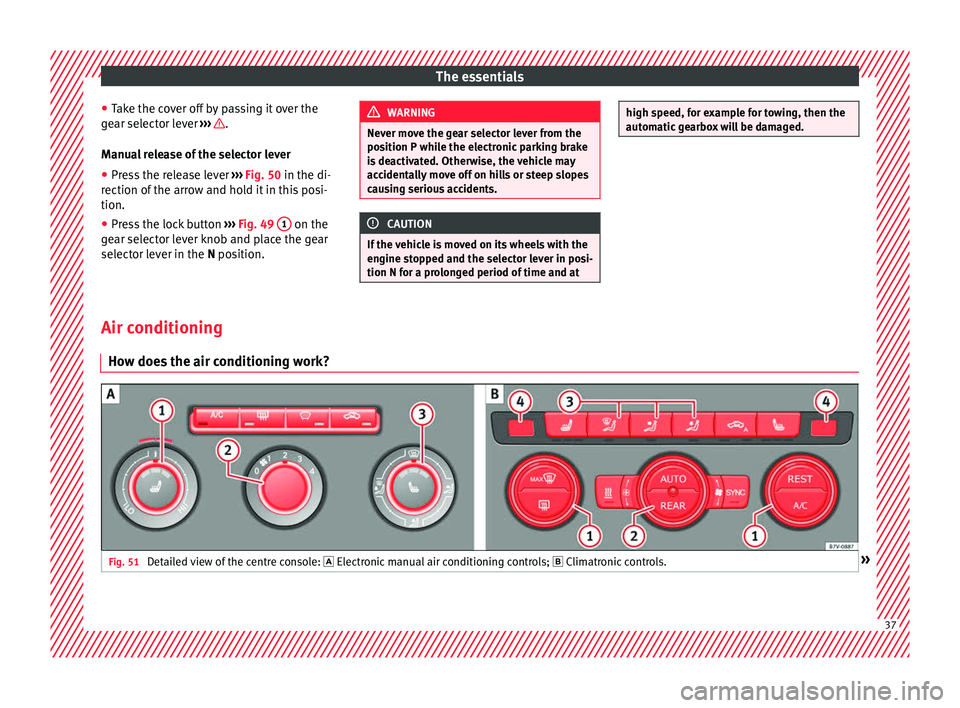
the air conditioning work?Fig. 51
Detailed view of the centre console: El
ectronic
manual air conditioning controls; Climatronic controls. » 37
Page 40 of 324
The essentialsControl buttonElectronic manual air conditioning
››› Fig. 51;
Climatronic ››› Fig. 51.
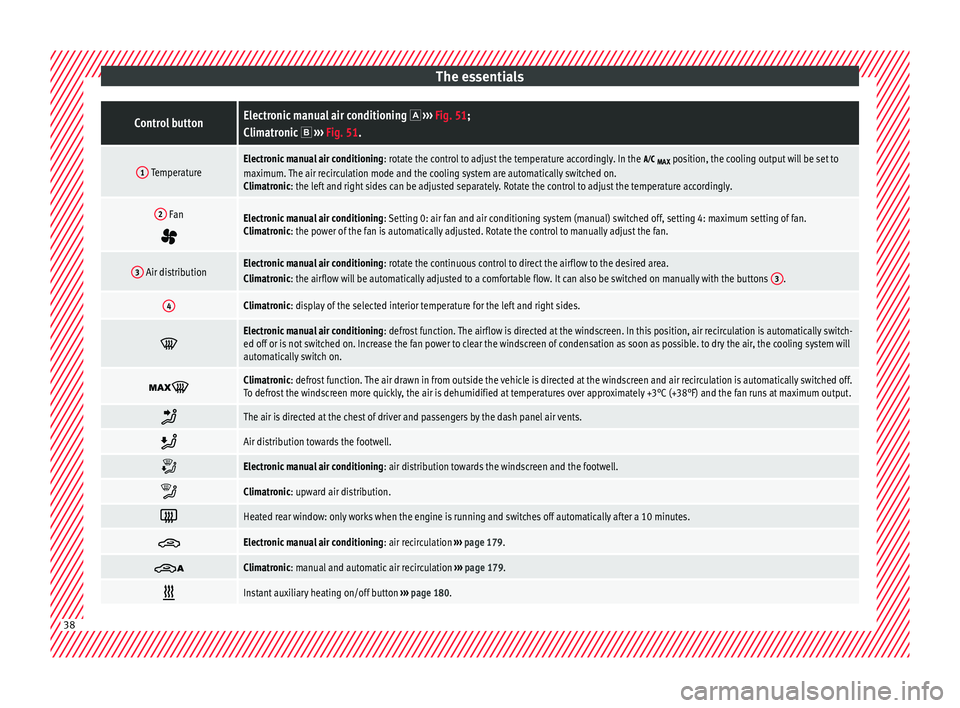
1 TemperatureElectronic manual air conditioning : rotate the control to adjust the temperature accordingly. In the
MAX position, the cooling output will be set to
maximum. The air recirculation mode and the cooling system are automatically switched on.
Climatronic: the left and right sides can be adjusted separately. Rotate the control to adjust the temperature accordingly.
2 Fan
Electronic manual air conditioning : Setting 0: air fan and air conditioning system (manual) switched off, setting 4: maximum setting of fan.
Climatronic: the power of the fan is automatically adjusted. Rotate the control to manually adjust the fan.
3 Air distributionElectronic manual air conditioning : rotate the continuous control to direct the airflow to the desired area.
Climatronic: the airflow will be automatically adjusted to a comfortable flow. It can also be switched on manually with the buttons 3.
4Climatronic: display of the selected interior temperature for the left and right sides.
Electronic manual air conditioning
: defrost function. The airflow is directed at the windscreen. In this position, air recirculation is automatically switch-
ed off or is not switched on. Increase the fan power to clear the windscreen of condensation as soon as possible. to dry the air, the cooling system will
automatically switch on.
Climatronic: defrost function. The air drawn in from outside the vehicle is directed at the windscreen and air recirculation is automatically switched off.
To defrost the windscreen more quickly, the air is dehumidified at temperatures over approximately +3°C (+38°F) and the fan runs at maximum output.
The air is directed at the chest of driver and passengers by the dash panel air vents.
Air distribution towards the footwell.
Electronic manual air conditioning
: air distribution towards the windscreen and the footwell.
Climatronic: upward air distribution.
Heated rear window: only works when the engine is running and switches off automatically after a 10 minutes.
Electronic manual air conditioning
: air recirculation ››› page 179.
Climatronic: manual and automatic air recirculation
››› page 179.
Instant auxiliary heating on/off button
››› page 180. 38
Page 41 of 324
The essentialsControl buttonElectronic manual air conditioning
››› Fig. 51;
Climatronic ››› Fig. 51.
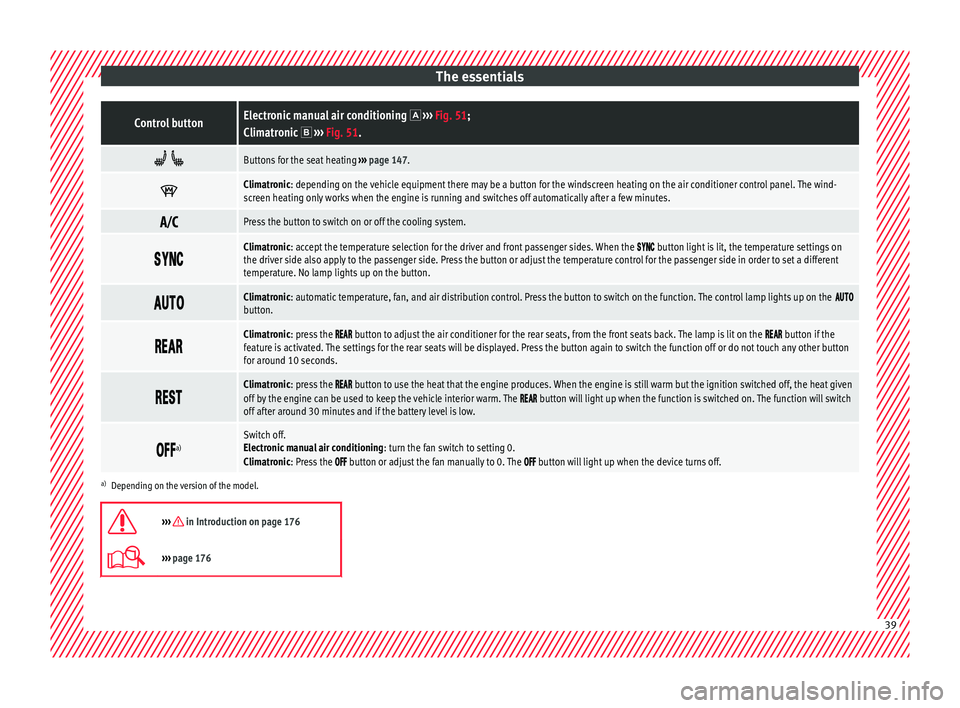
Buttons for the seat heating
››› page 147.
Climatronic: depending on the vehicle equipment there may be a button for the windscreen heating on the air conditioner control panel. The wind-
screen heating only works when the engine is running and switches off automatically after a few minutes.
Press the button to switch on or off the cooling system.
Climatronic: accept the temperature selection for the driver and front passenger sides. When the button light is lit, the temperature settings on
the driver side also apply to the passenger side. Press the button or adjust the temperature control for the passenger side in order to set a different
temperature. No lamp lights up on the button.
Climatronic: automatic temperature, fan, and air distribution control. Press the button to switch on the function. The control lamp lights up on the button.
Climatronic: press the button to adjust the air conditioner for the rear seats, from the front seats back. The lamp is lit on the button if the
feature is activated. The settings for the rear seats will be displayed. Press the button again to switch the function off or do not touch any other button
for around 10 seconds.
Climatronic: press the button to use the heat that the engine produces. When the engine is still warm but the ignition switched off, the heat given
off by the engine can be used to keep the vehicle interior warm. The button will light up when the function is switched on. The function will switch
off after around 30 minutes and if the battery level is low.
a)Switch off.
Electronic manual air conditioning
: turn the fan switch to setting 0.
Climatronic: Press the
button or adjust the fan manually to 0. The button will light up when the device turns off.
a) Depending on the version of the model.
››› in Introduction on page 176
››› page 176 39
Page 178 of 324
Operation
Air conditioning
Air c onditionin
g
Intr
oduction Viewing Climatronic information
The fact
or
y-fitted radio or navigation system
screen briefly displays information relating to
Climatronic.
The units of temperature measurement is dis-
played on the factory-installed radio or navi-
gation system and, depending on the vehicle
equipment, can be set using the Configu-
ration menu on the instrument panel. WARNING
Reduced visibility through the windows in-
cr e
ases the risk of serious accidents.
● Ensure that all windows are free of ice and
snow and th
at they are not fogged up pre-
venting a clear view of everything outside.
● The maximum heat output required to de-
fros
t windows quickly is only available when
the engine has reached its normal running
temperature. Only drive when you have good
visibility.
● Always ensure that you use the air condi-
tioner and heated r
ear window to maintain
good visibility.
● Never leave the air recirculation on for a
long period of time. If
the cooling system is switched off and air recirculation mode
swit
c
hed on, the windows can mist over very
quickly, considerably limiting visibility.
● Switch air recirculation mode off when it is
not requir
ed. WARNING
Stuffy or used air will increase fatigue and re-
duc e driv er c
oncentration possibly resulting
in a serious accident.
● Never leave the fresh air fan turned off or
use the air rec
irculation for long periods of
time; the air in the vehicle interior will not be
refreshed. CAUTION
● Swit c
h the air conditioner off if you think it
may be broken. This will avoid additional
damage. Have the air conditioner checked by
a specialised workshop.
● Repairs to the air conditioner require spe-
cia
list knowledge and special tools. SEAT rec-
ommends taking your car in for technical
service.
● Do not smoke when air recirculation is
switc
hed on in vehicles with an air condition-
er. The smoke taken in could lie on the cool-
ing system vaporiser and on the activated
charcoal cartridge of the dust and pollen fil-
ter, leading to a permanently unpleasant
smell. Note
● When the coo lin
g system is turned off, air
coming from the outside will not be dried. To
avoid fogging up the windows, SEAT recom-
mends leaving the cooler (compressor) on. To
do this, press the A/C button. The button
lamp shou l
d light up.
● If the humidity and temperature outside the
vehicl
e are high, condensation can drip off
the evaporator in the cooling system and
form a pool underneath the vehicle, this is
completely normal and there is no need to
suspect a leak.
● Keep the air intake slots in front of the
winds
creen free of snow, ice and leaves to en-
sure heating and cooling are not impaired,
and to prevent the windows from misting
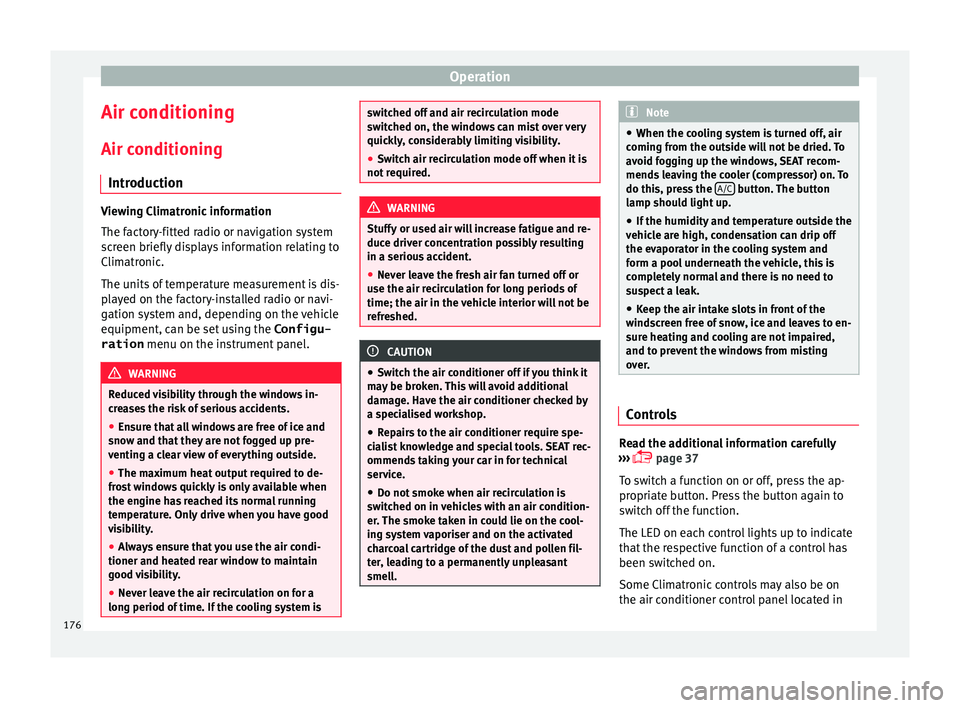
over. Controls
Read the additional information carefully
› ›
›
page 37
To switch a function on or off, press the ap-
propriate button. Press the button again to
switch off the function.
The LED on each control lights up to indicate
that the respective function of a control has
been switched on.
Some Climatronic controls may also be on
the air conditioner control panel located in
176
Page 179 of 324
Air conditioning
the rear centre console. These controls are
u sed t
o m
ake the appropriate settings for the
rear seats. Note
● Not a l
l Climatronic buttons are operational
in mode.
● The button is locked in defrost mode.
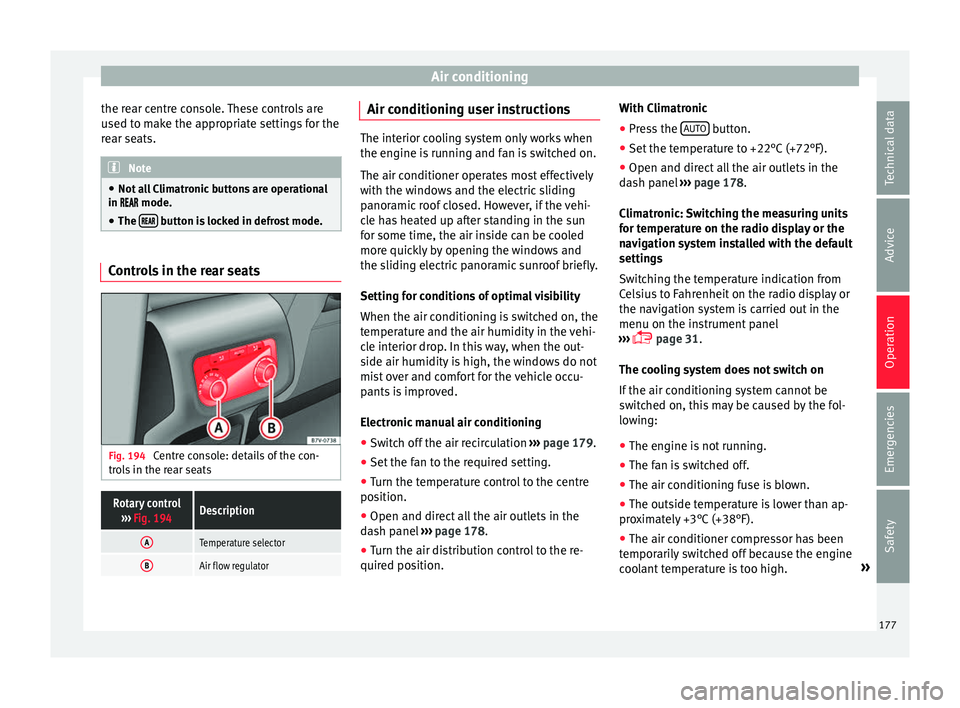
Controls in the rear seats
Fig. 194
Centre console: details of the con-
tr o
l
s in the rear seats
Rotary control
››› Fig. 194Description
ATemperature selector
BAir flow regulator Air conditioning user instructions
The interior cooling system only works when
the engine i
s
running and fan is switched on.
The air conditioner operates most effectively
with the windows and the electric sliding
panoramic roof closed. However, if the vehi-
cle has heated up after standing in the sun
for some time, the air inside can be cooled
more quickly by opening the windows and
the sliding electric panoramic sunroof briefly.
Setting for conditions of optimal visibility
When the air conditioning is switched on, the
temperature and the air humidity in the vehi-
cle interior drop. In this way, when the out-
side air humidity is high, the windows do not
mist over and comfort for the vehicle occu-
pants is improved.
Electronic manual air conditioning
● Switch off the air recirculation ››
›
page 179.
● Set the fan to the required setting.
● Turn the temperature control to the centre
position.
● Open and dir
ect all the air outlets in the
dash p
anel ›››
page 178.
● Turn the air distribution control to the re-
quired pos
ition. With Climatronic
●
Press the AUTO button.
● Set the temperature to +22°C (+72°F).
● Open and direct all the air outlets in the
d a
sh p
anel ››› page 178.
Climatronic: Switching the measuring units
for temperature on the radio display or the
navigation system installed with the default
settings
Switching the temperature indication from
Celsius to Fahrenheit on the radio display or
the navigation system is carried out in the
menu on the instrument panel
››› page 31.
The cooling system does not switch on
If the air conditioning system cannot be
switched on, this may be caused by the fol-
lowing:
● The engine is not running.
● The fan is switched off.
● The air conditioning fuse is blown.
● The outside temperature is lower than ap-
prox
imately +3°C (+38°F).
● The air conditioner compressor has been
temporari
ly switched off because the engine
coolant temperature is too high. »
177
Technical data
Advice
Operation
Emergencies
Safety
Page 181 of 324
Air conditioning
heat-sensitive, they may be damaged or
ma
de u
nsuitable for use by the air coming
from the air vents. Note
The air from the vents flows through the vehi-
c le int
erior and out through the outlets below
the rear window. The slots must not be cov-
ered with items of clothing or other objects. Air recirculation
Air recirculation mode prevents the ambient
air fr
om ent
erin
g the interior.
When the outside temperature is very high,
selecting manual air recirculation mode for a
short period refreshes the vehicle interior
more quickly.
For safety reasons, air recirculation mode is
switched off when the button is press-
ed or the air distributor turned to ››› .
Sw it
c
hing the recirculation mode on and off
manually on the air conditioning (Electronic
manual air conditioning)
Switching on: press the button until the
lamp on the button lights up.
Switching off: press the button until the
lamp on it is not lit up. Switching the recirculation mode on and off
manual
ly on the Climatronic
Switching on: press the button until the
lamp on the button lights up.
Switching off: press the button until the
lamp on it is not lit up.
Automatic air recirculation mode
When in position , fresh air enters the ve-
hicle interior. If the system detects a high
concentration of hazardous substances in the
ambient air, air recirculation mode is switch-
ed on automatically. When the level of impur-
ities drops to within a normal range, recircu-
lation mode is switched off.
The system is unable to detect unpleasant
smells.
With the following outside temperatures and
conditions the air recirculation does not
switch on automatically:
● The cooling system is switched on (the AC button is lit up) and the outside temperature
i
s
belo
w +3°C (+38°F).
● The cooling system and the windscreen
wipers
are switched off and the outside tem-
perature is below +10°C (+50°F).
● The cooling system is switched off and the
outside temper
ature is below +15°C (+59°F).
The windscreen wiper is switched on. Switching the automatic air recirculation
mode on and off
Switc
hing on: press the button until the
right-hand lamp on the button lights up.
Switching off: press the button until no
lamp on the button is lit up.
Switching the automatic air recirculation
mode off temporarily
● press the button t
o temporarily switch
to manual air recirculation mode in the event
of unpleasant smells from outside. The left
indicator lamp turns on.
● After more than two seconds, press the
button ag
ain to restart automatic air recircu-
lation. The right indicator lamp turns on. WARNING
Observe the safety warnings ›››
in Intro-
duction on pag e 176
.
● If the cooling system is switched off and air
recir
culation mode switched on, the windows
can mist over very quickly, considerably limit-
ing visibility.
● Switch air recirculation mode off when it is
not requir
ed. » 179
Technical data
Advice
Operation
Emergencies
Safety
Page 183 of 324

Air conditioning
burn any fuel remaining in the auxiliary heat-
er .
The e
xhaust gases are also extracted from
the system.
Remote control Fig. 196
Auxiliary heater: remote control
Fig. 196Meaning
Switch the auxiliary heater on.
Switch the auxiliary heater off:
AAerial.
BLight.
The auxiliary heater may accidentally switch
on if
a b
utt
on is pressed on the remote con-
trol by mistake. This may also occur outside
the range of the remote control or if the light
flashes. Remote control light
The remote c
ontrol light provides users with
different information at the push of a button:
Battery light
Fig. 196 BMeaning
Lights up green for
around two seconds.The auxiliary heater has been
switched on using the but-
ton.
Lights up red for
around two seconds.The auxiliary heater has been
switched off using the but-
ton.
Slowly flashes green
for around two sec-
onds.No on a)
signal has been re-
ceived.
Quickly flashes green
for around two sec-
onds.The auxiliary heater is locked.
Possible causes: the fuel tank
is almost empty, the battery
charge is very low or there is a
fault.
Flashes red for
around two seconds.No off a)
signal has been re-
ceived.
Lights up orange for
around two seconds,
then green or red.The remote control battery is
almost flat. However, the on or
off signal has been received,
respectively.
Lights up orange for
around two seconds,
then flashes green or
red.The remote control battery is
almost flat. The on or off signal
has not been received, respec-
tively.
Battery light
Fig. 196 BMeaning
Flashes orange for
around five seconds.The remote control battery is
flat. The on or off signal has
not been received, respective-
ly.
a)
Within its range, the remote control might not receive the sig-
nal sent by the vehicle receiver. In this case, the remote control
will send an error message whether the auxiliary heater is on or
off. Come closer to the vehicle and press the corresponding but-
ton on the remote control once again.
Replacing the remote control battery
If the light ›››
Fig. 196 B on the remote con-
tr o
l
does not come on when the button is
pressed, the remote control battery should
soon be replaced.
The battery is located beneath a cover on the
back of the remote control. Turn the slot to
the left using a flat, blunt object (e.g. a coin).
When changing the battery, use another bat-
tery of the same model and observe the po-
larity when fitting it ››› .
R an
g
e
The receiver is in the interior of the vehicle.
The remote control, when fitted with new bat-
teries, has a range of several hundred me-
tres. Obstacles between the remote control
and the vehicle, bad weather conditions and
discharged batteries can considerably reduce
the range of the remote control. »
181
Technical data
Advice
Operation
Emergencies
Safety
Page 203 of 324
Driving
In addition, “skipping” gears when shifting
up help s
t
o save fuel, weather and traffic
conditions permitting.
Do not wait until the last moment before
changing gear. Only use first gear when you
move off and change to second gear quickly.
Avoid the kick-down function in vehicles with
automatic gearbox.
Vehicles with a gear display help to achieve
an economical driving style as the display in-
dicates the best moment to change gear.
Let the vehicle roll
If you take your foot off the accelerator, the
fuel supply is stopped and consumption is
reduced.
Allow the vehicle to roll without accelerating,
for example when approaching a red traffic
light. However, if the vehicle is rolling too
slowly or the distance is too long, the clutch
pedal should be pressed to declutch. The en-
gine will then operate at idle speed.
If the vehicle is going to be at a standstill for
a period of time, switch off the engine; for ex-
ample, while waiting at a level crossing. In
vehicles which have the Start-Stop function
on, the engine switches off automatically
when the vehicle is not moving. Think ahead and “flow” with the traffic
Frequent ac
celeration and braking considera-
bly increase fuel consumption. If you think
ahead as you drive and keep a safe distance
from the vehicle in front, it is possible to slow
down by simply lifting your foot off the accel-
erator. This eliminates the need for constant
braking and acceleration.
Calm and steady driving
Constancy is more important than speed: The
more you drive at a constant speed, the lower
the fuel consumption.
When driving on the motorway, it is more effi-
cient to drive at a constant and more moder-
ate speed than to be continuously accelerat-
ing and braking. As a general rule, you will
reach your destination just as quickly when
you drive at a constant speed.
The cruise control function helps you to ach-
ieve a constant style of driving.
Moderate use of additional devices
It is important to travel in comfort, but con-
venience systems should be used ecological-
ly.
Some equipment, when connected, increase
fuel consumption considerably, for example:
● Air conditioning cooling system: If the air
conditionin g sy
stem is required to cool to
significantly lower temperatures than the true outside temperature, it will require a large
amount
of
energy from the engine. Therefore,
we recommend that the selected temperature
for the vehicle is not too different to the out-
side temperature. It is a good idea to air the
vehicle before starting your journey and to
drive a short distance with all the windows
open. Only then should you close all the win-
dows and switch on the air conditioning.
Keep windows closed when travelling at high
speeds. Driving with the windows open in-
creases fuel consumption.
● Switch off the seat heating when the seats
have w
armed up.
● Switch off the heated rear window and the
winds
creen heating when the windows have
demisted and are free of ice.
● Do not leave the auxiliary heater switched
on when the vehic
le is moving ››› page 180.
Avoid short journeys
Fuel consumption is much higher when the
engine is cold, immediately after it has been
started. It takes a few kilometres of driving
for the engine to warm up and to normalise
consumption.
The engine and catalytic converter need to
reach their proper working temperature in or-
der to minimise fuel consumption and emis-
sions. The ambient temperature has a deci-
sive influence. »
201
Technical data
Advice
Operation
Emergencies
Safety
Page 212 of 324
Operation
Vehicles with a manual gearbox
● When the vehicle is at a standstill, leave it
in neutr al
and t
ake your foot off the clutch.
The engine switches off.
● Simply depress the clutch pedal to move
off again.
V
ehicles with an automatic gearbox
● When the vehicle is at a standstill, depress
the brake or k
eep it pressed down. The en-
gine switches off.
● The engine will start again as soon as you
rele
ase the brake pedal.
● With the selector lever set to position P, the
engine wi
ll not start until a range of gears is
selected or the accelerator pedal is de-
pressed.
Important conditions for the engine to auto-
matically switch off
● The driver seat belt must be buckled.
● The driver door must be closed.
● The bonnet must be closed.
● The factory-fitted towing bracket must not
be electrical
ly connected to a trailer.
● A minimum engine temperature has been
reac
hed.
● The steering wheel must not be turned
more than 270 de
grees.
● The vehicle has moved since the last stop. ●
In vehic
les with Climatronic: the tempera-
ture inside the vehicle is within the pre-set
temperature range.
● The temperature set is neither very high nor
very
low.
● The air conditioning defrost function is not
switc
hed on.
● In vehicles with Climatronic: the blower has
not been manual
ly set to a high speed.
● The power level of the vehicle's battery is
sufficient
.
● The vehicle's battery temperature is neither
too high nor too lo
w.
● The vehicle is not on a steep gradient or
slope.
● The front
wheels are not overly turned.
● The heated windscreen is not switched on.
● Reverse gear is not engaged.
● The park assist system is not switched on.
Conditions
for automatically restarting the
engine
The engine may automatically restart under
the following conditions:
● If the vehicle interior is too hot or too cold.
● If the vehicle moves.
● If the vehicle's battery voltage drops. Conditions requiring the key to restart the
engine
The engine mu
st be started manually under
the following conditions:
● If the driver unbuckles his/her seat belt.
● If the driver door is opened.
● If the bonnet is opened.
● In vehicles with a manual gearbox: if a gear
has
been selected.
Switching Start-Stop mode on and off man-
ually
● Press the button on the c
entre console
››› Fig. 206.
● The button will light up when the Start-Stop
function i
s switched off.
The engine will start immediately if the vehi-
cle is in Stop mode when it is switched off
manually. WARNING
The brake servo and the power steering do
not w ork
when the engine is switched off.
● Never allow the vehicle to move when the
engine is
switched off. CAUTION
Using the Start-Stop function for a long peri-
od at v
ery high outside temperatures could
damage the vehicle's battery. 210