warning Seat Altea 2015 Workshop Manual
[x] Cancel search | Manufacturer: SEAT, Model Year: 2015, Model line: Altea, Model: Seat Altea 2015Pages: 236, PDF Size: 4.23 MB
Page 66 of 236
Operation
“Safe” security system* This is an anti-theft device which consists of
a double lock for the door locks and a deacti-
vation function for the boot in order to pre-
vent forced entry.
Activating the “deadlock”
– Press once the locking button on the re-
mote control. or
– Turn the k
ey once in the driver door lock to
lock. A w
arning lamp in the driver door
flashes to indicate the “deadlock” is work-
ing. The warning lamp flashes for approx. 2
seconds at short intervals and then more
slowly.
Deactivating the “deadlock” when the
vehicle is locked
– Press the lock button on the remote con-
trol twice within 2 seconds. The vehicle is
loc k
ed without activating the “deadlock”.
The driver door warning lamp flashes for
approx. 2 seconds and then goes out. It
flashes again after around 30 seconds.
The doors can be unlocked and opened from
the inside if the “deadlock” has not been ac-
tivated. You will have to pull the door release
lever once. When the “deadlock” is off, the
anti-theft alarm* ›››
page 68 remains active.
The v
ehicle interior monitoring system* and
the anti-tow system are deactivated*. WARNING
Nobody should remain in the vehicle if the
“deadlock” system mechanism has been acti-
vated. It is not possible to open the doors
from the inside. Locked doors could delay as-
sistance in an emergency. People could be-
come trapped inside in an emergency. Selective unlocking system*
This system allows to unlock either just the
driver door or all the vehicle.
Using the remote control, press the unlock
button on the remote
once. The “Safe”
system for all the vehicle is deactivated, only
the driver door is unlocked and both the
alarm and the warning lamp are also turned
off.
Unlocking all doors and the luggage
compartment
The unlock button on the remote control
must be pressed twice so that all doors
and the luggage compartment can be
opened.
Press twice within 2 seconds to deactivate
the “Safe” system for all vehicle, to unlock all
doors and to use the luggage compartment.
The warning lamp and the alarm (only vehi-
cles fitted with one) are turned off. Automatic speed-dependent locking
and unlocking system* This is a safety system which prevents access
to the vehicle from the outside when it is run-
ning (e.g. when stopped at a traffic light).
Locking
The doors and boot will lock automatically if
the speed of 15 km/h (9 mph) is exceeded.
If the vehicle is stopped and one of the doors
is opened, when the vehicle moves off again
and exceeds a speed of 15 km/h (9 mph),
the unlocked door(s) will lock once more.
Unlocking
The driver door automatically unlocks when
the key is removed from the ignition.
Each door can be unlocked and opened inde-
pendently from the inside (for example, when
a passenger gets out). To do it, simply oper-
ate the lever inside the door.
WARNING
The door handles must not be operated when
the vehicle is running: the door would open. 64
Page 68 of 236
Operation
● All doors can be unlocked separately from
inside the vehicle. Do this by pulling the door
release lever once
. WARNING
● If the vehicle is locked, children and disa-
bled people may be trapped inside it.
● The central lock button is not operative in
the following cases:
● When the vehicle is locked from the outside
(with the remote control or the key).
● While the ignition is not activated after un-
locking the door lock cylinder with the key. Note
● Vehicle locked, amber button .
● Vehicle unlocked, red button . Childproof lock
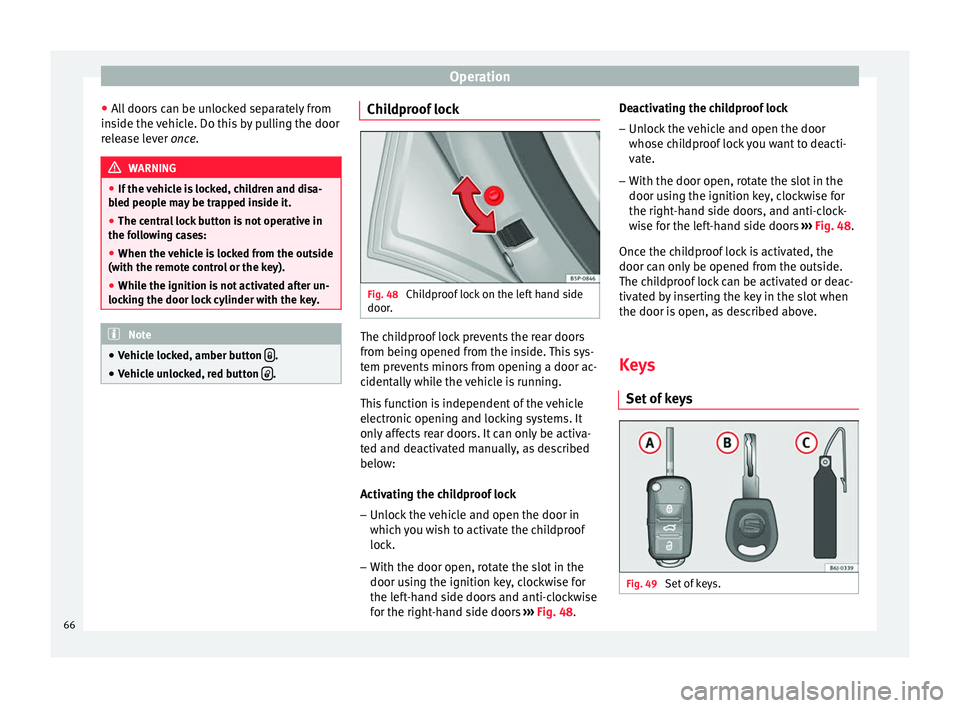
Fig. 48
Childproof lock on the left hand side
door. The childproof lock prevents the rear doors
from being opened from the inside. This sys-
tem prevents minors from opening a door ac-
cidentally while the vehicle is running.
This function is independent of the vehicle
electronic opening and locking systems. It
only affects rear doors. It can only be activa-
ted and deactivated manually, as described
below:
Activating the childproof lock
– Unlock the vehicle and open the door in
which you wish to activate the childproof
lock.
– With the door open, rotate the slot in the
door using the ignition key, clockwise for
the left-hand side doors and anti-clockwise
for the right-hand side doors ››› Fig. 48 . D
e activating the childproof lock
– Unlock the vehicle and open the door
whose childproof lock you want to deacti-
vate.
– With the door open, rotate the slot in the
door using the ignition key, clockwise for
the right-hand side doors, and anti-clock-
wise for the left-hand side doors ››› Fig. 48.
Once the c
hildproof lock is activated, the
door can only be opened from the outside.
The childproof lock can be activated or deac-
tivated by inserting the key in the slot when
the door is open, as described above.
Keys
Set of keys Fig. 49
Set of keys.66
Page 69 of 236
Opening and closing
The set of keys belonging to your vehicle con-
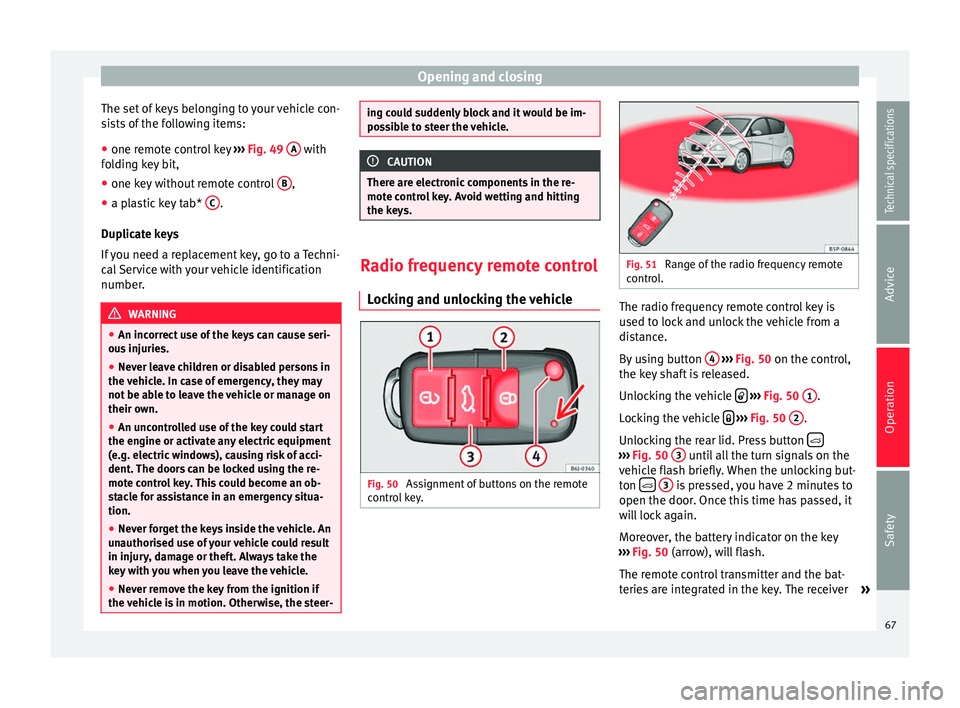
sists of the following items:
● one remote control key ››› Fig. 49 A with
folding key bit,
● one key without remote control B ,
● a plastic key tab* C .
Duplicate keys
If you need a replacement key, go to a Techni-
cal Service with your vehicle identification
number. WARNING
● An incorrect use of the keys can cause seri-
ous injuries.
● Never leave children or disabled persons in
the vehicle. In case of emergency, they may
not be able to leave the vehicle or manage on
their own.
● An uncontrolled use of the key could start
the engine or activate any electric equipment
(e.g. electric windows), causing risk of acci-
dent. The doors can be locked using the re-
mote control key. This could become an ob-
stacle for assistance in an emergency situa-
tion.
● Never forget the keys inside the vehicle. An
unauthorised use of your vehicle could result
in injury, damage or theft. Always take the
key with you when you leave the vehicle.
● Never remove the key from the ignition if
the vehicle is in motion. Otherwise, the steer- ing could suddenly block and it would be im-
possible to steer the vehicle.
CAUTION
There are electronic components in the re-
mote control key. Avoid wetting and hitting
the keys. Radio frequency remote control
Locking and unlocking the vehicle Fig. 50
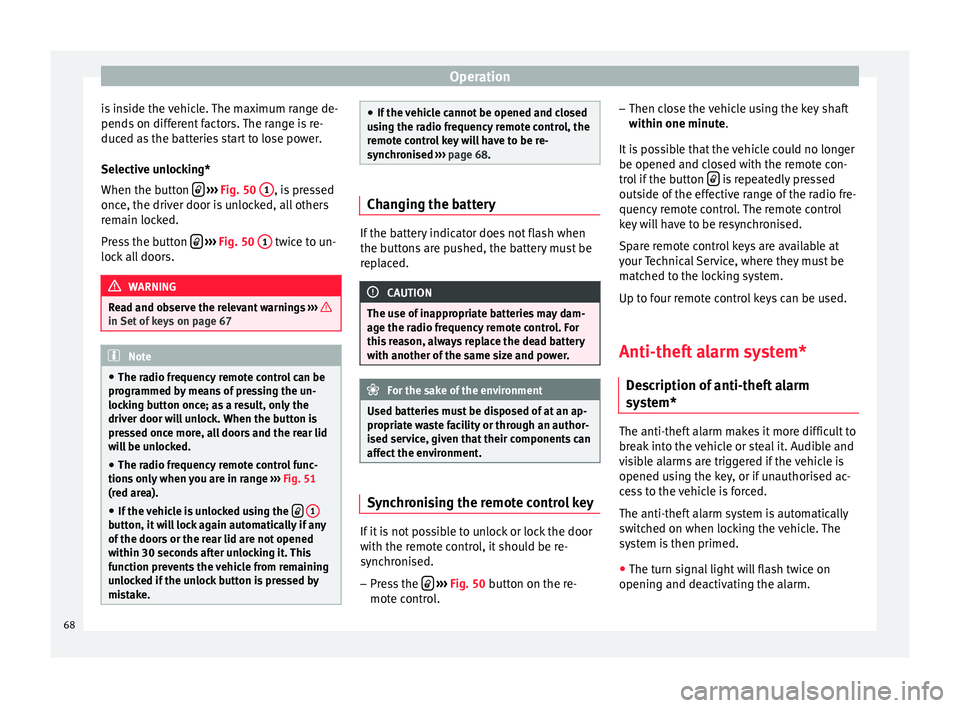
Assignment of buttons on the remote
control key. Fig. 51
Range of the radio frequency remote
control. The radio frequency remote control key is
used to lock and unlock the vehicle from a
distance.
By using button
4
››› Fig. 50 on the control,
the k ey
shaft is released.
Unlocking the vehicle
››› Fig. 50 1 .
Locking the vehicle
››› Fig. 50 2 .
Unlocking the rear lid. Press button ›››
Fig. 50 3 until all the turn signals on the
vehicle flash briefly. When the unlocking but-
ton
3 is pressed, you have 2 minutes to
open the door. Once this time has passed, it
will lock again.
Moreover, the battery indicator on the key
››› Fig. 50 (arrow), will flash.
The r emot
e control transmitter and the bat-
teries are integrated in the key. The receiver »
67
Technical specifications
Advice
Operation
Safety
Page 70 of 236
Operation
is inside the vehicle. The maximum range de-
pends on different factors. The range is re-
duced as the batteries start to lose power.
Selective unlocking*
When the button
››› Fig. 50 1 , is pressed
once, the driver door is unlocked, all others
remain locked.
Press the button
››› Fig. 50 1 twice to un-
lock all doors. WARNING
Read and observe the relevant warnings ››› in Set of keys on page 67
Note
● The radio frequency remote control can be
programmed by means of pressing the un-
locking button once; as a result, only the
driver door will unlock. When the button is
pressed once more, all doors and the rear lid
will be unlocked.
● The radio frequency remote control func-
tions only when you are in range ››› Fig. 51
(red area).
● If the vehicle is unlocked using the
1 button, it will lock again automatically if any
of the doors or the rear lid are not opened
within 30 seconds after unlocking it. This
function prevents the vehicle from remaining
unlocked if the unlock button is pressed by
mistake. ●
If the vehicle cannot be opened and closed
using the radio frequency remote control, the
remote control key will have to be re-
synchronised ››› page 68. Changing the battery
If the battery indicator does not flash when
the buttons are pushed, the battery must be
replaced.
CAUTION
The use of inappropriate batteries may dam-
age the radio frequency remote control. For
this reason, always replace the dead battery
with another of the same size and power. For the sake of the environment
Used batteries must be disposed of at an ap-
propriate waste facility or through an author-
ised service, given that their components can
affect the environment. Synchronising the remote control key
If it is not possible to unlock or lock the door
with the remote control, it should be re-
synchronised.
– Press the
›››
Fig. 50 button on the re-
mot e c
ontrol. –
Then close the vehicle using the key shaft
within one minute.
It i
s possible that the vehicle could no longer
be opened and closed with the remote con-
trol if the button is repeatedly pressed
outside of the effective range of the radio fre-
quency remote control. The remote control
key will have to be resynchronised.
Spare remote control keys are available at
your Technical Service, where they must be
matched to the locking system.
Up to four remote control keys can be used.
Anti-theft alarm system* Description of anti-theft alarm
system* The anti-theft alarm makes it more difficult to
break into the vehicle or steal it. Audible and
visible alarms are triggered if the vehicle is
opened using the key, or if unauthorised ac-
cess to the vehicle is forced.
The anti-theft alarm system is automatically
switched on when locking the vehicle. The
system is then primed.
● The turn signal light will flash twice on
opening and deactivating the alarm.
68
Page 71 of 236

Opening and closing
● The turn signal light will flash once on clos-
ing and activating the alarm.
When does the system trigger an alarm?
The system triggers an alarm if the following
unauthorised actions are carried out when
the vehicle is locked:
● Opening the vehicle mechanically using
the key and with the ignition off.
● A door is opened.
● Opening the bonnet.
● The rear lid is opened.
● Ignition switched on with a non-validated
key.
● Movements in the driving compartment
(vehicles with interior monitoring).
● Undue manipulation of the alarm.
● Battery handling.
The acoustic signals sound and the turn sig-
nals flash for approx. 30 seconds. This cycle
may be repeated up to 10 times depending
on the country.
Opening the doors mechanically (emergency
opening)
If the radio frequency remote control function
fails, you will have to use the key to unlock
the vehicle. This is done as follows: ●
Use the lock on the driver door to unlock
the vehicle. The anti-theft alarm system re-
mains active, but an alarm is not triggered
immediately.
● Switch on the ignition within 15 seconds.
When the ignition is switched on, the elec-
tronic immobiliser recognises a valid vehicle
key and deactivates the anti-theft alarm sys-
tem. If you do not switch on the ignition with-
in 15 seconds, the alarm is triggered (in cer-
tain markets, such as the Netherlands, there
is no 15-second waiting time and the alarm
is activated immediately after opening the
door).
Opening all the doors in manual mode
In vehicles without an alarm, when opening
the driver door manually, all doors are
opened.
How to switch the alarm off
When the vehicle is unlocked via the unlock-
ing button of the radio frequency remote con-
trol or when the key is inserted in the ignition
lock. Note
● After 28 days, the indicator light will be
switched off to prevent the battery from
draining if the vehicle has been left parked
for a long period of time. The alarm system
remains activated. ●
If, after the audible warning turns off, an-
other monitored area is accessed (e.g. the
boot hatch is opened after a door has been
opened), the alarm is triggered again.
● The anti-theft alarm is not activated when
the vehicle is locked from within using the
central locking button .
● If the vehicle battery is run down or flat
then the anti-theft alarm will not operate cor-
rectly.
● Vehicle monitoring remains active even if
the battery is disconnected or not working for
any reason.
● The alarm is triggered immediately if one of
the battery cables is disconnected while the
alarm system is active. Interior monitoring*
This is a monitoring or control function incor-
porated in the anti-theft alarm* which de-
tects unauthorized vehicle entry by means of
ultrasound.
The system consists of 3 sensors, 2 emitters
and a receptor.
Activation
– It is automatically turned on with the anti-
theft alarm, when the vehicle is locked me-
chanically with the key and when the but-
ton on the remote control is used.
»
69Technical specifications
Advice
Operation
Safety
Page 72 of 236

Operation
Deactivation – Press the button on the remote control
twice. It only deactivates the interior moni-
tor. The alarm system remains activated.
False alarms
Interior monitoring will only operate correctly
if the vehicle is completely closed. Please ob-
serve related legal requirements.
The following cases may cause a false alarm:
● Open windows (partially or fully).
● Panoramic/tilting sunroof open (partially or
completely).
● Movement of objects inside the vehicle,
such as loose papers, items hanging from
the rear vision mirror (air fresheners), etc. WARNING
● The “deadlock” system remains deactiva-
ted if the interior monitor is deactivated.
● For those vehicles in which a separation
screen is fitted, the alarm will not function
correctly due to interference with the sensor. Note
● If the alarm has been triggered by the inte-
rior monitor, this will be indicated by a flash-
ing of the warning lamp on the driver door when the vehicle is opened. This flashing will
be different to that for an activated alarm.
Deactivating vehicle interior
monitoring systems
1) Fig. 52
interior monitor button. With the vehicle locked, any movement in the
interior (e.g. pets) will set off the alarm. De-
activate interior monitor systems to prevent
the alarm from going off unintentionally.
– To switch off the vehicle interior monitor,
switch off the ignition and press button
››› Fig. 52 . The indicator on the button will
light up
.
– When the vehicle is now locked, the vehicle
interior monitor is switched off until the
next time the door is opened. If the anti-theft security system “deadlock”*
››› page 64 is switched off, the interior moni-
tor aut
omatically turns off. WARNING
Observe the safety warnings ››› in “Safe”
security system* on page 64. 1)
Only available in certain markets.
70
Page 73 of 236
Opening and closing
Boot hatch Unlocking and locking Fig. 53
Rear lid: opening from the outside. Fig. 54
Close-up of the inside trim of the rear
lid: hand grip The rear lid opening system operates electri-
cally. It is activated by using the handle on
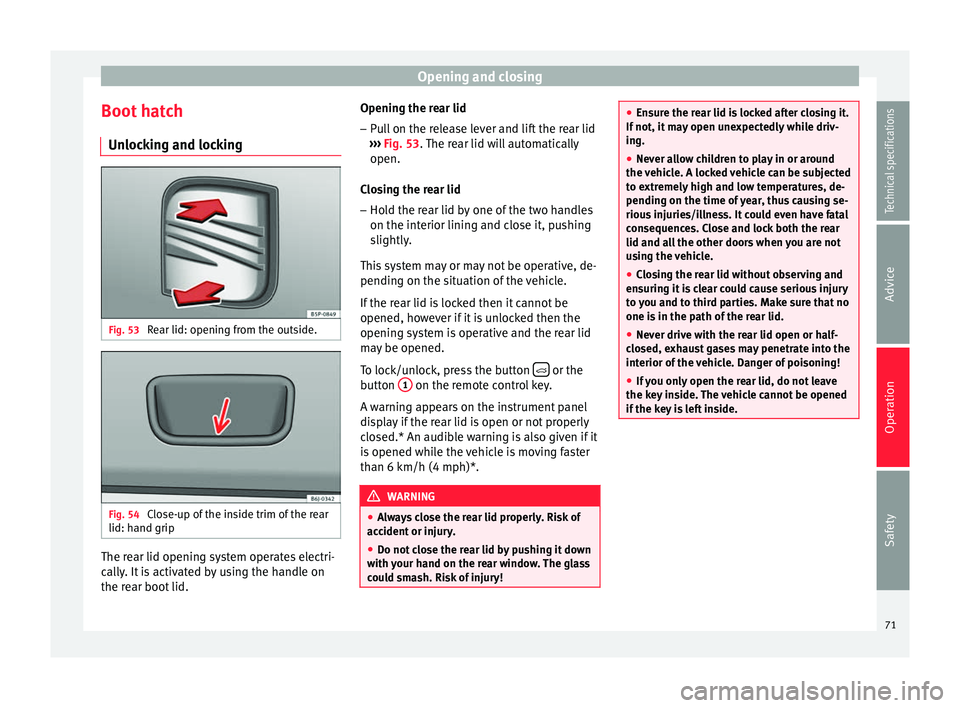
the rear boot lid. Opening the rear lid
– Pull on the release lever and lift the rear lid
››› Fig. 53 . The rear lid will automatically
open.
C lo
sing the rear lid
– Hold the rear lid by one of the two handles
on the interior lining and close it, pushing
slightly.
This system may or may not be operative, de-
pending on the situation of the vehicle.
If the rear lid is locked then it cannot be
opened, however if it is unlocked then the
opening system is operative and the rear lid
may be opened.
To lock/unlock, press the button or the
button 1 on the remote control key.
A warning appears on the instrument panel
display if the rear lid is open or not properly
closed.* An audible warning is also given if it
is opened while the vehicle is moving faster
than 6 km/h (4 mph)*. WARNING
● Always close the rear lid properly. Risk of
accident or injury.
● Do not close the rear lid by pushing it down
with your hand on the rear window. The glass
could smash. Risk of injury! ●
Ensure the rear lid is locked after closing it.
If not, it may open unexpectedly while driv-
ing.
● Never allow children to play in or around
the vehicle. A locked vehicle can be subjected
to extremely high and low temperatures, de-
pending on the time of year, thus causing se-
rious injuries/illness. It could even have fatal
consequences. Close and lock both the rear
lid and all the other doors when you are not
using the vehicle.
● Closing the rear lid without observing and
ensuring it is clear could cause serious injury
to you and to third parties. Make sure that no
one is in the path of the rear lid.
● Never drive with the rear lid open or half-
closed, exhaust gases may penetrate into the
interior of the vehicle. Danger of poisoning!
● If you only open the rear lid, do not leave
the key inside. The vehicle cannot be opened
if the key is left inside. 71
Technical specifications
Advice
Operation
Safety
Page 74 of 236
Operation
Electric windows Opening or closing the electric
windows Fig. 55
Detail of the driver door: controls for
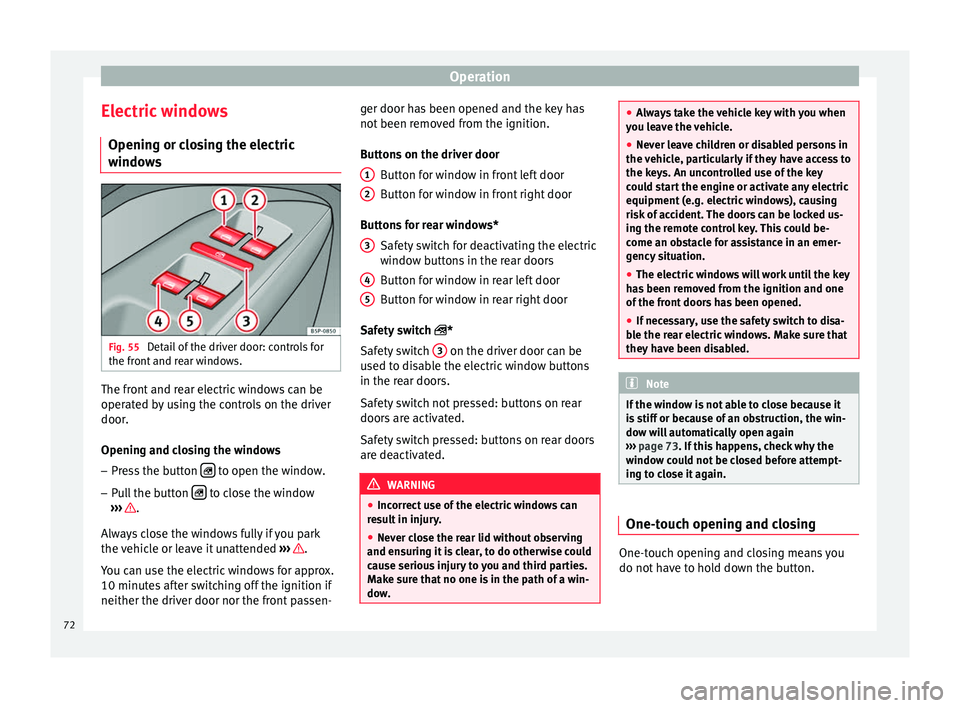
the front and rear windows. The front and rear electric windows can be
operated by using the controls on the driver
door.
Opening and closing the windows
– Press the button to open the window.
– Pull the button to close the window
››› .
Always close the windows fully if you park
the vehicle or leave it unattended ››› .
You can use the electric windows for approx.
10 minutes after switching off the ignition if
neither the driver door nor the front passen- ger door has been opened and the key has
not been removed from the ignition.
Buttons on the driver door
Button for window in front left door
Button for window in front right door
Buttons for rear windows* Safety switch for deactivating the electric
window buttons in the rear doors
Button for window in rear left door
Button for window in rear right door
Safety switch *
Safety switch 3 on the driver door can be
used to disable the electric window buttons
in the rear doors.
Safety switch not pressed: buttons on rear
doors are activated.
Safety switch pressed: buttons on rear doors
are deactivated. WARNING
● Incorrect use of the electric windows can
result in injury.
● Never close the rear lid without observing
and ensuring it is clear, to do otherwise could
cause serious injury to you and third parties.
Make sure that no one is in the path of a win-
dow. 1
2
3
4
5 ●
Always take the vehicle key with you when
you leave the vehicle.
● Never leave children or disabled persons in
the vehicle, particularly if they have access to
the keys. An uncontrolled use of the key
could start the engine or activate any electric
equipment (e.g. electric windows), causing
risk of accident. The doors can be locked us-
ing the remote control key. This could be-
come an obstacle for assistance in an emer-
gency situation.
● The electric windows will work until the key
has been removed from the ignition and one
of the front doors has been opened.
● If necessary, use the safety switch to disa-
ble the rear electric windows. Make sure that
they have been disabled. Note
If the window is not able to close because it
is stiff or because of an obstruction, the win-
dow will automatically open again
››› page 73. If this happens, check why the
w indo
w could not be closed before attempt-
ing to close it again. One-touch opening and closing
One-touch opening and closing means you
do not have to hold down the button.
72
Page 75 of 236

Opening and closing
One-touch closing
– Pull up the window button briefly up to the
second position. The window closes fully.
One-touch opening
– Push down the window button briefly up to
the second position. The window opens
fully.
Restoring one-touch opening and closing
– Close all windows.
– Use the key to lock the vehicle from outside
and hold the key in the lock position for at
least one second. The one-touch function is
now ready for operation.
The buttons ››› Fig. 55 1 and
2 have two
levels for opening the window and two for
closing it. This makes it easier to open and
close windows to the desired position.
One-touch closing does not work when the
ignition has been switched off, even if the
key is in the ignition.
The automatic open and close function will
not work if the battery has been temporarily
disconnected, or if the battery is flat. The
function then has to be reactivated.
The one-touch function and roll-back function
will not work if there is a malfunction in the
electric windows. Contact a specialised work-
shop. Roll-back function The roll-back function reduces the risk of in-
jury when the electric windows close.
● If a window is obstructed when closing au-
tomatically, the window stops at this point
and lowers immediately ››› .
● If this happens, check immediately (within
10 seconds) why the window could not be
closed before attempting to close it again. Af-
ter 10 seconds the normal automatic func-
tion resumes.
● If the window is still obstructed, the win-
dow will stop at this point.
● If there is no obvious reason why the win-
dow cannot be closed, try to close it again
within 5 seconds.
If you wait longer than 10 seconds, the win-
dow will open again fully when you operate
one of the buttons. One-touch closing is reac-
tivated.
The one-touch function and roll-back function
will not work if there is a malfunction in the
electric windows. Contact a specialised work-
shop. WARNING
● Incorrect use of the electric windows can
result in injury.
● Always take the ignition key with you when
leaving the vehicle, even if you only intend to be gone for a short time. Please ensure that
children are never left alone inside the vehi-
cle.
●
The electric windows will work until the key
has been removed from the ignition and one
of the front doors has been opened.
● Never close the rear lid without observing
and ensuring it is clear, to do otherwise could
cause serious injury to you and third parties.
Make sure that no one is in the path of a win-
dow.
● Never allow people to remain in the vehicle
when you close the vehicle from the outside.
The windows cannot be opened even in an
emergency. Note
The roll-back function is deactivated if the
windows are closed from the outside of the
vehicle using the ignition key for convenience
closing ››› page 73. Convenience opening and closing*
Using the door lock
– Hold the key in the door lock of the driver
door in either the locking or the unlocking
position until all windows are either
opened or closed.
– Release the key to interrupt this function.
»
73Technical specifications
Advice
Operation
Safety
Page 76 of 236
Operation
Using the remote control
– Push the lock or unlock button on the re-
mote control for approximately 3 seconds.
All windows which function electrically will
be either opened or closed.
– Release the unlock button to interrupt the
function.
– Once the windows are completely closed,
the turn signals will flash.
Sliding/tilting sunroof* Opening and closing the
sliding/tilting roof Fig. 56
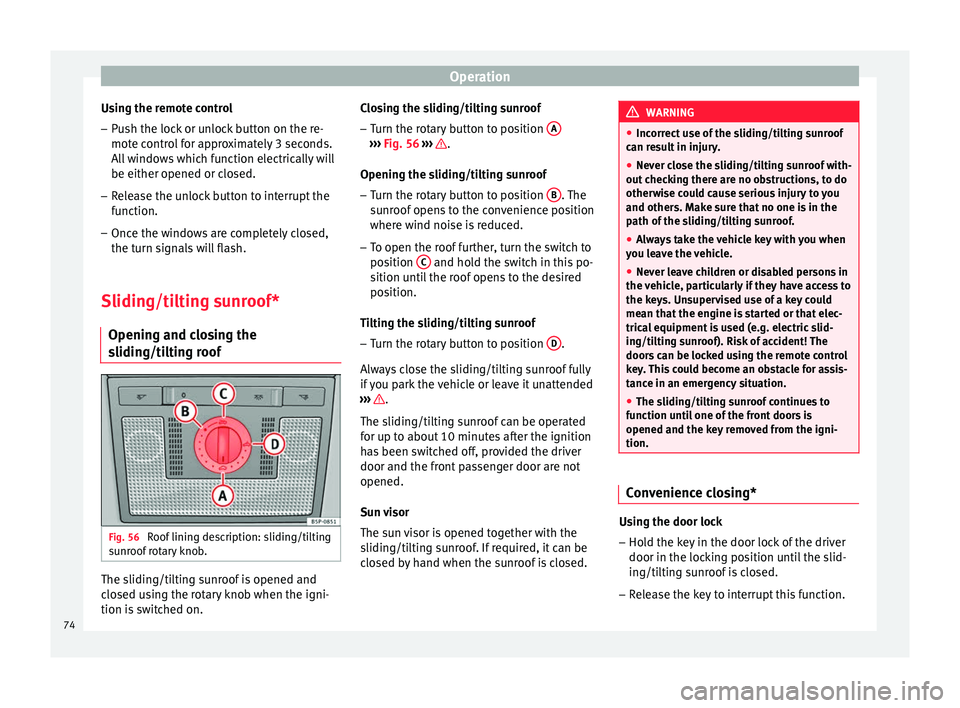
Roof lining description: sliding/tilting
sunroof rotary knob. The sliding/tilting sunroof is opened and
closed using the rotary knob when the igni-
tion is switched on. Closing the sliding/tilting sunroof
– Turn the rotary button to position A ›››
Fig. 56
›
›› .
Opening the sliding/tilting sunroof
– Turn the rotary button to position B . The
sunroof opens to the convenience position
where wind noise is reduced.
– To open the roof further, turn the switch to
position C and hold the switch in this po-
sition until the roof opens to the desired
position.
Tilting the sliding/tilting sunroof
– Turn the rotary button to position D .
Always close the sliding/tilting sunroof fully
if you park the vehicle or leave it unattended
››› .
The sliding/tilting sunroof can be operated
for up to about 10 minutes after the ignition
has been switched off, provided the driver
door and the front passenger door are not
opened.
Sun visor
The sun visor is opened together with the
sliding/tilting sunroof. If required, it can be
closed by hand when the sunroof is closed. WARNING
● Incorrect use of the sliding/tilting sunroof
can result in injury.
● Never close the sliding/tilting sunroof with-
out checking there are no obstructions, to do
otherwise could cause serious injury to you
and others. Make sure that no one is in the
path of the sliding/tilting sunroof.
● Always take the vehicle key with you when
you leave the vehicle.
● Never leave children or disabled persons in
the vehicle, particularly if they have access to
the keys. Unsupervised use of a key could
mean that the engine is started or that elec-
trical equipment is used (e.g. electric slid-
ing/tilting sunroof). Risk of accident! The
doors can be locked using the remote control
key. This could become an obstacle for assis-
tance in an emergency situation.
● The sliding/tilting sunroof continues to
function until one of the front doors is
opened and the key removed from the igni-
tion. Convenience closing*
Using the door lock
– Hold the key in the door lock of the driver
door in the locking position until the slid-
ing/tilting sunroof is closed.
– Release the key to interrupt this function.
74