trailer Seat Arona 2017 Owner's Manual
[x] Cancel search | Manufacturer: SEAT, Model Year: 2017, Model line: Arona, Model: Seat Arona 2017Pages: 308, PDF Size: 6.66 MB
Page 8 of 308
Table of Contents
Manual gearbox . . . . . . . . . . . . . . . . . . . . . . . . . 183
Automatic gearbox/DSG automatic gear-
bo x*
. . . . . . . . . . . . . . . . . . . . . . . . . . . . . . . . . . . 183
Ge
ar-change indicator . . . . . . . . . . . . . . . . . . . . 190
Run-in and economical driving . . . . . . . . . . . . . 191
Engine management and exhaust gas purifica-
tion syst
em . . . . . . . . . . . . . . . . . . . . . . . . . . . . . 193
Driving tips . . . . . . . . . . . . . . . . . . . . . . . . . . . . . 195
Driver assistance systems . . . . . . . . . . . . . . . . . 196
Start-Stop System* . . . . . . . . . . . . . . . . . . . . . . . 196
Cruise control system (CCS)* . . . . . . . . . . . . . . . 198
Speed limiter . . . . . . . . . . . . . . . . . . . . . . . . . . . 200
Area monitoring system (Front Assist) includ-
ing City
emergency braking and pedestrian
monitoring* . . . . . . . . . . . . . . . . . . . . . . . . . . . . 203
Adaptive Cruise Control ACC* . . . . . . . . . . . . . . 209
Blind spot detector (BSD) with parking assis-
tance (RCT
A)* . . . . . . . . . . . . . . . . . . . . . . . . . . . 220
SEAT Drive Profile* . . . . . . . . . . . . . . . . . . . . . . . 225
Fatigue detection (break recommendation)* . . 227
Park Assist* . . . . . . . . . . . . . . . . . . . . . . . . . . . . 228
Parking aid . . . . . . . . . . . . . . . . . . . . . . . . . . . . . 236
Rear Assist “Rear View Camera”* . . . . . . . . . . . 242
Towing bracket device . . . . . . . . . . . . . . . . . . . . 245
Towing bracket device* . . . . . . . . . . . . . . . . . . . 245
Trailer towing . . . . . . . . . . . . . . . . . . . . . . . . . . . 250
Advice . . . . . . . . . . . . . . . . . . . . . . . . . . . . . . . . 255
Care and maintenance . . . . . . . . . . . . . . . . . . . . 255
Accessories and modifications to the vehi-
cle
. . . . . . . . . . . . . . . . . . . . . . . . . . . . . . . . . . . . 255
Care and cleaning . . . . . . . . . . . . . . . . . . . . . . . 256
Care of the vehicle exterior . . . . . . . . . . . . . . . . 257
Caring for the vehicle interior . . . . . . . . . . . . . . 262
Checking and refilling levels . . . . . . . . . . . . . . . 265
Refuelling . . . . . . . . . . . . . . . . . . . . . . . . . . . . . . 265
Fuel . . . . . . . . . . . . . . . . . . . . . . . . . . . . . . . . . . . 265
Working in the engine compartment . . . . . . . . 267 Engine oil . . . . . . . . . . . . . . . . . . . . . . . . . . . . . . 270
Cooling system . . . . . . . . . . . . . . . . . . . . . . . . . . 273
Brake fluid . . . . . . . . . . . . . . . . . . . . . . . . . . . . . 275
Windscreen washer reservoir . . . . . . . . . . . . . . 276
Vehicle battery . . . . . . . . . . . . . . . . . . . . . . . . . . 276
Wheels
. . . . . . . . . . . . . . . . . . . . . . . . . . . . . . . . 278
Wheels and tyres . . . . . . . . . . . . . . . . . . . . . . . . 278
Spare wheel (temporary spare wheel)* . . . . . . 283
Winter service . . . . . . . . . . . . . . . . . . . . . . . . . . . 284
Technical data . . . . . . . . . . . . . . . . . . . . . . . . 285
Technical specifications . . . . . . . . . . . . . . . . . . 285
Important information . . . . . . . . . . . . . . . . . . . . 285
Information on fuel consumption . . . . . . . . . . . 286
Trailer mode . . . . . . . . . . . . . . . . . . . . . . . . . . . . 286
Wheels . . . . . . . . . . . . . . . . . . . . . . . . . . . . . . . . 287
Engine data . . . . . . . . . . . . . . . . . . . . . . . . . . . . . 288
Dimensions . . . . . . . . . . . . . . . . . . . . . . . . . . . . . 290
Index . . . . . . . . . . . . . . . . . . . . . . . . . . . . . . . . . 293
6
Page 48 of 308
The essentials
Fuel tank almost empty.›››
page
117
Fault in airbag system and seat
belt tensioners.›››
page
82 Other warning lamps
Left or right turn signal.›››
page
31
Hazard warning lights on.››› page
141
Trailer turn signals›››
page
245
it lights up green:
Press the brake
pedal!
It blinks in green: the selector lever
locking button has not engaged.››› page
183
it lights up green:
cruise control ac-
tivated or speed limiter switched
on and active.
››› page
42
››› page
200
it blinks in green: the speed set by
the speed limiter has been excee-
ded.
Main beam on or flasher on.›››
page
31 On the instrument panel display
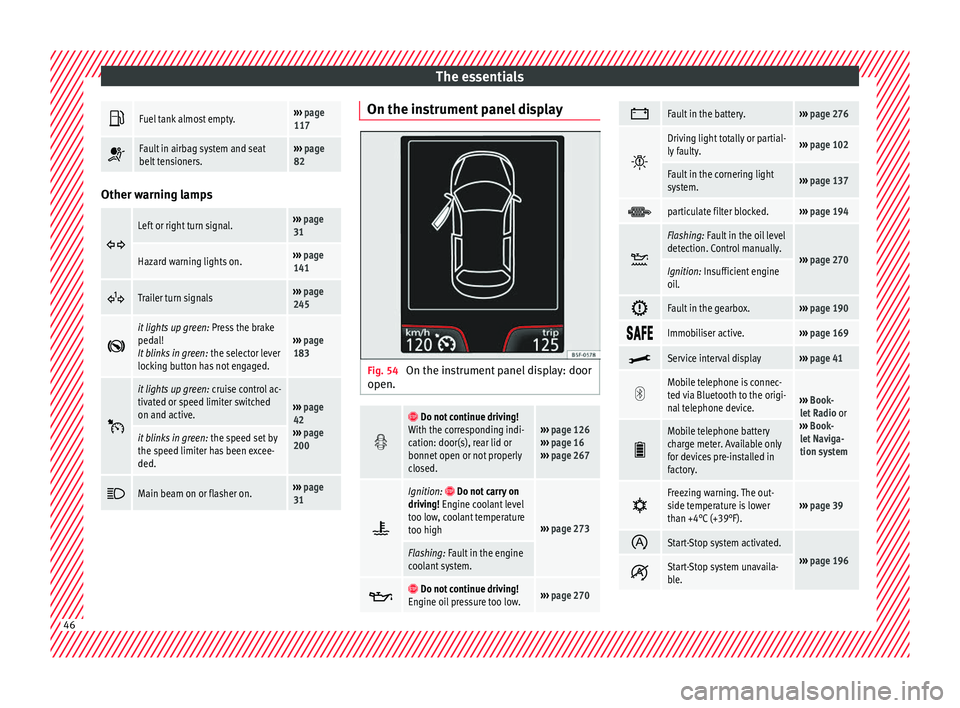
Fig. 54
On the instrument panel display: door
open.
Do not continue driving!
With the corresponding indi-
cation: door(s), rear lid or
bonnet open or not properly
closed.››› page 126
››› page 16
››› page 267
Ignition: Do not carry on
driving! Engine coolant level
too low, coolant temperature
too high
››› page 273
Flashing: Fault in the engine
coolant system.
Do not continue driving!
Engine oil pressure too low.››› page 270
Fault in the battery.›››
page 276
Driving light totally or partial-
ly faulty.›››
page 102
Fault in the cornering light
system.››› page 137
particulate filter blocked.›››
page 194
Flashing: Fault in the oil level
detection. Control manually.
›››
page 270Ignition: Insufficient engine
oil.
Fault in the gearbox.›››
page 190
Immobiliser active.›››
page 169
Service interval display›››
page 41
Mobile telephone is connec-
ted via Bluetooth to the origi-
nal telephone device.
›››
Book-
let Radio or
››› Book-
let Naviga-
tion system
Mobile telephone battery
charge meter. Available only
for devices pre-installed in
factory.
Freezing warning. The out-
side temperature is lower
than +4°C (+39°F).›››
page 39
Start-Stop system activated.
›››
page 196 Start-Stop system unavaila-
ble.
46
Page 62 of 308
The essentials
Action in the event of a punc-
t ur
e
R
elated video Fig. 72
Wheels What to do first
●
Park the vehicle on a horizontal surface
and in a s af
e p
lace as far away from traffic as
possible.
● Apply the handbrake.
● Switch on the hazard warning lights.
● Manual gearbox: select the 1s
t gear.
● Automatic gearbox: Move the sel
ector lever
to position P.
● If you are towing a trailer, unhitch it from
your v
ehicle.
● Have the vehicle tool kit* ›››
page 61 and
the spare wheel ›››
page 283 ready.
● Observe the applicable legislation for each
countr
y (reflective vest, warning triangles,
etc.). ●
All
occupants should leave the vehicle and
wait in a safe place (for instance behind the
roadside crash barrier). WARNING
● Alw a
ys observe the above steps and pro-
tect yourself and other road users.
● If you change the wheel on a slope, block
the wheel on the oppo
site side of the car with
a stone or similar to prevent the vehicle from
moving. Repairing a tyre with the anti-punc-
t
ur
e k
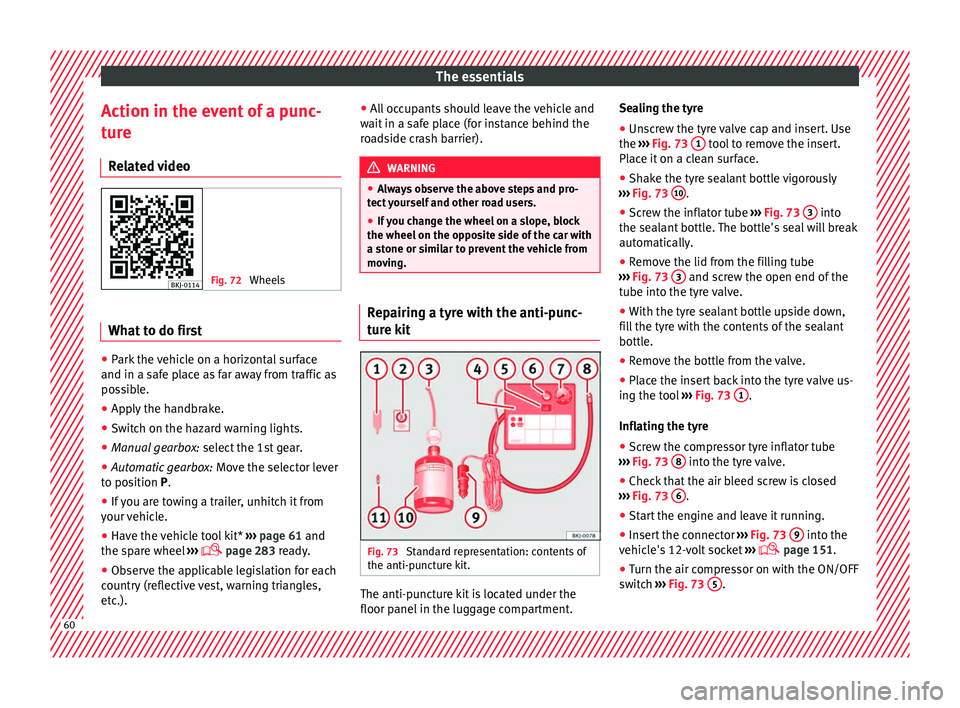
it Fig. 73
Standard representation: contents of
the anti-p u
nct
ure kit. The anti-puncture kit is located under the
floor p
anel
in the lug
gage compartment. Sealing the tyre
● Unscrew the tyre valve cap and insert. Use
the ›››
Fig. 73 1 tool to remove the insert.
Pl ac
e it
on a clean surface.
● Shake the tyre sealant bottle vigorously
›››
Fig. 73 10 .
● Screw the inflator tube ››
›
Fig. 73 3 into
the se al
ant
bottle. The bottle's seal will break
automatically.
● Remove the lid from the filling tube
›››
Fig. 73 3 and screw the open end of the
t ube int
o the ty
re valve.
● With the tyre sealant bottle upside down,
fill
the tyre with the contents of the sealant
bottle.
● Remove the bottle from the valve.
● Place the insert back into the tyre valve us-
ing the too
l ››› Fig. 73 1 .
Infl atin
g the ty
re
● Screw the compressor tyre inflator tube
›››
Fig. 73 8 into the tyre valve.
● Check that the air bleed screw is closed
› ›
›
Fig. 73 6 .
● Start the engine and leave it running.
● Insert the connector ››
›
Fig. 73 9 into the
v ehic
l
e's 12-volt socket ›››
page 151.
● Turn the air compressor on with the ON/OFF
swit c
h ››› Fig. 73 5 .
60
Page 99 of 308
Self-help
WARNING
The risk of accidents is high when tow-start-
ing, f or e
xample, the towed vehicle can easily
be driven into the towing vehicle. CAUTION
If there is no oil in the gearbox or no lubricant
in the autom atic
transmission the car may
only be towed with the driven wheels lifted
clear of the road, or transported on a special
car transporter or trailer. CAUTION
Do not tow a vehicle for more than 50 m in at-
tempt t
o start it. There is risk of damage to
the catalytic converter. Note
● Ple a
se observe related legal requirements.
● Switch on the hazard warning lights of both
vehicl
es. However, observe any regulations
to the contrary.
● The tow rope must not be twisted. Other-
wise the fr
ont tow line anchorage could be
pulled off the vehicle. Indications for tow-starting
Vehicle's should not generally be tow-star-
t
ed.
The jump s
tart should be used instead
››› page 67. For technical reasons, towing the following
vehicl
es is not allowed:
● Vehicles with an automatic gearbox.
● If the vehicle battery is discharged, be-
cause in
vehicles with the Keyless Access
locking and ignition system the steering re-
mains locked and the electronic parking
brake cannot be deactivated nor can the elec-
tronic lock of the steering column be re-
leased if they are activated.
● If the battery is flat, it is possible that the
engine contr
ol units may not operate correct-
ly.
However, if the vehicle must absolutely be
tow-started (in the case of manual gearbox-
es):
● Engage the 2nd or 3rd gear.
● Keep the clutch pressed down.
● Switch on the ignition and the hazard warn-
ing lights.
● Once both
vehicles are moving, release the
clutc
h.
● Once the engine starts, press the clutch
and diseng
age the gear to avoid colliding
with the towing vehicle. Note
The vehicle can only be tow-started if the
electr onic
parking brake and, if appropriate,
the electronic lock of the steering column are deactivated. If the vehicle has no power sup-
ply
or ther
e is an electric system fault, the
engine must be tow-started to deactivate the
electronic parking brake and the electronic
lock of the steering column. 97
Technical data
Advice
Operation
Emergencies
Safety
Page 101 of 308
Self-help
WARNING
● If the t o
wline anchorage is not screwed in
as far as the stop, there is a risk of the screw
connection shearing off during towing (acci-
dent risk).
● If your car has a towing bracket, only use
speci
al towing ropes. Risk of accident! CAUTION
In vehicles fitted with a towing bracket, only
use s pec
ial tow bars to prevent damage to
the ball joint. These tow bars have been spe-
cially approved for use with towing brackets. Towing vehicles with a manual gear-
bo
x Towing is relatively straightforward.
Pl
e
a
se observe the relevant instructions
››› page 96.
The vehicle can be towed using a tow bar or
tow rope in the normal way, with all four
wheels on the road; it can also be towed with
either the front or rear wheels lifted off the
road. The maximum towing speed is 50 km/h
(30 mph). Towing a vehicle equipped with auto-
matic g
earbox Certain restrictions must be observed when
to
w
ing your vehicle.
Please observe the relevant instructions
››› page 96.
The vehicle can be towed with a tow bar or
tow rope in the normal way, with all four
wheels on the ground. When doing so,
please note the following points:
● Make sure the select or l
ever is in the N po-
sition.
● The vehicle must not be towed faster than
50 km/h (30 mph).
● The vehicle must not be towed further than
50 km (30 mile
s). Reason: when the engine
is not running, the gearbox oil pump does
not work and the gearbox is not adequately
lubricated for higher speeds or longer distan-
ces.
If the vehicle has to be towed with a break-
down truck, it must only be suspended at the
front wheels. Reason: the drive shafts are lo-
cated on the front wheels. If the car is towed
with the rear wheels lifted off the road (I.e.
travelling backwards), the drive shafts also
turn backwards. The planetary gears in the
automatic gearbox then turn at such high
speeds that the gearbox will be severely
damaged in a short time. Note
● If it i
s not possible to tow the vehicle in the
normal way, or if it has to be towed further
than 50 km (30 miles), it must be transported
on a special car transporter or trailer.
● Should the power supply to the selector
lever be int
errupted in position P, the selector
lever will be locked. Before the vehicle can be
recovered/manoeuvred you must manually
release the selector lever. 99Technical data
Advice
Operation
Emergencies
Safety
Page 141 of 308
Lights and visibility
WARNING
● Never driv e w
ith daytime lights if the road
is not well lit due to weather or lighting con-
ditions. Daytime lights do not provide
enough light to illuminate the road properly
or be seen by other road users.
● On vehicles with rear lights with bulbs,
when activating the d
aytime running light
the rear lights are not switched on. A vehicle
which does not have the rear lights on may
not be visible to other drivers in the dark-
ness, in the case of heavy rain or in condi-
tions of poor visibility. Fog lights
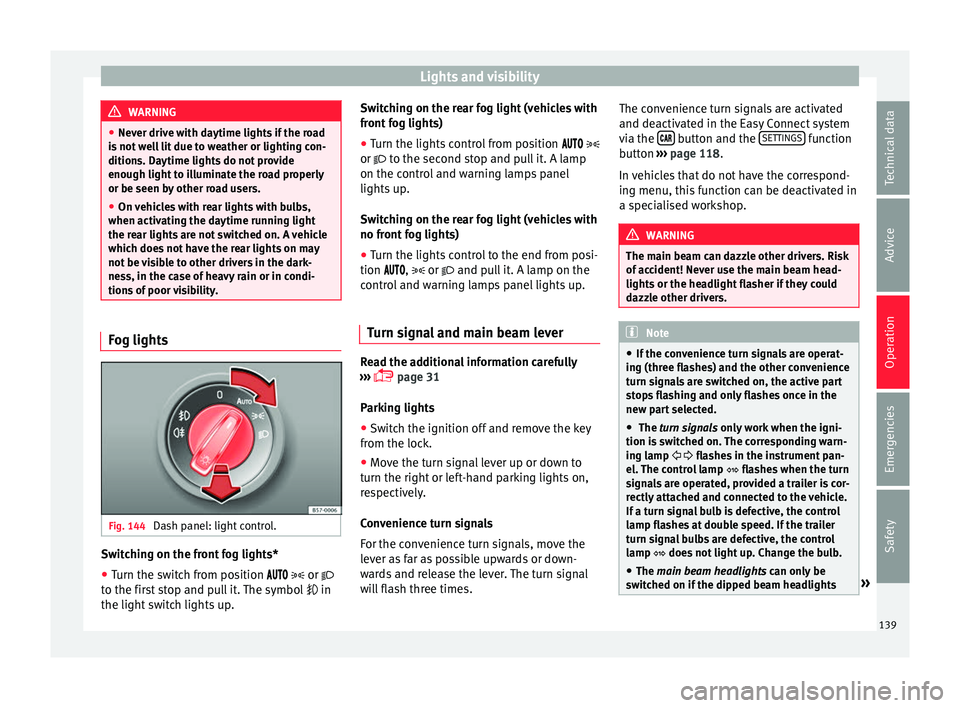
Fig. 144
Dash panel: light control. Switching on the front fog lights*
● Turn the switch from position
or
t o the fir
st stop and pull it. The symbol in
the light switch lights up. Switching on the rear fog light (vehicles with
front f
og lights)
● Turn the lights control from position
or to the second stop and pull it. A lamp
on the control and warning lamps panel
lights up.
Switching on the rear fog light (vehicles with
no front fog lights)
● Turn the lights control to the end from posi-
tion ,
or and pull it. A lamp on the
control and warning lamps panel lights up.
Turn signal and main beam lever Read the additional information carefully
› ›
›
page 31
Parking lights
● Switch the ignition off and remove the key
from the lock.
● Mo
ve the turn signal lever up or down to
turn the right or l
eft-hand parking lights on,
respectively.
Convenience turn signals
For the convenience turn signals, move the
lever as far as possible upwards or down-
wards and release the lever. The turn signal
will flash three times. The convenience turn signals are activated
and deactivat
ed in the Easy Connect system
via the button and the
S
ET
TINGS function
b utt
on ›
›› page 118.
In vehicles that do not have the correspond-
ing menu, this function can be deactivated in
a specialised workshop. WARNING
The main beam can dazzle other drivers. Risk
of ac c
ident! Never use the main beam head-
lights or the headlight flasher if they could
dazzle other drivers. Note
● If the c on
venience turn signals are operat-
ing (three flashes) and the other convenience
turn signals are switched on, the active part
stops flashing and only flashes once in the
new part selected.
● The turn signals only
work when the igni-
tion is switched on. The corresponding warn-
ing lamp flashes in the instrument pan-
el. The control lamp flashes when the turn
signals are operated, provided a trailer is cor-
rectly attached and connected to the vehicle.
If a turn signal bulb is defective, the control
lamp flashes at double speed. If the trailer
turn signal bulbs are defective, the control
lamp does not light up. Change the bulb.
● The main beam headligh
ts can only be
switched on if the dipped beam headlights » 139
Technical data
Advice
Operation
Emergencies
Safety
Page 143 of 308
Lights and visibility
Motorway light* The motorway light is available on vehicles
equipped w
ith f
ull-LED lights.
The function is connected/disconnected via
the corresponding Easy Connect system
menu.
● Activation: when going abo
ve 110 km/h
(68 mph) for more than 10 seconds, the dip-
ped beam raises slightly to increase the driv-
er's visibility distance.
● Deactivation: when reduc in
g the speed of
the car below 100 km/h (62 mph), the dip-
ped beam returns to its normal position.
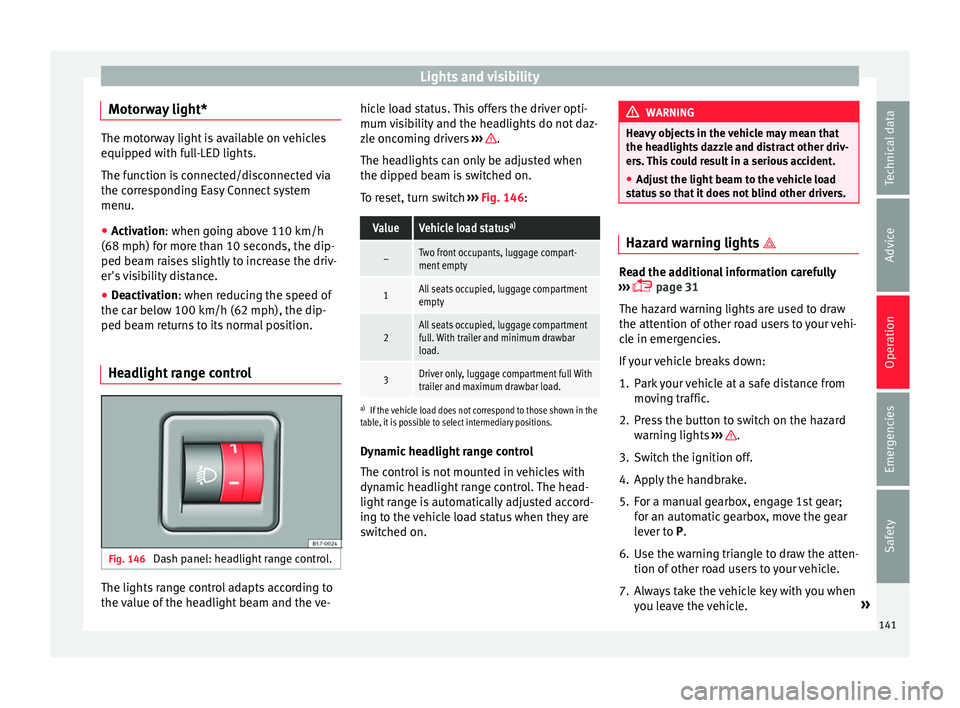
Headlight range control Fig. 146
Dash panel: headlight range control. The lights range control adapts according to
the
v
alue of
the headlight beam and the ve- hicle load status. This offers the driver opti-
mum vi
sibility and the headlights do not daz-
zle oncoming drivers ››› .
The he a
dlights
can only be adjusted when
the dipped beam is switched on.
To reset, turn switch ››› Fig. 146:
ValueVehicle load status a)
–Two front occupants, luggage compart-
ment empty
1All seats occupied, luggage compartment
empty
2All seats occupied, luggage compartment
full. With trailer and minimum drawbar
load.
3Driver only, luggage compartment full With
trailer and maximum drawbar load.
a)
If the vehicle load does not correspond to those shown in the
table, it is possible to select intermediary positions.
Dynamic headlight range control
The control is not mounted in vehicles with
dynamic headlight range control. The head-
light range is automatically adjusted accord-
ing to the vehicle load status when they are
switched on. WARNING
Heavy objects in the vehicle may mean that
the hea dlight
s dazzle and distract other driv-
ers. This could result in a serious accident.
● Adjust the light beam to the vehicle load
stat
us so that it does not blind other drivers. Hazard warning lights
Read the additional information carefully
›› ›
page 31
The hazard warning lights are used to draw
the attention of other road users to your vehi-
cle in emergencies.
If your vehicle breaks down:
1. Park your vehicle at a safe distance from mov in
g traffic.
2. Press the button to switch on the hazard warning lights
››› .
3. Switch the ignition off.
4. Apply the handbrake.
5. For a manual gearbox, engage 1st gear; for an aut
om
atic gearbox, move the gear
lever to P.
6. Use the warning triangle to draw the atten- tion of other ro
ad users to your vehicle.
7. Always take the vehicle key with you when you le
ave the vehicle. »
141
Technical data
Advice
Operation
Emergencies
Safety
Page 179 of 308
Driving
Braking and stability systems El ectr
onic
Stability Control (ESC)*This Electronic Stability System reduces the
risk
of
skidding and improves the vehicle's
stability and ability to hold the road.
The Electronic Stability Control (ESC) contains
the electronic differential lock (EDL) and the
traction control system (ASR). The ESC works
together with the ABS. Both control lamps
will light up if the ESC or ABS systems are
faulty.
The ESC system is started automatically
when the engine is started.
The ESC system is always active and cannot
be switched off. With the Easy Connect sys-
tem it is only possible to deactivate the ASR
or else select Sport mode.
The ASR can be deactivated when wheel spin
is desirable ›››
page 178.
For example:
● When driving with snow chains.
● When driving in deep snow or on loose sur-
fac e
s.
● When the vehicle is stuck, to rock it back-
ward
s and forwards.
Press the button to switch the ASR back on
when you no longer need wheel spin. Electronic Stability Control (ESC)*
The ESC r
educes the risk of skidding by brak-
ing the wheels individually.
The system uses the steering wheel angle
and road speed to calculate the changes of
direction desired by the driver, and constant-
ly compares them with the actual behaviour
of the vehicle. When irregularities occur, for
example, if the vehicle begins to skid, the
ESC brakes the appropriate wheel automati-
cally.
The forces acting on the braked wheel bring
the vehicle back to a stable condition. If the
vehicle tends to oversteer (the rear end
slides out), the system will act on the front
wheel on the outside of the turn.
Control lamp
There are two control lamps for the electronic
stability control. The lamp provides infor-
mation concerning function and disconnec-
tion status.
Both control lamps light up together when
the ignition is switched on and should turn
off after approximately 2 seconds. This is the
time taken for the function check.
This programme includes the ABS, EDL and
ASR. It also includes emergency braking as-
sistance (BAS). The control lamp
has the following func-
tions:
● It flashes whilst driving when the ASR/ESC
is activ
ated.
● It will light up if there is a fault in the ESC.
● As the ESC operates in conjunction with the
ABS, the ESC light
will also come on if a fault
should occur in the ABS.
If the ESC control lamp lights up and stays
on after the engine is started, this may mean
that the control system has temporarily
switched off the ESC. In this case the ESC can
be reactivated by switching the ignition off
and then on again. If the control lamp goes
out, this means the system is fully functional.
The lamp provides information about the
disconnection status of the system:
● It stays lit when the ASR is disconnected or
if y
ou select ESC Sport mode, only by means
of Easy Connect. WARNING
● Do not f or
get that the electronic stability
control ESC cannot defy the laws of physics.
This should be kept in mind, particularly on
slippery and wet roads and when towing a
trailer.
● Always adapt your driving style to suit the
condition of the r
oads and the traffic situa-
tion. The greater safety provided by the ESC
should not encourage you to run any risks. » 177
Technical data
Advice
Operation
Emergencies
Safety
Page 180 of 308
Operation
CAUTION
● To en s
ure that the ESC works correctly, all
four wheels must be fitted with the same
tyres. Any differences in the rolling radius of
the tyres can cause the system to reduce en-
gine power when this is not desired.
● Any modifications made to the vehicle (for
examp
le, to the engine, brake system, run-
ning gear or to the combination of wheels
and tyres) may affect the operation of the
ABS, EDL, ESC and ASR. Traction control system (ASR)
The traction control system prevents the driv-
en wheel
s
fr
om spinning when the vehicle is
accelerating.
Description and operation of the traction
control system during acceleration (ASR)
The ASR system intervenes by reducing en-
gine power and preventing the driven wheels
from slipping during acceleration.
TCS helps the car to start moving, accelerate
and climb a gradient in slippery conditions
where this may otherwise be difficult or even
impossible.
The ASR automatically switches on when the
engine is started. If necessary, it could be
switched on or off using the Easy Connect
system*. When the ASR is off, the warning lamp lights
up . The ASR shoul
d normally be left on.
Only in exceptional circumstances, when
wheel spin is required, it can be turned off
using the Easy Connect system menu, for ex-
ample:
● With compact temporary spare wheel.
● When using the snow chains.
● When driving in deep snow or on soft ter-
rain.
● When the v
ehicle is bogged-down, to free it
“by r
ocking it.”
The ASR should be switched on again as
soon as possible.
Control lamp
There are three control lamps for the traction
control system: (for vehicles equipped
with M-ABS), (for vehicles equipped with
ESC) and . Both control lamps light up to-
gether when the ignition is switched on and
should turn off after approximately 2 sec-
onds, which is the time taken for the function
check.
The or lamp has the following function:
● It flashes when the ASR is working if the ve-
hicle i
s moving.
If the system is deactivated or if it has any
fault, the warning lamp will remain lit. The warning lamp will also light up if a fault
should oc
cur in the ABS because the ASR op-
erates in conjunction with the ABS. For fur-
ther information, see ››› page 178.
The lamp provides information about the
disconnection status of the system:*
● It stays lit when the ASR is disconnected
via E
asy Connect.
By means of Easy Connect, the ASR function
is reactivated and the warning lamp switched
off. WARNING
● Remember th at
not even the ASR can defy
the laws of physics. This should be kept in
mind, particularly on slippery and wet roads
and when towing a trailer.
● Always adapt your driving style to suit the
condition of the r
oads and the traffic situa-
tion. The greater safety provided by the ASR
should not encourage you to run any risks. CAUTION
● To en s
ure that the ASR works correctly,
identical tyres should be fitted on all four
wheels. Any differences in the rolling radius
of the tyres can cause the system to reduce
engine power when this is not desired.
● Any modifications made to the vehicle (for
examp
le, to the engine, brake system, run-
ning gear or to the combination of wheels 178
Page 189 of 308

Driving
Starting off uphill – Apply the handbrake.
– Once you have engaged a gear press the
ac c
el
erator carefully and disengage the
handbrake.
Driving down hills: in some situations (on
mountain roads or when towing a trailer or
caravan) it can be advantageous to switch
temporarily to the manual gearbox pro-
gramme so that the gear ratios can be selec-
ted manually to suit the driving conditions
››› .
On l ev
el
ground it is sufficient to move the
selector lever to position P. On slopes, first
engage the parking brake and then put the
selection lever into the P position. This
avoids overloading the locking mechanism
and it will be easier to move the selector lev-
er from position P. WARNING
Observe the safety warnings ›››
in Selector
lev er po
sitions on page 184.
● Never allow the brake to rub and do not use
the brake ped
al too often or for long periods.
Constant braking causes overheating in the
brakes. This could significantly reduce brak-
ing power, increase braking distance or even
result in the total failure of the brake system.
● To avoid rolling back on gradients always
hold the
vehicle with the footbrake or hand-
brake if you have to stop. CAUTION
● If y
ou stop the vehicle on a gradient, do not
attempt to stop it from rolling by depressing
the accelerator when a gear has been selec-
ted. This could cause overheating and dam-
age the automatic gearbox. Apply the hand-
brake firmly or press the brake pedal in order
to prevent the vehicle from rolling back.
● If you allow the car to roll with the selector
lever in po
sition N with the engine switched
off, the automatic gearbox will be damaged
as it will not be lubricated.
● In certain driving situations or traffic condi-
tions, suc
h as frequently starting, prolonged
“creeping” of the vehicle or traffic jams with
continuous stoppages, the gearbox could
overheat causing damage! If the warning
lamp lights up, stop the vehicle as soon as
possible and wait for the gearbox to cool
››› page 190. Kick-down feature
The kick-down feature allows maximum ac-
c
el
er
ation to be reached.
When the accelerator pedal is pressed right
down past the point of resistance at full throt-
tle, the gearbox will shift down to a lower
gear, depending on road speed and engine
speed. The upshift to the next higher gear is
delayed until the engine reaches maximum
rpm. WARNING
Please note that if the road surface is slip-
pery or w
et, the kick-down feature could
cause the driving wheels to spin, which could
result in skidding. Launch control programme
3 Valid for vehicles: with Launch-Control/6-Speed
D SG w
ith diesel engines superior to 125 kW and pet-
rol engines superior to 140 kW.
The Launch control programme enables maxi-
mum acceleration.
Important: the engine must have reached op-
erating temperature and the steering wheel
must not be turned.
The engine speed for launch-control is differ-
ent on petrol and diesel engines. To use the
launch-control you must disconnect the anti-
slip regulation (ASR) through the Easy Con-
nect system menu ›››
page 118. The warning
lamp will stay switched on or will flash
slowly depending on whether or not the vehi-
cle has a driver information system*.
On vehicles with the driver information sys-
tem, the ESC lamp lights up permanently and
the corresponding text message Stability
control deactivated (temporary) ap-
pears on the instrument panel to indicate the
deactivation status. »
187
Technical data
Advice
Operation
Emergencies
Safety