gearbox Seat Ateca 2017 User Guide
[x] Cancel search | Manufacturer: SEAT, Model Year: 2017, Model line: Ateca, Model: Seat Ateca 2017Pages: 328, PDF Size: 6.36 MB
Page 89 of 328
Self-help
–
Ac
celerate with particular care and cau-
tion.
– Avoid sudden braking and manoeuvres.
– Brake earlier than usual and more
smoothly. CAUTION
● To av
oid damaging the vehicle, for example
the paint, remove and replace the lid and
towing eye carefully.
● Unburnt fuel could enter the catalytic con-
ver
ter and damage it during towing. Indications for tow-starting
Vehicle's should not generally be tow-star-
t
ed.
The jump start should be used instead
››› page 58.
For technical reasons, towing the following
vehicles is not allowed:
● Vehicles with an automatic gearbox.
● If the vehicle battery is discharged, be-
cau
se in vehicles with the Keyless Access
locking and ignition system the steering re-
mains locked and the electronic parking
brake cannot be deactivated nor can the elec-
tronic lock of the steering column be re-
leased if they are activated. ●
If the b
attery is flat, it is possible that the
engine control units may not operate correct-
ly.
However, if the vehicle must absolutely be
tow-started (in the case of manual gearbox-
es):
● Engage the 2nd or 3rd gear.
● Keep the clutch pressed down.
● Switch on the ignition and the hazard warn-
ing lights.
● Onc
e both vehicles are moving, release the
clut
ch.
● Once the engine starts, press the clutch
and disen
gage the gear to avoid colliding
with the towing vehicle. CAUTION
When tow-starting, unburnt fuel could enter
the c at
alytic converter and damage it. Note
The vehicle can only be tow-started if the
el ectr
onic parking brake and, if appropriate,
the electronic lock of the steering column are
deactivated. If the vehicle has no power sup-
ply or there is an electric system fault, the
engine must be tow-started to deactivate the
electronic parking brake and the electronic
lock of the steering column. Indications for towing
Tow rope or tow bar
It
i
s safer for the vehicle to be towed using a
tow bar, avoiding damage to the vehicle. A
tow rope should only be used if a tow bar is
not available.
A tow rope should be slightly elastic to avoid
damage to both vehicles. It is advisable to
use a tow rope made of synthetic fibre or sim-
ilarly elastic material.
Only attach the tow rope or the tow bar to the
towing eyes provided or a towing bracket.
If the vehicle is factory-equipped with a tow-
ing bracket, it is only allowed to tow with a
tow bar if this has been specially designed to
be installed with a tow hitch ›››
page 257.
When the vehicle needs to be towed:
Check whether the vehicle may be towed
››› page 88, Cases where towing a vehicle
is not allowed .
● Switch the ignition on.
● Put the gearbox lever in neutral or the se-
l ect
or lever in the N position ›››
page 176.
● Do not allow the vehicle to be towed at
speed
s of over 50 km/h (30 mph).
● Do not allow the vehicle to be towed at
s peed
s of over 50 km. »
87
Technical data
Advice
Operation
Emergencies
Safety
Page 90 of 328
Emergencies
● If a br
eakdown lorry is used, vehicles with
automatic transmission are only allowed to
be towed with the front wheels suspended.
Towing vehicles with four-wheel drive
(4Drive)
Four-wheel drive vehicles (4Drive) can be
towed using a tow bar or tow rope. If the ve-
hicle is towed with the front or rear axle sus-
pended, the engine must be switched off,
otherwise the transmission may be damaged.
Cases where towing a vehicle is not allowed
● If, due to a fault, the gearbox is out of lubri-
cant
.
● If the vehicle battery is discharged, be-
cau
se the steering remains locked and, if ap-
propriate, the electronic parking brake can-
not be deactivated or the electronic lock of
the steering column released.
● If a distance above 50 km needs to be trav-
ell
ed.
● When, for example, after an accident, the
smooth rot
ation of the wheels or the steering
operation cannot be guaranteed.
When the vehicle is to tow another vehicle:
● Observe legal requirements.
● Keep in mind the instructions in the man-
ual on t
owing vehicles. Note
The vehicle can only be towed if the electron-
ic p
arking brake and the electronic lock of the
steering column are deactivated. If the vehi-
cle has no power supply or there is an electric
system fault, the engine must be tow-started
››› page 58 to deactivate the electronic
parking brake and the electronic lock of the
steering column. Fitting the front towing eye
Fig. 96
Front bumper on right: remove the lid. Fig. 97
Front bumper on right: towline an-
c hor
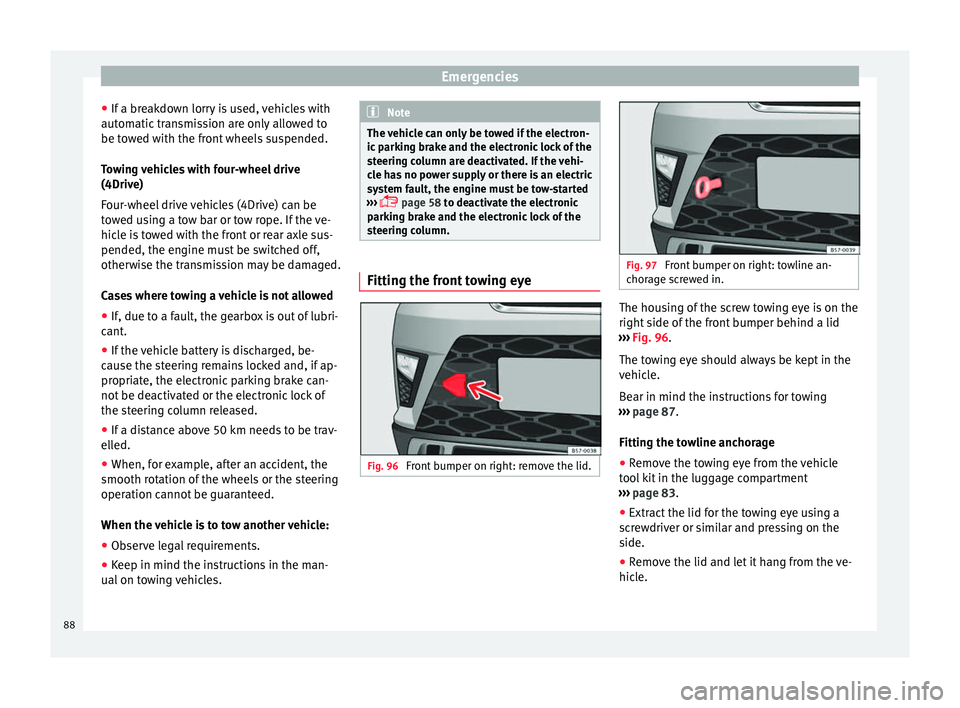
age screwed in. The housing of the screw towing eye is on the
right
s
ide of the front bumper behind a lid
››› Fig. 96.
The towing eye should always be kept in the
vehicle.
Bear in mind the instructions for towing
››› page 87.
Fitting the towline anchorage
● Remove the towing eye from the vehicle
too
l kit in the luggage compartment
››› page 83.
● Extract the lid for the towing eye using a
sc
rewdriver or similar and pressing on the
side.
● Remove the lid and let it hang from the ve-
hicl
e.
88
Page 93 of 328
Fuses and bulbs
●
Nev er u
se a fuse with a higher value. Only
replace fuses with a fuse of the same amper-
age (same colour and markings) and size.
● Never repair a fuse.
● Never replace a fuse by a metal strip, staple
or simi
lar. CAUTION
● To pr
event damage to the vehicle's electric
system, before replacing a fuse always turn
off the ignition, the lights and all electrical
elements and remove the key from the igni-
tion.
● If you replace a fuse with higher-rating
fu
se, you could cause damage to another part
of the electrical system.
● Protect the fuse boxes when open to pre-
vent
the entry of dust or humidity as they can
damage the electrical system. Note
● One c omponent
may have more than one
fuse.
● Several components may run on a single
fu
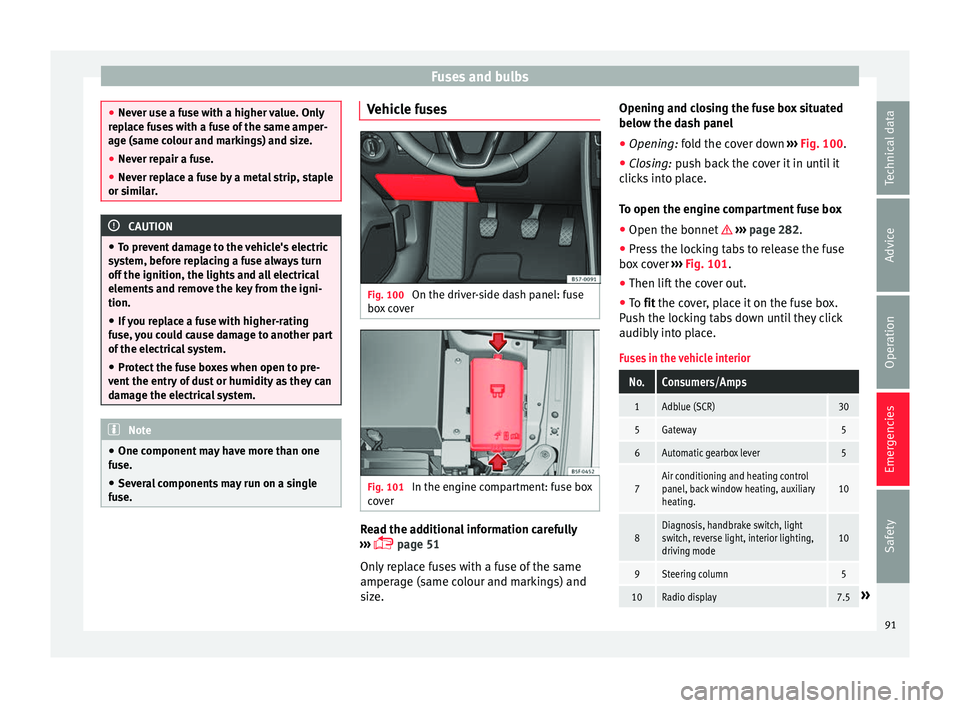
se. Vehicle fuses
Fig. 100
On the driver-side dash panel: fuse
bo x
cover Fig. 101
In the engine compartment: fuse box
c o
ver Read the additional information carefully
› ›
› page 51
Only replace fuses with a fuse of the same
amperage (same colour and markings) and
size. Opening and closing the fuse box situated
below the d
ash panel
● Opening: fold the cover down ›
›› Fig. 100.
● Closing: push back the cover it in until it
c
licks into place.
To open the engine compartment fuse box
● Open the bonnet ››
› page 282.
● Press the locking tabs to release the fuse
box
cover ››› Fig. 101.
● Then lift the cover out.
● To fit the cover, place it on the fuse box.
P
ush the locking tabs down until they click
audibly into place.
Fuses in the vehicle interior
No.Consumers/Amps
1Adblue (SCR)30
5Gateway5
6Automatic gearbox lever5
7Air conditioning and heating control
panel, back window heating, auxiliary
heating.10
8Diagnosis, handbrake switch, light
switch, reverse light, interior lighting,
driving mode10
9Steering column5
10Radio display7.5» 91
Technical data
Advice
Operation
Emergencies
Safety
Page 94 of 328
EmergenciesNo.Consumers/Amps
12Radio20
14Air conditioner fan40
15Steering column release10
16Connectivity box koppelantenne7.5
17Instrument panel5
18Rear camera7.5
19Kessy7.5
214x4 Haldex Control Unit15
22Trailer15
23Right lights40
24Electric sunroof30
25Left door30
26Heated seats30
28Trailer25
31Left lights40
32Parking aid control unit7.
5/10
33Airbag5
34Reverse switch, clima sensor, electro-
chromic mirror7.5
35Diagnosis, headlight control unit,
headlight adjuster10
No.Consumers/Amps
36Front camera, Radar5/10
38Trailer25
39Right door30
4012V socket20
42Central locking40
43Interior light30
44Trailer15
45Electric driver's seat15
47Rear window wiper15
49Starter motor; clutch sensor5
50Electric rear lid40
53Heated rear window30
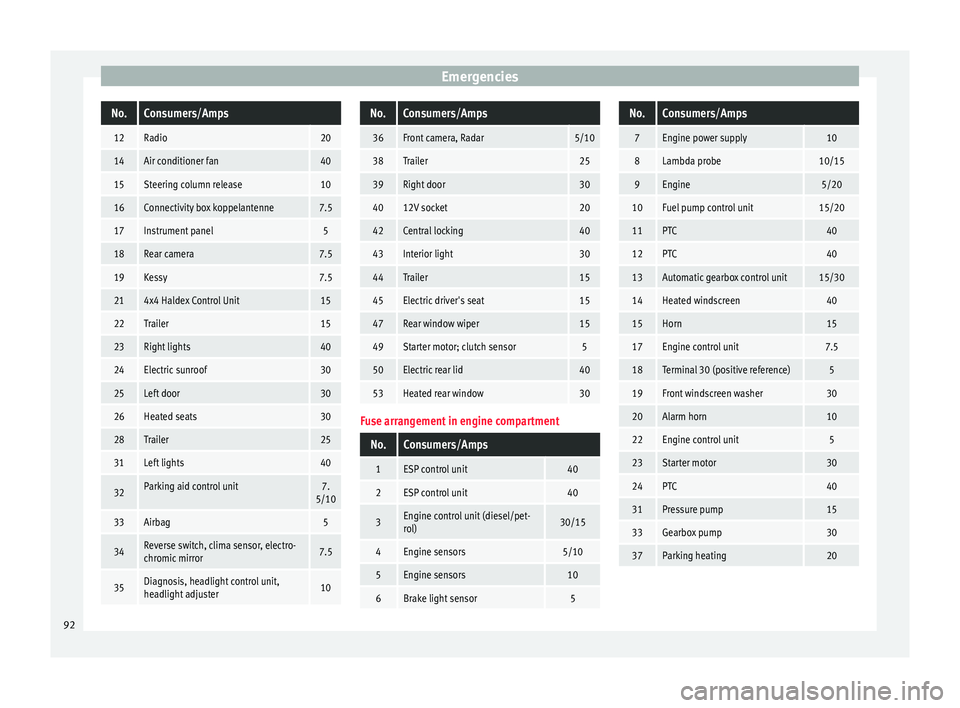
Fuse arrangement in engine compartment
No.Consumers/Amps
1ESP control unit40
2ESP control unit40
3Engine control unit (diesel/pet-
rol)30/15
4Engine sensors5/10
5Engine sensors10
6Brake light sensor5
No.Consumers/Amps
7Engine power supply10
8Lambda probe10/15
9Engine5/20
10Fuel pump control unit15/20
11PTC40
12PTC40
13Automatic gearbox control unit15/30
14Heated windscreen40
15Horn15
17Engine control unit7.5
18Terminal 30 (positive reference)5
19Front windscreen washer30
20Alarm horn10
22Engine control unit5
23Starter motor30
24PTC40
31Pressure pump15
33Gearbox pump30
37Parking heating20 92
Page 103 of 328
Controls and displays
Operation
C ontr
ols and displays
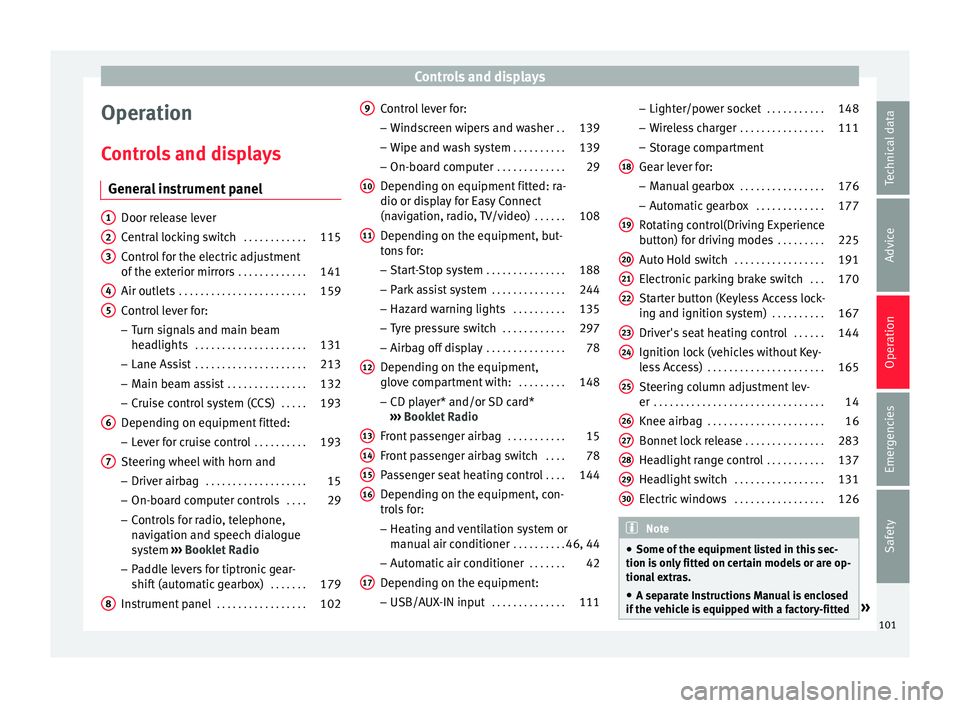
General instrument panel Door release lever
C
entr
al locking switch . . . . . . . . . . . .115
Control for the electric adjustment
of the e
xterior mirrors . . . . . . . . . . . . . 141
Air outlets . . . . . . . . . . . . . . . . . . . . . . . . 159
Control lever for:
– Turn s
ignals and main beam
headlights . . . . . . . . . . . . . . . . . . . . . 131
– Lane As s
ist . . . . . . . . . . . . . . . . . . . . . 213
– Main be
am assist . . . . . . . . . . . . . . . 132
– Crui
se control system (CCS) . . . . .193
Depending on equipment fitted:
– Lev
er for cruise control . . . . . . . . . .193
Steering wheel with horn and – Driver airb
ag . . . . . . . . . . . . . . . . . . . 15
– On-bo ar
d computer controls . . . .29
– Contr
ols for radio, telephone,
navigation and speech dialogue
system ›››
Booklet Radio
– Paddle levers for tiptronic gear-
shift (automatic gearbox) . . . . . . .179
Instrument panel . . . . . . . . . . . . . . . . . 102
1 2
3
4
5
6
7
8 Control lever for:
– Wind
screen wipers and washer . .139
– Wipe and w
ash system . . . . . . . . . . 139
– On-boar
d computer . . . . . . . . . . . . . 29
Depending on equipment fitted: ra-
dio or dis
play for Easy Connect
(navigation, radio, TV/video) . . . . . .108
Depending on the equipment, but-
ton
s for:
– Start-Stop system . . . . . . . . . . . . . . . 188
– Park
assist system . . . . . . . . . . . . . . 244
– Hazar
d warning lights . . . . . . . . . .135
– Ty
re pressure switch . . . . . . . . . . . .297
– Airbag off
display . . . . . . . . . . . . . . . 78
Depending on the equipment,
glo v
e compartment with: . . . . . . . . .148
– CD p l
ayer* and/or SD card*
››› Booklet Radio
Front passenger airbag . . . . . . . . . . .15
Front passenger airbag switch . . . .78
Passenger seat heating control . . . .144
Depending on the equipment, con-
tr o
ls for:
– Heating and ventilation system or
manual air conditioner . . . . . . . . . .46, 44
– Aut om
atic air conditioner . . . . . . .42
Depending on the equipment:
– USB/A UX
-IN input . . . . . . . . . . . . . . 111
9
10
11
12
13
14
15
16
17 –
Light er/po
wer socket . . . . . . . . . . . 148
– Wir
eless charger . . . . . . . . . . . . . . . . 111
– Stor
age compartment
Gear lever for: – Manual gearbox . . . . . . . . . . . . . . . . 176
– Autom
atic gearbox . . . . . . . . . . . . . 177
Rotating control(Driving Experience
butt
on) for driving modes . . . . . . . . .225
Auto Hold switch . . . . . . . . . . . . . . . . . 191
Electronic parking brake switch . . .170
Starter button (Keyless Access lock-
ing and ignition sy
stem) . . . . . . . . . . 167
Driver's seat heating control . . . . . .144
Ignition lock (vehicles without Key-
le
ss Access) . . . . . . . . . . . . . . . . . . . . . . 165
Steering column adjustment lev-
er . . . . . . . . . . . . . . . . . . . . . . . . . . . . . . . . 14
Knee airbag . . . . . . . . . . . . . . . . . . . . . . 16
Bonnet lock release . . . . . . . . . . . . . . .283
Headlight range control . . . . . . . . . . .137
Headlight switch . . . . . . . . . . . . . . . . . 131
Electric windows . . . . . . . . . . . . . . . . . 126 Note
● Some of the equipment
listed in this sec-
tion is only fitted on certain models or are op-
tional extras.
● A separate Instructions Manual is enclosed
if the
vehicle is equipped with a factory-fitted » 18
19
20
21
22
23
24
25
26
27
28
29
30
101
Technical data
Advice
Operation
Emergencies
Safety
Page 105 of 328
Instruments and warning/control lamps
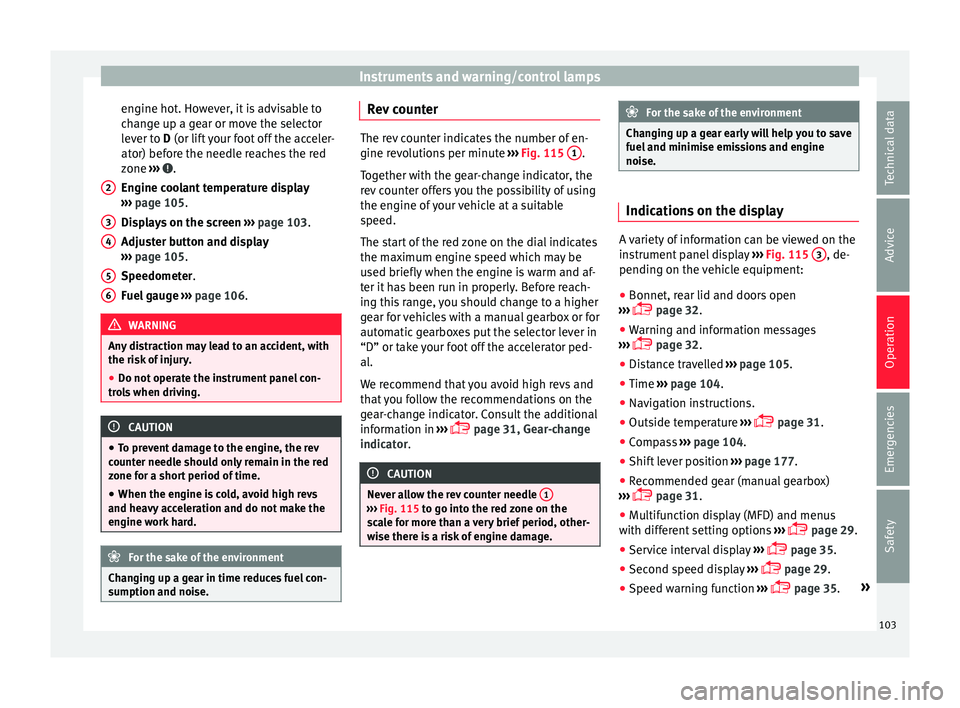
engine hot. However, it is advisable to
c h
ange up a gear or move the selector
lever to D (or lift your foot off the acceler-
ator) before the needle reaches the red
zone ››› .
En gine c
oolant temperature display
››› page 105.
Displays on the screen ››› page 103.
Adjuster button and display
››› page 105.
Speedometer.
Fuel gauge ››› page 106. WARNING
Any distraction may lead to an accident, with
the ri sk
of injury.
● Do not operate the instrument panel con-
tro
ls when driving. CAUTION
● To pr
event damage to the engine, the rev
counter needle should only remain in the red
zone for a short period of time.
● When the engine is cold, avoid high revs
and heavy
acceleration and do not make the
engine work hard. For the sake of the environment
Changing up a gear in time reduces fuel con-
s umption and noi
se.2
3
4
5
6 Rev counter
The rev counter indicates the number of en-
gine r
ev
olutions per minute ››› Fig. 115 1 .
T og
ether with the gear-change indicator, the
rev counter offers you the possibility of using
the engine of your vehicle at a suitable
speed.
The start of the red zone on the dial indicates
the maximum engine speed which may be
used briefly when the engine is warm and af-
ter it has been run in properly. Before reach-
ing this range, you should change to a higher
gear for vehicles with a manual gearbox or for
automatic gearboxes put the selector lever in
“D” or take your foot off the accelerator ped-
al.
We recommend that you avoid high revs and
that you follow the recommendations on the
gear-change indicator. Consult the additional
information in ›››
page 31, Gear-change
indicator. CAUTION
Never allow the rev counter needle 1 ›››
Fig. 115 t o g
o into the red zone on the
scale for more than a very brief period, other-
wise there is a risk of engine damage. For the sake of the environment
Changing up a gear early will help you to save
f uel
and minimise emissions and engine
noise. Indications on the display
A variety of information can be viewed on the
in
s
trument panel display ››› Fig. 115 3 , de-
pendin g on the
vehicle equipment:
● Bonnet, rear lid and doors open
› ›
› page 32.
● Warning and information messages
››
› page 32.
● Distance travelled ››
›
page 105.
● Time ››
›
page 104.
● Navigation instructions.
● Outside temperature ››
›
page 31.
● Compass ››
›
page 104.
● Shift lever position ››
›
page 177.
● Recommended gear (manual gearbox)
››
› page 31.
● Multifunction display (MFD) and menus
with diff
erent setting options ›››
page 29.
● Service interval display ››
›
page 35.
● Second speed display ››
›
page 29.
● Speed warning function ››
›
page 35. »
103
Technical data
Advice
Operation
Emergencies
Safety
Page 106 of 328
Operation
● St ar
t-Stop system status display
››› page 188.
● Active cylinder management display
(ACT ®
)* ›
›› page 185
● Signs recognised by the traffic signal de-
tection sy
stem ››› page 228
● Low consumption driving status (ECO)
››
› page 104
● Identifying letters on engine (MKB).
Dis
tance travelled
The odometer registers the total distance
travelled by the car.
The odometer (trip ) shows the distance
travelled since the last odometer reset. The
last digit of the trip recorder indicates distan-
ces of 100 metres or one tenths of a mile.
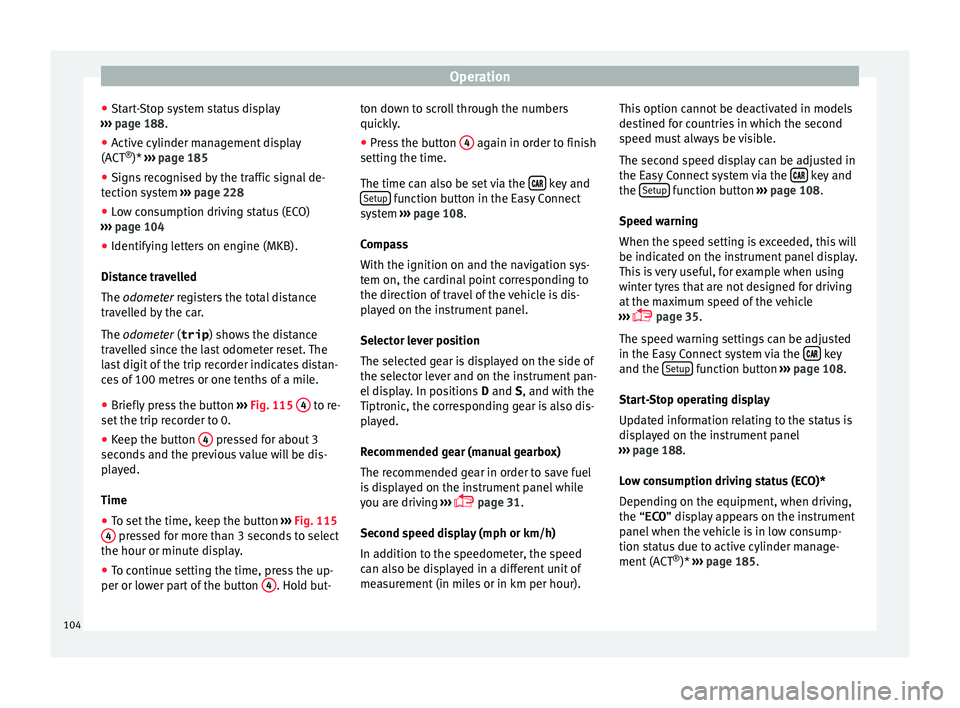
● Briefly press the button ››
› Fig. 115 4 to re-
set the trip r
ecorder to 0.
● Keep the button 4 pressed for about 3
sec ond
s and the previous value will be dis-
played.
Time
● To set the time, keep the button ››
› Fig. 115
4 pressed for more than 3 seconds to select
the hour or minut e di
splay.
● To continue setting the time, press the up-
per or low
er part of the button 4 . Hold but-ton down to scroll through the numbers
quic
k
ly.
● Press the button 4 again in order to finish
settin g the time.
The time c
an also be set via the key and
Set up function button in the Easy Connect
sy s
tem ››› page 108.
Compass
With the ignition on and the navigation sys-
tem on, the cardinal point corresponding to
the direction of travel of the vehicle is dis-
played on the instrument panel.
Selector lever position
The selected gear is displayed on the side of
the selector lever and on the instrument pan-
el display. In positions D and S, and with the
Tiptronic, the corresponding gear is also dis-
played.
Recommended gear (manual gearbox)
The recommended gear in order to save fuel
is displayed on the instrument panel while
you are driving ›››
page 31.
Second speed display (mph or km/h)
In addition to the speedometer, the speed
can also be displayed in a different unit of
measurement (in miles or in km per hour). This option cannot be deactivated in models
des
tined for countries in which the second
speed must always be visible.
The second speed display can be adjusted in
the Easy Connect system via the key and
the Set
up function button
››
› page 108.
Speed warning
When the speed setting is exceeded, this will
be indicated on the instrument panel display.
This is very useful, for example when using
winter tyres that are not designed for driving
at the maximum speed of the vehicle
››› page 35.
The speed warning settings can be adjusted
in the Easy Connect system via the key
and the Set
up function button
››
› page 108.
Start-Stop operating display
Updated information relating to the status is
displayed on the instrument panel
››› page 188.
Low consumption driving status (ECO)*
Depending on the equipment, when driving,
the “ECO ” display appears on the instrument
panel when the vehicle is in low consump-
tion status due to active cylinder manage-
ment (ACT ®
)* ›››
page 185.
104
Page 137 of 328
Lights and visibility
● When the c ar door i
s opened, the “Coming
Home” lighting comes on. The headlights are
turned off 60 seconds after the vehicle door
is opened.
Deactivation
● If no door has been closed, they go out au-
tom
atically after 60 seconds.
● After the last door has been closed, the
hea
dlights will be switched off after the
“Coming Home” delay (as established in the
radio menu) has elapsed.
● On turning the light switch to position
››
› page 23.
● When the ignition is switched on (when
st
arting the engine).
Function “Leaving Home” The “Leaving Home” function is only availa-
b
l
e for vehicles with a light and rain sensor
(rotary light switch in position ).
This function may be connected/disconnec-
ted through the radio menu. The “Leaving
Home” function switch-off delay may also be
set (default: 30 sec).
Vehicle with halogen headlights
In the “Leaving Home” function, the daytime
running lights (DRL), the rear side lights and
the licence plate lights are switched on. Vehicle with full-LED headlights
In the “Le
aving Home” function, the dipped
beams, the daytime running lights (DRL), the
rear side lights and the registration plate
lights switch on (“Welcome Light”).
Activation
● When the vehicle is unlocked using the re-
mote c
ontrol.
● The “Leaving Home” function is only activa-
ted when the r
otary light switch is in position
and the light sensor detects darkness.
Deactivation
● When the “Leaving Home” delay period
ends
(default: 30 sec).
● When the vehicle is locked using the re-
mote c
ontrol.
● When the light control is switched into a
pos
ition other than .
● With the ignition is switched on. Hazard warning lights
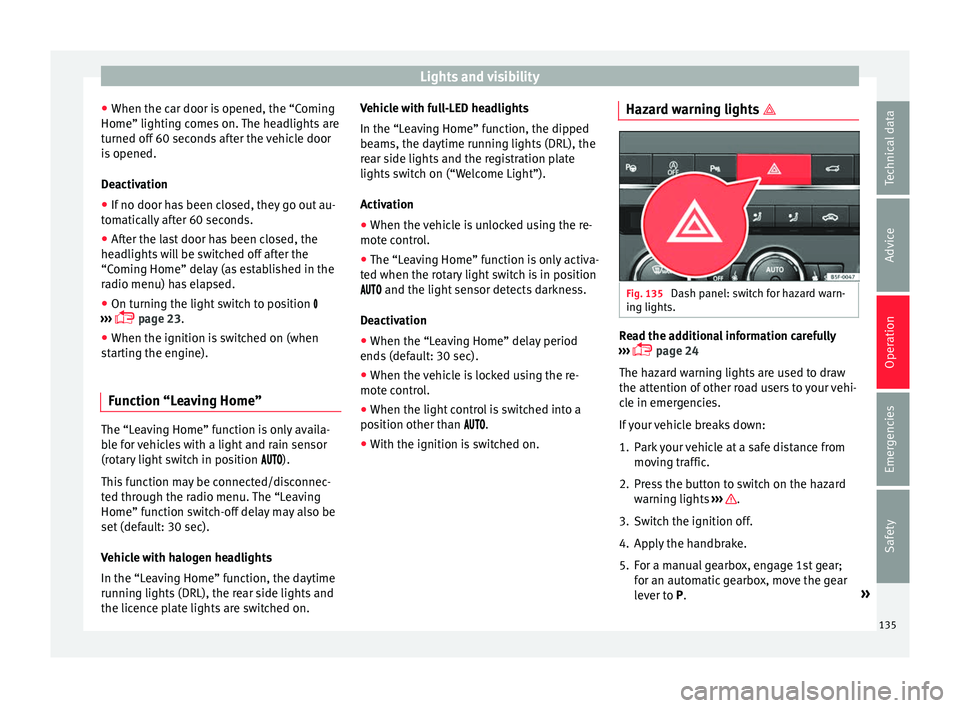
Fig. 135
Dash panel: switch for hazard warn-
in g lights. Read the additional information carefully
› ›
› page 24
The hazard warning lights are used to draw
the attention of other road users to your vehi-
cle in emergencies.
If your vehicle breaks down:
1. Park your vehicle at a safe distance from mov
ing traffic.
2. Press the button to switch on the hazard warnin
g lights ››› .
3. Switch the ignition off.
4. Apply the handbrake.
5. For a manual gearbox, engage 1st gear; for an aut
omatic gearbox, move the gear
lever to P. »
135
Technical data
Advice
Operation
Emergencies
Safety
Page 167 of 328

Driving
Driving St ar
t and stop the engine
Switching the ignition on and starting
the engine with the key Fig. 163
Ignition key positions. Read the additional information carefully
› ›
› page 23
Diesel engines can take a few seconds longer
than usual to start on cold days. Therefore
the clutch pedal (manual gearbox) or the
brake pedal (automatic gearbox) must re-
main pressed until the engine starts up. Dur-
ing preheating, the warning lamp remains
lit.
The preheating time depends on the coolant
and exterior temperatures. With the engine at
operating temperature, or at outside temper-
atures above +8°C, the warning lamp will light up for about one second. This means
that
the engine starts immediately.
If the engine does not immediately start up,
interrupt the starting process and try again
after 30 seconds. To start the engine again,
return the key to position 1 .
St ar
t-Stop System*
If the vehicle is stopped and the Start-Stop
system* switches off the engine, the ignition
remains switched on.
Automatic gearbox: before leaving the vehi-
cle, make sure that the ignition is switched
off and the selector lever is in position P.
Driver messages on the instrument panel
display
Press the clutch
This message appears on vehicles with a
manual gearbox if the driver tries to start the
engine without having the clutch pedal
pressed. The engine will only start if you
press the clutch pedal.
Press the brake This message appears on vehicles with an
automatic gearbox if the driver tries to start
the engine without having the brake pedal
pressed. Select N or P
This
message appears if you try to start or
stop the engine when the selector lever of
the automatic gearbox is not in position P or
N. The engine can only start or stop in certain
positions.
Engage position P; the vehicle
can move; doors can only close in
position P.For safety reasons, this driver message ap-
pears and an audible warning sounds if the
selector lever of the automatic gearbox is not
in position P after you switch off the ignition.
Put the selector lever in position P, otherwise
the vehicle could roll away.
Gear change: selector lever in
the drive position! This driver message is displayed when the
selector lever is not in the position P when
the driver door is opened. Additionally, a
buzzer will sound. Put the selector lever in
position P, otherwise the vehicle could roll
away.
Ignition is switched on
This driver message is displayed and a buz-
zer is sounded when the driver door is
opened with the ignition switched on. »
165
Technical data
Advice
Operation
Emergencies
Safety
Page 168 of 328

Operation
WARNING
● Nev er ru
n the engine in confined spaces, as
the exhaust gases are poisonous. CAUTION
Avoid high engine speeds, full throttle and
e xtr
eme load conditions until the engine has
reached its normal operating temperature,
otherwise this can damage the engine. For the sake of the environment
Do not warm up the engine by idling it. You
shou l
d drive off as soon as you start the en-
gine. This will help avoid unnecessary ex-
haust emissions. Note
● If it
is difficult to turn the ignition key to
the position 1 , turn the steering wheel to
both s ide
s to release the steering lock.
● When starting from cold, the engine may be
a little noi
sy for the first few seconds until oil
pressure has built up in the hydraulic valve
lifters. This is quite normal, and no cause for
concern.
● If the vehicle battery is disconnected and
rec
onnected, the key must remain in the posi-
tion 1 for around 5 seconds before starting
up .
● V
ehicles with automatic gearbox: after
swit
ching off the ignition, you can only re-
move the ignition key if the selector lever is in position “P” (parking lock). Next, the se-
l
ect
or lever is locked. Switching off the engine with the key
Switching off the engine
– Stop the vehicle.
– Turn the ignition key to position 1 ›››
Fig. 163.
En g
aging the steering wheel lock
In vehicles with automatic gearbox, the igni-
tion key can only be removed when the selec-
tor lever is in position P.
– Remove the key from the ignition in posi-
tion 1
› ›
›
Fig. 163 ››› .
– Turn the steering wheel until you hear it en-
gag
e.
Possible vehicle theft is prevented with the
steering lock engaged. WARNING
● Nev er sw
itch the engine off until the vehi-
cle is stationary. The brake servo and power
steering functions will not be completely cov-
ered under warranty. More force may also be
needed to turn the steering wheel or to brake.
As you cannot steer and brake in the normal
manner, there is a greater risk of accidents
and serious injury. ●
Nev er r
emove the key from the ignition if
the vehicle is in motion. Otherwise, the steer-
ing could suddenly lock, making it impossible
to steer the vehicle: risk of accident!
● Always take the key with you when you
le
ave the vehicle. This is particularly impor-
tant if there are children in the vehicle, as
they might otherwise be able to start the en-
gine or use power-operated equipment (e.g.
the electric windows), which could cause in-
juries. CAUTION
If the engine has been running under high
lo a
d for a long time, there is a risk of heat
building up in the engine compartment after
it has been switched off; this could cause en-
gine damage. For this reason, you should idle
the engine for approximately 2 minutes be-
fore you switch it off. Note
● Af t
er the engine is switched off the radiator
fan may run on for up to 10 minutes, even if
the ignition is switched off. It is also possible
that the fan turns itself on once more if the
coolant temperature increases due to the
heat accumulated in the engine compartment
or due to its prolonged exposure to solar ra-
diation.
● If the vehicle is stopped and the Start-Stop
sys
tem* switches off the engine, the ignition 166