window Seat Ateca 2017 User Guide
[x] Cancel search | Manufacturer: SEAT, Model Year: 2017, Model line: Ateca, Model: Seat Ateca 2017Pages: 328, PDF Size: 6.36 MB
Page 87 of 328
Self-help
CAUTION
Switch off the air compressor after a maxi-
mum of 8 oper
ational minutes to avoid over-
heating! Before switching on the air compres-
sor again, let it cool for several minutes. Check after 10 minutes of driving
Screw the inflator tube
››
› Fig. 95 5 again
and c hec
k the pressure on the gauge 6 .
1.3 b ar (19 p
si / 130 kPa) and lower:
● Stop the vehicle! The tyr
e cannot be sealed
sufficiently with the tyre mobility set.
● You should obtain professional assistance
››
› .
1.4 b ar (20 p
si / 140 kPa) and higher:
● Set the tyre pressure to the correct value
again.
● C
arefully resume your journey until you
re
ach the nearest specialised workshop with-
out exceeding 80 km/h (50 mph).
● Have the damaged tyre replaced. WARNING
Driving with an unsealed tyre is dangerous
and c an c
ause accidents and serious injury.
● Do not continue driving if the tyre pressure
is
1.3 bar (19 psi / 130 kPa) and lower. ●
Seek s
pecialist assistance. Manual unlocking/locking
Intr oduction Read the additional information carefully
› ›
› page 10,
›››
page 11.
The doors, rear lid and panoramic tilting sun-
roof can be locked manually and partially
opened, for example if the key or the central
locking is damaged. WARNING
Opening and closing doors carelessly can
c au
se serious injury.
● If the vehicle is locked from outside, the
doors
and windows cannot be opened from
the inside.
● Never leave children or disabled people
alone in the c
ar. They could be trapped in the
car in an emergency and will not be able to
get themselves to safety.
● Depending on the time of the year, temper-
atur
es inside a locked and closed vehicle can
be extremely high or extremely low resulting
in serious injuries and illness or even death,
particularly for young children. WARNING
Getting in the way of the doors and the rear
lid i s
dangerous and can lead to serious in-
jury.
● Open and close the doors and the rear lid
only
when there is nobody in the way. CAUTION
When opening and closing in an emergency,
c ar
efully disassemble components and then
reassemble them carefully to avoid damage
to the vehicle. Changing the windscreen wiper
b
l
ades
Changing the windscreen and rear
window wiper blades Read the additional information carefully
› ›
› page 61.
The windscreen wiper blades are supplied as
standard with a layer of graphite. This layer is
responsible for ensuring that the wipe is si-
lent. If the graphite layer is damaged, the
noise of the water as it is wiped across the
windscreen will be louder.
Check the condition of the wiper blades regu-
larly. If the wipers scrape across the glass ,»
85
Technical data
Advice
Operation
Emergencies
Safety
Page 93 of 328
Fuses and bulbs
●
Nev er u
se a fuse with a higher value. Only
replace fuses with a fuse of the same amper-
age (same colour and markings) and size.
● Never repair a fuse.
● Never replace a fuse by a metal strip, staple
or simi
lar. CAUTION
● To pr
event damage to the vehicle's electric
system, before replacing a fuse always turn
off the ignition, the lights and all electrical
elements and remove the key from the igni-
tion.
● If you replace a fuse with higher-rating
fu
se, you could cause damage to another part
of the electrical system.
● Protect the fuse boxes when open to pre-
vent
the entry of dust or humidity as they can
damage the electrical system. Note
● One c omponent
may have more than one
fuse.
● Several components may run on a single
fu
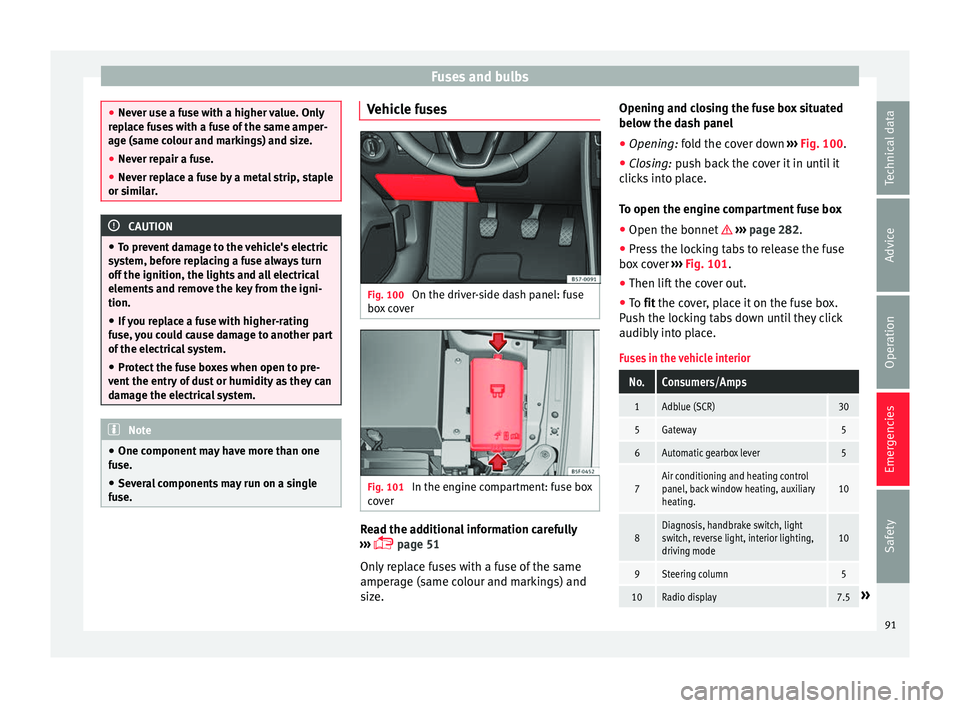
se. Vehicle fuses
Fig. 100
On the driver-side dash panel: fuse
bo x
cover Fig. 101
In the engine compartment: fuse box
c o
ver Read the additional information carefully
› ›
› page 51
Only replace fuses with a fuse of the same
amperage (same colour and markings) and
size. Opening and closing the fuse box situated
below the d
ash panel
● Opening: fold the cover down ›
›› Fig. 100.
● Closing: push back the cover it in until it
c
licks into place.
To open the engine compartment fuse box
● Open the bonnet ››
› page 282.
● Press the locking tabs to release the fuse
box
cover ››› Fig. 101.
● Then lift the cover out.
● To fit the cover, place it on the fuse box.
P
ush the locking tabs down until they click
audibly into place.
Fuses in the vehicle interior
No.Consumers/Amps
1Adblue (SCR)30
5Gateway5
6Automatic gearbox lever5
7Air conditioning and heating control
panel, back window heating, auxiliary
heating.10
8Diagnosis, handbrake switch, light
switch, reverse light, interior lighting,
driving mode10
9Steering column5
10Radio display7.5» 91
Technical data
Advice
Operation
Emergencies
Safety
Page 94 of 328
EmergenciesNo.Consumers/Amps
12Radio20
14Air conditioner fan40
15Steering column release10
16Connectivity box koppelantenne7.5
17Instrument panel5
18Rear camera7.5
19Kessy7.5
214x4 Haldex Control Unit15
22Trailer15
23Right lights40
24Electric sunroof30
25Left door30
26Heated seats30
28Trailer25
31Left lights40
32Parking aid control unit7.
5/10
33Airbag5
34Reverse switch, clima sensor, electro-
chromic mirror7.5
35Diagnosis, headlight control unit,
headlight adjuster10
No.Consumers/Amps
36Front camera, Radar5/10
38Trailer25
39Right door30
4012V socket20
42Central locking40
43Interior light30
44Trailer15
45Electric driver's seat15
47Rear window wiper15
49Starter motor; clutch sensor5
50Electric rear lid40
53Heated rear window30
Fuse arrangement in engine compartment
No.Consumers/Amps
1ESP control unit40
2ESP control unit40
3Engine control unit (diesel/pet-
rol)30/15
4Engine sensors5/10
5Engine sensors10
6Brake light sensor5
No.Consumers/Amps
7Engine power supply10
8Lambda probe10/15
9Engine5/20
10Fuel pump control unit15/20
11PTC40
12PTC40
13Automatic gearbox control unit15/30
14Heated windscreen40
15Horn15
17Engine control unit7.5
18Terminal 30 (positive reference)5
19Front windscreen washer30
20Alarm horn10
22Engine control unit5
23Starter motor30
24PTC40
31Pressure pump15
33Gearbox pump30
37Parking heating20 92
Page 103 of 328
Controls and displays
Operation
C ontr
ols and displays
General instrument panel Door release lever
C
entr
al locking switch . . . . . . . . . . . .115
Control for the electric adjustment
of the e
xterior mirrors . . . . . . . . . . . . . 141
Air outlets . . . . . . . . . . . . . . . . . . . . . . . . 159
Control lever for:
– Turn s
ignals and main beam
headlights . . . . . . . . . . . . . . . . . . . . . 131
– Lane As s
ist . . . . . . . . . . . . . . . . . . . . . 213
– Main be
am assist . . . . . . . . . . . . . . . 132
– Crui
se control system (CCS) . . . . .193
Depending on equipment fitted:
– Lev
er for cruise control . . . . . . . . . .193
Steering wheel with horn and – Driver airb
ag . . . . . . . . . . . . . . . . . . . 15
– On-bo ar
d computer controls . . . .29
– Contr
ols for radio, telephone,
navigation and speech dialogue
system ›››
Booklet Radio
– Paddle levers for tiptronic gear-
shift (automatic gearbox) . . . . . . .179
Instrument panel . . . . . . . . . . . . . . . . . 102
1 2
3
4
5
6
7
8 Control lever for:
– Wind
screen wipers and washer . .139
– Wipe and w
ash system . . . . . . . . . . 139
– On-boar
d computer . . . . . . . . . . . . . 29
Depending on equipment fitted: ra-
dio or dis
play for Easy Connect
(navigation, radio, TV/video) . . . . . .108
Depending on the equipment, but-
ton
s for:
– Start-Stop system . . . . . . . . . . . . . . . 188
– Park
assist system . . . . . . . . . . . . . . 244
– Hazar
d warning lights . . . . . . . . . .135
– Ty
re pressure switch . . . . . . . . . . . .297
– Airbag off
display . . . . . . . . . . . . . . . 78
Depending on the equipment,
glo v
e compartment with: . . . . . . . . .148
– CD p l
ayer* and/or SD card*
››› Booklet Radio
Front passenger airbag . . . . . . . . . . .15
Front passenger airbag switch . . . .78
Passenger seat heating control . . . .144
Depending on the equipment, con-
tr o
ls for:
– Heating and ventilation system or
manual air conditioner . . . . . . . . . .46, 44
– Aut om
atic air conditioner . . . . . . .42
Depending on the equipment:
– USB/A UX
-IN input . . . . . . . . . . . . . . 111
9
10
11
12
13
14
15
16
17 –
Light er/po
wer socket . . . . . . . . . . . 148
– Wir
eless charger . . . . . . . . . . . . . . . . 111
– Stor
age compartment
Gear lever for: – Manual gearbox . . . . . . . . . . . . . . . . 176
– Autom
atic gearbox . . . . . . . . . . . . . 177
Rotating control(Driving Experience
butt
on) for driving modes . . . . . . . . .225
Auto Hold switch . . . . . . . . . . . . . . . . . 191
Electronic parking brake switch . . .170
Starter button (Keyless Access lock-
ing and ignition sy
stem) . . . . . . . . . . 167
Driver's seat heating control . . . . . .144
Ignition lock (vehicles without Key-
le
ss Access) . . . . . . . . . . . . . . . . . . . . . . 165
Steering column adjustment lev-
er . . . . . . . . . . . . . . . . . . . . . . . . . . . . . . . . 14
Knee airbag . . . . . . . . . . . . . . . . . . . . . . 16
Bonnet lock release . . . . . . . . . . . . . . .283
Headlight range control . . . . . . . . . . .137
Headlight switch . . . . . . . . . . . . . . . . . 131
Electric windows . . . . . . . . . . . . . . . . . 126 Note
● Some of the equipment
listed in this sec-
tion is only fitted on certain models or are op-
tional extras.
● A separate Instructions Manual is enclosed
if the
vehicle is equipped with a factory-fitted » 18
19
20
21
22
23
24
25
26
27
28
29
30
101
Technical data
Advice
Operation
Emergencies
Safety
Page 114 of 328
Operation
Opening and closing C entr
al locking system
Description Read the additional information carefully
› ›
› page 9
The vehicle can be locked and unlocked via
the central locking system. There are several
methods, depending on the vehicle equip-
ment:
● key with remote control ›
›
›
page 114 ,
● lock on driver door (emergency opening
››
› page 9) or
● interior central locking switch ››
›
page 115.
Unlocking one side of the vehicle only
When you lock the vehicle with the key, the
doors and the rear lid are locked. When you
open the door, you can either unlock only the
driver door, or all the vehicle doors. To select
the required option, use Easy Connect*
››› page 115.
Automatic locking (Auto Lock)*
The Auto Lock function locks the doors and
the rear lid when the vehicle exceeds a speed
of about 15 km/h (9 mph). The vehicle is unlocked again when the igni-
tion key
is removed. Alternatively, the vehicle
can also be unlocked via the central locking
switch or by pulling one of the inside door
handles. The Auto Lock function can be
switched on and off on the sound system or
on the Easy Connect* system ››› page 115.
In the event of an accident in which the air-
bags inflate, the doors will be automatically
unlocked to facilitate access and assistance.
Anti-theft alarm system*
If the anti-theft alarm system senses interfer-
ence with the vehicle it triggers an audible
and visible alarm.
The anti-theft alarm system is automatically
switched on when locking the vehicle. It
switches off when the vehicle is unlocked
from a distance.
When the driver door is unlocked with the
key, you should switch on the ignition within
15 seconds. Otherwise the alarm will be trig-
gered. On some export versions, the alarm is
triggered immediately when you open a door.
To deactivate the alarm, press the button on the remote control key, or switch on the
ignition. Af
t
er a certain time, the alarm will
automatically switch off.
Switch off the vehicle interior monitoring and
tow-away protection if you wish to prevent the alarm from being triggered accidentally
››
› page 123.
Turn signals
The turn signals will flash twice when the ve-
hicle is unlocked and once when the vehicle
is locked.
If it does not flash, this indicates that one of
the doors, the rear lid or the bonnet is not
closed correctly.
Accidental lock-out
The central locking system prevents you from
being locked out of the vehicle in the follow-
ing situations: ● If the driver door is open, the vehicle can-
not be loc
ked with the central locking switch
››› page 115.
Lock the vehicle with the remote control key,
when all the doors and the rear lid have been
closed. This prevents the accidental locking
of the vehicle. WARNING
Do not leave anyone (especially children) in
the v
ehicle if it is locked from the outside and
the anti-theft security system* is enabled, as
the doors and windows cannot then be
opened from the inside. Locked doors could
delay assistance in an emergency, potentially
putting lives at risk. 112
Page 115 of 328
Opening and closing
Note
● Nev er l
eave any valuable items in the vehi-
cle unattended. Even a locked vehicle is not a
safe.
● If the diode on the driver door sill lights up
for about
30 seconds when the vehicle is
locked, the central locking system or anti-
theft alarm* is not working properly. You
should have the fault repaired at a SEAT Offi-
cial Service or specialised workshop.
● The vehicle interior monitoring of the anti-
theft
alarm* system will only function as in-
tended if the windows and the sunroof* are
closed. Car key
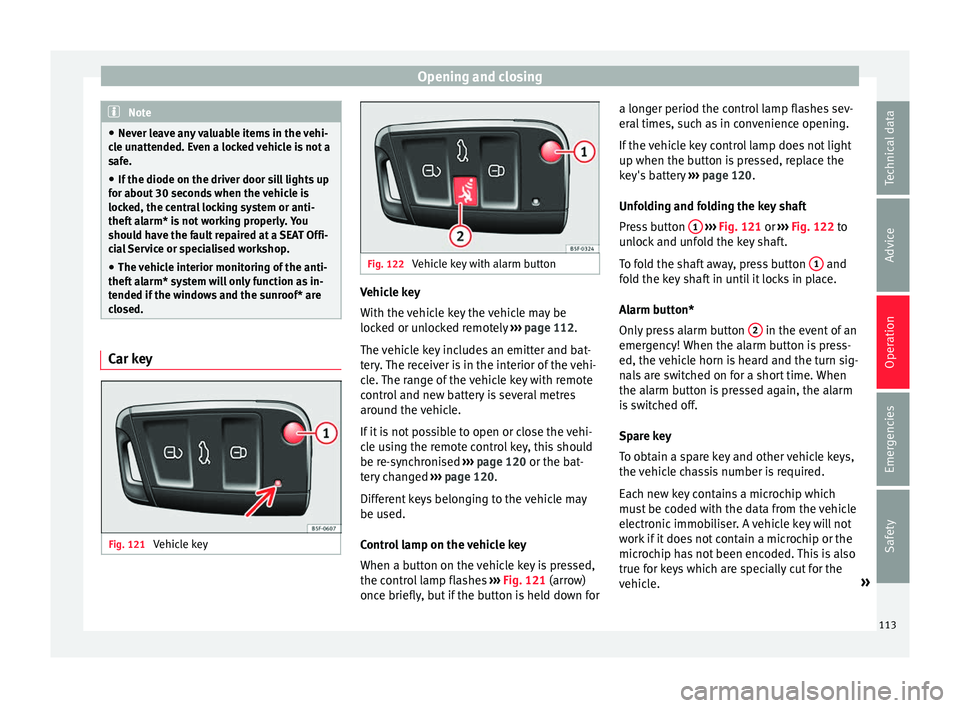
Fig. 121
Vehicle key Fig. 122
Vehicle key with alarm button Vehicle key
W
ith the
vehicle key the vehicle may be
locked or unlocked remotely ››› page 112.
The vehicle key includes an emitter and bat-
tery. The receiver is in the interior of the vehi-
cle. The range of the vehicle key with remote
control and new battery is several metres around the vehicle.
If it is not possible to open or close the vehi-
cle using the remote control key, this should
be re-synchronised ››› page 120 or the bat-
tery changed ››› page 120.
Different keys belonging to the vehicle may
be used.
Control lamp on the vehicle key
When a button on the vehicle key is pressed,
the control lamp flashes ››› Fig. 121 (arrow)
once briefly, but if the button is held down for a longer period the control lamp flashes sev-
eral
times, such as in convenience opening.
If the vehicle key control lamp does not light
up when the button is pressed, replace the
key's battery ››› page 120.
Unfolding and folding the key shaft
Press button 1
› ››
Fig. 121
or ››› Fig. 122 to
unlock and unfold the key shaft.
To fold the shaft away, press button 1 and
f o
ld the key shaft in until it locks in place.
Alarm button*
Only press alarm button 2 in the event of an
emer g
ency! When the alarm button is press-
ed, the vehicle horn is heard and the turn sig-
nals are switched on for a short time. When
the alarm button is pressed again, the alarm
is switched off.
Spare key
To obtain a spare key and other vehicle keys,
the vehicle chassis number is required.
Each new key contains a microchip which
must be coded with the data from the vehicle
electronic immobiliser. A vehicle key will not
work if it does not contain a microchip or the
microchip has not been encoded. This is also
true for keys which are specially cut for the
vehicle. »
113
Technical data
Advice
Operation
Emergencies
Safety
Page 120 of 328
Operation
While the rear lid is in motion (either opening
or c lo
sing), it can be stopped with another
foot movement similar to the opening one
(provided a valid vehicle key is in the proxim-
ity of the rear lid).
The Easy Open feature is not available or only
has limited availability in the following situa-
tions (examples):
● If the rear bumper is very dirty.
● If the rear bumper is wet with salt water,
e.g. af
ter having driven on gritted roads.
● If the electrical unlocking tow hitch is not
co
vered.
● If the vehicle has been equipped at a later
time with a t
ow bracket.
In the event of heavy rain, the Easy Open fea-
ture may take a little longer to open the boot
or automatically disable to avoid the boot
opening by accident, e.g. when the rain falls.
The Easy Open function may be connected
and disconnected permanently in the info-
tainment system by pressing the
S
ETUP and
Openin
g and c
losing
› ››
page 26 func-
tion buttons.
What happens when locking the vehicle with
a second key
If there is a vehicle key inside the vehicle and
it is locked from the outside with a second
vehicle key, the key inside the vehicle is
blocked for engine ignition ››› page 165. In order to enable engine ignition, the button
on the key
inside the vehicle needs to be
pr e
ssed.
Automatically disabling sensors
If the vehicle is not locked or unlocked for a
long period of time, the proximity sensors on
the passenger doors are automatically disa-
bled.
If one of the sensor surfaces on the door han-
dles is often activated in a unusual manner
with the vehicle locked (e.g. by the branches
of a bush rubbing against it), all proximity
sensors are disabled for a certain period of
time.
Sensors will again be enabled: ● After a time.
● OR: if the vehicle is unlocked with the but-
t
on on the key.
● OR: if the rear lid is open.
● OR:
if the vehicle is unlocked manually with
the k
ey.
Convenience functions
To close all the electric windows and the
glass roof using the convenience function,
keep a finger for a few seconds on the lock-
ing sensor surface ››› Fig. 124 B (arrow) of
the door h andl
e until the windows and roof
have closed. The doors may be opened
by
touching the
sensor surface of the door handle depending
on the settings that have been activated in
the infotainment system with the
S
ETUP and
Openin
g and c
losing function buttons.
WARNING
If there is a valid key in the proximity of the
r e
ar lid, in some cases the Easy Open func-
tion may be accidentally turned on and the
rear lid will open, for example, when sweep-
ing under the rear bumper, when directing a
water jet or high pressure steam to the area
or when carrying out maintenance work or re-
pairs in that area. If accidentally opened, the
rear lid could injure somebody situated in its
area of operation or cause material damage.
● Therefore, always make sure that there is
no un
supervised valid key in the area near
the rear lid.
● Before carrying out any maintenance or re-
pair w
ork on the vehicle, always disable the
Easy Open feature on the infotainment sys-
tem.
● Before washing the vehicle, always disable
the Ea
sy Open feature on the infotainment
system.
● Before attaching a bicycle rack or a trailer
››
› page 255, always disable the Easy Open
feature on the information system. 118
Page 121 of 328
Opening and closing
CAUTION
The sensor surfaces on the door handles
c ou
ld engage if hit with a water jet or high
pressure steam if there is a valid vehicle key
in the proximity. If at least one of the win-
dows is open and the sensor surface B on
one of the h
andles permanently activates, all
windows will close. If the water jet or steam
is briefly moved away from the sensor surface A (arrow) on one of the handles and then
point ed at
it again, all the windows will prob-
ably open ››› page 118. Note
● If the
vehicle battery has little or no charge,
or the vehicle key battery is almost or entire-
ly out of charge, you will probably not be able
to lock or unlock the vehicle with the Keyless
Access system. The vehicle can be unlocked
or locked manually ››› page 85.
● To control the proper locking of the vehicle,
the rel
ease function is disabled for approx. 2
seconds.
● If the message Keyless access system
faulty is
displayed on the screen of the
dash panel, abnormalities may occur in the
operation of the Keyless Access system. Con-
tact a specialised workshop. SEAT recom-
mends visiting a SEAT dealership for this.
● Depending on the function set on the info-
tainment
system for the mirrors, the exterior
mirrors will unfold and the surround lighting
will come on when unlocking the vehicle us- ing the sensor surface on the driver and pas-
sen
g
er door handles ››› page 141.
● If there is no valid key inside the vehicle or
the sys
tem fails to detect one, a warning will
display on the dash panel screen. This could
happen if any other radio frequency signal in-
terferes with the key signal (e.g. from a mo-
bile device accessory) or if the key is covered
by another object (e.g. an aluminium case).
● If the sensors are very dirty, e.g. have a lay-
er of s
alt, how the sensors on the door han-
dles operate may be affected. In this case,
clean the vehicle.
● If the vehicle is equipped with an automatic
ge
arbox, it may only be locked in the gear
stick is in position P. Anti-theft security system (Safelock)*
The following message is displayed on the in-
s
trument
panel to remind the driver that
when the vehicle is closed from the outside,
the anti-theft security system is switched on. Do not forget the Safelock.
Please see Instruction Manual . The
vehicle cannot be opened from inside. This
makes it more difficult for unauthorised per-
sons to break into the vehicle ››› in De-
s c
ription on page 112.
The anti-theft security system can be switch-
ed off each time the vehicle is locked: ●
Turn the k
ey a second time to the lock posi-
tion, in the door lock, within two seconds. If
necessary, remove the protective cover on
the driver door handle ›››
page 9 or else
● Press on the remote control key for a
sec ond time
within 2 seconds.
The flashing frequency of the diode in the
door sill immediately confirms the process.
Initially, the diode flashes in a fast sequence
for a brief period, then it stops for approxi-
mately 30 seconds and, lastly continues
flashing slowly.
119Technical data
Advice
Operation
Emergencies
Safety
Page 124 of 328
Operation
for a long period of time. The alarm system
r
em
ains activated.
● If, after the audible warning goes off, an-
other monitor
ed area is accessed (e.g. the
rear lid is opened after a door has been
opened), the alarm is triggered again.
● The anti-theft alarm is not activated when
the v
ehicle is locked from within using the
central locking button .
● If the driver door is unlocked mechanically
w ith the k
ey, only the driver door is unlocked,
the rest of the doors remain locked. Only
when the ignition has been turned on will the
other doors be available - but not unlocked -
and the central locking button will be activa-
ted.
● If the vehicle battery is run down or flat
then the anti-theft
alarm will not operate cor-
rectly.
● Vehicle monitoring remains active even if
the batt
ery is disconnected or not working for
any reason.
● The alarm is triggered immediately if one of
the batt
ery cables is disconnected while the
alarm system is active. Vehicle interior monitoring and anti-
t
o
w system* It is a monitoring or control function incorpo-
r
at
ed in the anti-theft alarm* which detects
unauthorised vehicle entry by means of ultra-
sound. Activation
– It is automatically switched on when the
anti-theft
alarm is activated.
Deactivation – Open the vehicle with the key, either me-
ch
anically or by pressing the button on
the r emot
e control. The time period from
when the door is opened until the key is in-
serted in the contact should not exceed 15
seconds, otherwise the alarm will be trig-
gered.
– Press the button on the remote control
tw ic
e. The volumetric sensor and tilt sen-
sors will be deactivated. The alarm system
remains activated.
The vehicle interior monitoring and the anti-
tow system are automatically switched on
again next time the vehicle is locked.
The vehicle interior monitoring and anti-tow
sensor (tilt sensor) are automatically switch-
ed on when the anti-theft alarm is switched
on. In order to activate it, all the doors and
the rear lid must be closed.
If you wish to switch off the vehicle interior
monitoring and the anti-tow system, it must
be done each time that the vehicle is locked;
if not, they will be automatically switched on.
The vehicle interior monitoring and the anti-
tow system should be switched off if animals
are left inside the locked vehicle (otherwise, their movements will trigger the alarm) or
when, for e
xample, the vehicle is transported
or has to be towed with only one axle on the
ground.
False alarms
Interior monitoring will only operate correctly
if the vehicle is completely closed. Please ob-
serve related legal requirements.
The following cases may cause a false alarm:
● Open windows (partially or fully).
● Panoramic/tilting sunroof open (partially or
comp
letely).
● Movement of objects inside the vehicle,
suc
h as loose papers, items hanging from
the rear vision mirror (air fresheners), etc. Note
● If the
vehicle is relocked and the alarm is
activated without the volumetric sensor func-
tion, relocking will activate the alarm with all
its functions, except the volumetric sensor.
This function is reactivated when the alarm is
switched on again, unless it is deliberately
switched off.
● If the alarm has been triggered by the volu-
metric sen
sor, this will be indicated by a
flashing of the warning lamp on the driver
door when the vehicle is opened. The flash is
different to the flash indicating the alarm is
activated. 122
Page 128 of 328
Operation
●
Alw
ays close the rear lid properly. Risk of
accident or injury.
● The rear lid must not be opened when the
rev
erse or rear fog lights are lit. This may
damage the tail lights.
● Do not close the rear lid by pushing it down
with
your hand on the rear window. The glass
could smash. Risk of injury!
● Ensure the rear lid is locked after closing it.
If not, it
may open unexpectedly while driv-
ing.
● Closing the rear lid without observing and
ens
uring it is clear could cause serious injury
to you and to third parties. Make sure that no
one is in the path of the rear lid.
● Never drive with the rear lid open or half-
clo
sed, exhaust gases may penetrate into the
interior of the vehicle. Danger of poisoning!
● If you only open the rear lid, do not leave
the key
inside. The vehicle cannot be opened
if the key is left inside. Electric windows
El ectric
opening and closing of win-
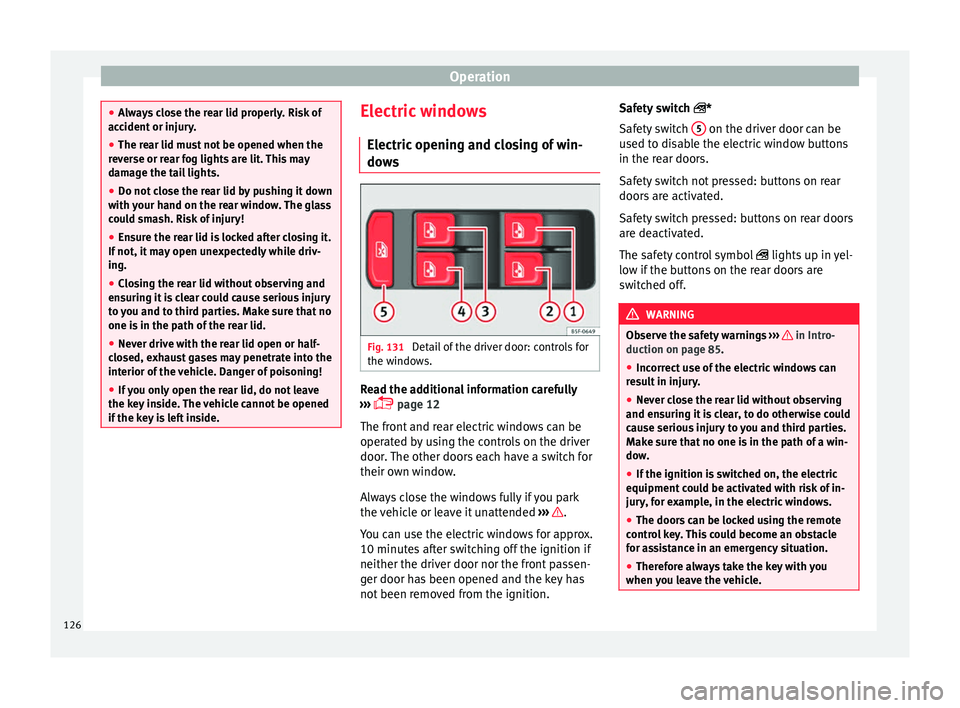
dows Fig. 131
Detail of the driver door: controls for
the w indo
ws. Read the additional information carefully
› ›
› page 12
The front and rear electric windows can be
operated by using the controls on the driver
door. The other doors each have a switch for
their own window.
Always close the windows fully if you park
the vehicle or leave it unattended ››› .
Y ou c
an use the electric windows for approx.
10 minutes after switching off the ignition if
neither the driver door nor the front passen-
ger door has been opened and the key has
not been removed from the ignition. Safety switch
*
Safety
switch 5 on the driver door can be
u sed t
o disable the electric window buttons
in the rear doors.
Safety switch not pressed: buttons on rear
doors are activated.
Safety switch pressed: buttons on rear doors
are deactivated.
The safety control symbol lights up in yel-
low if the buttons on the rear doors are
switched off. WARNING
Observe the safety warnings ››
› in Intro-
duction on p ag
e 85.
● Incorrect use of the electric windows can
re
sult in injury.
● Never close the rear lid without observing
and ens
uring it is clear, to do otherwise could
cause serious injury to you and third parties.
Make sure that no one is in the path of a win-
dow.
● If the ignition is switched on, the electric
equipment c
ould be activated with risk of in-
jury, for example, in the electric windows.
● The doors can be locked using the remote
contr
ol key. This could become an obstacle
for assistance in an emergency situation.
● Therefore always take the key with you
when y
ou leave the vehicle.126