window Seat Ateca 2017 Owner's Manual
[x] Cancel search | Manufacturer: SEAT, Model Year: 2017, Model line: Ateca, Model: Seat Ateca 2017Pages: 328, PDF Size: 6.36 MB
Page 5 of 328
Table of Contents
Table of Contents
The e s
sentials . . . . . . . . . . . . . . . . . . . . . . . . 5
Exterior view . . . . . . . . . . . . . . . . . . . . . . . . . . . . 5
Exterior view . . . . . . . . . . . . . . . . . . . . . . . . . . . . 6
Interior view (left-hand drive) . . . . . . . . . . . . . . 7
Interior view (right-hand drive) . . . . . . . . . . . . . 8
How it works . . . . . . . . . . . . . . . . . . . . . . . . . . . . 9
Unlocking and locking . . . . . . . . . . . . . . . . . . . . 9
Before driving . . . . . . . . . . . . . . . . . . . . . . . . . . . 12
Airbags . . . . . . . . . . . . . . . . . . . . . . . . . . . . . . . . 15
Child seats . . . . . . . . . . . . . . . . . . . . . . . . . . . . . 17
Starting the vehicle . . . . . . . . . . . . . . . . . . . . . . 23
Lights and visibility . . . . . . . . . . . . . . . . . . . . . . 23
Easy Connect . . . . . . . . . . . . . . . . . . . . . . . . . . . 26
Driver information system . . . . . . . . . . . . . . . . . 29
Driving data . . . . . . . . . . . . . . . . . . . . . . . . . . . . 33
Cruise control . . . . . . . . . . . . . . . . . . . . . . . . . . . 36
Warning lamps . . . . . . . . . . . . . . . . . . . . . . . . . . 38
Gearbox lever . . . . . . . . . . . . . . . . . . . . . . . . . . . 40
Air conditioning . . . . . . . . . . . . . . . . . . . . . . . . . 42
Fluid Level control . . . . . . . . . . . . . . . . . . . . . . . 48
Emergencies . . . . . . . . . . . . . . . . . . . . . . . . . . . . 51
Fuses . . . . . . . . . . . . . . . . . . . . . . . . . . . . . . . . . . 51
Bulbs . . . . . . . . . . . . . . . . . . . . . . . . . . . . . . . . . . 52
Action in the event of a puncture . . . . . . . . . . . 52
Changing a wheel . . . . . . . . . . . . . . . . . . . . . . . 54
Snow chains . . . . . . . . . . . . . . . . . . . . . . . . . . . . 56
Emergency towing of the vehicle . . . . . . . . . . . 57
How to jump start . . . . . . . . . . . . . . . . . . . . . . . . 58
Changing the wiper blades . . . . . . . . . . . . . . . . 60
Safety . . . . . . . . . . . . . . . . . . . . . . . . . . . . . . . . 62
Safe driving . . . . . . . . . . . . . . . . . . . . . . . . . . . . 62
Safety first! . . . . . . . . . . . . . . . . . . . . . . . . . . . . . 62
Advice about driving . . . . . . . . . . . . . . . . . . . . . 62 Correct position for passengers . . . . . . . . . . . . 63
Pedal area . . . . . . . . . . . . . . . . . . . . . . . . . . . . . . 67
Seat belts
. . . . . . . . . . . . . . . . . . . . . . . . . . . . . . 68
Why wear a seat belt? . . . . . . . . . . . . . . . . . . . . 68
How to properly adjust your seatbelt . . . . . . . . 71
Seat belt tensioners . . . . . . . . . . . . . . . . . . . . . . 72
Airbag system . . . . . . . . . . . . . . . . . . . . . . . . . . 73
Brief introduction . . . . . . . . . . . . . . . . . . . . . . . . 73
Airbag safety instructions . . . . . . . . . . . . . . . . . 75
Deactivating airbags . . . . . . . . . . . . . . . . . . . . . 77
Transporting children safely . . . . . . . . . . . . . . . 79
Safety for children . . . . . . . . . . . . . . . . . . . . . . . 79
Child seats . . . . . . . . . . . . . . . . . . . . . . . . . . . . . 80
Emergencies . . . . . . . . . . . . . . . . . . . . . . . . . . 83
Self-help . . . . . . . . . . . . . . . . . . . . . . . . . . . . . . . 83
Vehicle tool kit, anti-puncture kit* . . . . . . . . . . 83
Tyre repair . . . . . . . . . . . . . . . . . . . . . . . . . . . . . . 83
Manual unlocking/locking . . . . . . . . . . . . . . . . . 85
Changing the windscreen wiper blades . . . . . . 85
Tow-starting and towing . . . . . . . . . . . . . . . . . . 86
Fuses and bulbs . . . . . . . . . . . . . . . . . . . . . . . . . 90
Fuses . . . . . . . . . . . . . . . . . . . . . . . . . . . . . . . . . . 90
Changing bulbs . . . . . . . . . . . . . . . . . . . . . . . . . 93
Change the front bulbs . . . . . . . . . . . . . . . . . . . 94
Change the rear bulbs . . . . . . . . . . . . . . . . . . . . 96
Operation . . . . . . . . . . . . . . . . . . . . . . . . . . . . . 101
Controls and displays . . . . . . . . . . . . . . . . . . . . 101
General instrument panel . . . . . . . . . . . . . . . . . 100
Instruments and warning/control lamps . . . . . 102
Instruments . . . . . . . . . . . . . . . . . . . . . . . . . . . . 102
Control lamps . . . . . . . . . . . . . . . . . . . . . . . . . . . 106
Introduction to the Easy Connect system* . . . . 108
System settings (CAR)* . . . . . . . . . . . . . . . . . . . 108
Communications and multimedia . . . . . . . . . . . 109
Steering wheel controls* . . . . . . . . . . . . . . . . . . 109
Multimedia . . . . . . . . . . . . . . . . . . . . . . . . . . . . . 111 Opening and closing
. . . . . . . . . . . . . . . . . . . . . 112
Central locking system . . . . . . . . . . . . . . . . . . . . 112
Anti-theft alarm system* . . . . . . . . . . . . . . . . . . 121
Rear lid (luggage compartment) . . . . . . . . . . . . 123
Electric windows . . . . . . . . . . . . . . . . . . . . . . . . . 126
Sunroof* . . . . . . . . . . . . . . . . . . . . . . . . . . . . . . . 128
Lights and visibility . . . . . . . . . . . . . . . . . . . . . . 131
Lights . . . . . . . . . . . . . . . . . . . . . . . . . . . . . . . . . 131
Visibility . . . . . . . . . . . . . . . . . . . . . . . . . . . . . . . 138
Windscreen wiper and window wiper sys-
tems
. . . . . . . . . . . . . . . . . . . . . . . . . . . . . . . . . . 139
Mirror . . . . . . . . . . . . . . . . . . . . . . . . . . . . . . . . . 141
Seats and head restraints . . . . . . . . . . . . . . . . . 143
Adjusting the seats and headrests . . . . . . . . . . 143
Seat functions . . . . . . . . . . . . . . . . . . . . . . . . . . 144
Transport and practical equipment . . . . . . . . . 147
Storage compartments . . . . . . . . . . . . . . . . . . . 147
Storing objects . . . . . . . . . . . . . . . . . . . . . . . . . . 149
Roof carrier . . . . . . . . . . . . . . . . . . . . . . . . . . . . . 154
Air conditioning . . . . . . . . . . . . . . . . . . . . . . . . . 156
Heating, ventilation and cooling . . . . . . . . . . . . 156
Auxiliary heater (additional heater) . . . . . . . . . 161
Driving . . . . . . . . . . . . . . . . . . . . . . . . . . . . . . . . 165
Start and stop the engine . . . . . . . . . . . . . . . . . 165
Braking and parking . . . . . . . . . . . . . . . . . . . . . 170
Manual gearbox . . . . . . . . . . . . . . . . . . . . . . . . . 176
Automatic gearbox/DSG automatic gear-
box*
. . . . . . . . . . . . . . . . . . . . . . . . . . . . . . . . . . . 177
Run-in and economical driving . . . . . . . . . . . . . 184
Engine management and exhaust gas purifica-
tion sys
tem . . . . . . . . . . . . . . . . . . . . . . . . . . . . . 186
Driving tips . . . . . . . . . . . . . . . . . . . . . . . . . . . . . 187
Driver assistance systems . . . . . . . . . . . . . . . . . 188
Start-Stop System* . . . . . . . . . . . . . . . . . . . . . . . 188
Hill Descent Control (HDC) . . . . . . . . . . . . . . . . . 190
Auto Hold Function . . . . . . . . . . . . . . . . . . . . . . . 191
Cruise control system (CCS)* . . . . . . . . . . . . . . . 193
Speed limiter . . . . . . . . . . . . . . . . . . . . . . . . . . . 194 3
Page 14 of 328
The essentials
● The bonnet c
an be opened. Release the
bonnet stay and secure it in the fixture de-
signed for this in the bonnet.
››› in Work in the engine compartment
on page 283
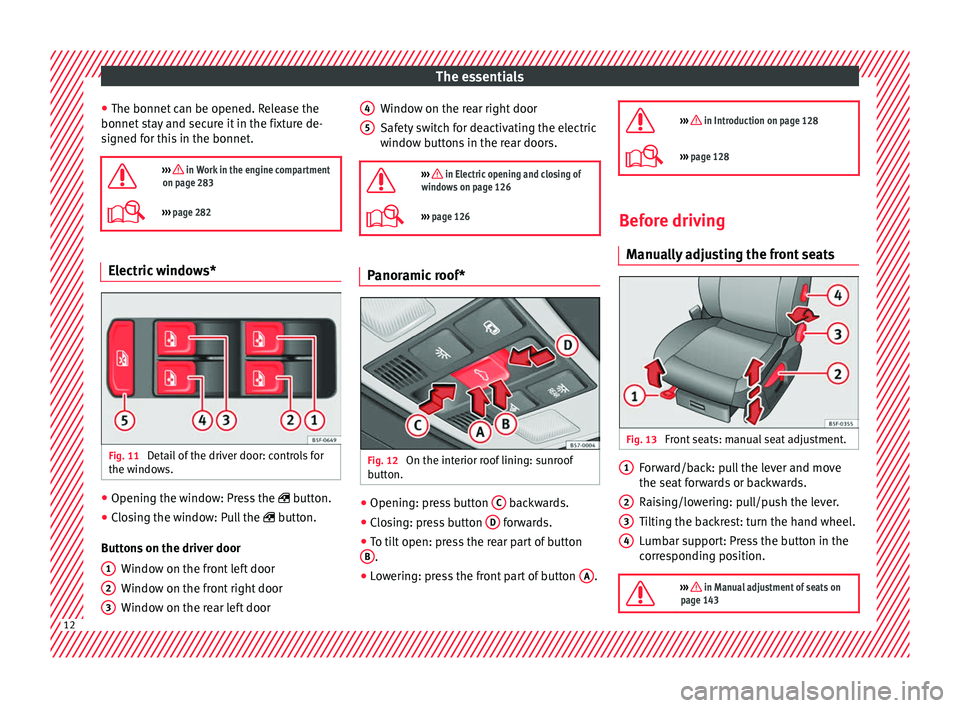
››› page 282 Electric windows*
Fig. 11
Detail of the driver door: controls for
the w indo
ws. ●
Opening the window: Press the butt
on.
● Closing the window: Pull the butt
on.
Buttons on the driver door Window on the front left door
Window on the front right door
Window on the rear left door
1 2
3 Window on the rear right door
Saf
ety
switch for deactivating the electric
window buttons in the rear doors.
››› in Electric opening and closing of
windows on page 126
››› page 126 Panoramic roof*
Fig. 12
On the interior roof lining: sunroof
b utt
on. ●
Opening: press button C backwards.
● Closing: press button D forwards.
● To tilt open: press the rear part of button
B .
● Lowering: press the front part of button A .
4 5
››› in Introduction on page 128
›››
page 128 Before driving
M anua
lly adjusting the front seats Fig. 13
Front seats: manual seat adjustment. Forward/back: pull the lever and move
the se
at
forwards or backwards.
Raising/lowering: pull/push the lever.
Tilting the backrest: turn the hand wheel.
Lumbar support: Press the button in the
corresponding position.
››› in Manual adjustment of seats on
page 143 1
2
3
4
12
Page 27 of 328
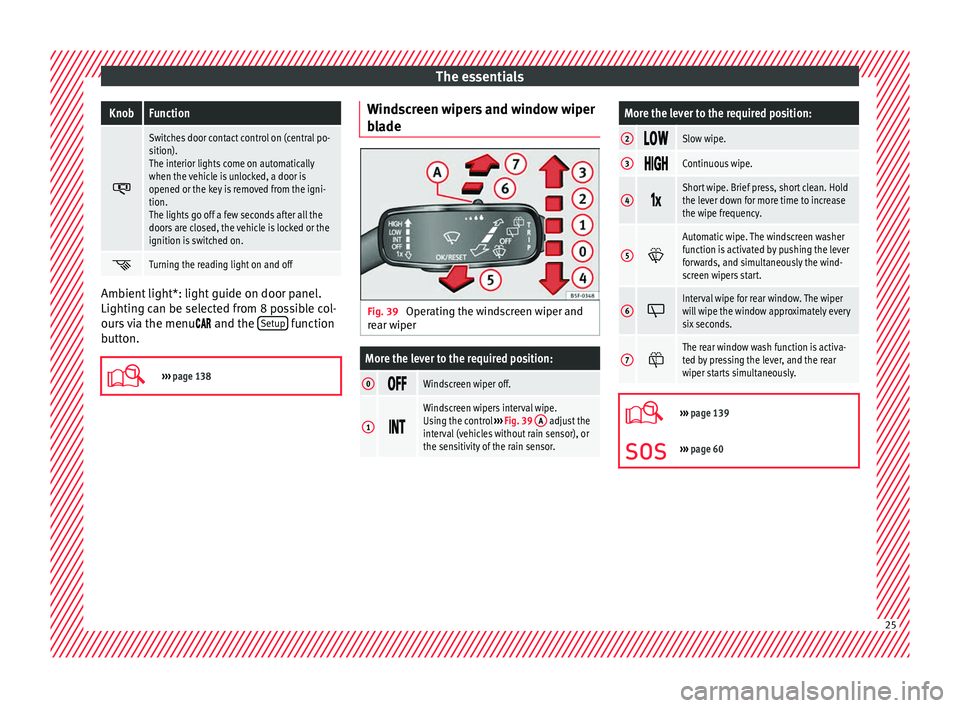
The essentialsKnobFunction
Switches door contact control on (central po-
sition).
The interior lights come on automatically
when the vehicle is unlocked, a door is
opened or the key is removed from the igni-
tion.
The lights go off a few seconds after all the
doors are closed, the vehicle is locked or the
ignition is switched on.
Turning the reading light on and off
Ambient light*: light guide on door panel.
Lightin
g c
an be selected from 8 possible col-
ours via the menu and the Setup function
b utt
on.
››› page 138 Windscreen wipers and window wiper
b
l
ade Fig. 39
Operating the windscreen wiper and
r e
ar wiper
More the lever to the required position:
0 Windscreen wiper off.
1
Windscreen wipers interval wipe.
Using the control
››› Fig. 39 A adjust the
interval (vehicles without rain sensor), or
the sensitivity of the rain sensor.
More the lever to the required position:
2 Slow wipe.
3
Continuous wipe.
4
Short wipe. Brief press, short clean. Hold
the lever down for more time to increase
the wipe frequency.
5
Automatic wipe. The windscreen washer
function is activated by pushing the lever
forwards, and simultaneously the wind-
screen wipers start.
6
Interval wipe for rear window. The wiper
will wipe the window approximately every
six seconds.
7
The rear window wash function is activa-
ted by pressing the lever, and the rear
wiper starts simultaneously.
›››
page 139
››› page 60 25
Page 45 of 328
The essentials
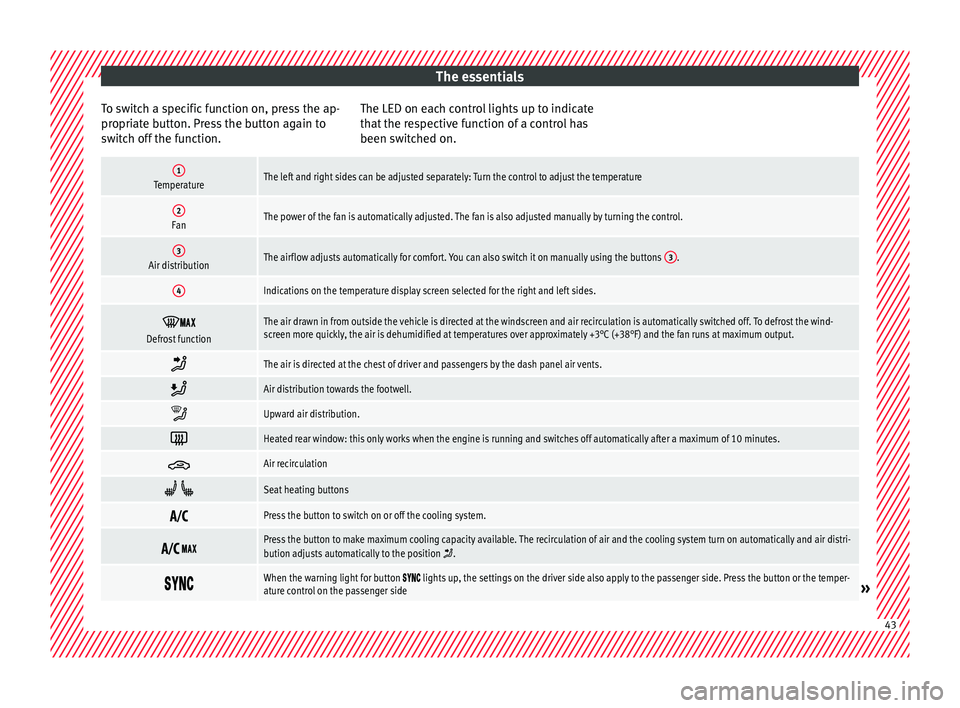
To switch a specific function on, press the ap-
pr opri
ate button. Press the button again to
switch off the function. The LED on each control lights up to indicate
that
the respective function of a control has
been switched on.
1TemperatureThe left and right sides can be adjusted separately: Turn the control to adjust the temperature
2FanThe power of the fan is automatically adjusted. The fan is also adjusted manually by turning the control.
3Air distributionThe airflow adjusts automatically for comfort. You can also switch it on manually using the buttons 3.
4Indications on the temperature display screen selected for the right and left sides.
Defrost functionThe air drawn in from outside the vehicle is directed at the windscreen and air recirculation is automatically switched off. To defrost the wind-
screen more quickly, the air is dehumidified at temperatures over approximately +3°C (+38°F) and the fan runs at maximum output.
The air is directed at the chest of driver and passengers by the dash panel air vents.
Air distribution towards the footwell.
Upward air distribution.
Heated rear window: this only works when the engine is running and switches off automatically after a maximum of 10 minutes.
Air recirculation
Seat heating buttons
Press the button to switch on or off the cooling system.
Press the button to make maximum cooling capacity available. The recirculation of air and the cooling system turn on automatically and air distri-
bution adjusts automatically to the position .
When the warning light for button lights up, the settings on the driver side also apply to the passenger side. Press the button or the temper-
ature control on the passenger side» 43
Page 47 of 328
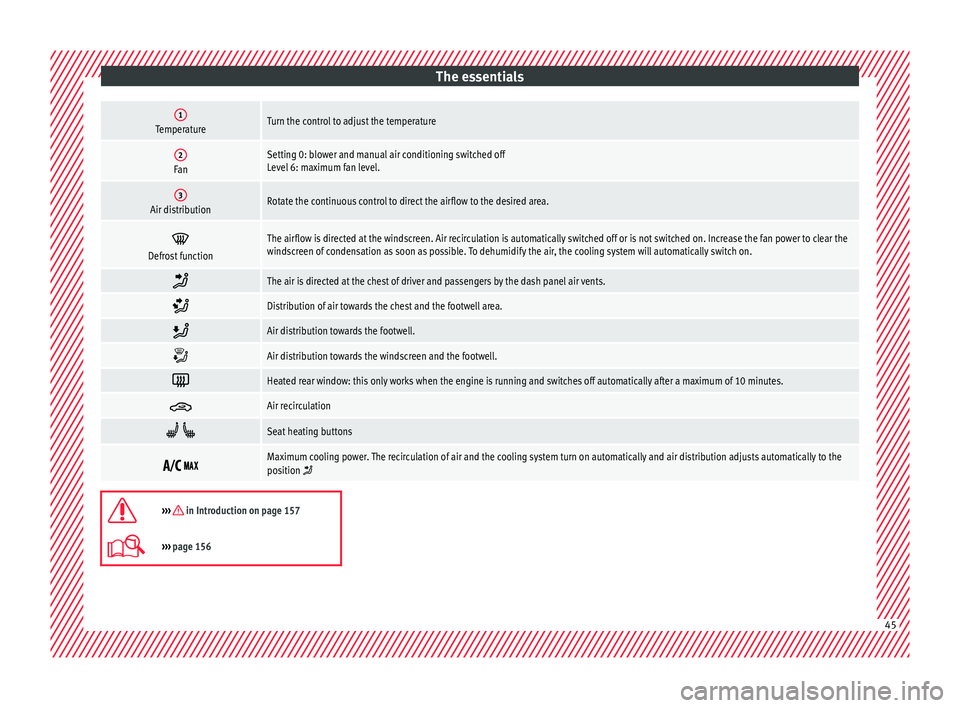
The essentials1TemperatureTurn the control to adjust the temperature
2FanSetting 0: blower and manual air conditioning switched off
Level 6: maximum fan level.
3Air distributionRotate the continuous control to direct the airflow to the desired area.
Defrost functionThe airflow is directed at the windscreen. Air recirculation is automatically switched off or is not switched on. Increase the fan power to clear the
windscreen of condensation as soon as possible. To dehumidify the air, the cooling system will automatically switch on.
The air is directed at the chest of driver and passengers by the dash panel air vents.
Distribution of air towards the chest and the footwell area.
Air distribution towards the footwell.
Air distribution towards the windscreen and the footwell.
Heated rear window: this only works when the engine is running and switches off automatically after a maximum of 10 minutes.
Air recirculation
Seat heating buttons
Maximum cooling power. The recirculation of air and the cooling system turn on automatically and air distribution adjusts automatically to the
position
››› in Introduction on page 157
›››
page 156 45
Page 49 of 328
The essentials
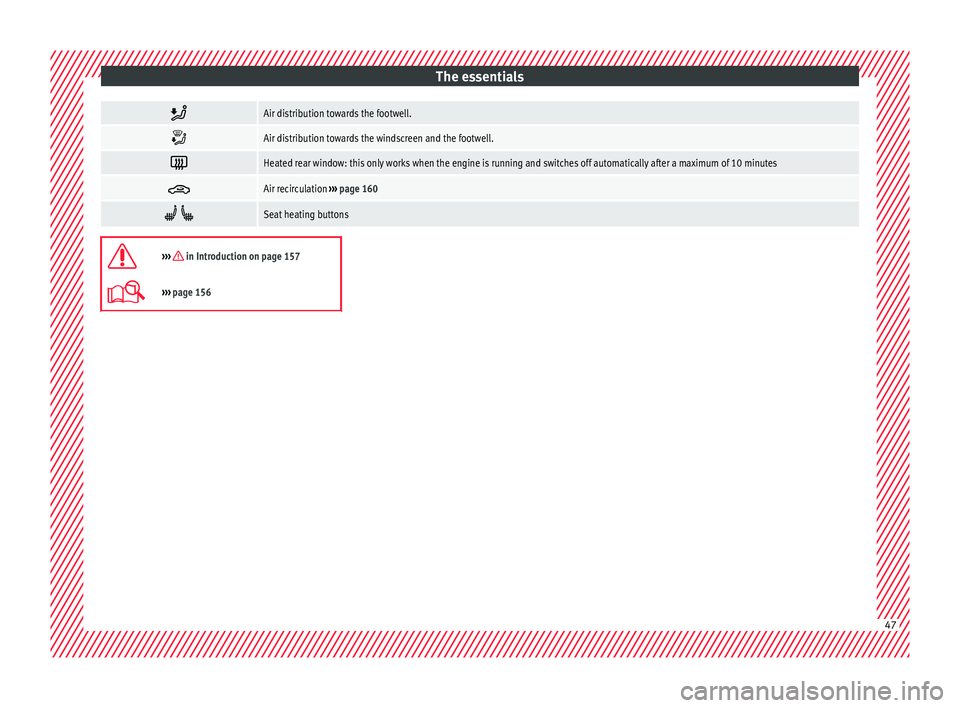
Air distribution towards the footwell.
Air distribution towards the windscreen and the footwell.
Heated rear window: this only works when the engine is running and switches off automatically after a maximum of 10 minutes
Air recirculation
››› page 160
Seat heating buttons
››› in Introduction on page 157
›››
page 156 47
Page 63 of 328

The essentials
Changing the windscreen and rear
w indo
w wiper blades Fig. 79
Changing the windscreen wiper
b l
ades Fig. 80
Changing the rear wiper blade Raising and lowering windscreen wiper arms
● Place the windscreen wipers in the service
po s
ition ››› page 60.
● Grip the wiper arms only
by the blade's fas-
tening point. Cleaning windscreen wiper blades
●
Raise the wiper arms.
● Use a soft cloth to remove dust and dirt
from the w
indscreen wiper blades.
● If the blades are very dirty, a sponge or
damp c
loth may be used ››› in Changing
the w ind
screen and rear window wiper
blades on page 86.
Changing the windscreen wiper blades
● Lift and unfold the wiper arms.
● Press and hold release button ››
› Fig. 79 1 and pull gently on the wiper blade in the di-
r
ection of
the arrow.
● Fit a new wiper blade of the same l
ength
and design on to the wiper arm and hook it
into place.
● Rest the wiper arms back onto the wind-
sc
reen.
Changing the rear wiper blade
● Raising/lowering the wiper arm.
● Turn the blade slightly ››
› Fig. 80 (arrow
A ).
● Hold down the release button 1 while
g ently
pulling the blade in the direction of ar-
row B .
● Insert a new blade of the same l
ength and
type in the rear wiper arm in the opposite di-
rection to the arrow B and hook into place
b utt
on 1 .●
Rep
lace the wiper arm on the rear window.
››› in Changing the windscreen and
rear window wiper blades on page 86
››› page 85 61
Page 64 of 328
Safety
Safety
Saf e driv
ing
Safety first! WARNING
● Thi s
manual contains important informa-
tion about the operation of the vehicle, both
for the driver and the passengers. The other
sections of the on-board documentation also
contain further information that you should
be aware of for your own safety and for the
safety of your passengers.
● Ensure that the on-board documentation is
kept
in the vehicle at all times. This is espe-
cially important when lending or selling the
vehicle to another person. Advice about driving
B ef
ore starting every trip For your own safety and the safety of your
p
a
ssengers, always note the following points
before every trip:
– Make sure that the vehicle's lights and turn
sign
als are working properly.
– Check tyre pressure. –
Ens
ure that all windows provide a clear and
good view of the surroundings.
– Make sure all luggage is secured
››
› page 149.
– Make sure that no objects can interfere
with the ped
als.
– Adjust front seat, head restraint and mir-
ror
s properly according to your size.
– Ensure that the passengers in the rear
seats
always have the head restraints in
the in-use position ››› page 66.
– Instruct passengers to adjust the head re-
str
aints according to their height.
– Protect children with appropriate child
seats
and properly applied seat belts
››› page 79.
– Assume the correct sitting position. Instruct
your p
assengers also to assume a proper
sitting position. ››› page 63.
– Fasten your seat belt securely. Instruct your
pa
ssengers also to fasten their seat belts
properly. ››› page 68.
What affects driving safety? As a driver, you are responsible for yourself
and
y
our passengers. When your concentra-
tion or driving safety is affected by any cir- cumstance, you endanger yourself as well as
others
on the road ››› , for this reason:
– Always pay attention to traffic and do not
g et
distracted by passengers or telephone
calls.
– Never drive when your driving ability is im-
pair
ed (e.g. by medication, alcohol, drugs).
– Observe traffic laws and speed limits.
– Always reduce your speed as appropriate
for r
oad, traffic and weather conditions.
– When travelling long distances, take
bre
aks regularly - at least every two hours.
– If possible, avoid driving when you are tired
or str
essed. WARNING
When driving safety is impaired during a trip,
the ri sk
of injury and accidents increases. Safety equipment
Never put your safety or the safety of your
p
a
ssengers in danger. In the event of an acci-
dent, the safety equipment may reduce the
risk of injury. The following list includes most
of the safety equipment in your SEAT:
● Three-point seat belts
● belt tension limiters for the front and rear
side se
ats,
62
Page 67 of 328

Safe driving
●
Alw
ays keep your feet in the footwell when
the vehicle is moving; never rest them on the
dash panel, out the window or on the seat. An
incorrect sitting position exposes you to an
increased risk of injury in case of a sudden
braking or an accident. If the airbag is trig-
gered, you could sustain severe injuries due
to an incorrect sitting position.
● To reduce the risk of injury to the front pas-
seng
er in events such as sudden braking ma-
noeuvres or an accident, never travel with the
backrest tilted far back! The airbag system
and seat belts can only provide optimal pro-
tection when the backrest is in an upright po-
sition and the front passenger is wearing his
or her seat belt properly. The further the seat
backrests are tilted to the rear, the greater
the risk of injury due to incorrect positioning
of the belt web or to the incorrect sitting po-
sition!
● Adjust the head restraint correctly in order
to ac
hieve maximum protection. Correct sitting position for rear seat
p
a
ssengers To reduce the risk of injury in the event of a
s
ud
den braking manoeuvre or an accident,
passengers on the rear seat bench must con-
sider the following:
– Sit up straight.
– Adjust the head restraint to the correct po-
sition ›
›› page 66. –
Alw
ays keep both feet in the footwell in
front of the rear seat.
– Fasten your seat belt securely ››
› page 68.
– Use an appropriate child restraint system
when y
ou take children in the vehicle
››› page 79. WARNING
● If the p
assengers in the rear seats are not
sitting properly, they could sustain severe in-
juries.
● Adjust the head restraint correctly in order
to ac
hieve maximum protection.
● Seat belts can only provide optimal protec-
tion when seat
backrests are in an upright
position and the vehicle occupants are wear-
ing their seat belts correctly. If passengers In
the rear seats are not sitting in an upright po-
sition, the risk of injury due to incorrect posi-
tioning of the seat belt increases. Examples of incorrect sitting posi-
tion
s Seat belts can provide optimal protection on-
ly
when the belt
webs are properly posi-
tioned. Incorrect sitting positions substan-
tially reduce the protective function of seat
belts and increase the risk of injury due to in-
correct seat belt position. As the driver, you
are responsible for all passengers, especially
children. –
Never al
low anyone to assume an incorrect
sitting position in the vehicle while travel-
ling ››› .
The f o
llowing list contains examples of sit-
ting positions that could be dangerous for all
vehicle occupants. The list is not complete,
but we would like to make you aware of this
issue.
Therefore, whenever the vehicle is in motion:
● Never stand in the vehicle.
● Never stand on the seats.
● Never kneel on the seats.
● Never tilt your seat backrest far to the rear.
● Never lean against the dash panel.
● Never lie on the rear bench.
● Never sit on the front edge of a seat.
● Never sit sideways.
● Never lean out of a window.
● Never put your feet out of a window.
● Never put your feet on the dash panel.
● Never put your feet on the surface of a seat.
● Do not allow anyone to travel in the foot-
wel
l.
● Never travel without wearing the seat belt.
● Do not allow anyone to travel in the lug-
gag
e compartment. »
65
Technical data
Advice
Operation
Emergencies
Safety
Page 69 of 328

Safe driving
Rear head restraints – The rear head restraints have 2 positions:
use
and non-use.
– One position for use
(head restraint raised)
››› Fig. 84. In this position, the head re-
straints are used normally, protecting pas-
sengers along with the rear seat belts.
– And one position for non-use
(head re-
straint lowered).
– To fit the head restraints in position for use,
pu
ll on the edges with both hands in the
direction of the arrow. WARNING
● Under no c ir
cumstances should the rear
passengers travel while the head restraints
are in the non-use position. See the warning
label located on the rear side fixed window
››› Fig. 85.
● Do not swap the centre rear head restraint
with either of
the outer seat rear head re-
straints. Risk of injury in case of an accident! CAUTION
Note the instructions on the adjustment of
the he a
d restraints ››› page 143. Pedal area
P ed
als –
Ensure that you can always press the accel-
er at
or, brake and clutch pedals unimpaired
to the floor.
– Ensure that the pedals can return unim-
pair
ed to their initial positions.
– Ensure that the floor mats are securely fas-
tened durin
g the trip and do not obstruct
the pedals ››› .
On ly
use floor mats which leave the pedals
clear and which are secured to prevent them
from slipping. You can obtain suitable floor
mats from a specialised dealership. Fasten-
ers* for floor mats are fitted in the footwells.
If a brake circuit fails, the brake pedal must
be pressed down thoroughly in order to stop
the vehicle.
Wear suitable footwear
Always wear shoes which support your feet
properly and give you a good feeling for the
pedals. WARNING
● Re
stricting pedal operation can lead to crit-
ical situations while driving. ●
Nev er l
ay or fit floor mats or other floor cov-
erings over the original floor mats. This
would reduce the pedal area and could ob-
struct the pedals. Risk of accident.
● Never place objects in the driver footwell.
An ob
ject could move into the pedal area and
impair pedal operation. In the event of a sud-
den driving or braking manoeuvre, you will
not be able to operate the brake, clutch or ac-
celerator pedal. Risk of accident! 67Technical data
Advice
Operation
Emergencies
Safety