ECO Seat Exeo ST 2013 MEDIA SYSTEM E
[x] Cancel search | Manufacturer: SEAT, Model Year: 2013, Model line: Exeo ST, Model: Seat Exeo ST 2013Pages: 167, PDF Size: 5.48 MB
Page 150 of 167
INFO (Traffic information)149
Operating
RADIO, MEDIA (audiovisual
systems)
NAME, TEL
NAV, INFO
CAR, SETUP
Setting timer start time
–Select Timer 1 or Timer 2 ⇒ page 148, fig. 190 .
– Press the control knob. The hour display for the corresponding timer will then be highlighted white.
– Rotate the control knob to set the hour.
– Press the control knob. The minute display for the corresponding timer will then be highlighted white.
– Rotate the control knob to set the minutes.
– Press the control knob to confirm your selection.With this function you can set the start time of two separate timers for
recording traffic news announcements.
From the time set in Timer 1 or Timer 2 , the navigation system can store traffic
announcements for approx. two hours.
Use the Timer status option to activate the times you have set. e.g. in the
timer status function, if you select timer 1, the traffic announcements are
stored for approx. two hours as of the time set by you.
You can access the recorded traffic announcements using the TP memo
control button ⇒ page 146.
When you park your vehicle, the timers will remain on for a total of 72 hours.
During these 72 hours the system will record the traffic announcements it
receives at the times you have specified. If you have not used your vehicle for
longer than 72 hours the timers will be deactivated to avoid draining the
battery.
Recorded traffic announcements will be deleted after about six hours.
Note
•Traffic announcements can only be recorded if the Traffic programme
option in Radio Setup is set to on.•All incoming traffic news announcements will be recorded. As the system
has a limited memory capacity, all old traffic announcements are overwritten
by new ones.•To avoid draining the battery we recommend that you only activate the
timers when necessary.TMC announcements
When the route guidance is activated, you can switch the TMC
announcement option on or off as desired.TMC stands for “Traffic Message Channel”.
– Starting from any one of the INFO menus, press the ⇒page 9 button.
– Select TMC announcement ⇒ page 148, fig. 188 .
– Select on to activate the option for TMC announcements, or
– Select off to deactivate the option for TMC announcements.If there is an obstruction, but your route cannot be adapted, you will hear a
TMC announcement.
Whenever there is an obstruction, you will hear two TMC announcements (if
applicable). The first announcement will be made about 30 km before you
reach the traffic obstruction and a second announcement will follow about
two km before the obstruction.
SETUP
media_systemE_EN.book Seite 149 Montag, 21. September 2009 1:48 13
Page 154 of 167
SETUP153
Operating
RADIO, MEDIA (audiovisual
systems)
NAME, TEL
NAV, INFO
CAR, SETUP
SETUPIntroductionGeneral safety precautionsWe recommend that you only make adjustments to the system configuration
while the vehicle is stationary. In this way you can be sure that you will not
be unnecessarily distracted from the traffic when reading the messages on
the display. Please note ⇒page 6, “Notes on road safety”.Selecting system setup functionIn addition to the main setup menus for the individual main func-
tions, the Settings , Sound and Display submenus are available for
adjusting system settings. These setup submenus are the same for
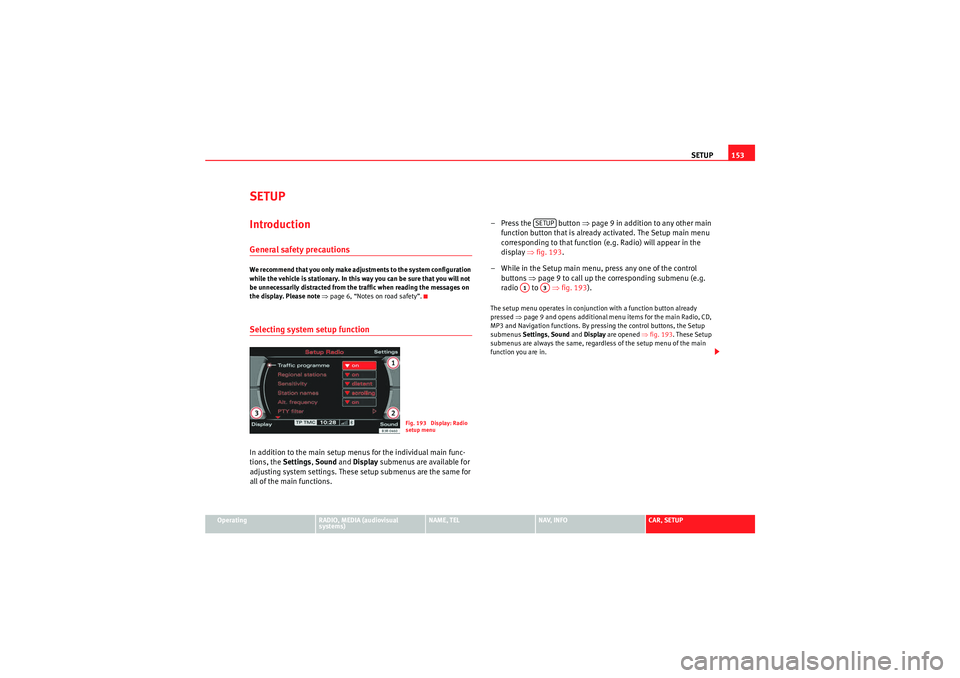
all of the main functions. – Press the button
⇒page 9 in addition to any other main
function button that is already activated. The Setup main menu
corresponding to that function (e.g. Radio) will appear in the
display ⇒fig. 193 .
– While in the Setup main menu, press any one of the control buttons ⇒page 9 to call up the corresponding submenu (e.g.
radio to ⇒fig. 193 ).
The setup menu operates in conjunction with a function button already
pressed ⇒page 9 and opens additional menu items for the main Radio, CD,
MP3 and Navigation functions. By pressing the control buttons, the Setup
submenus Settings, Sound and Display are opened ⇒fig. 193. These Setup
submenus are always the same, regardless of the setup menu of the main
function you are in.
Fig. 193 Display: Radio
setup menu
SETUP
A1
A3
media_systemE_EN.book Seite 153 Montag, 21. September 2009 1:48 13
Page 165 of 167
Index
164PTY filter (selecting radio programmes) . . . . . . 45RRadio
Functions: automatic seek mode . . . . . . . . . 39
Functions: band settings . . . . . . . . . . . . . . . 36
Functions: manual tuning . . . . . . . . . . . . . . . 39
Functions: regional stations . . . . . . . . . . . . . 43
Functions: station scan . . . . . . . . . . . . . . . . . 41
Functions: storing stations (store) . . . . . . . . 40
Main menu . . . . . . . . . . . . . . . . . . . . . . . . . . . 36
Menu: "Memory" . . . . . . . . . . . . . . . . . . . . . . 38
Menu: Band . . . . . . . . . . . . . . . . . . . . . . . . . . 36
Menu: Tuning . . . . . . . . . . . . . . . . . . . . . . . . 39
Setup menu . . . . . . . . . . . . . . . . . . . . . . . . . . 41
Station list: AM (static) . . . . . . . . . . . . . . . . . 37
Station list: FM (dynamic) . . . . . . . . . . . . . . . 37
Station list: using . . . . . . . . . . . . . . . . . . . . . 38
RADIO (function button) See "Radio" . . . . . . . . . . . . . . . . . . . . . . . . . . 35
Radio navigation system Components: control panel . . . . . . . . . . . . . . 3
Road safety . . . . . . . . . . . . . . . . . . . . . . . . . . . 6
Switching off . . . . . . . . . . . . . . . . . . . . . . . . . . 4
Switching on . . . . . . . . . . . . . . . . . . . . . . . . . . 4
Radio sound See Sound . . . . . . . . . . . . . . . . . . . . . . . . . . . 59
Regional stations . . . . . . . . . . . . . . . . . . . . . . . . 43
Rejecting a call . . . . . . . . . . . . . . . . . . . . . . . . . . 75
Removing an MP3 card . . . . . . . . . . . . . . . . . . . . 26
Reset . . . . . . . . . . . . . . . . . . . . . . . . . . . . . . . . . . 11 RNS-E
See "Radio navigation system" . . . . . . . . . . . 3
Road safety . . . . . . . . . . . . . . . . . . . . . . . . . . . . . . 6
Route guidance information . . . . . . . . . . . . . . . 113
Route guidance on the instrument panel display . . 101
RPT (CD) . . . . . . . . . . . . . . . . . . . . . . . . . . . . . . . . 53
RPT (MP3) . . . . . . . . . . . . . . . . . . . . . . . . . . . . . . 57
SSafety: general precautions . . . . . . . . . . . . . . . 153
Safety: navigation system . . . . . . . . . . . . . . . . . 97
SCAN . . . . . . . . . . . . . . . . . . . . . . . . . . . . . . . . . . 41
SCAN (CD) . . . . . . . . . . . . . . . . . . . . . . . . . . . . . . 53
SCAN (MP3) . . . . . . . . . . . . . . . . . . . . . . . . . . . . . 56
Selected option . . . . . . . . . . . . . . . . . . . . . . . . . . 18
Setting a directory navigation destination . . . . 66
Settings Sound . . . . . . . . . . . . . . . . . . . . . . . . . . . . . . . 59
Volume of other functions . . . . . . . . . . . . . . 61
See also Vehicle systems . . . . . . . . . . . . . . 154
Setup Deleting user data . . . . . . . . . . . . . . . . . . . . 156
Display control button . . . . . . . . . . . . . . . . 156
Factory settings (default) . . . . . . . . . . . . . . 156
Safety: precautions . . . . . . . . . . . . . . . . . . . 153
Setting distance unit (km/miles) . . . . . . . . 155
Setting the menu language . . . . . . . . . . . . 154
Switch off display . . . . . . . . . . . . . . . . . . . . 156
Time settings . . . . . . . . . . . . . . . . . . . . . . . . 155 SETUP (function button)
See "System setup" . . . . . . . . . . . . . . . . . . 153
Setup Navigation Navigation cues . . . . . . . . . . . . . . . . . . . . . 134
Sound AudioPilot® . . . . . . . . . . . . . . . . . . . . . . . . . . 60
DSP . . . . . . . . . . . . . . . . . . . . . . . . . . . . . . . . . 60
GALA . . . . . . . . . . . . . . . . . . . . . . . . . . . . . . . . 60
Settings . . . . . . . . . . . . . . . . . . . . . . . . . . . . . 59
Volume of other functions . . . . . . . . . . . . . . 61
Speech control system Commands . . . . . . . . . . . . . . . . . . . . . . . . . . 89
Dialling a number . . . . . . . . . . . . . . . . . . . . . 91
Help function . . . . . . . . . . . . . . . . . . . . . . . . . 90
Introduction . . . . . . . . . . . . . . . . . . . . . . . . . . 86
Phone book . . . . . . . . . . . . . . . . . . . . . . . . . . 86
Speech recognition Deleting name tags . . . . . . . . . . . . . . . . . . . . 96
Selecting name tags . . . . . . . . . . . . . . . . . . . 96
Storing name tags . . . . . . . . . . . . . . . . . . . . . 95
Spoken navigation directions . . . . . . . . . . . . . 134
STORE . . . . . . . . . . . . . . . . . . . . . . . . . . . . . . . . . 40
System settings MP3 . . . . . . . . . . . . . . . . . . . . . . . . . . . . . . . . 57
System setup INFO (traffic information) . . . . . . . . . . . . . . 148
RADIO . . . . . . . . . . . . . . . . . . . . . . . . . . . . . . . 41
Settings control button . . . . . . . . . . . . . . . . 154
media_systemE_EN.book Seite 164 Montag, 21. September 2009 1:48 13