ESP Seat Toledo 2012 User Guide
[x] Cancel search | Manufacturer: SEAT, Model Year: 2012, Model line: Toledo, Model: Seat Toledo 2012Pages: 249, PDF Size: 3.6 MB
Page 47 of 249

46Child safety
WARNING
● Never install a child seat facing backwards on the front passenger
seat unless the front passenger front airbag has been disabled. This
could lead to a risk of potentially fatal injuries to the child! However, if it
is necessary, in exceptional cases, to transport a child in the front pas-
senger seat, the front passenger front airbag must always be disabled
⇒ page 43. If the passenger seat has a height adjustment option, move it
to the highest position.
● For those vehicles that do not include a key lock switch to disable the
airbag, the vehicle must be taken to a Technical Service.
● All vehicle occupants, especially children, must assume the proper
sitting position and be properly belted in while travelling.
● Never hold children or babies on your lap, this can result in potential-
ly fatal injuries to the child!
● Never allow a child to be transported in a vehicle without being prop-
erly secured, or to stand up or kneel on a seat while travelling. In an acci-
dent, the child could be thrown through the vehicle, causing possibly fa-
tal injuries to themselves and to the other vehicle occupants.
● If children assume an improper sitting position when the vehicle is
moving, they expose themselves to greater risk of injury in the event of a
sudden braking manoeuvre or in an accident. This is particularly impor-
tant if the child is travelling on the front passenger seat and the airbag
system is triggered in an accident; as this could cause serious injury or
even death.
● A suitable child seat can protect your child.
● Never leave an unsupervised child alone on a child seat or in the vehi-
cle.
● Depending on weather conditions, it may become extremely hot or
cold inside the vehicle. This can be fatal.WARNING (Continued)
● Children who are less than 1.5 metres tall must not wear a normal
seat belt without a child seat, as this could cause injuries to the abdomi-
nal and neck areas during a sudden braking manoeuvre or in an accident.
● Do not allow the seat belt to become twisted or jammed, or to rub on
any sharp edges.
● Incorrectly worn seat belts can cause injuries even in a minor colli-
sion or in sudden braking manoeuvres.
● The seat belt provides maximum protection only when the seat belt is
properly positioned ⇒ page 26, Seat belts.
● Only one child may occupy a child seat ⇒ page 47, Child seats.
Page 55 of 249
54Controls and displays
Note
The location of the controls of right-hand drive cars differs slightly from the
location shown here ⇒ Fig. 30. However, the symbols correspond to the re-
spective controls.
Page 56 of 249

55
Controls and displays
Instruments and warning lamps
General instrument panel – summary
Fig. 31 General instrument panel Rev counter ⇒ page 55
Digital display:
– with trip counter
⇒ page 57
– with service interval display
⇒ page 57
– with digital clock
⇒ page 58
– with multifunction display
⇒ page 59
– with informative digital display
⇒ page 62
Speedometer ⇒ page 56
Coolant temperature indicator ⇒ page 56
1
2
34
Control for selecting the mode:
–
adjust hours/minutes
– activate/deactivate according to speed in mph or km/h respectively
– service intervals – show the days and kilometres (miles) remaining
Switch for:
– delete trip counter
– reset the service intervals
– adjust hours/minutes
– activate/deactivate the selected mode
Fuel reserve indicator ⇒ page 56
WARNING
● Always keep your attention on driving! As the driver, you have the full
responsibility for the safety of traffic.
● Never use the instrument panel controls when the vehicle is in mo-
tion. Do so only when the vehicle is stopped!
Rev counter
The red part of the rev counter scale 1 ⇒ Fig. 31 ⇒
page 55 marks the zone
where the engine control unit begins to limit the engine speed. The engine
control unit is responsible for reducing the revs to a safe limit.
Before the needle reaches the red zone change up into a higher gear, or
move the selector lever of the automatic gearbox to D.
In order to drive at an optimum RPM, respect the gear change indications
⇒ page 58.
5
6
7
Safety FirstOperating instructionsPractical TipsTechnical specifications
Page 58 of 249

57
Controls and displays
Trip counter*
Daily trip counter (trip)
The daily trip counter indicates the journey that has been covered since the
last time the function was reset in 100 metre sections.
In order to reset the daily distance covered keep the button 6
⇒ Fig. 31
⇒ page 55 pressed down.
Odometer
The odometer indicates the total number of kilometres (or mileage) that the
vehicle has covered until now.
Fault indication
In the event of a fault in the informative display the word Error will appear
permanently. Please take the vehicle to a specialised Technical Service to
solve this fault.
Note
In vehicles equipped with an informative display, if the indicator of the sec-
ond speed in mph or in kph are activated respectively, this speed will be
displayed in place of the odometer.
Service interval display*
Service interval display
Before reaching the service interval, when the ignition is switched on the
key symbol appears on the screen for several seconds together with the
indication of the number of kilometres (miles) remaining. The number of
days remaining until the service inspection is indicated simultaneously.
The informative display indicates:
Service in … km (miles) or… days. The indication of kilometres (miles) or time remaining until the inspection
reduces in intervals of 100km (miles) or 1 day.
If the service interval is reached, when the ignition is switched on the key
symbol
appears flashing on the screen together with the word Service.
The informative display indicates: Service now!
Indication of number of kilometres (miles) or time remaining until the
service inspection
The number of kilometres (miles) or time remaining until the service inspec-
tion can always be displayed when the ignition is switched on by pressing
the button 5
⇒ Fig. 31 ⇒
page 55.
The key symbol and indication of the number of kilometres (miles) re-
maining appear on the display for several seconds. The number of days re-
maining until the service inspection is indicated simultaneously.
In vehicles equipped with an informative display this information can be ac-
cessed from the menu, Settings ⇒ page 63.
Resetting service interval display
The service interval display can be reset only after a service message or pre-
warning has been displayed in the general instrument panel display.
It is advisable to visit a Technical Service to reset the display.
The specialised Technical Service:
● resets the display memory after performing the following inspection
● stores the information in the Maintenance Programme
● places a sticker on the side of the instrument panel in the driver area in-
dicating the date of the next inspection
The service intervals display can be reset by pressing the button, 6
⇒ Fig. 31 ⇒
page 55.
Safety FirstOperating instructionsPractical TipsTechnical specifications
Page 59 of 249
58Controls and displays
In vehicles equipped with an informative display the service interval display
can be reset from the menu, Settings ⇒ page 63.
CAUTION
We advise against resetting the service interval display yourself, given that
this action could cause an imbalance in the service intervals, and as a re-
sult, faults in the vehicle.
Note
● Never reset the display between service intervals as this could lead to
erroneous indications.
● After disconnecting the battery of the vehicle, the service interval dis-
play values remain stored.
● If the general instrument panel is changed after a repair, the correct val-
ues must be input in the service interval display. This operation is carried
out by a specialised service.
● After resetting the display with flexible service intervals, the information
will be indicated in the same way as vehicles with fixed service intervals.
Therefore, we recommend that a SEAT Authorised Service resets the service
interval display, who will do so correctly using diagnostics equipment.
● For more detailed information please consult the Maintenance Pro-
gramme.
Digital clock
The clock is set using the buttons 5 to 6
⇒ Fig. 31
⇒ page 55.
Select the indication you want to change with button 5
and make the ad-
justment with button 6.
In vehicles equipped with an informative display this can be reset from the
menu, Time ⇒ page 63. Recommended gear display
Fig. 32 Recommended
gear display
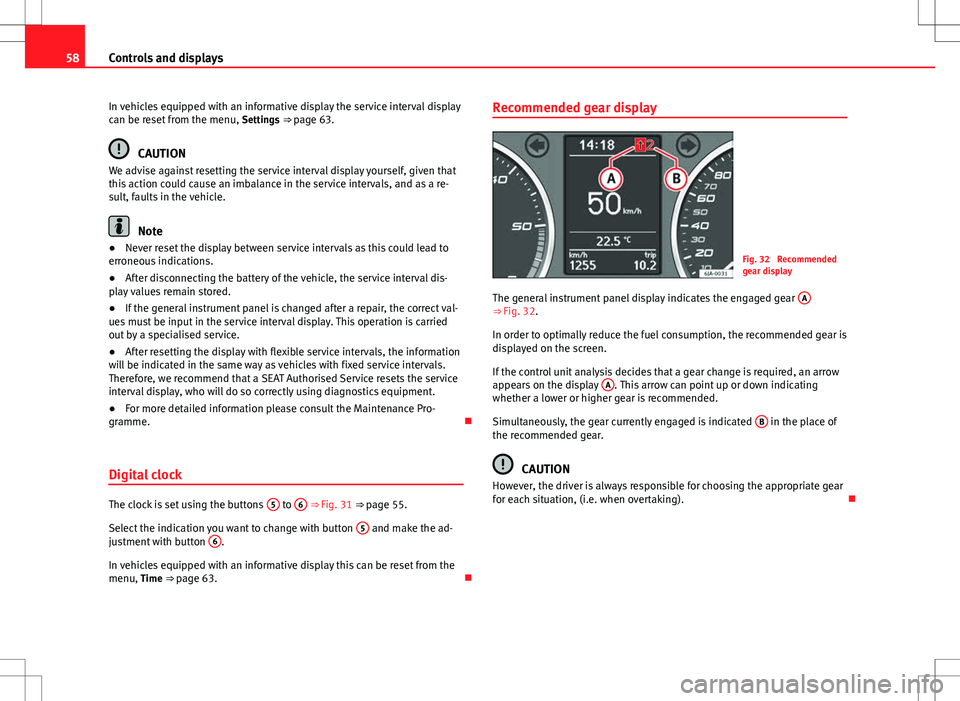
The general instrument panel display indicates the engaged gear A
⇒ Fig. 32.
In order to optimally reduce the fuel consumption, the recommended gear is
displayed on the screen.
If the control unit analysis decides that a gear change is required, an arrow
appears on the display A
. This arrow can point up or down indicating
whether a lower or higher gear is recommended.
Simultaneously, the gear currently engaged is indicated B
in the place of
the recommended gear.
CAUTION
However, the driver is always responsible for choosing the appropriate gear
for each situation, (i.e. when overtaking).
Page 60 of 249

59
Controls and displays
Multi-function display* (on board computer)
Introduction
The multifunction display can only be operated when the ignition is switch-
ed on. When the ignition is switched on the last function selected before it
was switched off is displayed.
The multifunction display data is shown on the screen ⇒ Fig. 33
⇒ page 59.
In vehicles fitted with an informative display ⇒ page 62 the system can be
adjusted so that certain data is not shown.
WARNING
● Always keep your attention on driving! As the driver, you have the full
responsibility for the safety of traffic.
● Do not rely only on the outside temperature indicator to verify wheth-
er the road surface is frozen. This is because with an outside temperature
of +4 °C (+39 °F) ice can generate on the road - Warning of frozen road
surface!
Note
● Models for certain countries can show the values in imperial units.
● If the second speed in mph (km/h) is displayed, the current speed in
km/h (mph) is not displayed on the screen. Memory
Fig. 33 Multifunction
display
The multifunction display has two automatic memories. The selected mem-
ory is displayed on the screen ⇒ Fig. 33.
The current journey data (memory 1) is always displayed when the number
1 appears on the display. When number 2 appears on the display, the total
distance travelled is shown (memory 2).
The memory is selected by pressing button B
⇒ Fig. 34 ⇒
page 60.
Current journey memory (memory 1)
The current journey memory collects data from the moment the ignition is
switched on until it is switched off. If the journey is continued within two
hours of switching off the ignition, the new values will be added to the ex-
isting trip recorder memory. The memory will automatically be deleted if the
journey is interrupted for more than two hours.
Total distance travelled memory (memory 2)
The total distance travelled memory collects journey data from any number
of individual journeys up to a maximum of 19 hours and 59 minutes and
1999 km (miles) or until 99 hours and 59 minutes and 9999 km (miles) in
cars with an informative display. The memory will automatically be deleted
if one of the named values is reached, resetting the data collected.
Safety FirstOperating instructionsPractical TipsTechnical specifications
Page 64 of 249
63
Controls and displays
Main menu
Fig. 35 Window wiper
lever: informative display
controls
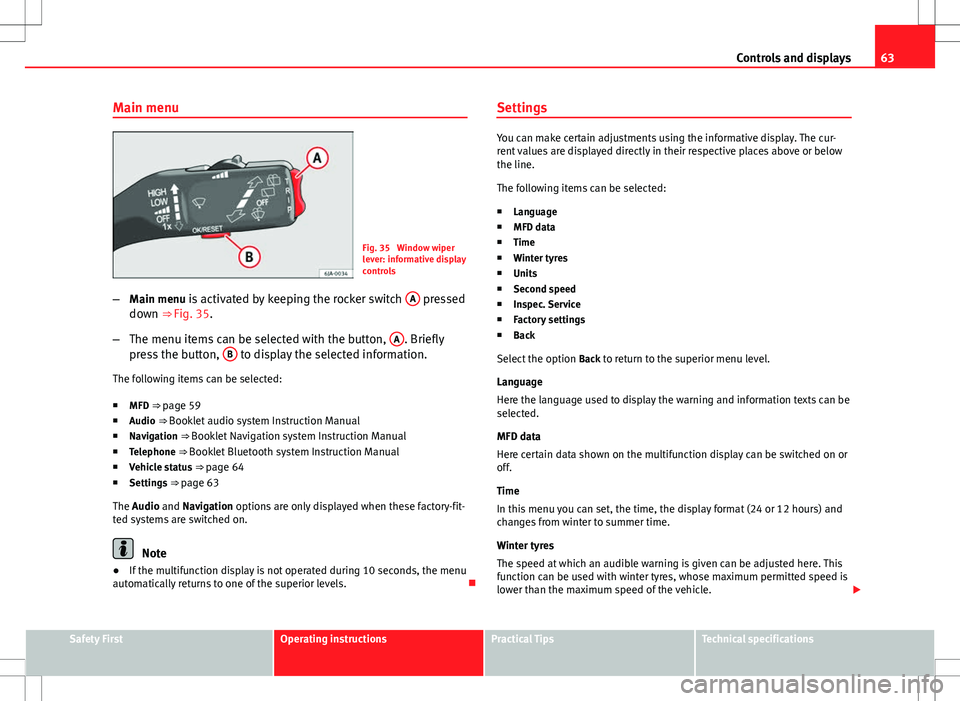
– Main menu is activated by keeping the rocker switch A
pressed
down ⇒ Fig. 35.
– The menu items can be selected with the button, A
. Briefly
press the button, B to display the selected information.
The following items can be selected:
■ MFD ⇒ page 59
■ Audio ⇒ Booklet audio system Instruction Manual
■ Navigation ⇒ Booklet Navigation system Instruction Manual
■ Telephone ⇒ Booklet Bluetooth system Instruction Manual
■ Vehicle status ⇒ page 64
■ Settings ⇒ page 63
The Audio and Navigation options are only displayed when these factory-fit-
ted systems are switched on.
Note
● If the multifunction display is not operated during 10 seconds, the menu
automatically returns to one of the superior levels. Settings
You can make certain adjustments using the informative display. The cur-
rent values are displayed directly in their respective places above or below
the line.
The following items can be selected:
■ Language
■ MFD data
■ Time
■ Winter tyres
■ Units
■ Second speed
■ Inspec. Service
■ Factory settings
■ Back
Select the option Back to return to the superior menu level.
Language
Here the language used to display the warning and information texts can be
selected.
MFD data
Here certain data shown on the multifunction display can be switched on or
off.
Time
In this menu you can set, the time, the display format (24 or 12 hours) and
changes from winter to summer time.
Winter tyres
The speed at which an audible warning is given can be adjusted here. This
function can be used with winter tyres, whose maximum permitted speed is
lower than the maximum speed of the vehicle.
Safety FirstOperating instructionsPractical TipsTechnical specifications
Page 65 of 249

64Controls and displays
When exceeding the maximum speed the following is shown on the display: Winter tyres max speed … km/h … (mph)
Units
The units of measure for temperature, consumption and journey distances
can be set here.
Second speed
The second speed can be activated/deactivated in mph or km/h respective-
ly here.
Inspection Service
Here you can choose to display the kilometres (miles) and days remaining
until the next service, and reset the service interval display.
Factory settings
Select Factory setting to reset the values of the informative display to their
factory settings.
Door, rear lid or bonnet open indicator
If at least one of the doors, rear lid or bonnet is open, a symbol is shown on
the informative display indicating that the door, rear lid or bonnet con-
cerned is open.
An audible warning is also given simultaneously if the vehicle is being driv-
en at a speed of above 6 km/h (4 mph). Auto-check system
Vehicle status
When the ignition is switched on, some vehicle functions such as the condi-
tion of its systems are automatically checked.
The warning messages about eventual faults in addition to other informa-
tion is displayed on the informative display. This information is displayed
together with their respective symbols on the informative display or by
warning lamps that light up on the general instrument panel
⇒ page 65.
The option, Vehicle status, appears in the menu when at least one warning
message is present. The first of the warnings given is displayed upon se-
lecting this option. If there is more than one message present, this is dis-
played on the screen, i.e. 1/3. This means that the warning currently dis- played is the first of a total of three.
Warning symbols
The engine oil pressure is too low⇒ page 67
Automatic gearbox overheated clutches⇒ page 64
Engine oil level,
engine oil sensor faulty⇒ page 67
Engine oil pressure fault⇒ page 65
Automatic gearbox overheated clutches
If the symbol appears on the informative display, the temperature of the
automatic gearbox clutches has reached an unacceptable level.
The informative display indicates:
Gearbox overheated. Stop! Instruction Manual!
Page 67 of 249

66Controls and displays
Engine electronics control (petrol engines)⇒ page 71
Particulate filter (diesel engines)⇒ page 71
Fuel reserve⇒ page 71
Airbag system⇒ page 72
Tyre pressure⇒ page 72
Liquid level in the window washer system⇒ page 73
Turn signals (left/right)⇒ page 73
Fog lights⇒ page 73
Cruise speed⇒ page 73
Selector lever lock⇒ page 73
Main beams⇒ page 73
WARNING
● Failure to observe control lamps and warning messages can result in
serious personal injuries or damage to your vehicle.
● The engine compartment is a dangerous area! Carrying out work in
the engine compartment, i.e. checking and filling service liquids, can
lead to injury, scalding, burns and fires. Therefore the corresponding
warnings must always be observed ⇒ page 173, Engine compartment.
Handbrake
If the
warning lamp lights up, the handbrake is applied. Additionally,
driving the vehicle at speeds exceeding 6 km/h (4 mph) for at least 3 sec-
onds produces an audible warning.
The informative display indicates:
Release the handbrake!
Brake system
The warning lamp lights up if the brake fluid level falls too low or if there
is a fault in the ABS system.
The informative display indicates:
Brake fluid Instruction Manual!
Stop the vehicle, switch off the engine and check the level of the brake fluid
⇒ page 181
WARNING
● If the vehicle has to be stopped for technical reasons, park it a safe
distance away from moving traffic, switch off the engine and turn on the
hazard warning lights ⇒ page 98.
● The following indications must be taken into account when opening
the engine compartment to check the brake fluid ⇒ page 173, Engine
compartment.
Page 69 of 249
68Controls and displays
If the symbol flashes although the oil level is correct, do not drive on. Do
not even run the engine at idle speed!
Seek professional help.
The control lamp lights up yellow (insufficient oil level)
The informative display indicates:
Check the oil level!
Stop the vehicle, switch off the engine and check the engine oil level
⇒ page 177
If the bonnet remains open for more than 30 seconds, the warning lamp
switches off. If the engine oil is not refilled, the warning lamp lights up
again after 100 km (62 miles).
The control lamp flashes yellow (oil level sensor faulty)
The informative display indicates:
Oil sensor. Workshop!
If the engine oil level sensor is faulty, The warning lamp flashes various
times after the ignition is switched on and an audible warning is given.
Seek professional help.
WARNING
If the vehicle has to be stopped for technical reasons, park it a safe dis-
tance away from moving traffic, switch off the engine and turn on the
hazard warning lights ⇒ page 98.
Coolant level and temperature
If the warning lamp (blue) is lit up, the engine has not yet reached its op-
erating temperature 1)
. Avoid high engine speeds, hard acceleration and
submitting the engine to high loads.
If the warning lamp (red) is lit up or flashing, the coolant temperature is
too high or its level is too low.
The informative display indicates:
Check coolant! Instruction Manual!
Stop the vehicle, switch off the engine, check the coolant level ⇒ page 179
and refill if necessary ⇒ page 180.
If the coolant is situated in the prescribed area, the high temperature may
be due to a fault in the cooling system fan. Check the radiator fan fuse and
replace it if necessary ⇒ page 214, Changing fuses in the engine compart-
ment.
If the warning lamp (red) remains lit up, despite both the coolant level
and the radiator fan fuse being in correct condition, stop the vehicle!
Seek professional help.
1)
This does not apply to vehicles equipped with an informative display.