ESP Seat Toledo 2012 Owner's Guide
[x] Cancel search | Manufacturer: SEAT, Model Year: 2012, Model line: Toledo, Model: Seat Toledo 2012Pages: 249, PDF Size: 3.6 MB
Page 72 of 249

71
Controls and displays
If the warning lamp starts to flash while driving, there is a fault in the
engine power control electronic system. The engine control unit allows driv-
ing to continue in an emergency program.
Seek professional help.
Engine management (diesel engines)
If the warning lamp is lit up, there is a fault in the engine management
system. The engine control unit allows driving to continue in an emergency
program.
Seek professional help.
Particulate filter (diesel engines)
The particulate filter eliminates soot from emissions. The particles accumu-
late in the filter where they are normally burned off.
If the warning lamp is lit up, the filter is obstructed by soot.
In order for the filter to clean itself (if the traffic conditions ⇒
so permit) it
is essential to drive for at least 15 minutes (or until the warning lamp
switches off) with 4th or 5th gear engaged (automatic gearbox: position S)
at a minimum speed of 60 km/h (37 mph) with the engine speed between
1800-2500 1/min.
The warning lamp switches off once the filter has been successfully
cleaned.
If the cleaning process is not successful, the warning lamp does not
switch off and the warning lamp starts to flash.
The informative display indicates: Diesel particulate filter. Instruction Manual!
The engine control unit allows driving to continue in an emergency program.
When switching the ignition off and on again, the warning lamp also
lights up.
Seek professional help.
WARNING
● The particulate filter attains very high temperatures. Therefore, do
not park the vehicle in places where the exhaust pipe could come into
contact with dry grass or with highly-flammable materials. Risk of fire!
● Always adjust your speed to suit the weather, road, terrain and traffic
conditions. Never be encouraged, by the recommendations shown in the
warning lamps, to fail to respect traffic legislation.
CAUTION
While the warning lamp is lit up, the fuel consumption is high, and in
certain conditions, the engine power is reduced.
Note
● In order for the particulate filter to burn off soot in a correct manner,
avoid carrying out frequent short journeys.
● Using diesel fuel with a high sulphur count can considerably reduce the
useful life of the particulate filter. The specialised service provides informa-
tion about the countries where fuel with a high sulphur content is used.
Fuel reserve
The warning lamp lights up when approximately only 7 litres of fuel re-
main in the tank.
Safety FirstOperating instructionsPractical TipsTechnical specifications
Page 81 of 249

80Communication
Note
iPod ®
is a registered trademark of Apple Computer, Inc.
Multimedia AUX-IN and MDI Inputs
Fig. 42 AUX-IN input/MDI input
The operating description is located in the respective Instruction Manuals of
the audio system or the navigation system.
AUX-IN Input
The AUX-IN input is located in one of the following places:
● in the centre console between the front seats
⇒ Fig. 42 - ;
● above the storage compartment in the front centre console
⇒ Fig. 42 -
;
● in the front panel of the SEAT Media System 2.2 navigation system. The purpose of the AUX-IN input is to connect external devices in order to
play music (i.e. iPod
®
or an mp3 player) using the factory-fitted audio sys-
tem or the navigation system.
MDI Input
The MDI input is located above the storage compartment in the front centre
console ⇒ Fig. 42 - ;
The MDI input is composed of the USB and AUX-IN inputs.
The purpose of the MDI input is to connect external devices (i.e. iPod ®
, mp3
players or USB memories) in order to play music using the audio system or
the navigation system.
In order to connect Apple multimedia devices (such as an iPod ®
/iPhone ®
…)
the corresponding adaptor from the SEAT Original Accessories catalogue is
required.
Page 87 of 249
86Opening and closing
Manual locking
Fig. 48 Rear door: man-
ual locking
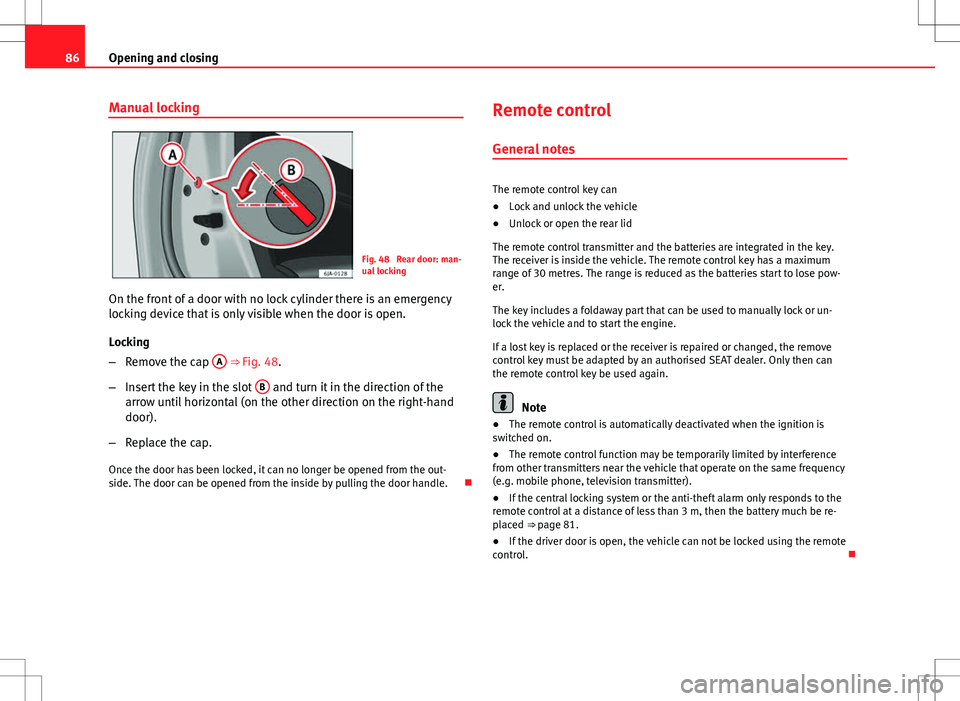
On the front of a door with no lock cylinder there is an emergency
locking device that is only visible when the door is open.
Locking
– Remove the cap A
⇒ Fig. 48.
– Insert the key in the slot B
and turn it in the direction of the
arrow until horizontal (on the other direction on the right-hand
door).
– Replace the cap.
Once the door has been locked, it can no longer be opened from the out-
side. The door can be opened from the inside by pulling the door handle. Remote control
General notes
The remote control key can
● Lock and unlock the vehicle
● Unlock or open the rear lid
The remote control transmitter and the batteries are integrated in the key.
The receiver is inside the vehicle. The remote control key has a maximum
range of 30 metres. The range is reduced as the batteries start to lose pow-
er.
The key includes a foldaway part that can be used to manually lock or un-
lock the vehicle and to start the engine.
If a lost key is replaced or the receiver is repaired or changed, the remove
control key must be adapted by an authorised SEAT dealer. Only then can
the remote control key be used again.
Note
● The remote control is automatically deactivated when the ignition is
switched on.
● The remote control function may be temporarily limited by interference
from other transmitters near the vehicle that operate on the same frequency
(e.g. mobile phone, television transmitter).
● If the central locking system or the anti-theft alarm only responds to the
remote control at a distance of less than 3 m, then the battery much be re-
placed ⇒ page 81.
● If the driver door is open, the vehicle can not be locked using the remote
control.
Page 93 of 249
92Opening and closing
Release
–Fold down the backrest of the rear seat ⇒ page 110.
– Insert the car key in the opening in the mat.
– Move it towards the arrow to release the rear lid.
– Open the rear lid.
Opening and closing electric windows Introduction
WARNING
● When locking the vehicle from the outside, make sure that nobody is
inside the vehicle, as the windows cannot be opened from the inside in
an emergency.
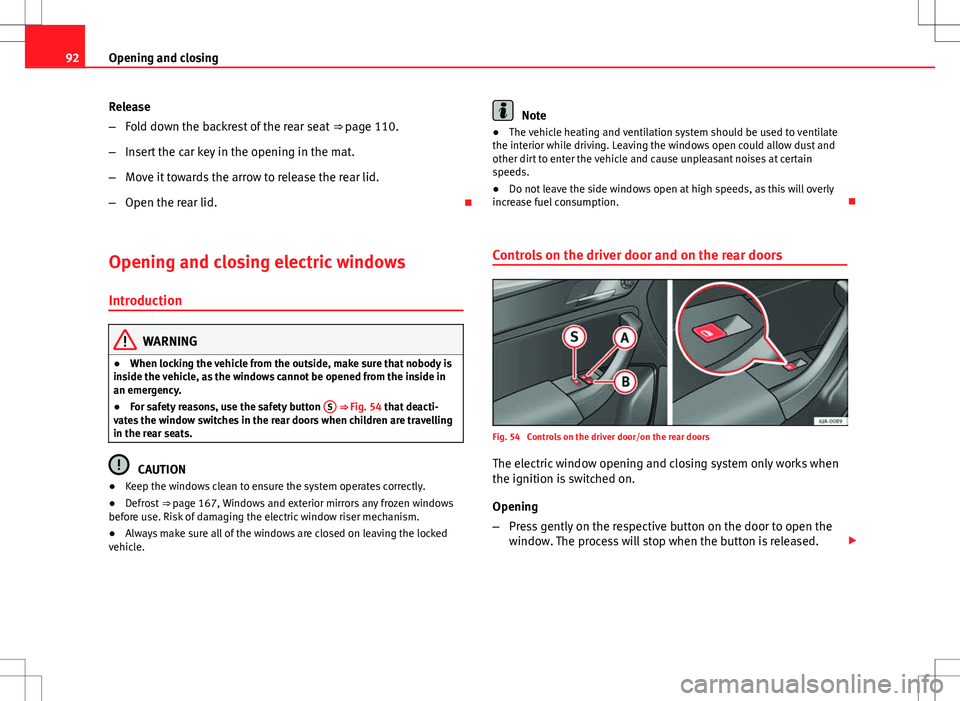
● For safety reasons, use the safety button S
⇒ Fig. 54 that deacti-
vates the window switches in the rear doors when children are travelling
in the rear seats.
CAUTION
● Keep the windows clean to ensure the system operates correctly.
● Defrost ⇒ page 167, Windows and exterior mirrors any frozen windows
before use. Risk of damaging the electric window riser mechanism.
● Always make sure all of the windows are closed on leaving the locked
vehicle.
Note
● The vehicle heating and ventilation system should be used to ventilate
the interior while driving. Leaving the windows open could allow dust and
other dirt to enter the vehicle and cause unpleasant noises at certain
speeds.
● Do not leave the side windows open at high speeds, as this will overly
increase fuel consumption.
Controls on the driver door and on the rear doors
Fig. 54 Controls on the driver door/on the rear doors
The electric window opening and closing system only works when
the ignition is switched on.
Opening
– Press gently on the respective button on the door to open the
window. The process will stop when the button is released.
Page 94 of 249

93
Opening and closing
– The driver door window can also be automatically opened by
pressing the button as far as it will go (fully open). Press the
button again to immediately stop it.
Closing
– Press the respective button gently to close the window. The
process will stop when the button is released.
Window controls on the driver armrest A
Window control on the driver door
B
Window control on the front passenger door
S
Safety button
Safety button
Press the safety button S
⇒ Fig. 54 to deactivate the controls on the rear
doors. Pressing the safety button S again will reactivate the controls on
the rear doors.
If the rear door controls are deactivated, the warning lamp on the safety
button S
will light up.
Note
The electric window opening mechanism is equipped with a thermostat
switch. This may overheat if the window is opened and closed repeatedly.
This causes the window to lock temporarily. Once the thermostat switch has
cooled down the window can be operated once again.
Safety FirstOperating instructionsPractical TipsTechnical specifications
Page 95 of 249

94Lights and visibility
Lights and visibility
Lights Introduction
The location of the controls of right-hand drive cars differs slightly from the
location shown here ⇒ Fig. 55 ⇒ page 94. However, the symbols indicat-
ing the respective positions of the controls remain the same.
WARNING
Never drive with only the side lights on! The side lights are not bright
enough to illuminate the road ahead and to ensure that other road users
are able to see you. Always use your dipped beam headlights if it is dark
or if visibility is poor.
CAUTION
● Use the lights in line with local law.
● However, drivers always remain responsible for correctly adjusting and
using the lights.
Note
● An audible warning will be heard when the light control is set to and
you remove the ignition key and open the door. Once the driver door is
closed (ignition off), the audible warning will stop, whereas the side lights
will remain on to light up the stationary vehicle if necessary.
● Depending on weather conditions (cold or wet), the lights may mist up
temporarily on the inside. This is particularly the case in the event of a dif-
ference in temperature between the inside and in front of the light. By
switching on the lights, the area through which the beam of light is projec- ted will quickly be demisted, although the edges may remain misted. The
real lights and turn signals can mist up. This has no influence on the useful
life of the lighting system.
Switching lights on and off
Fig. 55 Instrument panel: Light switch/Fuses: Switch for daytime driving lights
Switching on side lights
– Turn the light switch ⇒ Fig. 55 to position .
Switching on dipped beam
– Turn the light switch ⇒ Fig. 55 to position .
Switching off lights (except daytime driving lights)
– Turn the light switch ⇒ Fig. 55 to position 0.
Page 97 of 249
96Lights and visibility
Switching on front fog lights
–First turn the light switch ⇒ Fig. 56 to position or .
– Pull on the light switch to position 1
.
The ⇒ page 65 warning lamp lights up on the general instrument panel if
the front fog lights are switched on.
Rear fog light
Switching on the rear fog light
– First turn the light switch ⇒ Fig. 56 ⇒ page 95 to position or
.
– Pull on the light switch to position 2
.
If the vehicle is not equipped with front fog lights ⇒ page 95, the rear fog
light is switched on by turning the switch to position and pulling it to po-
sition 2
. This type of switch only has one position.
The ⇒ page 65 warning lamp lights up on the general instrument panel if
the front fog lights are switched on.
If you are towing a trailer or caravan equipped with a rear fog light on a vehi-
cle with a factory-fitted towing bracket or one installed using parts from the
original SEAT parts catalogue , only the rear fog light on the trailer or cara-
van will light up. Range control of main lights
Fig. 57 Instrument pan-
el: light range control
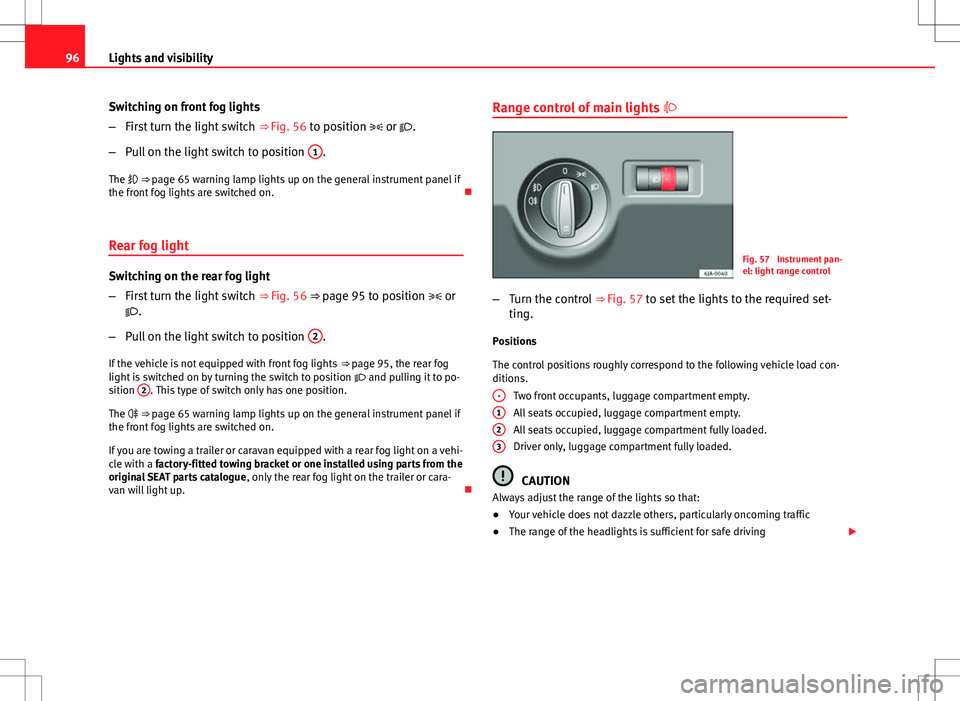
– Turn the control ⇒ Fig. 57 to set the lights to the required set-
ting.
Positions
The control positions roughly correspond to the following vehicle load con-
ditions. Two front occupants, luggage compartment empty.
All seats occupied, luggage compartment empty.
All seats occupied, luggage compartment fully loaded.
Driver only, luggage compartment fully loaded.
CAUTION
Always adjust the range of the lights so that:
● Your vehicle does not dazzle others, particularly oncoming traffic
● The range of the headlights is sufficient for safe driving
-
123
Page 99 of 249
98Lights and visibility
Parking lights*
Parking lights
– Switch the ignition off.
– Move the turn signal lever ⇒ Fig. 58 ⇒ page 97 up or down to
turn on the right or left-hand parking lights respectively.
Parking light on both sides
– Turn the light switch ⇒ Fig. 55 ⇒ page 94 to position and
engage the steering lock.
Note
● The parking lights only work when the ignition is switched on.
● The parking light will not come on automatically on switching the igni-
tion off if the left or right-hand turn signal is left on.
Front fog lights with CORNER function*
Front fog lights with CORNER function provide better lighting of the area
around the car when driving through a corner or parking, etc.
Front fog lights with CORNER function switch on depending on how far you
turn the steering wheel or whether or not the turn signals 1)
are switched on,
if the following conditions are met:
● The vehicle is stationary, the ignition is switched on or you are moving
at a speed less than 40 km/h (25 mph)
● The daytime driving light is switched off ●
The dipped beam is switched on
● The fog lights are switched off
● Reverse gear is not engaged
Hazard warning light switch
Fig. 59 Instrument pan-
el: switch for hazard
warning lights
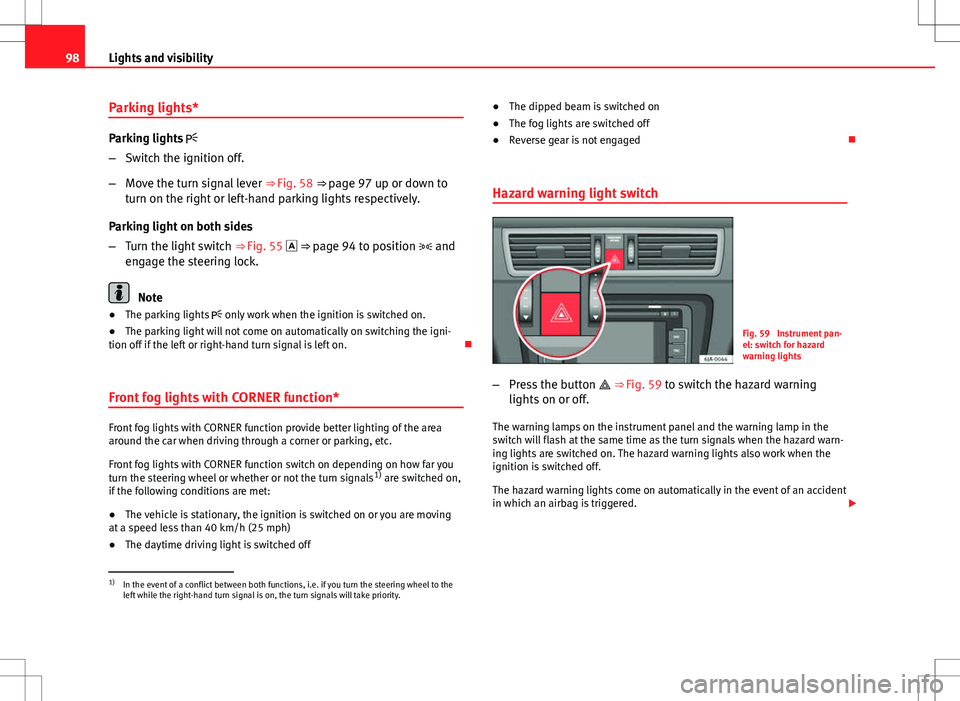
– Press the button ⇒ Fig. 59 to switch the hazard warning
lights on or off.
The warning lamps on the instrument panel and the warning lamp in the
switch will flash at the same time as the turn signals when the hazard warn-
ing lights are switched on. The hazard warning lights also work when the
ignition is switched off.
The hazard warning lights come on automatically in the event of an accident
in which an airbag is triggered.
1)
In the event of a conflict between both functions, i.e. if you turn the steering wheel to the
left while the right-hand turn signal is on, the turn signals will take priority.
Page 102 of 249

101
Lights and visibility
Visibility Heated rear window
Fig. 63 Heated rear win-
dow switch
– Switch the heated rear window on or off by pressing the button
⇒ Fig. 63, the warning lamp in the button will come on or go
off respectively.
The heated rear window only works when the engine is running.
After approx. 7 minutes, the rear window heating device switches off auto-
matically.
For the sake of the environment
The heated rear window should be switched off as soon as the glass is dem-
isted. By saving electrical power you can also save fuel ⇒ page 157, Save
electrical energy.
Note
In the event of a drop in voltage in the onboard systems, the heated rear
window switches off automatically to ensure enough power to control the
engine ⇒ page 186, Automatic disconnection of electrical equipment. Sun visors
Fig. 64 Driver sun visor
Fig. 65 Front passenger
sun visor
The sun visors for the driver and the front passenger can be pulled out of
their central supports and turned towards the doors in the direction of arrow 1
⇒ Fig. 64 and 2
⇒ Fig. 65 respectively.
The strip A
is to store small objects such as notepaper, etc.
The front passenger sun visor includes a vanity mirror B
with a cover. The
cover is opened by sliding it in the direction indicated by arrow 3
⇒
Fig. 65.
Safety FirstOperating instructionsPractical TipsTechnical specifications
Page 108 of 249
107
Seats and storage
Seats and storage Front seats
Introduction
Set the driver seat in such a way that the pedals can be fully depressed with
your legs slightly bent.
Set the driver seat backrest in such a way that the upper point of the steer-
ing wheel can be reached with your arms slightly bent.
The correct seat position is very important for:
● Reaching all of the controls safely and quickly
● A relaxed low-fatigue posture
● maximum protection from the seat belts and airbag system
WARNING
● Adjust the driver seat only when the vehicle is stationary. Risk of ac-
cident!
● Be careful when adjusting the front seats! Careless and uncontrolled
adjustment can cause injuries.
● The backrests must not be reclined too far back while driving. This
could limit the effect of the seat belts and the airbag system. Risk of in-
jury!
● Never transport more that the permitted amount of people in your ve-
hicle.
WARNING (Continued)
● Every occupant in the vehicle must properly fasten and wear the seat
belt belonging to his or her seat. Children must be protected with an ap-
propriate child restraint system ⇒ page 45, Child safety.
● The front seats, head restraints and seat belts must always be adjus-
ted to the size of the vehicle occupant to provide you and your passen-
gers with the greatest possible protection.
● Your feet should remain in the footwell while the vehicle is moving;
never rest them on the dash panel, on the window or on the seat! This
also applies to passengers. An incorrect sitting position exposes you to
an increased risk of injury in case of a sudden braking or an accident. If
the airbag is triggered, you could sustain severe injuries due to an incor-
rect sitting position!
● It is important for the driver and front passenger to keep a distance of
at least 25 cm from the steering wheel and dash panel. Failure to respect
the minimum distance means that the airbag will not protect you. Risk of
fatal injury if triggered!
● No items must not be kept in the footwell, as they could block the
pedals in the event of a sudden braking manoeuvre or change of direc-
tion. You would no longer be able to brake, change gear or accelerate.
● Do not place any items on the front passenger seat other than those
allowed (e.g. child seat). Risk of accident!
Note
After a certain time, the backrest angle adjustment mechanism may gain a
certain amount of play.
Safety FirstOperating instructionsPractical TipsTechnical specifications