engine Seat Toledo 2014 User Guide
[x] Cancel search | Manufacturer: SEAT, Model Year: 2014, Model line: Toledo, Model: Seat Toledo 2014Pages: 200, PDF Size: 4.37 MB
Page 53 of 200

Opening and closing
Multimedia AUX-IN and MDI Inputs Fig. 34
AUX-IN input/MDI input. The operating description is located in the re-
spective Instruction Manuals of the audio
system or the navigation system. AUX-IN Input
The AUX-IN input is located in one of the fol-
lowing places:
● in the centre console between the front
seats ››› Fig. 34 -
;
● abo
ve the storage compartment in the front
centre console ››› Fig. 34 -
;
● in the front panel of the SEAT Media System
2.2 navigation system.
The purpose of the AUX-IN input is to connect
external devices in order to play music (i.e.
iPod ®
or an mp3 player) using the factory-fit-
ted audio system or the navigation system.
MDI Input
The MDI input is located above the storage
compartment in the front centre console
››› Fig. 34 - ;
The MDI input
is composed of the USB and
AUX-IN inputs.
The purpose of the MDI input is to connect
external devices (i.e. iPod ®
, mp3 players or
USB memories) in order to play music using
the audio system or the navigation system.
In order to connect Apple multimedia devices
(such as an iPod ®
/iPhone ®
, etc.) the corre-
sponding adaptor from the SEAT Original Ac-
cessories Catalogue is required. Opening and closing
Remote control General notes The remote control key can
● Lock and unlock the vehicle
● Unlock or open the rear lid
The remote control transmitter and the bat-
teries are integrated in the key. The receiver
is inside the vehicle. The remote control key
has a maximum range of 30 metres. The
range is reduced as the batteries start to lose
power.
The key includes a foldaway part that can be
used to manually lock or unlock the vehicle
and to start the engine.
If a lost key is replaced or the receiver is re-
paired or changed, the remote control key
must be adapted by an authorised SEAT deal-
er. Only then can the remote control key be
used again. Note
● The remote control is automatically deacti-
vated when the ignition is switched on.
● The remote control function may be tempo-
rarily limited by interference from other » 51
Technical specifications
Advice
Operation
Safety
Page 55 of 200

Opening and closing
● Open the door using the key within the
next minute.
Keys General notes Fig. 36
Key with remote control/Key without
remote control. Two keys are always supplied with the vehi-
cle. Depending on the model version, your
car may include keys without remote control
››› Fig. 36
or w
ith remote control › ›› Fig. 36
. WARNING
● Never leave the key inside whenever you
leave the vehicle - even if only for a moment.
This is particularly important if children are
to remain in the vehicle. Children might start
the engine or some other electrical compo-
nent, e.g. electric windows. Risk of injury!
● Wait until the vehicle has completely stop-
ped before taking the key out of the ignition.
Otherwise the steering wheel may lock sud-
denly. Risk of accident! CAUTION
● Each key contains electronic components
and must, therefore, be protected from damp-
ness and strong vibrations.
● Keep the grooves in the key shaft clean.
Any dirt (fibre from clothing, dust, etc.) has a
negative impact on locks, ignition, etc. Note
Should a key be lost, request a duplicate key
from an Authorised SEAT dealer. Replacing the battery in the remote
control key
Fig. 37
Remote control key: removing the cov-
er/taking out the battery. Each remote control key contains a battery
that is fitted below the cover
A
››› Fig. 37 . If
the b att
ery is flat, the red control lamp
››› Fig. 36
will not light up when one of the
buttons is pressed. We recommend replacing
the battery at a SEAT dealer. You can replace
the battery yourself as follows. »
53
Technical specifications
Advice
Operation
Safety
Page 69 of 200

Lights and visibility
Interior lighting – version 2 Fig. 51
Interior lighting – version 2. Switching on the interior light
– Move the light switch to position
››› Fig. 51 .
Sw it
ching off the interior light
– Move the light switch to position 0.
Operatin
g the courtesy light
– Move the light switch to position .
The lights in version 2 are operated using the
same guidelines as ››› page 66, Interior light-
ing – version 1 . Rear interior light
Fig. 52
Rear interior light. Press the button
››› Fig. 52 to switch the light-
in g on or off
.
Glove compartment light The light will come on automatically when
the glove compartment is opened. The light
will go out when the glove compartment is
closed.
Luggage compartment light The light switches on automatically when the
boot is open and switches off automatically
10 minutes after the boot lid has been
opened.Visibility
Heated rear window Fig. 53
Heated rear window switch. –
Switch the heated rear window on or off by
pressing the button
››› Fig. 53 , the warn-
in g l
amp in the button will come on or go
off respectively.
The heated rear window only works when the
engine is running.
After approximately 7 minutes, the heating
device of the rear window switches off auto-
matically. For the sake of the environment
The heated rear window should be switched
off as soon as the glass is demisted. By sav-
ing electrical power you can also save fuel
››› page 106.
» 67
Technical specifications
Advice
Operation
Safety
Page 70 of 200

Operation
Note
In the event of a drop in voltage in the on-
board systems, the heated rear window
switches off automatically to ensure enough
power to control the engine ››› page 143, Au-
tomatic disconnection of electrical equip-
ment. Sun visors
Fig. 54
Driver's sun visor. Fig. 55
Front passenger's sun visor. The sun visors for the driver and the front
passenger can be pulled out of their central
supports and turned towards the doors in the
direction of arrow
1
››› Fig. 54 and 2 ›››
Fig. 55 respectively.
The s trip A is to store small objects such as
notepaper, etc.
The front passenger sun visor includes a van-
ity mirror B with a cover. The cover is
opened by sliding it in the direction indicated
by arrow 3
››› Fig. 55 . WARNING
Do not turn sun visors with attached objects
such as ball-pens, etc. toward the head pro-
tection airbag triggering zone on the side
windows. The head protection airbags could
injure occupants if triggered. Windscreen wipers and
windscreen washers
Introduction The windscreen wipers and windscreen
washers only work when the ignition is
switched on.
The speed of the automatic wipe in case of
rain is automatically adjusted according to
the intensity of the rainfall.The rear window is wiped once if the wind-
screen wipers are switched on and reverse
gear is engaged.
Fill the windscreen washer fluid
››› page 139. WARNING
● Make sure the blades ››› page 162 are in
perfect condition for good visibility and safe
driving.
● In cold conditions, you should not use the
wash/wipe system unless you have warmed
the windscreen with the heating and ventila-
tion system. The windscreen washer fluid
could otherwise freeze on the windscreen and
obscure your view of the road. CAUTION
● During winter, always check that the wind-
screen wiper blades are not frozen to the
glass before each trip or before switching on
the ignition. If you switch on the windscreen
wipers when the wiper blades are frozen to
the glass, this could damage both the wiper
blades and the wiper motor.
● If the ignition is switched off when the
windscreen wipers are on, they will start op-
erating in the same mode when the ignition
is switched back on. The wiper blades may be
frozen to the glass at low temperatures when
the ignition is switched off.
● Carefully separate the frozen wipers from
the windscreen or rear window. 68
Page 72 of 200

Operation
Switching off the wipers – Move the lever to position 0
››› Fig. 56 . WARNING
The rain sensor may not detect enough rain
to switch on the wipers.
● If necessary, switch on the wipers manually
when water on the windscreen obstructs visi-
bility. Note
Do not put stickers on the windscreen in front
of the rain sensor*. This may cause sensor
disruption or faults. Headlight washer system*
The headlight washers operate briefly if the
dipped headlights or headlights are on and
the lever is moved to position
5
›››
Fig. 56 .
The he a
dlight washer system also operates
every 10 windscreen wash cycles.
Clean off stubborn dirt (insects, etc.) from the
headlights at regular intervals, for instance
when filling the fuel tank. Please observe the
following indications ›››
page 126, Head-
lights.
To en
sure the system works properly in win-
ter, keep the nozzle holders free of snow and
remove any ice with a de-icer spray. CAUTION
Never pull on the nozzle holders. Risk of
damage to the system! Rear vision mirrors
Interior rear vision mirror with manual
anti-dazzle adjustment Basic settings
– Push the lever at the bottom of the mirror
forward.
Rear vision mirror anti-dazzle setting – Pull the lever at the bottom of the mirror to-
wards you.
Exterior mirrors Fig. 57
Door interior: adjuster knob. Before beginning any journey, adjust the rear
view mirrors for a good rear visibility.
Heated rear vision mirrors*
–
Turn the knob to position
›
›› Fig. 57
.
Electrical adjustment of the left-hand
exterior mirror*
– Turn the knob to position ›
›› Fig. 57. The
mirror movements are the same as those of
the knob.
Electrical adjustment of the right-hand
exterior mirror*
– Turn the knob to position ››› Fig. 57. The
mirror mo
vements are the same as those of
the knob. WARNING
● Convex (wide-angle) rear vision mirrors give
a larger field of vision. However, they make
objects appear smaller and further away than
they really are. For this reason, you should
not rely on these rear vision mirrors for judg-
ing the distance of vehicle behind.
● If possible, use the interior rear vision mir-
ror to estimate distances to vehicles behind
you. Note
● Exterior mirrors are only heated when the
engine is running. 70
Page 76 of 200
Operation
Note
● Only connect the heated seats when the
engine is running. This provides considerable
savings on the battery capacity.
● In the event of a drop in voltage in the on-
board systems, the heated seats switch off
automatically to ensure enough power to con-
trol the engine ››› page 143, Automatic dis-
connection of electrical equipment . Armrest on front seats with inner
storage*
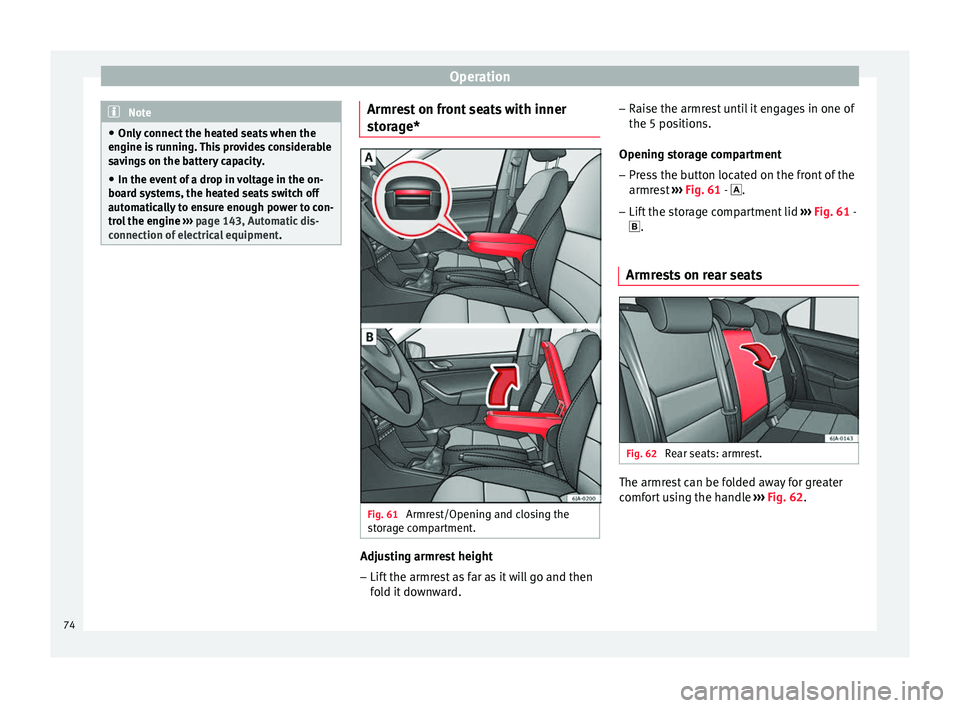
Fig. 61
Armrest/Opening and closing the
storage compartment. Adjusting armrest height
– Lift the armrest as far as it will go and then
fold it downward. –
Raise the armrest until it engages in one of
the 5 positions.
Opening storage compartment
– Press the button located on the front of the
armrest ››› Fig. 61 -
.
– Lif
t the storage compartment lid ››› Fig. 61 -
.
Armre
sts on rear seats Fig. 62
Rear seats: armrest. The armrest can be folded away for greater
comfort using the handle
››› Fig. 62 .
74
Page 81 of 200

Transport and practical equipment
WARNING
Never put flammable materials in the ashtray.
Risk of fire! CAUTION
Never hold onto the ashtray by the lid when
removing it. Risk of breaking the lid. 12 Volt power socket
Fig. 71
Centre console: 12 V power socket. The 12 V power socket is located at the front
of the centre console
›››
Fig. 71 .
U s
ing the power socket
– Open the cover or remove the cigarette
lighter concealing the socket.
– Insert the plug of the electrical appliance
into the socket. Additional information
››› page 122, Acces-
sories and modifications to the vehicle . WARNING
● Improper use of the sockets or electrical
appliances can cause a fire and lead to burns
and other serious injuries.
● Never leave children unsupervised in the
vehicle. The 12 V power socket is also func-
tional when the ignition is switched off and
the key is removed.
● Should the connected appliance overheat,
immediately switch it off and disconnect it
from the socket. CAUTION
● The 12 V power socket can only be used to
power appliances with a power rating of up to
120 watts.
● Never exceed the maximum permitted pow-
er, as this could cause damage to the vehicle
electrical installation.
● With the engine switched off, however, the
vehicle battery will drain. Risk of discharging
the battery!
● Only use suitable plugs so as not to dam-
age the power socket.
● Only use appliances that have been tested
for electromagnetic compatibility in compli-
ance with current regulations.
● Before switching the ignition on or off, un-
plug the appliances from the power socket to protect them from any damage caused by
fluctuations in voltage.
● Follow the instructions for use of connected
appliances! Multimedia compartment
Fig. 72
Front centre console: multimedia
compartment. The multimedia compartment is in the stor-
age compartment of the front centre console
››› Fig. 72 .
The c omp
artment can be used to hold mobile
phones, mp3 players or similar devices. WARNING
Never use the multimedia compartment as an
ashtray or to store flammable materials. Risk
of fire! 79
Technical specifications
Advice
Operation
Safety
Page 89 of 200

Heating and air conditioning
Heating and air conditioning Heating and air conditioning General notes The power of the heating depends on the
temperature of the coolant. Therefore, maxi-
mum power is only obtained when the en-
gine has reached operating temperature.
The temperature and humidity of the air in-
side the vehicle decrease when the cooling
system is turned on. This therefore increases
the comfort of all vehicle occupants when
outside temperatures and humidity are high.
It also helps prevent the windows from mist-
ing over during cold periods of the year.
The air recirculation system can be switched
on temporarily to increase the cooling effect.
Keep the air intake slots in front of the wind-
screen clear of ice, snow or leaves to ensure
unimpaired heating and cooling.
When the air conditioning is on,
condensa-
tion can drip from the evaporator in the air
c oo
ling system and form a pool underneath
the vehicle. This is normal and does not indi-
cate a leak! WARNING
● All windows must be clear of ice, snow and
condensation for driving safety. Therefore, make sure you familiarise yourself with the
correct use of heating and ventilation, win-
dow demisting and defrosting and cooling.
●
Never use the air recirculation system for
too long, as it prevents fresh air from enter-
ing the vehicle and used air can cause tired-
ness, reduce your attention span and cause
the windows to mist over. This increases the
risk of an accident. Switch off the air recircu-
lation system as soon as the windows begin
to mist over. Note
● Used air escapes through ventilation slots
in the rear of the luggage compartment.
● Smoking is not recommended while the air
recirculation system is in use, as the smoke
drawn from the interior of the vehicle settles
in the evaporator of the air conditioning sys-
tem. This causes a persistent, unpleasant
smell while the system is running that is
time-consuming and expensive (evaporator
replacement) to eliminate.
● To ensure proper functioning, never cover
the air outlets. Economic use of the air conditioning
system
When the air conditioning is switched on, the
compressor consumes engine power and has
influence on fuel consumption.If the vehicle interior has overheated due to
excessive solar radiation, it is best to open
the windows or doors to allow the hot air to
escape.
While in motion, the air conditioning should
not be switched on if the windows are open.
If the interior temperature can be reached
without switching on the air conditioning, the
fresh air mode should be used.
For the sake of the environment
Saving fuel reduces emissions. Faults
If the air conditioning does not work at out-
side temperatures above +5 °C (+41 °F) then
the system is faulty. This may be due to one
of the following reasons:
● One of the fuses has blown. Check the fuse
and replace if necessary ›››
page 163.
● The air conditioning compressor has
switched off temporarily because of in-
creased engine coolant temperature
››› page 31 .
If
you cannot repair the fault yourself or
where cooling power continues to drop,
switch off the system. Contact a specialised
service.
87
Technical specifications
Advice
Operation
Safety
Page 92 of 200
Operation
Note
● Controls A
››› Fig. 86 ››› page 88, B ,
C and button
1 .
● Air vents 4 ››› page 88.
● We r
ecommend you leave the air vents 3
››› page 88 in the open position. Air recirculation
Air recirculation prevents unpleasant smells,
e.g. when passing through a tunnel or in
queuing traffic, from entering the interior.
Switching on air recirculation mode
– Press button
1
›››
Fig. 86 ›
›
›
page 88
and the lamp in the button will illuminate.
Switching off air recirculation mode
– Press button
1
›››
Fig. 86 ›
›
›
page 88
again and the lamp in the button will
switch off.
If air vent C
›››
Fig. 86 ›
›
›
page 88 is in posi-
tion , air recirculation mode switches off
automatically. Press the button to switch
air recirculation mode back on in this posi-
tion. WARNING
Read and observe the safety warnings ››› in
General notes on page 87. Air conditioning (manual)*
General notes The air cooling system only works if
A/C but-
ton 2
›››
Fig. 87 ›
›
›
page 90 is pressed and
under following conditions:
● The engine is running,
● The outside temperature is above +2 °C
(+36 °F),
● The blower control is in position 1–4.
When the cooling system is on and under cer-
tain conditions, air can be blown from the
vents at a temperature of approximately
+5 °C (+41 °F). In the event of prolonged, ir-
regular distribution of the air flow from the
outlets and significant differences in temper-
ature, e.g. on leaving the vehicle, sensitive
people may catch cold. Note
A visit to the specialised service once a year
is recommended to clean the air conditioning
system. Operation
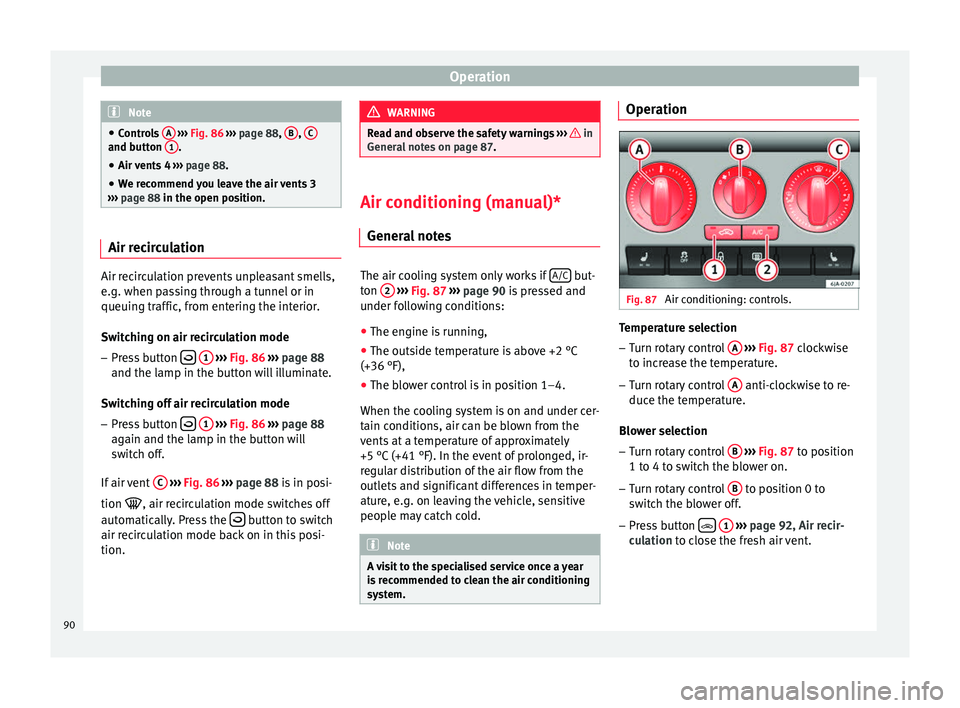
Fig. 87
Air conditioning: controls. Temperature selection
– Turn rotary control A
››› Fig. 87 clockwise
t o inc
rease the temperature.
– Turn rotary control A anti-clockwise to re-
duce the temperature.
Blower selection
– Turn rotary control B
››› Fig. 87 to position
1 t o 4 t
o switch the blower on.
– Turn rotary control B to position 0 to
switch the blower off.
– Press button
1
››› page 92, Air recir-
culation to close the fresh air vent.
90
Page 95 of 200

Heating and air conditioning
Switching on air recirculation mode
– Press button
1
››› Fig. 87
›
›› page 90
and the lamp in the button will illuminate.
Switching off air recirculation mode
– Press button
1
››› Fig. 87
›
›› p
age 90
again and the lamp in the button will
switch off.
If air distribution control C
››› Fig. 87
››› page 90 is in position
, air r
ec
irculation
mode switches off automatically Press the button to switch air recirculation mode
back on in this position. WARNING
Read and observe the safety warnings ››› in
General notes on page 87. Climatronic* (automatic air
conditioning)
General notes Climatronic automatically maintains a com-
fortable temperature. To do so, it automati- cally regulates the supplied air temperature
and the blower and air distribution levels.
The system also allows for the effect of sun-
light, so there is no need for manual adjust-
ment.
Automatic operations
›
›
› page 94
guarantee maximum comfort any time of
year.
Climatronic description
Cooling only works if the following conditions
are met:
● The engine is running
● the outside temperature is above +2 °C
(+36 °F);
● A/C
18
››› Fig. 88
›
›› p
age 94 switched
on.
In order to ensure engines subject to heavy
loads are cooled, the air conditioning com-
pressor is switched off in the event of high
coolant temperatures.
Recommended setting for all seasons of the
year
● Set the required temperature. We recom-
mend +22 °C (72 °F). ●
Press the AUTO button
12
››› Fig. 88
››› page 94 .
● Adju s
t vents 3 ››› p
age 88 and 4 so that the
air flow is directed slightly upwards.
Change between degrees Centigrade and
degrees Fahrenheit
Keep the AUTO and
A/C
››› Fig. 88
››› page 94 buttons pressed down at the
s ame time.
The data is displayed on the
screen in the units required. Note
A visit to the specialised service once a year
is recommended to clean the Climatronic sys-
tem. 93
Technical specifications
Advice
Operation
Safety