lock Seat Toledo 2014 User Guide
[x] Cancel search | Manufacturer: SEAT, Model Year: 2014, Model line: Toledo, Model: Seat Toledo 2014Pages: 200, PDF Size: 4.37 MB
Page 35 of 200
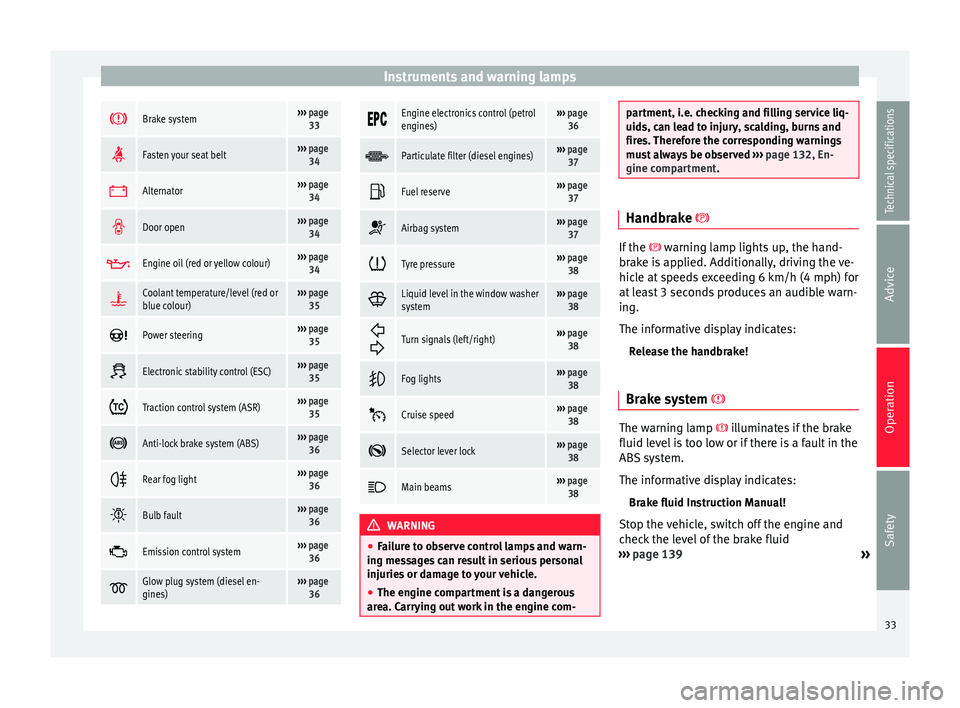
Instruments and warning lamps
Brake system›››
page
33
Fasten your seat belt›››
page
34
Alternator›››
page
34
Door open›››
page
34
Engine oil (red or yellow colour)›››
page
34
Coolant temperature/level (red or
blue colour)›››
page
35
Power steering›››
page
35
Electronic stability control (ESC)›››
page
35
Traction control system (ASR)›››
page
35
Anti-lock brake system (ABS)›››
page
36
Rear fog light›››
page
36
Bulb fault›››
page
36
Emission control system›››
page
36
Glow plug system (diesel en-
gines)›››
page
36
Engine electronics control (petrol
engines)›››
page
36
Particulate filter (diesel engines)›››
page
37
Fuel reserve›››
page
37
Airbag system›››
page
37
Tyre pressure›››
page
38
Liquid level in the window washer
system›››
page
38
Turn signals (left/right)››› page
38
Fog lights›››
page
38
Cruise speed›››
page
38
Selector lever lock›››
page
38
Main beams›››
page
38 WARNING
● Failure to observe control lamps and warn-
ing messages can result in serious personal
injuries or damage to your vehicle.
● The engine compartment is a dangerous
area. Carrying out work in the engine com- partment, i.e. checking and filling service liq-
uids, can lead to injury, scalding, burns and
fires. Therefore the corresponding warnings
must always be observed
››› page 132, En-
gine compartment. Handbrake
If the
warning lamp lights up, the hand-
br ak
e is applied. Additionally, driving the ve-
hicle at speeds exceeding 6 km/h (4 mph) for
at least 3 seconds produces an audible warn-
ing.
The informative display indicates:
Release the handbrake!
Brake system The warning lamp
illuminates if the brake
fluid level is too low or if there is a fault in the
ABS system.
The informative display indicates:
Brake fluid Instruction Manual!
Stop the vehicle, switch off the engine and
check the level of the brake fluid
››› page 139
»
33
Technical specifications
Advice
Operation
Safety
Page 36 of 200
Operation
WARNING
● The following indications must be taken in-
to account when opening the engine com-
partment to check the brake fluid
››› page 132, Engine compartment.
● If the w
arning lamp illuminates together
with the warning lamp ››› p
age 36, Anti-
lock system (ABS) , , stop the vehicle!
Go t o a t
echnical service.
● A fault in the brake system or in the Anti-
lock brake system (ABS) can lead to longer
braking distances – Risk of accident! Fastening seat belts
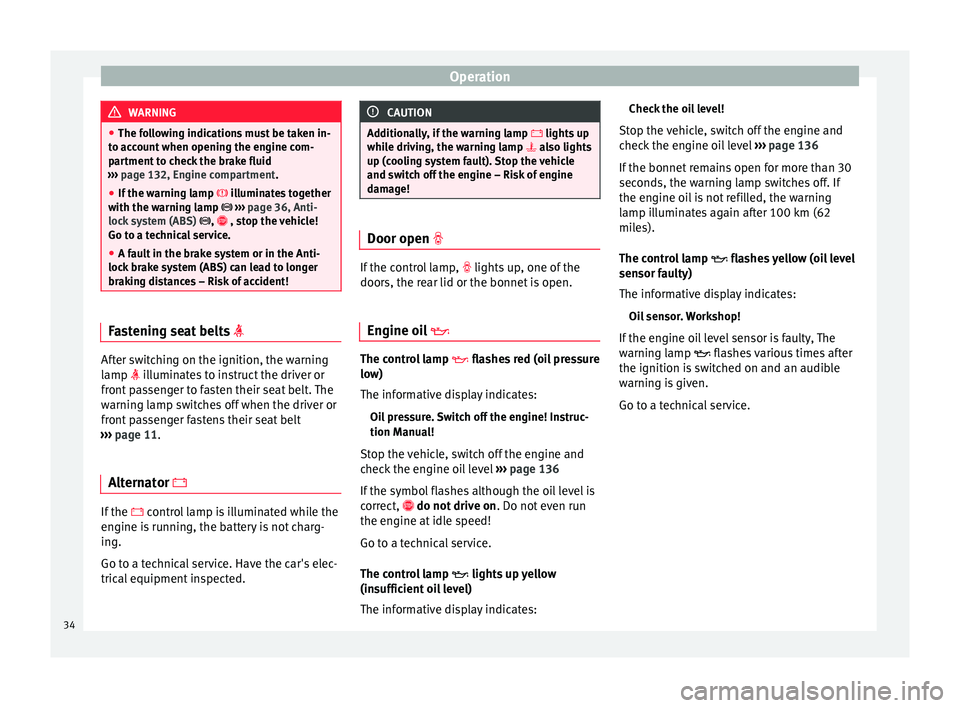
After switching on the ignition, the warning
lamp illuminates to instruct the driver or
front passenger to fasten their seat belt. The
warning lamp switches off when the driver or
front passenger fastens their seat belt
››› page 11 .
A lt
ernator If the
control lamp is illuminated while the
engine is running, the battery is not charg-
ing.
Go to a technical service. Have the car's elec-
trical equipment inspected. CAUTION
Additionally, if the warning lamp lights up
whi l
e driving, the warning lamp also lights
up (cooling system fault). Stop the vehicle
and switch off the engine – Risk of engine
damage! Door open
If the control lamp,
lights up, one of the
doors, the rear lid or the bonnet is open.
Engine oil The control lamp
flashes red (oil pressure
low)
The informative display indicates:
Oil pressure. Switch off the engine! Instruc-
tion Manual!
Stop the vehicle, switch off the engine and
check the engine oil level ›››
page 136
If the symbol flashes although the oil level is
correct, do not drive on
. Do not
ev
en run
the engine at idle speed!
Go to a technical service.
The control lamp lights up yellow
(insufficient oil level)
The informative display indicates: Check the oil level!
Stop the vehicle, switch off the engine and
check the engine oil level ››› page 136
If the bonnet remains open for more than 30
seconds, the warning lamp switches off. If
the engine oil is not refilled, the warning
lamp illuminates again after 100 km (62
miles).
The control lamp flashes yellow (oil level
sensor f
aulty)
The informative display indicates:
Oil sensor. Workshop!
If the engine oil level sensor is faulty, The
warning lamp flashes various times after
the ignition is switched on and an audible
warning is given.
Go to a technical service.
34
Page 38 of 200

Operation
and turn it on again. Upon switching on the
ignition again, if the warning lamp has
switched off, this means the TCS is function-
ing correctly again.
If the warning lamp remains illuminated,
there is a fault in the TCS.
The informative display indicates:
Report No.: Traction control system (ASR)
Go to a technical service.
Further information ››› page 109, Traction
control system (ASR) .
Anti-lock system (ABS) If the
warning lamp is illuminated, there is
a fault in the ABS.
The informative display indicates:
ABS fault
The brake system alone is operational in the
vehicle, without ABS.
Go to a technical service. WARNING
● If the warning lamp illuminates together
w ith the ›
›› page 33 warning lamp, ,
st
op the vehicle! Go to a technical service. ●
A fault in the Anti-lock brake system (ABS)
can lead to longer braking distances – Risk of
accident! Rear fog light
The control lamp
lights up when the rear
fog light is switched on ››› page 64.
Bulb fault The control lamp
lights up when there is a
fault in a bulb:
● for several seconds after switching on the
ignition,
● When connecting a faulty bulb
This is indicated on the informative display,
e.g.: Check the front right dipped beam headlight! Note
The rear side lights and number plate light
contain several bulbs. The control lamp
lights up only when there is a fault in all the
number plate bulbs or side light bulbs (of a
combined tail light). Therefore it is advisable
to regularly check the bulb operation. Emission control system
If the warning lamp
is lit up, there is a
fault in the emission system. The engine con-
trol unit allows driving to continue in an
emergency program.
Go to a technical service.
Preheating (diesel engines) When you switch on the ignition, the warning
lamp lights up. The engine can be started
straight away when the lamp switches off.
If the
warning lamp
does not illuminate or
if it
does not switch off , there is a fault in the
glow plug system.
If the warning lamp starts to flash
while
driving, there is a fault in the engine power
control electronic system. The engine control
unit allows driving to continue in an emer-
gency program.
Go to a technical service.
Engine management system
(petrol engines) If the
warning lamp is illuminated, there is
a fault in the engine management system.
The engine control unit allows driving to con-
tinue in an emergency program.
36
Page 40 of 200
Operation
If the front passenger airbag has been disa-
bled with the airbag switch located in the
storage compartment side:
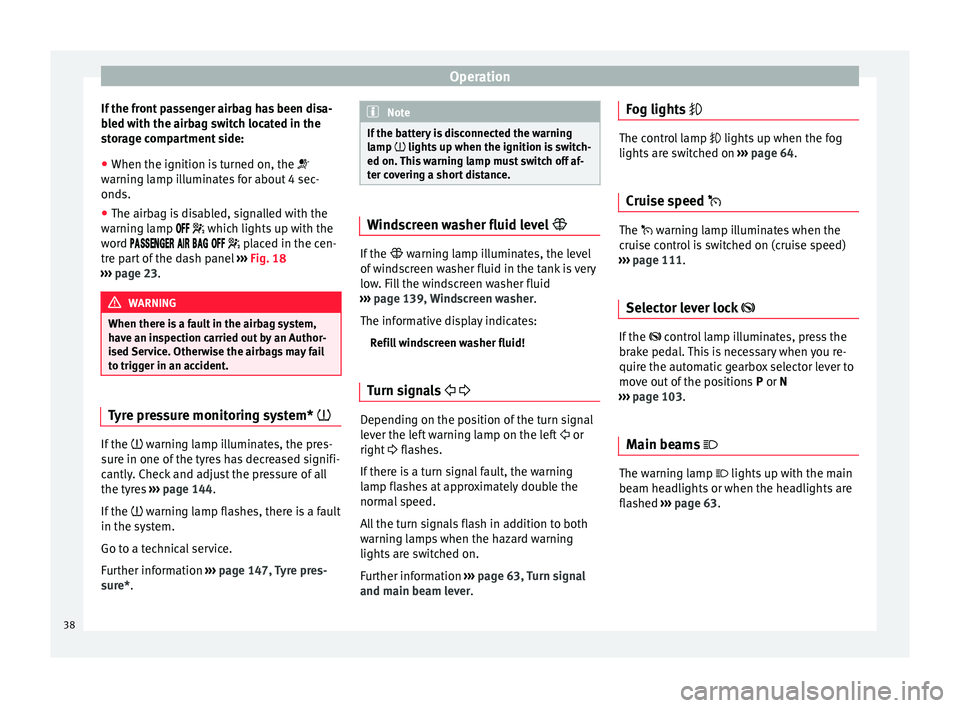
● When the ignition is turned on, the
warning lamp illuminates for about 4 sec-
onds.
● The airbag is disabled, signalled with the
warning lamp
which lights up with the
word placed in the cen-
tre part of the dash panel ››› Fig. 18
››› page 23. WARNING
When there is a fault in the airbag system,
have an inspection carried out by an Author-
ised Service. Otherwise the airbags may fail
to trigger in an accident. Tyre pressure monitoring system*
If the
warning lamp illuminates, the pres-
sure in one of the tyres has decreased signifi-
cantly. Check and adjust the pressure of all
the tyres ›››
page 144 .
If the
warning lamp flashes, there is a fault
in the system.
Go to a technical service.
Further information ›››
page 147, Tyre pres-
sure*
. Note
If the battery is disconnected the warning
lamp lights up when the ignition is switch-
ed on.
This warning lamp must switch off af-
ter covering a short distance. Windscreen washer fluid level
If the
warning lamp illuminates, the level
of w
indscreen washer fluid in the tank is very
low. Fill the windscreen washer fluid
››› page 139, Windscreen washer.
The informative display indicates: Refill windscreen washer fluid!
Turn signals Depending on the position of the turn signal
lever the left warning lamp on the left
or
right flashes.
If there is a turn signal fault, the warning
lamp flashes at approximately double the
normal speed.
All the turn signals flash in addition to both
warning lamps when the hazard warning
lights are switched on.
Further information ›››
page 63, Turn signal
and main beam lever. Fog lights
The control lamp
lights up when the fog
lights are switched on ››› page 64.
Cruise speed The warning lamp illuminates when the
cruise control is switched on (cruise speed)
››› page 111.
Sel ect
or lever lock If the
control lamp illuminates, press the
brake pedal. This is necessary when you re-
quire the automatic gearbox selector lever to
move out of the positions P or
N
›
›› page 103.
Main be
ams The warning lamp lights up with the main
beam headlights or when the headlights are
flashed
›››
page 63 .38
Page 52 of 200

Operation
The microphone for the voice control is loca-
ted in the headliner and is pointing at the
driver and the front passenger. Therefore, the
driver and the front passenger are the only
persons who can operate the device.
Enter the telephone number
The telephone number can be entered as a
straight row of memorized numbers in se-
quence (the whole number at once) or in
blocks (separated by brief pauses). After
each series of digits (separated by a brief
pause) the system repeats the digits that
have been recognised.
Digits 0 - -9 and symbols +, , #
are allowed.
The sy
stem does not recognise coherent
number combinations such as twenty-three.
Voice control activation
Briefly press button 1
››› Fig. 33 on the
mu ltif
unction steering wheel.
Disabling voice control
If the system is playing a message, end the
message by briefly pressing button 1 ›››
Fig. 33 on the multifunction steering
wheel .
If
the system is waiting for a voice command,
the dialogue may be completed as follows:
● use the CANCEL voice command; ●
briefly press button 1
››› Fig. 33 on the
mu ltif
unction steering wheel.
Basic voice commands
Voice com-
mandAction
HELPAfter this command, the system plays all
the possible commands.
CALL A [XYZ]This command is used to call a contact
in the phone book.
PHONE
BOOKFor example, after this command you
can play the phone book, correct or de-
lete a voice recording for a contact, etc.
CALL LISTList of selected numbers, lost calls, etc.
DIAL NUM-
BERAfter this command you can enter a
phone number to call the desired per-
son.
REDIALAfter this command the system dials the
last number that was selected.
MUSICMusic playback from the mobile phone
or other connected telephone.
OTHER OP-
TIONSAfter this command, the system offers
other commands depending on the con-
text.
SETTINGSSelection for adjusting the Bluetooth ®
,
dialogue, etc.
CANCELThe dialogue ends. Note
● An incoming call will immediately end the
dialogue.
● Voice control is only possible in vehicles
equipped with a multifunction steering wheel
with telephone control (High version). 50
Page 53 of 200

Opening and closing
Multimedia AUX-IN and MDI Inputs Fig. 34
AUX-IN input/MDI input. The operating description is located in the re-
spective Instruction Manuals of the audio
system or the navigation system. AUX-IN Input
The AUX-IN input is located in one of the fol-
lowing places:
● in the centre console between the front
seats ››› Fig. 34 -
;
● abo
ve the storage compartment in the front
centre console ››› Fig. 34 -
;
● in the front panel of the SEAT Media System
2.2 navigation system.
The purpose of the AUX-IN input is to connect
external devices in order to play music (i.e.
iPod ®
or an mp3 player) using the factory-fit-
ted audio system or the navigation system.
MDI Input
The MDI input is located above the storage
compartment in the front centre console
››› Fig. 34 - ;
The MDI input
is composed of the USB and
AUX-IN inputs.
The purpose of the MDI input is to connect
external devices (i.e. iPod ®
, mp3 players or
USB memories) in order to play music using
the audio system or the navigation system.
In order to connect Apple multimedia devices
(such as an iPod ®
/iPhone ®
, etc.) the corre-
sponding adaptor from the SEAT Original Ac-
cessories Catalogue is required. Opening and closing
Remote control General notes The remote control key can
● Lock and unlock the vehicle
● Unlock or open the rear lid
The remote control transmitter and the bat-
teries are integrated in the key. The receiver
is inside the vehicle. The remote control key
has a maximum range of 30 metres. The
range is reduced as the batteries start to lose
power.
The key includes a foldaway part that can be
used to manually lock or unlock the vehicle
and to start the engine.
If a lost key is replaced or the receiver is re-
paired or changed, the remote control key
must be adapted by an authorised SEAT deal-
er. Only then can the remote control key be
used again. Note
● The remote control is automatically deacti-
vated when the ignition is switched on.
● The remote control function may be tempo-
rarily limited by interference from other » 51
Technical specifications
Advice
Operation
Safety
Page 54 of 200
Operation
transmitters near the vehicle that operate on
the same frequency (e.g. mobile phone, tele-
vision transmitter).
● If the central locking system or the anti-
theft alarm only responds to the remote con-
trol at a distance of less than 3 metres, then
the battery must be replaced ››› page 53.
● If the driver door is open, the vehicle can-
not be locked using the remote control. Unlocking and locking the vehicle
Fig. 35
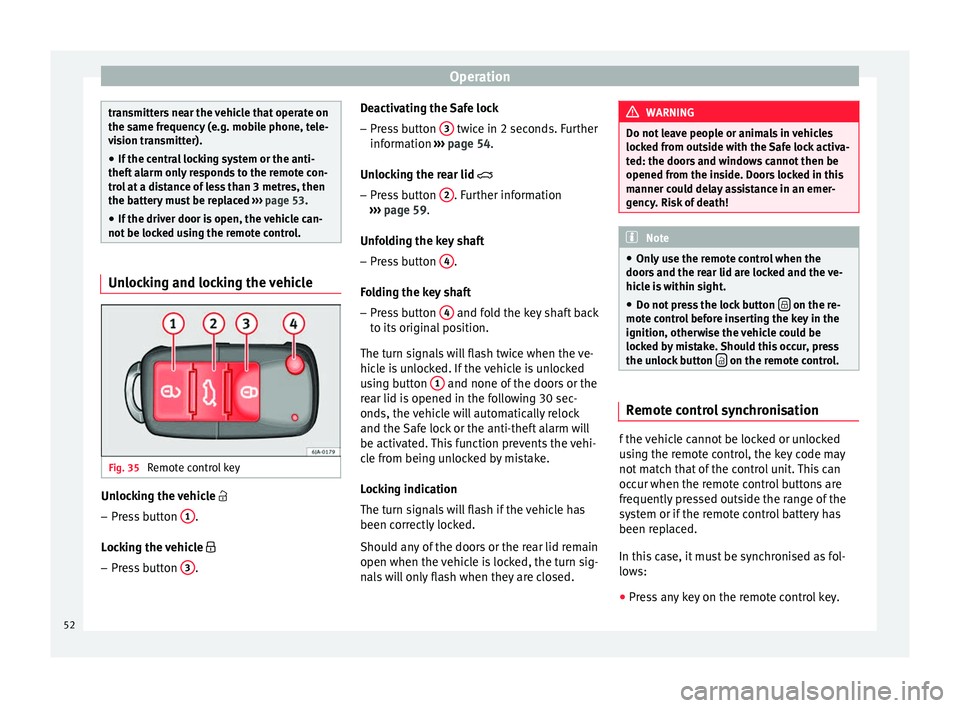
Remote control key Unlocking the vehicle
– Press button 1 .
Locking the vehicle
– Press button 3 . Deactivating the Safe lock
– Press button 3 twice in 2 seconds. Further
information ››› page 54.
Unlocking the rear lid
– Pr e
ss button 2 . Further information
››› page 59 .
Unf o
lding the key shaft
– Press button 4 .
Folding the key shaft
– Press button 4 and fold the key shaft back
to its original position.
The turn signals will flash twice when the ve-
hicle is unlocked. If the vehicle is unlocked
using button 1 and none of the doors or the
rear lid is opened in the following 30 sec-
onds, the vehicle will automatically relock
and the Safe lock or the anti-theft alarm will
be activated. This function prevents the vehi-
cle from being unlocked by mistake.
Locking indication
The turn signals will flash if the vehicle has
been correctly locked.
Should any of the doors or the rear lid remain
open when the vehicle is locked, the turn sig-
nals will only flash when they are closed. WARNING
Do not leave people or animals in vehicles
locked from outside with the Safe lock activa-
ted: the doors and windows cannot then be
opened from the inside. Doors locked in this
manner could delay assistance in an emer-
gency. Risk of death! Note
● Only use the remote control when the
doors and the rear lid are locked and the ve-
hicle is within sight.
● Do not press the lock button on the re-
mote control before inserting the key in the
ignition, otherwise the vehicle could be
locked by mistake. Should this occur, press
the unlock button on the remote control.
Remote control synchronisation
f the vehicle cannot be locked or unlocked
using the remote control, the key code may
not match that of the control unit. This can
occur when the remote control buttons are
frequently pressed outside the range of the
system or if the remote control battery has
been replaced.
In this case, it must be synchronised as fol-
lows:
● Press any key on the remote control key.
52
Page 55 of 200

Opening and closing
● Open the door using the key within the
next minute.
Keys General notes Fig. 36
Key with remote control/Key without
remote control. Two keys are always supplied with the vehi-
cle. Depending on the model version, your
car may include keys without remote control
››› Fig. 36
or w
ith remote control › ›› Fig. 36
. WARNING
● Never leave the key inside whenever you
leave the vehicle - even if only for a moment.
This is particularly important if children are
to remain in the vehicle. Children might start
the engine or some other electrical compo-
nent, e.g. electric windows. Risk of injury!
● Wait until the vehicle has completely stop-
ped before taking the key out of the ignition.
Otherwise the steering wheel may lock sud-
denly. Risk of accident! CAUTION
● Each key contains electronic components
and must, therefore, be protected from damp-
ness and strong vibrations.
● Keep the grooves in the key shaft clean.
Any dirt (fibre from clothing, dust, etc.) has a
negative impact on locks, ignition, etc. Note
Should a key be lost, request a duplicate key
from an Authorised SEAT dealer. Replacing the battery in the remote
control key
Fig. 37
Remote control key: removing the cov-
er/taking out the battery. Each remote control key contains a battery
that is fitted below the cover
A
››› Fig. 37 . If
the b att
ery is flat, the red control lamp
››› Fig. 36
will not light up when one of the
buttons is pressed. We recommend replacing
the battery at a SEAT dealer. You can replace
the battery yourself as follows. »
53
Technical specifications
Advice
Operation
Safety
Page 56 of 200

Operation
– Unfold the key shaft.
– Remove the battery cover by pressing down
with your thumb or a flat screwdriver in the
location of the arrows 1
››› Fig. 37 .
– Remo
ve the flat battery from the key by
pressing downwards in the location of the
arrows 2 .
– Insert the new battery. Check that the “+”
symbol on the battery is facing upwards.
The correct polarity is indicated on the bat-
tery cover.
– Replace the battery cover and press down
until it clicks. CAUTION
● The correct polarity must always be ob-
served when replacing the battery.
● The new battery must be of the same type
as the original. For the sake of the environment
Dispose of the used battery in line with na-
tional legislation. Note
If it is not possible to unlock or lock the vehi-
cle with the remote control key once the bat- tery has been replaced, it will need to be re-
synchronised
››› page 52. Central locking system
General notes All of the doors, the boot lid and the fuel cap
fl ap w
ill1)
unlock at the same time when the
central locking system is used.
Warning lamp on the driver door
Once the doors are locked, the warning lamp
will flash quickly for 2 seconds and then at a
slower rate.
If the vehicle is locked with Safe lock engag-
ed ››› page 55, the warning lamp on the
driv er door w
ill flash quickly for 2 seconds
before switching off for 30 seconds and then
flashing at a slower rate.
If the warning lamp flashes quickly for 2 sec-
onds and then remains switched on before
flashing at a slower rate after 30 seconds,
there is a fault in the interior monitor and
tow-away protection system ››› page 58. Go
to a technical service. Individual settings Unlocking single doors
This optional function unlocks the driver door
only. The other doors remain locked and are
only unlocked when the next command is giv-
en (unlock).
Automatic unlock and lock
The doors and the rear lid are locked auto-
matically when the vehicle reaches a speed
of about 15 km/h (9 mph).
The doors unlock automatically when the key
is removed from the ignition. Additionally,
the driver or front passenger can unlock the
doors by pressing the
›››
page 56 central
lock button or by pulling the front door han-
dle. WARNING
Locking the doors prevents intruders from
getting into the car, e.g. while waiting at in-
tersections. However, it can also delay assis-
tance in the event of an accident. Risk of
death! Note
● Activation of the single door setting can be
requested at your SEAT dealer. 1)
Valid for vehicles with a keyless fuel tank cap.
54
Page 57 of 200

Opening and closing
●
In the event of an accident in which the air-
bags deploy, the doors will be automatically
unlocked for easier access and assistance.
● If the central locking system should fail to
work at any time, only the driver door can be
locked or unlocked using the key
››› page 55. All other doors and the boot
h at
ch can be operated manually.
– Manual release ››› page 161.
– Manual release of the rear lid
››› page 161. Unlocking the vehicle with the key
Fig. 38
Key positions during vehicle locking
and unlocking. –
Turn the key in the driver door in the for-
ward driving direction to its unlock position
A
››› Fig. 38 .
– Pu
ll the handle and open the door.
● All doors (driver door only on vehicles with
anti-theft alarm) are unlocked.
● The rear lid is unlocked.
● The fuel tank flap is unlocked 1)
.
● The courtesy lights switch on.
● The Safe lock is deactivated.
● The driver door warning lamp stops flash-
ing (on vehicles not equipped with an anti-
theft system) ››› page 57. Note
If the vehicle is equipped with an anti-theft
alarm system, you have 15 seconds from the
time the door is opened to insert the key in
the ignition and start the vehicle. If, during
these 15 seconds, the vehicle is not started,
the alarm is triggered. Locking the vehicle with the key
–
Turn the key in the driver door lock cylinder
in the reverse direction to its lock position
B
›››
Fig. 38 . ●
The door s, the boot
lid and the fuel tank
flap 1)
will be locked.
● The courtesy lights switch off.
● The Safe lock is immediately activated.
● Warning lamp on the driver door starts to
flash. Note
The vehicle doors cannot be locked if the
driver door is open. Safe Lock
The central locking system is equipped with a
Safe lock
. If the vehicle is closed from out-
s ide, the door loc
ks will automatically lock.
The warning lamp on the driver door will
flash quickly for about 2 seconds and then at
a slower rate. It is not possible to open any of
the doors from the inside or outside using
the handle. This limits the possibility of in-
truders getting into the vehicle.
The Safe lock can be deactivated by pressing
the lock button twice in less than 2 seconds.
If Safe lock is out of service, the control lamp
on the driver door will flash quickly for about
2 seconds before switching off for 30 sec-
onds and then flashing at a slower rate. »1)
Valid for vehicles with a keyless fuel tank cap.
55
Technical specifications
Advice
Operation
Safety