lock Seat Toledo 2014 Service Manual
[x] Cancel search | Manufacturer: SEAT, Model Year: 2014, Model line: Toledo, Model: Seat Toledo 2014Pages: 200, PDF Size: 4.37 MB
Page 105 of 200

Driving
The manual gearbox can be activated when
the vehicle is either moving or stationary.
When accelerating, the gearbox automatical-
ly shifts up shortly before the maximum en-
gine speed is reached.
On shifting up, the gear is only engaged
when there is no risk of engine damage.
When the accelerator pedal is pressed down
to the kick-down zone, the gearbox will shift
down in line with the road speed and engine
speed. Note
The kick-down function is also available in
manual shift mode. Selector lever lock
Automatic selector lever lock
The selector lever is locked in the positions P
and N
when the ignition is on. Press down on
the br
ake to unlock it. Remember, if the se-
lector lever is in positions P
and N then the
warning lamp will light up on the general in-
strument panel ›››
page 38.
When the selector lever merely moves
through position
N (e.g. when moved from R
to D), the lever lock is not applied. This makes it possible, for example, to rock a
stuck vehicle backwards and forwards. The
lock is only applied if the brake is not press-
ed and the selector lever is moved to position
N
for more than 2 seconds.
The selector lever only locks when the is vehi-
cle stationary or driving at a speed lower
than 5 km/h (3 mph). At a higher speed, it
automatically disconnects in the N position.
Interloc
k button
The interlock button on the selector lever
knob prevents the driver from inadvertently
engaging a gear. Press the button to unlock
the selector lever.
Safety interlock for ignition key 1)
After switching off the ignition, you can only
remove the ignition key if the selector lever is
in position P. When the ignition key is re-
mo
ved, the selector lever is locked in posi-
tion
P.
Driving programmes Your vehicle is equipped with an electronical-
ly-controlled automatic gearbox. Shifting up
or down depends on the programme selec-
ted. For a
calm driving style, the gearbox uses the
mo s
t economic programme. The gearbox
shifts up as quickly as possible and shifts
down as late as possible, thus increasing
driving economy.
With a
sporty driving style , characterised by
sudden acceleration, heavy acceleration,
speeds that often increase and decrease and
maximum speed, the gearbox adapts to this
driving style when the accelerator is pressed
down fully (kick-down) by shifting down as
quickly as possible and can even shift down
by several gears at once.
Selecting the best driving programmes is an
endless job. Regardless of this, the driver can
also make the gearbox switch to a more dy-
namic gear shift programme by pressing the
accelerator quickly. This makes the automatic
gearbox shift down into a lower gear than the
one that would normally apply to the current
speed, allowing for more rapid acceleration
(e.g. to overtake another vehicle) without
having to press the accelerator until the kick-
down position. On shifting up in a corre-
sponding driving style, the gearbox returns to
the original programme.
When driving along mountain roads, the
gearbox adapts to the gradients. This avoids
having to frequently change gears when driv-
ing uphill. In Tiptronic mode, it is possible to »1)
Valid only for certain countries.
103
Technical specifications
Advice
Operation
Safety
Page 111 of 200

Driver assistance systems
The
warning lamp on the general instru-
ment
panel starts flashing when the system
is working.
The
stability (ESC) system includes the fol-
lowing systems:
● Anti-lock brake system (ABS),
● Traction control system (TCS),
● Electronic differential lock (EDL),
● Hydraulic brake assist system (HBA),
● Hill hold control (HHC).
The ESC system cannot be switched on. The
››› Fig. 95 button can only be used to
sw it
ch off the TCS system. The warning
lamp lights up on the general instrument
panel if the TCS system is switched off.
The ASR should be switched on at all times.
Only under certain circumstances should the
system be switched off, e.g.
● driving with chains,
● driving in deep snow or on very soft surfa-
ces,
● During the “swinging movement” required
to remove a stuck vehicle
Switch the ASR back on as soon as possible. Brake assist system (HBA)*
The HBA system is activated when you press
down on the brake pedal suddenly. It increa-
ses braking power, helping to reduce braking
distances. To reduce braking distance as
much as possible, keep the brake pedal
pressed down firmly until the vehicle comes
to a standstill.
With the help of this system, the ABS is acti-
vated more quickly and more efficiently.
The brake assist function is deactivated auto-
matically when the brake pedal is released.
Hill hold control (HHC)*
The HHC system makes it easier to start the
vehicle on hills. The system maintains the
brake pressure created by pressing down on
the brake pedal for 2 seconds after it has
been released. Your foot can be removed
from the brake pedal and you can use the ac-
celerator pedal and move away on a hill with-
out having to use the handbrake. The brake
pressure drops as the accelerator pedal is
pressed. If the vehicle cannot be started, it
will start to move backwards after 2 seconds.
The HHC is activated on gradients of over
5%, if the driver door is closed. It only works
for starting on hills, moving both forward and
in reverse. It is not activated during start-up
down hill.
Anti-lock system (ABS) The ABS system prevents the wheels locking
during braking. This helps the driver keep
control of the vehicle.
The driver is made aware of ABS assistance
by the pulsating of the brake pedal
and a
characteristic noise.
Keep the brake pedal pressed down while the
ABS is working. The ABS will switch off when
the brake pedal is released. Never brake in-
termittently while the ABS is working!
Traction control system (ASR) If the wheels start to slip, the TCS adapts the
engine speed to the driving conditions. Par-
ticularly in unfavourable conditions, the TCS
helps starting, accelerating and hill starts.
The TCS
1)
warning lamp on the general
dash panel flashes when the system is work-
ing. 1)
Valid for vehicles not fitted with the stability con-
trol system (ESC). 109
Technical specifications
Advice
Operation
Safety
Page 112 of 200
Operation
Electronic differential lock If one of the wheels starts to skid, the EDL
brakes that wheel, transmitting the driving
force to the other wheels. This increases ve-
hicle stability and improves driving stability.
To prevent the disc brake of the braking
wheel from overheating, the EDL cuts out au-
tomatically if subjected to excessive loads.
The vehicle will continue to function normally
without EDL. The EDL will switch on again au-
tomatically when the brake has cooled down.
Parking aid* Functioning Fig. 96
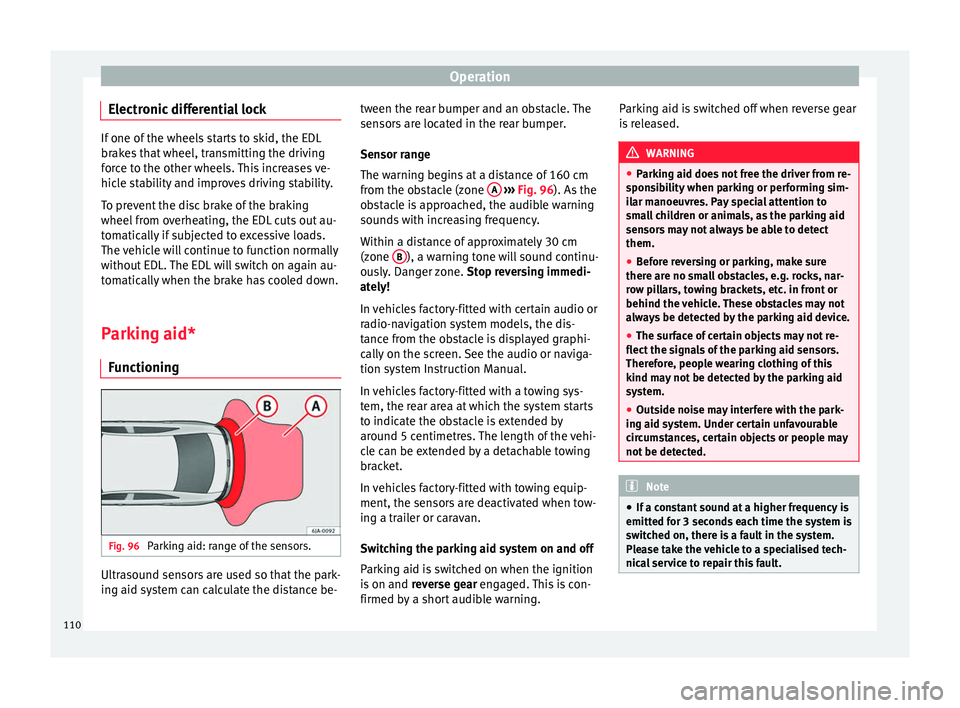
Parking aid: range of the sensors. Ultrasound sensors are used so that the park-
ing aid system can calculate the distance be- tween the rear bumper and an obstacle. The
sensors are located in the rear bumper.
Sensor range
The warning begins at a distance of 160 cm
from the obstacle (zone
A
››› Fig. 96 ). As the
o b
stacle is approached, the audible warning
sounds with increasing frequency.
Within a distance of approximately 30 cm
(zone B ), a warning tone will sound continu-
ously. Danger zone. Stop reversing immedi-
ately!
In vehicles factory-fitted with certain audio or
radio-navigation system models, the dis-
tance from the obstacle is displayed graphi-
cally on the screen. See the audio or naviga-
tion system Instruction Manual.
In vehicles factory-fitted with a towing sys-
tem, the rear area at which the system starts
to indicate the obstacle is extended by
around 5 centimetres. The length of the vehi-
cle can be extended by a detachable towing
bracket.
In vehicles factory-fitted with towing equip-
ment, the sensors are deactivated when tow-
ing a trailer or caravan.
Switching the parking aid system on and off
Parking aid is switched on when the ignition
is on and reverse gear engaged. This is con-
firmed by a short audible warning. Parking aid is switched off when reverse gear
is released. WARNING
● Parking aid does not free the driver from re-
sponsibility when parking or performing sim-
ilar manoeuvres. Pay special attention to
small children or animals, as the parking aid
sensors may not always be able to detect
them.
● Before reversing or parking, make sure
there are no small obstacles, e.g. rocks, nar-
row pillars, towing brackets, etc. in front or
behind the vehicle. These obstacles may not
always be detected by the parking aid device.
● The surface of certain objects may not re-
flect the signals of the parking aid sensors.
Therefore, people wearing clothing of this
kind may not be detected by the parking aid
system.
● Outside noise may interfere with the park-
ing aid system. Under certain unfavourable
circumstances, certain objects or people may
not be detected. Note
● If a constant sound at a higher frequency is
emitted for 3 seconds each time the system is
switched on, there is a fault in the system.
Please take the vehicle to a specialised tech-
nical service to repair this fault. 110
Page 117 of 200

Towing bracket device
altitude, this also reduces climbing ability,
which requires a reduction of the weight of
the vehicle with a trailer by 10% for every
1000 m increase in altitude. The weight of
the assembly is calculated by adding the ve-
hicle weight (loaded) to the trailer weight
(loaded). Always drive with special care when
towing a trailer.
The towed load and support load information
that is displayed on the towing bracket man-
ufacturers label are only values for the verifi-
cation of the device. The correct figures for
your specific vehicle, which are usually lower
than these figures, are given in the documen-
tation of your vehicle. WARNING
● Exceeding the maximum established load
per axle and the maximum towing bracket
load in addition to the maximum permitted
load or the load of the vehicle + trailer as-
sembly can cause accidents and serious inju-
ries.
● A sliding load can considerably affect the
stability and safety of the vehicle + trailer as-
sembly, resulting in accidents and serious in-
juries. Towing a trailer
Exterior mirrors
Check whether you can see enough of the
road behind the trailer with the standard rear
vision mirrors. If this is not the case, you
should have additional exterior mirrors fitted.
Observe the relevant statutory requirements
of the country you are in.
Headlights
Before starting a journey, also check the
headlight beam settings with the trailer
hitched up. Adjust the headlight range set-
tings if necessary
›››
page 62, Range control
of main lights .
Driving speed
For your own safety do not drive faster than
the maximum permitted speed indicated on
the trailer.
At all times, immediately reduce speed if you
detect the slightest swaying movement of the
trailer. Never try to “return the trailer to a
straight position” by accelerating.
Brakes
Brake in due course! If the trailer has an over-
run brake , apply the brakes gently at first and
then, firm ly
. This will prevent the jerking that
can be caused by locking of trailer wheels.
Change to a lower gear in good time before descending a slope in order to take advant-
age of the engine brake.
The trailer is incorporated into the vehicle's
anti-theft alarm system:
● When the vehicle has a factory-fitted anti-
theft alarm and a towing bracket.
● When the trailer is electrically connected to
the vehicle via the towing bracket socket.
● When the vehicle electrical device and the
towing bracket are operational.
● When the vehicle is locked and the vehi-
cle's anti-theft alarm device is activated.
Once the electrical connection is interrupted
with the vehicle trailer locked, the alarm
sounds.
Always switch off the vehicle anti-theft alarm
device before connecting or disconnecting a
trailer. The vehicle anti-theft alarm device
could cause the alarm to sound ››› page 57,
Anti-theft alarm system*.
Engine overheating
In the event that the coolant temperature
gauge needle moves to the right section of
the scale or to the red area, immediately re-
duce speed. If the control lamp flashes on
the general instrument panel, stop the vehi-
cle and switch off the engine. Wait several
minutes and check the coolant level in the
tank ››› page 138
.
»
115
Technical specifications
Advice
Operation
Safety
Page 119 of 200

Towing bracket device
Description Fig. 99
Towing bracket device support for
hitching/ball-headed bar. The ball-headed bar is detachable. It is loca-
ted in the spare wheel compartment or in the
spare wheel compartment in the boot
››› page 150, Vehicle tool kit*.
Key to ››› Fig. 99
13-pin socket
Safety flange
1 2 Clamping bush
Clamping bush cap
Ball head cover
Ball-headed bar
Locking balls
Centred
Red marking on the manual regulator
Manual regulator
Key
Key slot cover
Red marking on the manual regulator
White marking on the ball-headed bar
Note
Contact an Authorised Service Partner if you
lose your key. 3
4
5
6
7
8
9
10
11
12
13
14 Placing in service position
Fig. 100
Placing in service position.
» 117Technical specifications
Advice
Operation
Safety
Page 120 of 200
Operation
Fig. 101
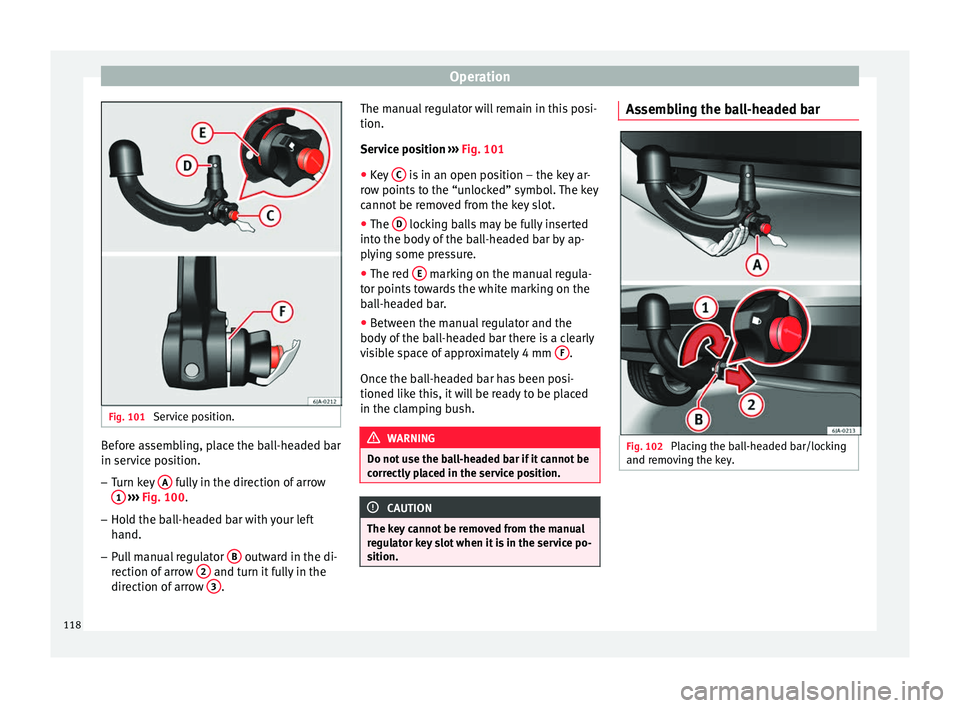
Service position. Before assembling, place the ball-headed bar
in service position.
–
Turn key A fully in the direction of arrow
1
››› Fig. 100 .
– Ho l
d the ball-headed bar with your left
hand.
– Pull manual regulator B outward in the di-
rection of arrow 2 and turn it fully in the
direction of arrow 3 .The manual regulator will remain in this posi-
tion.
Service position
› ››
Fig. 101
● K
ey C is in an open position – the key ar-
row points to the “unlocked” symbol. The key
cannot be removed from the key slot.
● The D locking balls may be fully inserted
into the body of the ball-headed bar by ap-
plying some pressure.
● The red E marking on the manual regula-
tor points towards the white marking on the
ball-headed bar.
● Between the manual regulator and the
body of the ball-headed bar there is a clearly
visible space of approximately 4 mm F .
Once the ball-headed bar has been posi-
tioned like this, it will be ready to be placed
in the clamping bush. WARNING
Do not use the ball-headed bar if it cannot be
correctly placed in the service position. CAUTION
The key cannot be removed from the manual
regulator key slot when it is in the service po-
sition. Assembling the ball-headed bar
Fig. 102
Placing the ball-headed bar/locking
and removing the key. 118
Page 121 of 200

Towing bracket device
Fig. 103
Placing the key slot cover. –
Remove the cap from the clamping bush 4›››
Fig. 99 by pulling downwards.
– Plac
e the ball-headed bar in the service po-
sition ››› page 117.
– Hol
d the ball-headed bar from underneath
››› Fig. 102
and push it into the clamping
bush as far as possible until you hear it
click into place ››› .
The manual regulator A
automatically turns
in the op po
site direction, adjusting to the
ball-headed bar ››› .
– Switch off the manual regulator lock with
key B by turning the key fully to the right
in the direction of arrow 1 – the arrow in
the key displays the “locked” symbol.
– Remove the key in the direction of arrow
2 .
– Place cover C over the manual regulator
lock in the direction of arrow 3
››› Fig. 103 .–
Verif
y the correct placement of the ball-
headed bar ››› page 119. WARNING
● Do not hold the manual regulator with your
hand when fitting the ball-headed bar since
you could sustain injuries to your fingers.
● When mounting the ball-headed bar, al-
ways lock it with a key and remove the key
from the slot.
● The ball-headed bar must not be in the
service position with the key in the key slot.
● If the ball-headed bar is not placed in the
service position you will not be able to place
it in the clamping bush. CAUTION
When removing the key, always place the
cover over the key slot of the manual regula-
tor to prevent dirt from entering. Note
Once removed, place the clamping bush cap
in an appropriate location in the boot. Verification of correct placement
Fig. 104
Correct placement of the ball-head-
ed bar. Before using the ball-headed bar, ensure it is
correctly fitted.
Ensure that:
● The ball-headed bar does not come out of
the clamping bush in a “jerky” manner.
● The red mark A
››› Fig. 104 on the manual
r e
gulator signals toward the white mark on
the ball-headed bar.
● The manual regulator is adjusted to the
ball-headed bar, leaving no space between
them.
● The regulator is locked and the key has
been removed.
● Cover B has been placed over the manual
regulator lock. »
119
Technical specifications
Advice
Operation
Safety
Page 122 of 200
Operation
WARNING
Only use the towing bracket device when the
ball-headed bar is properly fitted! Disassembly of the ball-headed bar
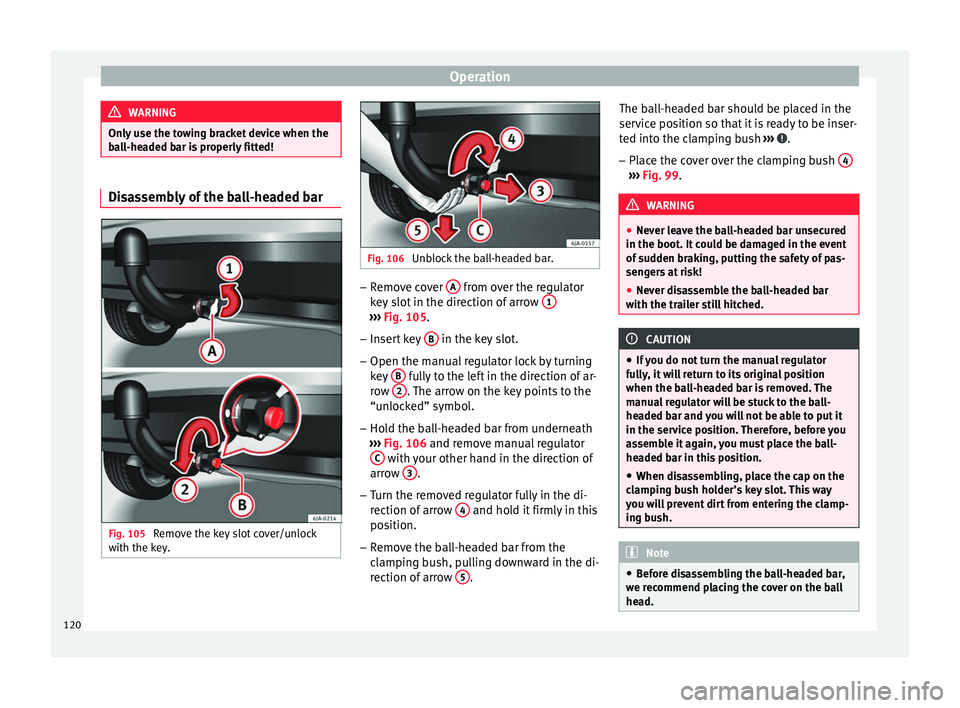
Fig. 105
Remove the key slot cover/unlock
with the key. Fig. 106
Unblock the ball-headed bar. –
Remove cover A from over the regulator
key slot in the direction of arrow 1 ›››
Fig. 105 .
– Inser
t key B in the key slot.
– Open the manual regulator lock by turning
key B fully to the left in the direction of ar-
row 2 . The arrow on the key points to the
“unlocked” symbol.
– Hold the ball-headed bar from underneath
››› Fig. 106 and remove manual regulator
C with your other hand in the direction of
arrow 3 .
– Turn the removed regulator fully in the di-
rection of arrow 4 and hold it firmly in this
position.
– Remove the ball-headed bar from the
clamping bush, pulling downward in the di-
rection of arrow 5 .The ball-headed bar should be placed in the
service position so that it is ready to be inser-
ted into the clamping bush
››› .
– Place the cover over the clamping bush 4 ›››
Fig. 99 . WARNING
● Never leave the ball-headed bar unsecured
in the boot. It could be damaged in the event
of sudden braking, putting the safety of pas-
sengers at risk!
● Never disassemble the ball-headed bar
with the trailer still hitched. CAUTION
● If you do not turn the manual regulator
fully, it will return to its original position
when the ball-headed bar is removed. The
manual regulator will be stuck to the ball-
headed bar and you will not be able to put it
in the service position. Therefore, before you
assemble it again, you must place the ball-
headed bar in this position.
● When disassembling, place the cap on the
clamping bush holder’s key slot. This way
you will prevent dirt from entering the clamp-
ing bush. Note
● Before disassembling the ball-headed bar,
we recommend placing the cover on the ball
head. 120
Page 125 of 200

Care and maintenance
●
The modification of the suspension of the
vehicle wheels, including the use of non-per-
mitted combinations of tyres and rims can al-
ter the operation of the airbag system and in-
crease the risk of serious or fatal injuries in
an accident.
● During all jobs on the airbag system, in ad-
dition to the removal and fitting of parts of
the system in the course of other repair jobs,
parts of the airbag system can be damaged.
Therefore in the event of an accident, this
may cause the airbags to activate incorrectly
or not activate at all. Care and cleaning
Introduction Regular and suitable care helps to
maintain
the useful life of your vehicle. This may also
be one of the requirements for upholding any
warranty claims in the event of corrosion or
paint defects.
We recommend you use cleaning products
from the SEAT Original Accessories pro-
gramme available in SEAT dealers. Please fol-
low the instructions for use on the packag-
ing. WARNING
● Cleaning products and other materials used
for car care can damage the health if mis-
used.
● Always keep car care materials in a safe
place out of the reach of children. Risk of poi-
soning!
● When washing the car during the winter
season: Moisture and ice on the brakes may
affect braking efficiency. Risk of accident!
● The ignition must always be switched off
when the car is washed. Risk of accident!
● Do not clean the underside of the car or in-
side the wheel arches without protecting your
hands and arms. You may cut yourself on
sharp metal parts!
● Perfumes and air fresheners inside the ve-
hicle may be harmful to health at high tem-
peratures in the interior. CAUTION
● Check the colour-fastness of your clothing
to avoid damaging or visibly staining the fab-
ric (leather), upholstery and fabric trim.
● Cleaning products containing solvents may
damage the material being cleaned.
● Do not wash the vehicle in direct sunlight.
Risk of damage to paintwork.
● If washing the vehicle with a hose in win-
ter, do not direct the jet of water directly at
the locks or at the door seals or bonnet. Risk
of freezing. ●
Do not use sponges for removing insects or
abrasive household sponges, etc. on painted
surfaces. Risk of damage to the painted sur-
face!
● Do not put stickers on the inner side of the
rear window in areas where heating elements
or the aerial are located. This could cause
damage and, in the case of the aerial, radio
and navigation system reception faults.
● Do not clean the inside of the window with
sharp objects or corrosive or acidic cleaning
products. Risk of damaging the heating ele-
ments or the aerial.
● Do not attach any fragrance or air freshener
to the dash panel. Risk of damage to the
dash panel!
● To avoid damaging the parking aid system
sensors, spray them only briefly at a mini-
mum distance of 10 cm when cleaning the ve-
hicle with a high-pressure or steam cleaner.
● Do not clean the roof panel with a brush.
Risk of damage to the panel surface! For the sake of the environment
● The packaging of the product used to care
for your vehicle is hazardous waste. It must
be disposed of according to current local law.
● Only wash the car in special wash bays.
» 123Technical specifications
Advice
Operation
Safety
Page 128 of 200

Advice
●
Make sure you do not damage the paint-
work on the vehicle on removing snow and
ice from the windows and rear vision mirrors.
● Do not remove the snow or ice dirty with
thick particles, e.g. gravel, sand or road salt,
from windows and mirrors. Risk of damage to
the glass and mirror surfaces. Radio reception and aerial
In vehicles factory-fitted with an audio or
navigation system, the aerial may be instal-
led in different places:
● inside the rear window next to the heating
elements,
● on the roof of the vehicle.
Headlights Use soap and clean, hot water to clean the
front headlights.
CAUTION
● Never rub the headlights to dry them and
do not use sharp objects to clean the plastic
glass material. These could damage the pro-
tective paint and cause the headlights to
crack. ●
Do not use aggressive cleaning products or
chemical solvents to clean the glass. This
could damage the headlights. Care of rubber seals
The weatherstrips on doors and windows will
remain pliable and last longer if they are oc-
casionally treated with a suitable rubber care
product. This will prevent premature ageing
and leaks. If they are properly cared for, the
seals will be less likely to freeze up in the
winter.
Door lock cylinder Special products must be used to defrost
lock cylinders.
Note
● Make sure, when washing the vehicle, that
the least amount of water possible enters the
lock cylinders.
● We recommend the use of products from
the selection of SEAT Original Accessories to
care for the door lock cylinder. Wheels
Wheel trims
If you wash the vehicle regularly, you should
also thoroughly wash the wheel trim. Regu-
larly remove any brake dust and road salt
from the wheels, otherwise the wheel materi-
al could be damaged. Repair any damage to
the wheel paintwork immediately.
Alloy wheels
After thorough washing, treat the wheels
with a protective product for alloy wheels. Do
not use abrasive products to care for the
wheels.
WARNING
Moisture, ice and road salt may affect braking
efficiency. Risk of accident! CAUTION
Heavy dirt on the wheels could lead to their
misalignment. This could result in vibrations
being transmitted to the steering wheel that
under certain conditions may cause prema-
ture steering wear. This dirt must be re-
moved. Note
We recommend you leave paint damage re-
pairs to a SEAT Authorised Service. 126