display SKODA FABIA 2014 2.G / 5J Owner's Guide
[x] Cancel search | Manufacturer: SKODA, Model Year: 2014, Model line: FABIA, Model: SKODA FABIA 2014 2.G / 5JPages: 197, PDF Size: 13.56 MB
Page 43 of 197
WARNINGWhen a fault of the airbag system occurs, there is a risk of the system not
being triggered in the event of an accident. Therefore, this is to be checked
immediately by a specialized company.
Tyre pressure
Read and observe
on page 35 first.
The warning light lights up, if there is a substantial drop in inflation pres-
sure in one of the tyres. Check and adjust the pressure in all tyres.
If the indicator light flashes, there is a fault in the tyre pressure monitoring
system. Stop the car, turn the ignition off and on again.
If the warning light flashes again after re-starting the engine, then the help
of a professional service provider is to be sought.
Further information » page 154, Tyre pressure monitor .
WARNINGIf you have to stop for technical reasons, then park the vehicle at a safe
distance from the traffic, switch off the engine and activate the hazard
warning lights system » page 59.
Note
If the battery has been disconnected, the warning light illuminates after the
ignition is switched on. The warning light should go out after driving a short
distance.
Windscreen washer fluid level
Read and observe
on page 35 first.
If the windscreen washer fluid level is too low, the warning light comes on.
The following message is shown in the MAXI DOT display. Top up wash fluid!
Top up with liquid » page 140.
Traction control (TCS) switched off
Read and observe
on page 35 first.
The ASR is switched off by pressing the button » page 115 and the warning
light
illuminates.
The following message is shown in the MAXI DOT display.
Traction control (ASR) deactivated.
Turn signal system
Read and observe
on page 35 first.
Either the left or right
warning light flashes depending on the position of
the turn signal lever.
If a turn signal light fails, the warning light flashes at twice its normal rate.
Switching off the hazard warning light system is switched on will cause all of
the turn signal lights as well as both warning lights to flash.
Further information » page 57, Turn signal and main beam lights .
Low beam
Read and observe
on page 35 first.
The warning light comes on when low beam is selected
» page 56.
Fog lights
Read and observe
on page 35 first.
The warning light comes on when the fog lights are operating
» page 58.
Cruise control system
Read and observe
on page 35 first.
The warning light comes on when the cruise control is operat-
ing » page 117 .
41Instruments and Indicator Lights
Page 48 of 197
Warning light in the driver's door
After locking the vehicle, the warning light flashes for around 2 seconds in
quick succession, afterwards it begins to flash evenly at longer intervals.
If the vehicle is locked and the safe securing system » page 46 is not operat-
ing, the warning light in the driver door flashes for about 2 seconds fast, goes
out and starts to flash evenly at longer intervals after about 30 seconds.
If the indicator light first flashes fast for about 2 seconds, then lights up for
about 30 seconds continuously and then flashes slowly, there is a fault in the
central locking system or in the interior monitor and in the towing protec-
tion » page 50 . Seek help from a specialist garage.
Convenience operation of windows
The windows can be opened and closed when unlocking and locking the vehi-
cle » page 53 .
CAUTION
If the safe securing system is activated » page 46, the door opening lever and
the central locking buttons do not operate.
Note
■ In the event of an accident in which the airbags are deployed, the locked
doors are automatically unlocked in order to enable rescuers to gain access to
the vehicle.■
Upon failure of the central locking system the key can only be used for lock-
ing and unlocking the driver's door. The other doors and the boot lid can be
manually locked or unlocked. ■ Emergency locking of the door » page 45.
■ Emergency unlocking of the boot lid » page 51.
Individual settings
Read and observe
on page 46 first.
Opening a single door
This selection function makes it possible to only unlock the driver's door. The other doors remain locked and are only unlocked when the command is repea-
ted.
Automatic locking and unlocking
All the doors and the boot lid are locked automatically once the car reaches a
speed of about 15 km/h.
If the ignition key is withdrawn, the car is then automatically unlocked again.
In addition, it is possible for the driver or front passenger to unlock the car by
pressing the central locking button
» page 47 .
The doors can be unlocked and opened from the inside by a single pull on the
opening lever of the respective door.
Note
Individual settings can be applied in a specialist workshop.
Safe securing
Read and observe
on page 46 first.
The central locking system is equipped with a safe securing system. The door
locks are blocked automatically if the vehicle is locked from the outside. It is
then not possible to open the doors with the door handle, either from the in-
side or from the outside.
You will be informed that the safe securing system is activated after the vehi-
cle is locked by the CHECK DEADLOCK message on the instrument cluster dis-
play. On vehicles equipped with the MAXI DOT display, the display shows
Check deadlock. Log book!
Switching off
Opening can take place in one of the following ways.
›
By locking twice within 2 seconds.
›
By disabling the interior monitoring » page 50, Interior monitor and towing
protection .
If the vehicle is locked and the safe securing system is switched off, the door can be opened separately from the inside by a single pull on the opening lever.
Switching on
The safelock switches on automatically the next time the vehicle is locked and
unlocked.
Switch-on display
The warning light flashes for around 2 seconds in quick succession, afterwards
it begins to flash evenly at longer intervals.
Switch-off display
The indicator light in the driver door flashes for about 2 seconds fast, goes out
and starts to flash regularly at longer intervals after about 30 seconds.
46Using the system
Page 92 of 197

Climatronic (automatic air conditioning system)
Introduction
This chapter contains information on the following subjects:
Control elements
90
Automatic mode
91
Setting the temperature
91
Recirculated air mode
91
Controlling the blower
91
Defrosting windscreen
92
Climatronic in automatic mode ensures the best-possible setting of the tem-
perature of the outflowing air, the blower stage and air distribution.
The system also takes sunlight into account, which eliminates the need to al-
ter the settings manually.
The cooling system operates only if the following conditions are met. The cooling system is switched on » page 90.
The engine is running.
The outside temperature is above approximately +2 °C.
If the coolant temperature is too high, the cooling system is switched off to
ensure that the engine cools down.
Note
■ We recommend that you have Climatronic cleaned by a specialist garage
once every year.■
During operation of the Climatronic, under certain circumstances an increase
in engine idle speed can occur in order to ensure adequate heating comfort.
Control elementsFig. 97
Climatronic: Control elements
The buttons/control dial Setting the interior temperature » page 91
Display Display of selected interior temperature
Degrees Celsius or Fahrenheit, change the displayed temperature
units » page 91
Automatic operation of the air conditioning system
Ventilation or defrosting of the windscreen activated
Direction of air flow
Recirculated air mode activated
Cooling system activated
Blower speed set
The buttons/control dial Adjust the blower speed » page 91
Interior temperature sensor Automatic mode » page 91
De-mist or de-ice the windscreen » page 92
Air flow to the windows
Air flow to the upper body
Air flow in the footwell
123456789101190Using the system
Page 93 of 197
Switch recirculation on/off » page 91
Switch the cooling system on/off
Note
Do not stick anything on or cover the interior temperature sensor 11 » Fig. 97 ;
it could have an unfavourable effect on the Climatronic system.
Automatic mode
The automatic mode is used in order to maintain a constant temperature and
to demist the windows in the interior of the car.
Switching on
›
Set a temperature between +18 °C and +29 ℃.
›
Move the air outlet vents 3 » Fig. 94 on page 85 and 4 so that the air flow is
directed slightly upwards.
›
Press the button
» Fig. 97 on page 90 ;
will appear in the display.
Automatic mode can be switched off by pressing any of the air distribution
buttons or by increasing/decreasing the blower speed. The temperature is
nevertheless regulated.
Setting the temperature
Setting temperature
›
Switch on the ignition.
›
Turn the control dial
1
» Fig. 97 on page 90 to the left or to the right to in-
crease or decrease the temperature.
Switching between Celsius and Fahrenheit
›
Press and hold the and
buttons simultaneously.
The information appears in the display in the desired temperature unit (no.
3
» Fig. 97 on page 90 ).
The interior temperature can be set between +18 °C and +29 ℃. The interior
temperature is regulated automatically within this range.
If you set the temperature below +18 ℃, “LO” appears in the display.
If you set a temperature higher than +29 ℃, “HI” appears in the display.
In both end positions, the Climatronic operates at maximum cooling or heating capacity. There is therefore no automatic temperature control.
CAUTIONLengthy and uneven distribution of the air flow out of the vents (especially
around the feet) and large differences in temperature, for example, when get-
ting out of the vehicle, can cause susceptible individuals to catch a cold.
Recirculated air mode
Recirculated air mode prevents polluted air from outside the vehicle getting in-
to the vehicle, for example when driving through a tunnel or when standing in
a traffic jam.
Switching on
›
Press the button
» Fig. 97 on page 90 .
The display shows the icon.
Switching off
›
Press the button
» Fig. 97 on page 90 again.
The icon in the display goes out.
WARNINGNever leave recirculated air mode on over a longer period, as “stale air” can
cause fatigue in the driver and the passengers, reduce attention levels and
also cause the windows to mist up. The risk of having an accident increa-
ses. Switch off recirculated air mode as soon as the windows start to mist
up.
Note
If recirculated air mode is switched on for around 15 minutes, the symbol
will begin to flash in the display as a sign that the recirculated air mode is
switched on long-term. If the recirculated air mode is not switched off, the
symbol flashes for around 5 minutes.
Controlling the blower
The Climatronic system controls the blower stages automatically in line with
the interior temperature. However, the blower level can be manually adjusted
to suit your particular needs.
›
Turn control dial
10
» Fig. 97 on page 90 to the left or to the right to increase
or decrease the blower speed.
If the blower is switched off, the Climatronic system is switched off.
91Heating and air conditioning
Page 94 of 197
The blower speed set is indicated by displaying the corresponding number of
segments in icon 9 » Fig. 97 on page 90 in the display.WARNING■
“Stale air” may result in fatigue in the driver and occupants, reduce atten-
tion levels and also cause the windows to mist up. The risk of having an ac-
cident increases.■
Do not switch off the Climatronic system for longer than necessary.
■
Switch on the Climatronic system as soon as the windows mist up.
Defrosting windscreen
Switching on
›
Press the button
» Fig. 97 on page 90 .
Switching off
›
Press the button
» Fig. 97 on page 90 again or press the
button.
More air flows out of the air outlet vents 1 and 2 » Fig. 94 on page 85 . The
temperature control is controlled automatically.
Communication and multimedia
Universal telephone preinstallation GSM II
Introduction
This chapter contains information on the following subjects:
Mobile phones and two-way radio systems
92
Introductory information
93
Phone Phonebook
93
Operating the phone on the multifunction steering wheel
94
Inserting the mobile phone and adapter
94
Managing telephone calls with the help of the adapter
95
Connecting the mobile phone to the hands-free system
95
Symbols in the MAXI DOT display
96
Telephone operation in the MAXI DOT display
96
Mobile phones and two-way radio systems
ŠKODA permits the operation of mobile phones and two-way radio systems
with a professionally installed external aerial and a maximum transmission
power of up to 10 watts.
Please consult a ŠKODA Partner for information about the possibility of instal- ling and operating mobile phones and two-way radio systems with a transmis-
sion power of more than 10 W.
Operating mobile phones or two-way radio systems may interfere with the
functionality of the electronic systems in your vehicle.
The possible reasons for this are.
› no external aerial.
› external aerial incorrectly installed.
› transmission power greater than 10 watts.
WARNING■
Concentrate fully at all times on your driving! As the driver, you are fully
responsible for the operation of your vehicle.■
Only use the device in a way that you are in full control of your vehicle in
every traffic situation – there is the risk of accidents!
92Using the system
Page 95 of 197
WARNING (Continued)■The national regulations for using a mobile phone in a vehicle must be
observed.■
If a mobile phone or a two-way radio system is operated in a vehicle with-
out an external aerial or an external aerial which has been installed incor-
rectly, this can increase the strength of the electromagnetic field inside the
vehicle.
■
Two-way radio systems, mobile phones or mounts must not be installed
on airbag covers or within the immediate deployment range of the airbags.
■
Never leave a mobile phone on a seat, on the dash panel or in another
area, from which it can be thrown during a sudden braking manoeuvre, an
accident or a collision - risk of injury.
■
The Bluetooth ®
function must be switched off by a specialist workshop
before the vehicle is transported by air.
Note
■ We recommend that mobile phones and two-way radio systems be installed
in the a vehicle by a specialist workshop.■
Not all mobile phones that enable Bluetooth ®
communication are compatible
with the universal telephone preinstallation GSM II. You can ask a ŠKODA Part-
ner whether your telephone is compatible with the GSM II universal telephone
fitting.
■
The range of the Bluetooth ®
connection to the hands-free system is restric-
ted to the vehicle interior. The range is dependent on local factors, e.g. obsta-
cles between the devices and mutual interferences with other devices. If your
mobile phone is in a jacket pocket, for example, this can lead to difficulties
when establishing a connection with the hands-free-system or transferring
data.
Introductory information
The universal telephone preinstallation GSM II (hands-free system) includes a
convenience mode for the mobile phone via voice control, the multifunction
steering wheel, the adapter, radio or the navigation system.
The universal telephone preinstallation GSM II comprises the following func-
tions.
› Phone Phonebook
» page 93.
› Convenience operation of the telephone via the multifunction steering
wheel » page 94 .
›Managing telephone calls via the adapter
» page 95.
› Telephone operation in the MAXI DOT display
» page 96.
› Voice control of the telephone
» page 97.
› Music playback from the telephone or other multimedia units
» page 98.
All communication between a mobile phone and your vehicle's hands-free sys-
tem is established with the help of Bluetooth ®
technology. The adapter serves
only for charging the telephone and for transmitting the signal to the vehicle's
external aerial.
Note
The following guidelines must be observed » page 92, Mobile phones and two-
way radio systems .
Phone Phonebook
A phone phonebook is part of the hands-free system. This phone phonebook
can be used depending on the type of mobile phone.
After the first connection of the telephone, the system begins to load the
phone book from the phone and the SIM card into the memory of the control
unit.
Each time the telephone has established a new connection with the hands-
free system, an update of the relevant phone book is performed. The updating
can take a few minutes. During this time the phone book, which was stored af-
ter the last update was completed, is available. Newly stored telephone num-
bers are only shown after the updating has ended.
The update is interrupted if a telephone event (e.g. incoming or outgoing call,
voice control dialogue) occurs during the updating procedure. After the tele-
phone event has ended, the updating starts anew.
The internal phonebook provides 2 500 free memory locations. Each contact can contain up to 4 numbers.
If the number of contacts loaded exceeds 2 500, the phone book is not com-
plete.
93Communication and multimedia
Page 97 of 197
CAUTIONTaking the mobile phone out of the adapter during the call can lead to inter-
ruption of the connection. When removing the mobile phone, the connection
to the factory-fitted antenna is interrupted, which reduces the quality of the
transmitting and receiving signal. The charging of the mobile phone battery is
also interrupted.
Managing telephone calls with the help of the adapter
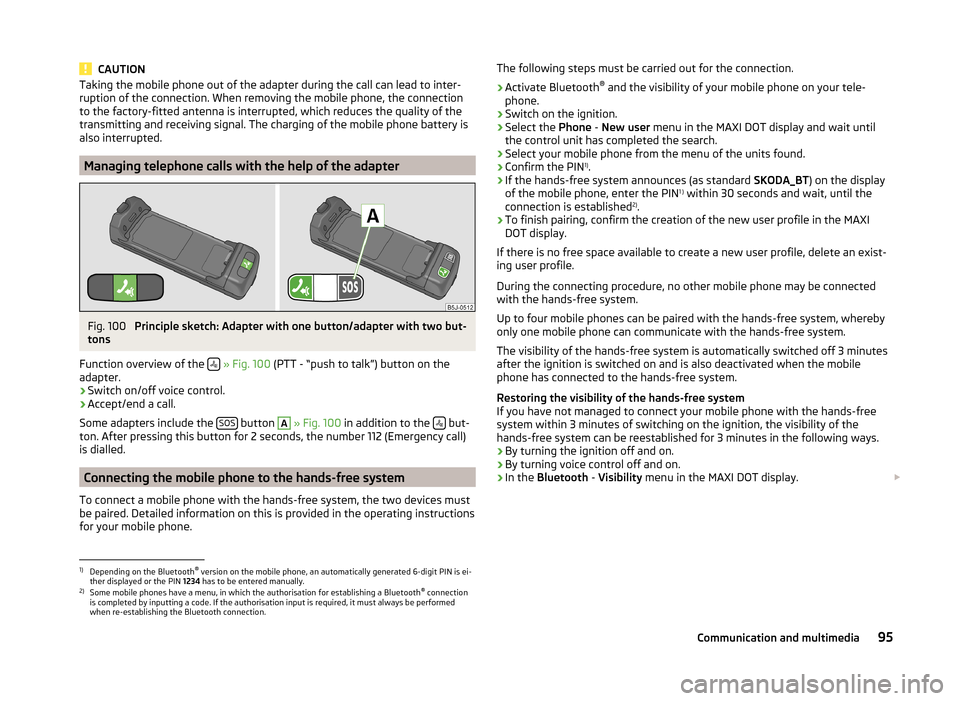
Fig. 100
Principle sketch: Adapter with one button/adapter with two but-
tons
Function overview of the
» Fig. 100 (PTT - “push to talk”) button on the
adapter.
› Switch on/off voice control.
› Accept/end a call.
Some adapters include the SOS
button
A
» Fig. 100 in addition to the but-
ton. After pressing this button for 2 seconds, the number 112 (Emergency call)
is dialled.
Connecting the mobile phone to the hands-free system
To connect a mobile phone with the hands-free system, the two devices must
be paired. Detailed information on this is provided in the operating instructions
for your mobile phone.
The following steps must be carried out for the connection.›
Activate Bluetooth ®
and the visibility of your mobile phone on your tele-
phone.
›
Switch on the ignition.
›
Select the Phone - New user menu in the MAXI DOT display and wait until
the control unit has completed the search.
›
Select your mobile phone from the menu of the units found.
›
Confirm the PIN 1)
.
›
If the hands-free system announces (as standard SKODA_BT) on the display
of the mobile phone, enter the PIN 1 )
within 30 seconds and wait, until the
connection is established 2)
.
›
To finish pairing, confirm the creation of the new user profile in the MAXI
DOT display.
If there is no free space available to create a new user profile, delete an exist-
ing user profile.
During the connecting procedure, no other mobile phone may be connected
with the hands-free system.
Up to four mobile phones can be paired with the hands-free system, whereby
only one mobile phone can communicate with the hands-free system.
The visibility of the hands-free system is automatically switched off 3 minutes
after the ignition is switched on and is also deactivated when the mobile
phone has connected to the hands-free system.
Restoring the visibility of the hands-free system
If you have not managed to connect your mobile phone with the hands-free
system within 3 minutes of switching on the ignition, the visibility of the
hands-free system can be reestablished for 3 minutes in the following ways.
› By turning the ignition off and on.
› By turning voice control off and on.
› In the
Bluetooth - Visibility menu in the MAXI DOT display.
1)
Depending on the Bluetooth®
version on the mobile phone, an automatically generated 6-digit PIN is ei-
ther displayed or the PIN 1234 has to be entered manually.
2)
Some mobile phones have a menu, in which the authorisation for establishing a Bluetooth ®
connection
is completed by inputting a code. If the authorisation input is required, it must always be performed
when re-establishing the Bluetooth connection.
95Communication and multimedia
Page 98 of 197
Creating a connection with an already paired mobile phone
After switching on the ignition, the connection is automatically established for the already paired mobile phone 1)
. Check on your mobile phone if the automat-
ic connection has been established.
Disconnecting the connection
› By withdrawing the ignition key.
› By disconnecting the hands-free system in the mobile phone.
› By disconnecting the user in the
Bluetooth - Users menu item in the MAXI
DOT display.
Solving connection problems
Check the operating status of the mobile phone if the system reports No
paired phone found .
› Is the mobile phone switched on?
› Is the PIN code entered?
› Is Bluetooth ®
active?
› Is the visibility of the mobile phone active?
› Has the mobile phone already been paired with the hands-free system?
Note
■
If a suitable adapter is available for your mobile phone, only use your mobile
phone in the adapter inserted in the telephone mount so that the radiation in
the vehicle drops to a minimum.■
Placing the mobile phone in the adapter inserted in the telephone mount en-
sures optimum sending and receiving power.
Symbols in the MAXI DOT display
SymbolMeaningCharge status of the telephone battery a)Signal strengtha)a phone is connected to the hands-free system.SymbolMeaningThe hands-free system is visible to other devices.A multimedia unit is connected to the hands-free system.a)
This function is only supported by some mobile phones.
Telephone operation in the MAXI DOT display
The following menu items can be selected from the Phone menu.
■ Phone book
■ Dial number 2)
■ Call lists
■ Voice mailbox
■ Bluetooth 2)
■ Settings 3)
■ Back
Phone book
The Phone book menu item lists the contacts downloaded from the telephone
memory and the mobile phone SIM card.
Dial number
Any telephone number can be entered in the Dial number menu item. The re-
quired numbers must be selected one after the other using adjustment wheel
and confirmed by pressing the adjustment wheel. You can select digits 0-9,
symbols ,
, , #
and the Cancel, Call and Delete functions.
Call lists
The following menu items can be selected in the Call lists menu item.
■ Missed calls
■ Dialled numbers
■ Received calls
Voice mailbox
In the Voice mailbox menu item, you can set the number of the voice mailbox 2)
and then dial the number.
1)
Some mobile phones have a menu, in which the authorisation for establishing a Bluetooth®
connection
is completed by inputting a code. If the authorisation input is required, it must always be performed
when re-establishing the Bluetooth connection.
2)
On vehicles fitted with the Amundsen+ navigation system, this function can be accessed via the naviga-
tion system menu; refer to the » Operating instructions for the Amundsen+ navigation system .
3)
This function is not available in vehicles fitted with the Amundsen+ navigation system.
96Using the system
Page 104 of 197
The MAXI DOT display shows the following:Immobilizer active.
Ignition lock
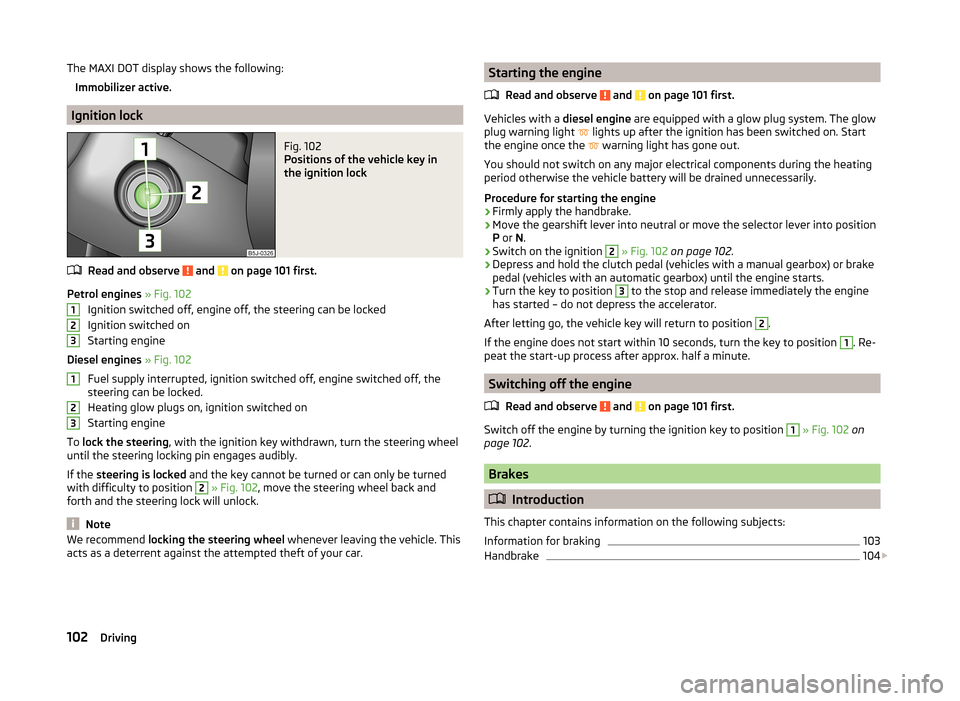
Fig. 102
Positions of the vehicle key in
the ignition lock
Read and observe and on page 101 first.
Petrol engines » Fig. 102
Ignition switched off, engine off, the steering can be locked
Ignition switched on
Starting engine
Diesel engines » Fig. 102
Fuel supply interrupted, ignition switched off, engine switched off, the
steering can be locked.
Heating glow plugs on, ignition switched on
Starting engine
To lock the steering , with the ignition key withdrawn, turn the steering wheel
until the steering locking pin engages audibly.
If the steering is locked and the key cannot be turned or can only be turned
with difficulty to position
2
» Fig. 102 , move the steering wheel back and
forth and the steering lock will unlock.
Note
We recommend locking the steering wheel whenever leaving the vehicle. This
acts as a deterrent against the attempted theft of your car.123123Starting the engine
Read and observe
and on page 101 first.
Vehicles with a diesel engine are equipped with a glow plug system. The glow
plug warning light
lights up after the ignition has been switched on. Start
the engine once the
warning light has gone out.
You should not switch on any major electrical components during the heating
period otherwise the vehicle battery will be drained unnecessarily.
Procedure for starting the engine
›
Firmly apply the handbrake.
›
Move the gearshift lever into neutral or move the selector lever into position
P or N.
›
Switch on the ignition
2
» Fig. 102 on page 102 .
›
Depress and hold the clutch pedal (vehicles with a manual gearbox) or brake
pedal (vehicles with an automatic gearbox) until the engine starts.
›
Turn the key to position
3
to the stop and release immediately the engine
has started – do not depress the accelerator.
After letting go, the vehicle key will return to position
2
.
If the engine does not start within 10 seconds, turn the key to position
1
. Re-
peat the start-up process after approx. half a minute.
Switching off the engine
Read and observe
and on page 101 first.
Switch off the engine by turning the ignition key to position
1
» Fig. 102 on
page 102 .
Brakes
Introduction
This chapter contains information on the following subjects:
Information for braking
103
Handbrake
104
102Driving
Page 107 of 197
In the driver's footwell, only a footmat, which is attached to the two corre-
sponding attachment points, may be used.
Only use factory-supplied footmats or footmats from the range of ŠKODAOrigi-
nal Accessories, which are fitted to two attachment points.WARNINGNo objects are allowed in the driver's footwell – there is a risk of obstruct-
ing or restriction pedal operation.
Automatic transmission
Introduction
This chapter contains information on the following subjects:
Modes and use of selector lever
105
Manual gear shifting (Tiptronic)
106
Starting-off and driving
107
Malfunction
107
Selector lever-emergency unlocking
108WARNING■ Do not depress the accelerator if the forward driving mode is changed
when the vehicle is halted and the engine is running – there is a risk of an
accident.■
Never shift the selector lever to R or P modes when driving – there is a
risk of an accident.
■
The vehicle must be held on the brake pedal in D, S or R modes if the ve-
hicle is halted and the engine is running. Even when the engine is idling,
power transmission is never completely interrupted – the vehicle will creep.
CAUTION■ If the selector lever is shifted to N while the vehicle is being driven you must
lift off the accelerator pedal and you will need to wait until the engine has
reached its idling speed before shifting the selector lever to a forward driving
mode again.■
At temperatures below -10 °C, the engine can only be started in selector lev-
er position P.
■
Never try to hold the vehicle using the accelerator pedal when stopping on a
hill – this may lead to transmission damage.
Note
The ignition key can only be withdrawn once the ignition has been switched
off if the selector lever is in the P position 1)
.
Modes and use of selector lever
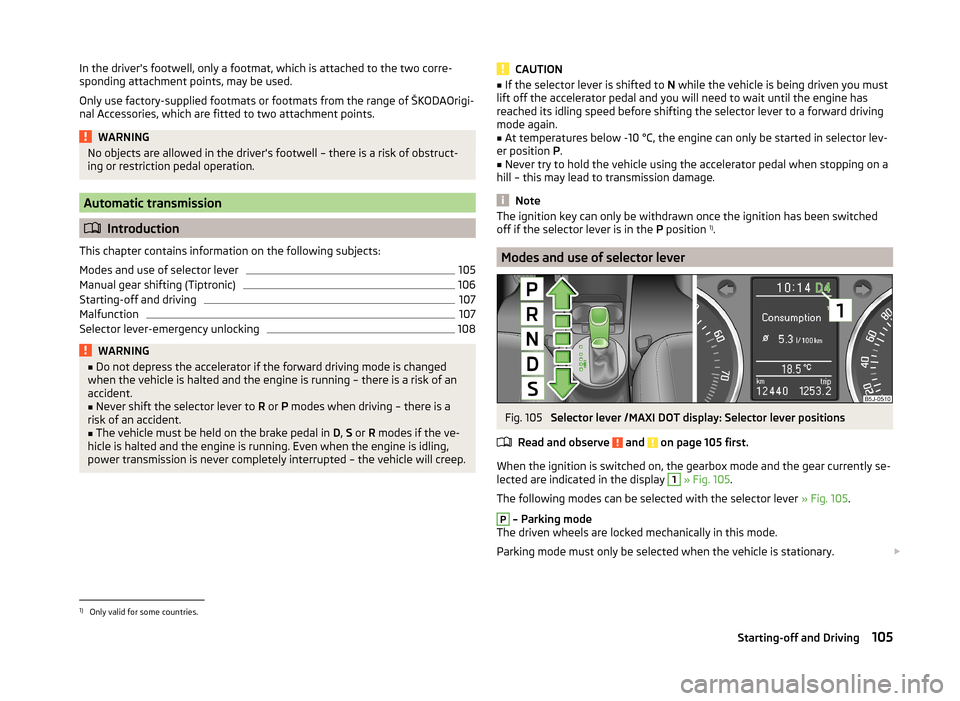
Fig. 105
Selector lever /MAXI DOT display: Selector lever positions
Read and observe
and on page 105 first.
When the ignition is switched on, the gearbox mode and the gear currently se- lected are indicated in the display
1
» Fig. 105 .
The following modes can be selected with the selector lever » Fig. 105.
P
– Parking mode
The driven wheels are locked mechanically in this mode.
Parking mode must only be selected when the vehicle is stationary.
1)
Only valid for some countries.
105Starting-off and Driving