interior lights SKODA OCTAVIA 2014 3.G / (5E) User Guide
[x] Cancel search | Manufacturer: SKODA, Model Year: 2014, Model line: OCTAVIA, Model: SKODA OCTAVIA 2014 3.G / (5E)Pages: 280, PDF Size: 35.53 MB
Page 87 of 280

WARNING■Make sure that the mirror is not covered by ice, snow, mist or other ob-
jects.■
Convex (curved outward) or aspheric exterior mirrors increase the field of
vision. They do, however, make objects appear smaller in the mirror. These
mirrors are therefore only of limited use for estimating distances to the fol-
lowing vehicles.
■
Whenever possible use the interior mirror for estimating the distances to
the following vehicles.
WARNINGThe mirrors with automatic dimming contain an electrolyte liquid which can
escape if mirror glass is broken.■
The leaking electrolytic fluid can irritate the skin, eyes and breath appara-
tus. Immediately seek out fresh air and leave the vehicle. If this is not pos-
sible, at least open the window.
■
If you swallow electrolytic fluid, seek medical assistance immediately.
■
If your eyes or skin come into contact with the electrolytic fluid, immedi-
ately wash the affected area for a few minutes long with a lot of water.
Then consult a doctor immediately.
Interior mirror
Fig. 64
Interior mirror: manual dimming/auto-dimming/light sensor
Read and observe
on page 84 first.
Mirror with manual dimming » Fig. 64
Basic position of the mirror
Mirror blackout
12Mirror with automatic dimming » Fig. 64
Warning light - lights when dimming is activated
Switch for the activation of the automatic mirror dimming
Light sensor
Light sensor on the back of the mirror
Mirror with automatic dimming
If the automatic dimming is enabled, the mirror dims automatically depending
on the light falling on the sensors.
When the interior lights are switched on or the reverse gear is engaged, the
mirror always moves back into the basic position (not dimmed).
Do not attach external navigation devices on to the windscreen or in the vicini-
ty of the interior mirror »
.
WARNINGThe illuminated display of an external navigation unit can lead to opera-
tional faults to the automatic dimming interior mirror – risk of accident.
CAUTION
The automatic dimming mirror only functions smoothly if the light falling on
the sensors is not impaired, e.g. by the rear sun roller blind.
Note
If the automatic interior mirror dimming is switched off, the exterior mirror
dimming is also switched off.ABCD84Using the system
Page 88 of 280
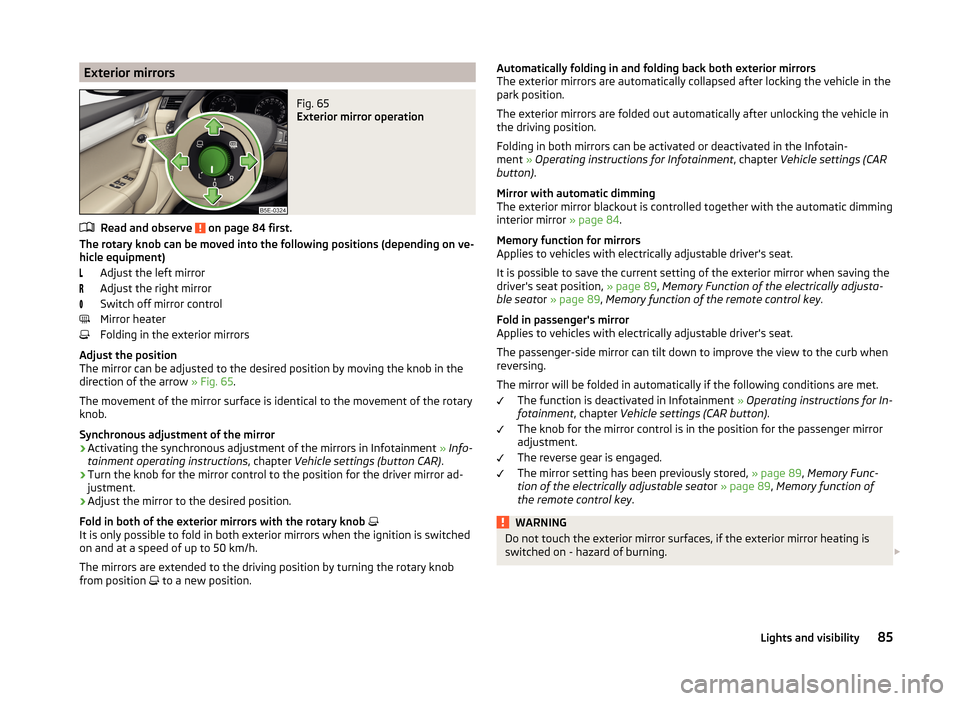
Exterior mirrorsFig. 65
Exterior mirror operation
Read and observe on page 84 first.
The rotary knob can be moved into the following positions (depending on ve-hicle equipment)
Adjust the left mirror
Adjust the right mirror
Switch off mirror control
Mirror heater
Folding in the exterior mirrors
Adjust the position
The mirror can be adjusted to the desired position by moving the knob in the
direction of the arrow » Fig. 65.
The movement of the mirror surface is identical to the movement of the rotary
knob.
Synchronous adjustment of the mirror
›
Activating the synchronous adjustment of the mirrors in Infotainment » Info-
tainment operating instructions , chapter Vehicle settings (button CAR) .
›
Turn the knob for the mirror control to the position for the driver mirror ad-
justment.
›
Adjust the mirror to the desired position.
Fold in both of the exterior mirrors with the rotary knob
It is only possible to fold in both exterior mirrors when the ignition is switched
on and at a speed of up to 50 km/h.
The mirrors are extended to the driving position by turning the rotary knob
from position to a new position.
Automatically folding in and folding back both exterior mirrors
The exterior mirrors are automatically collapsed after locking the vehicle in the
park position.
The exterior mirrors are folded out automatically after unlocking the vehicle in
the driving position.
Folding in both mirrors can be activated or deactivated in the Infotain-
ment » Operating instructions for Infotainment , chapter Vehicle settings (CAR
button) .
Mirror with automatic dimming
The exterior mirror blackout is controlled together with the automatic dimming
interior mirror » page 84.
Memory function for mirrors
Applies to vehicles with electrically adjustable driver's seat.
It is possible to save the current setting of the exterior mirror when saving the
driver's seat position, » page 89, Memory Function of the electrically adjusta-
ble seat or » page 89 , Memory function of the remote control key .
Fold in passenger's mirror
Applies to vehicles with electrically adjustable driver's seat.
The passenger-side mirror can tilt down to improve the view to the curb when
reversing.
The mirror will be folded in automatically if the following conditions are met. The function is deactivated in Infotainment » Operating instructions for In-
fotainment , chapter Vehicle settings (CAR button) .
The knob for the mirror control is in the position for the passenger mirror
adjustment.
The reverse gear is engaged.
The mirror setting has been previously stored, » page 89, Memory Func-
tion of the electrically adjustable seat or » page 89 , Memory function of
the remote control key .WARNINGDo not touch the exterior mirror surfaces, if the exterior mirror heating is
switched on - hazard of burning. 85Lights and visibility
Page 120 of 280
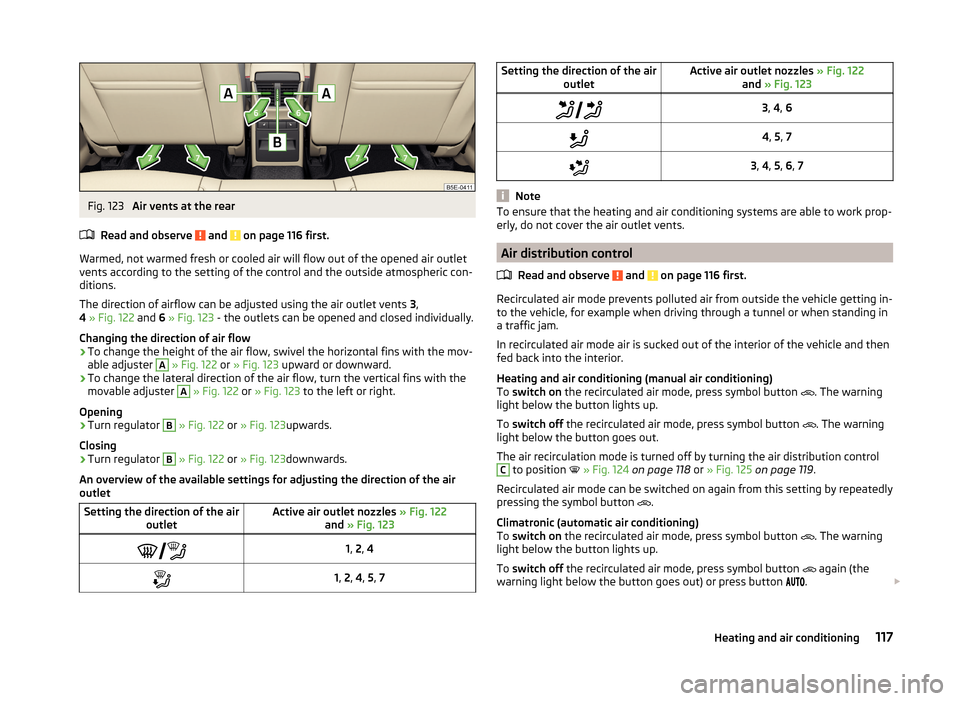
Fig. 123
Air vents at the rear
Read and observe
and on page 116 first.
Warmed, not warmed fresh or cooled air will flow out of the opened air outlet
vents according to the setting of the control and the outside atmospheric con-
ditions.
The direction of airflow can be adjusted using the air outlet vents 3,
4 » Fig. 122 and 6 » Fig. 123 - the outlets can be opened and closed individually.
Changing the direction of air flow
›
To change the height of the air flow, swivel the horizontal fins with the mov-
able adjuster
A
» Fig. 122 or » Fig. 123 upward or downward.
›
To change the lateral direction of the air flow, turn the vertical fins with the
movable adjuster
A
» Fig. 122 or » Fig. 123 to the left or right.
Opening
›
Turn regulator
B
» Fig. 122 or » Fig. 123 upwards.
Closing
›
Turn regulator
B
» Fig. 122 or » Fig. 123 downwards.
An overview of the available settings for adjusting the direction of the air
outlet
Setting the direction of the air outletActive air outlet nozzles » Fig. 122
and » Fig. 123 1, 2 , 41, 2 , 4 , 5 , 7Setting the direction of the air
outletActive air outlet nozzles » Fig. 122
and » Fig. 1233, 4 , 64 , 5 , 73 , 4 , 5 , 6 , 7
Note
To ensure that the heating and air conditioning systems are able to work prop-
erly, do not cover the air outlet vents.
Air distribution control
Read and observe
and on page 116 first.
Recirculated air mode prevents polluted air from outside the vehicle getting in-
to the vehicle, for example when driving through a tunnel or when standing in
a traffic jam.
In recirculated air mode air is sucked out of the interior of the vehicle and then
fed back into the interior.
Heating and air conditioning (manual air conditioning)
To switch on the recirculated air mode, press symbol button
. The warning
light below the button lights up.
To switch off the recirculated air mode, press symbol button
. The warning
light below the button goes out.
The air recirculation mode is turned off by turning the air distribution control
C
to position
» Fig. 124 on page 118 or » Fig. 125 on page 119 .
Recirculated air mode can be switched on again from this setting by repeatedly
pressing the symbol button .
Climatronic (automatic air conditioning)
To switch on the recirculated air mode, press symbol button
. The warning
light below the button lights up.
To switch off the recirculated air mode, press symbol button
again (the
warning light below the button goes out) or press button .
117Heating and air conditioning
Page 122 of 280
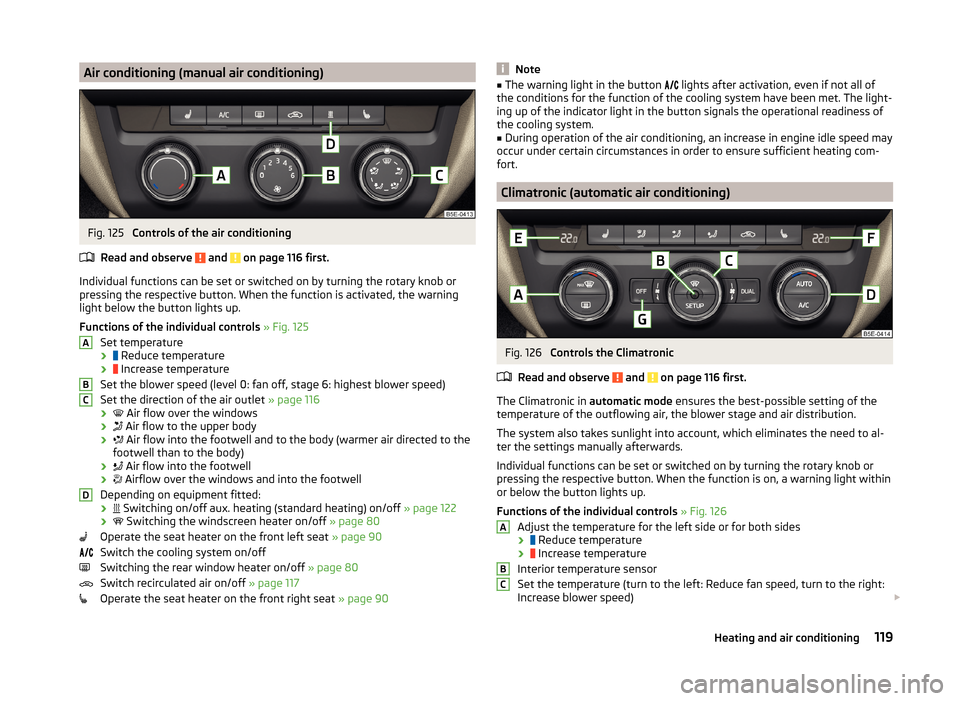
Air conditioning (manual air conditioning)Fig. 125
Controls of the air conditioning
Read and observe
and on page 116 first.
Individual functions can be set or switched on by turning the rotary knob or
pressing the respective button. When the function is activated, the warning
light below the button lights up.
Functions of the individual controls » Fig. 125
Set temperature ›
Reduce temperature
›
Increase temperature
Set the blower speed (level 0: fan off, stage 6: highest blower speed)
Set the direction of the air outlet » page 116
›
Air flow over the windows
›
Air flow to the upper body
›
Air flow into the footwell and to the body (warmer air directed to the
footwell than to the body)
›
Air flow into the footwell
›
Airflow over the windows and into the footwell
Depending on equipment fitted: ›
Switching on/off aux. heating (standard heating) on/off
» page 122
›
Switching the windscreen heater on/off
» page 80
Operate the seat heater on the front left seat » page 90
Switch the cooling system on/off
Switching the rear window heater on/off » page 80
Switch recirculated air on/off » page 117
Operate the seat heater on the front right seat » page 90
ABCDNote■
The warning light in the button lights after activation, even if not all of
the conditions for the function of the cooling system have been met. The light-
ing up of the indicator light in the button signals the operational readiness of
the cooling system.■
During operation of the air conditioning, an increase in engine idle speed may
occur under certain circumstances in order to ensure sufficient heating com-
fort.
Climatronic (automatic air conditioning)
Fig. 126
Controls the Climatronic
Read and observe
and on page 116 first.
The Climatronic in automatic mode ensures the best-possible setting of the
temperature of the outflowing air, the blower stage and air distribution.
The system also takes sunlight into account, which eliminates the need to al-
ter the settings manually afterwards.
Individual functions can be set or switched on by turning the rotary knob or
pressing the respective button. When the function is on, a warning light within
or below the button lights up.
Functions of the individual controls » Fig. 126
Adjust the temperature for the left side or for both sides
›
Reduce temperature
›
Increase temperature
Interior temperature sensor
Set the temperature (turn to the left: Reduce fan speed, turn to the right:
Increase blower speed)
ABC119Heating and air conditioning
Page 123 of 280
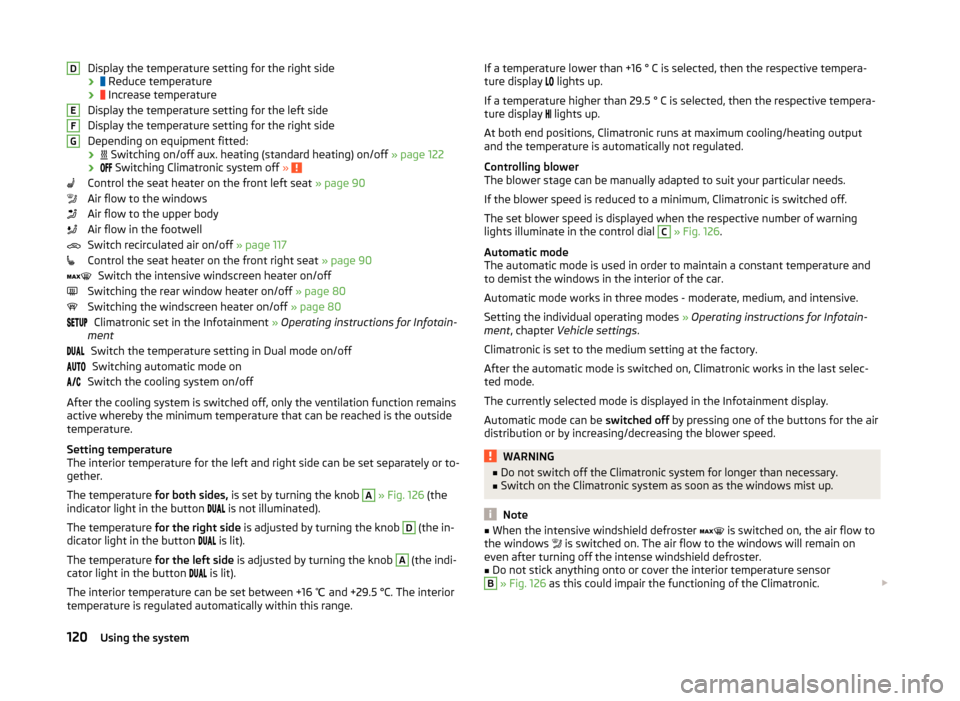
Display the temperature setting for the right side
›
Reduce temperature
›
Increase temperature
Display the temperature setting for the left side
Display the temperature setting for the right side
Depending on equipment fitted: ›
Switching on/off aux. heating (standard heating) on/off » page 122
›
Switching Climatronic system off »
Control the seat heater on the front left seat » page 90
Air flow to the windows
Air flow to the upper body
Air flow in the footwell
Switch recirculated air on/off » page 117
Control the seat heater on the front right seat » page 90
Switch the intensive windscreen heater on/off
Switching the rear window heater on/off » page 80
Switching the windscreen heater on/off » page 80
Climatronic set in the Infotainment » Operating instructions for Infotain-
ment
Switch the temperature setting in Dual mode on/offSwitching automatic mode on
Switch the cooling system on/off
After the cooling system is switched off, only the ventilation function remains active whereby the minimum temperature that can be reached is the outside
temperature.
Setting temperature
The interior temperature for the left and right side can be set separately or to-
gether.
The temperature for both sides, is set by turning the knob
A
» Fig. 126 (the
indicator light in the button is not illuminated).
The temperature for the right side is adjusted by turning the knob
D
(the in-
dicator light in the button is lit).
The temperature for the left side is adjusted by turning the knob
A
(the indi-
cator light in the button is lit).
The interior temperature can be set between +16 ℃ and +29.5 °C. The interior
temperature is regulated automatically within this range.
DEFGIf a temperature lower than +16 ° C is selected, then the respective tempera-
ture display lights up.
If a temperature higher than 29.5 ° C is selected, then the respective tempera-
ture display
lights up.
At both end positions, Climatronic runs at maximum cooling/heating output
and the temperature is automatically not regulated.
Controlling blower
The blower stage can be manually adapted to suit your particular needs.
If the blower speed is reduced to a minimum, Climatronic is switched off.
The set blower speed is displayed when the respective number of warning
lights illuminate in the control dial C
» Fig. 126 .
Automatic mode
The automatic mode is used in order to maintain a constant temperature and
to demist the windows in the interior of the car.
Automatic mode works in three modes - moderate, medium, and intensive.
Setting the individual operating modes » Operating instructions for Infotain-
ment , chapter Vehicle settings .
Climatronic is set to the medium setting at the factory.
After the automatic mode is switched on, Climatronic works in the last selec-
ted mode.
The currently selected mode is displayed in the Infotainment display.
Automatic mode can be switched off by pressing one of the buttons for the air
distribution or by increasing/decreasing the blower speed.
WARNING■ Do not switch off the Climatronic system for longer than necessary.■Switch on the Climatronic system as soon as the windows mist up.
Note
■When the intensive windshield defroster is switched on, the air flow to
the windows is switched on. The air flow to the windows will remain on
even after turning off the intense windshield defroster.■
Do not stick anything onto or cover the interior temperature sensor
B
» Fig. 126 as this could impair the functioning of the Climatronic.
120Using the system
Page 125 of 280
CAUTION■The running auxiliary heater consumes fuel from the vehicle tank and auto-
matically controls the filling level. If only a low quantity of fuel is present in the
fuel tank, the auxiliary heating switches off.■
The exhaust pipe of the auxiliary heating, which is located on the underside
of the vehicle, must not be clogged and the exhaust flow must not be blocked.
■
If the auxiliary heating is running, the vehicle battery discharges. If the auxili-
ary heating and ventilation has been operated several times over a longer peri-
od, the vehicle must be driven a few kilometres in order to recharge the vehi-
cle battery.
■
The air inlet in front of the windscreen must be free (e.g. of ice, snow or
leaves) to ensure that the auxiliary heating operates properly.
Note
■ The auxiliary heating switches on the blower B » Fig. 125 on page 119 orC » Fig. 126 on page 119 only if it has achieved a coolant temperature of ap-
prox. 50 °C.■
At low outside temperatures, this can result in a formation of water vapour in
the area of the engine compartment. This is quite normal and is not an operat-
ing problem.
■
So that warm air can flow into the vehicle interior after switching on the aux-
iliary heating, you must maintain the comfort temperature normally selected
by you, leave the fan switched on and leave the air outlet vents in an open po-
sition. It is recommended to put the air flow in the position
or
.
Switching on/off
Fig. 127
Button for switching on/off the system directly on the operating
part of the air conditioning/Climatronic
Read and observe and on page 121 first.
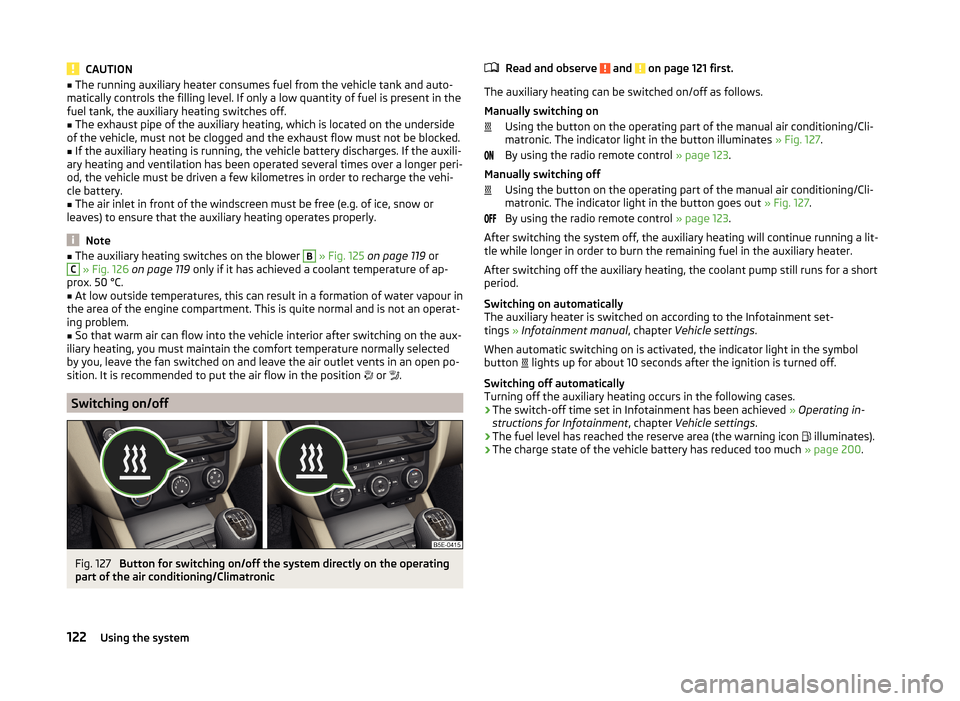
The auxiliary heating can be switched on/off as follows.
Manually switching on Using the button on the operating part of the manual air conditioning/Cli-
matronic. The indicator light in the button illuminates » Fig. 127.
By using the radio remote control » page 123.
Manually switching off Using the button on the operating part of the manual air conditioning/Cli-
matronic. The indicator light in the button goes out » Fig. 127.
By using the radio remote control » page 123.
After switching the system off, the auxiliary heating will continue running a lit- tle while longer in order to burn the remaining fuel in the auxiliary heater.
After switching off the auxiliary heating, the coolant pump still runs for a short
period.
Switching on automatically
The auxiliary heater is switched on according to the Infotainment set-
tings » Infotainment manual , chapter Vehicle settings .
When automatic switching on is activated, the indicator light in the symbol
button lights up for about 10 seconds after the ignition is turned off.
Switching off automatically
Turning off the auxiliary heating occurs in the following cases.
› The switch-off time set in Infotainment has been achieved
» Operating in-
structions for Infotainment , chapter Vehicle settings .
› The fuel level has reached the reserve area (the warning icon
illuminates).
› The charge state of the vehicle battery has reduced too much
» page 200.
122Using the system
Page 126 of 280
Radio remote controlFig. 128
Radio remote control of the aux-
iliary heating
Read and observe and on page 121 first.
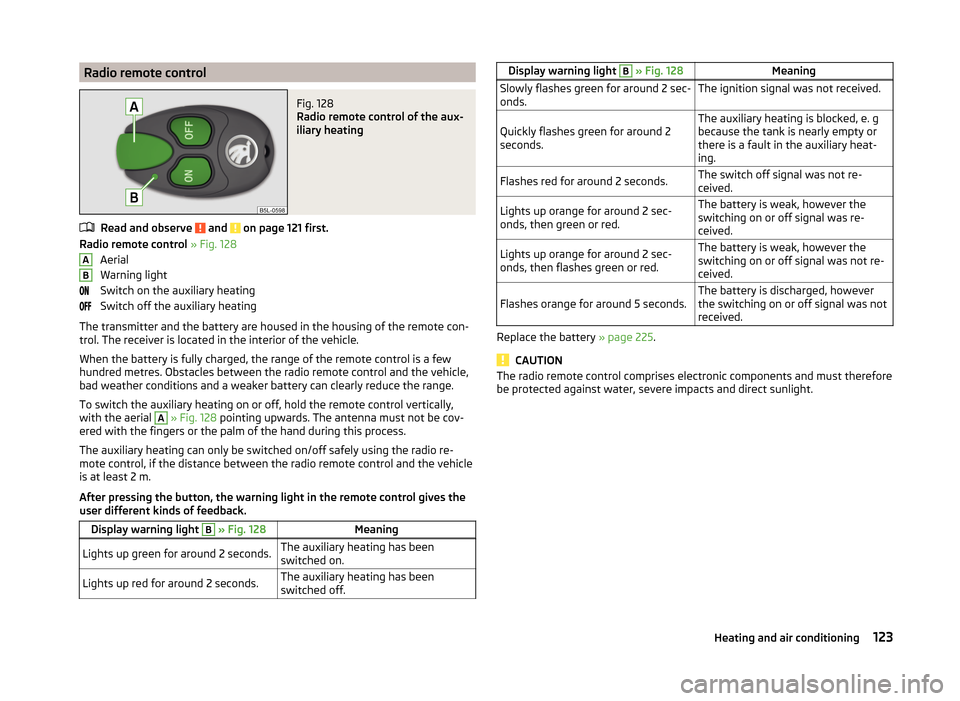
Radio remote control » Fig. 128
Aerial
Warning light
Switch on the auxiliary heating
Switch off the auxiliary heating
The transmitter and the battery are housed in the housing of the remote con-
trol. The receiver is located in the interior of the vehicle.
When the battery is fully charged, the range of the remote control is a few
hundred metres. Obstacles between the radio remote control and the vehicle,
bad weather conditions and a weaker battery can clearly reduce the range.
To switch the auxiliary heating on or off, hold the remote control vertically,
with the aerial
A
» Fig. 128 pointing upwards. The antenna must not be cov-
ered with the fingers or the palm of the hand during this process.
The auxiliary heating can only be switched on/off safely using the radio re-
mote control, if the distance between the radio remote control and the vehicle
is at least 2 m.
After pressing the button, the warning light in the remote control gives the
user different kinds of feedback.
Display warning light B » Fig. 128MeaningLights up green for around 2 seconds.The auxiliary heating has been
switched on.Lights up red for around 2 seconds.The auxiliary heating has been
switched off.ABDisplay warning light B » Fig. 128MeaningSlowly flashes green for around 2 sec-
onds.The ignition signal was not received.Quickly flashes green for around 2
seconds.The auxiliary heating is blocked, e. g
because the tank is nearly empty or
there is a fault in the auxiliary heat-
ing.Flashes red for around 2 seconds.The switch off signal was not re-
ceived.Lights up orange for around 2 sec-
onds, then green or red.The battery is weak, however the
switching on or off signal was re-
ceived.Lights up orange for around 2 sec-
onds, then flashes green or red.The battery is weak, however the
switching on or off signal was not re-
ceived.Flashes orange for around 5 seconds.The battery is discharged, however
the switching on or off signal was not
received.
Replace the battery » page 225.
CAUTION
The radio remote control comprises electronic components and must therefore
be protected against water, severe impacts and direct sunlight.123Heating and air conditioning
Page 161 of 280
START-STOP
Introduction
This chapter contains information on the following subjects:
Operating conditions of the system
158
Operation in vehicles with manual gearbox
158
Operation in vehicles with automatic gearbox
159
System related automatic start-up
159
Manually deactivating/activating the system
159
Information messages
160
The START-STOP system (hereinafter referred to as the system) saves fuel and
reduces polluting emissions and CO 2 emissions by turning the engine off, e.g.
when stopping at traffic lights, and starting the engine again when moving off.
WARNING■ Never let the vehicle roll with the engine switched off.■The brake servo unit and power steering only operate if the engine is run-
ning.
Operating conditions of the system
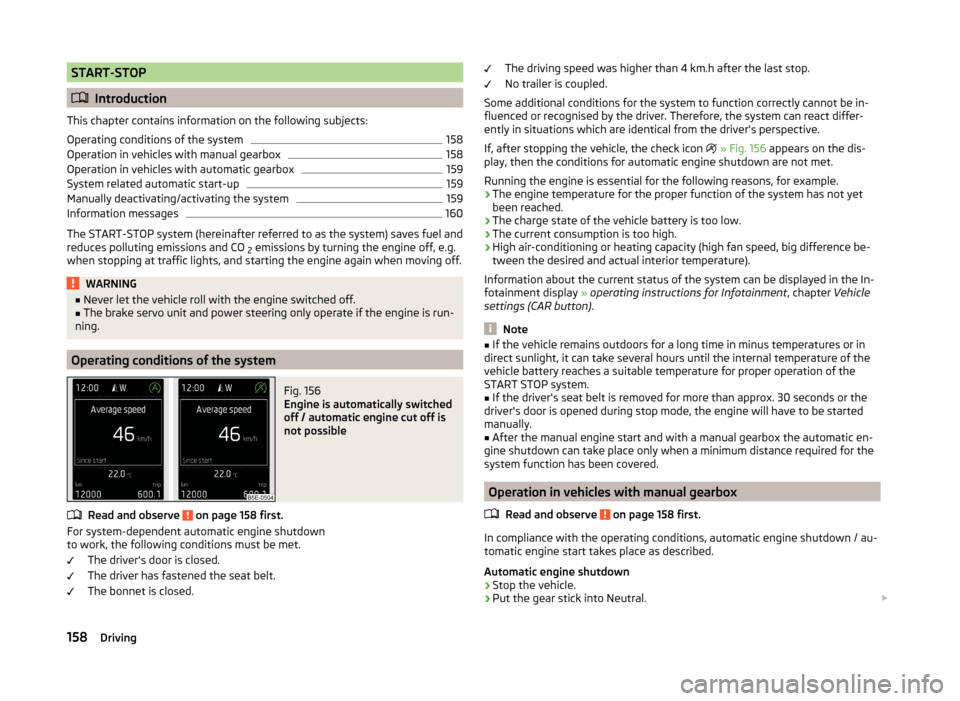
Fig. 156
Engine is automatically switched
off / automatic engine cut off is
not possible
Read and observe on page 158 first.
For system-dependent automatic engine shutdown
to work, the following conditions must be met.
The driver's door is closed.
The driver has fastened the seat belt.
The bonnet is closed.
The driving speed was higher than 4 km.h after the last stop.
No trailer is coupled.
Some additional conditions for the system to function correctly cannot be in-
fluenced or recognised by the driver. Therefore, the system can react differ-
ently in situations which are identical from the driver's perspective.
If, after stopping the vehicle, the check icon
» Fig. 156 appears on the dis-
play, then the conditions for automatic engine shutdown are not met.
Running the engine is essential for the following reasons, for example.
› The engine temperature for the proper function of the system has not yet
been reached.
› The charge state of the vehicle battery is too low.
› The current consumption is too high.
› High air-conditioning or heating capacity (high fan speed, big difference be-
tween the desired and actual interior temperature).
Information about the current status of the system can be displayed in the In-
fotainment display » operating instructions for Infotainment , chapter Vehicle
settings (CAR button) .
Note
■
If the vehicle remains outdoors for a long time in minus temperatures or in
direct sunlight, it can take several hours until the internal temperature of the
vehicle battery reaches a suitable temperature for proper operation of the
START STOP system.■
If the driver's seat belt is removed for more than approx. 30 seconds or the
driver's door is opened during stop mode, the engine will have to be started
manually.
■
After the manual engine start and with a manual gearbox the automatic en-
gine shutdown can take place only when a minimum distance required for the
system function has been covered.
Operation in vehicles with manual gearbox
Read and observe
on page 158 first.
In compliance with the operating conditions, automatic engine shutdown / au-
tomatic engine start takes place as described.
Automatic engine shutdown
›
Stop the vehicle.
›
Put the gear stick into Neutral.
158Driving
Page 164 of 280

Engine (drive)
The vehicle acceleration is more dynamic than in Normal mode.
The engine noise is noticeable in the interior more intensely than in
normalmode 1)
.
Steering
The power steering is reduced slightly, i.e., the driver needs to exert more
force for steering .
Adaptive Cruise Control (ACC)
The acceleration is quicker than in normal mode with distance con-
trol » page 149 .
Adaptive headlights (AHL)
The headlights adapt to the driving style more dynamically than in mode
Normal » page 74 .
ProActive passenger protection
The first level of protection is deactivated » page 161.
Ecomode
Read and observe
on page 160 first.
This mode is suitable for a relaxed style of driving and helps to save fuel.
Selecting this mode primarily affects the function of the following systems.
Engine (drive)
Vehicle acceleration is more relaxed than in Normal mode.
The recommended gear is controlled such to achieve the lowest possible fuel
consumption » page 46.
When the START-STOP system was deactivated manually » page 158, it is au-
tomatically activated.
The automatic gearbox is set automatically to mode E » page 133 .
The engine noise is felt less intensely in the interior less than in normalmode 1)
.
Adaptive Cruise Control (ACC)
Acceleration occurs more relaxed than in Normal » page 149mode with dis-
tance control.
Adaptive headlights (AHL)
The system is automatically deactivated » page 74.
Air conditioning (Climatronic)
The air conditioning is controlled so as to save energy. For this reason, for ex-
ample, it may take longer to reach the desired interior temperature in mode
Normal.
Note
■ The Eco driving mode is not available when towing a trailer. When the vehicle
is connected electrically to a trailer and is in the Eco driving mode, the Normal
driving mode is configured automatically.■
The maximum vehicle acceleration (kickdown function) is possible also in
driving mode Eco.
Individualmode
Read and observe
on page 160 first.
In mode Individual you can select between Normal, Sport and Eco for each sys-tem separately » Operating instructions for Infotainment , chapter Vehicle set-
tings .
ProActive passenger protection
Introduction
This chapter contains information on the following subjects:
Function
162
ProActive passenger protection (From here on referred to only as system) in-
creases passenger protection in the front seats in situations that could lead to
vehicle impact or overturning.
WARNING■ The increased safety by ProActive passenger protection must not tempt
you to take greater risks than otherwise – risk of accident!■
Adjust the speed and driving style to the current visibility, weather, road
and traffic conditions.
1)
Applies to Octavia RS, Octavia RS.
161Assist systems
Page 233 of 280
No.Consumer12Radio13Belt tensioner - driver's side14Air blower for air conditioning,heating15Electric steering lock16Signal amplifier for telephone, telephone preinstallation17Instrument cluster18Not assigned19KESSY control unit20Operating lever underneath the steering wheel21Not assigned22Towing hitch - contact in the socket23Light - right24Panorama roof25Control unit for central locking front door right, power windows -
left26Heated front seats27Music amplifier28Towing hitch - left light29CNG relay30Not assigned31Headlight - left32Parking aid (Park Assist)33Airbag switch for hazard warning lights
34
TCS, ESC button, tyre control display, pressure sensor for air-condi-
tioning, reverse light switch, interior mirror with automatic dim-
ming, START-STOP button, telephone preinstallation, control for
heating of rear seats, sensor for air-conditioning, 230 V power
socket, sport-sound generator35Headlight, headlamp beam adjustment, diagnostic connector, cam-
era, radar36Headlight right37Headlight left38Towing hitch - right lightNo.Consumer39Control unit for central locking front door - right, power windows -
front and rear right4012-Volt power socket41Not assigned42Control unit for central locking rear door - left, right, headlight
cleaning system, windscreen wipers43Visor for gas discharge bulbs, interior lighting44Towing hitch - contact in the socket45Control unit for control of seat adjustment46230-Volt power socket47Rear window wiper48Not assigned49Coil on starter relay, clutch pedal switch50Opening the boot lid51Belt tensioner - front passenger side52Not assigned53Relay for rear window heater
Fuses in the engine compartment
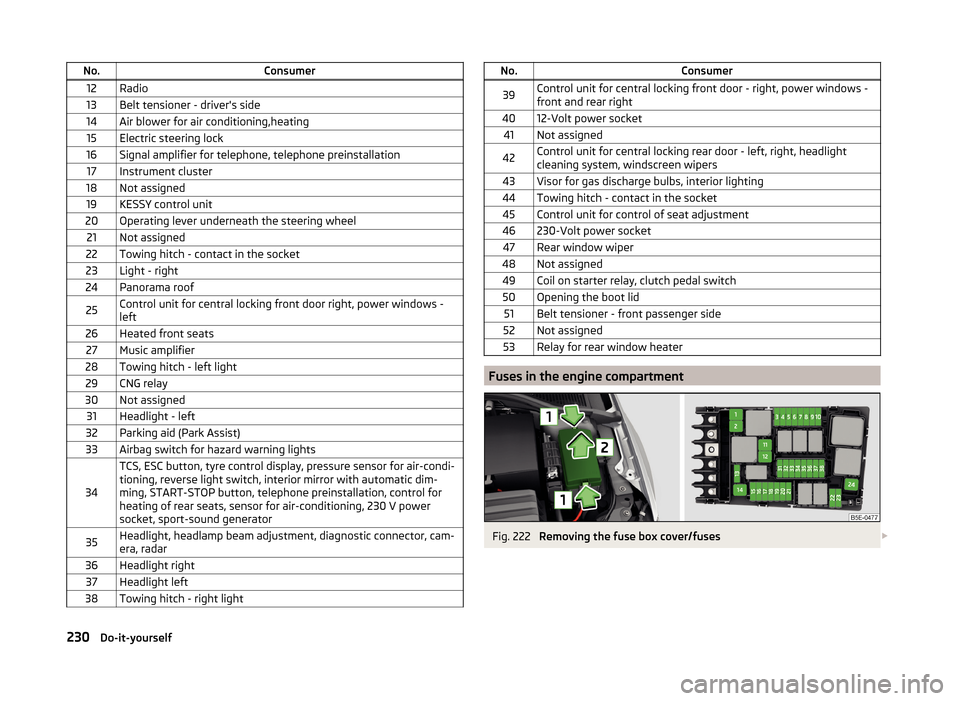
Fig. 222
Removing the fuse box cover/fuses
230Do-it-yourself