engine SKODA OCTAVIA 2014 3.G / (5E) Owner's Guide
[x] Cancel search | Manufacturer: SKODA, Model Year: 2014, Model line: OCTAVIA, Model: SKODA OCTAVIA 2014 3.G / (5E)Pages: 280, PDF Size: 35.53 MB
Page 52 of 280
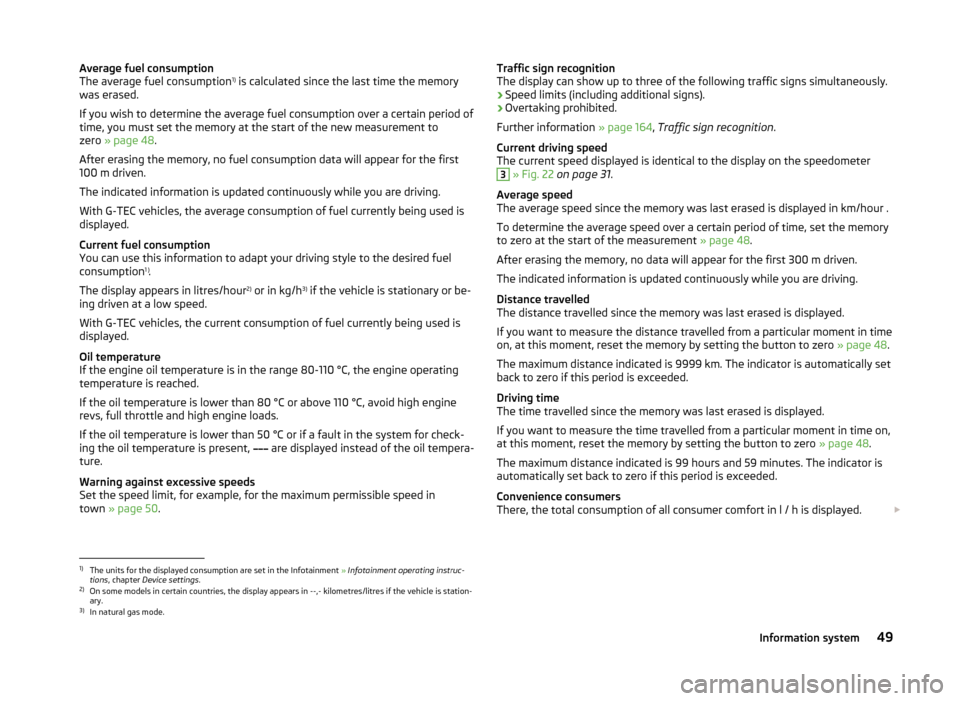
Average fuel consumption
The average fuel consumption 1)
is calculated since the last time the memory
was erased.
If you wish to determine the average fuel consumption over a certain period of
time, you must set the memory at the start of the new measurement to
zero » page 48 .
After erasing the memory, no fuel consumption data will appear for the first
100 m driven.
The indicated information is updated continuously while you are driving.
With G-TEC vehicles, the average consumption of fuel currently being used is displayed.
Current fuel consumption
You can use this information to adapt your driving style to the desired fuel
consumption 1 )
.
The display appears in litres/hour 2)
or in kg/h 3)
if the vehicle is stationary or be-
ing driven at a low speed.
With G-TEC vehicles, the current consumption of fuel currently being used is
displayed.
Oil temperature
If the engine oil temperature is in the range 80-110 °C, the engine operating
temperature is reached.
If the oil temperature is lower than 80 °C or above 110 °C, avoid high engine
revs, full throttle and high engine loads.
If the oil temperature is lower than 50 °C or if a fault in the system for check-
ing the oil temperature is present, are displayed instead of the oil tempera-
ture.
Warning against excessive speeds
Set the speed limit, for example, for the maximum permissible speed in
town » page 50 .Traffic sign recognition
The display can show up to three of the following traffic signs simultaneously.
› Speed limits (including additional signs).
› Overtaking prohibited.
Further information » page 164, Traffic sign recognition .
Current driving speed
The current speed displayed is identical to the display on the speedometer3
» Fig. 22 on page 31 .
Average speed
The average speed since the memory was last erased is displayed in km/hour .
To determine the average speed over a certain period of time, set the memory
to zero at the start of the measurement » page 48.
After erasing the memory, no data will appear for the first 300 m driven.
The indicated information is updated continuously while you are driving.
Distance travelled
The distance travelled since the memory was last erased is displayed.
If you want to measure the distance travelled from a particular moment in time
on, at this moment, reset the memory by setting the button to zero » page 48.
The maximum distance indicated is 9999 km. The indicator is automatically set
back to zero if this period is exceeded.
Driving time
The time travelled since the memory was last erased is displayed.
If you want to measure the time travelled from a particular moment in time on,
at this moment, reset the memory by setting the button to zero » page 48.
The maximum distance indicated is 99 hours and 59 minutes. The indicator is
automatically set back to zero if this period is exceeded.
Convenience consumers
There, the total consumption of all consumer comfort in l / h is displayed.
1)
The units for the displayed consumption are set in the Infotainment
» Infotainment operating instruc-
tions , chapter Device settings .
2)
On some models in certain countries, the display appears in --,- kilometres/litres if the vehicle is station-
ary.
3)
In natural gas mode.
49Information system
Page 53 of 280
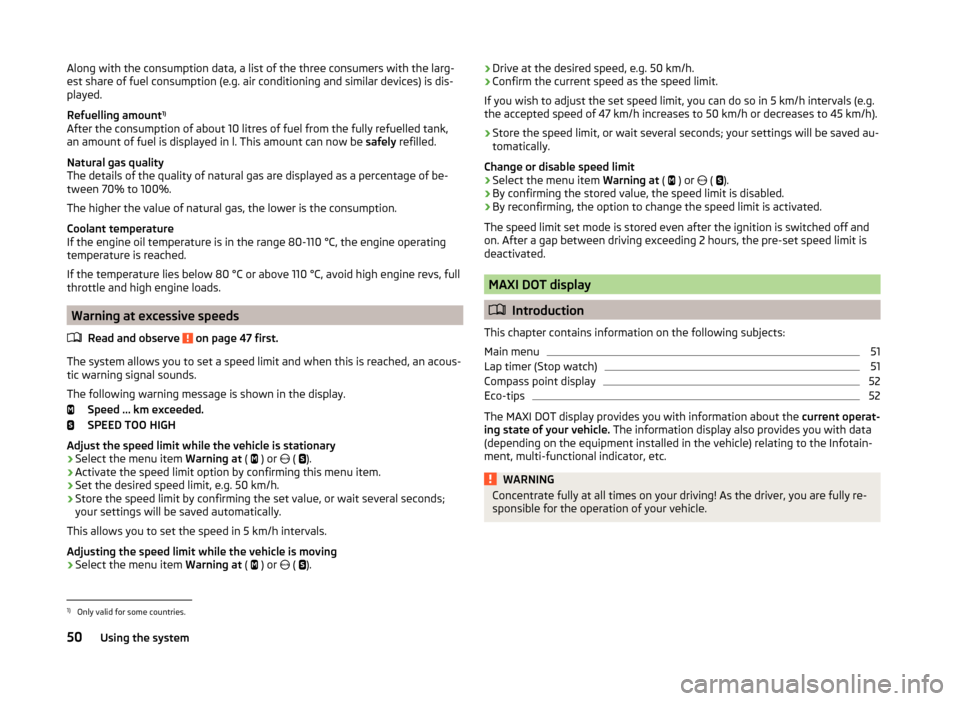
Along with the consumption data, a list of the three consumers with the larg-
est share of fuel consumption (e.g. air conditioning and similar devices) is dis-
played.
Refuelling amount 1)
After the consumption of about 10 litres of fuel from the fully refuelled tank, an amount of fuel is displayed in l. This amount can now be safely refilled.
Natural gas quality
The details of the quality of natural gas are displayed as a percentage of be-
tween 70% to 100%.
The higher the value of natural gas, the lower is the consumption.
Coolant temperature
If the engine oil temperature is in the range 80-110 °C, the engine operating
temperature is reached.
If the temperature lies below 80 °C or above 110 °C, avoid high engine revs, full
throttle and high engine loads.
Warning at excessive speeds
Read and observe
on page 47 first.
The system allows you to set a speed limit and when this is reached, an acous-
tic warning signal sounds.
The following warning message is shown in the display. Speed … km exceeded.
SPEED TOO HIGH
Adjust the speed limit while the vehicle is stationary
›
Select the menu item Warning at (
) or
(
).
›
Activate the speed limit option by confirming this menu item.
›
Set the desired speed limit, e.g. 50 km/h.
›
Store the speed limit by confirming the set value, or wait several seconds;
your settings will be saved automatically.
This allows you to set the speed in 5 km/h intervals.
Adjusting the speed limit while the vehicle is moving
›
Select the menu item Warning at (
) or
(
).
› Drive at the desired speed, e.g. 50 km/h.›Confirm the current speed as the speed limit.
If you wish to adjust the set speed limit, you can do so in 5 km/h intervals (e.g.
the accepted speed of 47 km/h increases to 50 km/h or decreases to 45 km/h).›
Store the speed limit, or wait several seconds; your settings will be saved au-
tomatically.
Change or disable speed limit
›
Select the menu item Warning at (
) or
(
).
›
By confirming the stored value, the speed limit is disabled.
›
By reconfirming, the option to change the speed limit is activated.
The speed limit set mode is stored even after the ignition is switched off and
on. After a gap between driving exceeding 2 hours, the pre-set speed limit is
deactivated.
MAXI DOT display
Introduction
This chapter contains information on the following subjects:
Main menu
51
Lap timer (Stop watch)
51
Compass point display
52
Eco-tips
52
The MAXI DOT display provides you with information about the current operat-
ing state of your vehicle. The information display also provides you with data
(depending on the equipment installed in the vehicle) relating to the Infotain-
ment, multi-functional indicator, etc.
WARNINGConcentrate fully at all times on your driving! As the driver, you are fully re-
sponsible for the operation of your vehicle.1)
Only valid for some countries.
50Using the system
Page 57 of 280
Unlocking and opening
Unlocking and locking
Introduction
This chapter contains information on the following subjects:
Locking/unlocking using the key via the lock cylinder
55
Unlocking/locking with the remote control key
55
Opening/closing a door
56
Unlocking / locking - KESSY
56
Safe securing system
57
Individual settings
57
Locking and unlocking the vehicle with the central locking button
58
Child safety lock
58
Malfunctions
58
Your car is equipped with a central locking system.
The central locking system allows you to lock and unlock all doors, the fuel fill-
er flap and the boot lid at the same time.
Depending on the equipment configuration, the following applies after
unlocking
› The turn signal lights flash twice as confirmation that the vehicle has been
unlocked.
› The doors, the boot lid and the fuel filler flap are unlocked.
› The interior light operated via the door contact illuminates.
› The SafeLock system is switched off.
› The indicator light in the driver door stops flashing.
› The exterior mirrors are folded back into the driving position.
› The anti-theft alarm system is deactivated.
If the vehicle is unlocked and a door or the boot lid not opened within the next
45 seconds, the vehicle will lock again automatically and the safe securing sys-
tem or anti-theft alarm system will be switched back on. This function is inten-
ded to prevent the car being unlocked unintentionally.
The seat and mirror are adjusted after the vehicle is unlocked » page 89.
Depending on the equipment configuration, the following applies after
locking
› The turn signal lights flash once as confirmation that the vehicle has been
locked.
› The doors, the boot lid and the fuel filler flap are locked.
› The interior light operated via the door contact goes out.
› The SafeLock system is switched on.
› The warning light in the driver door begins flashing.
› The exterior mirrors are folded back into the park position.
› The anti-theft alarm system is activated.
If the doors or the luggage compartment lid remain open after the vehicle has
been locked, the turn signal lights do not flash until they have been closed.
The current position of the seat and mirror after the vehicle is
locked » page 89 .WARNING■
Never leave the key in the vehicle when you exit the vehicle. Unauthor-
ized persons, such as children, for example, could lock the car, turn on the
ignition or start the engine - there is a danger of injury and accidents!■
When leaving the vehicle, never leave persons who are not completely in-
dependent, such as children, unattended in the vehicle. The children might,
for example, release the handbrake or take the vehicle out of gear. The ve-
hicle could then start to move – risk of injury and accidents! These individu-
als might also not be able to leave the vehicle on their own or to help
themselves. Can be fatal at very high or very low temperatures!
CAUTION
■ Each key contains electronic components; therefore it must be protected
against moisture and severe shocks.■
Keep the groove of the keys absolutely clean. Impurities (textile fibres, dust,
etc.) have a negative effect on the functionality of the locking cylinder and ig-
nition lock.
■
The battery must be replaced if the central locking or anti-theft alarm system
does react to the remote control at less than approx. 3 metres
away » page 224 .
■
When leaving the vehicle, always check if it is locked.
■
If the driver's door has been opened, the vehicle cannot be locked.
54Using the system
Page 79 of 280
WARNING (Continued)■The windscreen around the camera is dirty, iced up, misted up, or covered
by stickers.■
Near the camera lens there is a light source, such as the screen of an ex-
ternal navigation system.
CAUTION
Do not attach any stickers or similar objects in front of the camera on the
windscreen to avoid impairing the function or its reliability.
Fog lights
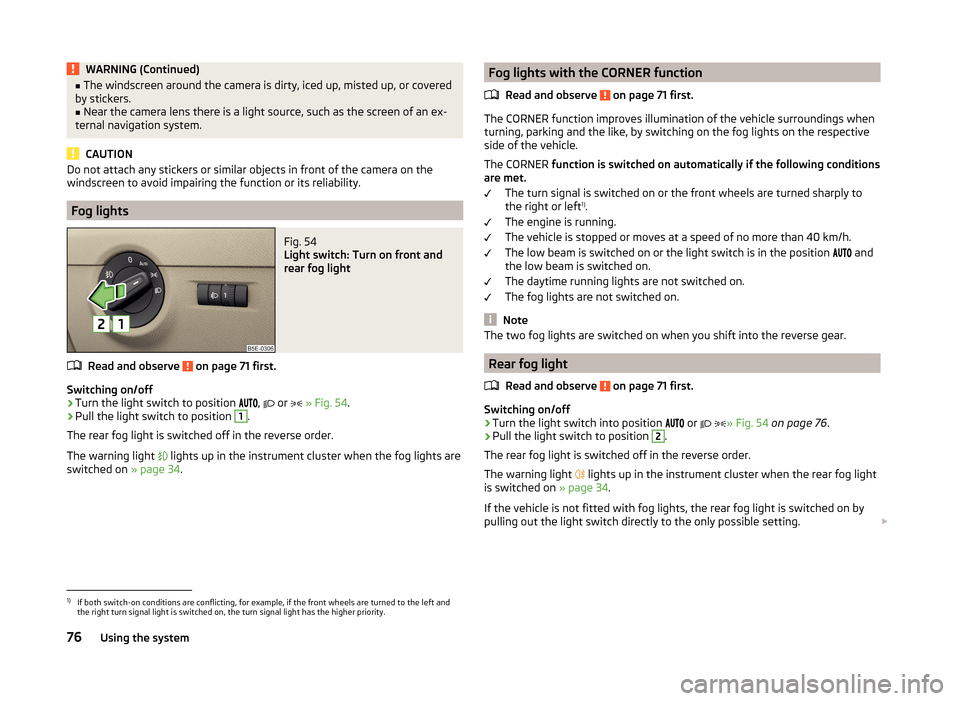
Fig. 54
Light switch: Turn on front and
rear fog light
Read and observe on page 71 first.
Switching on/off
›
Turn the light switch to position
,
or
» Fig. 54 .
›
Pull the light switch to position
1
.
The rear fog light is switched off in the reverse order.
The warning light
lights up in the instrument cluster when the fog lights are
switched on » page 34.
Fog lights with the CORNER function
Read and observe
on page 71 first.
The CORNER function improves illumination of the vehicle surroundings when
turning, parking and the like, by switching on the fog lights on the respective
side of the vehicle.
The CORNER function is switched on automatically if the following conditions
are met.
The turn signal is switched on or the front wheels are turned sharply to
the right or left 1)
.
The engine is running.
The vehicle is stopped or moves at a speed of no more than 40 km/h.
The low beam is switched on or the light switch is in the position and
the low beam is switched on.
The daytime running lights are not switched on.
The fog lights are not switched on.
Note
The two fog lights are switched on when you shift into the reverse gear.
Rear fog light
Read and observe
on page 71 first.
Switching on/off
›
Turn the light switch into position or
» Fig. 54
on page 76 .
›
Pull the light switch to position
2
.
The rear fog light is switched off in the reverse order.
The warning light lights up in the instrument cluster when the rear fog light
is switched on » page 34.
If the vehicle is not fitted with fog lights, the rear fog light is switched on by
pulling out the light switch directly to the only possible setting.
1)
If both switch-on conditions are conflicting, for example, if the front wheels are turned to the left and
the right turn signal light is switched on, the turn signal light has the higher priority.
76Using the system
Page 83 of 280
There is a reflector installed here on some vehicles instead.
Entry space lighting
The lighting is positioned on the bottom edge of the exterior mirror and illumi-
nates the entry area of the front door.
The light comes on after the vehicle has been unlocked or on opening the
front door. The lighting goes out about 30 seconds after the doors are closed
or if the ignition is switched on.
WARNINGIf the entry light is on, do not touch its cover – risk of burns!
Visibility
Introduction
This chapter contains information on the following subjects:
Windscreen and rear window heater
80
Sun visors in the front
81
Sun screen
81
Windscreen and rear window heater
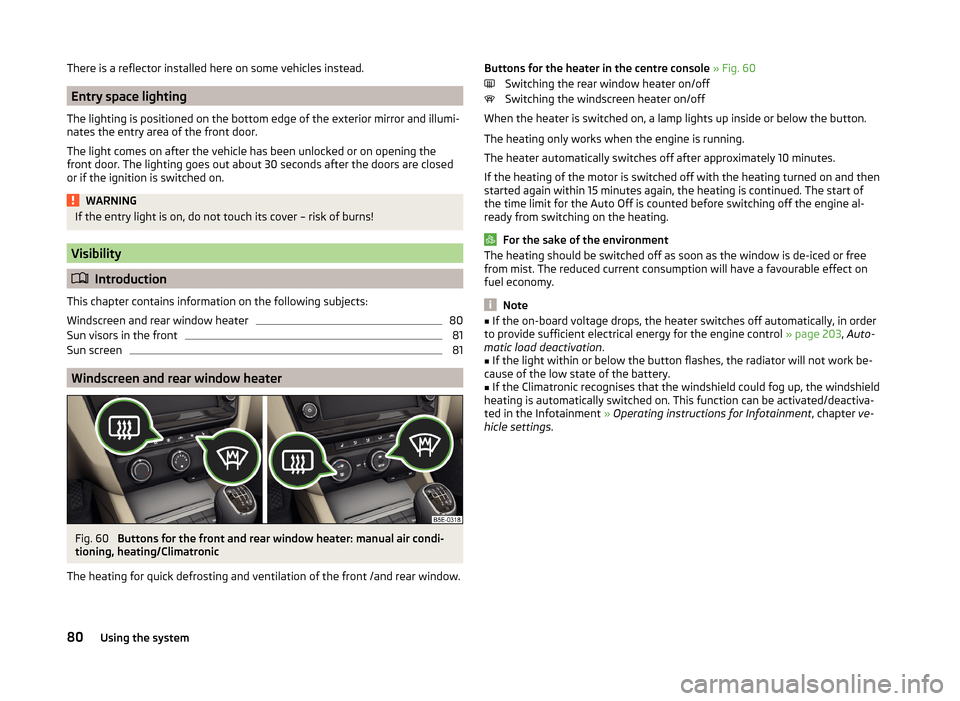
Fig. 60
Buttons for the front and rear window heater: manual air condi-
tioning, heating/Climatronic
The heating for quick defrosting and ventilation of the front /and rear window.
Buttons for the heater in the centre console » Fig. 60
Switching the rear window heater on/off
Switching the windscreen heater on/off
When the heater is switched on, a lamp lights up inside or below the button.
The heating only works when the engine is running.
The heater automatically switches off after approximately 10 minutes.
If the heating of the motor is switched off with the heating turned on and then
started again within 15 minutes again, the heating is continued. The start of
the time limit for the Auto Off is counted before switching off the engine al-
ready from switching on the heating.
For the sake of the environment
The heating should be switched off as soon as the window is de-iced or free
from mist. The reduced current consumption will have a favourable effect on
fuel economy.
Note
■ If the on-board voltage drops, the heater switches off automatically, in order
to provide sufficient electrical energy for the engine control » page 203, Auto-
matic load deactivation .■
If the light within or below the button flashes, the radiator will not work be-
cause of the low state of the battery.
■
If the Climatronic recognises that the windshield could fog up, the windshield
heating is automatically switched on. This function can be activated/deactiva-
ted in the Infotainment » Operating instructions for Infotainment , chapter ve-
hicle settings .
80Using the system
Page 89 of 280
CAUTION■Never adjust exterior mirrors with the fold-in function by hand - risk of
damaging the electric mirror actuator!■
When the mirror is swung by external influences (due to impact during ma-
noeuvring, for example), then first fold-in the mirror by turning the knob and
wait for a loud clapping noise.
Note
■ The mirror heater only operates when the engine is running and up to an
outside temperature of +35 ℃.■
If the electrical mirror setting fails at any time, the mirrors can be adjusted by
hand by pressing on the edge of the mirror surface.
Seats and head restraints
Seats and head restraints
Introduction
This chapter contains information on the following subjects:
Manually adjusting seats
87
Adjusting the front seats electronically
87
Head restraints - adjusting height
88
Headrests - removing and installing
88
Memory Function of the electrically adjustable seat
89
Memory function of the remote control key
89
The driver's seat should be adjusted in such a way that the pedals can be fully
pressed to the floor with slightly bent legs.
The seat backrest on the driver's seat should be adjusted in such a way that the upper point of the steering wheel can be easily reached with slightly bent
arms.
Correct adjustment of the seats is particularly important for the following: › Reaching the controls safely and quickly,
› A relaxed and fatigue-free body position.
› Achieving the maximum protection offered by the seat belts and the airbag
system.
WARNING■ Only adjust the driver's seat when the vehicle is stationary – risk of acci-
dent!■
Caution when adjusting the seat! You may suffer injuries or bruises as a
result of adjusting the seat without paying proper attention.
■
The electric front seat adjustment is also functional when the ignition is
turned off (even with the ignition key removed). Therefore, when leaving
the vehicle, never leave people who are not completely independent, such
as children, unattended in the vehicle - there is a danger of injury!
■
Never carry more people than there are number of seats in the vehicle.
■
Do not transport any objects on the front passenger seat except objects
(e.g. child safety seat) provided for this purpose – risk of accident!
86Using the system
Page 93 of 280
When automatic storage is activated, the current positions of the driver's seat
and the external mirrors are saved in the memory of the remote control key
each time the vehicle is locked. When the vehicle is next unlocked using the
same key, the driver's seat and the external mirrors assume the positions stor-
ed in the memory of this key 1)
.
Saving front passenger mirror settings when reversing
The function of the lowering of the passenger-side mirror surface must be en-
abled in infotainment » Bedienungsanleitung Infotainment, chapter Vehicle
settings (button CAR) .›
Unlock the vehicle with the remote control key.
›
Switch on the ignition.
›
Adjust the rotary knob for the mirrors to the position
or in right-hand drive
to the position
» page 85 .
›
Engage reverse gear.
›
Adjust the front passenger's mirror to the desired position » page 85.
›
Disengage reverse gear.
The adjusted position of the exterior mirror is stored in the remote control key
memory.
Disable the function of automatic storage
›
Unlock the vehicle with the remote control key.
›
Press and hold the SET button
A
» Fig. 71 on page 89 . At the same time,
press the button on the remote control key within 10 seconds.
The successful deactivation of the automatic storage function for each key is confirmed by an acoustic signal.
Stopping the ongoing adjustment
›
Press any button on the driver's seat.
Or
›
Press the button on the remote control key.
Seat features
Introduction
This chapter contains information on the following subjects:
Seat heaters
90
Front armrest
91
Rear armrest
91
Folding front passenger seat
92
Seat backrests
92
Rear seat backrests - fold down from the luggage compartment
93
Rear-seat backrest with long-cargo channel
94
Seat heaters
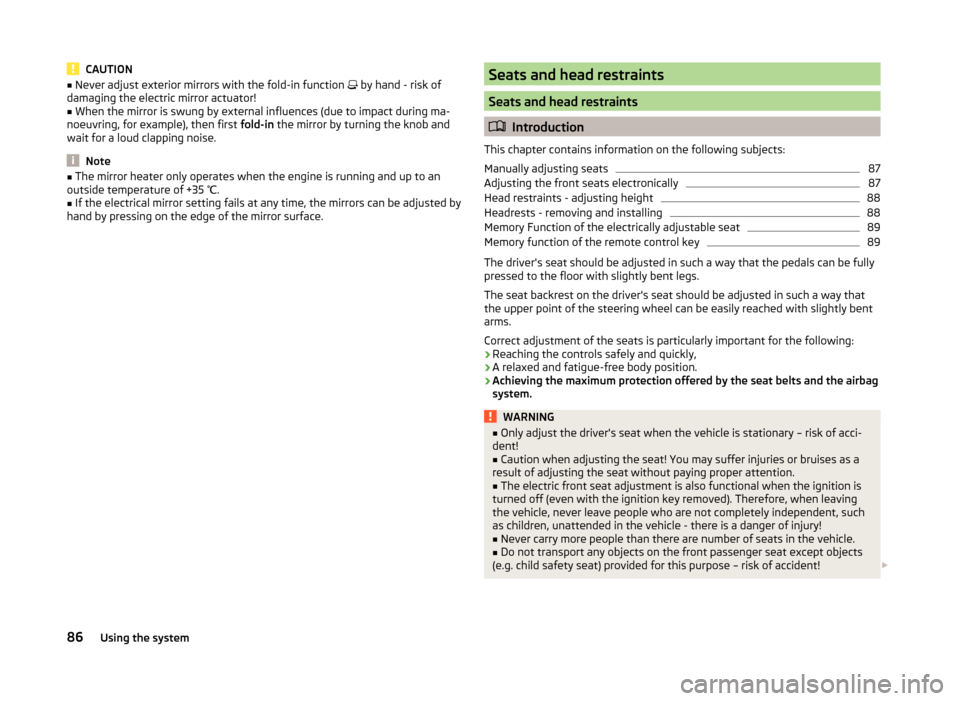
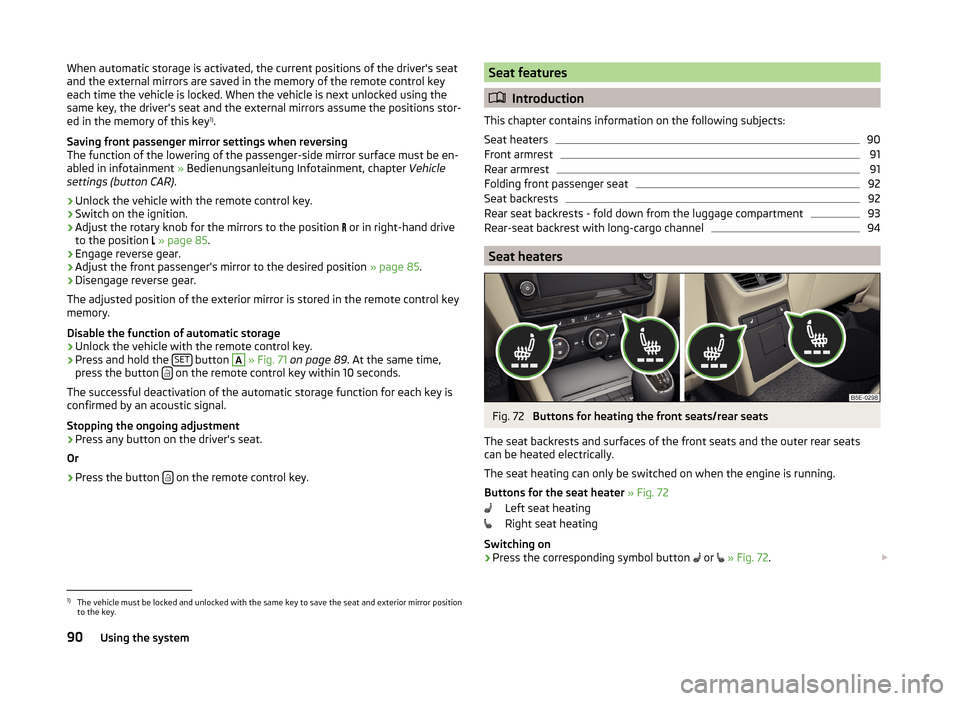
Fig. 72
Buttons for heating the front seats/rear seats
The seat backrests and surfaces of the front seats and the outer rear seats
can be heated electrically.
The seat heating can only be switched on when the engine is running.
Buttons for the seat heater » Fig. 72
Left seat heating
Right seat heating
Switching on
›
Press the corresponding symbol button or
» Fig. 72 .
1)
The vehicle must be locked and unlocked with the same key to save the seat and exterior mirror position
to the key.
90Using the system
Page 94 of 280

Pressing once switches the seat heating on at its maximum level.
With repeated pressing of the switch, the intensity of the heating is reduced
until it is switched off.
The level of the seat heating is indicated by the number of illuminated warning
lights underneath/in the switch.
If the engine is switched off and then turned on again within 10 mins with the
driver seat heating switched, then the driver's seat heating is automatically
turned on again.WARNINGIf, as a passenger, you have a subdued pain and/or temperature sensitivity,
e.g. through medication, paralysis or because of chronic illness (e.g. diabe-
tes), we recommend you do not use seat heating on the driver's or front
passenger seat. This can lead to burns on the back, the posterior and the
legs which are difficult to heal. If the seat heating is used, we recommend
to make regular breaks in your journey when driving long distances, so that
the body can recuperate from the stress of the journey. Please consult your
doctor, who can evaluate your specific condition.
CAUTION
■ Do not kneel on the seats or otherwise apply concentrated pressure to them.■The seat heating in the following cases will not turn on - there is a risk of
damaging the seat covers and seat heating. ■The seats are not occupied by people.
■ Items are fastened or stored items on the seats, such as a child seat, a bag
and the like.
■ Additional seat covers or protective covers are fixed to the seats.■
Clean the seat covers » page 187.
Note
If the on-board voltage drops, the heater switches off automatically, in order
to provide sufficient electrical energy for the engine control » page 203, Auto-
matic load deactivation .Front armrestFig. 73
Adjust armrest
The armrest is adjustable for height and length.
Setting the height
›
First of all, fold the armrest downwards and then lift it in the direction of the
arrow
A
» Fig. 73 to one of the 4 rest positions.
Move
›
Move the cover into the desired position in the direction of the arrow
B
» Fig. 73 .
The armrest includes a storage compartment underneath » page 99.
Note
Push the armrest cover all the way back to the stop before applying the hand-
brake.
Rear armrest
Fig. 74
Fold the armrest forwards
Folding forward
›
Pull on the loop
A
» Fig. 74 and fold the armrest forward in the direction of
the arrow.
91Seats and head restraints
Page 101 of 280
WARNINGNever place flammable objects in the ashtray – risk of fire!
CAUTION
When removing, do not hold the ashtray on the cover – risk of breakage.
12-Volt power outlet
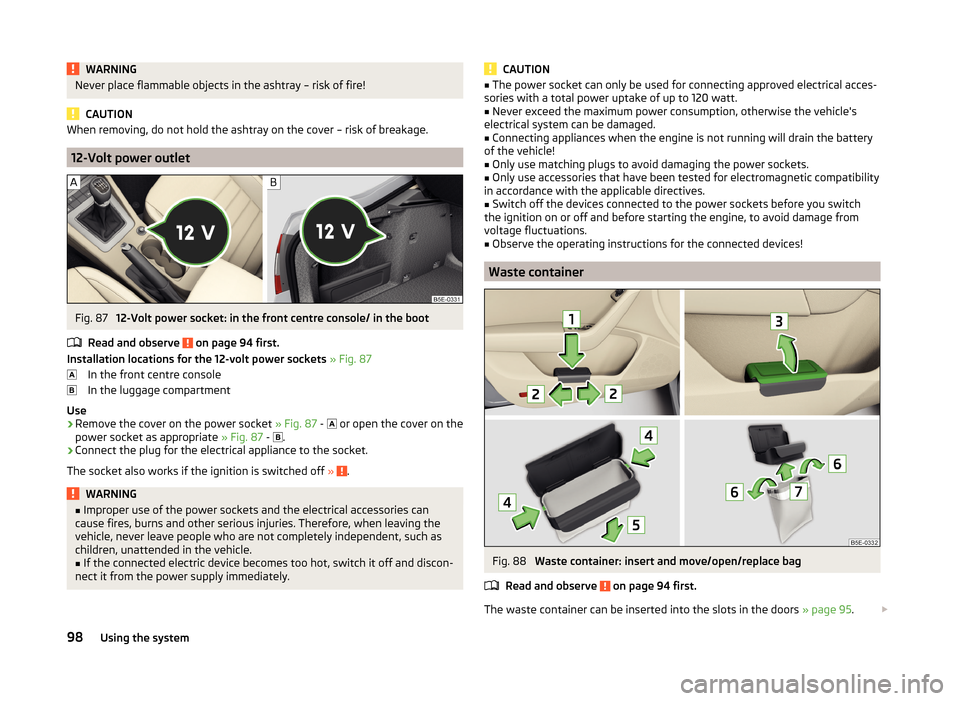
Fig. 87
12-Volt power socket: in the front centre console/ in the boot
Read and observe
on page 94 first.
Installation locations for the 12-volt power sockets » Fig. 87
In the front centre console
In the luggage compartment
Use
›
Remove the cover on the power socket » Fig. 87 -
or open the cover on the
power socket as appropriate » Fig. 87 -
.
›
Connect the plug for the electrical appliance to the socket.
The socket also works if the ignition is switched off »
.
WARNING■
Improper use of the power sockets and the electrical accessories can
cause fires, burns and other serious injuries. Therefore, when leaving the
vehicle, never leave people who are not completely independent, such as
children, unattended in the vehicle.■
If the connected electric device becomes too hot, switch it off and discon-
nect it from the power supply immediately.
CAUTION■ The power socket can only be used for connecting approved electrical acces-
sories with a total power uptake of up to 120 watt.■
Never exceed the maximum power consumption, otherwise the vehicle's
electrical system can be damaged.
■
Connecting appliances when the engine is not running will drain the battery
of the vehicle!
■
Only use matching plugs to avoid damaging the power sockets.
■
Only use accessories that have been tested for electromagnetic compatibility
in accordance with the applicable directives.
■
Switch off the devices connected to the power sockets before you switch
the ignition on or off and before starting the engine, to avoid damage from
voltage fluctuations.
■
Observe the operating instructions for the connected devices!
Waste container
Fig. 88
Waste container: insert and move/open/replace bag
Read and observe
on page 94 first.
The waste container can be inserted into the slots in the doors » page 95.
98Using the system
Page 105 of 280
The socket only works if the ignition is switched on.
Use›
Fold out the lid on the power socket in the direction of the arrow » Fig. 95.
›
Connect the plug for the electrical appliance to the socket.
The power socket can only be used when the ignition is switched on »
.
When the plug on the electrical appliance is inserted into the power socket,
the child safety lock is released, and the power socket is activated.
Warning light
› Permanent green light: The power socket is activated.
› Flashing red light: The power socket is temporarily deactivated.
The power socket is deactivated automatically when the amperage is too high,
the temperature is too high or the battery charge state is too low.
If disabling reasons no longer exist, the socket is automatically activated. Then
re-activate connected devices which are switched on »
.
WARNING■
The power socket can only be used for connecting approved electrical ac-
cessories with a two-pin 230V plug, with a total power uptake of up to
150 watt.■
Improper use can lead to serious injury or fire. Therefore, when leaving
the vehicle, never leave people who are not completely independent, such
as children, unattended in the vehicle.
■
Safely stow away all connected devices during the journey to prevent
them from being thrown around the interior in the event of a sudden brak-
ing manoeuvre or an accident – risk of death!
■
Do not pour liquids into the power socket – risk of death! If fluid does
manage to get into the power socket, completely dry out the socket before
reuse.
■
The connected devices may warm up during operation – risk of injury or
fire!
■
The child lock on the power socket is unlocked when using adapters and
extension cables which carry volts – risk of injury!
■
Do no insert any conductive objects into the contacts of the power sock-
et, e.g. knitting needs – risk of death!
CAUTION■ Place the connector on the electrical device into the power socket as far as it
can go to create a connection between the contacts.■
If the connector of the electrical device is not inserted fully into the power
socket, the child safety lock might release, and the power socket be activated.
The electrical device is still not supplied with power.
■
The socket is temporarily disabled at engine start-up and the indicator light
flashes red. After starting the engine, the power socket is re-activated auto-
matically.
■
Do not connect any lamps with neon filaments to the power socket - risk of
damaging the lamp.
■
A larger current surge may arise in some power supplies (e.g. for notebooks)
when connecting them to the power socket- this will automatically deactivate
the power socket. In this case, disconnect the power supply from the consum-
er and connect the power supply to the power socket first, followed by the
consumer.
■
The connected appliances may behave differently to when connected to the
mains.
■
Observe the operating instructions for the connected devices!
Removable through-loading bag
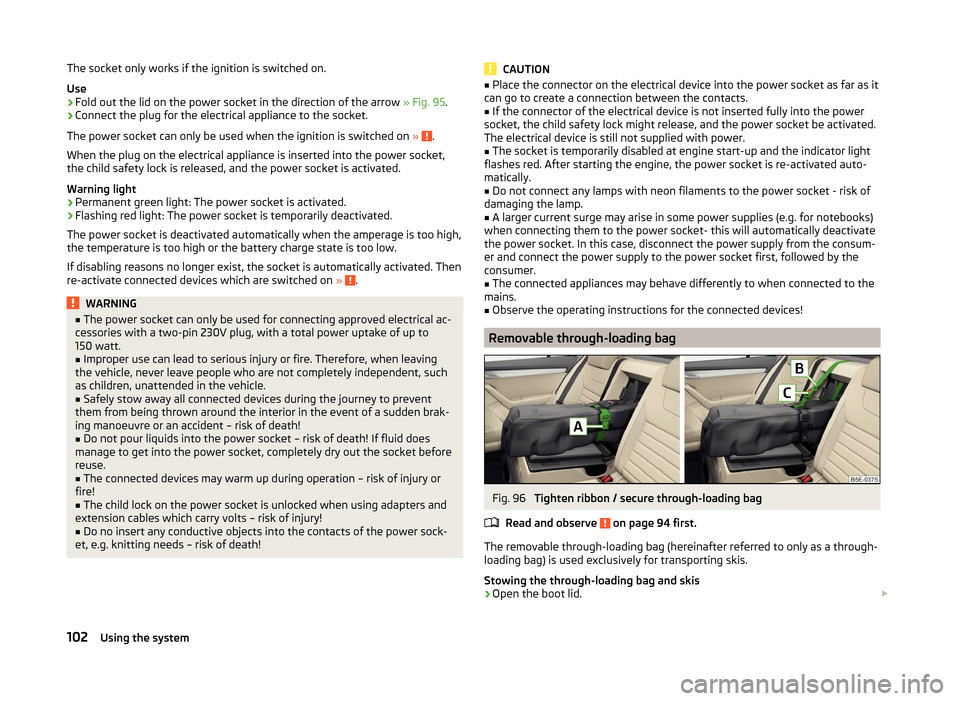
Fig. 96
Tighten ribbon / secure through-loading bag
Read and observe
on page 94 first.
The removable through-loading bag (hereinafter referred to only as a through-
loading bag) is used exclusively for transporting skis.
Stowing the through-loading bag and skis
›
Open the boot lid.
102Using the system