light SKODA OCTAVIA 2016 3.G / (5E) Service Manual
[x] Cancel search | Manufacturer: SKODA, Model Year: 2016, Model line: OCTAVIA, Model: SKODA OCTAVIA 2016 3.G / (5E)Pages: 324, PDF Size: 48.85 MB
Page 75 of 324
Automatic windscreen wiping during rain can be in the Infotainment menu
→ →
Mirrors and wipers
activated/ deactivated .WARNINGAutomatic wiping during rain is only a support. The driver is still responsible
for setting the function of the windscreen wipers manually depending on
the visibility conditions.
Note
If the wiping is carried out without interruption, the wiping speed varies de-
pending on the vehicle speed.
Rear wipers and washers / reversing camera cleaning system
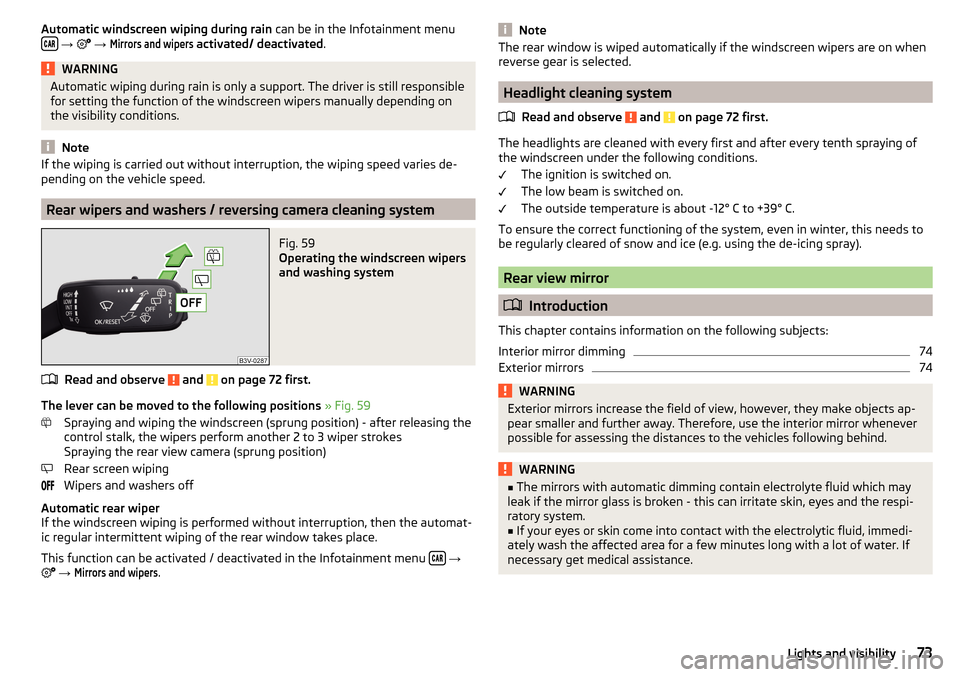
Fig. 59
Operating the windscreen wipers
and washing system
Read and observe and on page 72 first.
The lever can be moved to the following positions » Fig. 59
Spraying and wiping the windscreen (sprung position) - after releasing the
control stalk, the wipers perform another 2 to 3 wiper strokes
Spraying the rear view camera (sprung position)
Rear screen wiping
Wipers and washers off
Automatic rear wiper
If the windscreen wiping is performed without interruption, then the automat-
ic regular intermittent wiping of the rear window takes place.
This function can be activated / deactivated in the Infotainment menu
→
→
Mirrors and wipers
.
NoteThe rear window is wiped automatically if the windscreen wipers are on when
reverse gear is selected.
Headlight cleaning system
Read and observe
and on page 72 first.
The headlights are cleaned with every first and after every tenth spraying of
the windscreen under the following conditions.
The ignition is switched on.
The low beam is switched on.
The outside temperature is about -12° C to +39° C.
To ensure the correct functioning of the system, even in winter, this needs to
be regularly cleared of snow and ice (e.g. using the de-icing spray).
Rear view mirror
Introduction
This chapter contains information on the following subjects:
Interior mirror dimming
74
Exterior mirrors
74WARNINGExterior mirrors increase the field of view, however, they make objects ap-
pear smaller and further away. Therefore, use the interior mirror whenever
possible for assessing the distances to the vehicles following behind.WARNING■ The mirrors with automatic dimming contain electrolyte fluid which may
leak if the mirror glass is broken - this can irritate skin, eyes and the respi-
ratory system.■
If your eyes or skin come into contact with the electrolytic fluid, immedi-
ately wash the affected area for a few minutes long with a lot of water. If
necessary get medical assistance.
73Lights and visibility
Page 76 of 324
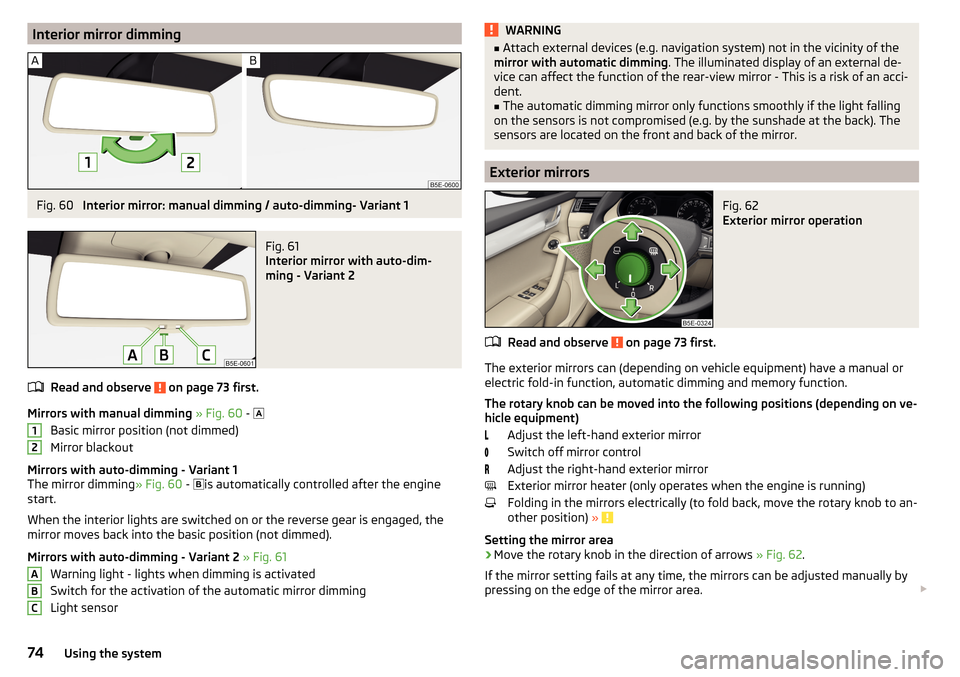
Interior mirror dimmingFig. 60
Interior mirror: manual dimming / auto-dimming- Variant 1
Fig. 61
Interior mirror with auto-dim-
ming - Variant 2
Read and observe on page 73 first.
Mirrors with manual dimming » Fig. 60 -
Basic mirror position (not dimmed)
Mirror blackout
Mirrors with auto-dimming - Variant 1
The mirror dimming » Fig. 60 -
is automatically controlled after the engine
start.
When the interior lights are switched on or the reverse gear is engaged, the
mirror moves back into the basic position (not dimmed).
Mirrors with auto-dimming - Variant 2 » Fig. 61
Warning light - lights when dimming is activated
Switch for the activation of the automatic mirror dimming
Light sensor
12ABCWARNING■ Attach external devices (e.g. navigation system) not in the vicinity of the
mirror with automatic dimming . The illuminated display of an external de-
vice can affect the function of the rear-view mirror - This is a risk of an acci-
dent.■
The automatic dimming mirror only functions smoothly if the light falling
on the sensors is not compromised (e.g. by the sunshade at the back). The
sensors are located on the front and back of the mirror.
Exterior mirrors
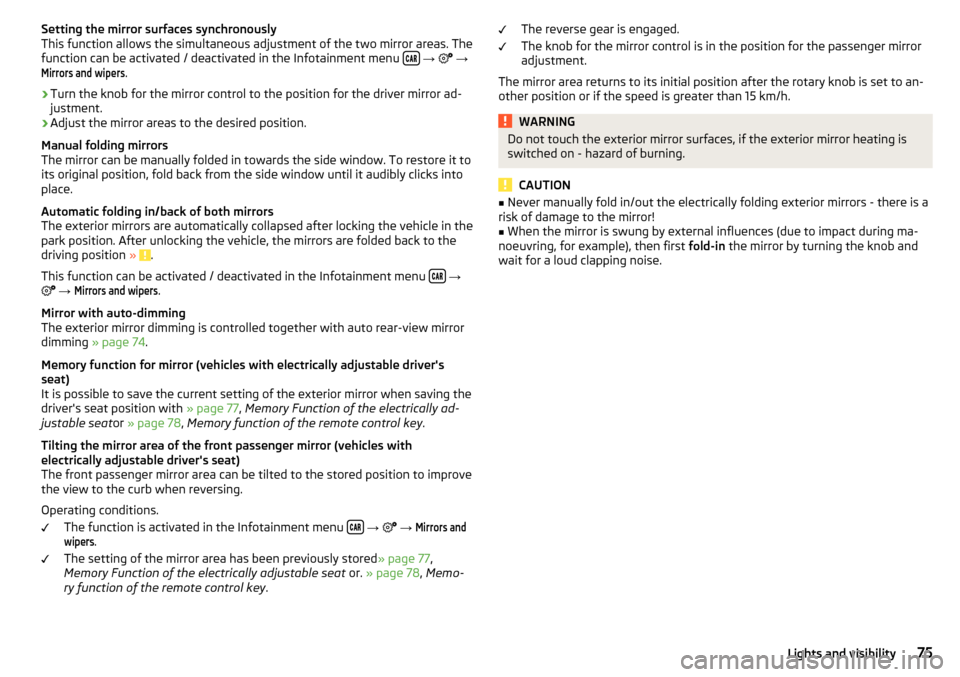
Fig. 62
Exterior mirror operation
Read and observe on page 73 first.
The exterior mirrors can (depending on vehicle equipment) have a manual or
electric fold-in function, automatic dimming and memory function.
The rotary knob can be moved into the following positions (depending on ve- hicle equipment)
Adjust the left-hand exterior mirror
Switch off mirror control
Adjust the right-hand exterior mirror
Exterior mirror heater (only operates when the engine is running)
Folding in the mirrors electrically (to fold back, move the rotary knob to an-
other position) »
Setting the mirror area
›
Move the rotary knob in the direction of arrows » Fig. 62.
If the mirror setting fails at any time, the mirrors can be adjusted manually by
pressing on the edge of the mirror area.
74Using the system
Page 77 of 324
Setting the mirror surfaces synchronously
This function allows the simultaneous adjustment of the two mirror areas. The
function can be activated / deactivated in the Infotainment menu
→
→
Mirrors and wipers
.
›
Turn the knob for the mirror control to the position for the driver mirror ad-
justment.
›
Adjust the mirror areas to the desired position.
Manual folding mirrors
The mirror can be manually folded in towards the side window. To restore it to
its original position, fold back from the side window until it audibly clicks into
place.
Automatic folding in/back of both mirrors
The exterior mirrors are automatically collapsed after locking the vehicle in the park position. After unlocking the vehicle, the mirrors are folded back to the
driving position »
.
This function can be activated / deactivated in the Infotainment menu
→
→
Mirrors and wipers
.
Mirror with auto-dimming
The exterior mirror dimming is controlled together with auto rear-view mirror
dimming » page 74 .
Memory function for mirror (vehicles with electrically adjustable driver's
seat)
It is possible to save the current setting of the exterior mirror when saving the
driver's seat position with » page 77, Memory Function of the electrically ad-
justable seat or » page 78 , Memory function of the remote control key .
Tilting the mirror area of the front passenger mirror (vehicles with
electrically adjustable driver's seat)
The front passenger mirror area can be tilted to the stored position to improve
the view to the curb when reversing.
Operating conditions. The function is activated in the Infotainment menu
→
→
Mirrors andwipers
.
The setting of the mirror area has been previously stored » page 77,
Memory Function of the electrically adjustable seat or. » page 78 , Memo-
ry function of the remote control key .
The reverse gear is engaged.
The knob for the mirror control is in the position for the passenger mirror
adjustment.
The mirror area returns to its initial position after the rotary knob is set to an-
other position or if the speed is greater than 15 km/h.WARNINGDo not touch the exterior mirror surfaces, if the exterior mirror heating is
switched on - hazard of burning.
CAUTION
■ Never manually fold in/out the electrically folding exterior mirrors - there is a
risk of damage to the mirror!■
When the mirror is swung by external influences (due to impact during ma-
noeuvring, for example), then first fold-in the mirror by turning the knob and
wait for a loud clapping noise.
75Lights and visibility
Page 83 of 324

›To
adjust the height , hold the locking button A and move the rest in the de-
sired direction » Fig. 71.
Setting the height of the rear headrests
Fig. 72
Setting the height of the back headrest
›
Grasp the headrest and move upwards in the direction of arrow
1
» Fig. 72 .
›
To move the headrest down, press the securing button
A
in the direction of
arrow
2
and hold it down while pressing the headrest in the direction of ar-
row
3
.
Removing/inserting the rear headrests
Fig. 73
Removing/inserting the rear headrests
Before removing/inserting the headrests, fold the corresponding seat backrest
slightly forward » page 79.
›
To remove the headrest, pull it out of the seat backrest up to the stop.
›Hold the locking button A in the direction of arrow 1, at the same time us-
ing a flat screwdriver with a max. width of 5 mm to press the locking button
in the opening B
in the direction of arrow
2
and pull out the rest in the di-
rection of arrow
3
» Fig. 73 .
›
To insert the headrest, push the headrest into the seat backrest in the direc-
tion of arrow
4
until the locking button clicks into place.
Seat heaters
Fig. 74
Buttons for heating the front seats/rear seats
The seat backrests and surfaces of the front seats and the outer rear seats
can be heated electrically.
Seat heating buttons » Fig. 74
Left seat heating
Right seat heating
›
To turn on the heating to max, press the key
or
button.
By repeatedly pressing the button, the heat is turned down until it is com-
pletely switched off . The level of the seat heating is indicated by the number
of illuminated warning lights underneath / in the button.
The seat heating only operates when the engine is running.
When the ignition is switched off, the seat heating / ventilation is also switch-
ed off. if the engine is started again within 10 minutes, then the driver's seat
heating / ventilation is switched on again automatically according to the set-
ting before switching off the ignition.
81Seats and head restraints
Page 89 of 324

Glasses compartmentFig. 86
Opening the glasses storage box
Read and observe and on page 82 first.
›
To open , press on the outer edge of the glasses compartment in area
A
.
The compartment folds in the direction of the arrow » Fig. 86.
›
To close , swivel the compartment against the direction of the arrow until it
audibly clicks into place.
CAUTION
■ Do not put any heat-sensitive objects in the glasses storage box - with high
temperatures there is risk of damage.■
The box must be closed before leaving and locking the vehicle – risk of im-
pairment to the functions of the anti-theft alarm system.
Storage compartment on the front passenger side
Fig. 87
Open storage compartment / close storage compartment and
open air supply
Read and observe and on page 82 first.
The storage compartment is equipped with an interior light (this is illuminated
when the parking lights / low beam are switched on), a pen/card holder and an air outlet.
Storage compartment
›
To open , pull the handle
A
in the direction of arrow
1
and fold the cover in
the direction of arrow
2
» Fig. 87 .
›
To close , swivel the cover in the direction of arrow
3
until it audibly clicks
into place.
Air supply
›
To open , turn the rotary switch until it stops in the position
» Fig. 87
.
›
To close , turn the rotary switch until it stops in the position
.
The temperature of the storage compartment supplied with air is dependent
on the setting in the air conditioning.
Storage compartment for umbrella
Fig. 88
Opening the storage compart-
ment
Read and observe and on page 82 first.
The storage compartment under the passenger seat is used for storing an um-
brella.
›
To open , pull the handle in direction of arrow
1
pull and open the compart-
ment in the direction of arrow
2
» Fig. 88 .
›
To close , screw in the lid in the opposite direction of arrow
2
until it audibly
clicks into place.
CAUTION
Never store a wet umbrella in the storage compartment - there is a risk of
damage to the umbrella. 87Useful features
Page 91 of 324

Long cargo channelFig. 92
Open the cover: from the passenger compartment / from the lug-
gage compartment
Read and observe
and on page 82 first.
After folding-up the rear armrest and cover, an opening in the seat backrest
becomes visible through which the through-loading bag with skis can be push-
ed.
›
To open from the passenger compartment , fold down the rear armrest
slightly » page 80 .
›
Pull handle
A
in the direction of arrow
1
and fold down the cover in the
direction of arrow
2
» Fig. 92 .
›
To open from the luggage compartment , push the securing tab
B
in the di-
rection of the arrow and fold the cover with the armrest forwards.
›
To close , fold the cover and the rear armrest upwards until the stop. This
should audibly click into place.
The cover must be secured after the closing process. Ensure that the red field
above the securing tab
B
is not visible.
WARNINGThe through-loading channel is only intended for transporting skis that are
placed in a properly secured, through-loading bag.Removable through-loading bagFig. 93
Tighten ribbon / secure through-loading bag
Read and observe
and on page 82 first.
The removable through-loading bag (hereinafter referred to as through-load-
ing bag) is used exclusively for transporting skis and poles (max. 4 pairs).
Stowing the through-loading bag and skis
›
Fold the rear armrest and the cover in the seat backrest downwards » Fig. 92
on page 89 .
›
Place the empty, through-loading bag in the opening in such a way that the
end of the bag with the zip is in the boot.
›
Place the skis with the tips facing to the front and the sticks with the tips
facing to the rear. into the through-loading bag and close the bag.
Securing the through-loading bag and skis
›
Tighten the strap
A
around the skis in front of the bindings » Fig. 93. The
strap must hold the skis tight.
›
Fold the seat backrest a little forward » page 79.
›
Guide the securing strap
B
through the opening in the seat backrest around
the upper part of the seat backrest.
›
Then, fold the seat backrests back until the locking button clicks into place.
Check this by pulling on the seat backrest.
›
Insert the securing strap
B
into the lock
C
until it clicks into place.
WARNING■ The total weight of the skis which are transported must not exceed
24 kg.■
Always stow and secure the skis and the bag securely - otherwise there is
a risk of injury or accident!
89Useful features
Page 92 of 324

CAUTIONNever fold and stow the through-loading bag when it is wet - There is a risk of
damaging the through-loading bag.
Electrical sockets
Introduction
This chapter contains information on the following subjects:
12-volt power outlet
90
230-volt socket
90WARNING■ Do not place anything on the dash panel. These objects might slide or fall
down when driving and may distract you from concentrating on the traffic –
There is a risk of an accident!■
Make sure that while driving no objects can enter the driver's footwell -
There is a risk of an accident!
■
Stow all devices safely during the journey to prevent them from being
thrown around the interior in the event of a sudden braking manoeuvre or
an accident – The is a risk to life!
■
The devices may warm up during operation – The is a risk of injury or fire!
■
Improper use of the power sockets and the electrical accessories can
cause fires, burns and other serious injuries.
■
The 12-Volt sockets also work if the ignition is switched off. When leaving
the vehicle, never leave persons who are not completely independent, such
as children, unattended in the vehicle.
CAUTION
When using the 12-volt sockets, the following notes are to be observed.■The sockets can only be used for the connection of approved electrical ac-
cessories with a total power consumption of up to 120 watts - otherwise the
there is a risk of damage to the electrical system of the vehicle.■
Connecting appliances when the engine is not running will drain the battery
of the vehicle!
■
Before switching the ignition on / off or before starting the engine, switch
off the devices which are connected to the sockets - there is a risk of damage
to the equipment due to voltage fluctuations.
12-volt power outletFig. 94
Cover of the 12 volt power outlet: in the front centre console/ in
the boot
Read and observe
and on page 90 first.
›
Touse , remove the cover of the socket » Fig. 94 -
or open the cover of the
socket » Fig. 94 -
.
›
Connect the plug for the electrical appliance to the socket.
230-volt socket
Fig. 95
Open the cover of the 230 volt
power outlet
Read and observe and on page 90 first.
The 230-volt socket has a child safety lock. When inserting the plug, the fuse
is released, the socket is activated and the warning light above the socket is
illuminates green (if this flashes red, then the socket is deactivated).
›
To use , fold up the cover of the socket in the direction of arrow » Fig. 95 and
plug the electrical appliance plug into the socket.
90Using the system
Page 93 of 324

The socket may be automatically deactivated for the following reasons.
▶ Excessive current.
▶ Low battery charge state.
▶ High socket temperature.
If disabling reasons no longer exist, the socket is automatically activated.WARNING■ Make sure that no liquid or moisture enters into the socket - There is a
risk to life! If fluid does manage to get into the power socket, completely
dry out the socket before reuse.■
The child lock on the power socket is unlocked when using adapters and
extension cables which carry volts – There is a risk of injury!
■
Do no insert any objects (e.g. knitting needles) into the contacts of the
power socket – There is a risk to life!
CAUTION
■ The power socket can only be used for connecting approved electrical acces-
sories with a two-pin 230V plug, with a total power uptake of up to 150 watt.■
The plug of the electrical appliance must be plugged in up to the stop, other-
wise the child safety lock can be unlocked and the socket may be activated but
the electric appliance is still not receiving power.
■
Do not connect bulbs with neon tubes in the socket - there is a risk of dam-
aging the lamp.
■
For appliances with an independent power source (e.g. such as notebooks),
first connect the power source itself and only after that connect the appliance.
Ashtray and cigarette lighter
Introduction
This chapter contains information on the following subjects:
Ashtray
91
Cigarette lighter
91
The ashtray can be used for ash, cigarettes, cigars and the like
WARNINGNever place hot or flammable objects in the ashtray – risk of fire!AshtrayFig. 96
Removing front ashtray / Removing rear ashtray insert
Read and observe
on page 91 first.
Removable ashtray
›
Hold the ashtray
A
(not by the lid) remove in the direction of the arrow
» Fig. 96 .
Insertion takes place in reverse order.
Ashtray with removable insert
›
To remove , open the insert of the ashtray, hold the insert in the area
B
and
remove in the direction of the arrow » Fig. 96.
Insertion takes place in reverse order.
Cigarette lighter
Fig. 97
Cigarette lighter
Read and observe on page 91 first.
›
To use the lighter, push it in as far as the stop and wait until the glowing
lighter clicks out again » Fig. 97.
91Useful features
Page 94 of 324

›Take out the glowing lighter instantly, use it and insert it back into the sock-
et.WARNING■ The cigarette lighter also works if the ignition is switched off. When leav-
ing the vehicle, never leave people who are not completely independent,
such as children, unattended in the vehicle - there is a risk of burns, fire or
damage to the vehicle interior.■
Be careful when using the cigarette lighter - There is a risk of burns.
Note
The cigarette lighter socket can also be used as a 12 volt socket.
Tablet holder
Introduction
This chapter contains information on the following subjects:
Attaching the rear headrests
92
Handle holder
93
External devices (e.g. tablet, smartphone, etc.) measuring min. 122 mm and
max. 195 mm can be secured in the support.
The maximum permissible load of the holder is 750 g.
CAUTION
Never exceed the maximum permissible load of the holder - there is a risk of
damage or functional impairment.Attaching the rear headrestsFig. 98
Inserting: Adapter / holder
Fig. 99
Removing: Holder / adapter
Read and observe
on page 92 first.
›
To insert , attach the opened adapter to the guide rods of the front headrest
and clip in the direction of arrow
1
» Fig. 98 » .
›
Clip the holder in the direction of arrow
2
into the adapter.
›
To remove , pull on the securing tab
A
in direction of arrow
3
and take the
holder in direction of arrow
4
out of the adapter » Fig. 99.
›
Press the adapter and remove from the guide rods of the headrest in the di-
rection of arrow
5
.
WARNINGBe careful with the adapter- otherwise there is a risk of finger injury.92Using the system
Page 95 of 324

Handle holderFig. 100
Tilt and rotate holder
Fig. 101
Adjust holder size
Read and observe on page 92 first.
The holder may be by 30° in the direction of the arrow
1
tipped and by 360°
in the direction of arrow
2
turned » Fig. 100 .
›
To adjust the holder size , pull out the securing tab
A
in the direction of ar-
row
3
and push the part
B
in the direction of arrow
4
to the desired posi-
tion » Fig. 101 .
Note
If there is no external device in the holder, then we recommend that the partB is moved down fully. Otherwise, irritating noise may occur at certain
speeds.Transport of cargo
Luggage compartment and transporting objects
Introduction
This chapter contains information on the following subjects:
Fastening elements
94
Fixing nets
95
Multifunction pocket
95
Folding double hooks
96
Foldable hook
96
Fasten the flooring
96
Floor covering on both sides
96
Net on the luggage compartment cover
97
Luggage compartment cover
97
Roll-up cover
98
Storage compartment with cargo element
99
Storage compartments under the floor covering
99
Multi-function pocket
100
Class N1 vehicles
100
When transporting heavy objects, the driving characteristics change due to the
shift in centre-of-gravity. The speed and style of driving must be adjusted ac-
cordingly.
When transporting cargo the following the instructions must be adhered to
▶ Distribute the load evenly in the luggage compartment and secure it with
suitable lashing straps to the lashing eyes or fixing nets so that they cannot
slip.
▶ Place heavy objects as far forward as possible.
▶ Tyre pressure is to match the load.
In the event of an accident, even small and light objects gain so much kinetic
energy that they can cause severe injuries.
The magnitude of the kinetic energy is dependent on the speed at which the
vehicle is travelling and the weight of the object.
Luggage compartment light
The light switches on/off when the luggage compartment lid is opened or
closed.
93Transport of cargo