light SKODA ROOMSTER 2010 1.G Repair Manual
[x] Cancel search | Manufacturer: SKODA, Model Year: 2010, Model line: ROOMSTER, Model: SKODA ROOMSTER 2010 1.GPages: 231, PDF Size: 12.91 MB
Page 95 of 231
Automatic gearbox
94
Automatic gearboxAutomatic gearbox*Information for driving with the 6-speed automatic gearbox*
Your car is equipped with a conv entional 6-speed automatic gearbox.The maximum speed is reached in the 5th gear. The 6th gear serves as an economic
driving programme, which is intended to redu ce the fuel consumption. Shifting up and
down through the gears is performed automa tically. You can also, however, switch the
gearbox over into the Tiptronic mode. This mode makes it possible for you to also shift
gears manually page 98.Starting-off and Driving– Depress the brake pedal fully and keep it depressed.
– Press the Shiftlock button (button in ha ndle of the selector lever), move the
selector lever into the desired position, e.g. D page 95, and then release the
Shiftlock button.
– Wait a moment until the gearbox has shif ted (a slight engagement nudge can be
felt).
– Release the brake pedal and depress the accelerator .Stop– The selector lever position N does not have to be selected when stopping just for
a short time, such as at a cross roads. It is sufficient to hold the vehicle stationary
using the foot brake. The engine can, however, be allowed just to idle.Parking– Depress the brake pedal and hold it depressed.
– Apply the handbrake firmly.
– Press and Shiftlock button in the selector lever, move the selector lever to P and
then release the Shiftlock button.
The engine can only be started when the selector lever is in position P or N page 88. It is sufficient to engage selector lever position
P when parking on a flat surface. When
parking on a slope you should first apply the handbrake firmly and then move the
selector lever into position P. This is to ensure that there is no excessive pressure acting
on the lock mechanism and that it is easier to subsequently move the selector lever out
of position P.
If the selector lever position N is selected by accident while driving it is first necessary
to release pressure on the accelerator pedal and wait for idling speed of the engine to
be reached before engaging a drive position in the selector lever.
WARNING
Do not depress the accelerator when changing the position of the selector
lever if the car is stationary and the engine is running - risk of accident!
Never move the selector lever into position R or P when driving - risk of an
accident!
When the engine is running and the vehi cle is stationary, it is necessary to
hold the car with the brake pedal in all the positions of the selector lever (except
P and N) since the power transmission is never completely interrupted, also not
when the engine is idling - the vehicle creeps.
Information for driving with the automatic gearbox DSG*
The abbreviation DSG mean s Direct shift gearbox (Direct shift gearbox).Two independent clutches are needed for the power transmission between the engine
and the gearbox. These replace the torque converter of the conventional automatic
gearbox. Their shifting is matched in such a way that there are no jerks when shifting
the gear and the power transmission of the engine to the front wheels is not inter-
rupted. Shifting up and down through the gears is performed automatically. You can
also, however, switch the gearbox over into the Tiptronic mode. This mode makes it
possible for you to also shift gears manually page 98.Starting-off and Driving– Depress the brake pedal fully and keep it depressed.
s16g.4.book Page 94 Wednesda y, February 10, 2010 3:53 PM
Page 96 of 231
Automatic gearbox95
Using the system
Safety
Driving Tips
General Maintenance
Breakdown assistance
Praktik
Technical Data
– Press the Shiftlock button (button in ha
ndle of the selector lever), move the
selector lever into the desired position, e.g. in D, and then release the Shiftlock
button.
– Release the brake pedal and depress the accelerator .
Stop– The selector lever position N does not have to be selected when stopping just for
a short time, such as at a cross roads. It is absolutely sufficient to hold the stopped
vehicle stationary by depressing the foot brake. The engine can, however, be
allowed just to idle.Parking– Depress the brake pedal and hold it depressed.
– Apply the handbrake firmly.
– Press and Shiftlock button in the selector lever, move the selector lever to P and
then release the Shiftlock button.
The engine can only be started when the selector lever is in position P or N page 88.
At temperatures below -10 °C the engine can only be started in the selector lever posi-
tion P.
It is sufficient to engage selector lever position P when parking on a flat surface. When
parking on a slope you should first apply the handbrake firmly and then move the
selector lever into position P. This is to ensure that there is no excessive pressure acting
on the lock mechanism and that it is easier to subsequently move the selector lever out
of position P .
If the selector lever position N is selected by accident while driving it is first necessary
to release pressure on the accelerator pedal and wait for idling speed of the engine to
be reached before engaging a drive position in the selector lever.
WARNING
Do not depress the accelerator when changing the position of the selector
lever if the car is stationary and the engine is running - risk of accident!
Never move the selector lever into position R or P when driving - risk of an
accident!
If you are stopping at a hill (downhill section), never try to hold the car
stationary with the gear engaged by mean s of the “accelerator”, this means by
letting the clutch slip. This can lead to ov erheating of the clutch. If there is a risk
of overheating of the clutch due to overlo ad, the clutch is opened automatically
and the vehicle rolls backward - risk of accident!
If yo u m us t s to p a t a sl ope , d e pre s s a nd ho ld t he b ra ke pe d a l , s o t ha t y ou c a n
prevent the vehicle from rolling back.Caution
The double clutch on the automatic gear box DSG is equipped with an overload
protection. If you make use of the uphill func tion on a vehicle which is stationary or
driving slowly uphill, it will result in an increase of thermal stress of the clutches.
In the event that they overheat, the warning light
and a warning text page 23
appear in the information display*. In such a case bring the vehicle to a stop, switch off
the engine and wait until the warning light and the warning go out - risk of gearbox
damage! You can continue the trip as soon as the warning light and the warning go
out.
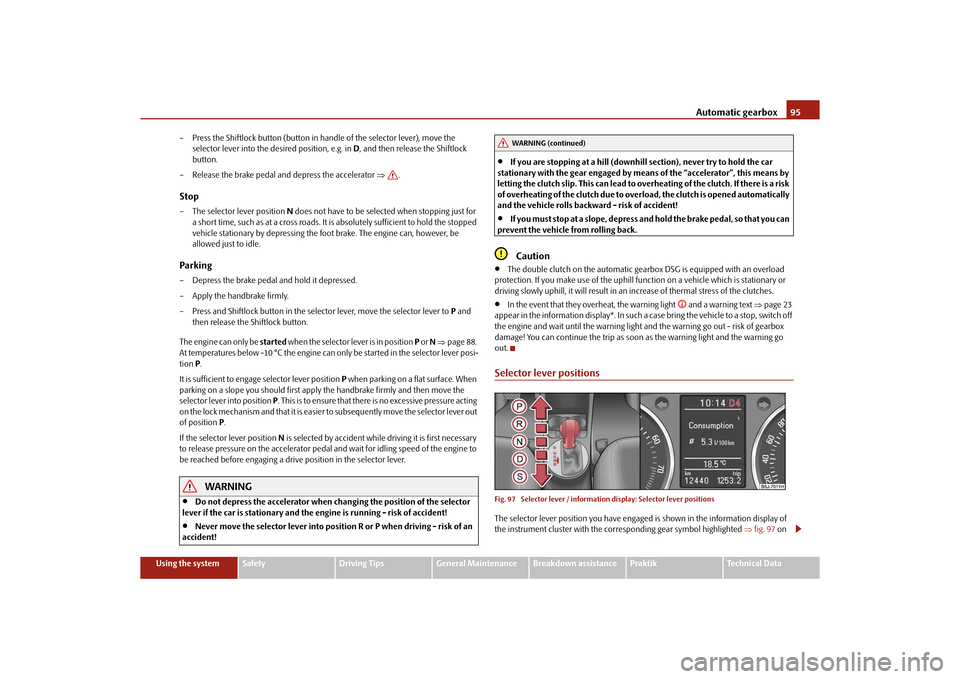
Selector lever positionsFig. 97 Selector lever / information display: Se lector lever positionsThe selector lever position you have engaged is shown in the information display of
the instrument cluster with the corresponding gear symbol highlighted fig. 97 on
WARNING (continued)
s16g.4.book Page 95 Wednesda y, February 10, 2010 3:53 PM
Page 97 of 231
Automatic gearbox
96
the right. In the positions D and S the gear you have already engaged will be addition-
ally displayed on the display.
- Parklock
The driven wheels are locked mechanically in this position.
The Parklock must only be engage d when the vehicle is stationary .
If you wish to move the selector lever into or out of this position, you must press the
Shiftlock button in the handle of the selector lever and at the same time depress the
brake pedal.
- Reverse gear
Reverse gear must only be engaged when the vehicle is stationary and the engine
idling .
The brake pedal must be depressed and at the same time the Shiftlock must be
pressed, if you wish to obtain the selector lever positions R, P or N.
When the ignition is switched on an d the selector lever is in position R, the reverse
lights will come on.
- Neutral
The transmission is in Neutral in this position.
The brake pedal must be depressed (if the le ver is in its position for longer than 2
seconds) in order to move the selector lever out of the position N into the position D,
with the ignition switched on, on a vehicle travelling at less than 5 km/hour or on a
stationary vehicle.
- Position for driving forward
When the selector lever is in this position , the forward gears are shifted up and down
automatically in line with engine lo ad, vehicle speed and the dynamic shift
programme.
You must depress the brake pedal if you wish to move into position D from N when the
vehicle is travelling at less th an 5 km/hour or is stationary .
In certain circumstances (e.g. when driving in mountainous regions or when towing a
trailer) it may be beneficial to select the manual shift programme page 98 for a short
time in order to adapt the gearbox rati os manually to the driving situations. - Position for sporty style of driving
Shifting up later into a higher gear makes it possible to fully exploit the power potential
of the engine. The gearbox also then shifts down at higher engine speeds as in the posi-
tion D.
The gearbox does not shift into the 6th gear in the position S, because the maximum
speed is reached with the 5th gear
9).
The Shiftlock on the selector lever grip mu st be pressed when moving the selector
lever out of the position D into the position S.
WARNING
Never move the selector lever into position R or P when driving - risk of an
accident!
When the engine is running and the vehi cle is stationary, it is necessary to
hold the car with the brake pedal in all the positions of the selector lever (except
P and N) since the power transmission is never completely interrupted, also not
when the engine is idling - the vehicle creeps.
You must on no account unintentionally operate the throttle (e.g. by hand
from the engine compartment) if a driv e position is engaged when the car is
stationary. The vehicle would otherwise immediately start off - also when the
handbrake is firmly applied - risk of an accident!
You must move the selector lever into position P and firmly apply the hand-
brake first before you or any other person opens the bonnet and starts working
on the engine when it is running - risk of accident! It is also essential to observe
all warnings page 162, “Working in the engine compartment”.
Selector lever lockAutomatic selector lever lock
With the ignition on, the selector lever is locked when it is in the positions P and N. You
must first of all depress the brake pedal in or der to move the selector lever out of this
position. The warning light
page 30 lights up in the instrument cluster as a
reminder for the driver when the selector lever is in position P or N.
APARANAD
9)Not valid for vehicles with automatic gearbox DSG.AS
s16g.4.book Page 96 Wednesda y, February 10, 2010 3:53 PM
Page 99 of 231

Automatic gearbox
98
Tiptronic
The Tiptronic allows the driver to also shift gears manually.Fig. 98 Manual shifting: Selector lever / large information displayThe selector lever position you have engaged is indicated in the information display of
the instrument cluster together with the engaged gear fig. 98 on the right.Switching over to manual shifting– Push the selector lever to the right out of position D. After switching over, the
current engaged gear is indicated in the display.Shifting up gears– One-touch forward of the selector lever (in the Tiptronic position) fig. 98 .Shifting down gears– One-touch back of the selector lever (in the Tiptronic position) .
It is possible to switch over to manual both when the car is stationary and also when
driving.
When you accelerate, the gearbox shifts up automatically into the higher gear just
before the maximum permissible engine speed is reached.
If you select a lower gear, the automatic gearbox does not shift down until there is no
risk of the engine overrevving.
If you operate the kickdown function, the gearbox shifts into a lower gear in line with
the vehicle speed and engine speed.
Emergency programme
An emergency programme exists in the event of a fault in the system.The gearbox operates in a corresponding emergency programme if there are func-
tional faults in the gearbox electronics. This is indicated by all of the segments in the
display lighting up or going out.
A functional fault can ha ve the following effect:
The gearbox only shifts into certain gears.
The reverse gear R cannot be used.
The manual shift programme (Tiptronic) is switched off in the emergency mode.
If the gearbox has switched over to emergency mode, drive to the nearest
specialist garage in order to have the fault rectified.
Selector lever-emergency unlockingIn case of interruption of the power supply (e.g. flat vehicle battery, defective fuse) or
defect of the selector lever lock, the select or lever can no longer be shifted from the
position P in the normal way and the vehicle ca n no longer be moved. The selector
lever must be unlocked in case of emergency.
– Apply the handbrake firmly.
– Carefully pull up the front left and right cover.
– Pull up rear cover.
– Use the finger to press the yellow plastic part downwards fig. 99 .
A+
A-
Fig. 99 Selector lever-emergency
unlocking
s16g.4.book Page 98 Wednesda y, February 10, 2010 3:53 PM
Page 101 of 231
Communication
100
CommunicationMultifunction steering wheel*Operate radio und navigation on the multifunction steering wheel
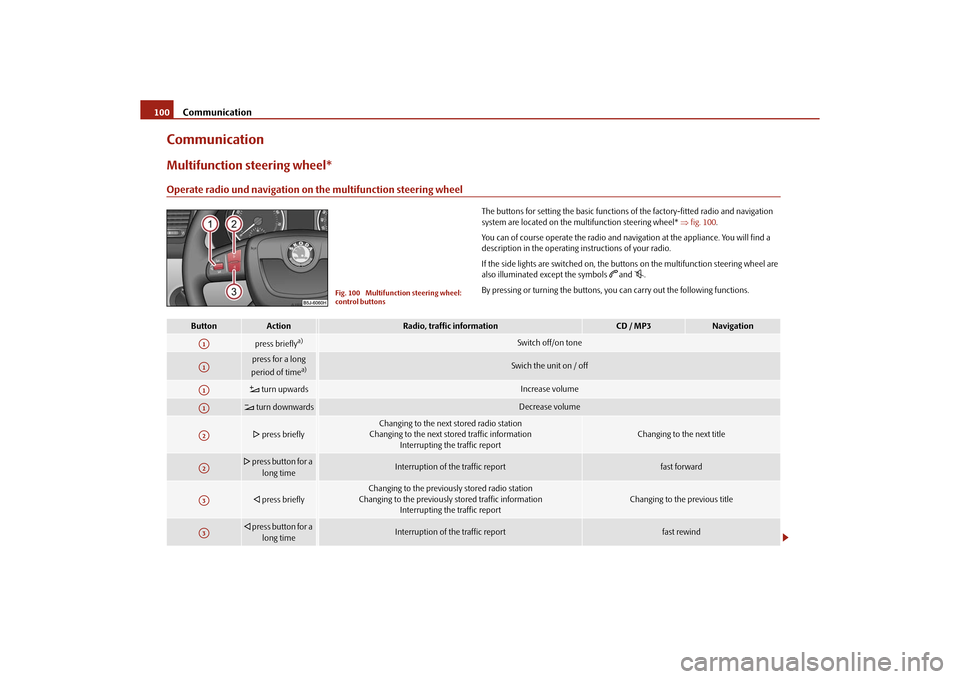
The buttons for setting the basic functions of the factory-fitted radio and navigation
system are located on the multifunction steering wheel* fig. 100 .
You can of course operate the radio and navi gation at the appliance. You will find a
description in the operating instructions of your radio.
If the side lights are switched on, the buttons on the multifunction steering wheel are
also illuminated except the symbols
and
.
By pressing or turning the buttons, yo u can carry out the following functions.
Fig. 100 Multifunction steering wheel:
control buttons
Button
Action
Radio, traffic information
CD / MP3
Navigation
press briefly
a)
Switch off/on tone
press for a long
period of time
a)
Swich the unit on / off
turn upwards
Increase volume
turn downwards
Decrease volume
press briefly
Changing to the next stored radio station
Changing to the next stored traffic information Interrupting the traffic report
Changing to the next title
press button for a
long time
Interruption of the traffic report
fast forward
press briefly
Changing to the previously stored radio station
Changing to the previously stored traffic information Interrupting the traffic report
Changing to the previous title
press button for a
long time
Interruption of the traffic report
fast rewind
A1A1A1A1A2A2A3A3
s16g.4.book Page 100 Wednesda y, February 10, 2010 3:53 PM
Page 103 of 231
Communication
102
To ensure an optimum signal transmission, always leave the telephone with the
adapter* in the telephone mount.
Furthermore the volume can be changed indivi dually during the call at any time with
the button for setting the radio* or navigation system* or with the buttons on the
multifunction steering wheel*.
WARNING
Pay attention primarily to the traffic situation! As the driver you are fully
responsible for road safety. Use the teleph one system only to such an extent, so
that you are in full control of your vehicle at any time.
Note
Please also refer to the additional instructions page 101.
Should you have any questions, please contact an authorised Škoda Service
Par tner.
Phone PhonebookA phone phonebook is part of the mobile ph one preinstallation with voice control. In
the phone phonebook there are 2 500 free memory locations available. This phone
phonebook can be used in line with the mobile telephone.
After the first connection of the telephone, the system begins to load the phone book
from the phone and the SIM card into the memory of the control unit.
Each time the telephone has established a new connection with the handsfree-system,
an update of the relevant phone book is performed. The updating can take a few
minutes. During this time the phone book, which was stored after the last update was
completed, is available. Newly stored te lephone numbers are only shown after the
updating has ended.
If the number of contacts loaded exceed s 2 500, the phone book is not complete.
If a telephone event (e.g. incoming or outgoing call, dialogue of the voice control)
occurs during the updating pr ocedure, the updating is interrupted. After the telephone
event has ended, the updating starts anew.
Note
It a yellow or red warning symbol lights up in the information display, the menu phone-
book cannot be selected.Connection of the mobile phone with the handsfree-systemIn order to connect a mobile phone with the handsfree-system, it is necessary to
connect the telephone to the handsfree-system. Detailed information on this is
provided in the operating instructions of your mobile phone. The following steps must
be carried out for the connection:
– Activate the Bluetooth
® in your telephone and the visibility of the mobile phone.
– Switch on the ignition.
– Select the menu Phone - Phone search in the information display and wait until
the control unit has ended the search.
– Select your mobile phone in the menu of the units found.
–Confirm the PIN (as standard 1234).
– If the hands-free system announces (as standard Skoda UHV) on the display of the
mobile phone, enter the PIN (as standard 1234) within 30 seconds and wait until
the connection is established.
11)
– After ending the connection, confirm in the information display that a new user profile was created.
If no more free space is available for creating a new user profile, delete an existing user
profile.
If you have not managed to connect your mobile phone with the hands-free system
within 3 minutes after switching on the ignition, switch the ignition off and then again
on. The visibility of the hands-free system is established again for 3 minutes. The visi-
bility of the Bluetooth
® device is automatically switched off if the vehicle starts off or
if the mobile phone connects to the device.
11)Some mobile phones have a menu, in which the authorization for establishing a Bluetooth
®
connection is performed via the input of a code. If the input for the authorization is necessary, it
must always be performed when re-e stablishing the Bluetooth connection.
s16g.4.book Page 102 Wednesday, February 10, 2010 3:53 PM
Page 104 of 231
Communication103
Using the system
Safety
Driving Tips
General Maintenance
Breakdown assistance
Praktik
Technical Data
During the connecting procedur
e, no other mobile phone may be connected with the
hands-free system.
Up to four mobile phones can be paired to the hands-free system, whereby only one
mobile phone can communicate with the hands-free system.
Connection with an already paired mobile phone
After switching on the ignition, the connect ion is automatically established for the
already paired mobile phone
11). Check on the mobile unit if the automatic connection
was established.
Ending the connection
By withdrawing the ignition key.
By disconnecting the device in the information display.
By disconnecting the device in the mobile phone.
Solving connection problems
If the system announces No paired phone found , check the operating state of the
telephone:
Is the telephone switched on?
Is the PIN code entered?
Is Bluetooth
® active?
Is the visibility of the mobile phone active?
Was the telephone already paired with the handsfree-system?
WARNING
In the event of air transport, the Bluetooth
® function of the handsfree-system
must be switched off by a specialist garage!
Note
Not valid for all mobile phones which enable a communication via Bluetooth
®.
You can ask at an authorised Škoda Service Partner if your telephone is compatible
with the universal telephone preinstallation GSM II.
Please operate your mobile phone exclusiv ely with a suitable adapter in order to
keep a low radiation in the vehicle.
Inserting the mobile phone into the adapter ensures an optimal sending and
receiving power and offers at the same ti me the advantage of the battery charging.
The range of the Bluetooth
® connection to the handsfree-system is restricted to
the vehicle interior. The range is dependent on local factors, e.g. obstacles between the
devices and mutual interferences with other de vices. If your mobile phone is e.g. in a
jacket pocket, this can lead to diffic ulties when establishing the Bluetooth
® connection
with the handsfree-system or the data transfer.
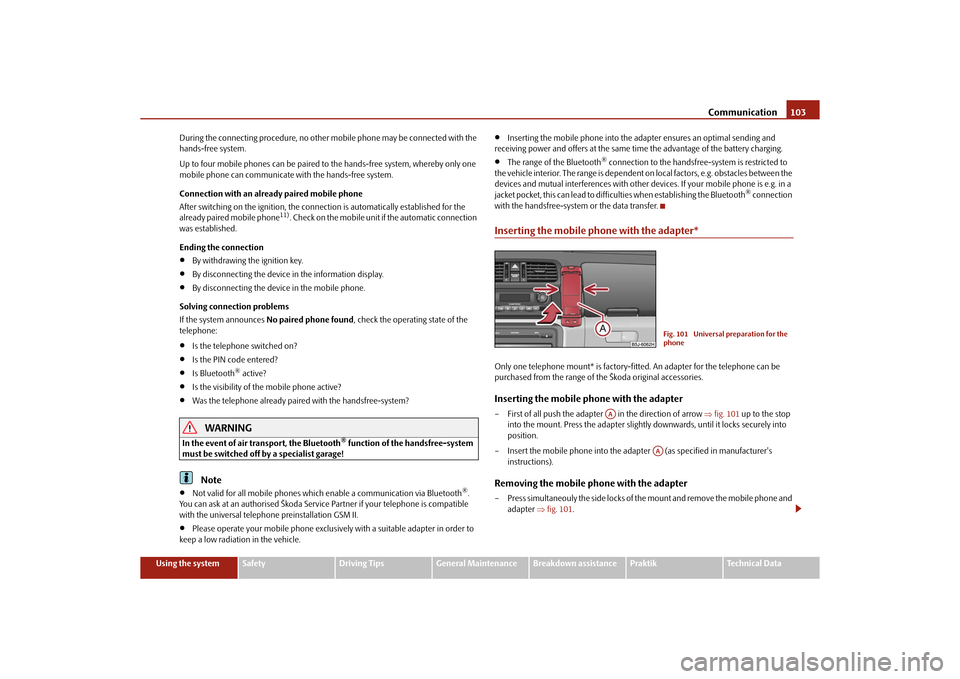
Inserting the mobile phone with the adapter*Only one telephone mount* is factory-fitted. An adapter for the telephone can be
purchased from the range of the Škoda original accessories.Inserting the mobile phone with the adapter– First of all push the adapter in the direction of arrow fig. 101 up to the stop
into the mount. Press the adapter slightly downwards, until it locks securely into
position.
– Insert the mobile phone into the adapter (as specified in manufacturer's instructions).Removing the mobile phone with the adapter– Press simultaneouly the side locks of the mount and remove the mobile phone and adapter fig. 101 .
Fig. 101 Universal preparation for the
phone
AA
AA
s16g.4.book Page 103 Wednesda y, February 10, 2010 3:53 PM
Page 105 of 231
Communication
104Caution
Taking the mobile phone out of the adapter du ring the call can lead to interruption of
the connection. When taking out the mobile phone, the connection to the factory-
fitted antenna is interrupted, this reduces the quality of the transmitting and receiving
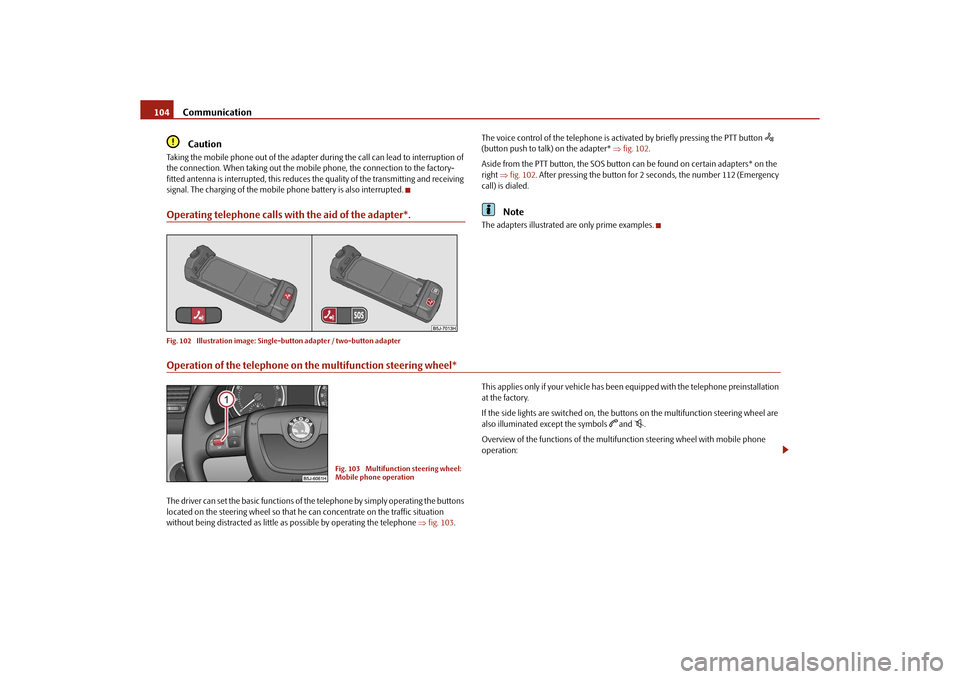
signal. The charging of the mobile phone battery is also interrupted.Operating telephone calls with the aid of the adapter*.Fig. 102 Illustration image: Single -button adapter / two-button adapter
The voice control of the telephone is acti vated by briefly pressing the PTT button
(button push to talk) on the adapter* fig. 102 .
Aside from the PTT button, the SOS button can be found on certain adapters* on the
right fig. 102 . After pressing the button for 2 seconds, the number 112 (Emergency
call) is dialed.
Note
The adapters illustrated are only prime examples.
Operation of the telephone on the multifunction steering wheel*The driver can set the basic functions of the telephone by simply operating the buttons
located on the steering whee l so that he can concentrate on the traffic situation
without being distracted as little as possible by operating the telephone fig. 103 . This applies only if your vehicle has been equipped with the telephone preinstallation
at the factory.
If the side lights are switched on, the buttons on the multifunction steering wheel are
also illuminated except the symbols
and
.
Overview of the functions of the multifunction steering wheel with mobile phone
operation:
Fig. 103 Multifunction steering wheel:
Mobile phone operation
s16g.4.book Page 104 Wednesda y, February 10, 2010 3:53 PM
Page 110 of 231
Passive Safety109
Using the system
Safety
Driving Tips
General Maintenance
Breakdown assistance
Praktik
Technical Data
SafetyPassive SafetyBasic informationDriving the safe way
Passive safety measures reduce the risk of injury in accident situations.In this section you will find important info rmation, tips and notes on the subject of
passive safety in your vehicle. We have combined everything here which you should
be familiar with, for example, regarding seat belts, airbags, child seats and safety of
children. It is therefore important, in partic ular, to comply with the notes and warnings
in this section for your own interest and in the interest of those travelling with you.
WARNING
This chapter contains important information on how to use the vehicle for
the driver and his occupants. You will find further information on safety, which
concerns you and those travelling with you, in the following chapters of this
Owner's Manual.
The complete on-board literature should always be in the vehicle. This
applies in particular, if you rent out or sell the vehicle.
Safety equipment
The safety equipment is part of the occupant protection and it can
reduce the risk of injuries in accident situations.“Do not put at risk” your safety and the safety of those travelling with you . In the event
of an accident, the safety equipment can redu ce the risk of injuries. The following list
contains part of the safety equipment in your vehicle:
three-point seat belts for all the seats;
belt force limiters for front seats;
belt tensioners for front seats;
seat belt height adjusters for front seats;
front airbags for the driver and the front passenger*;
side airbags*;
head airbags*;
anchoring points for child seat using the “ISOFIX” system;
anchoring points for child seat using the “Top Tether” system;
head restraints adjustable for height;
adjustable steering column.
The specified safety equipment works togeth er, in order to optimally protect you and
those travelling with you in accident situat ions. The safety equipment does not protect
you or the people travelling with you, if you or your occupants adopt an incorrect
seated position or the equipment is not correctly adjusted or used.
For this reason you will be provided with information on why this equipment is very
important, how it protects you and the occupants, what should be observed when
using the equipment and how you and the peop le travelling with you can make full use
of the existing safety equipment. This Owner's Manual contains important warning
notes, which you and those travelling with you should pay attention to in order to
reduce a risk of injury.
Safety concerns everybody!
Before setting off
The driver is always fully responsibl e for his occupants and for the oper-
ating safety of the vehicle.For your own safety and the safety of the pe ople travelling with you, please pay atten-
tion to the following points before setting off.
Ensure that the lighting and the turn signal system are functioning properly.
Inspect the tyre inflation pressure.
s16g.4.book Page 109 Wednesda y, February 10, 2010 3:53 PM
Page 111 of 231
Passive Safety
110
Ensure that all the windows offer a good visibility to the outside.
Safely attach the items of luggage page 62, “Loading the luggage compartment”.
Ensure that no objects can obstruct the pedal.
Adjust the mirror, the front seat and the head restraint to match your body size.
Point out to your occupants that the head restraints must be adjusted to match
their body size.
Protect the children in suitable child seats with correctly fastened seat belts
page 126, “Transporting children safely”.
Adopt the correct seated position. Also in form your occupants to adopt the correct
seated position.
Fasten the seat belt correctly. Also inform your occupants to properly fasten the
seat belts page 115, “How are seat belts correctly fastened?”.
What influences the driving safety?
The driving safety is primarily determined by the style of driving and the
personal behaviour of all the occupants.The driver is fully responsible for himself an d his occupants. If your driving safety is
effected, you place yourself and the oncomi ng traffic at risk. Please refer to the
following guidelines.
Do not get distracted from concentrating on the traffic situation, e.g. by your occu-
pants or mobile phone calls.
Never drive when your driving ability is impaired, e.g. through medication, alcohol,
drugs.
Keep to the traffic regulations and the permissible speed limit.
Adjust the driving speed at all times to the road condition as well as to the traffic
and weather conditions.
Take regular breaks on long journe ys - at the latest every two hours.
Correct seated positionCorrect seated position for the driver
Correct seated position for the driver is important for safe and relaxed
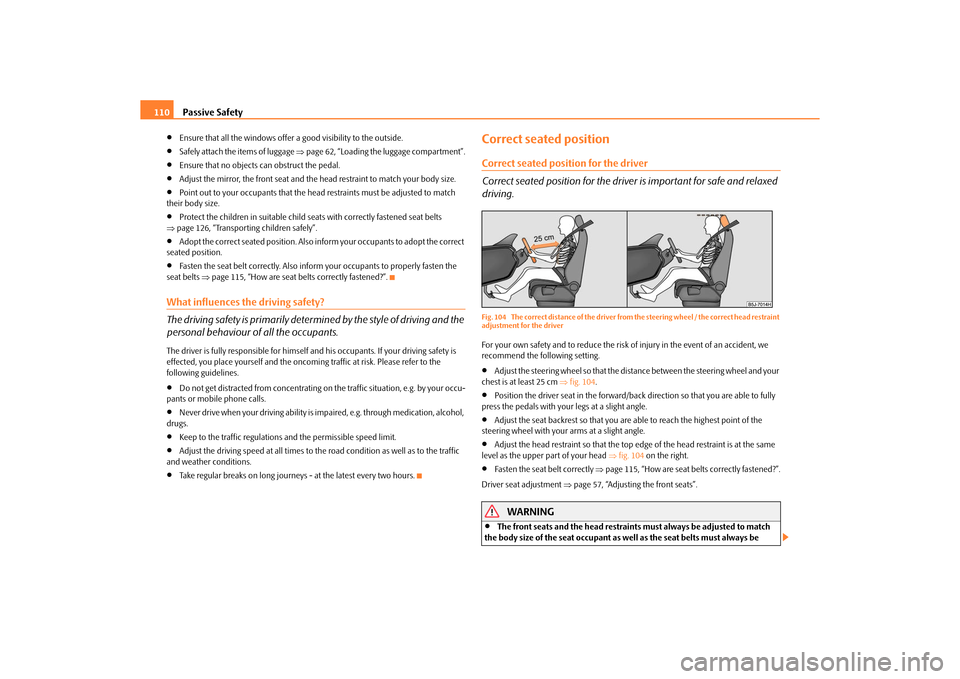
driving.Fig. 104 The correct distance of the driver from the steering wheel / the correct head restraint
adjustment for the driverFor your own safety and to reduce the risk of injury in the event of an accident, we
recommend the following setting.
Adjust the steering wheel so that the distance between the steering wheel and your
chest is at least 25 cm fig. 104 .
Position the driver seat in the forward/back direction so that you are able to fully
press the pedals with your legs at a slight angle.
Adjust the seat backrest so that you are able to reach the highest point of the
steering wheel with your arms at a slight angle.
Adjust the head restraint so that the top edge of the head restraint is at the same
level as the upper part of your head fig. 104 on the right.
Fasten the seat belt correctly page 115, “How are seat belts correctly fastened?”.
Driver seat adjustment page 57, “Adjusting the front seats”.
WARNING
The front seats and the head restraints must always be adjusted to match
the body size of the seat occupant as well as the seat belts must always be
s16g.4.book Page 110 Wednesda y, February 10, 2010 3:53 PM