lock SKODA SUPERB 2015 3.G / (B8/3V) Workshop Manual
[x] Cancel search | Manufacturer: SKODA, Model Year: 2015, Model line: SUPERB, Model: SKODA SUPERB 2015 3.G / (B8/3V)Pages: 276, PDF Size: 42.14 MB
Page 111 of 276

Fig. 133
Luggage compartment cover
stowed behind the rear seats
Read and observe and on page 106 first.
If the support straps
A
» Fig. 132 are attached to the boot lid, then opening
the lid will raise the boot lid cover (hereafter referred to as cover).
If you want to carry bulky goods, the cover can be removed from the vehicle,
and may be stowed behind the rear seat backrests » Fig. 133.
Removing
›
On both sides of the boot lid unhook the straps
A
in direction of arrow
1
» Fig. 132 .
›
Hold the raised cover.
›
Press on the two sides to the underside of the cover in the region of the re-
cess
C
.
›
Take out the cover in the direction of the arrow
2
.
Fitting
›
Position the fixture
B
of the cover over the recess
C
of the side trim
» Fig. 132 .
›
Place first the front and then the rear fixture
B
.
›
Press on the two sides to the upper side of the cover in the region of the re-
cess
C
.
The fixture
B
must lock into place of the recess
C
on both sides of the lug-
gage compartment.
›
On both sides of the boot lid unhook the straps
A
.
WARNINGNo objects should be placed on the cover. This could endanger the vehicle
occupants during sudden braking or vehicle impact.CAUTION■ When closing the boot lid, jamming and damage to the cover or the side trim
panel can occur if handled incorrectly. The following guidelines must be ob-
served. ■ The fixtures B
» Fig. 132 on the cover must be engaged in the recess of
the side trim
C
.
■ The items which are transported must not exceed the height of the cover.
■ The cover must not be jammed in the surrounding seal of the luggage com-
partment lid when it is in the raised position. ■ There must be no object in the gap between the cover in the raise position
and the rear backrest.
■
Never fold the raised cover forwards to the rear seats - there is a risk of dam-
aging the cover and the boot lid.
Roll-up cover
Fig. 134
Roll-up cover: pull out / roll up / intermediate position / remove
109Transporting and practical equipment
Page 114 of 276

CAUTIONIf you want to stow the roll-up luggage compartment cover and the multifunc-
tion tray at the same time , then it is necessary that the rear part of the roll-up
luggage compartment is covering the multifunction tray.
Side storage compartment and trays
Fig. 138
Side shelf removal / open side pocket
Read and observe
and on page 106 first.
Located at the two sides of the luggage compartment, depending on vehicle equipment are side trays » Fig. 138 -
or lockable side compartments
» Fig. 138 -
.
The space behind the tray and in the tray is provided for storing small objects
up to a total weight of 2.5 kg.
Side shelf removing / Inserting
›
Take out the tray in the direction of arrow » Fig. 138 -
.
Insertion takes place in reverse order.
Open side compartment
›
Pull the handle to position
1
» Fig. 138 -
.
›
Remove the wiper blade in the direction of the arrow
2
.
The tray can be removed.
Close side compartment
›
Close the tray in the opposite direction of the arrow
2
» Fig. 138 -
.
CAUTION■
When using the side tray, take care not to damage it or the luggage compart-
ment lining.■
Only use the lockable side trays for storing smaller items, which do not
project out - there is a risk of damaging the trays.
Cargo element
Fig. 139
Removing cargo elements: variant 1 / variant 2
Fig. 140
Removing cargo elements : variant 3 / securing cargo using the
cargo elements
Read and observe
and on page 106 first.
The Cargo elements are equipment-dependent and are on the two sides of the
luggage compartment on the side trays or just in one of the lockable side com-
partments.
The cargo element is designed for attaching and securing objects with a maxi-
mum total weight of 8 kg.
112Using the system
Page 119 of 276

›Fold back part of the roll-up luggage compartment cover A in the opposite
direction of the arrow » Fig. 149.
Using the net partition behind the rear seats›
Fold out part of the roll-up luggage compartment cover
A
in the direction of
the arrow » Fig. 149.
›
Pull the transverse rod back slightly first on one side and then on the other
and remove it from the mounts
E
» Fig. 150 .
›
Hold the crossbar
C
in such a way that the net partition can slowly roll up
into the housing
D
without being damaged.
›
Fold back part of the roll-up luggage compartment cover
A
in the opposite
direction of the arrow » Fig. 149.
CAUTION
If the net partition blocks when pulling it out of the housing, push the release
lever B in the direction of the arrow » Fig. 149.
Removing and refitting the net partition housing
Fig. 151
Removing the net partition
housing
Removing
›
Fold the rear seat backrests forward » page 85.
›
Open the rear right door » page 56.
›
Push the net partition housing
A
in the direction of the arrow
1
and re-
move it from the mounts on the right seat backrests in the direction of the
arrow
2
» Fig. 151 .
Fitting
›
Insert the recesses on the net partition housing into the mounts on the rear
seat backrests.
›
Push the net partition housing in the opposite direction of the arrow
1
» Fig. 151 as far as the stop.
›
Fold the rear seats back into their original positions » page 85.
Roof rack
Introduction
This chapter contains information on the following subjects:
fixing points for base support
118
Roof load
118WARNINGWhen transporting cargo the following the instructions must be adhered
to.■
The transported items on the roof rack must always be securely attached
– risk of accident!
■
Always secure the load with appropriate and undamaged lashing straps
or tensioning straps.
■
Distribute the load evenly over the roof rack system.
■
When transporting heavy objects or objects which take up a large area on
the roof rack system, the handling of the car may change as a result of the
displacement of the centre of gravity. The style of driving and speed must
therefore be adapted to the current circumstances.
■
Avoid abrupt and sudden driving/braking manoeuvres.
■
The permissible roof load, permissible axle loads and permissible total ve-
hicle weight must not be exceeded under any circumstances – risk of acci-
dent!
CAUTION
■ On models fitted with a sliding/tilting roof, ensure that the sliding/tilting roof
does not strike any items of luggage transported on the roof when tilting.■
Ensure that the boot lid does not hit the roof load when opened.
■
The height of the vehicle changes after mounting a roof luggage rack system
including the load that is being transported. Compare the vehicle height with
available clearances, such as underpasses and garage doors.
■
Ensure the roof aerial is not impaired by the load being transported.
Note
We recommend that you use a roof rack from ŠKODA Original Accessories.117Transporting and practical equipment
Page 123 of 276
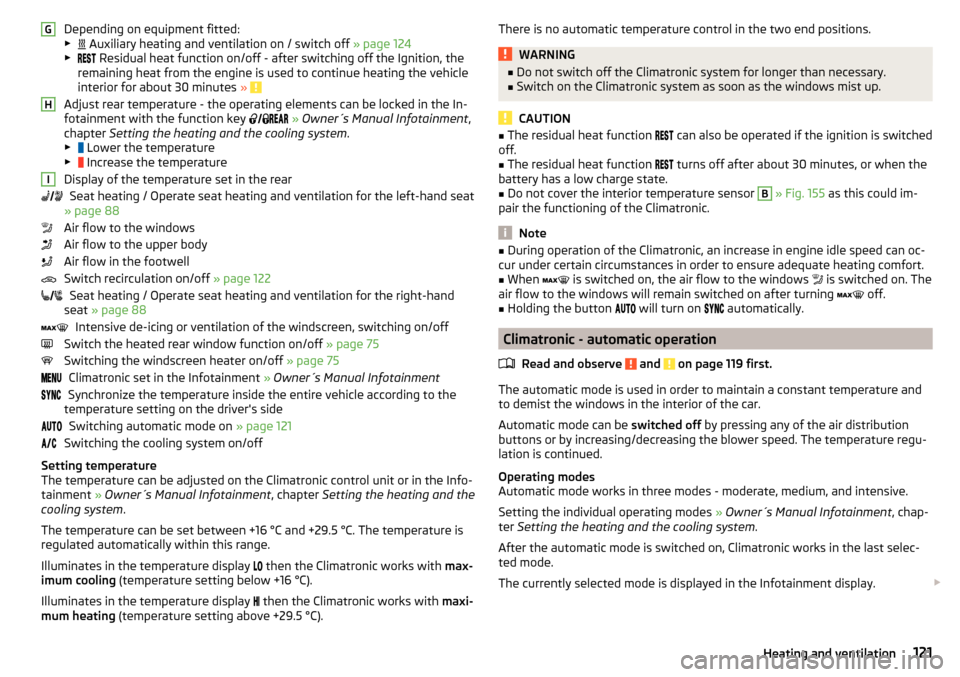
Depending on equipment fitted:
▶ Auxiliary heating and ventilation on / switch off » page 124
▶ Residual heat function on/off - after switching off the Ignition, the
remaining heat from the engine is used to continue heating the vehicle
interior for about 30 minutes »
Adjust rear temperature - the operating elements can be locked in the In-
fotainment with the function key
» Owner´s Manual Infotainment ,
chapter Setting the heating and the cooling system .
▶ Lower the temperature
▶ Increase the temperature
Display of the temperature set in the rear Seat heating / Operate seat heating and ventilation for the left-hand seat
» page 88
Air flow to the windows
Air flow to the upper body
Air flow in the footwell
Switch recirculation on/off » page 122
Seat heating / Operate seat heating and ventilation for the right-hand
seat » page 88
Intensive de-icing or ventilation of the windscreen, switching on/off
Switch the heated rear window function on/off » page 75
Switching the windscreen heater on/off » page 75
Climatronic set in the Infotainment » Owner´s Manual Infotainment
Synchronize the temperature inside the entire vehicle according to the
temperature setting on the driver's side
Switching automatic mode on » page 121
Switching the cooling system on/off
Setting temperature
The temperature can be adjusted on the Climatronic control unit or in the Info-
tainment » Owner´s Manual Infotainment , chapter Setting the heating and the
cooling system .
The temperature can be set between +16 °C and +29.5 °C. The temperature is
regulated automatically within this range.
Illuminates in the temperature display then the Climatronic works with
max-
imum cooling (temperature setting below +16 °C).
Illuminates in the temperature display then the Climatronic works with
maxi-
mum heating (temperature setting above +29.5 °C).
GHIThere is no automatic temperature control in the two end positions.WARNING■
Do not switch off the Climatronic system for longer than necessary.■Switch on the Climatronic system as soon as the windows mist up.
CAUTION
■The residual heat function can also be operated if the ignition is switched
off.■
The residual heat function
turns off after about 30 minutes, or when the
battery has a low charge state.
■
Do not cover the interior temperature sensor
B
» Fig. 155 as this could im-
pair the functioning of the Climatronic.
Note
■ During operation of the Climatronic, an increase in engine idle speed can oc-
cur under certain circumstances in order to ensure adequate heating comfort.■
When
is switched on, the air flow to the windows
is switched on. The
air flow to the windows will remain switched on after turning
off.
■
Holding the button
will turn on
automatically.
Climatronic - automatic operation
Read and observe
and on page 119 first.
The automatic mode is used in order to maintain a constant temperature and
to demist the windows in the interior of the car.
Automatic mode can be switched off by pressing any of the air distribution
buttons or by increasing/decreasing the blower speed. The temperature regu-
lation is continued.
Operating modes
Automatic mode works in three modes - moderate, medium, and intensive.
Setting the individual operating modes » Owner´s Manual Infotainment , chap-
ter Setting the heating and the cooling system .
After the automatic mode is switched on, Climatronic works in the last selec-
ted mode.
The currently selected mode is displayed in the Infotainment display.
121Heating and ventilation
Page 125 of 276
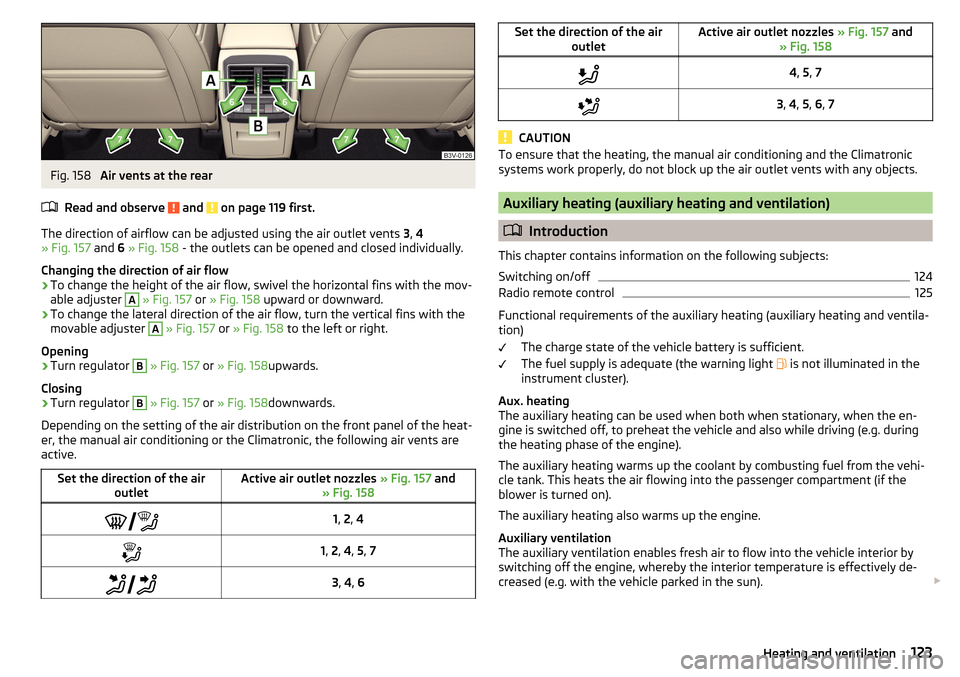
Fig. 158
Air vents at the rear
Read and observe
and on page 119 first.
The direction of airflow can be adjusted using the air outlet vents 3, 4
» Fig. 157 and 6 » Fig. 158 - the outlets can be opened and closed individually.
Changing the direction of air flow
›
To change the height of the air flow, swivel the horizontal fins with the mov-
able adjuster
A
» Fig. 157 or » Fig. 158 upward or downward.
›
To change the lateral direction of the air flow, turn the vertical fins with the
movable adjuster
A
» Fig. 157 or » Fig. 158 to the left or right.
Opening
›
Turn regulator
B
» Fig. 157 or » Fig. 158 upwards.
Closing
›
Turn regulator
B
» Fig. 157 or » Fig. 158 downwards.
Depending on the setting of the air distribution on the front panel of the heat-
er, the manual air conditioning or the Climatronic, the following air vents are
active.
Set the direction of the air outletActive air outlet nozzles » Fig. 157 and
» Fig. 158 1, 2 , 41, 2 , 4 , 5 , 7 3, 4 , 6Set the direction of the air
outletActive air outlet nozzles » Fig. 157 and
» Fig. 1584 , 5 , 73 , 4 , 5 , 6 , 7
CAUTION
To ensure that the heating, the manual air conditioning and the Climatronic
systems work properly, do not block up the air outlet vents with any objects.
Auxiliary heating (auxiliary heating and ventilation)
Introduction
This chapter contains information on the following subjects:
Switching on/off
124
Radio remote control
125
Functional requirements of the auxiliary heating (auxiliary heating and ventila-
tion)
The charge state of the vehicle battery is sufficient.
The fuel supply is adequate (the warning light is not illuminated in the
instrument cluster).
Aux. heating
The auxiliary heating can be used when both when stationary, when the en-
gine is switched off, to preheat the vehicle and also while driving (e.g. during
the heating phase of the engine).
The auxiliary heating warms up the coolant by combusting fuel from the vehi-
cle tank. This heats the air flowing into the passenger compartment (if the
blower is turned on).
The auxiliary heating also warms up the engine.
Auxiliary ventilation
The auxiliary ventilation enables fresh air to flow into the vehicle interior by
switching off the engine, whereby the interior temperature is effectively de-
creased (e.g. with the vehicle parked in the sun).
123Heating and ventilation
Page 126 of 276
WARNING■The auxiliary heating (auxiliary heating and ventilation) (following as aux.
heating) must never be operated in closed rooms (e.g. garages) – risk of
poisoning!■
The auxiliary heating must not be allowed to run during refuelling – risk
of fire.
■
The exhaust pipe of the auxiliary heating is located on the underside of
the vehicle. If you want to use the heater, do not switch off the car in pla-
ces where the exhaust fumes can come into contact with flammable mate-
rials such as dry grass, undergrowth, leaves, spilled fuel etc. -. risk of fire.
CAUTION
■ The exhaust pipe of the auxiliary heating, which is located on the underside
of the vehicle, must not be clogged and the exhaust flow must not be blocked.■
If the auxiliary heating is running, the vehicle battery discharges.
■
The air inlet in front of the windscreen must be free (e.g. of ice, snow or
leaves) to ensure that the auxiliary heating operates properly.
Note
■ The auxiliary heating only switches the blower on, if it has achieved a coolant
temperature of approx. 50 °C.■
At low outside temperatures, this can result in a formation of water vapour in
the area of the engine compartment. This is quite normal and is not an operat-
ing problem.
■
So that warm air can flow into the vehicle interior after switching on the aux.
heating, you must maintain the comfort temperature normally selected by you,
leave the fan switched on and leave the air outlet vents in open. It is recom-
mended to put the air flow in the position
or
.
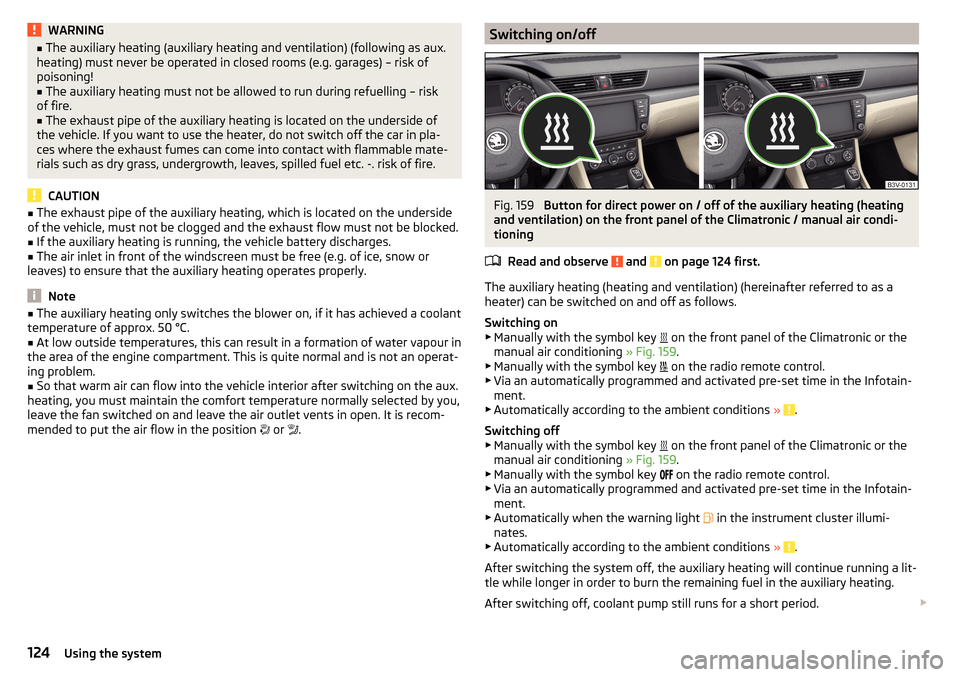
Switching on/offFig. 159
Button for direct power on / off of the auxiliary heating (heating
and ventilation) on the front panel of the Climatronic / manual air condi-
tioning
Read and observe
and on page 124 first.
The auxiliary heating (heating and ventilation) (hereinafter referred to as a
heater) can be switched on and off as follows.
Switching on
▶ Manually with the symbol key on the front panel of the Climatronic or the
manual air conditioning » Fig. 159.
▶ Manually with the symbol key on the radio remote control.
▶ Via an automatically programmed and activated pre-set time in the Infotain-
ment.
▶ Automatically according to the ambient conditions »
.
Switching off
▶ Manually with the symbol key on the front panel of the Climatronic or the
manual air conditioning » Fig. 159.
▶ Manually with the symbol key on the radio remote control.
▶ Via an automatically programmed and activated pre-set time in the Infotain-
ment.
▶ Automatically when the warning light in the instrument cluster illumi-
nates.
▶ Automatically according to the ambient conditions »
.
After switching the system off, the auxiliary heating will continue running a lit-
tle while longer in order to burn the remaining fuel in the auxiliary heating.
After switching off, coolant pump still runs for a short period.
124Using the system
Page 127 of 276
Programming the auxiliary heating in the Infotainment
For vehicles with Climatronic: on the front panel of the Climatronic button
→
Press
For vehicles with manual air conditioning: button in the Infotainment fea-
ture
→
Press
When automatic switching on is activated, the indicator light in the symbol key
lights up » Fig. 159 for about 10 seconds after the ignition is turned off.
CAUTION
The automatic switching on and off the heating for rapid heating of the vehicle
interior can be disabled in the Infotainment » Owner´s Manual Infotainment ,
chapter Setting the heating and the cooling system .
Radio remote control
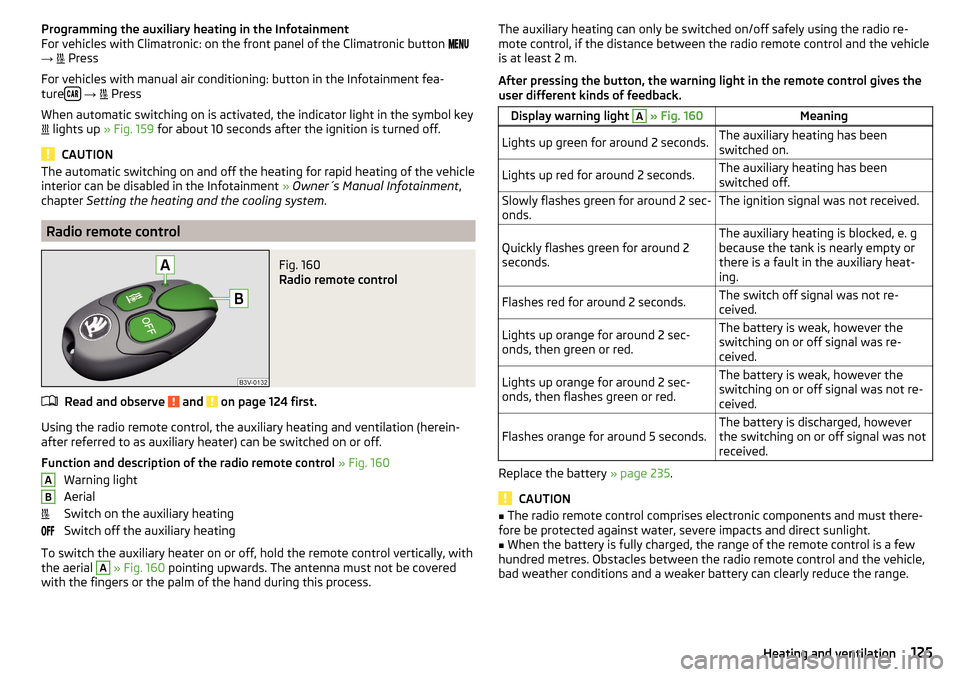
Fig. 160
Radio remote control
Read and observe and on page 124 first.
Using the radio remote control, the auxiliary heating and ventilation (herein-
after referred to as auxiliary heater) can be switched on or off.
Function and description of the radio remote control » Fig. 160
Warning light
Aerial
Switch on the auxiliary heating
Switch off the auxiliary heating
To switch the auxiliary heater on or off, hold the remote control vertically, with
the aerial
A
» Fig. 160 pointing upwards. The antenna must not be covered
with the fingers or the palm of the hand during this process.
ABThe auxiliary heating can only be switched on/off safely using the radio re-
mote control, if the distance between the radio remote control and the vehicle
is at least 2 m.
After pressing the button, the warning light in the remote control gives the
user different kinds of feedback.Display warning light A » Fig. 160MeaningLights up green for around 2 seconds.The auxiliary heating has been
switched on.Lights up red for around 2 seconds.The auxiliary heating has been
switched off.Slowly flashes green for around 2 sec-
onds.The ignition signal was not received.Quickly flashes green for around 2
seconds.The auxiliary heating is blocked, e. g
because the tank is nearly empty or
there is a fault in the auxiliary heat-
ing.Flashes red for around 2 seconds.The switch off signal was not re-
ceived.Lights up orange for around 2 sec-
onds, then green or red.The battery is weak, however the
switching on or off signal was re-
ceived.Lights up orange for around 2 sec-
onds, then flashes green or red.The battery is weak, however the
switching on or off signal was not re-
ceived.Flashes orange for around 5 seconds.The battery is discharged, however
the switching on or off signal was not
received.
Replace the battery » page 235.
CAUTION
■
The radio remote control comprises electronic components and must there-
fore be protected against water, severe impacts and direct sunlight.■
When the battery is fully charged, the range of the remote control is a few
hundred metres. Obstacles between the radio remote control and the vehicle,
bad weather conditions and a weaker battery can clearly reduce the range.
125Heating and ventilation
Page 128 of 276

Driving
Starting-off and Driving
Starting and stopping the engine using the key
Introduction
This chapter contains information on the following subjects:
Electronic immobilizer
126
Steering lock locking / unlocking
127
Turn ignition on / off and start the engine
127
Stopping the engine
127
With the key in the ignition, the ignition can be switched on and off and the
engine can be started / stopped.
WARNING■ While driving with the engine stopped, the ignition must always be
switched on » page 127, Turn ignition on / off and start the engine .
■ With the ignition off, the steering may lock » page 127 - danger of an
accident!■
Do not withdraw the ignition key from the ignition lock until the vehicle
has come to a stop » page 134, Parking . Otherwise, the steering may lock -
danger of an accident!
■
Never leave the key in the vehicle when you exit the vehicle. Unauthor-
ized persons, such as children, for example, could lock the car, turn on the
ignition or start the engine - there is a danger of injury, accidents and dam-
age!
■
Never leave the vehicle unattended with the engine running - there is
risk of accident, damage or theft!
■
Never switch off the engine before the vehicle is stationary – risk of acci-
dent!
WARNING■ Never (e.g. in garages) run the engine in a closed place - there is the dan-
ger of poisoning and death!■
Do not leave any items (e.g. cloths or tools) in the engine compartment.
This presents a fire hazard and the risk of engine damage.
■
Never cover the engine with additional insulation material (e.g. with a
cover) – risk of fire!
CAUTION
■ Only start the engine when the engine and the vehicle are stationary - there
is a danger of starter and engine damage!■
Do not push-start the engine – risk of damaging the engine and the catalytic
converter. The battery from another vehicle can be used as a jump-start aid
» page 230 .
Note
Do not warm up the engine while the vehicle is stationary. If possible, start
your journey as soon as the engine has started. Through this, the engine rea-
ches its operating temperature faster.
Electronic immobilizer
Read and observe
and on page 126 first.
The electronic immobiliser (hereinafter referred to as the immobiliser) makesthe attempted theft or unauthorised use of your vehicle more difficult.
An electronic chip is integrated in the head of the key. The immobiliser is deac-
tivated with the aid of this chip when the key is inserted in the ignition lock.
As soon as the ignition key is removed from the ignition lock, the immobiliser is
automatically activated.
Operational problems
If the immobiliser components in the key fail, it is not possible to start the en-
gine. A message appears in the display of the instrument cluster to explain
that the immobiliser is active.
To start, use the other vehicle key or seek help from a specialist garage.
126Driving
Page 129 of 276
Steering lock locking / unlockingRead and observe
and on page 126 first.
The steering lock (steering lock) deters any attempted theft of your vehicle.
Locking
›
Withdraw the ignition key.
›
Turn the steering wheel to the left or right until the steering lock clicks into
place.
Unlocking
›
Insert the key into the ignition lock.
›
Switch on the ignition » page 127.
The steering lock is unlocked.
If the ignition switch cannot be turned on, then turn the steering wheel back and forth slightly and thereby unlock the steering lock.
Turn ignition on / off and start the engine
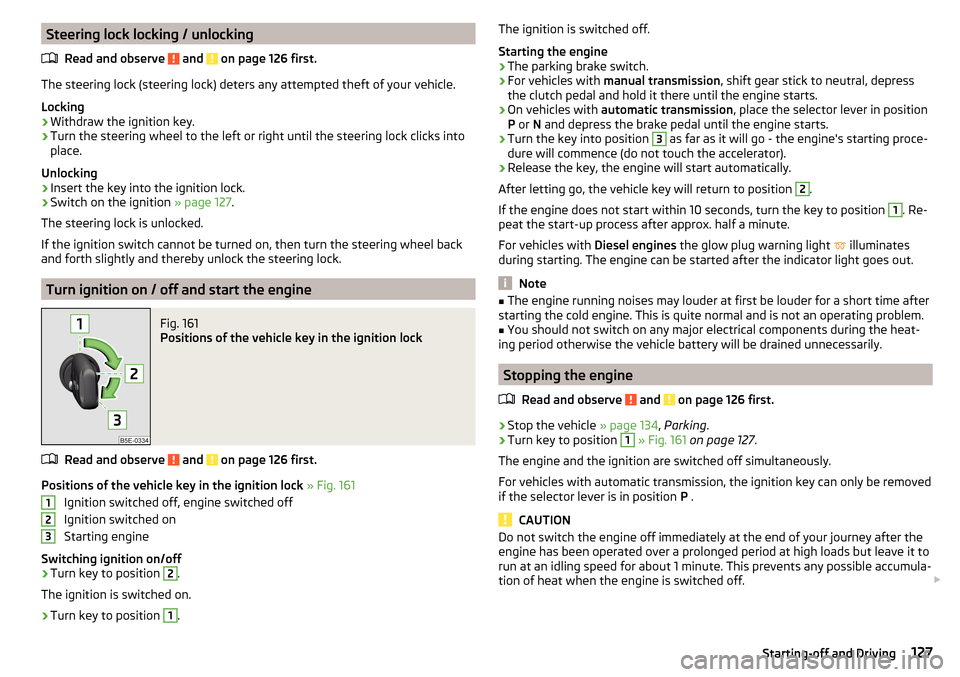
Fig. 161
Positions of the vehicle key in the ignition lock
Read and observe and on page 126 first.
Positions of the vehicle key in the ignition lock » Fig. 161
Ignition switched off, engine switched off
Ignition switched on
Starting engine
Switching ignition on/off
›
Turn key to position
2
.
The ignition is switched on.
›
Turn key to position
1
.
123The ignition is switched off.
Starting the engine›
The parking brake switch.
›
For vehicles with manual transmission , shift gear stick to neutral, depress
the clutch pedal and hold it there until the engine starts.
›
On vehicles with automatic transmission , place the selector lever in position
P or N and depress the brake pedal until the engine starts.
›
Turn the key into position
3
as far as it will go - the engine's starting proce-
dure will commence (do not touch the accelerator).
›
Release the key, the engine will start automatically.
After letting go, the vehicle key will return to position
2
.
If the engine does not start within 10 seconds, turn the key to position
1
. Re-
peat the start-up process after approx. half a minute.
For vehicles with Diesel engines the glow plug warning light
illuminates
during starting. The engine can be started after the indicator light goes out.
Note
■ The engine running noises may louder at first be louder for a short time after
starting the cold engine. This is quite normal and is not an operating problem.■
You should not switch on any major electrical components during the heat-
ing period otherwise the vehicle battery will be drained unnecessarily.
Stopping the engine
Read and observe
and on page 126 first.
›
Stop the vehicle » page 134, Parking .
›
Turn key to position
1
» Fig. 161 on page 127 .
The engine and the ignition are switched off simultaneously.
For vehicles with automatic transmission, the ignition key can only be removed if the selector lever is in position P .
CAUTION
Do not switch the engine off immediately at the end of your journey after the
engine has been operated over a prolonged period at high loads but leave it to
run at an idling speed for about 1 minute. This prevents any possible accumula-
tion of heat when the engine is switched off. 127Starting-off and Driving
Page 130 of 276

NoteAfter switching off the ignition, the radiator fan may intermittently continue to
operate for approx. 10 minutes.
Starting and stopping the engine at the push of the button
Introduction
Fig. 162
Starter button (
)
This chapter contains information on the following subjects:
Steering column lock locking / unlocking
128
Switch ignition on / off
129
Starting the engine
129
Switching off the engine
129
Problems starting the engine
130
The ignition can be switched on and off and the engine can be started / stop-
ped with the starter button » Fig. 162.
The key must be in the vehicle to unlock the steering wheel, start the vehicle
and drive.
WARNING■ Never leave the key in the vehicle when you exit the vehicle. Unauthor-
ized persons, such as children, for example, could lock the car, turn on the
ignition or start the engine - there is a danger of injury, accidents and dam-
age!■
Never leave the vehicle unattended with the engine running - there is a
risk of theft, accident etc.!
■
Never switch off the engine before the vehicle is stationary – risk of acci-
dent!
WARNINGNever (e.g. in garages) run the engine in a closed place - there is the danger
of poisoning and death!
CAUTION
■ The system can recognize the valid key, even if it has been accidentally left
on the vehicle roof - there is danger of loss or damage to the key!■
Only start the engine when the engine and the vehicle are stationary - there
is a danger of starter and engine damage!
■
Do not push-start the engine – risk of damaging the engine and the catalytic
converter. The battery from another vehicle can be used as a jump-start aid
» page 230 .
Note
■
Do not warm up the engine while the vehicle is stationary. If possible, start
your journey as soon as the engine has started. Through this, the engine rea-
ches its operating temperature faster.■
The system is protected against inadvertently switching off the engine while
driving, this means that the engine can only be switched off in an emergency
» page 129 .
Steering column lock locking / unlocking
Read and observe
and on page 128 first.
The steering lock (steering lock) deters any attempted theft of your vehicle.
Locking
›
Switch off the engine.
›
Open the driver door.
The steering lock is locked automatically.
If the driver's door is opened and the ignition is switched off afterwards, the
steering is only locked after the vehicle has been locked.
Unlocking
›
Open the driver's door and get into the vehicle.
›
Close the driver's door.
The steering is locked automatically.
128Driving