lock SKODA SUPERB 2015 3.G / (B8/3V) Repair Manual
[x] Cancel search | Manufacturer: SKODA, Model Year: 2015, Model line: SUPERB, Model: SKODA SUPERB 2015 3.G / (B8/3V)Pages: 276, PDF Size: 42.14 MB
Page 131 of 276
Under certain circumstances (e.g. after switching off the ignition and opening
the driver's door), the steering is enabled only when the ignition is switched on
or the engine is started.WARNINGNever let the vehicle roll with locked steering lock - there is a risk of acci-
dent!
Switch ignition on / off
Read and observe
and on page 128 first.
›
Press the button » Fig. 162 on page 128 briefly.
The ignition is switched on or off.
On vehicles fitted with a manual gearbox, the clutch pedal must not be de-
pressed while switching the ignition on or off, otherwise the system would try
to start.
On vehicles fitted with a automatic gearbox, the brake pedal must not be de-
pressed while switching the ignition on or off, otherwise the system would try
to start.
If the driver's door is opened while the ignition is on, an audible signal sounds
and the following message appears in the instrument cluster display.
Ignition switched on.IGNITION STILL ON
When leaving the vehicle always switch off the ignition.
Starting the engine
Read and observe
and on page 128 first.
Starting the engine
›
The parking brake switch.
›
For vehicles with manual transmission , shift gear stick to neutral, depress
the clutch pedal and hold it there until the engine starts.
›
On vehicles with automatic transmission , place the selector lever in position
P or N and depress the brake pedal until the engine starts.
›
Press the starter button » Fig. 162 on page 128 briefly – the engine starts au-
tomatically.
In vehicles with diesel engines after pressing the button, the glow plug warn-
ing light illuminates. The engine can be started after the indicator light goes
out.
Note
■ The engine running noises may louder at first be louder for a short time after
starting the cold engine. This is quite normal and is not an operating problem.■
You should not switch on any major electrical components during the heat-
ing period otherwise the vehicle battery will be drained unnecessarily.
Switching off the engine
Read and observe
and on page 128 first.
Stop
›
Stop the vehicle » page 134, Parking .
›
Press the button » Fig. 162 on page 128 briefly.
The engine and the ignition are switched off simultaneously.
Emergency shut-down
If necessary and in exceptional cases, the engine may even be turned off while
driving.
›
Press the starter button » Fig. 162 on page 128 for longer than 1 second or
twice within 1 second.
After the emergency stop of the engine, the steering lock will remain un-
locked.
CAUTION
Do not switch the engine off immediately at the end of your journey after the
engine has been operated over a prolonged period at high loads but leave it to
run at an idling speed for about 1 minute. This prevents any possible accumula-
tion of heat when the engine is switched off.
Note
After switching off the ignition, the radiator fan may intermittently continue to
operate for approx. 10 minutes.129Starting-off and Driving
Page 136 of 276

Manual shut-down›With the ignition switched on press the brake pedal and at the same time
push the symbol key
in the direction of arrow 2
» Fig. 167 .
›
With the engine running press either the brake or accelerator pedal and
press the symbol key
in the direction of arrow
2
.
The symbol on the key
and the warning light
goes out.
Automatic shut-off
The parking brake switches off when starting, as long as the driver's door is
closed, and the driver has fastened the seat belt.
Should the vehicle start to roll away when starting on a downhill slope then
step on the accelerator or and turn on the parking brake.
Turning off the parking brake can be prevented if, before starting the symbol key is pulled and held in the direction of arrow
1
» Fig. 167 . The parking
brake turns off after releasing the button.
Emergency braking function
If while driving a brake pedal error occurs or should the pedal block, then the
parking brake can be used as an emergency brake »
.
›
Pull on the symbol key
in the direction of arrow
1
» Fig. 167 and hold (at
the same time there is an audible signal).
The emergency brake is activated and the vehicle starts braking sharply.
The braking process is interrupted when the key is released or the accelerator
pedal is actuated.
Parking on a slope
If the parking brake is turned on while on a steep slope, the following message
may be displayed in the instrument cluster.
Parking brake: gradient too steep. Owner's manual!GRADIENT TOO STEEP
Find a parking space on a flat surface or on a slope that is not so steep.
WARNING■ The emergency brake is to be used only in an emergency when the vehi-
cle cannot be stopped with the brake pedal.■
When stopping and parking, the parking brake should always be on, oth-
erwise the vehicle could move off - there is the risk of an accident!
■
Do not place any objects in the recessed grip for the finger of the parking
brake key. The object could get into the space below the key and prevent
the operation of the parking brake!
Note
■ If the vehicle battery is discharged, it is not possible to release the parking
brake. First connect the vehicle first to a power source, such as the battery of
another vehicle » page 230, Jump-starting and then turn off the parking
brake.■
Noise when switching on and off of the parking brake is normal and there-
fore harmless.
Parking
Read and observe
and on page 132 first.
When stopping and parking, look for a place with a suitable surface » .
Only carry out the activities while parking in the specified order.
›
Bring the vehicle to a stop and depress the brake pedal.
›
The parking brake switch.
›
On vehicles with automatic transmission place the selector lever in the P po-
sition.
›
Switch off the engine.
›
For vehicles with manual transmission engage 1st gear or reverse gear R .
›
Release the brake pedal.
WARNINGThe exhaust system components can become very hot. Therefore, never
stop the vehicle at places where the underside of your vehicle can come in-
to contact with flammable materials such as dry grass, undergrowth,
leaves, spilled fuel or such like. - Risk of fire and serious injury can occur!134Driving
Page 137 of 276

Manual gear changing and pedals
Introduction
This chapter contains information on the following subjects:
Manual gear changing
135
Pedals
135
Manual gear changing
Fig. 168
The shift pattern
The gearshift pattern for the individual gear positions is shown on the gear
lever » Fig. 168 .
The gear shift indicator should be observed when changing gear » page 42.
Always depress the clutch pedal all the way down. This prevents uneven wear
on the clutch.
Engage reverse gear
›
Stop the vehicle.
›
The clutch pedal is fully depressed.
›
Move the shift lever to the idle position switch and press down.
›
Move the shift lever fully to the left and then forward into R position
» Fig. 168 .
The reversing lights will come on once reverse gear is engaged, provided the
ignition is on.
WARNINGNever engage reverse gear when driving – risk of accident!CAUTION■ If not in the process of changing gear, do not leave your hand on the gear
shift lever while driving. The pressure from the hand can cause the gear shift
mechanism to wear excessively.■
When stopping on a slope, never try to hold the vehicle using the accelerator
pedal and the clutch – this may lead to clutch damage.
Pedals
The operation of the pedals must not be hindered under any circumstances!
In the driver's footwell, only a format may be used, which is attached to the
two corresponding attachment points.
Only use factory-supplied foot mats or foot mats from the range of
ŠKODAOriginal Accessories, which are fitted to two attachment points.
WARNINGNo objects may be placed in the driver's footwell – risk due to obstruction
or limitation of pedal operation.
Automatic transmission
Introduction
This chapter contains information on the following subjects:
Modes and use of selector lever
136
Selector lever lock
137
Manual gear shifting (Tiptronic)
137
Starting-off and driving
138
The automatic transmission performs automatic gear changes.
The modes of the automatic transmission can be adjusted by the driver by
means of the selector lever.
WARNING■ No throttle when it is set before starting the mode for moving forward
with the selector lever - there is a risk of accident!■
Never move the selector lever to mode R or P when driving – risk of an
accident!
135Starting-off and Driving
Page 138 of 276

WARNING (Continued)■If the vehicle is in the D, S , R or Tiptronic mode and comes to a standstill
while at idle the engine stops, then prevent the vehicle from rolling away
with the brake pedal, the parking brake of the auto-hold function. Even
when the engine is idling, the power transmission is never completely in-
terrupted – the vehicle creeps.■
When leaving the vehicle, the selector lever is always to put in the P
mode. Otherwise, the vehicle could start to move - risk of accident.
CAUTION
■ If the selector lever is moved to mode N while driving, the accelerator pedal
must be released and you will need to wait until the engine has reached its
idling speed before moving the selector lever to a forward driving mode again.■
When the outdoor temperature is below -10 ° C, the selector lever when
starting must always be in P mode.
■
When stopping on a slope, never try to hold the vehicle using the accelerator
pedal – this may lead to gear damage.
Note
After the ignition is switched off, the ignition key can only be withdrawn if the
selector lever is in the position P.
Modes and use of selector lever
Fig. 169
Selector lever/display
Read and observe and on page 135 first.
When the ignition is switched on, the gearbox mode and the currently selected
gear are indicated in the display » Fig. 169.
The following modes can be selected with the selector lever » Fig. 169.
P – Parking mode
The driven wheels are locked mechanically in this mode.
The parking mode must only be selected when the vehicle is stationary.R
- Reverse gear
Reverse gear can only be engaged when the vehicle is stationary and the en-
gine is at idling speed.
N
- Neutral
The power transmission to the drive wheels is interrupted in this mode.
D
/
S
- mode for driving forward (Normal program) / mode for driving
forward (Sport program)
The system switches from one mode to the other by moving the selector lever
into the spring-loaded position
» Fig. 169 .
In mode D or S, the forward gears are shifted automatically depending on the
engine load, the operation of the accelerator pedal, the vehicle speed, and the
selected driving mode .
In mode S , the forward gears are shifted automatically up and down at high-
er engine speeds than in mode D.
If the Sport driving mode is selected with the engine running » page 171, Se-
lection of the driving mode(Driving Mode Selection) , the transmission is auto-
matically set in the S mode.
E – Economical driving mode
If the driving mode Eco or Individual (engine - Eco) » page 171 is selected and
the selection lever is in the setting D/S, the transmission is automatically set
to mode E. This mode cannot be selected with the selector lever.
In mode E , the forward gears are shifted automatically up and down at lower
engine speeds than in mode D.
136Driving
Page 139 of 276
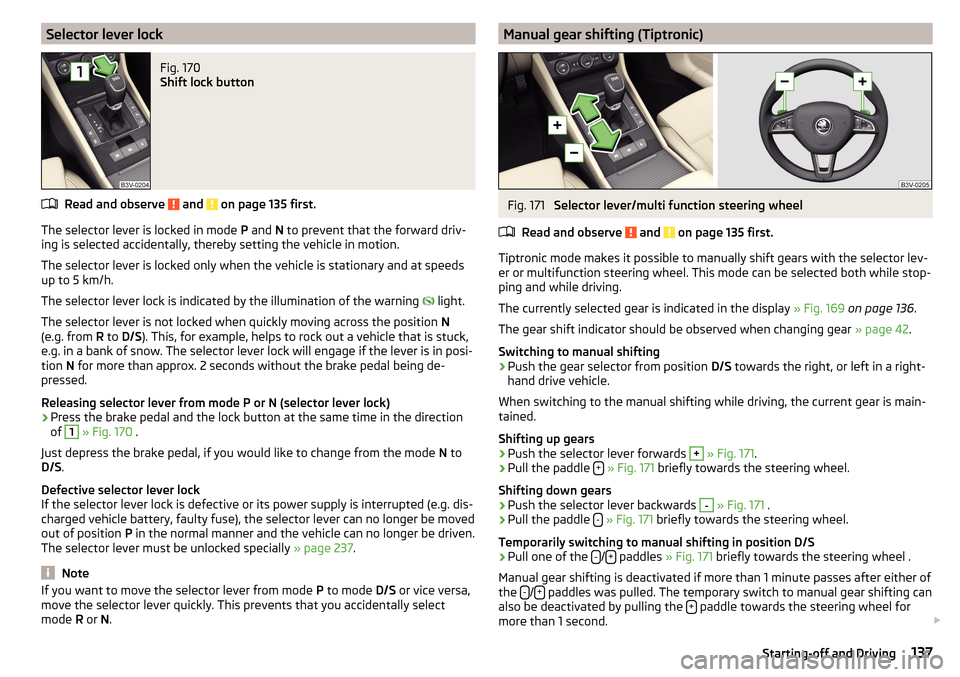
Selector lever lockFig. 170
Shift lock button
Read and observe and on page 135 first.
The selector lever is locked in mode P and N to prevent that the forward driv-
ing is selected accidentally, thereby setting the vehicle in motion.
The selector lever is locked only when the vehicle is stationary and at speeds
up to 5 km/h.
The selector lever lock is indicated by the illumination of the warning light.
The selector lever is not locked when quickly moving across the position N
(e.g. from R to D/S ). This, for example, helps to rock out a vehicle that is stuck,
e.g. in a bank of snow. The selector lever lock will engage if the lever is in posi-
tion N for more than approx. 2 seconds without the brake pedal being de-
pressed.
Releasing selector lever from mode P or N (selector lever lock)
›
Press the brake pedal and the lock button at the same time in the direction
of
1
» Fig. 170 .
Just depress the brake pedal, if you would like to change from the mode N to
D/S .
Defective selector lever lock
If the selector lever lock is defective or its power supply is interrupted (e.g. dis-
charged vehicle battery, faulty fuse), the selector lever can no longer be moved
out of position P in the normal manner and the vehicle can no longer be driven.
The selector lever must be unlocked specially » page 237.
Note
If you want to move the selector lever from mode P to mode D/S or vice versa,
move the selector lever quickly. This prevents that you accidentally select
mode R or N.Manual gear shifting (Tiptronic)Fig. 171
Selector lever/multi function steering wheel
Read and observe
and on page 135 first.
Tiptronic mode makes it possible to manually shift gears with the selector lev-
er or multifunction steering wheel. This mode can be selected both while stop-
ping and while driving.
The currently selected gear is indicated in the display » Fig. 169 on page 136 .
The gear shift indicator should be observed when changing gear » page 42.
Switching to manual shifting
›
Push the gear selector from position D/S towards the right, or left in a right-
hand drive vehicle.
When switching to the manual shifting while driving, the current gear is main-
tained.
Shifting up gears
›
Push the selector lever forwards
+
» Fig. 171 .
›
Pull the paddle +
» Fig. 171 briefly towards the steering wheel.
Shifting down gears
›
Push the selector lever backwards
-
» Fig. 171 .
›
Pull the paddle -
» Fig. 171 briefly towards the steering wheel.
Temporarily switching to manual shifting in position D/S
›
Pull one of the -/+ paddles
» Fig. 171 briefly towards the steering wheel .
Manual gear shifting is deactivated if more than 1 minute passes after either of
the -
/+ paddles was pulled. The temporary switch to manual gear shifting can
also be deactivated by pulling the + paddle towards the steering wheel for
more than 1 second.
137Starting-off and Driving
Page 140 of 276

Note■It may be beneficial, for example, when travelling downhill, to use manual
shifting of gears. Shifting to a lower gear reduces the load on the brakes and
hence the wear of the brakes » page 132.■
When accelerating, the gearbox automatically shifts up into the higher gear
just before the maximum permissible engine speed is reached.
■
If a lower gear is selected, the gearbox does not shift down until there is no
risk of the engine over revving.
Starting-off and driving
Read and observe
and on page 135 first.
Starting off
›
Start the engine.
›
Firmly depress and hold the brake pedal.
›
Press the lock button in the direction of
1
» Fig. 170 on page 137 and hold.
›
Move the selector lever into the desired position » page 136 and then release
the lock button.
›
Release the brake pedal and accelerate.
Stopping (while the car is moving)
›
Depress the brake pedal and bring the vehicle to a stop.
›
Keep holding the brake pedal until driving is resumed.
The selector lever position N does not have to be selected when stopping for a
short time, such as at a cross roads.
Kick down
The kick down function allows you to achieve the maximum acceleration of
your vehicle while driving.
When the accelerator pedal is fully depressed, the kick down function is activa-
ted in any forward driving mode.
The gearbox shifts down one or more gears depending on the vehicle speed
and engine speed, and the vehicle accelerates.
The gearbox does not shift up into the highest gear until the engine has
reached its maximum revolutions for this gear range.
Driving in neutral position in mode E (free-wheel)
›
Move the selector lever into the position D/S.
›Select the driving mode Eco or Individual (Drive - Eco)
» page 171, Selection
of the driving mode(Driving Mode Selection) .›
Remove your foot from the accelerator pedal (the speed is higher than 20
km/h).
The vehicle moves without the braking effect of the engine.
The gear is selected again automatically, when you briefly depress the acceler- ator brake pedal or pull the left rocker switch -
towards the steering wheel
» page 137 , Manual gear shifting (Tiptronic) .
This function is not available when towing a trailer or when another accessory
is connected to the trailer socket.
Launch control 1)
The launch control function allows the vehicle in mode S or Tiptronic to reach
its maximum acceleration when starting off.
›
Disable the TCS » page 143, Braking and stabilisation systems .
›
START STOP deactivate » page 132, Manually deactivating/activating the
system .
›
Fully depress and hold the brake pedal with your left foot.
›
Fully depress the accelerator pedal with your right foot.
›
Release the brake pedal.
The vehicle starts off with maximum acceleration.
›
Reactivate the TCS and START STOP when the desired speed has been
reached.
WARNINGRapid acceleration, particularly on slippery roads, can lead to loss of control
of the vehicle – risk of accident!
Running-in and economical driving
Introduction
This chapter contains information on the following subjects:
Running-in
139
Tips for economical driving
139
1)
This function is only valid for some engines.
138Driving
Page 145 of 276
Radar sensorFig. 174
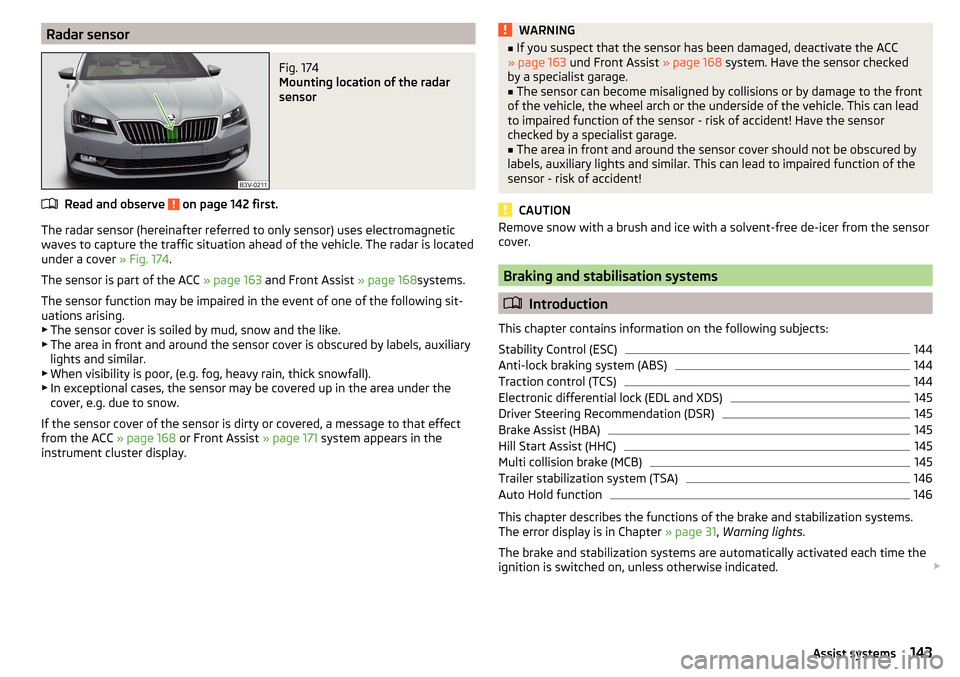
Mounting location of the radar
sensor
Read and observe on page 142 first.
The radar sensor (hereinafter referred to only sensor) uses electromagnetic
waves to capture the traffic situation ahead of the vehicle. The radar is located
under a cover » Fig. 174.
The sensor is part of the ACC » page 163 and Front Assist » page 168systems.
The sensor function may be impaired in the event of one of the following sit-
uations arising. ▶ The sensor cover is soiled by mud, snow and the like.
▶ The area in front and around the sensor cover is obscured by labels, auxiliary
lights and similar.
▶ When visibility is poor, (e.g. fog, heavy rain, thick snowfall).
▶ In exceptional cases, the sensor may be covered up in the area under the
cover, e.g. due to snow.
If the sensor cover of the sensor is dirty or covered, a message to that effect
from the ACC » page 168 or Front Assist » page 171 system appears in the
instrument cluster display.
WARNING■ If you suspect that the sensor has been damaged, deactivate the ACC
» page 163 und Front Assist » page 168 system. Have the sensor checked
by a specialist garage.■
The sensor can become misaligned by collisions or by damage to the front
of the vehicle, the wheel arch or the underside of the vehicle. This can lead
to impaired function of the sensor - risk of accident! Have the sensor
checked by a specialist garage.
■
The area in front and around the sensor cover should not be obscured by
labels, auxiliary lights and similar. This can lead to impaired function of the
sensor - risk of accident!
CAUTION
Remove snow with a brush and ice with a solvent-free de-icer from the sensor
cover.
Braking and stabilisation systems
Introduction
This chapter contains information on the following subjects:
Stability Control (ESC)
144
Anti-lock braking system (ABS)
144
Traction control (TCS)
144
Electronic differential lock (EDL and XDS)
145
Driver Steering Recommendation (DSR)
145
Brake Assist (HBA)
145
Hill Start Assist (HHC)
145
Multi collision brake (MCB)
145
Trailer stabilization system (TSA)
146
Auto Hold function
146
This chapter describes the functions of the brake and stabilization systems.
The error display is in Chapter » page 31, Warning lights .
The brake and stabilization systems are automatically activated each time the
ignition is switched on, unless otherwise indicated.
143Assist systems
Page 146 of 276

WARNINGThe general information relating to the use of assistance systems must be
observed » page 142, in section Introduction .
Stability Control (ESC)
Fig. 175
Press the ESC system
Read and observe on page 144 first.
The ESC improves vehicle stability in dynamic driving situations, such as when
the vehicle starts to skid.
The ESC monitors whether the desired direction of the current vehicle motion
is occurring. In case of any deviation (e.g. over steer), the ESC automatically
brakes individual wheels to maintain the desired direction.
During an intervention of the system, the indicator light
flashes in the in-
strument cluster.
Enable/disable ESC Sport
The activation of the ESC sports allows a sportier driving style. With a slight
over or under steering of the vehicle take no ESC interventions take place and
the TCS is restricted so that the spinning of the wheels of the driven axle can
occur.
The activation or deactivation of the ESC sports can be done in one of two
ways. ▶ By pressing the Symbol key
for the activation and briefly pressing the but-
ton for the deactivation » Fig. 175.
▶ Infotainment » Owner´s Manual Infotainment , chapter CAR - vehicle set-
tings .
Upon deactivation, in the instrument cluster the indicator light comes on and
the display shows the following message.ESC sport: directional stabil. restricted.ESC SPORT
Upon deactivation, in the instrument cluster the control indicator
turns off
and the display shows the following message.
Stabilisation control (ESC) activated.ESC ON
Anti-lock braking system (ABS)
Read and observe
on page 144 first.
ABS prevents the wheels locking when braking. Thus helping the driver to
maintain control of the vehicle.
The intervention of the ABS is noticeable from the pulsating movements of
the brake pedal which is accompanied by noises.
When the ABS system is active, do not brake periodically or reduce the pres-
sure on the brake pedal.
Traction control (TCS)
Read and observe
on page 144 first.
TCS prevents the spinning of the wheels of the driven axle. TCS reduces thedrive power transmitted to the wheels in the case of slipping wheels. Thus, for
example, driving on road surfaces with low grip is made easier.
During a TCS intervention, the indicator light flashes in the instrument clus-
ter.
Activating/deactivating TCS
The activation or deactivation of TCS can be done, depending on equipment, in
one of the following ways. ▶ Infotainment » Owner´s Manual Infotainment , chapter CAR - vehicle set-
tings .
▶ By briefly pressing the symbol key
» Fig. 175 on page 144 .
144Driving
Page 147 of 276

Upon deactivation, in the instrument cluster the indicator light illuminates
and the display shows the following message.Traction control (ASR) deactivated.ASR OFF
Upon activation, in the instrument cluster the indicator turns
and the display
shows the following message.
Traction control (ASR) activated.ASR ON
The TCS should normally always be enabled. The system should be deactivated
only in the following situations, for example. ▶ When driving with snow chains.
▶ When driving in deep snow or on a very loose surface.
▶ When it is necessary to “rock” a car free when it has become stuck.
Electronic differential lock (EDL and XDS)
Read and observe
on page 144 first.
EDL
EDL prevents the turning of the respective wheel of the driven axle. EDL
brakes the spinning wheel, if necessary, and transmits the driving force to the
other driving wheel. Driving becomes easier on road surfaces with different
traction under each wheel of the driven axle.
EDL switches off automatically to avoid excessive heat generation on the
brake of the wheel being braked. Once the brakes have cooled down, there is
an automatic re-activation of EDL.
XDS
XDS is an extension to the electronic differential lock. XDS does not respond to
traction, but to the load relief of the inner front wheel of the driving axle dur-
ing fast cornering.
The automatic brake intervention on the brake of the wheel with reduced load
prevents the wheel from spinning. Thus, the traction is improved and the vehi-
cle can continue to follow the desired track.
Driver Steering Recommendation (DSR)
Read and observe
on page 144 first.
In critical situations, the DSR provides the driver with a steering recommenda-tion in order to stabilise the vehicle. The DSR is activated, for example, on the
right and left vehicle side when braking sharply on different road surfaces.
Brake Assist (HBA)
Read and observe
on page 144 first.
The HBA increases the braking effect and helps to reduce the braking dis-
tance.
The HBA is activated by very quick operation of the brake pedal. In order to
achieve the shortest possible braking distance, the brake pedal must be ap-
plied firmly until the vehicle has come to a standstill.
The HBA function is automatically deactivated when the brake pedal is re-
leased.
Hill Start Assist (HHC)
Read and observe
on page 144 first.
When driving on slopes, HHC allows you to move your foot from the brake ped-al to the accelerator pedal without the vehicle rolling downhill on its own.
The system holds the brake pressure produced by the activation of the brake
pedal for approx. 2 seconds after the brake pedal is released.
The HHC is active from a 5% slope if the driver's door is closed. HHC is only ev-
er active on slopes when in forward or reverse start off.
Multi collision brake (MCB)
Read and observe
on page 144 first.
The MCB helps to decrease speed after a collision through automatic brakinginterventions and to stabilize the vehicle. This reduces the risk of a subse-
quent crash due to uncontrolled vehicle movement.
145Assist systems
Page 186 of 276

Hitch and trailer
Hitch
Introduction
This chapter contains information on the following subjects:
Swinging in and out the tow bar
184
Mount accessories
185
The maximum trailer draw bar load is 90 kg/h.
The draw bar load information on the type plate of the towing device is merely
a test value for the towing device. The vehicle-specific information is detailed
in the vehicle documents.
WARNING■ Do not use the towing equipment if it is damaged or incomplete.■Do not modify or adapt the towing device in any way.
Note
■ The towing vehicle by means of the towing device » page 233.■If the towing device is removed completely, it must be replaced with the
original reinforcement of the rear bumper which is part of the mount for the
towing eye.
Swinging in and out the tow bar
Fig. 220
Tow bar: swing in and out
Read and observe on page 184 first.
The tow bar is located in the rear bumper of the vehicle.
In addition to the handle
A
» Fig. 220 there is a warning light that indicates
whether the tow bar is locked - lit green, or is not locked - flashes red.
Swing out the tow bar
›
Open the tailgate.
›
Pull the handle
A
to position
1
» Fig. 220 » .
The tow bar pivots out in the direction of arrow
2
and the indicator beside
the handle flashes red.
›
The handle
A
may retract slowly » .
›
Press the tow bar in the direction of the arrow
2
, until it audibly clicks into
place.
The indicator next to the handle lights green.
Swivel tow bar
The trailer must be uncoupled from the tow bar.
An adapter may not be plugged into the 13-pin socket.
›
Open the tailgate.
›
Pull the handle
A
to position
1
» Fig. 220 .
The tow bar is unlocked and the indicator beside the handle flashes red.
›
The handle
A
may retract slowly » .
›
Swing in the tow bar into the bumper in the direction of arrow
3
until it
clicks into place.
The indicator next to the handle lights green.
Check latching
Before every journey when the tow bar is swung out check whether the warn- ing light is indicating green.
If the tow bar is incorrectly locked the warning light flashes red, after the igni-
tion is switched on an acoustic signal is sounded and the following message
appears in the instrument cluster.
Check towing bracket!TOWING BRACKET PLEASE CHECK
184Driving