change time SMART FORTWO 2016 User Guide
[x] Cancel search | Manufacturer: SMART, Model Year: 2016, Model line: FORTWO, Model: SMART FORTWO 2016Pages: 214, PDF Size: 4.93 MB
Page 114 of 214
Depending on the vehicle equipment, you can
call up the following menus one after the
other:
RDistancemenu (Ypage 112)
Rfrom Starttrip computer menu
(Ypage 112)
Rfrom Resettrip computer menu
(Ypage 112)
RFuel consumptionmenu (Ypage 112)
RCoolant Temperaturemenu (Ypage 113)
RMessages and Servicemenu (Ypage 113)
RSettingsmenu (Ypage 114)
Odometer menu
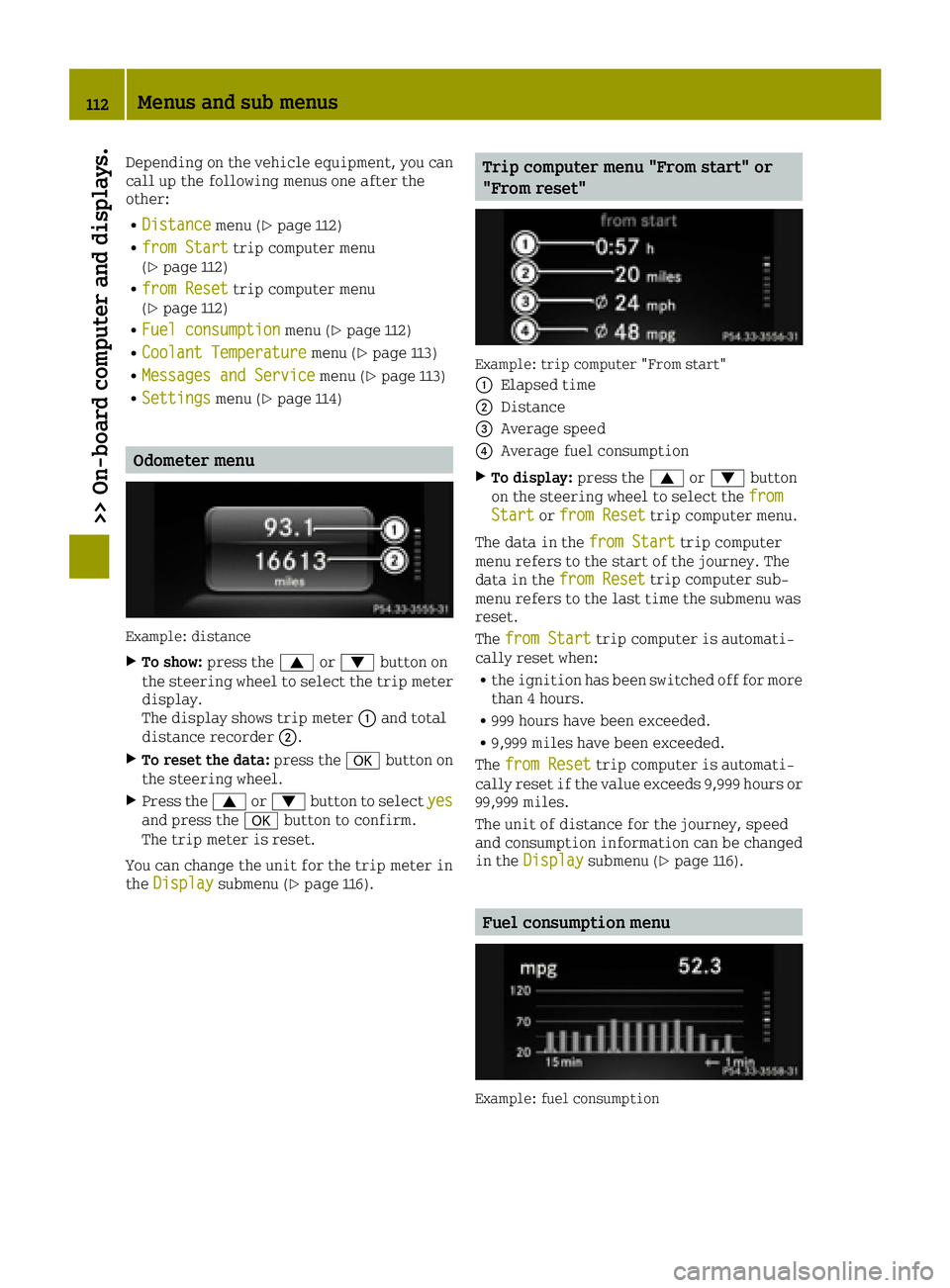
Example: distance
XTo show: press the 0063or0064 button on
the steering wheel to select the trip meter display.
The display shows trip meter 0043and total
distance recorder 0044.
XTo reset the data:press the0076button on
the steering wheel.
XPress the 0063or0064 button to select yesand press the0076button to confirm.
The trip meter is reset.
You can change the unit for the trip meter in
the Display
submenu (Ypage 116).
Trip computer menu "From start" or
"From reset"
Example: trip computer "From start"
0043
Elapsed time
0044Distance
0087Average speed
0085Average fuel consumption
XTo display: press the0063or0064 button
on the steering wheel to select the from
Startorfrom Resettrip computer menu.
The data in the from Start
trip computer
menu refers to the start of the journey. The
data in the from Reset
trip computer sub-
menu refers to the last time the submenu was
reset.
The from Start
trip computer is automati-
cally reset when:
Rthe ignition has been switched off for more
than 4 hours.
R999 hours have been exceeded.
R9,999 miles have been exceeded.
The from Reset
trip computer is automati-
cally reset if the value exceeds 9,999 hours or 99,999 miles.
The unit of distance for the journey, speed
and consumption information can be changed
in the Display
submenu (Ypage 116).
Fuel consumption menu
Example: fuel consumption
112Menus and sub menus
>> On-board computer and displays.
Page 116 of 214
Settings menu
Introduction
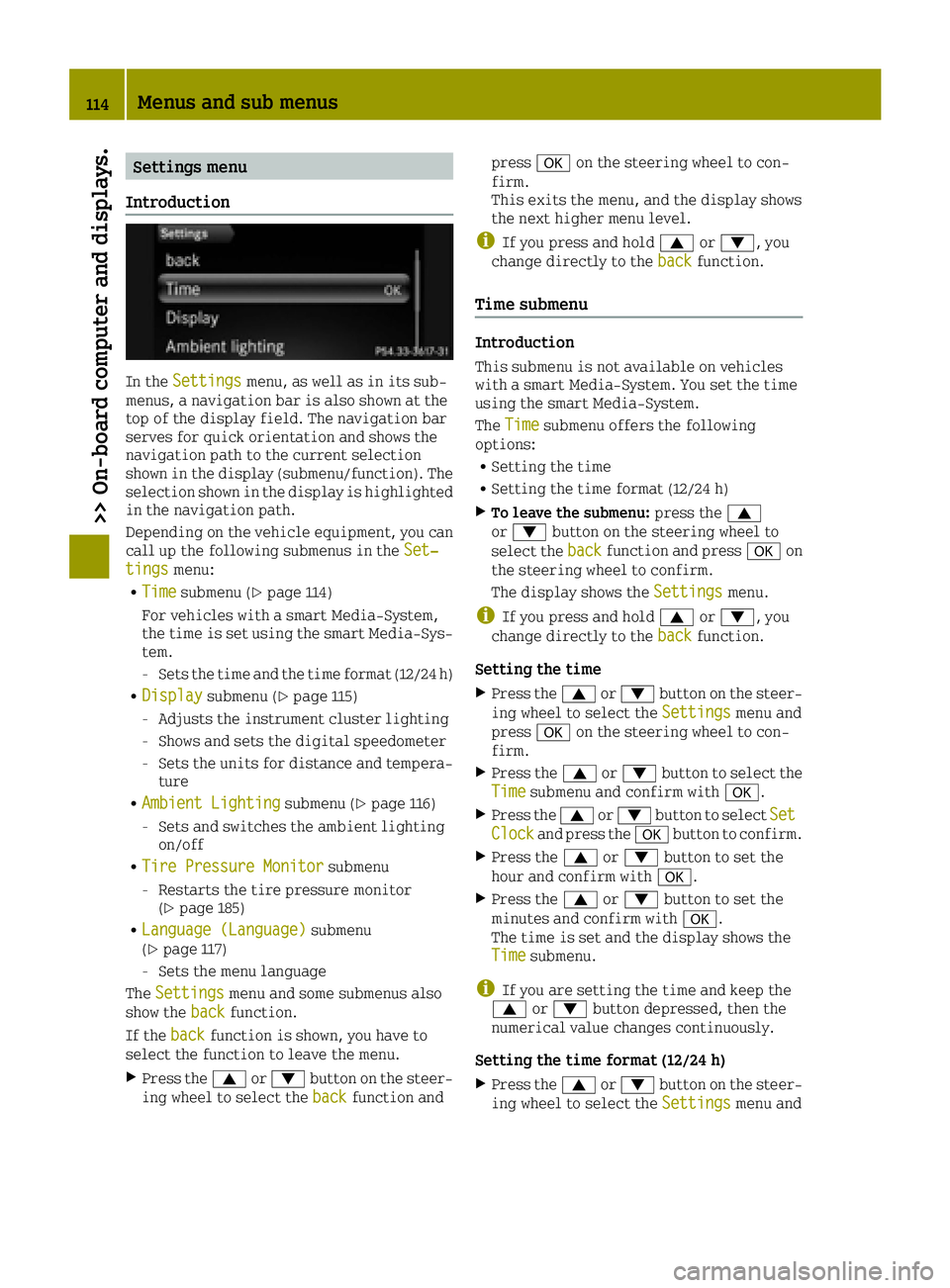
In the Settingsmenu, as well as in its sub-
menus, a navigation bar is also shown at the
top of the display field. The navigation bar
serves for quick orientation and shows the
navigation path to the current selection
shown in the display (submenu/function). The
selection shown in the display is highlighted
in the navigation path.
Depending on the vehicle equipment, you can
call up the following submenus in the Set‐
tingsmenu:
RTimesubmenu (Ypage 114)
For vehicles with a smart Media-System,
the time is set using the smart Media-Sys-
tem.
-Sets the time and the time format (12/24 h)
RDisplaysubmenu (Ypage 115)
-Adjusts the instrument cluster lighting
-Shows and sets the digital speedometer
-Sets the units for distance and tempera-
ture
RAmbient Lightingsubmenu (Ypage 116)
-Sets and switches the ambient lighting
on/off
RTire Pressure Monitorsubmenu
-Restarts the tire pressure monitor
(Ypage 185)
RLanguage (Language)submenu
(Ypage 117)
-Sets the menu language
The Settings
menu and some submenus also
show the backfunction.
If the back
function is shown, you have to
select the function to leave the menu.
XPress the 0063or0064 button on the steer-
ing wheel to select the backfunction andpress
0076on the steering wheel to con-
firm.
This exits the menu, and the display shows
the next higher menu level.
iIf you press and hold 0063or0064, you
change directly to the backfunction.
Time submenu
Introduction
This submenu is not available on vehicles
with a smart Media-System. You set the time
using the smart Media-System.
TheTime
submenu offers the following
options:
RSetting the time
RSetting the time format (12/24 h)
XTo leave the submenu: press the0063
or 0064 button on the steering wheel to
select the back
function and press 0076on
the steering wheel to confirm.
The display shows the Settings
menu.
iIf you press and hold0063or0064, you
change directly to the backfunction.
Setting the time
XPress the0063or0064 button on the steer-
ing wheel to select the Settingsmenu and
press 0076on the steering wheel to con-
firm.
XPress the 0063or0064 button to select the
Timesubmenu and confirm with 0076.
XPress the0063or0064 button to select SetClockand press the0076button to confirm.
XPress the 0063or0064 button to set the
hour and confirm with 0076.
XPress the0063or0064 button to set the
minutes and confirm with 0076.
The time is set and the display shows the
Time
submenu.
iIf you are setting the time and keep the
0063 or0064 button depressed, then the
numerical value changes continuously.
Setting the time format (12/24 h)
XPress the 0063or0064 button on the steer-
ing wheel to select the Settingsmenu and
114Menus and sub menus
>> On-board computer and displays.
Page 117 of 214
press0076on the steering wheel to con-
firm.
XPress the 0063or0064 button to select the
Timesubmenu and confirm with 0076.
XPress0063or0064 to select TimeFormat(12/24 h)and confirm with 0076.
XPress0063or0064 to select the desired
time format 24Hoursor12Hours(am/pm)and confirm with 0076.
The time format is accepted and the display
shows the Time
submenu.
Display submenu
Introduction
In theDisplaysubmenu, you can call up the
following submenus:
RBrightness Display/Switchessubmenu
(Ypage 115)
-Adjusting the instrument cluster light-
ing
RDigital Speedometersubmenu, see
(Ypage 115)
-Shows and sets the digital speedometer
RUnits of Distancesubmenu (Ypage 116)
-Setting the units of distance
RUnits of Temperaturesubmenu
(Ypage 116)
-Setting the units of temperature
XTo leave the submenu: press the0063
or 0064 button on the steering wheel to
select the back
function and press 0076on
the steering wheel to confirm.
The display shows the Settings
menu.
iIf you press and hold0063or0064, you
change directly to the backfunction.
Adjusting the instrument cluster lighting
Instrument cluster lighting includes illumi-
nation of the instrument cluster, the addi-
tional instruments on the dashboard, the dis-
plays and the controls.
You can set the brightness of the instrument
cluster to different levels with the Bright‐
ness Display/Switchesfunction.
XPress the0063or0064 button on the steer-
ing wheel to select the Settingsmenu andpress
0076on the steering wheel to con-
firm.
XPress the 0063or0064 button to select the
Displaysubmenu and confirm with 0076.
XPress the0063or0064 button to select
Brightness Display/Switchesand press
the 0076 button to confirm.
XPress the 0063or0064 button to set the
brightness level. Level 1corresponds to
dimmed instrument lighting and level 5to
bright instrument lighting.
With the selection during night-time driv-
ing, the instrument cluster brightness
level is set at the same time.
XPress the 0076button to confirm the set-
ting.
The instrument lighting is set and the dis-
play shows the Display
submenu.
Digital speedometer submenu
In theDigital Speedometersubmenu you
have the following options:
Rshowing/hiding the digital speedometer
Rsetting the unit for speed in the digital
speedometer
XTo call up the submenu: press the0063
or 0064 button on the steering wheel to
select the Settings
menu and press 0076on
the steering wheel to confirm.
XPress the 0063or0064 button to select the
Displaysubmenu and confirm with 0076.
XPress the0063or0064 button to select the
Digital Speedometersubmenu and con-
firm with 0076.
XTo show/hide the digital speedometer:
press the0063or0064 button to select the
On
function.
XActivate or deactivate the Onfunction by
pressing the 0076button.
When the function is highlighted, it is
activated and the display shows the digital
speedometer (
Ypage 111).
XTo set the unit of speed: press the0063
or 0064 button to select Unitand press the
0076 button to confirm.
XPress the 0063or0064 button to select the
unit of speed km/hormphand confirm with
0076.
The display shows the Digital Speedome‐
tersubmenu.
Menus and sub menus115
>> On-board computer and displays.
Z
Page 119 of 214
press0076on the steering wheel to con-
firm.
XPress the 0063or0064 button to select the
AmbientLightingsubmenu and confirm by
pressing the 0076button.
You will see the selected setting.
XPress the 0063or0064 button to select
Brightnessand press the 0076button to
confirm.
XPress the 0063or0064 button to set the
brightness level. Level 1corresponds to
dimmed ambient lighting and level 5to
bright ambient lighting.
With the selection, the ambient lighting
brightness level is set at the same time.
XPress the 0076button to save the setting.
The brightness of the ambient lighting is
set and the display shows the Ambient
Lightingsubmenu.
Language submenu
XPress the0063or0064 button on the steer-
ing wheel to select the Settingsmenu and
press 0076on the steering wheel to con-
firm.
XUse 0063 or0064 to select the Language(Language)submenu and confirm with
0076.
XPress the 0063or0064 button to select the
desired language for the displays and mes-
sages and confirm with 0076.
XPress the0063or0064 button on the steer-
ing wheel to select the backfunction and
press 0076on the steering wheel to con-
firm.
The display shows the Settings
menu in the
selected language.
iIf you press and hold 0063or0064, you
change directly to the backfunction.
Menus and sub menus117
>> On-board computer and displays.
Z
Page 144 of 214
Useful information
i
This Operator's Manual describes all
models and all standard and optional
equipment of your vehicle available at the
time of publication of the Operator's Man- ual. Country-specific differences are pos-
sible. Bear in mind that your vehicle may
not feature all functions described here.
This also applies to safety-relevant sys-
tems and functions.
iRead the information on qualified spe-
cialist workshops: (Ypage 20).
Stowage areas
Loading guidelines
GWARNING
If objects, luggage or loads are not secured or not secured sufficiently, they could
slip, tip over or be flung around and
thereby hit vehicle occupants. There is a
risk of injury, particularly in the event of
sudden braking or a sudden change in
direction.
Always store objects so that they cannot be
flung around. Secure objects, luggage or
loads against slipping or tipping before
the journey.
GWARNING
Combustion engines emit poisonous
exhaust gases such as carbon monoxide. If
the tailgate is open when the engine is
running, particularly if the vehicle is
moving, exhaust fumes could enter the
passenger compartment. There is a risk of
poisoning.
Turn off the engine before opening the
tailgate. Never drive with the tailgate
open.
Your vehicle has not been approved by the
manufacturer for towing a trailer. A trailer
could seriously impair driving safety.
Mounting a basic rack, a cycle rack or a ski/
snowboard rack on the rear of the vehicle will change the axle load distribution as speci-
fied by the vehicle manufacturer. Read the
operating instructions for the individual
accessories.
The handling characteristics of a laden vehi-
cle are dependent on the distribution of the
load within the vehicle. For this reason, you
should observe the following notes when
transporting a load:
Rnever exceed the maximum permissible
gross vehicle weight or the permissible
axle loads for the vehicle (including occu-
pants). The values are specified on the
vehicle identification plate on the B-pil-
lar of the driver's door
Rthe load must not protrude above the upper
edge of the head restraints
Rensure that no items of luggage can enter
the vehicle interior above or between the
front seats
Rensure that loaded objects are stowed
safely and are secured
Rload heavy objects at the bottom and light
objects at the top
Stowage space
Important safety notes
GWARNING
If you stow objects in the vehicle interior
in an unsuitable way, they could slip or be
thrown around and thus hit vehicle occu-
pants. Additionally, the cup holders, open
stowage spaces and mobile phone brackets
cannot restrain the objects placed in them
in the event of an accident. There is a risk
of injury, especially in the event of brak-
ing or sudden changes in direction.
RAlways stow objects so they cannot be
thrown around in these or similar situa-
tions.
RAlways ensure that objects do not pro-
trude from the stowage compartments or
stowage nets.
142Stowage areas
>> Stowage and features.
Page 156 of 214
Information on the type of service and ser-
vice intervals (see the separate Maintenance
Booklet).
For further information inquire at any smart
center or look under
http://www.smartUSA.com (only USA).
iThe service display does not show any
information on the engine oil level.
Observe the notes on the engine oil level
(
Ypage 150).
Whenever a service is due, this is shown
approximately 30 days or 1500 km (1000 miles)
beforehand. After starting the engine, a ser-
vice message appears in the instrument clus-
ter display for a few seconds; see the follow-
ing example.
Next
Servicein.. Daystogether with the
0099 or009A symbol. If the service due date
has been exceeded, Service Due .. Days
Ago.
The symbol shows the type of service. 0099
stands for a minor service and 009Afor a
major service.
The service display does not take into
account any periods of time during which the
battery is disconnected.
Maintaining the time-dependent service
schedule:
XNote down the service due date in the ser-
vice display before disconnecting the bat-
tery.
or
XAfter reconnecting the battery, subtract
the battery disconnection periods from the
service date shown on the display.
Hiding a service message
XPress the 0076button on the multifunction
steering wheel.
Calling up the service display
XSwitch on the ignition.
XPress the 0063or0064 button on the steer-
ing wheel to select the MessagesandSer‐vicemenu.
The service display shows when the service
is due.
Information about Service
Resetting the service display
!Have service work carried out as descri-
bed in the Maintenance Booklet. This may
otherwise lead to increased wear and dam-
age to the major assemblies or the vehicle.
A qualified specialist workshop, e.g. a smart center, will reset the service interval dis-
play after the service work has been carried
out. You can also obtain further information
on maintenance work, for example.
Special service requirements
The prescribed service interval is based on
normal operation of the vehicle. Service work
will need to be performed more often if the
vehicle is operated under arduous conditions
or increased loads, for example:
Rregular city driving with frequent inter-
mediate stops
Rif the vehicle is primarily used to travel
short distances
Rfor frequent operation in mountainous ter-
rain or on poor road surfaces
Rif the engine is often left idling for long
periods
In these or similar operating conditions,
have, for example, the air filter, engine oil
and oil filter changed more frequently. The
tires must be checked more frequently if the
vehicle is operated under increased loads.
You can obtain further information at a
qualified specialist workshop, e.g. a smart
center.
Driving abroad
An extensive smart service network is also
available in other countries. For further
information inquire at any smart center.
Care
General notes
HEnvironmental note
Dispose of empty packaging and cleaning
cloths in an environmentally responsible
manner.
154Care
>> Maintenance and care.
Page 161 of 214
!Do not affix the following to plastic sur-
faces:
Rstickers
Rfilms
Rscented oil bottles or similar items
You can otherwise damage the plastic.
!Do not allow cosmetics, insect repellent
or sunscreen to come into contact with the
plastic trim. This maintains the high-
quality look of the surfaces.
XWipe the plastic trim with a damp, lint-
free cloth, e.g. a microfiber cloth.
XHeavy soiling: use care products and clean-
ing agents recommended and approved by
smart.
The surface may change color temporarily.
Wait until the surface is dry again.
Cleaning the steering wheel and gear or
selector lever
XThoroughly wipe with a damp cloth or use
leather care agents that have been recom-
mended and approved by smart.
Cleaning the seat covers
General notes
!Do not use a microfiber cloth to clean
covers made out of real leather, artificial leather or DINAMICA. If used often, these
can damage the cover.
iNote that regular care is essential to
ensure that the appearance and comfort of
the covers is retained over time.
Genuine leather seat covers
Leather is a natural product.
It exhibits natural surface characteristics,
for example:
RDifferences in the texture
Rmarks caused by growth and injury
RSlight nuances of color
These are characteristics of leather and not
material defects.
!To retain the natural appearance of the
leather, observe the following cleaning
instructions:
RClean genuine leather covers carefully
with a damp cloth and then wipe the cov-
ers down with a dry cloth.
RMake sure that the leather does not
become soaked. It may otherwise become
rough and cracked.
ROnly use leather care agents that have
been recommended by smart. You can
obtain these from a qualified specialist
workshop.
Seat covers of other materials
!Observe the following when cleaning:
Rclean artificial leather covers with a
cloth moistened with a solution contain-
ing 1% detergent (e.g. dish washing liq-
uid).
Rclean cloth covers with a microfiber
cloth moistened with a solution contain-
ing 1% detergent (e.g. dish washing liq-
uid). Rub carefully and always wipe
entire seat sections to avoid leaving
visible lines. Leave the seat to dry
afterwards. Cleaning results depend on
the type of dirt and how long it has been
there.
Rclean DINAMICA covers with a damp cloth.
Make sure that you wipe entire seat sec-
tions to avoid leaving visible lines.
Cleaning the seat belts
GWARNING
Seat belts can become severely weakened if bleached or dyed. This could cause the seat
belts to tear or fail, for instance, in the
event of an accident. This poses an
increased risk of injury or fatal injury.
Never bleach or dye the seat belts.
!Do not clean the seat belts using chemical
cleaning agents. Do not dry the seat belts by
heating at temperatures above 176 ‡(80 †)
or in direct sunlight.
XUse clean, lukewarm water and soap solu-
tion.
Care159
>> Maintenance and care.
Z
Page 163 of 214
Useful information
i
This Operator's Manual describes all
models and all standard and optional
equipment of your vehicle available at the
time of publication of the Operator's Man- ual. Country-specific differences are pos-
sible. Bear in mind that your vehicle may
not feature all functions described here.
This also applies to safety-relevant sys-
tems and functions.
iRead the information on qualified spe-
cialist workshops: (Ypage 20).
Where will I find...?
Vehicle tool kit
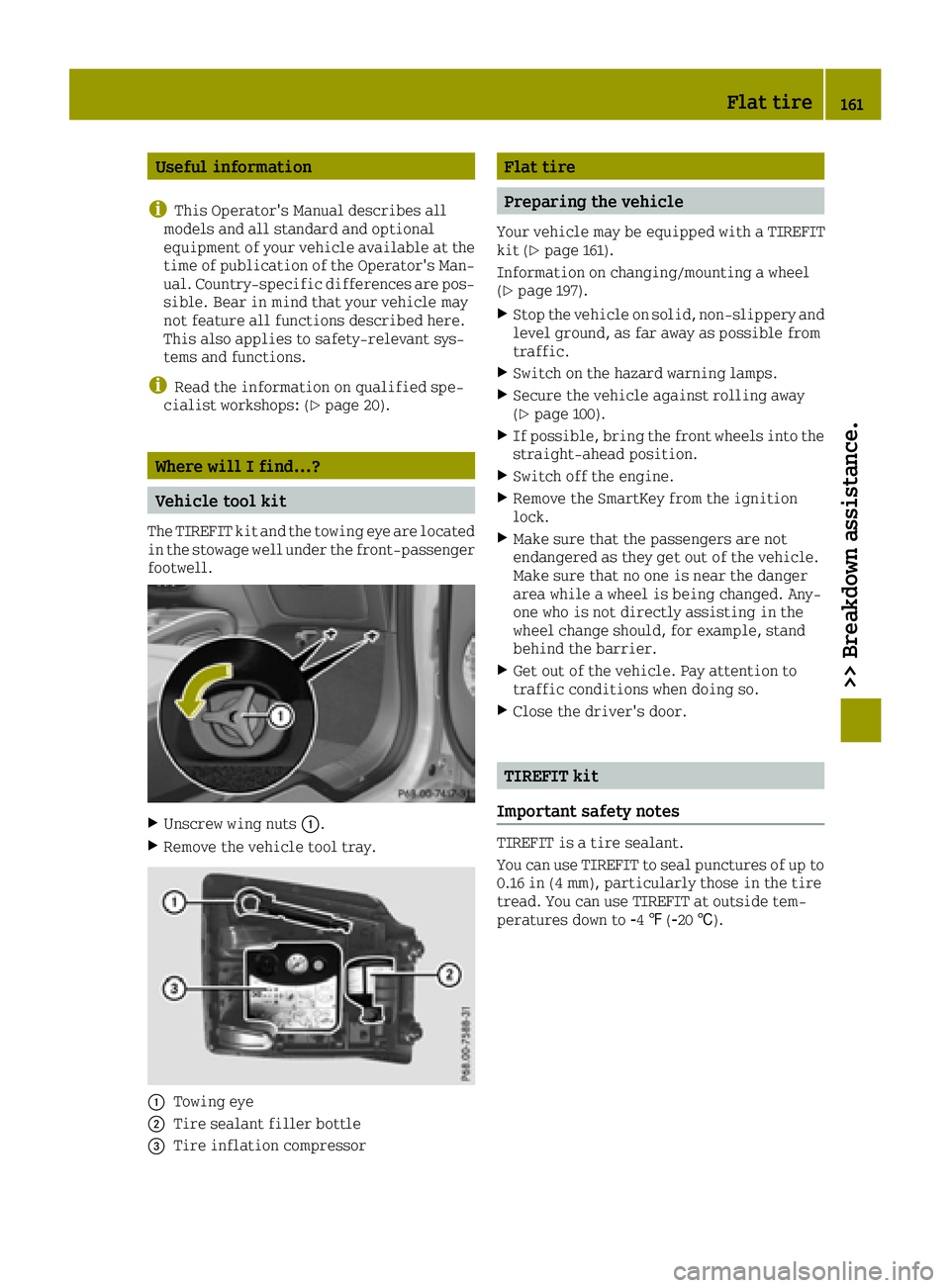
The TIREFIT kit and the towing eye are located
in the stowage well under the front-passenger
footwell.
XUnscrew wing nuts 0043.
XRemove the vehicle tool tray.
0043Towing eye
0044Tire sealant filler bottle
0087Tire inflation compressor
Flat tire
Preparing the vehicle
Your vehicle may be equipped with a TIREFIT
kit (Ypage 161).
Information on changing/mounting a wheel
(
Ypage 197).
XStop the vehicle on solid, non-slippery and
level ground, as far away as possible from
traffic.
XSwitch on the hazard warning lamps.
XSecure the vehicle against rolling away
(Ypage 100).
XIf possible, bring the front wheels into the
straight-ahead position.
XSwitch off the engine.
XRemove the SmartKey from the ignition
lock.
XMake sure that the passengers are not
endangered as they get out of the vehicle.
Make sure that no one is near the danger
area while a wheel is being changed. Any-
one who is not directly assisting in the
wheel change should, for example, stand
behind the barrier.
XGet out of the vehicle. Pay attention to
traffic conditions when doing so.
XClose the driver's door.
TIREFIT kit
Important safety notes
TIREFIT is a tire sealant.
You can use TIREFIT to seal punctures of up to
0.16 in (4 mm), particularly those in the tire
tread. You can use TIREFIT at outside tem-
peratures down to 00F84‡(00F820 †).
Flat tire161
>> Breakdown assistance.
Page 164 of 214
GWARNING
In the following situations, the tire seal-
ant is unable to provide sufficient break-
down assistance, as it is unable to seal the
tire properly:
Rthere are cuts or punctures in the tire
larger than those mentioned above.
Rthe wheel rim is damaged.
Ryou have driven at very low tire pressures
or on a flat tire.
There is a risk of an accident.
Do not drive the vehicle. Contact a quali-
fied specialist workshop.
GWARNING
The tire sealant is harmful and causes irri-
tation. It must not come into contact with
your skin, eyes or clothing or be swallowed.
Do not inhale TIREFIT fumes. Keep tire
sealant away from children. There is a risk
of injury.
If you come into contact with the tire seal-
ant, observe the following:
RRinse off the tire sealant from your skin
immediately with water.
RIf the tire sealant comes into contact
with your eyes, immediately rinse them
thoroughly with clean water.
RIf tire sealant is swallowed, immediately
rinse your mouth out thoroughly and
drink plenty of water. Do not induce vom-
iting, and seek medical attention imme-
diately.
RImmediately change out of clothing
which has come into contact with tire
sealant.
RIf an allergic reaction occurs, seek med-
ical attention immediately.
!Do not operate the tire inflation com-
pressor for longer than 15 minutes at a time
without a break. It may otherwise overheat.
The tire inflation compressor can be oper-
ated again once it has cooled down. Comply with the manufacturer’s safety
instructions on the sticker on the tire infla-
tion compressor.
Using the TIREFIT kit
XDo not remove any foreign objects which
have penetrated the tire, e.g. screws or
nails.
XRemove the tire sealant bottle and the tire
inflation compressor from the front-
passenger footwell (
Ypage 161).
XAffix the 50 mph (80 km/h) maximum speed
sticker to the instrument cluster within the
driver's field of vision.
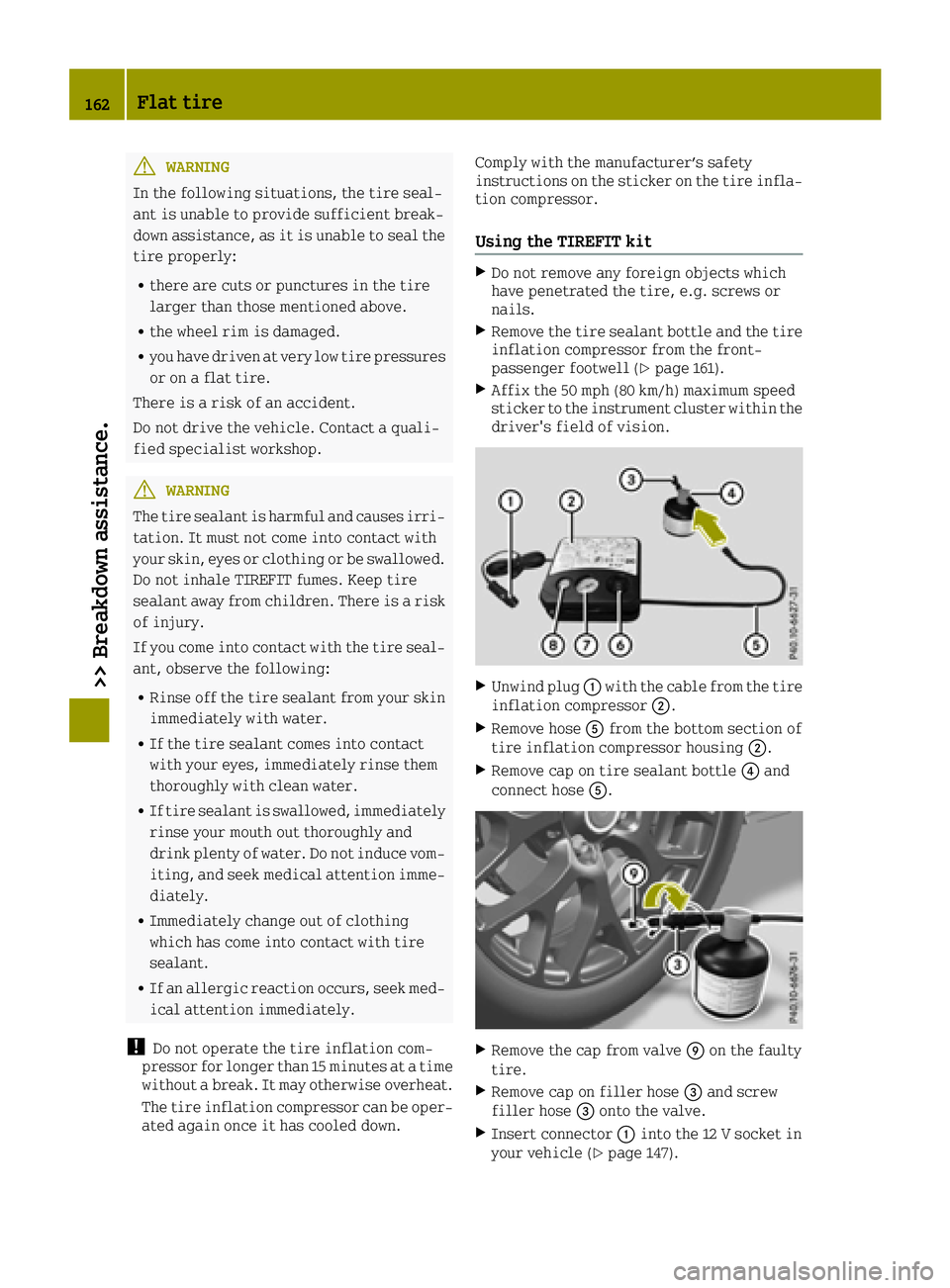
XUnwind plug
0043with the cable from the tire
inflation compressor 0044.
XRemove hose0083from the bottom section of
tire inflation compressor housing 0044.
XRemove cap on tire sealant bottle0085and
connect hose 0083.
XRemove the cap from valve 006Don the faulty
tire.
XRemove cap on filler hose 0087and screw
filler hose 0087onto the valve.
XInsert connector 0043into the 12 V socket in
your vehicle (Ypage 147).
162Flat tire
>> Breakdown assistance.
Page 198 of 214
Tread
The part of the tire that comes into contact
with the road.
Bead
The tire bead ensures that the tire sits
securely on the wheel. There are several steel
wires in the bead to prevent the tire from
coming loose from the wheel rim.
Sidewall
The part of the tire between the tread and the
bead.
Weight of optional extras
The combined weight of those optional extras
that weigh more than the replaced standard
parts and more than 5 lbs (2.3 kilograms).
These optional extras, such as high-perform-
ance brakes, level control, a roof rack or a
high-performance battery, are not included
in the curb weight and the weight of the
accessories.
TIN (Tire Identification Number)
This is a unique identifier which can be used
by a tire manufacturer to identify tires, for
example for a product recall, and thus iden-
tify the purchasers. The TIN is made up of the manufacturer's identity code, tire size, tire
type code and the manufacturing date.
Load bearing index
The load bearing index (also load index) is a
code that contains the maximum load bearing
capacity of a tire.
Traction
Traction is the result of friction between the
tires and the road surface.
Treadwear indicators
Narrow bars (tread wear bars) that are dis-
tributed over the tire tread. If the tire tread
is level with the bars, the wear limit of 00CDin
(1.6 mm) has been reached.
Occupant distribution
The distribution of occupants in a vehicle at
their designated seating positions.
Total load limit
Nominal load and luggage load plus 68 kg
(150 lbs) multiplied by the number of seats in
the vehicle.
Changing a wheel
Flat tire
You can find information on what to do in the
event of a flat tire in the "Flat tire" section
(
Ypage 161).
Rotating the wheels
GWARNING
Never interchange the front and rear wheels
as they have different dimensions, e.g.
size, wheel offset etc. Otherwise, there
could be a negative effect on the road hold- ing and you could endanger yourself or oth-
ers.
!On vehicles equipped with a tire pressure
monitor, electronic components are loca-
ted in the wheel.
Tire-mounting tools should not be used
near the valve. This could damage the elec-
tronic components.
Only have tires changed at a qualified spe-
cialist workshop.
Various types of steel wheel can be fitted on
your vehicle. Some steel wheels have a red
mark in the hub cap area. The hub cap has to be
removed to see the red mark, see "Raising the
vehicle" in the "Wheel change" section
(
Ypage 197). When changing the wheels,
always fit wheels of the same type on all axles.
Always pay attention to the instructions and
safety notes when changing a wheel
(
Ypage 196).
The wear patterns on the front and rear tires
differ, depending on the operating condi-
tions. Front tires typically wear more on the
shoulders and the rear tires in the center.
Clean the contact surfaces of the wheel and
the brake disc thoroughly every time a wheel
is rotated. Check the tire pressure and reac-
tivate the tire pressure monitor if necessary.
196Changing a wheel
>> Wheels and tires.