key SUBARU FORESTER 2004 Service Manual PDF
[x] Cancel search | Manufacturer: SUBARU, Model Year: 2004, Model line: FORESTER, Model: SUBARU FORESTER 2004Pages: 2870, PDF Size: 38.67 MB
Page 1136 of 2870

EN(H4SO)-38
ENGINE (DIAGNOSTIC)
Inspection Mode
P0734 Gear 4 Incorrect Ratio
P0741 Torque Converter Clutch Circuit Performance or Stuck Off
P0743 Torque Converter Clutch Circuit Electrical
P0748 Pressure Control Solenoid “A” Electrical
P0753 Shift Solenoid “A” Electrical
P0758 Shift Solenoid “B” Electrical
P0771 Low clutch timing solenoid
P0778 Pressure Control Solenoid “B” Electrical
P0785 Shift/Timing Solenoid
P0851 Neutral Switch Input Circuit Low
P0852 Neutral Switch Input Circuit High
P0864 TCM Communication Circuit Range/Performance
P0865 TCM Communication Circuit Low
P0866 TCM Communication Circuit Low
P1110 Atmospheric Pressure Sensor Circuit Malfunction (Low Input)
P1111 Atmospheric Pressure Sensor Circuit Malfunction (High Input)
P1492 EGR Valve Signal #1 Circuit Malfunction (Low Input)
P1493 EGR Valve Signal #1 Circuit Malfunction (High Input)
P1494 EGR Valve Signal #2 Circuit Malfunction (Low Input)
P1495 EGR Valve Signal #2 Circuit Malfunction (High Input)
P1496 EGR Valve Signal #3 Circuit Malfunction (Low Input)
P1497 EGR Valve Signal #3 Circuit Malfunction (High Input)
P1498 EGR Valve Signal #4 Circuit Malfunction (Low Input)
P1499 EGR Valve Signal #4 Circuit Malfunction (High Input)
P1510 ISC Solenoid Valve Signal #1 Circuit Malfunction (Low Input)
P1511 ISC Solenoid Valve Signal #1 Circuit Malfunction (High Input)
P1512 ISC Solenoid Valve Signal #2 Circuit Malfunction (Low Input)
P1513 ISC Solenoid Valve Signal #2 Circuit Malfunction (High Input)
P1514 ISC Solenoid Valve Signal #3 Circuit Malfunction (Low Input)
P1515 ISC Solenoid Valve Signal #3 Circuit Malfunction (High Input)
P1516 ISC Solenoid Valve Signal #4 Circuit Malfunction (Low Input)
P1517 ISC Solenoid Valve Signal #4 Circuit Malfunction (High Input)
P1518 Starter Switch Circuit Low Input
P1560 Back-Up Voltage Circuit Malfunction
P1570 Antenna
P1571 Reference Code Incompatibility
P1572 EGI — Immobilizer Communication
P1574 Key — Communication Failure
P1576 EGI Control Module EEPROM
P1577 IMM Control Module EEPROM
P1698 Engine Torque Control Cut Signal Circuit Malfunction (Low Input)
P1699 Engine Torque Control Cut Signal Circuit Malfunction (High Input)
P1700 Throttle Position Sensor Circuit Malfunction For AT
P1711 Engine Torque Control Signal #1 Circuit Malfunction
P1712 Engine Torque Control Signal #2 Circuit MalfunctionDTC Item
Page 1138 of 2870
EN(H4SO)-40
ENGINE (DIAGNOSTIC)
Inspection Mode
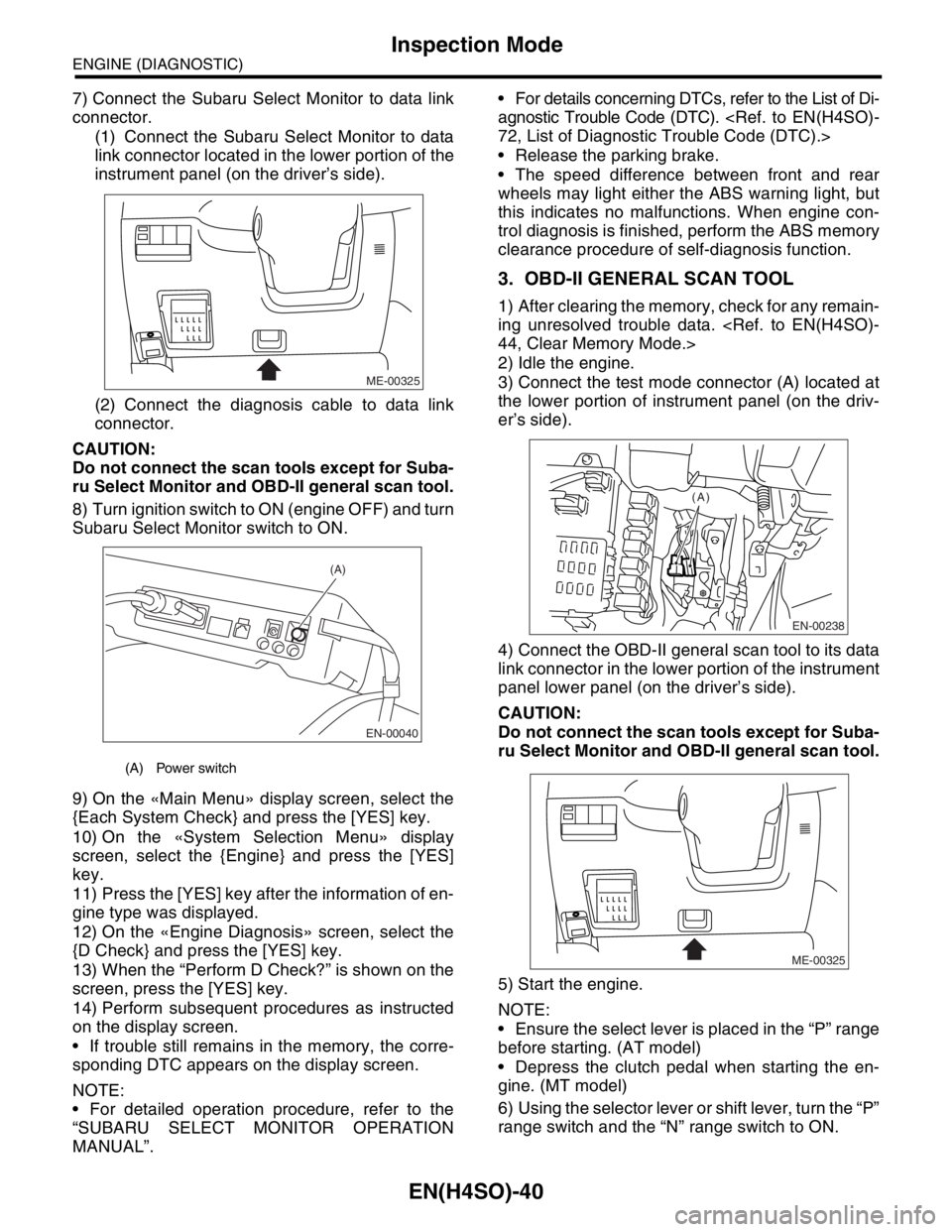
7) Connect the Subaru Select Monitor to data link
connector.
(1) Connect the Subaru Select Monitor to data
link connector located in the lower portion of the
instrument panel (on the driver’s side).
(2) Connect the diagnosis cable to data link
connector.
CAUTION:
Do not connect the scan tools except for Suba-
ru Select Monitor and OBD-II general scan tool.
8) Turn ignition switch to ON (engine OFF) and turn
Subaru Select Monitor switch to ON.
9) On the «Main Menu» display screen, select the
{Each System Check} and press the [YES] key.
10) On the «System Selection Menu» display
screen, select the {Engine} and press the [YES]
key.
11) Press the [YES] key after the information of en-
gine type was displayed.
12) On the «Engine Diagnosis» screen, select the
{D Check} and press the [YES] key.
13) When the “Perform D Check?” is shown on the
screen, press the [YES] key.
14) Perform subsequent procedures as instructed
on the display screen.
If trouble still remains in the memory, the corre-
sponding DTC appears on the display screen.
NOTE:
For detailed operation procedure, refer to the
“SUBARU SELECT MONITOR OPERATION
MANUAL”. For details concerning DTCs, refer to the List of Di-
agnostic Trouble Code (DTC).
Release the parking brake.
The speed difference between front and rear
wheels may light either the ABS warning light, but
this indicates no malfunctions. When engine con-
trol diagnosis is finished, perform the ABS memory
clearance procedure of self-diagnosis function.
3. OBD-II GENERAL SCAN TOOL
1) After clearing the memory, check for any remain-
ing unresolved trouble data.
2) Idle the engine.
3) Connect the test mode connector (A) located at
the lower portion of instrument panel (on the driv-
er’s side).
4) Connect the OBD-II general scan tool to its data
link connector in the lower portion of the instrument
panel lower panel (on the driver’s side).
CAUTION:
Do not connect the scan tools except for Suba-
ru Select Monitor and OBD-II general scan tool.
5) Start the engine.
NOTE:
Ensure the select lever is placed in the “P” range
before starting. (AT model)
Depress the clutch pedal when starting the en-
gine. (MT model)
6) Using the selector lever or shift lever, turn the “P”
range switch and the “N” range switch to ON.
(A) Power switch
ME-00325
EN-00040
(A)
EN-00238
(A)
ME-00325
Page 1142 of 2870

EN(H4SO)-44
ENGINE (DIAGNOSTIC)
Clear Memory Mode
14.Clear Memory Mode
A: OPERATION
1. SUBARU SELECT MONITOR (NORMAL
MODE)
1) On the «Main Menu» display screen, select the
{Each System Check} and press the [YES] key.
2) On the «System Selection Menu» display
screen, select the {Engine} and press the [YES]
key.
3) Press the [YES] key after the information of en-
gine type was displayed.
4) On the «Engine Diagnosis» display screen, se-
lect the {Memory Clear} and press the [YES] key.
5) When the “Done” and “Turn Ignition Switch OFF”
are shown on the display screen, turn the ignition
switch to OFF and then Subaru Select Monitor
switch to OFF.
NOTE:
After the memory has been cleared, the idle air
control solenoid valve must be initialized. To do
this, turn the ignition switch to the ON position. Wait
3 seconds before starting the engine.
For detailed operation procedure, refer to the
“SUBARU SELECT MONITOR OPERATION
MANUAL”.
2. SUBARU SELECT MONITOR (OBD
MODE)
1) On the «Main Menu» display screen, select the
{Each System Check} and press the [YES] key.
2) On the «System Selection Menu» display
screen, select the {Engine} and press the [YES]
key.
3) Press the [YES] key after the information of en-
gine type was displayed.
4) On the «Engine Diagnosis» display screen, se-
lect the {OBD System} and press the [YES] key.
5) On the «OBD Menu» display screen, select the
{DTC Clear} and press the [YES] key.
6) When the “Perform Diagnostic Code(s) Clear?”
is shown on the screen, press the [YES] key.
7) Turn the ignition switch to OFF and then turn the
Subaru Select Monitor to OFF.
NOTE:
After the memory has been cleared, the idle air
control solenoid valve must be initialized. To do
this, turn the ignition switch to the ON position. Wait
3 seconds before starting the engine.
For detailed operation procedure, refer to the
“SUBARU SELECT MONITOR OPERATION
MANUAL”.
3. OBD-II GENERAL SCAN TOOL
For clear memory procedures using the OBD-II
general scan tool, refer to the OBD-II General Scan
Tool Instruction Manual.
After the memory has been cleared, the idle air
control solenoid valve must be initialized. To do
this, turn the ignition switch to the ON position. Wait
3 seconds before starting the engine.
Page 1143 of 2870
EN(H4SO)-45
ENGINE (DIAGNOSTIC)
Compulsory Valve Operation Check Mode
15.Compulsory Valve Operation
Check Mode
A: OPERATION
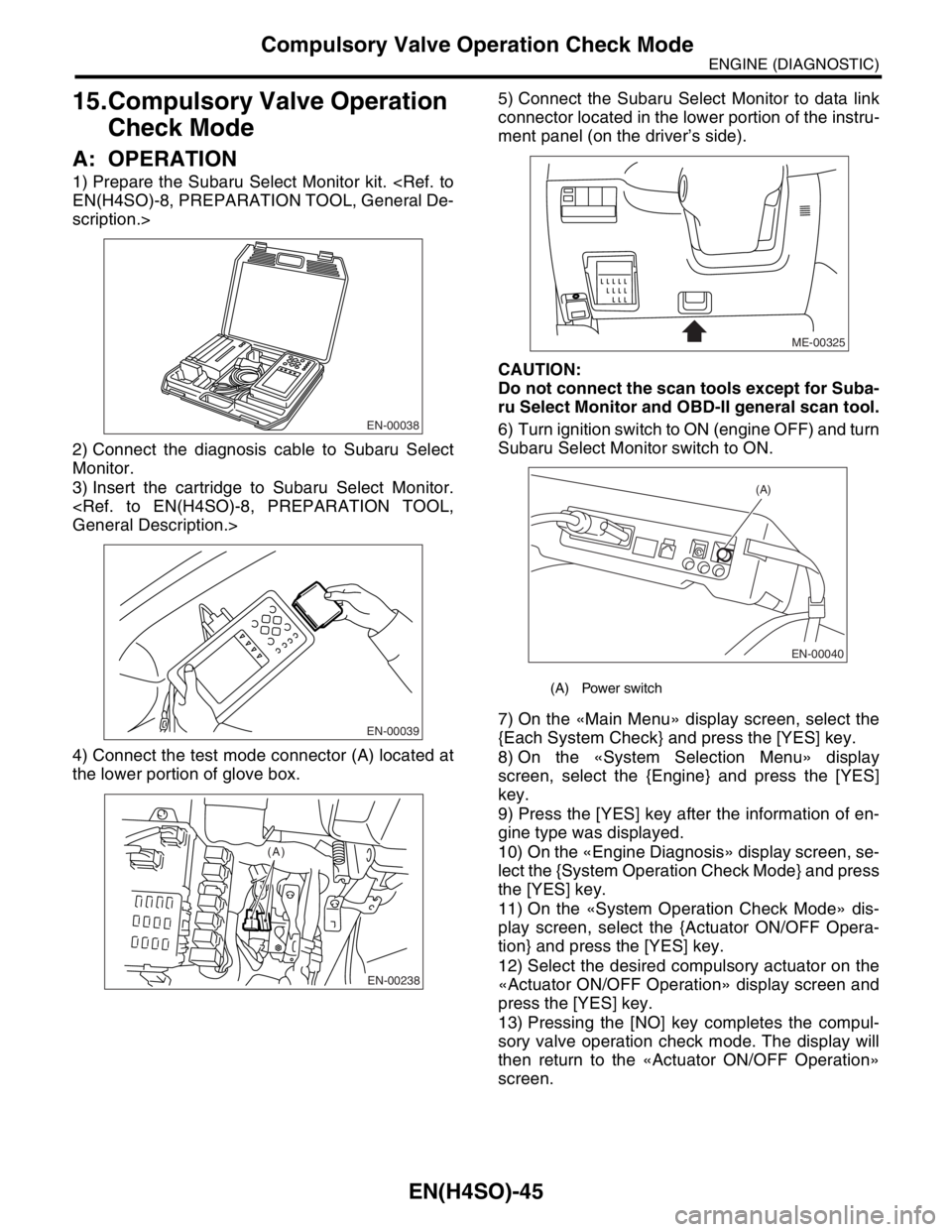
1) Prepare the Subaru Select Monitor kit.
scription.>
2) Connect the diagnosis cable to Subaru Select
Monitor.
3) Insert the cartridge to Subaru Select Monitor.
4) Connect the test mode connector (A) located at
the lower portion of glove box.5) Connect the Subaru Select Monitor to data link
connector located in the lower portion of the instru-
ment panel (on the driver’s side).
CAUTION:
Do not connect the scan tools except for Suba-
ru Select Monitor and OBD-II general scan tool.
6) Turn ignition switch to ON (engine OFF) and turn
Subaru Select Monitor switch to ON.
7) On the «Main Menu» display screen, select the
{Each System Check} and press the [YES] key.
8) On the «System Selection Menu» display
screen, select the {Engine} and press the [YES]
key.
9) Press the [YES] key after the information of en-
gine type was displayed.
10) On the «Engine Diagnosis» display screen, se-
lect the {System Operation Check Mode} and press
the [YES] key.
11) On the «System Operation Check Mode» dis-
play screen, select the {Actuator ON/OFF Opera-
tion} and press the [YES] key.
12) Select the desired compulsory actuator on the
«Actuator ON/OFF Operation» display screen and
press the [YES] key.
13) Pressing the [NO] key completes the compul-
sory valve operation check mode. The display will
then return to the «Actuator ON/OFF Operation»
screen.
EN-00038
EN-00039
EN-00238
(A)
(A) Power switch
ME-00325
EN-00040
(A)
Page 1172 of 2870

EN(H4SO)-74
ENGINE (DIAGNOSTIC)
List of Diagnostic Trouble Code (DTC)
P0420 Catalyst System Efficiency Below
Threshold (Bank 1)
Trouble Code (DTC).>
P0458 Evaporative Emission Control Sys-
tem Purge Control Valve Circuit Low
cedure with Diagnostic Trouble Code (DTC).>
P0459 Evaporative Emission Control Sys-
tem Purge Control Valve Circuit High
Procedure with Diagnostic Trouble Code (DTC).>
P0461 Fuel Level Sensor Circuit Range/Per-
formance
Code (DTC).>
P0462 Fuel Level Sensor Circuit Low Input
P0463 Fuel Level Sensor Circuit High Input
P0464 Fuel Level Sensor Circuit Intermittent
(DTC).>
P0483 Cooling Fan Rationality Check
P0502 Vehicle Speed Sensor Circuit Low
Input
P0503 Vehicle Speed Sensor Intermittent/
Erratic/High
P0506 Idle Control System RPM Lower
Than Expected
Code (DTC).>
P0507 Idle Control System RPM Higher
Than Expected
Code (DTC).>
P0512 Starter Request Circuit
P0513 Incorrect Immobilizer Key
P0519 Idle Control System Malfunction
(Fail-Safe)
(DTC).>
P0565 Cruise Control On Signal
P0604 Internal Control Module Random
Access Memory (RAM) Error
nostic Trouble Code (DTC).>
P0691 Cooling Fan 1 Control Circuit Low
P0692 Cooling Fan 1 Control Circuit High
P0703 Torque Converter/Brake Switch “B”
Circuit
(DTC).>
P0705 Transmission Range Sensor Circuit
(PRNDL Input)
P0710 Transmission Fluid Temperature
Sensor Circuit
P0716 Torque converter turbine speed sen-
sor
Page 1174 of 2870

EN(H4SO)-76
ENGINE (DIAGNOSTIC)
List of Diagnostic Trouble Code (DTC)
P1493 EGR Valve Signal #1 Circuit Malfunc-
tion (High Input)
ble Code (DTC).>
P1494 EGR Valve Signal #2 Circuit Malfunc-
tion (Low Input)
ble Code (DTC).>
P1495 EGR Valve Signal #2 Circuit Malfunc-
tion (High Input)
ble Code (DTC).>
P1496 EGR Valve Signal #3 Circuit Malfunc-
tion (Low Input)
ble Code (DTC).>
P1497 EGR Valve Signal #3 Circuit Malfunc-
tion (High Input)
ble Code (DTC).>
P1498 EGR Valve Signal #4 Circuit Malfunc-
tion (Low Input)
ble Code (DTC).>
P1499 EGR Valve Signal #4 Circuit Malfunc-
tion (High Input)
ble Code (DTC).>
P1510 ISC Solenoid Valve Signal #1 Circuit
Malfunction (Low Input)
nostic Trouble Code (DTC).>
P1511 ISC Solenoid Valve Signal #1 Circuit
Malfunction (High Input)
nostic Trouble Code (DTC).>
P1512 ISC Solenoid Valve Signal #2 Circuit
Malfunction (Low Input)
nostic Trouble Code (DTC).>
P1513 ISC Solenoid Valve Signal #2 Circuit
Malfunction (High Input)
nostic Trouble Code (DTC).>
P1514 ISC Solenoid Valve Signal #3 Circuit
Malfunction (Low Input)
nostic Trouble Code (DTC).>
P1515 ISC Solenoid Valve Signal #3 Circuit
Malfunction (High Input)
nostic Trouble Code (DTC).>
P1516 ISC Solenoid Valve Signal #4 Circuit
Malfunction (Low Input)
nostic Trouble Code (DTC).>
P1517 ISC Solenoid Valve Signal #4 Circuit
Malfunction (High Input)
nostic Trouble Code (DTC).>
P1518 Starter Switch Circuit Low Input
P1560 Back-Up Voltage Circuit Malfunction
P1570 ANTENNA
P1571 Reference Code Incompatibility
P1572 IMM Circuit Failure
P1574 Key IMM Circuit Failure
Page 1471 of 2870
ME(H4DOTC)-15
MECHANICAL
General Description
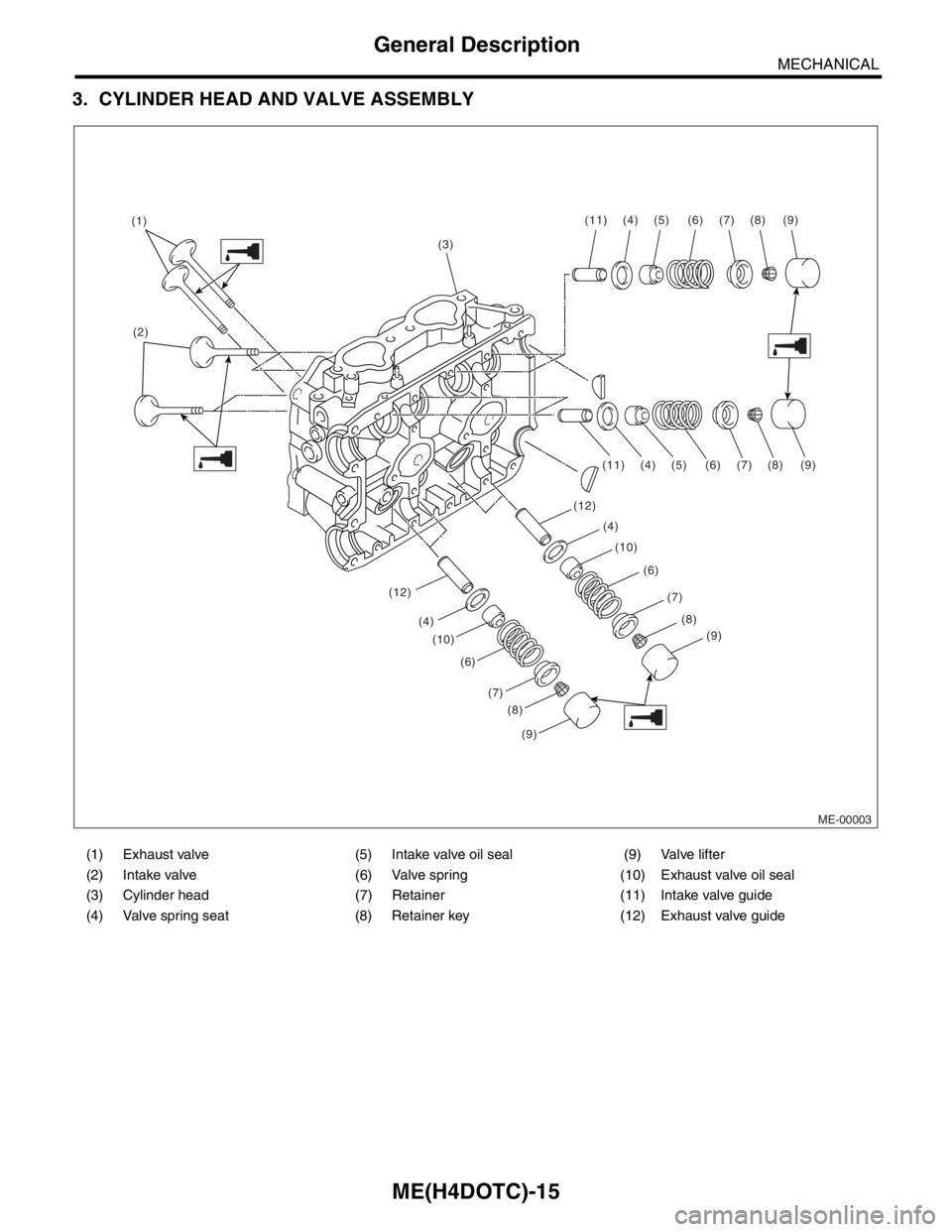
3. CYLINDER HEAD AND VALVE ASSEMBLY
(1) Exhaust valve (5) Intake valve oil seal (9) Valve lifter
(2) Intake valve (6) Valve spring (10) Exhaust valve oil seal
(3) Cylinder head (7) Retainer (11) Intake valve guide
(4) Valve spring seat (8) Retainer key (12) Exhaust valve guide
ME-00003
(3) (1)
(2)(11) (4) (5) (6) (7) (8) (9)
(11)
(12)
(12)(10)(4)
(4)(5) (6)
(6)(7)
(7)(8)
(8)(9)
(9)
(10) (4)
(6)
(7)
(8)
(9)
Page 1474 of 2870
ME(H4DOTC)-18
MECHANICAL
General Description
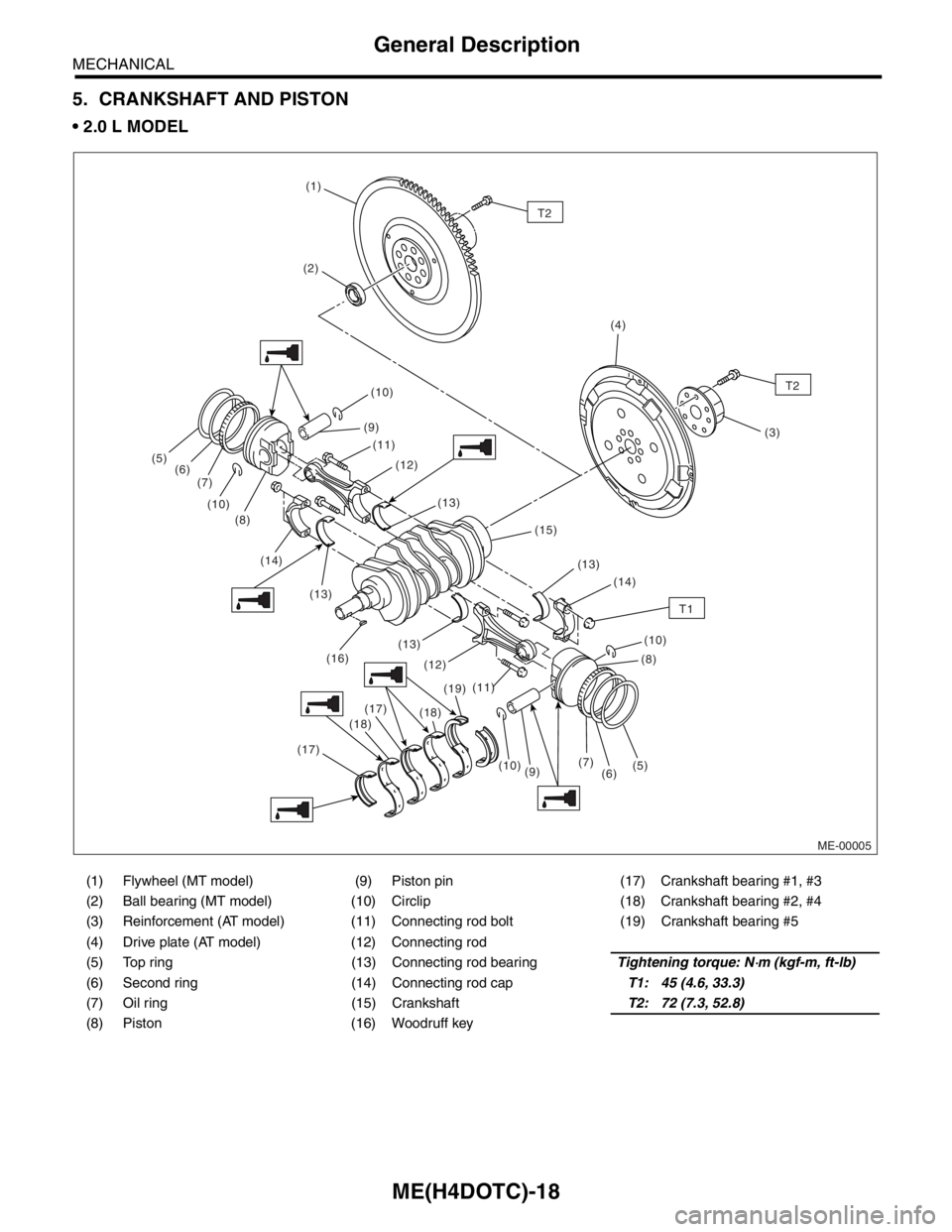
5. CRANKSHAFT AND PISTON
2.0 L MODEL
(1) Flywheel (MT model) (9) Piston pin (17) Crankshaft bearing #1, #3
(2) Ball bearing (MT model) (10) Circlip (18) Crankshaft bearing #2, #4
(3) Reinforcement (AT model) (11) Connecting rod bolt (19) Crankshaft bearing #5
(4) Drive plate (AT model) (12) Connecting rod
(5) Top ring (13) Connecting rod bearingTightening torque: N
⋅m (kgf-m, ft-lb)
(6) Second ring (14) Connecting rod capT1: 45 (4.6, 33.3)
(7) Oil ring (15) CrankshaftT2: 72 (7.3, 52.8)
(8) Piston (16) Woodruff key
ME-00005
(10)(1)
(17)
(18)(18)(13) (12) (11)
(8)(10) (10)
(9)
(16)
(19)
(10)
(9) (11) (13)
(12) (8)
(14)
(13)(14) (13) (15)
(7)(6)(5)
(17)
T2
(2)
(4)
(3)
(5)
(6) (7)
T2
T1
Page 1475 of 2870
ME(H4DOTC)-19
MECHANICAL
General Description
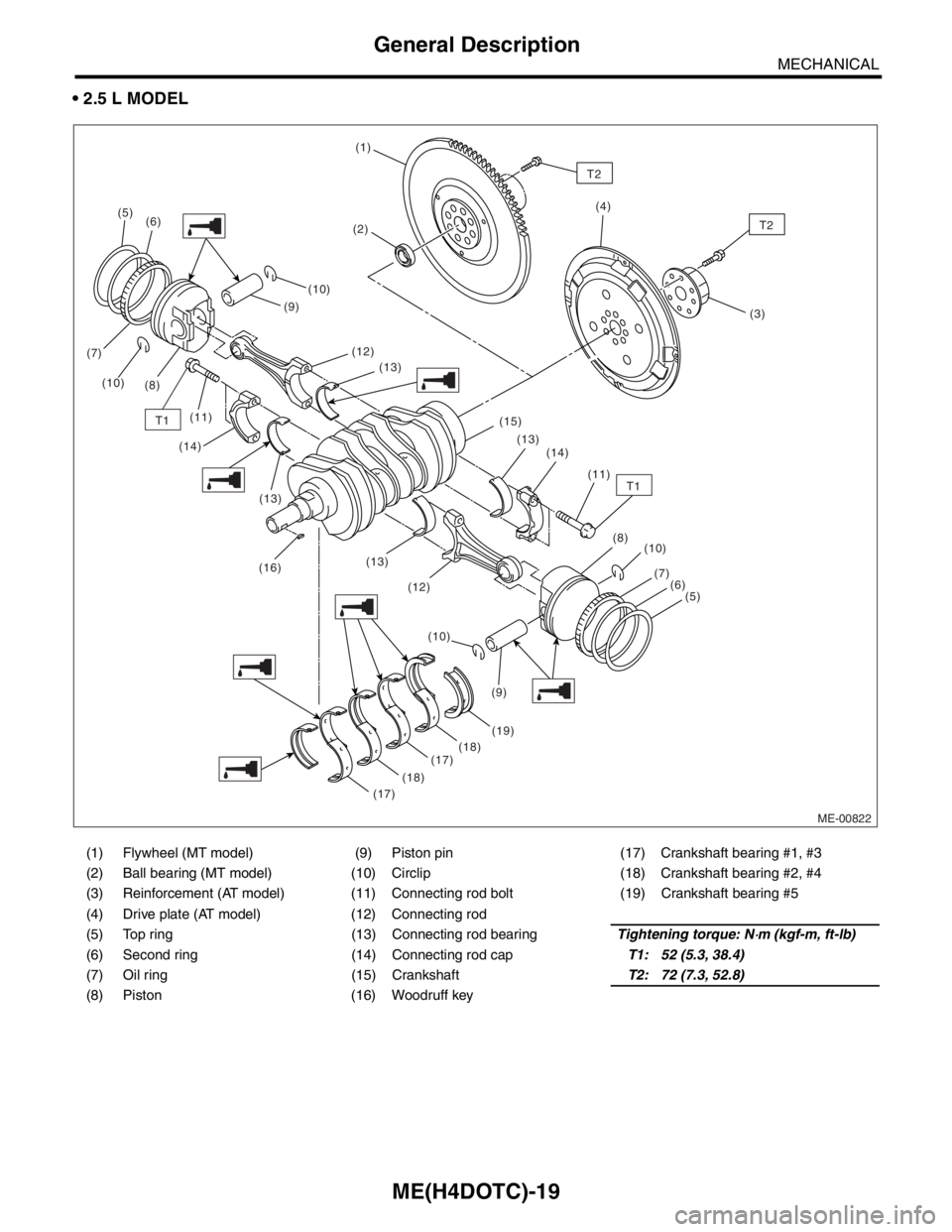
2.5 L MODEL
(1) Flywheel (MT model) (9) Piston pin (17) Crankshaft bearing #1, #3
(2) Ball bearing (MT model) (10) Circlip (18) Crankshaft bearing #2, #4
(3) Reinforcement (AT model) (11) Connecting rod bolt (19) Crankshaft bearing #5
(4) Drive plate (AT model) (12) Connecting rod
(5) Top ring (13) Connecting rod bearingTightening torque: N
⋅m (kgf-m, ft-lb)
(6) Second ring (14) Connecting rod capT1: 52 (5.3, 38.4)
(7) Oil ring (15) CrankshaftT2: 72 (7.3, 52.8)
(8) Piston (16) Woodruff key
ME-00822
T1
(5)
(6)
(7)
(10)
(8)(10)
(12)
(13)
(13)
(16)(13)
(12)
(19)
(18)
(17)
(17)(18)(10)(10)
(7)
(6)
(5)
(9)(8) (13) (15)
(14)
(11) (14)(9)
T1(11)
(1)
T2
(2)(4)
(3)
T2
Page 1524 of 2870
ME(H4DOTC)-66
MECHANICAL
Cam Sprocket
16.Cam Sprocket
A: REMOVAL
1) Remove the V-belt.
2) Remove the crank pulley.
3) Remove the timing belt cover.
4) Remove the timing belt assembly.
bly.>
5) Remove the camshaft position sensor. (2.0 L
model)
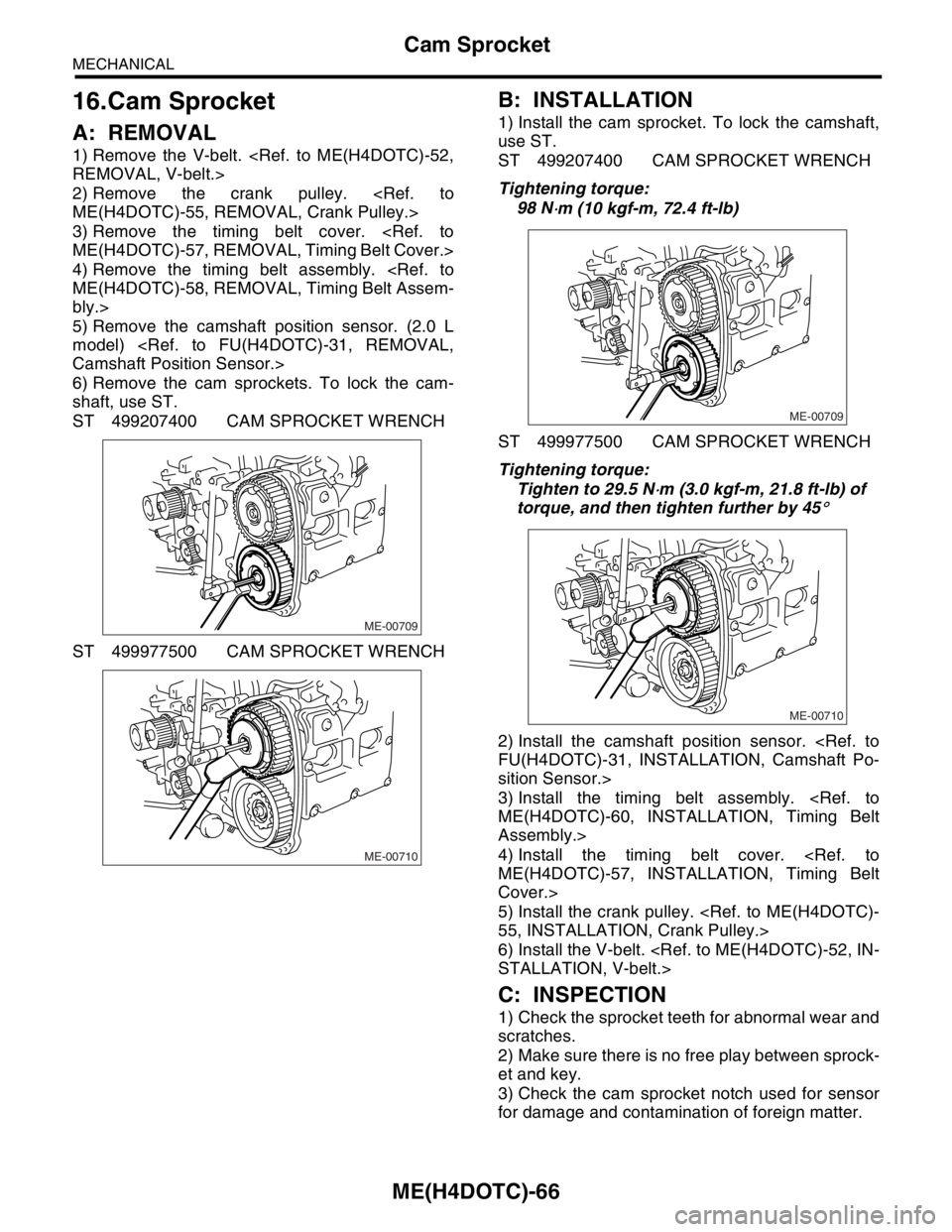
6) Remove the cam sprockets. To lock the cam-
shaft, use ST.
ST 499207400 CAM SPROCKET WRENCH
ST 499977500 CAM SPROCKET WRENCH
B: INSTALLATION
1) Install the cam sprocket. To lock the camshaft,
use ST.
ST 499207400 CAM SPROCKET WRENCH
Tightening torque:
98 N
⋅m (10 kgf-m, 72.4 ft-lb)
ST 499977500 CAM SPROCKET WRENCH
Tightening torque:
Tighten to 29.5 N
⋅m (3.0 kgf-m, 21.8 ft-lb) of
torque, and then tighten further by 45
°
2) Install the camshaft position sensor.
sition Sensor.>
3) Install the timing belt assembly.
Assembly.>
4) Install the timing belt cover.
Cover.>
5) Install the crank pulley.
6) Install the V-belt.
C: INSPECTION
1) Check the sprocket teeth for abnormal wear and
scratches.
2) Make sure there is no free play between sprock-
et and key.
3) Check the cam sprocket notch used for sensor
for damage and contamination of foreign matter.
ME-00709
ME-00710
ME-00709
ME-00710