key SUBARU FORESTER 2004 Service Manual Online
[x] Cancel search | Manufacturer: SUBARU, Model Year: 2004, Model line: FORESTER, Model: SUBARU FORESTER 2004Pages: 2870, PDF Size: 38.67 MB
Page 1670 of 2870

EN(H4DOTC)-40
ENGINE (DIAGNOSTIC)
Inspection Mode
12.Inspection Mode
A: OPERATION
Perform the diagnosis on the “Diagnosis Trouble Codes (DTC) List” below.
Refer to the item of drive cycle when perform the diagnosis not on the “Diagnosis Trouble Codes (DTC) List”
below.
DTC Item On condition
P0011 A Camshaft Position-Timing Over-Advanced or System Performance (Bank 1) —
P0021 A Camshaft Position-Timing Over-Advanced or System Performance (Bank 2) —
P0031 HO2S Sensor Circuit Low Voltage (Bank 1 Sensor 1) —
P0032 HO2S Sensor Circuit High Voltage (Bank 1 Sensor 1) —
P0037 HO2S Sensor Circuit Low Voltage (Bank 1 Sensor 2) —
P0038 HO2S Sensor Circuit High Voltage (Bank 1 Sensor 2) —
P0102 Mass or Volume Air Flow Circuit Low Input —
P0103 Mass or Volume Air Flow Circuit High Input —
P0107 Manifold Absolute Pressure/Barometric Pressure Circuit Low Input —
P0108 Manifold Absolute Pressure/Barometric Pressure Circuit High Input —
P0112 Intake Air Temperature Circuit Low Input —
P0113 Manifold Absolute Pressure/Barometric Pressure Circuit High Input —
P0117 Engine Coolant Temperature Circuit Low Input —
P0118 Engine Coolant Temperature Circuit High Input —
P0122 Throttle/Pedal Position Sensor/Switch “A” Circuit Low Input —
P0123 Throttle/Pedal Position Sensor/Switch “A” Circuit High Input —
P0129 Barometric Pressure Too Low —
P0130 O
2 Sensor Circuit (Bank 1 Sensor 1) —
P0131 O
2 Sensor Circuit Low Voltage (Bank 1 Sensor 1) —
P0132 O
2 Sensor Circuit High Voltage (Bank 1 Sensor 1) —
P0134 O
2 Sensor Circuit No Activity Detected (Bank 1 Sensor 1) —
P0137 O
2 Sensor Circuit Low Voltage (Bank 1 Sensor 2) —
P0138 O
2 Sensor Circuit High Voltage (Bank 1 Sensor 2) —
P0171 System Too Lean (Bank 1) —
P0172 System Too Rich (Bank 1) —
P0230 Fuel Pump Primary Circuit —
P0245 Turbo/Super Charger Wastegate Solenoid “A” Low —
P0327 Knock Sensor 1 Circuit Low Input (Bank 1 or Single Sensor) —
P0328 Knock Sensor 1 Circuit High Input (Bank 1 or Single Sensor) —
P0335 Crankshaft Position Sensor “A” Circuit —
P0336 Crankshaft Position Sensor “A” Circuit Range/Performance —
P0340 Camshaft Position Sensor “A” Circuit (Bank 1 or Single Sensor) —
P0341Camshaft Position Sensor “A” Circuit Range/Performance (Bank 1 or Single
Sensor)—
P0365 Camshaft Position Sensor “B” Circuit (Bank 1) —
P0390 Camshaft Position Sensor “B” Circuit (Bank 2) —
P0458 Evaporative Emission Control System Purge Control Valve Circuit Low —
P0462 Fuel Level Sensor Circuit Low Input —
P0463 Fuel Level Sensor Circuit High Input —
P0502 Vehicle Speed Sensor Circuit Low Input —
P0503 Vehicle Speed Sensor Intermittent/Erratic/High —
P0509 Idle Control System Circuit High —
P0512 Starter Request Circuit—
P0513 Incorrect Immobilizer Key —
P0519 Idle Control System Malfunction (Fail-Safe) —
Page 1671 of 2870

EN(H4DOTC)-41
ENGINE (DIAGNOSTIC)
Inspection Mode
P0545 Exhaust Gas Temperature Sensor Circuit Low - Bank 1 —
P0558 Generator Circuit Low Input —
P0559 Generator Circuit High Input —
P0565 Cruise Control On Signal —
P0600 Serial Communication Link —
P0604 Internal Control Module Random Access Memory (RAM) Error —
P0691 Cooling Fan 1 Control Circuit Low —
P0692 Cooling Fan 1 Control Circuit High —
P0700 Transmission Control System (MIL Request) —
P0851 Neutral Switch Input Circuit Low —
P0852 Neutral Switch Input Circuit High —
P1086 Tumble Generated Valve Position Sensor 2 Circuit Low —
P1087 Tumble Generated Valve Position Sensor 2 Circuit High —
P1088 Tumble Generated Valve Position Sensor 1 Circuit Low —
P1089 Tumble Generated Valve Position Sensor 1 Circuit High —
P1091 Tumble Generated Valve System 1 (Valve Close) —
P1093 Tumble Generated Valve System 2 (Valve Close) —
P1094 Tumble Generated Valve Signal 1 Circuit Malfunction (Open) —
P1095 Tumble Generated Valve Signal 1 Circuit Malfunction (Short) —
P1096 Tumble Generated Valve Signal 2 Circuit Malfunction (Open) —
P1097 Tumble Generated Valve Signal 2 Circuit Malfunction (Short) —
P1110 Atmospheric Pressure Sensor Circuit Malfunction (Low Input) —
P1111 Atmospheric Pressure Sensor Circuit Malfunction (High Input) —
P1152 O
2 Sensor Circuit Range/Performance (Low) (Bank 1 Sensor 1) —
P1153 O
2 Sensor Circuit Range/Performance (High) (Bank 1 Sensor 1) —
P1306 OCV Solenoid Valve Signal 1 Circuit Malfunction (Open) —
P1307 OCV Solenoid Valve Signal 1 Circuit Malfunction (Short) —
P1308 OCV Solenoid Valve Signal 2 Circuit Malfunction (Open) —
P1309 OCV Solenoid Valve Signal 2 Circuit Malfunction (Short) —
P1518 Starter Switch Circuit Low Input —
P1544 Exhaust Gas Temperature Too High —
P1560 Back-Up Voltage Circuit Malfunction —
P1570 ANTENNA—
P1571 Reference Code Incompatibility —
P1572 IMM Circuit Failure (Except Antenna Circuit) —
P1574 Key Communication Failure —
P1576 EGI Control Module EEPROM —
P1577 IMM Control Module EEPROM —DTC Item On condition
Page 1673 of 2870
EN(H4DOTC)-43
ENGINE (DIAGNOSTIC)
Inspection Mode
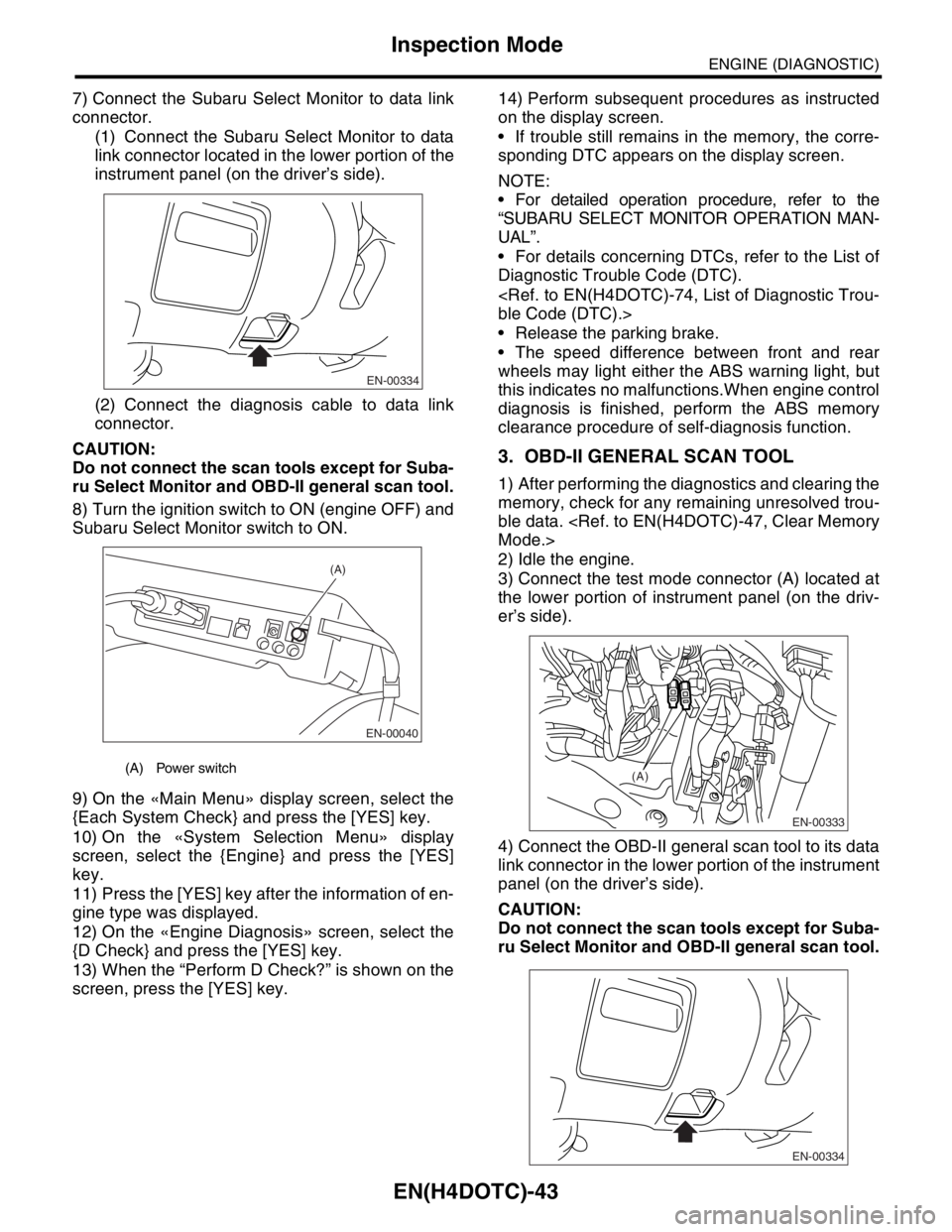
7) Connect the Subaru Select Monitor to data link
connector.
(1) Connect the Subaru Select Monitor to data
link connector located in the lower portion of the
instrument panel (on the driver’s side).
(2) Connect the diagnosis cable to data link
connector.
CAUTION:
Do not connect the scan tools except for Suba-
ru Select Monitor and OBD-II general scan tool.
8) Turn the ignition switch to ON (engine OFF) and
Subaru Select Monitor switch to ON.
9) On the «Main Menu» display screen, select the
{Each System Check} and press the [YES] key.
10) On the «System Selection Menu» display
screen, select the {Engine} and press the [YES]
key.
11) Press the [YES] key after the information of en-
gine type was displayed.
12) On the «Engine Diagnosis» screen, select the
{D Check} and press the [YES] key.
13) When the “Perform D Check?” is shown on the
screen, press the [YES] key.14) Perform subsequent procedures as instructed
on the display screen.
If trouble still remains in the memory, the corre-
sponding DTC appears on the display screen.
NOTE:
For detailed operation procedure, refer to the
“SUBARU SELECT MONITOR OPERATION MAN-
UAL”.
For details concerning DTCs, refer to the List of
Diagnostic Trouble Code (DTC).
Release the parking brake.
The speed difference between front and rear
wheels may light either the ABS warning light, but
this indicates no malfunctions.When engine control
diagnosis is finished, perform the ABS memory
clearance procedure of self-diagnosis function.
3. OBD-II GENERAL SCAN TOOL
1) After performing the diagnostics and clearing the
memory, check for any remaining unresolved trou-
ble data.
2) Idle the engine.
3) Connect the test mode connector (A) located at
the lower portion of instrument panel (on the driv-
er’s side).
4) Connect the OBD-II general scan tool to its data
link connector in the lower portion of the instrument
panel (on the driver’s side).
CAUTION:
Do not connect the scan tools except for Suba-
ru Select Monitor and OBD-II general scan tool.
(A) Power switch
EN-00334
EN-00040
(A)
EN-00333
(A)
EN-00334
Page 1677 of 2870

EN(H4DOTC)-47
ENGINE (DIAGNOSTIC)
Clear Memory Mode
14.Clear Memory Mode
A: OPERATION
1. SUBARU SELECT MONITOR (NORMAL
MODE)
1) On the «Main Menu» display screen, select the
{Each System Check} and press the [YES] key.
2) On the «System Selection Menu» display
screen, select the {Engine} and press the [YES]
key.
3) Press the [YES] key after the information of en-
gine type was displayed.
4) On the «Engine Diagnosis» display screen, se-
lect the {Memory Clear} and press the [YES] key.
5) When the “Done” are shown on the display
screen, turn the Subaru Select Monitor to OFF after
turning the ignition switch to OFF.
NOTE:
For detailed operation procedure, refer to the “SUBA-
RU SELECT MONITOR OPERATION MANUAL”.
2. SUBARU SELECT MONITOR (OBD
MODE)
1) On the «Main Menu» display screen, select the
{Each System Check} and press the [YES] key.
2) On the «System Selection Menu» display screen,
select the {Engine} and press the [YES] key.
3) Press the [YES] key after the information of en-
gine type was displayed.
4) On the «Engine Diagnosis» display screen, se-
lect the {OBD System} and press the [YES] key.
5) On the «OBD Menu» display screen, select the
{DTC Clear} and press the [YES] key.
6) When the “Perform Diagnostic Code(s) Clear?”
is shown on the screen, press the [YES] key.
7) Turn the ignition switch to OFF and then turn the
SUBARU SELECT MONITOR to OFF.
NOTE:
For detailed operation procedure, refer to the “SUBA-
RU SELECT MONITOR OPERATION MANUAL”.
3. OBD-II GENERAL SCAN TOOL
For clear memory procedures using the OBD-II
general scan tool, refer to the OBD-II General Scan
Tool Instruction Manual.
Page 1678 of 2870
EN(H4DOTC)-48
ENGINE (DIAGNOSTIC)
Compulsory Valve Operation Check Mode
15.Compulsory Valve Operation
Check Mode
A: OPERATION
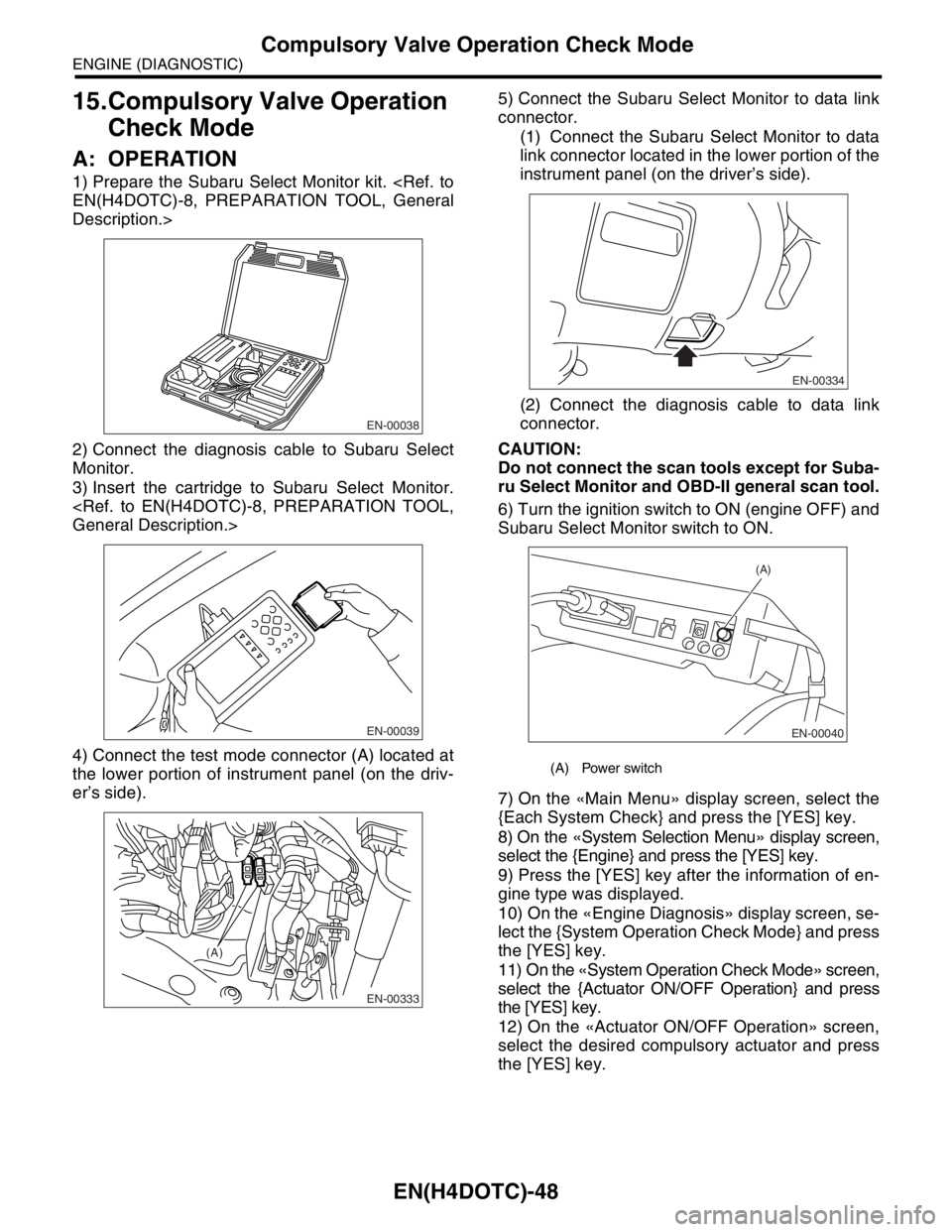
1) Prepare the Subaru Select Monitor kit.
Description.>
2) Connect the diagnosis cable to Subaru Select
Monitor.
3) Insert the cartridge to Subaru Select Monitor.
4) Connect the test mode connector (A) located at
the lower portion of instrument panel (on the driv-
er’s side).5) Connect the Subaru Select Monitor to data link
connector.
(1) Connect the Subaru Select Monitor to data
link connector located in the lower portion of the
instrument panel (on the driver’s side).
(2) Connect the diagnosis cable to data link
connector.
CAUTION:
Do not connect the scan tools except for Suba-
ru Select Monitor and OBD-II general scan tool.
6) Turn the ignition switch to ON (engine OFF) and
Subaru Select Monitor switch to ON.
7) On the «Main Menu» display screen, select the
{Each System Check} and press the [YES] key.
8) On the «System Selection Menu» display screen,
select the {Engine} and press the [YES] key.
9) Press the [YES] key after the information of en-
gine type was displayed.
10) On the «Engine Diagnosis» display screen, se-
lect the {System Operation Check Mode} and press
the [YES] key.
11) On the «System Operation Check Mode» screen,
select the {Actuator ON/OFF Operation} and press
the [YES] key.
12) On the «Actuator ON/OFF Operation» screen,
select the desired compulsory actuator and press
the [YES] key.
EN-00038
EN-00039
EN-00333
(A)
(A) Power switch
EN-00334
EN-00040
(A)
Page 1679 of 2870
![SUBARU FORESTER 2004 Service Manual Online EN(H4DOTC)-49
ENGINE (DIAGNOSTIC)
Compulsory Valve Operation Check Mode
13) Pressing the [NO] key completes the compul-
sory operation check mode.The display will then re-
turn to the «Actuator ON/OF](/img/17/57426/w960_57426-1678.png "SUBARU FORESTER 2004 Service Manual Online EN(H4DOTC)-49
ENGINE (DIAGNOSTIC)
Compulsory Valve Operation Check Mode
13) Pressing the [NO] key completes the compul-
sory operation check mode.The display will then re-
turn to the «Actuator ON/OF")
EN(H4DOTC)-49
ENGINE (DIAGNOSTIC)
Compulsory Valve Operation Check Mode
13) Pressing the [NO] key completes the compul-
sory operation check mode.The display will then re-
turn to the «Actuator ON/OFF Operation» screen.
A list of the support data is shown in the following
table.
NOTE:
The following parts will be displayed but not func-
tional.
For detailed operation procedure, refer to the
“SUBARU SELECT MONITOR OPERATION MAN-
UAL”.
Description Display
Compulsory fuel pump relay operation
checkFuel Pump
Compulsory radiator fan relay operation
checkRadiator Fan
Relay
Compulsory air conditioning relay oper-
ation checkA/C Compressor
Relay
Compulsory purge control solenoid
valve operation checkCPC Solenoid
Compulsory wastegate control sole-
noid valve operation checkWastegate con-
trol solenoid
Display
EGR Solenoid
ASV Solenoid
PCV Solenoid
Vent Control Solenoid
FICD Solenoid
Pressure Switching Solenoid1
Pressure Switching Solenoid2
EXH. Bypass Control Permit Flag
AAI Solenoid
Atmospheric pressure switching solenoid
Page 1707 of 2870

EN(H4DOTC)-77
ENGINE (DIAGNOSTIC)
List of Diagnostic Trouble Code (DTC)
P0507 Idle Control System RPM Higher
Than Expected
Code (DTC).>
P0508 Idle Control System Circuit Low
P0509 Idle Control System Circuit High
P0512 Starter Request Circuit
P0513 Incorrect Immobilizer Key
P0519 Idle Control System Malfunction
(Fail-Safe)
Code (DTC).>
P0545 Exhaust Gas Temperature Sensor
Circuit Low - Bank 1
Trouble Code (DTC).>
P0546 Exhaust Gas Temperature Sensor
Circuit High - Bank 1
Code (DTC).>
P0558 Generator Circuit Low Input
P0559 Generator Circuit High Input
P0600 Serial Communication Link
P0604 Internal Control Module Random
Access Memory (RAM) Error
nostic Trouble Code (DTC).>
P0691 Cooling Fan 1 Control Circuit Low
P0692 Cooling Fan 1 Control Circuit High
P0700 Transmission Control System (MIL
Request)
(DTC).>
P0851 Neutral Switch Input Circuit Low
Code (DTC).> or
Diagnostic Trouble Code (DTC).>
P0852 Neutral Switch Input Circuit High
Code (DTC).> or
Diagnostic Trouble Code (DTC).>
P1086 Tumble Generated Valve Position
Sensor 2 Circuit Low
tic Trouble Code (DTC).>
P1087 Tumble Generated Valve Position
Sensor 2 Circuit High
tic Trouble Code (DTC).>
P1088 Tumble Generated Valve Position
Sensor 1 Circuit Low
tic Trouble Code (DTC).> DTC Item NOTE
Page 1709 of 2870

EN(H4DOTC)-79
ENGINE (DIAGNOSTIC)
List of Diagnostic Trouble Code (DTC)
P1572 IMM Circuit Failure (Except
Antenna Circuit)
P1574 Key Communication Failure
P1576 EGI Control Module EEPROM
P1577 IMM Control Module EEPROM
P2088 OCV Solenoid Valve Signal A Cir-
cuit Open (Bank 1)
Code (DTC).>
P2089 OCV Solenoid Valve Signal A Cir-
cuit Short (Bank 1)
Code (DTC).>
P2092 OCV Solenoid Valve Signal A Cir-
cuit Open (Bank 2)
Code (DTC).>
P2093 OCV Solenoid Valve Signal A Cir-
cuit Short (Bank 2)
Code (DTC).> DTC Item NOTE
Page 2052 of 2870
![SUBARU FORESTER 2004 Service Manual Online EN(H4DOTC 2.5)-28
ENGINE (DIAGNOSTIC)
Subaru Select Monitor
4. READ CURRENT DATA FOR ENGINE. (NORMAL MODE)
1) On the «Main Menu» display screen, select the {Each System Check} and press the [YES] ke](/img/17/57426/w960_57426-2051.png "SUBARU FORESTER 2004 Service Manual Online EN(H4DOTC 2.5)-28
ENGINE (DIAGNOSTIC)
Subaru Select Monitor
4. READ CURRENT DATA FOR ENGINE. (NORMAL MODE)
1) On the «Main Menu» display screen, select the {Each System Check} and press the [YES] ke")
EN(H4DOTC 2.5)-28
ENGINE (DIAGNOSTIC)
Subaru Select Monitor
4. READ CURRENT DATA FOR ENGINE. (NORMAL MODE)
1) On the «Main Menu» display screen, select the {Each System Check} and press the [YES] key.
2) On the «System Selection Menu» display screen, select the {Engine} and press the [YES] key.
3) Press the [YES] key after the information of engine type was displayed.
4) On the «Engine Diagnosis» screen, select the {Current Data Display/Save}, and then press the [YES] key.
5) On the «Data Display Menu» screen, select the {Data Display} and press the [YES] key.
6) Using the scroll key, move the display screen up or down until the desired data is shown.
A list of the support data is shown in the following table.
Remarks Display Unit of measure
Battery voltage Battery Voltage V
Vehicle speed signal Vehicle Speed km/h or MPH
Engine speed signal Engine Speed rpm
Engine coolant temperature signal Coolant Temp.°C or °F
Ignition timing signal Ignition Timing deg
Throttle position signal Throttle Opening Angle %
Injection pulse width Fuel Injection #1 Pulse ms
Fuel pump duty control signal Fuel Pump Duty %
A/F sensor current A/F Sensor #1 Current mA
A/F sensor resistance A/F Sensor #1 ResistanceΩ
Front oxygen (A/F) sensor lambda value A/F Sensor #1 —
Rear oxygen sensor output signalRear O
2 Sensor
V
Short term fuel trim A/F Correction #1 %
Knock sensor compensation Knocking Correction deg
Atmospheric pressure signal Atmosphere Pressure mmHg, kPa, inHg or psi
Intake manifold relative pressure signal Mani. Relative Pressure mmHg, kPa, inHg or psi
Intake manifold absolute pressure signal Mani. Absolute Pressure mmHg, kPa, inHg or psi
A/F correction (short term fuel trim) by rear oxygen sensor A/F Correction #3 %
Long term whole fuel trim A/F Learning #1 %
Canister purge control solenoid valve duty ratio CPC Valve Duty Ratio %
Primary supercharged pressure control signal Primary Control %
Tumble generated valve position sensor signal (RH side) TGV Position Sensor R V
Tumble generated valve position sensor signal (LH side) TGV Position Sensor L V
Acceleration opening angle Accel Opening Angle %
VVT advance angle amount (R) VVT Adv. Amount R deg
VVT advance angle amount (L) VVT Adv. amount L deg
OCV duty R OCV Duty R %
OCV duty L OCV Duty L %
OCV current R OCV current R mA
OCV current L OCV Current L mA
Throttle motor duty Throttle Motor Duty %
Throttle power supply voltage Throttle Motor Voltage V
Sub throttle sensor voltage Sub-Throttle Sensor V
Main throttle sensor voltage Main-Throttle Sensor V
Sub acceleration sensor voltage Sub-Accelerator Sensor V
Main acceleration sensor voltage Main-Accelerator Sensor V
Memory vehicle speed Memorized Cruise Speed km/h
Alternate duty ratio ALT Duty %
Exhaust gas temperature signal Exhaust gas temperature°C
Estimated cumulative driving distance Odd Meter Km
Fuel level signal Fuel Level Voltage V
Intake air temperature signal Intake Air Temp.°C or °F
Mass air flow sensor signal Mass Air Flow g/s
Page 2054 of 2870
![SUBARU FORESTER 2004 Service Manual Online EN(H4DOTC 2.5)-30
ENGINE (DIAGNOSTIC)
Subaru Select Monitor
5. READ CURRENT DATA FOR ENGINE (OBD MODE)
1) On the «Main Menu» display screen, select the {Each System Check} and press the [YES] key.
2](/img/17/57426/w960_57426-2053.png "SUBARU FORESTER 2004 Service Manual Online EN(H4DOTC 2.5)-30
ENGINE (DIAGNOSTIC)
Subaru Select Monitor
5. READ CURRENT DATA FOR ENGINE (OBD MODE)
1) On the «Main Menu» display screen, select the {Each System Check} and press the [YES] key.
2")
EN(H4DOTC 2.5)-30
ENGINE (DIAGNOSTIC)
Subaru Select Monitor
5. READ CURRENT DATA FOR ENGINE (OBD MODE)
1) On the «Main Menu» display screen, select the {Each System Check} and press the [YES] key.
2) On the «System Selection Menu» display screen, select the {Engine} and press the [YES] key.
3) Press the [YES] key after the information of engine type was displayed.
4) On the «Engine Diagnosis» display screen, select the {OBD System} and press the [YES] key.
5) On the «OBD Menu» screen, select the {Current Data Display/Save}, and then press the [YES] key.
6) On the «Data Display Menu» screen, select the {Data Display} and press the [YES] key.
7) Using the scroll key, move the display screen up or down until the desired data is shown.
A list of the support data is shown in the following table.
NOTE:
For detailed operation procedure, refer to the “SUBARU SELECT MONITOR OPERATION MANUAL”.
Description Display Unit of measure
Number of diagnosis code Number of Diagnosis Code —
Condition of malfunction indicator light MI (MIL) ON or OFF
Monitoring test of misfire Misfire monitoring No support
Monitoring test of fuel system Fuel system monitoring No support
Monitoring test of comprehensive component Component monitoring No support
Test of catalyst Catalyst Diagnosis No support
Test of heating-type catalyst Heated catalyst No support
Test of evaporative emission purge control system Evaporative purge system No support
Test of secondary air system Secondary air system No support
Test of air conditioning system refrigerant A/C system refrigerant No support
Test of oxygen sensor Oxygen sensor No support
Test of oxygen sensor heaterO
2 Heater Diagnosis
No support
Test of EGR system EGR system No support
Air fuel ratio control system for bank 1 Fuel System for Bank 1 —
Engine load data Calculated load value %
Engine coolant temperature signal Coolant Temp.°C or °F
Short term fuel trim by front oxygen (A/F) sensor Short term fuel trim B1 %
Long term fuel trim by front oxygen (A/F) sensor Long term fuel trim B1 %
Intake manifold absolute pressure signal Mani. Absolute Pressure mmHg, kPa, inHg or psi
Engine speed signal Engine Speed rpm
Vehicle speed signal Vehicle Speed km/h or MPH
Ignition timing advance for #1 cylinder Ignition timing adv. #1°
Intake air temperature signal Intake Air Temp.°C or °F
Amount of intake air Mass Air Flow g/s
Throttle position signal Throttle Opening Angle %
Oxygen sensor #11 Oxygen Sensor #11 —
Oxygen sensor #12 Oxygen Sensor #12 —
Rear oxygen sensor output signal Oxygen Sensor #12 V
Air fuel ratio correction by rear oxygen sensor Short term fuel trim #12 %
On-board diagnostic system OBD System others
A/F sensor output signal A/F sensor #11 V
A/F lambda signal A/F sensor #11 —
A/F lambda signal #11 A/F sensor #11 —
A/F sensor current #11 A/F sensor #11 mA