key SUBARU FORESTER 2004 Service Manual PDF
[x] Cancel search | Manufacturer: SUBARU, Model Year: 2004, Model line: FORESTER, Model: SUBARU FORESTER 2004Pages: 2870, PDF Size: 38.67 MB
Page 1525 of 2870
ME(H4DOTC)-67
MECHANICAL
Crank Sprocket
17.Crank Sprocket
A: REMOVAL
1) Remove the V-belt.
2) Remove the crank pulley.
3) Remove the timing belt cover.
4) Remove the timing belt assembly.
bly.>
5) Remove the cam sprocket.
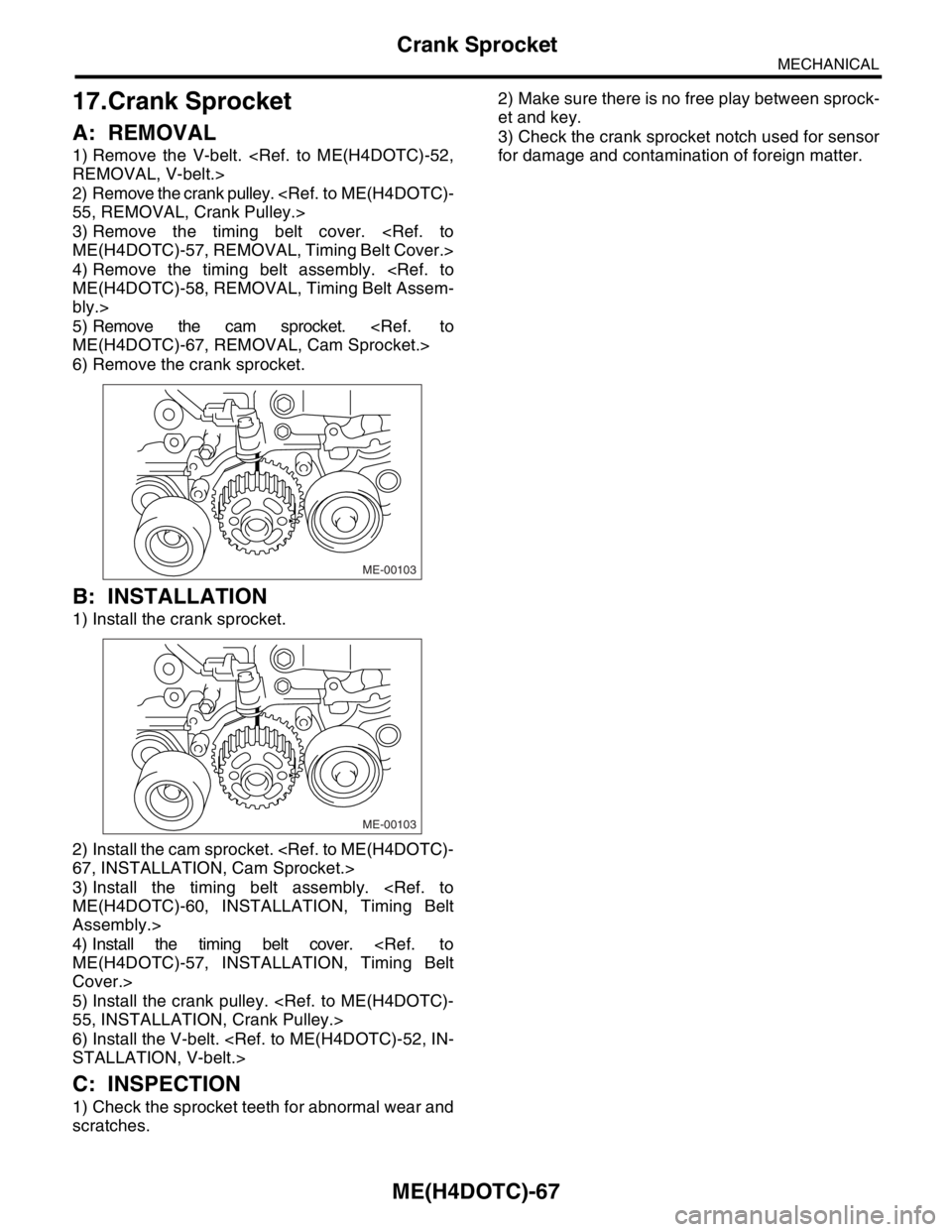
6) Remove the crank sprocket.
B: INSTALLATION
1) Install the crank sprocket.
2) Install the cam sprocket.
3) Install the timing belt assembly.
Assembly.>
4) Install the timing belt cover.
Cover.>
5) Install the crank pulley.
6) Install the V-belt.
C: INSPECTION
1) Check the sprocket teeth for abnormal wear and
scratches.2) Make sure there is no free play between sprock-
et and key.
3) Check the crank sprocket notch used for sensor
for damage and contamination of foreign matter.
ME-00103
ME-00103
Page 1534 of 2870
ME(H4DOTC)-76
MECHANICAL
Cylinder Head Assembly
7) Install the timing belt assembly.
Assembly.>
8) Install the timing belt cover.
Cover.>
9) Install the crank pulley.
10) Install the V-belt.
C: DISASSEMBLY
1) Remove the valve lifters.
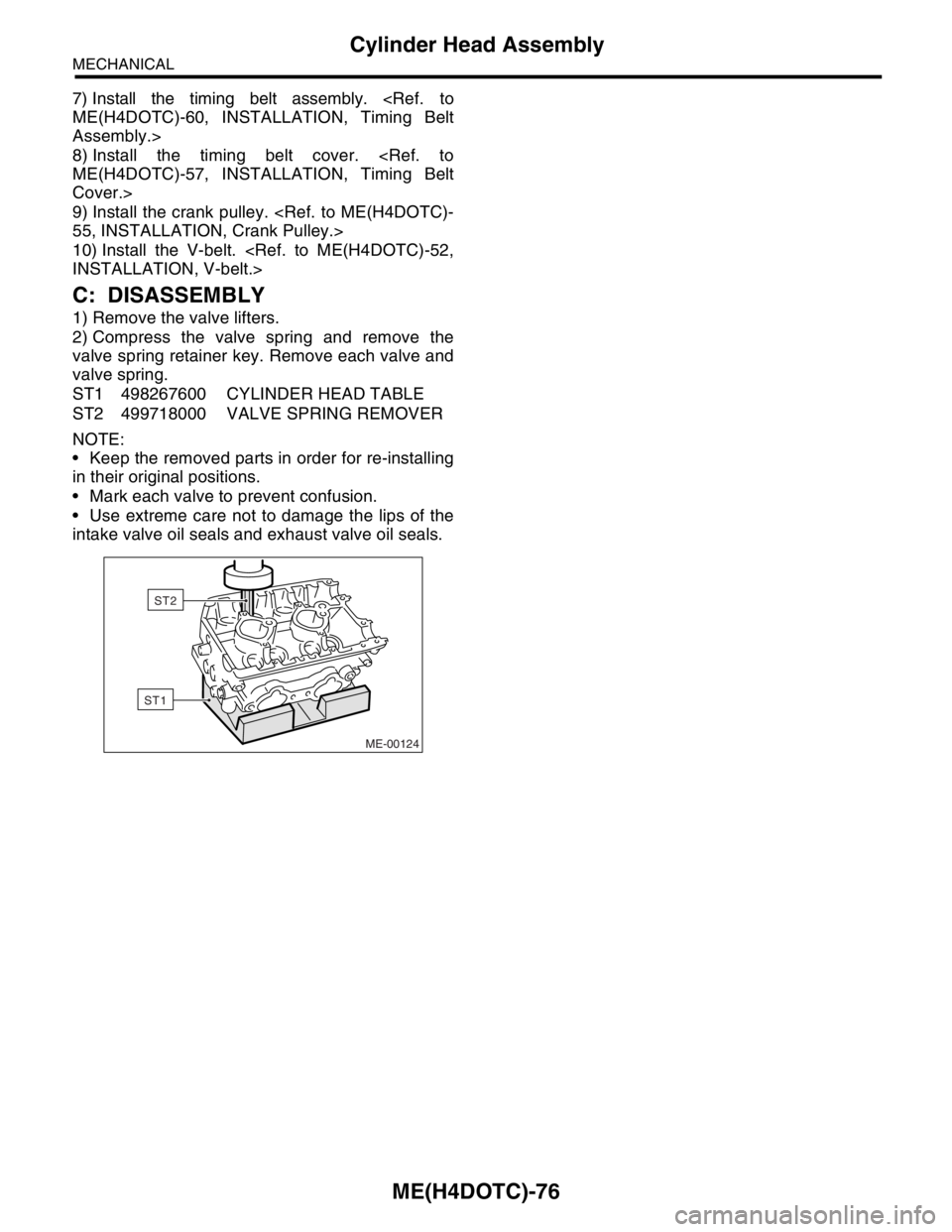
2) Compress the valve spring and remove the
valve spring retainer key. Remove each valve and
valve spring.
ST1 498267600 CYLINDER HEAD TABLE
ST2 499718000 VALVE SPRING REMOVER
NOTE:
Keep the removed parts in order for re-installing
in their original positions.
Mark each valve to prevent confusion.
Use extreme care not to damage the lips of the
intake valve oil seals and exhaust valve oil seals.
ME-00124
ST1
ST2
Page 1535 of 2870
ME(H4DOTC)-77
MECHANICAL
Cylinder Head Assembly
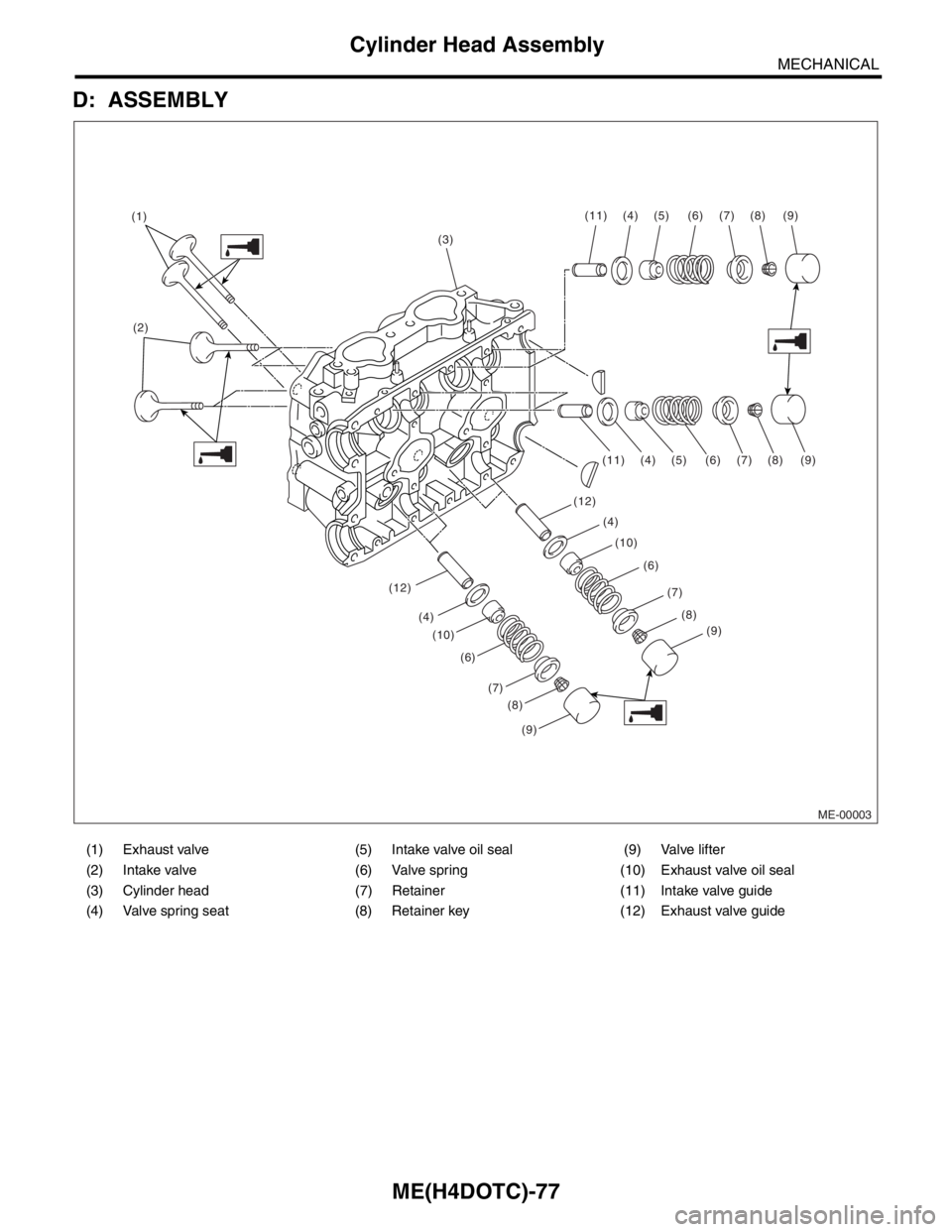
D: ASSEMBLY
(1) Exhaust valve (5) Intake valve oil seal (9) Valve lifter
(2) Intake valve (6) Valve spring (10) Exhaust valve oil seal
(3) Cylinder head (7) Retainer (11) Intake valve guide
(4) Valve spring seat (8) Retainer key (12) Exhaust valve guide
ME-00003
(3) (1)
(2)(11) (4) (5) (6) (7) (8) (9)
(11)
(12)
(12)(10)(4)
(4)(5) (6)
(6)(7)
(7)(8)
(8)(9)
(9)
(10) (4)
(6)
(7)
(8)
(9)
Page 1536 of 2870
ME(H4DOTC)-78
MECHANICAL
Cylinder Head Assembly
1) Installation of valve spring and valve.
(1) Coat the stem of each valve with engine oil
and insert the valve into valve guide.
NOTE:
When inserting the valve into valve guide, use spe-
cial care not to damage the oil seal lip.
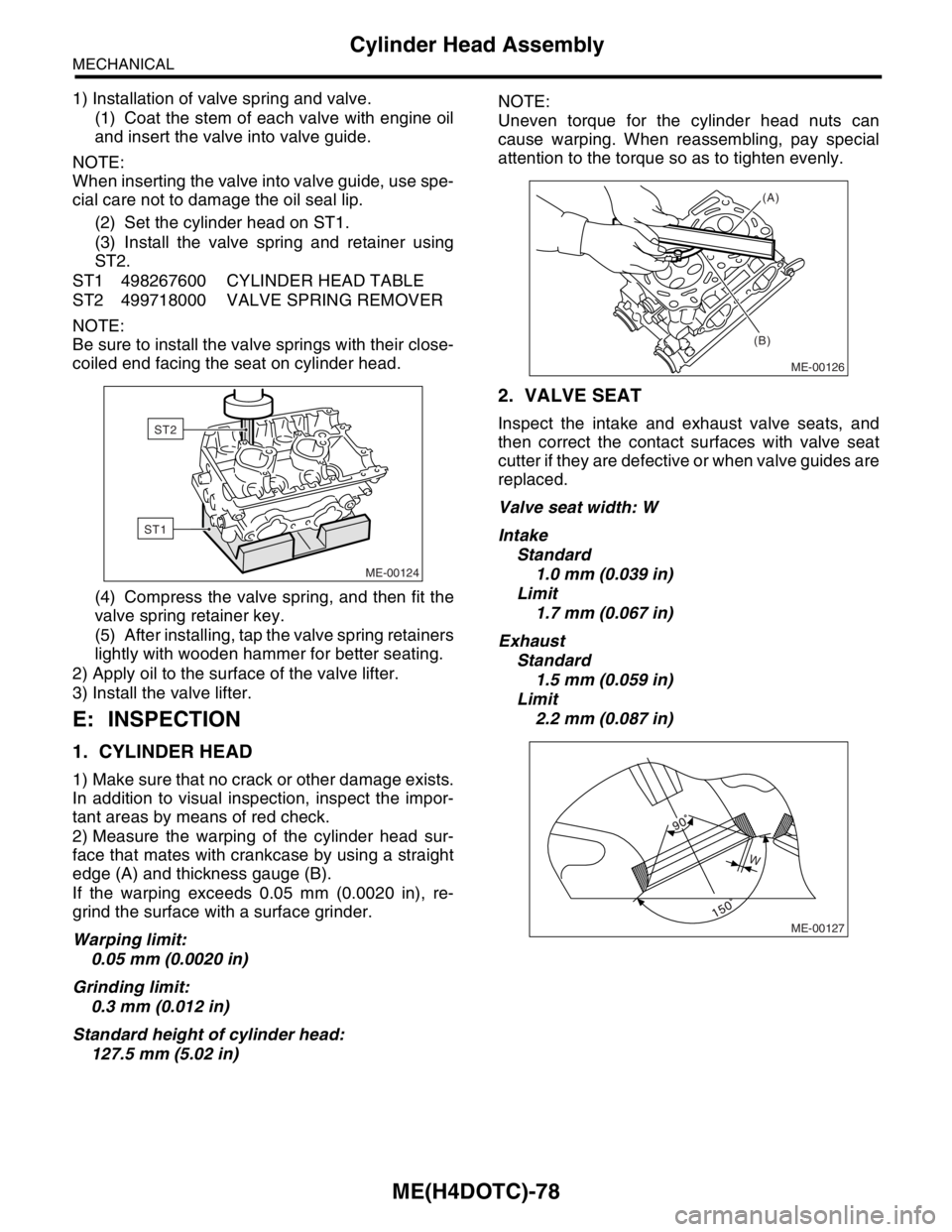
(2) Set the cylinder head on ST1.
(3) Install the valve spring and retainer using
ST2.
ST1 498267600 CYLINDER HEAD TABLE
ST2 499718000 VALVE SPRING REMOVER
NOTE:
Be sure to install the valve springs with their close-
coiled end facing the seat on cylinder head.
(4) Compress the valve spring, and then fit the
valve spring retainer key.
(5) After installing, tap the valve spring retainers
lightly with wooden hammer for better seating.
2) Apply oil to the surface of the valve lifter.
3) Install the valve lifter.
E: INSPECTION
1. CYLINDER HEAD
1) Make sure that no crack or other damage exists.
In addition to visual inspection, inspect the impor-
tant areas by means of red check.
2) Measure the warping of the cylinder head sur-
face that mates with crankcase by using a straight
edge (A) and thickness gauge (B).
If the warping exceeds 0.05 mm (0.0020 in), re-
grind the surface with a surface grinder.
Warping limit:
0.05 mm (0.0020 in)
Grinding limit:
0.3 mm (0.012 in)
Standard height of cylinder head:
127.5 mm (5.02 in)NOTE:
Uneven torque for the cylinder head nuts can
cause warping. When reassembling, pay special
attention to the torque so as to tighten evenly.
2. VALVE SEAT
Inspect the intake and exhaust valve seats, and
then correct the contact surfaces with valve seat
cutter if they are defective or when valve guides are
replaced.
Valve seat width: W
Intake
Standard
1.0 mm (0.039 in)
Limit
1.7 mm (0.067 in)
Exhaust
Standard
1.5 mm (0.059 in)
Limit
2.2 mm (0.087 in)
ME-00124
ST1
ST2
ME-00126
(A)
(B)
ME-00127
W
Page 1664 of 2870
![SUBARU FORESTER 2004 Service Manual PDF EN(H4DOTC)-34
ENGINE (DIAGNOSTIC)
Subaru Select Monitor
4. READ CURRENT DATA FOR ENGINE. (NORMAL MODE)
1) On the «Main Menu» display screen, select the {Each System Check} and press the [YES] key.
2](/img/17/57426/w960_57426-1663.png "SUBARU FORESTER 2004 Service Manual PDF EN(H4DOTC)-34
ENGINE (DIAGNOSTIC)
Subaru Select Monitor
4. READ CURRENT DATA FOR ENGINE. (NORMAL MODE)
1) On the «Main Menu» display screen, select the {Each System Check} and press the [YES] key.
2")
EN(H4DOTC)-34
ENGINE (DIAGNOSTIC)
Subaru Select Monitor
4. READ CURRENT DATA FOR ENGINE. (NORMAL MODE)
1) On the «Main Menu» display screen, select the {Each System Check} and press the [YES] key.
2) On the «System Selection Menu» display screen, select the {Engine} and press the [YES] key.
3) Press the [YES] key after the information of engine type was displayed.
4) On the «Engine Diagnosis» screen, select the {Current Data Display/Save}, and then press the [YES] key.
5) On the «Data Display Menu» screen, select the {Data Display} and press the [YES] key.
6) Using the scroll key, move the display screen up or down until the desired data is shown.
A list of the support data is shown in the following table.
Remarks Display Unit of measure
Battery voltage Battery Voltage V
Vehicle speed signal Vehicle Speed km/h or MPH
Engine speed signal Engine Speed rpm
Engine coolant temperature signal Coolant Temp.°C or °F
Ignition timing signal Ignition Timing deg
Throttle position signal Throttle Opening Angle %
Throttle position signal Throttle Sensor Voltage V
Injection pulse width Fuel Injection #1 Pulse ms
Idle air control signal ISC Valve Duty Ratio %
generated duty control signal ALT Duty %
Fuel pump duty control signal Fuel Pump Duty %
A/F sensor current A/F Sensor #1 Current mA
A/F sensor resistance A/F Sensor #1 ResistanceΩ
Front oxygen (A/F) sensor output signal A/F Sensor #1 —
Rear oxygen sensor output signalRear O
2 Sensor
V
Short term fuel trim A/F Correction #1 %
Knock sensor correction Knocking Correction deg
Atmospheric pressure signal Atmosphere Pressure mmHg, kPa, inHg or psi
Intake manifold relative pressure signal Mani. Relative Pressure mmHg, kPa, inHg or psi
Intake manifold absolute pressure signal Mani. Absolute Pressure mmHg, kPa, inHg or psi
A/F correction (short term fuel trim) by rear oxygen sensor A/F Correction #3 %
Long term whole fuel trim A/F Learning #1 %
Canister purge control solenoid valve duty ratio CPC Valve Duty Ratio %
Primary supercharged pressure control signal Primary Control %
Tumble generated valve position sensor signal (RH side) TGV Position Sensor R V
Tumble generated valve position sensor signal (LH side) TGV Position Sensor L V
Tumble generated valve drive signal TGV Drive OPEN or CLOSE
Fuel level signal Fuel Level Voltage V
Intake air temperature signal Intake Air Temp.°C or °F
Mass air flow sensor signal Mass Air Flow g/s
Mass air flow sensor signal Air Flow Sensor Voltage V
Valve Timing Signal VVT Adv. Ang. amount R deg
Valve Timing Signal VVT Adv. Ang. amount L deg
Oil flow control solenoid valve signal OCV Duty R %
Oil flow control solenoid valve signal OCV Duty L %
Oil flow control solenoid valve current OCV current R mA
Oil flow control solenoid valve current OCV Current L mA
AT/MT identification signal AT Vehicle ID Signal AT or MT
Test Mode Signal Test Mode Signal ON or OFF
Load switch signal Electric Load Signal ON or OFF
Ignition switch signal Ignition Switch ON or OFF
Neutral position switch signal Neutral Position Switch ON or OFF
Air conditioning switch signal A/C Switch ON or OFF
Page 1665 of 2870

EN(H4DOTC)-35
ENGINE (DIAGNOSTIC)
Subaru Select Monitor
NOTE:
For detailed operation procedure, refer to the “SUBARU SELECT MONITOR OPERATION MANUAL”.
5. READ CURRENT DATA FOR ENGINE (OBD MODE)
1) On the «Main Menu» display screen, select the {Each System Check} and press the [YES] key.
2) On the «System Selection Menu» display screen, select the {Engine} and press the [YES] key.
3) Press the [YES] key after the information of engine type was displayed.
4) On the «Engine Diagnosis» display screen, select the {OBD System} and press the [YES] key.
5) On the «OBD Menu» screen, select the {Current Data Display/Save}, and then press the [YES] key.
6) On the «Data Display Menu» screen, select the {Data Display} and press the [YES] key.
7) Using the scroll key, move the display screen up or down until the desired data is shown.
A list of the support data is shown in the following table.
Air conditioning signal A/C Compressor Signal ON or OFF
Radiator main fan relay signal Radiator Fan Relay #1 ON or OFF
Knocking signal Knocking Signal ON or OFF
Radiator sub fan relay signal Radiator Fan Relay #2 ON or OFF
Power steering switch signal P/S Switch ON or OFF
Engine torque control permission signal Torque Permission Signal ON or OFF
Rear oxygen sensor rich signal Rear Oxygen Rich Signal ON or OFF
Starter switch signal Starter Switch ON or OFF
Idle switch signal Idle Switch ON or OFF
Crankshaft position sensor signal Crankshaft Position Sig. ON or OFF
Camshaft position sensor signal Camshaft Position Sig. ON or OFF
Rear defogger switch signal Rear Defogger SW ON or OFF
Blower fan switch signal Blower Fan SW ON or OFF
Small light switch signal Light Switch ON or OFF
Tumble generated valve output signal TGV Output ON or OFF
Exhaust temperature signal Exhaust Gas Temperature°C
Estimated cumulative driving distance Odd Meter km
Roughness Monitor for #1 cylinder Roughness Monitor #1 —
Roughness Monitor for #2 cylinder Roughness Monitor #2 —
Roughness Monitor for #3 cylinder Roughness Monitor #3 —
Roughness Monitor for #4 cylinder Roughness Monitor #4 —
Wiper switch signal Wiper Switch ON or OFF
A/C middle pressure switch signal A/C Mid pressure switch ON or OFF
AT retard angle demand signal Retard Signal from AT ON or OFF
AT fuel cut demand signal Fuel Cut Signal from AT ON or OFF
Description Display Unit of measure
Number of diagnosis code Number of Diag. Code —
Condition of malfunction indicator light MI (MIL) ON or OFF
Monitoring test of misfire Misfire monitoring Complete or incomplete
Monitoring test of fuel system Fuel system monitoring Complete or incomplete
Monitoring test of comprehensive component Component monitoring Complete or incomplete
Test of catalyst Catalyst Diagnosis Complete or incomplete
Test of heating-type catalyst Heated catalyst No support
Test of evaporative emission purge control system Evaporative purge system No support
Test of secondary air system Secondary air system No support
Test of air conditioning system refrigerant A/C system refrigerant No support
Test of oxygen sensor Oxygen sensor Complete or incomplete
Test of oxygen sensor heater Oxygen Heater Diagnosis Complete or incomplete
Test of EGR system EGR system No supportRemarks Display Unit of measure
Page 1666 of 2870

EN(H4DOTC)-36
ENGINE (DIAGNOSTIC)
Subaru Select Monitor
NOTE:
For detailed operation procedure, refer to the “SUBARU SELECT MONITOR OPERATION MANUAL”.
6. READ FREEZE FRAME DATA FOR ENGINE. (OBD MODE)
1) On the «Main Menu» display screen, select the {Each System Check} and press the [YES] key.
2) On the «System Selection Menu» display screen, select the {Engine} and press the [YES] key.
3) Press the [YES] key after the information of engine type was displayed.
4) On the «Engine Diagnosis» display screen, select the {OBD System} and press the [YES] key.
5) On the «OBD Menu» display screen, select the {Freeze Frame Data} and press the [YES] key.
A list of the support data is shown in the following table.
NOTE:
For detailed operation procedure, refer to the “SUBARU SELECT MONITOR OPERATION MANUAL”.
Air fuel ratio control system for bank 1 Fuel System for Bank 1 —
Engine load data Calculated load value %
Engine coolant temperature signal Coolant Temp.°C or °F
Short term fuel trim by front oxygen (A/F) sensor Short term fuel trim B1 %
Long term fuel trim by front oxygen (A/F) sensor Long term fuel trim B1 %
Intake manifold absolute pressure signal Mani. Absolute Pressure mmHg, kPa, inHg or psi
Engine speed signal Engine Speed rpm
Vehicle speed signal Vehicle Speed km/h or MPH
Ignition timing advance for #1 cylinder Ignition timing adv. #1°
Intake air temperature signal Intake Air Temp.°C or °F
Amount of intake air Mass Air Flow g/s
Throttle position signal Throttle Opening Angle %
Rear oxygen sensor output signal Oxygen Sensor #12 V
Air fuel ratio correction by rear oxygen sensor Short term fuel trim #12 %
On-board diagnostic system OBD System —
Rear oxygen sensor signal Oxygen Sensor #11 —
Rear oxygen sensor signal Oxygen Sensor #12 —
Malfunction indicator light illuminating process Lighted MI Lamp History —
A/F sensor output signal (voltage) A/F sensor #11 V
A/F lambda signal A/F sensor #11 —
A/F sensor lambda signal A/F sensor #11 —
A/F sensor signal (power supply) A/F sensor #11 mA
Description Display Unit of measure
Diagnostic code of freeze frame data Freeze frame data Diagnostic code
Air fuel ratio control system for bank 1 Fuel system for Bank 1 —
Air fuel ratio control system for bank 2 Fuel System for Bank 2 —
Engine load data Calculated Load Valve %
Engine coolant temperature signal Coolant Temp.°C or °F
Short term fuel trim by front oxygen (A/F) sensor Short term fuel trim B1 %
Long term fuel trim by front oxygen (A/F) sensor Long term fuel trim B1 %
Intake manifold absolute pressure signal Mani. Absolute Pressure mmHg, kPa, inHg or psi
Engine speed signal Engine Speed rpm
Vehicle speed signal Vehicle Speed km/h or MPH
Ignition timing advance for #1 cylinder Ignition timing adv. #1°
Intake air temperature signal Intake Air Temp.°C or °F
Amount of intake air Mass Air Flow g/s
Throttle position signal Throttle Opening Angle %Description Display Unit of measure
Page 1667 of 2870
![SUBARU FORESTER 2004 Service Manual PDF EN(H4DOTC)-37
ENGINE (DIAGNOSTIC)
Subaru Select Monitor
7. LED OPERATION MODE FOR ENGINE
1) On the «Main Menu» display screen, select the {Each System Check} and press the [YES] key.
2) On the «Sys](/img/17/57426/w960_57426-1666.png "SUBARU FORESTER 2004 Service Manual PDF EN(H4DOTC)-37
ENGINE (DIAGNOSTIC)
Subaru Select Monitor
7. LED OPERATION MODE FOR ENGINE
1) On the «Main Menu» display screen, select the {Each System Check} and press the [YES] key.
2) On the «Sys")
EN(H4DOTC)-37
ENGINE (DIAGNOSTIC)
Subaru Select Monitor
7. LED OPERATION MODE FOR ENGINE
1) On the «Main Menu» display screen, select the {Each System Check} and press the [YES] key.
2) On the «System Selection Menu» display screen, select the {Engine} and press the [YES] key.
3) Press the [YES] key after the information of engine type was displayed.
4) On the «Engine Diagnosis» screen, select the {Current Data Display/Save}, and then press the [YES] key.
5) On the «Data Display» screen, select the {Data & LED Display} and press the [YES] key.
6) Using the scroll key, move the display screen up or down until the desired data is shown.
A list of the support data is shown in the following table.
NOTE:
For detailed operation procedure, refer to the “SUBARU SELECT MONITOR OPERATION MANUAL”.
Description Display Message LED “ON” requirements
Ignition switch signal Ignition Switch ON or OFF When ignition switch is ON.
Test mode connector signal Test Mode Signal ON or OFF When test mode connector is connected.
Neutral position switch signal Neutral Position Switch ON or OFF When neutral position signal is entered.
Air conditioning switch signal A/C Switch ON or OFF When air conditioning switch is ON.
Air conditioning relay signal A/C Compressor Signal ON or OFF When air conditioning relay is in function.
Radiator main fan relay signal Radiator Fan Relay #1 ON or OFF When radiator main fan relay is in function.
Knocking signal Knocking Signal ON or OFF When knocking signal is input.
Radiator sub fan relay signal Radiator Fan Relay #2 ON or OFF When radiator sub fan relay is in function.
Engine torque control permission
signalTorque Control Permission ON or OFFWhen engine torque control permission sig-
nal is entered.
Rear oxygen sensor rich signalRear O
2 Rich Signal
ON or OFFWhen rear oxygen sensor mixture ratio is
rich.
Starter switch signal Starter Switch ON or OFF When starter switch signal is entered.
Idle switch signal Idle Switch ON or OFF When idle switch signal is entered.
Crankshaft position sensor signal Crankshaft Position Signal ON or OFFWhen crankshaft position sensor signal is
input.
Camshaft position sensor signal Camshaft Position Signal ON or OFFWhen camshaft position sensor signal is
entered.
Power steering switch signal P/S Switch ON or OFF When power steering switch is entered.
Rear defogger switch signal Rear Defogger Switch ON or OFF When rear defogger switch is ON.
Blower fan switch signal Blower Fan Switch ON or OFF When blower fan switch is ON.
Light switch signal Light Switch ON or OFF When small light switch is ON.
Wiper switch signal Wiper Switch ON or OFF When wiper switch is ON.
A/C middle pressure switch signal A/C Mid Pressure Switch ON or OFF When A/C switch is ON.
AT retard angle demand signal Retard Signal from AT ON or OFF When AT retard angle demand signal exists.
AT fuel cut demand signal Fuel Cut Signal from AT ON or OFF When AT fuel cut demand signal exists.
AT/MT identification signal AT Vehicle ID Signal ON or OFF For AT model
Tumble generated valve actuator
signalTGV Output ON or OFF When TGV actuator signal is output.
Tumble generated valve drive sig-
nalTGV DriveOPEN or
CLOSEWhen TGV moves and valve opens.
Page 1668 of 2870
![SUBARU FORESTER 2004 Service Manual PDF EN(H4DOTC)-38
ENGINE (DIAGNOSTIC)
Subaru Select Monitor
8. READ CURRENT DATA FOR AT
1) On the «Main Menu» display screen, select the {Each System Check} and press the [YES] key.
2) On the «System S](/img/17/57426/w960_57426-1667.png "SUBARU FORESTER 2004 Service Manual PDF EN(H4DOTC)-38
ENGINE (DIAGNOSTIC)
Subaru Select Monitor
8. READ CURRENT DATA FOR AT
1) On the «Main Menu» display screen, select the {Each System Check} and press the [YES] key.
2) On the «System S")
EN(H4DOTC)-38
ENGINE (DIAGNOSTIC)
Subaru Select Monitor
8. READ CURRENT DATA FOR AT
1) On the «Main Menu» display screen, select the {Each System Check} and press the [YES] key.
2) On the «System Selection Menu» display screen, select the {Transmission} and press the [YES] key.
3) Press the [YES] key after displayed the information of transmission type.
4) On the «Transmission Diagnosis» screen, select the {Current Data Display/Save}, and then press the
[YES] key.
5) On the «Data Display Menu» screen, select the {Data Display} and press the [YES] key.
6) Using the scroll key, move the display screen up or down until the desired data is shown.
A list of the support data is shown in the following table.
NOTE:
For detailed operation procedure, refer to the “SUBARU SELECT MONITOR OPERATION MANUAL”.
Description Display Unit of measure
Battery voltage Battery Voltage V
Rear vehicle speed sensor signal Rear Wheel Speed km/h or MPH
Front vehicle speed sensor signal Front Wheel Speed km/h or MPH
Engine speed signal Engine Speed rpm
ATF temperature signal ATF Temp.°C or °F
Mass air flow sensor signal Air Flow Sensor Voltage V
Throttle position signal Throttle Sensor Voltage V
Gear Position Gear position —
Line pressure control duty ratio Line Pressure Duty Ratio %
Lock up clutch control duty ratio Lock Up Duty Ratio %
Transfer clutch control duty ratio Transfer Duty Ratio %
Throttle position sensor power supply Throttle Sensor Power V
Turbine revolution signal Turbine Revolution Speed rpm
2-4 Brake timing pressure control duty ratio Brake Clutch Duty Ratio %
Stop light switch signal Stop Light Switch ON or OFF
Anti lock brake system signal ABS Signal ON or OFF
Cruise control system signal Cruise Control Signal ON or OFF
Neutral/Parking range signal N/P Range Signal ON or OFF
Reverse range signal R Range Signal ON or OFF
Drive range signal D Range Signal ON or OFF
3rd range signal 3rd Range Signal ON or OFF
2nd range signal 2nd Range Signal ON or OFF
1st range signal 1st Range Signal ON or OFF
Shift control solenoid A Shift Solenoid #1 ON or OFF
Shift control solenoid B Shift Solenoid #2 ON or OFF
Torque control output signal #1 Torque Control Signal #1 ON or OFF
Torque control output signal #2 Torque Control Signal #2 ON or OFF
Torque control cut signal Torque Control Cut Sig. ON or OFF
2-4 brake timing control solenoid valve 2-4 Brake Timing Sol. ON or OFF
Low clutch timing control solenoid valve Low Clutch Timing Sol. ON or OFF
Automatic transmission diagnosis indicator lamp Diagnosis Lamp ON or OFF
Page 1669 of 2870

EN(H4DOTC)-39
ENGINE (DIAGNOSTIC)
Read Diagnostic Trouble Code (DTC)
11.Read Diagnostic Trouble
Code (DTC)
A: OPERATION
1. SUBARU SELECT MONITOR (NORMAL
MODE)
1) On the «Main Menu» display screen, select the
{Each System Check} and press the [YES] key.
2) On the «System Selection Menu» display screen,
select the {Engine} and press the [YES] key.
3) Press the [YES] key after the information of en-
gine type was displayed.
4) On the «Engine Diagnosis» screen, select the
{DTC Display}, and then press the [YES] key.
5) On the «Diagnostic Code(s) Display» screen,
select the {Current Diagnostic Code(s)} or {History
Diagnostic Code(s)}, and then press the [YES] key.
NOTE:
For detailed operation procedure, refer to the
“SUBARU SELECT MONITOR OPERATION
MANUAL”.
For details concerning DTCs, refer to the List of Di-
agnostic Trouble Code (DTC).
(DTC).>
2. SUBARU SELECT MONITOR (OBD
MODE)
1) On the «Main Menu» display screen, select the
{Each System Check} and press the [YES] key.
2) On the «System Selection Menu» display screen,
select the {Engine} and press the [YES] key.
3) Press the [YES] key after the information of en-
gine type was displayed.
4) On the «Engine Diagnosis» display screen, se-
lect the {OBD System} and press the [YES] key.
5) On the «OBD Menu» display screen, select the
{DTC Display} and press the [YES] key.
6) Make sure DTC is shown on the screen.
NOTE:
For detailed operation procedure, refer to the
“SUBARU SELECT MONITOR OPERATION MAN-
UAL”.
For details concerning DTCs, refer to the List of Di-
agnostic Trouble Code (DTC).
(DTC).>
3. OBD-II GENERAL SCAN TOOL
Refers to data denoting emission-related power-
train diagnostic trouble codes.
For details concerning DTCs, refer to the List of Diag-
nostic Trouble Code (DTC).
NOTE:
Refer to OBD-II general scan tool manufacturer’s
instruction manual to access powertrain diagnosis
trouble codes (MODE $03).