battery SUBARU SOLTERRA 2023 Manual Online
[x] Cancel search | Manufacturer: SUBARU, Model Year: 2023, Model line: SOLTERRA, Model: SUBARU SOLTERRA 2023Pages: 628, PDF Size: 11.91 MB
Page 409 of 628
4096-1. Using the air conditioning system and defogger
Owners Manual_USA_M42C01_en
6
Interior features
■To return to automatic airflow
control
1 With the indicator off, turn the
power switch off.
2 After 60 minutes or more elapse,
turn the power switch to ON.
Check the temperature setting
of the air conditioning system.
(P.403)
The Remote Air Conditioning Sys-
tem will operate in accordance with
the temperature settings of the air
conditioning system.
Press and hold “A/C” on the
wireless remote control to oper-
ate the Remote Air Conditioning
Remote Air Condition-
ing System
The Remote Air Condition-
ing System uses electrical
energy stored in the trac-
tion battery and allows the
air conditioning to be oper-
ated by remote control.
If the Remote Air Condition-
ing System is used while
the charging cable is con-
nected to the vehicle, the
reduction of charge in the
traction battery will be sup-
pressed to allow you to use
electricity from an external
power source.
Charging will be conducted
automatically after the
Remote Air Conditioning Sys-
tem is stopped.
Before leaving the vehicle
Activating the Remote Air
Conditioning System
Page 410 of 628
4106-1. Using the air conditioning system and defogger
Owners Manual_USA_M42C01_en
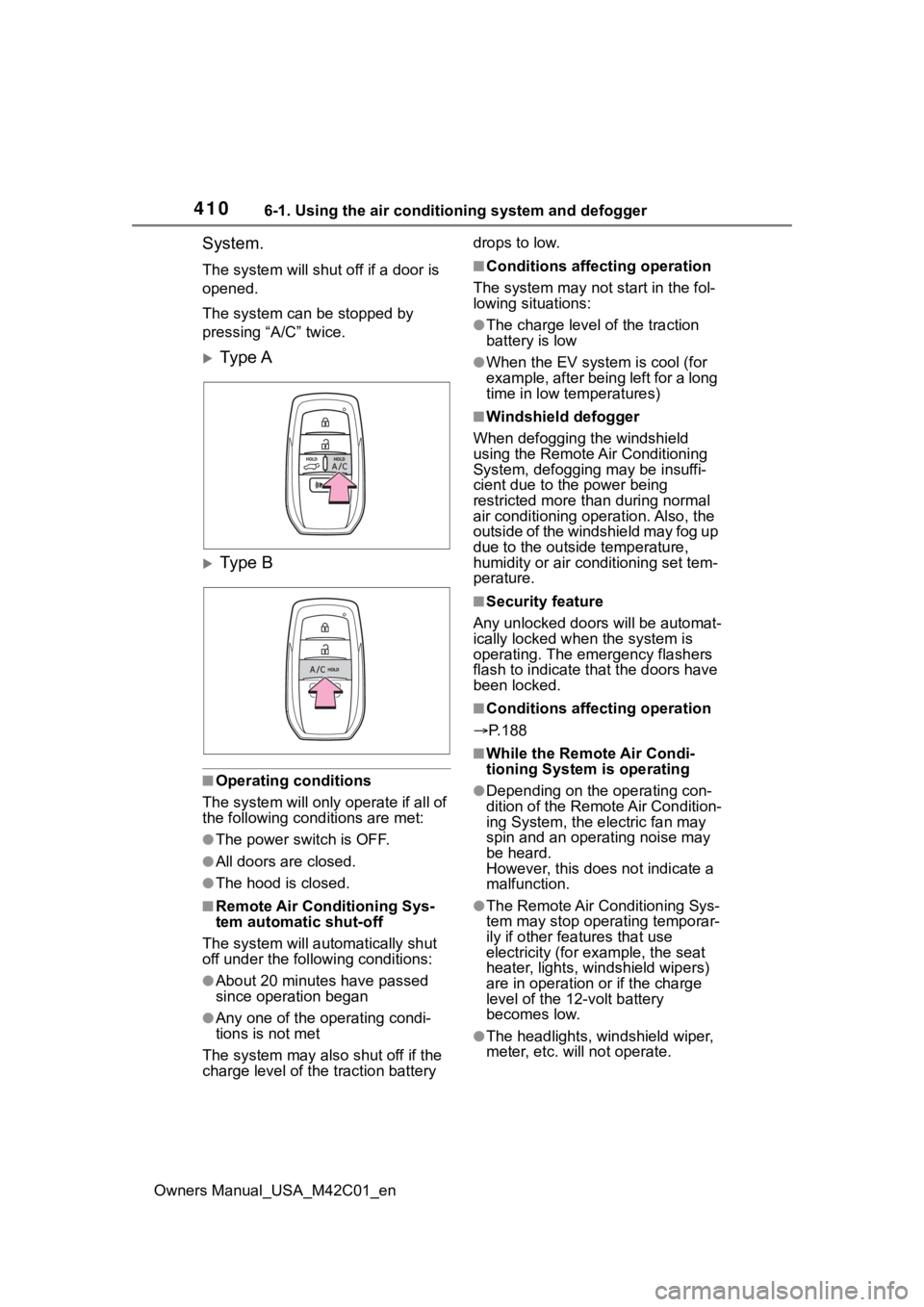
System.
The system will shut off if a door is
opened.
The system can be stopped by
pressing “A/C” twice.
Ty p e A
Ty p e B
■Operating conditions
The system will only operate if all of
the following cond itions are met:
●The power switch is OFF.
●All doors are closed.
●The hood is closed.
■Remote Air Conditioning Sys-
tem automatic shut-off
The system will auto matically shut
off under the following conditions:
●About 20 minutes have passed
since operation began
●Any one of the operating condi-
tions is not met
The system may also shut off if the
charge level of the traction battery drops to low.
■Conditions affecting operation
The system may not start in the fol-
lowing situations:
●The charge level of the traction
battery is low
●When the EV system is cool (for
example, after being left for a long
time in low temperatures)
■Windshield defogger
When defogging the windshield
using the Remote Air Conditioning
System, defogging may be insuffi-
cient due to the power being
restricted more than during normal
air conditioning operation. Also, the
outside of the windshield may fog up
due to the outsi de temperature,
humidity or air conditioning set tem-
perature.
■Security feature
Any unlocked doors will be automat-
ically locked when the system is
operating. The emergency flashers
flash to indicate that the doors have
been locked.
■Conditions affecting operation
P.188
■While the Remote Air Condi-
tioning System is operating
●Depending on the operating con-
dition of the Remote Air Condition-
ing System, the e lectric fan may
spin and an operating noise may
be heard.
However, this does not indicate a
malfunction.
●The Remote Air Conditioning Sys-
tem may stop operating temporar-
ily if other features that use
electricity (for example, the seat
heater, lights, windshield wipers)
are in operation or if the charge
level of the 12-volt battery
becomes low.
●The headlights, windshield wiper,
meter, etc. will not operate.
Page 411 of 628
4116-1. Using the air conditioning system and defogger
Owners Manual_USA_M42C01_en
6
Interior features
■Electronic key battery depletion
P. 1 6 2
■When the electronic key bat-
tery is fully depleted
P. 4 9 7
■Customization
Setting (e.g. Operation using “A/C”
on the wireless remote control) can
be changed. (Customizable fea-
tures: P.575)*: If equipped
WARNING
■Precautions for the Remote
Air Conditioning System
●Do not use the system if people
are in the vehicle.
Even when the system is in use,
the internal temperature may
still reach a high or low level
due to features such as the
automatic shut-off. Children and
pets left inside the vehicle may
suffer heatstroke dehydration or
hypothermia, or could result in
death or serious injury.
●Depending on the surrounding
environment, signals from the
wireless switch may transmit
further than expected. Pay
appropriate attention to the
vehicle’s surroundings and use
the switch only when necessary.
●Do not operate “A/C” if the hood
is open. The air conditioning
may operate unintentionally and
objects may be drawn into the
electrical cooling fan.
NOTICE
■To prevent the traction bat-
tery from being discharged
through incorrect operation
Use “A/C” only when necessary.
Heated steering
wheel*/seat heat-
ers*/seat ventila-
tors*/radiant heater*
Heated steering wheel
Warms up the grip of the
steering wheel
Seat heaters
Warm up the seat upholstery
Seat ventilators
Maintain good airflow on the
seat upholstery by sucking air
into the seats
Radiant heaters
Warm up the feet of the front
seats
WARNING
■To prevent minor burn inju-
ries
Care should be taken if anyone in
the following categories comes in
contact with the steering wheel or
seats when the heater is on:
●Babies, small children, the
elderly, the sick and the physi-
cally challenged
●Persons with sensitive skin
●Persons who are fatigued
●Persons who have taken alco-
hol or drugs that induce sleep
(sleeping drugs, cold remedies,
etc.)
Page 412 of 628
4126-1. Using the air conditioning system and defogger
Owners Manual_USA_M42C01_en
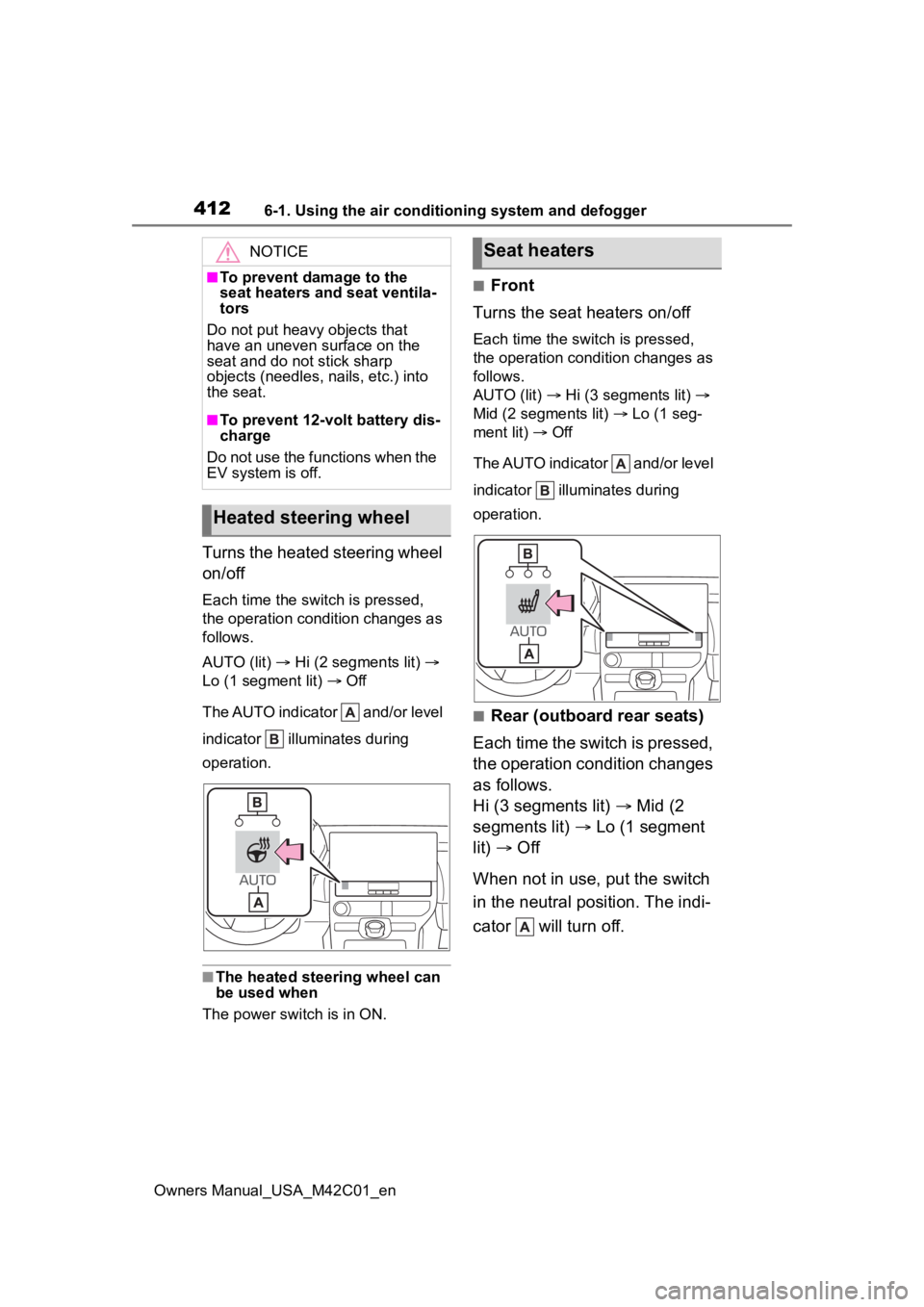
Turns the heated steering wheel
on/off
Each time the switch is pressed,
the operation condition changes as
follows.
AUTO (lit) Hi (2 segments lit)
Lo (1 segment lit) Off
The AUTO indicator and/or level
indicator illuminates during
operation.
■The heated steering wheel can
be used when
The power swit ch is in ON.
■Front
Turns the seat heaters on/off
Each time the switch is pressed,
the operation condition changes as
follows.
AUTO (lit) Hi (3 segments lit)
Mid (2 segments lit) Lo (1 seg-
ment lit) Off
The AUTO indicator and/or level
indicator illuminates during
operation.
■Rear (outboard rear seats)
Each time the switch is pressed,
the operation condition changes
as follows.
Hi (3 segments lit) Mid (2
segments lit) Lo (1 segment
lit) Off
When not in use, put the switch
in the neutral position. The indi-
cator will turn off.
NOTICE
■To prevent damage to the
seat heaters and seat ventila-
tors
Do not put heavy objects that
have an uneven surface on the
seat and do not stick sharp
objects (needles, nails, etc.) into
the seat.
■To prevent 12-volt battery dis-
charge
Do not use the functions when the
EV system is off.
Heated steering wheel
Seat heaters
Page 416 of 628
4166-2. Using the interior lights
Owners Manual_USA_M42C01_enoff, the lights will go off automati-
cally after 20 minutes.
■The interior lights will turn on
automatically when
If any of the SRS airbags deploy
(inflate) or in the event of a strong
rear impact, the interior lights will
turn on automatically. The interior
lights will turn off automatically after
approximately 20 minutes.
The interior lights can be turned off
manually. However, in order to help
prevent further collisions, it is rec-
ommended that they be left on until
safety can be ensured.
(The interior lights may not turn on
automatically depending on the
force of the impact and conditions of
the collision.)
■Customization
Setting (e.g. the time elapsed before
the lights turn off) can be changed.
(Customizable features: P.575)
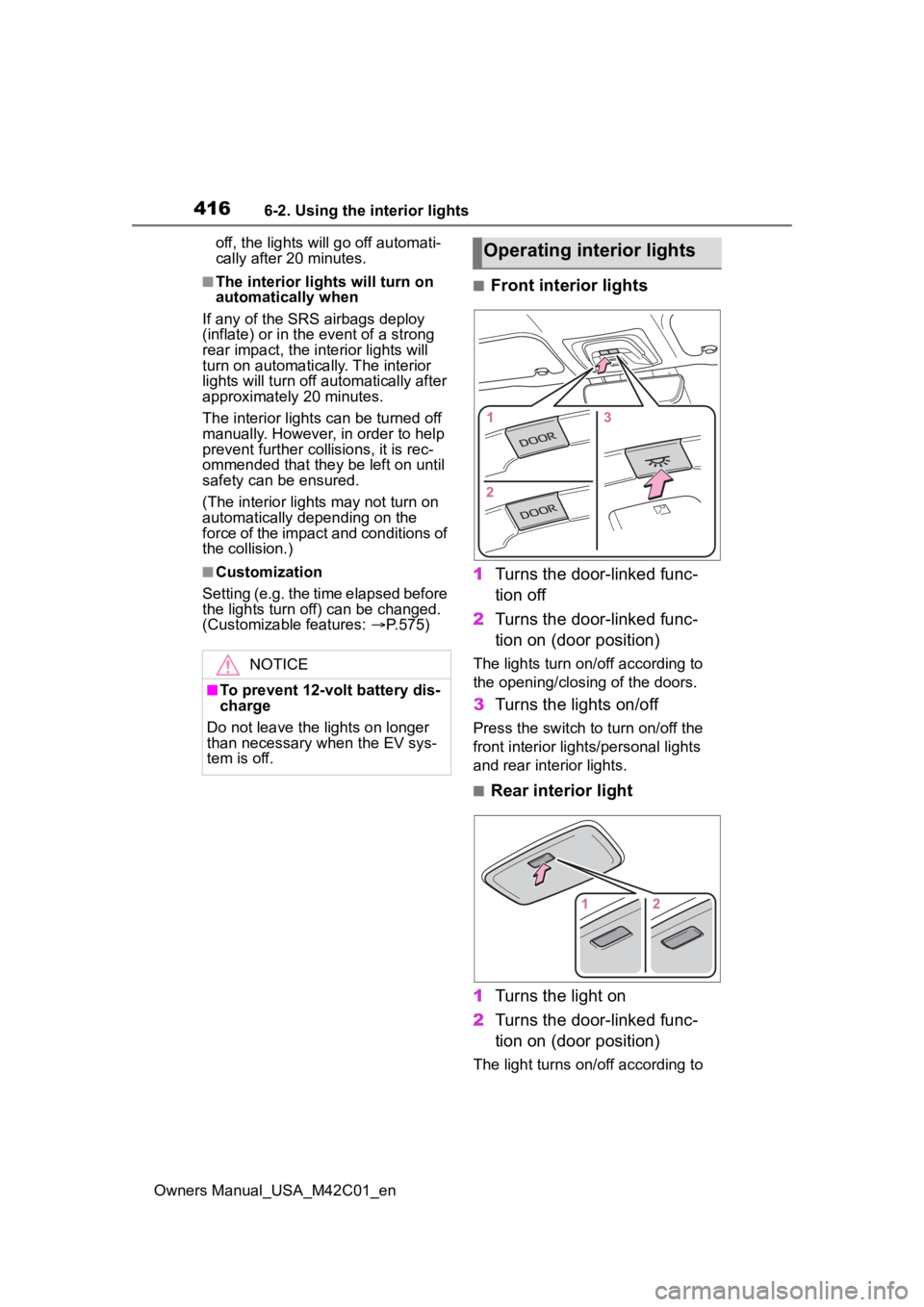
■Front interior lights
1 Turns the door-linked func-
tion off
2 Turns the door-linked func-
tion on (door position)
The lights turn on/off according to
the opening/closing of the doors.
3Turns the lights on/off
Press the switch to turn on/off the
front interior lights/personal lights
and rear interior lights.
■Rear interior light
1 Turns the light on
2 Turns the door-linked func-
tion on (door position)
The light turns on/off according to
NOTICE
■To prevent 12-volt battery dis-
charge
Do not leave the lights on longer
than necessary when the EV sys-
tem is off.
Operating interior lights
Page 428 of 628
4286-4. Using the other interior features
Owners Manual_USA_M42C01_en
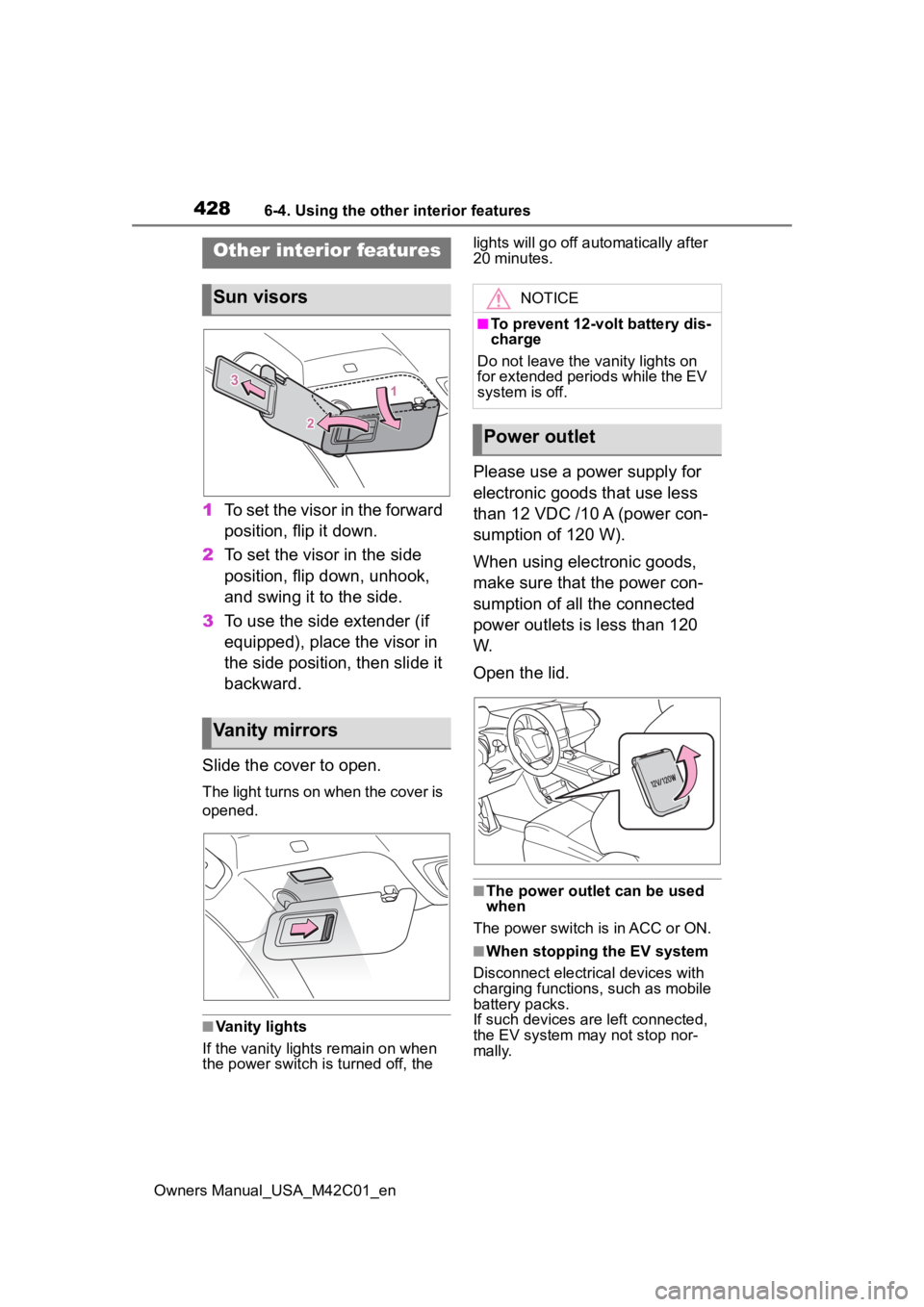
1To set the visor in the forward
position, flip it down.
2 To set the visor in the side
position, flip down, unhook,
and swing it to the side.
3 To use the side extender (if
equipped), place the visor in
the side position, then slide it
backward.
Slide the cover to open.
The light turns on when the cover is
opened.
■Vanity lights
If the vanity light s remain on when
the power switch is turned off, the lights will go off automatically after
20 minutes.
Please use a power supply for
electronic goods that use less
than 12 VDC /10 A (power con-
sumption of 120 W).
When using electronic goods,
make sure that the power con-
sumption of all the connected
power outlets is less than 120
W.
Open the lid.
■The power outlet can be used
when
The power switch is in ACC or ON.
■When stopping the EV system
Disconnect electrical devices with
charging functions, such as mobile
battery packs.
If such devices are left connected,
the EV system may not stop nor-
mally.
Other interior features
Sun visors
Vanity mirrors
NOTICE
■To prevent 12-volt battery dis-
charge
Do not leave the vanity lights on
for extended periods while the EV
system is off.
Power outlet
Page 429 of 628
4296-4. Using the other interior features
Owners Manual_USA_M42C01_en
6
Interior features
The USB Type-C charging ports
are used to supply 3 A of elec-
tricity at 5 V to external devices.
The USB Type-C charging ports
are for charging only. They are
not designed for data transfer or
other purposes. Depending on the external
device, it may not charge prop-
erly. Refer to the manual
included with the device before
using a USB charging port.
Refer to “MULTIMEDIA
OWNER’S MANUAL” for USB
Type-A information.
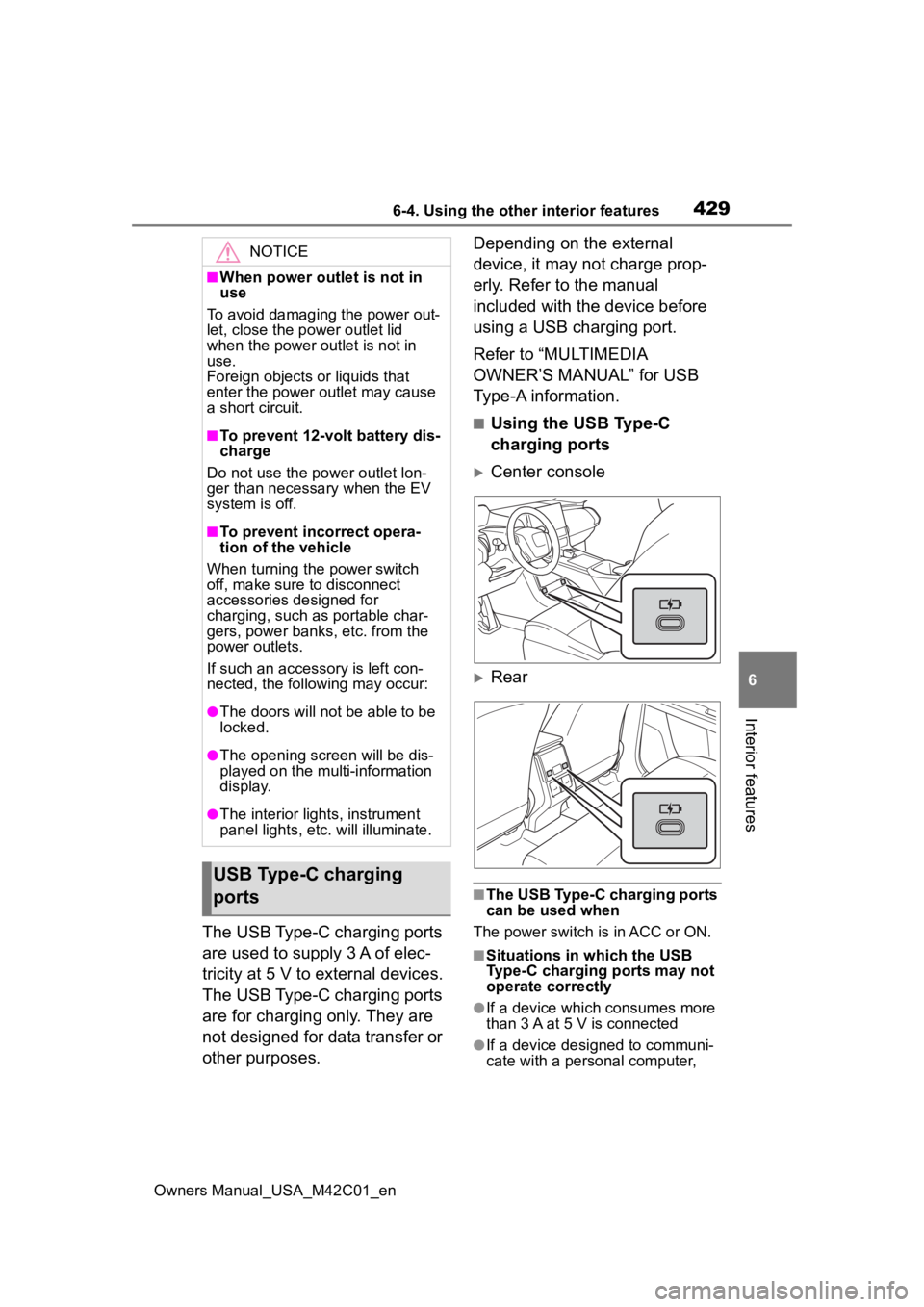
■Using the USB Type-C
charging ports
Center console
Rear
■The USB Type-C charging ports
can be used when
The power switch is in ACC or ON.
■Situations in which the USB
Type-C charging ports may not
operate correctly
●If a device which consumes more
than 3 A at 5 V is connected
●If a device designed to communi-
cate with a personal computer,
NOTICE
■When power outlet is not in
use
To avoid damaging the power out-
let, close the p ower outlet lid
when the power outlet is not in
use.
Foreign objects or liquids that
enter the power outlet may cause
a short circuit.
■To prevent 12-volt battery dis-
charge
Do not use the power outlet lon-
ger than necessary when the EV
system is off.
■To prevent incorrect opera-
tion of the vehicle
When turning the power switch
off, make sure to disconnect
accessories designed for
charging, such as portable char-
gers, power banks, etc. from the
power outlets.
If such an accessory is left con-
nected, the following may occur:
●The doors will not be able to be
locked.
●The opening scr een will be dis-
played on the multi-information
display.
●The interior lights, instrument
panel lights, etc. will illuminate.
USB Type-C charging
ports
Page 430 of 628
4306-4. Using the other interior features
Owners Manual_USA_M42C01_ensuch as a USB memory device, is
connected
●If the connected external device is
turned off (depending on device)
●If the temperature inside the vehi-
cle is high, such as after the vehi-
cle has been park
ed in the sun
■About connected external
devices
Depending on the connected exter-
nal device, charging may occasion-
ally be suspended and then start
again. This is not a malfunction.
A portable device can be
charged by just placing Qi stan-
dard wireless charge compatible
portable devices according to
the Wireless Power Consortium,
such as smartphones and
mobile batteries, etc., on the
charge area.
This function cannot be used
with portable devices that are
larger than the charging tray.
Also, depending on the portable
device, it may not operate as
normal. Please read the opera-
tion manual for portable devices
to be used.
■The “Qi” symbol
The “Qi” symbol is a trademark
of the Wireless Power Consor-
tium.
NOTICE
■To prevent damage to the
USB Type-C charging ports
●Do not insert foreign objects into
the ports.
●Do not spill water or other liq-
uids into the ports.
●Do not apply excessive force to
or impact the USB Type-C
charging ports.
●Do not disassemble or modify
the USB Type-C charging ports.
■To prevent damage to exter-
nal devices
●Do not leave external devices in
the vehicle. The temperature
inside the vehicle may become
high, resulting in damage to an
external device.
●Do not push down on or apply
unnecessary force to an exter-
nal device or the cable of an
external device while it is con-
nected.
■To prevent 12-volt battery dis-
charge
Do not use the USB Type-C
charging ports for a long period of
time with the EV system stopped.
Wireless charger (if
equipped)
Page 437 of 628
4376-4. Using the other interior features
Owners Manual_USA_M42C01_en
6
Interior features
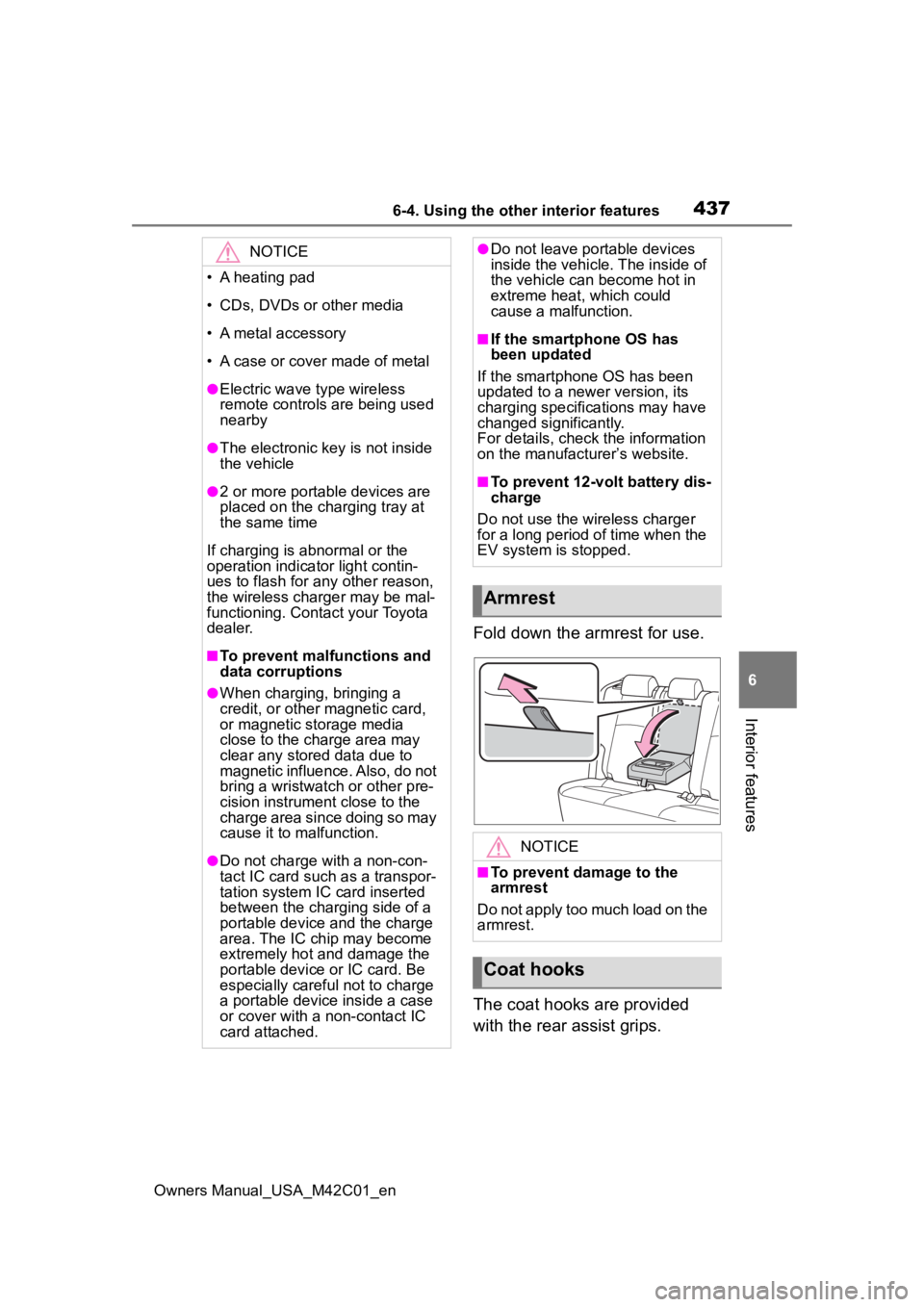
Fold down the armrest for use.
The coat hooks are provided
with the rear assist grips.
NOTICE
• A heating pad
• CDs, DVDs or other media
• A metal accessory
• A case or cover made of metal
●Electric wave type wireless
remote controls are being used
nearby
●The electronic key is not inside
the vehicle
●2 or more portable devices are
placed on the charging tray at
the same time
If charging is abnormal or the
operation indicator light contin-
ues to flash for any other reason,
the wireless charger may be mal-
functioning. Contact your Toyota
dealer.
■To prevent malfunctions and
data corruptions
●When charging, bringing a
credit, or other magnetic card,
or magnetic storage media
close to the charge area may
clear any stored data due to
magnetic influence. Also, do not
bring a wristwatch or other pre-
cision instrument close to the
charge area since doing so may
cause it to malfunction.
●Do not charge with a non-con-
tact IC card such as a transpor-
tation system IC card inserted
between the charging side of a
portable device and the charge
area. The IC chip may become
extremely hot and damage the
portable device or IC card. Be
especially careful not to charge
a portable device inside a case
or cover with a non-contact IC
card attached.
●Do not leave portable devices
inside the vehicle. The inside of
the vehicle can become hot in
extreme heat, which could
cause a malfunction.
■If the smartphone OS has
been updated
If the smartphone OS has been
updated to a newer version, its
charging specifications may have
changed significantly.
For details, check the information
on the manufacturer’s website.
■To prevent 12-volt battery dis-
charge
Do not use the wireless charger
for a long period of time when the
EV system is stopped.
Armrest
NOTICE
■To prevent damage to the
armrest
Do not apply too much load on the
armrest.
Coat hooks
Page 440 of 628
4406-4. Using the other interior features
Owners Manual_USA_M42C01_en
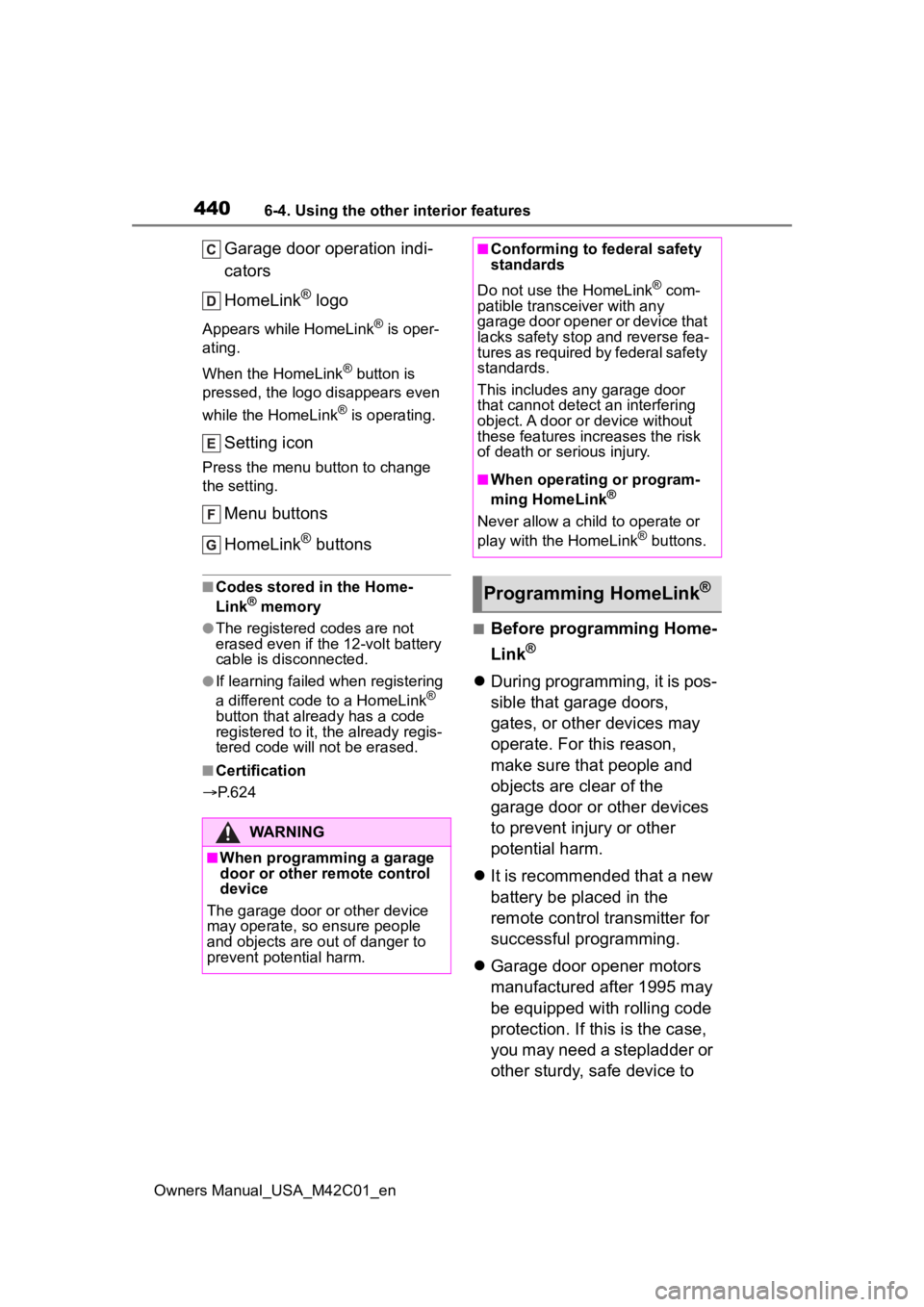
Garage door operation indi-
cators
HomeLink
® logo
Appears while HomeLink® is oper-
ating.
When the HomeLink
® button is
pressed, the logo disappears even
while the HomeLink
® is operating.
Setting icon
Press the menu button to change
the setting.
Menu buttons
HomeLink
® buttons
■Codes stored in the Home-
Link® memory
●The registered codes are not
erased even if the 12-volt battery
cable is disconnected.
●If learning failed when registering
a different code to a HomeLink®
button that already has a code
registered to it, the already regis-
tered code will not be erased.
■Certification
P. 6 2 4
■Before programming Home-
Link
®
During programming, it is pos-
sible that garage doors,
gates, or other devices may
operate. For this reason,
make sure that people and
objects are clear of the
garage door or other devices
to prevent injury or other
potential harm.
It is recommended that a new
battery be placed in the
remote control transmitter for
successful programming.
Garage door opener motors
manufactured after 1995 may
be equipped with rolling code
protection. If this is the case,
you may need a stepladder or
other sturdy, safe device to
WARNING
■When programming a garage
door or other remote control
device
The garage door o r other device
may operate, so ensure people
and objects are out of danger to
prevent potential harm.
■Conforming to federal safety
standards
Do not use the HomeLink
® com-
patible transce iver with any
garage door opener or device that
lacks safety stop and reverse fea-
tures as required by federal safety
standards.
This includes any garage door
that cannot detect an interfering
object. A door or device without
these features increases the risk
of death or serious injury.
■When operating or program-
ming HomeLink®
Never allow a child to operate or
play with the HomeLink® buttons.
Programming HomeLink®