light SUBARU TRIBECA 2009 1.G Service Workshop Manual
[x] Cancel search | Manufacturer: SUBARU, Model Year: 2009, Model line: TRIBECA, Model: SUBARU TRIBECA 2009 1.GPages: 2453, PDF Size: 46.32 MB
Page 350 of 2453
AC-24
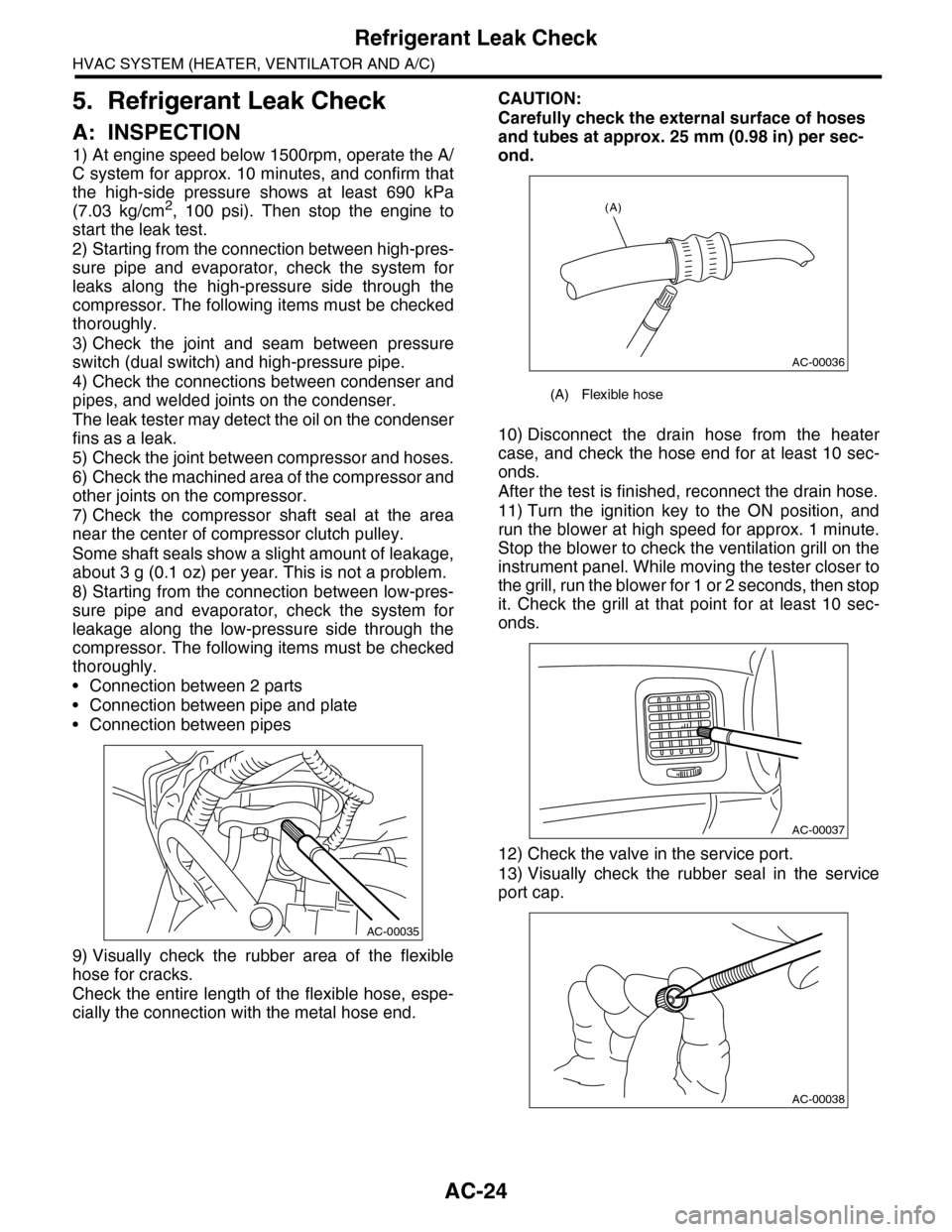
Refrigerant Leak Check
HVAC SYSTEM (HEATER, VENTILATOR AND A/C)
5. Refrigerant Leak Check
A: INSPECTION
1) At engine speed below 1500rpm, operate the A/
C system for approx. 10 minutes, and confirm that
the high-side pressure shows at least 690 kPa
(7.03 kg/cm2, 100 psi). Then stop the engine to
start the leak test.
2) Starting from the connection between high-pres-
sure pipe and evaporator, check the system for
leaks along the high-pressure side through the
compressor. The following items must be checked
thoroughly.
3) Check the joint and seam between pressure
switch (dual switch) and high-pressure pipe.
4) Check the connections between condenser and
pipes, and welded joints on the condenser.
The leak tester may detect the oil on the condenser
fins as a leak.
5) Check the joint between compressor and hoses.
6) Check the machined area of the compressor and
other joints on the compressor.
7) Check the compressor shaft seal at the area
near the center of compressor clutch pulley.
Some shaft seals show a slight amount of leakage,
about 3 g (0.1 oz) per year. This is not a problem.
8) Starting from the connection between low-pres-
sure pipe and evaporator, check the system for
leakage along the low-pressure side through the
compressor. The following items must be checked
thoroughly.
•Connection between 2 parts
•Connection between pipe and plate
•Connection between pipes
9) Visually check the rubber area of the flexible
hose for cracks.
Check the entire length of the flexible hose, espe-
cially the connection with the metal hose end.
CAUTION:
Carefully check the external surface of hoses
and tubes at approx. 25 mm (0.98 in) per sec-
ond.
10) Disconnect the drain hose from the heater
case, and check the hose end for at least 10 sec-
onds.
After the test is finished, reconnect the drain hose.
11) Turn the ignition key to the ON position, and
run the blower at high speed for approx. 1 minute.
Stop the blower to check the ventilation grill on the
instrument panel. While moving the tester closer to
the grill, run the blower for 1 or 2 seconds, then stop
it. Check the grill at that point for at least 10 sec-
onds.
12) Check the valve in the service port.
13) Visually check the rubber seal in the service
port cap.
AC-00035
(A) Flexible hose
AC-00036
(A)
AC-00037
AC-00038
Page 381 of 2453
AC(diag)-4
General Description
HVAC SYSTEM (AUTO A/C) (DIAGNOSTICS)
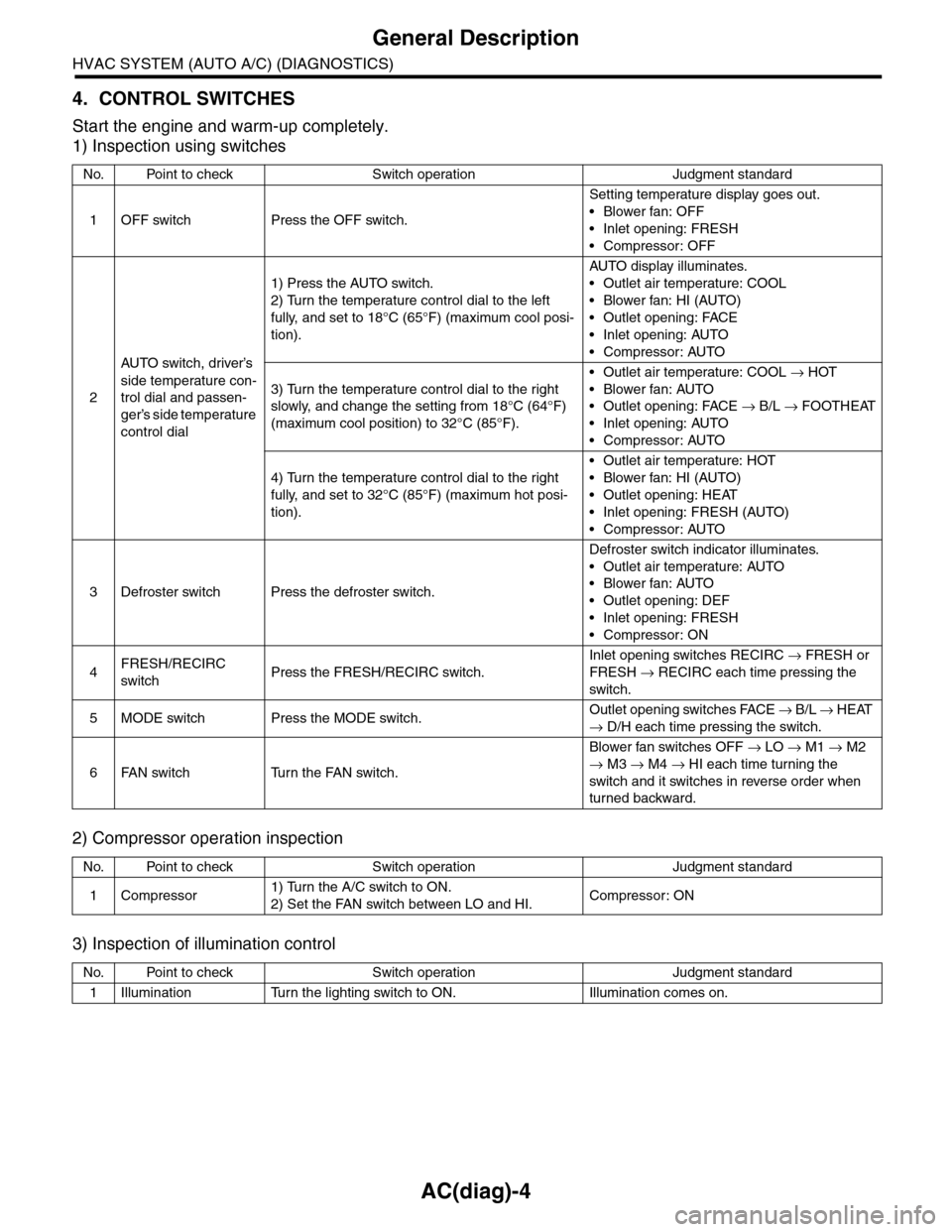
4. CONTROL SWITCHES
Start the engine and warm-up completely.
1) Inspection using switches
2) Compressor operation inspection
3) Inspection of illumination control
No. Point to check Switch operation Judgment standard
1OFF switch Press the OFF switch.
Setting temperature display goes out.
•Blower fan: OFF
•Inlet opening: FRESH
•Compressor: OFF
2
AU TO sw it c h, d r iver ’s
side temperature con-
trol dial and passen-
ger’s side temperature
control dial
1) Press the AUTO switch.
2) Turn the temperature control dial to the left
fully, and set to 18°C (65°F) (maximum cool posi-
tion).
AU TO di sp l ay i l lu mi n at e s.
•Outlet air temperature: COOL
•Blower fan: HI (AUTO)
•Outlet opening: FACE
•Inlet opening: AUTO
•Compressor: AUTO
3) Turn the temperature control dial to the right
slowly, and change the setting from 18°C (64°F)
(maximum cool position) to 32°C (85°F).
•Outlet air temperature: COOL → HOT
•Blower fan: AUTO
•Outlet opening: FACE → B/L → FOOTHEAT
•Inlet opening: AUTO
•Compressor: AUTO
4) Turn the temperature control dial to the right
fully, and set to 32°C (85°F) (maximum hot posi-
tion).
•Outlet air temperature: HOT
•Blower fan: HI (AUTO)
•Outlet opening: HEAT
•Inlet opening: FRESH (AUTO)
•Compressor: AUTO
3Defroster switch Press the defroster switch.
Defroster switch indicator illuminates.
•Outlet air temperature: AUTO
•Blower fan: AUTO
•Outlet opening: DEF
•Inlet opening: FRESH
•Compressor: ON
4FRESH/RECIRC
switchPress the FRESH/RECIRC switch.
Inlet opening switches RECIRC → FRESH or
FRESH → RECIRC each time pressing the
switch.
5MODE switch Press the MODE switch.Outlet opening switches FACE → B / L → HEAT
→ D/H each time pressing the switch.
6FAN switch Turn the FAN switch.
Blower fan switches OFF → LO → M1 → M2
→ M3 → M4 → HI each time turning the
switch and it switches in reverse order when
turned backward.
No. Point to check Switch operation Judgment standard
1Compressor1) Turn the A/C switch to ON.
2) Set the FAN switch between LO and HI.Compressor: ON
No. Point to check Switch operation Judgment standard
1Illumination Turn the lighting switch to ON. Illumination comes on.
Page 382 of 2453
AC(diag)-5
General Description
HVAC SYSTEM (AUTO A/C) (DIAGNOSTICS)
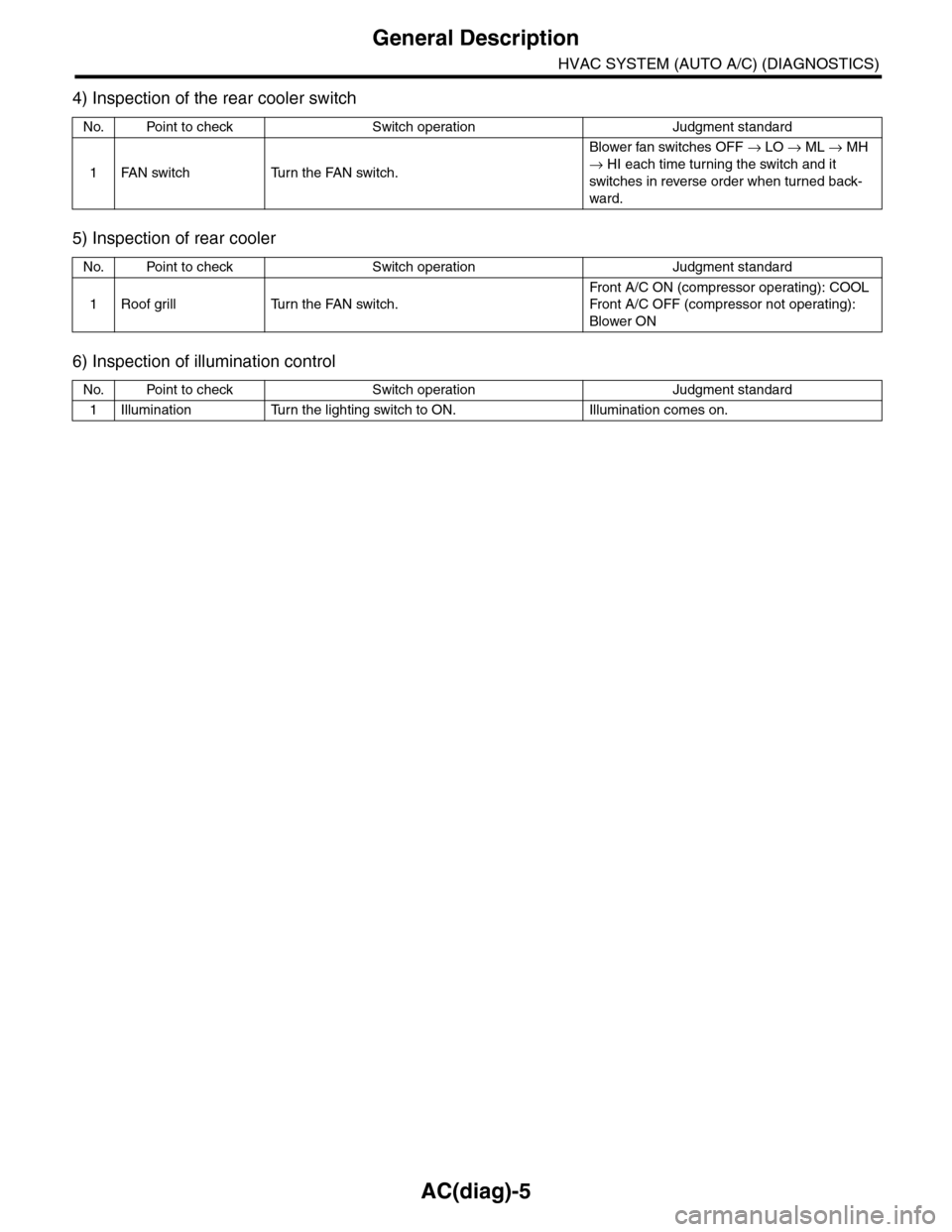
4) Inspection of the rear cooler switch
5) Inspection of rear cooler
6) Inspection of illumination control
No. Point to check Switch operation Judgment standard
1FAN switch Turn the FAN switch.
Blower fan switches OFF → LO → ML → MH
→ HI each time turning the switch and it
switches in reverse order when turned back-
ward.
No. Point to check Switch operation Judgment standard
1Roof grill Turn the FAN switch.
Fr on t A / C O N ( co mp r es so r op e rat i ng ) : COOL
Fr on t A / C O FF ( co mp r e ss or n ot o pe ra t in g) :
Blower ON
No. Point to check Switch operation Judgment standard
1Illumination Turn the lighting switch to ON. Illumination comes on.
Page 414 of 2453
AC(diag)-37
Diagnostic Procedure for Sensors
HVAC SYSTEM (AUTO A/C) (DIAGNOSTICS)
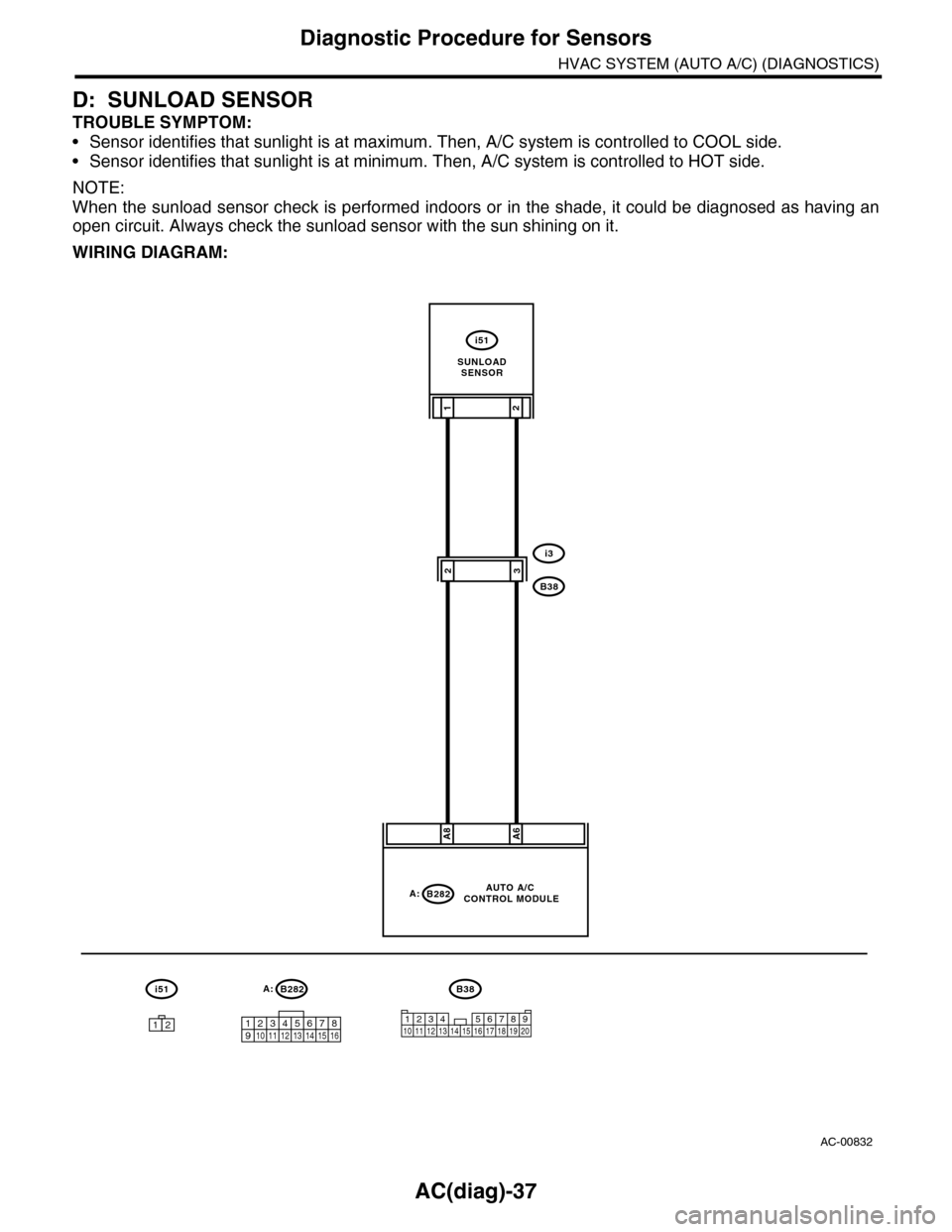
D: SUNLOAD SENSOR
TROUBLE SYMPTOM:
•Sensor identifies that sunlight is at maximum. Then, A/C system is controlled to COOL side.
•Sensor identifies that sunlight is at minimum. Then, A/C system is controlled to HOT side.
NOTE:
When the sunload sensor check is performed indoors or in the shade, it could be diagnosed as having an
open circuit. Always check the sunload sensor with the sun shining on it.
WIRING DIAGRAM:
AC-00832
A:B282
12345678910 11 12 13 14 15 16
i51
A:B282
A8A6
21
i3
B38
i51
12
AUTO A/C CONTROL MODULE
32
1234 5678910 11 12 13 14 15 16 17 18 19 20
B38
SUNLOADSENSOR
Page 418 of 2453
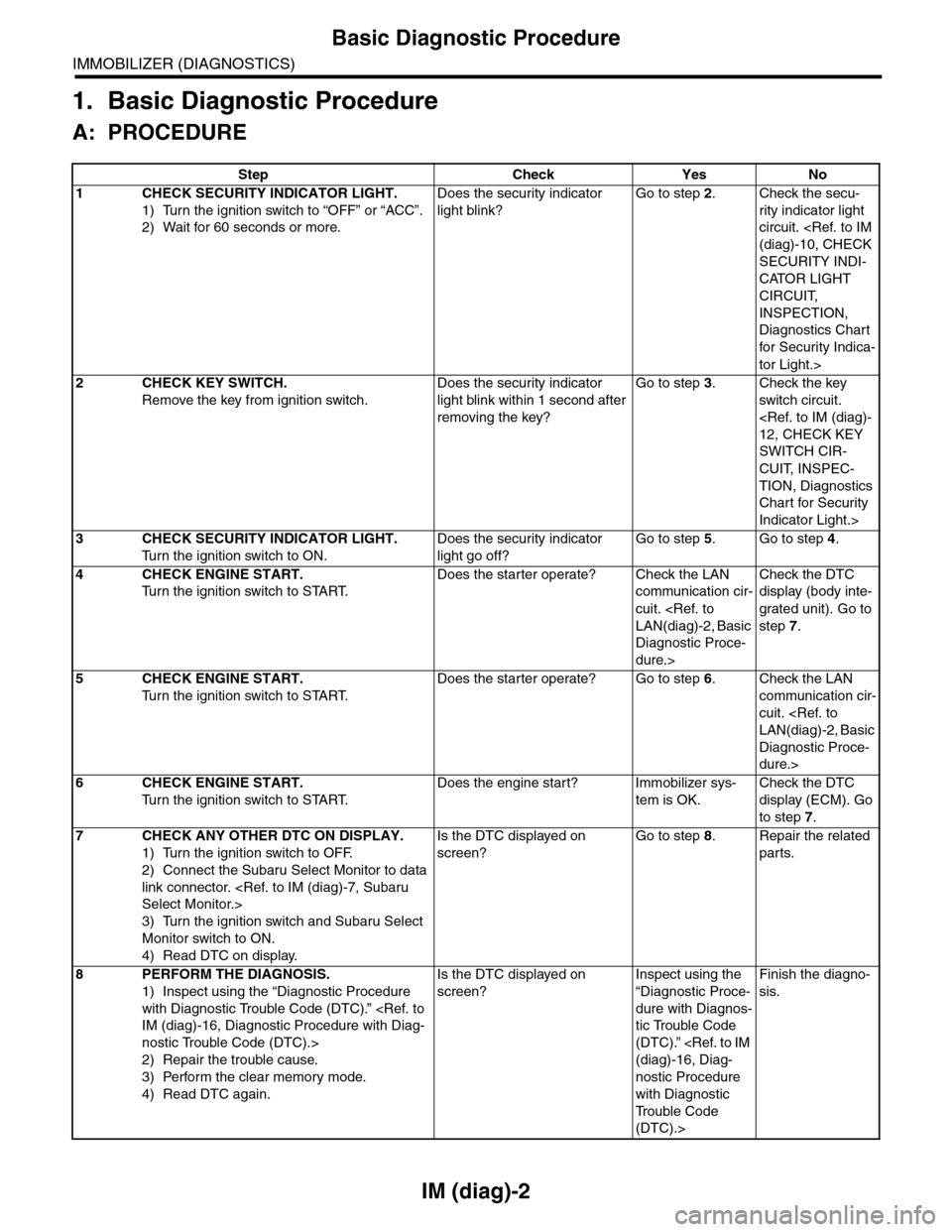
IM (diag)-2
Basic Diagnostic Procedure
IMMOBILIZER (DIAGNOSTICS)
1. Basic Diagnostic Procedure
A: PROCEDURE
Step Check Yes No
1CHECK SECURITY INDICATOR LIGHT.
1) Turn the ignition switch to “OFF” or “ACC”.
2) Wait for 60 seconds or more.
Does the security indicator
light blink?
Go to step 2.Check the secu-
rity indicator light
circuit.
SECURITY INDI-
CATOR LIGHT
CIRCUIT,
INSPECTION,
Diagnostics Chart
for Secur ity Indica-
tor Light.>
2CHECK KEY SWITCH.
Remove the key from ignition switch.
Does the security indicator
light blink within 1 second after
removing the key?
Go to step 3.Check the key
switch circuit.
SWITCH CIR-
CUIT, INSPEC-
TION, Diagnostics
Chart for Security
Indicator Light.>
3CHECK SECURITY INDICATOR LIGHT.
Tu r n t h e i g n i t i o n s w i t c h t o O N .
Does the security indicator
light go off?
Go to step 5.Go to step 4.
4CHECK ENGINE START.
Tu r n t h e i g n i t i o n s w i t c h t o S TA R T.
Does the starter operate? Check the LAN
communication cir-
cuit.
Diagnostic Proce-
dure.>
Check the DTC
display (body inte-
grated unit). Go to
step 7.
5CHECK ENGINE START.
Tu r n t h e i g n i t i o n s w i t c h t o S TA R T.
Does the starter operate? Go to step 6.Check the LAN
communication cir-
cuit.
Diagnostic Proce-
dure.>
6CHECK ENGINE START.
Tu r n t h e i g n i t i o n s w i t c h t o S TA R T.
Does the engine start? Immobilizer sys-
tem is OK.
Check the DTC
display (ECM). Go
to step 7.
7CHECK ANY OTHER DTC ON DISPLAY.
1) Turn the ignition switch to OFF.
2) Connect the Subaru Select Monitor to data
link connector.
3) Turn the ignition switch and Subaru Select
Monitor switch to ON.
4) Read DTC on display.
Is the DTC displayed on
screen?
Go to step 8.Repair the related
parts.
8PERFORM THE DIAGNOSIS.
1) Inspect using the “Diagnostic Procedure
with Diagnostic Trouble Code (DTC).”
nostic Trouble Code (DTC).>
2) Repair the trouble cause.
3) Perform the clear memory mode.
4) Read DTC again.
Is the DTC displayed on
screen?
Inspect using the
“Diagnostic Proce-
dure with Diagnos-
tic Trouble Code
(DTC).”
nostic Procedure
with Diagnostic
Tr o u b l e C o d e
(DTC).>
Finish the diagno-
sis.
Page 419 of 2453
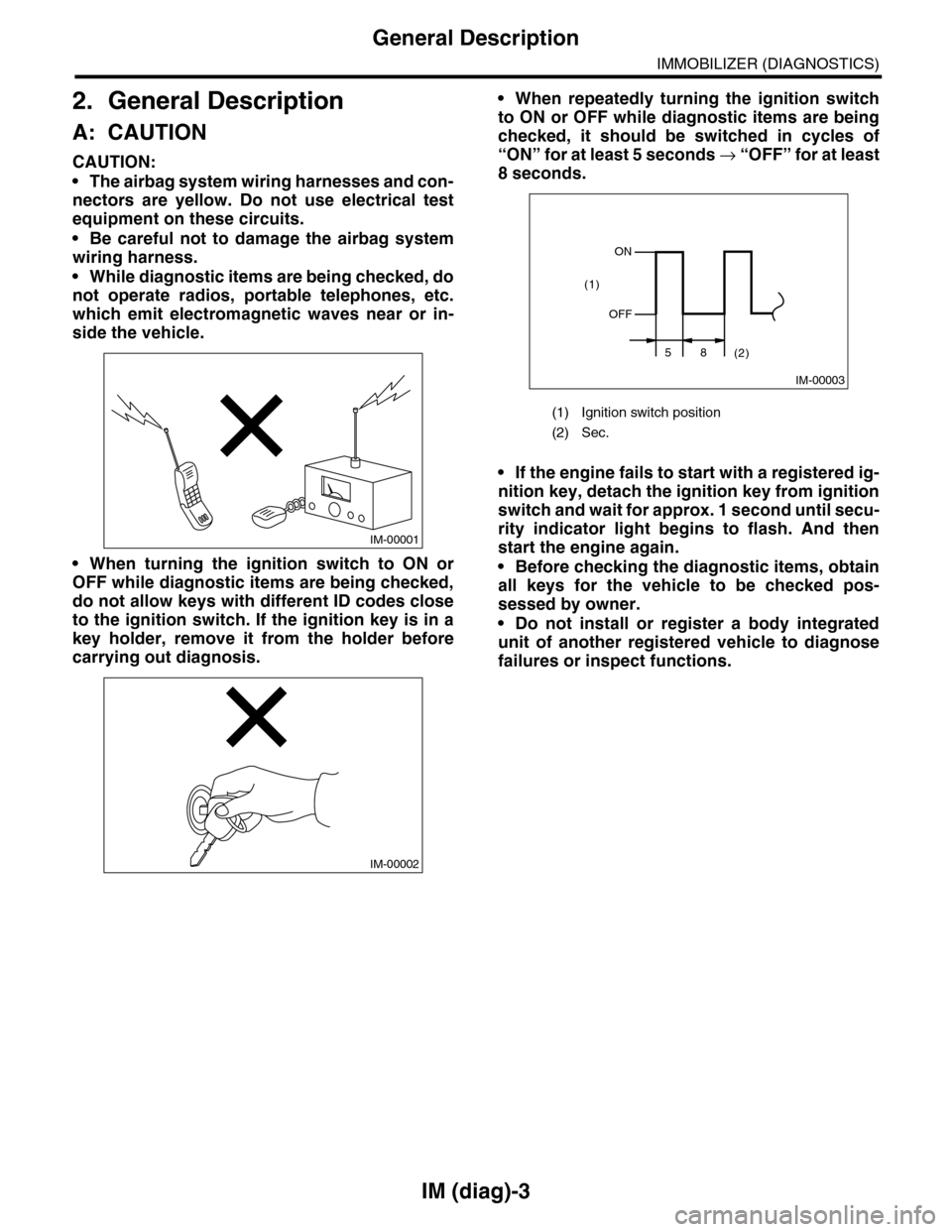
IM (diag)-3
General Description
IMMOBILIZER (DIAGNOSTICS)
2. General Description
A: CAUTION
CAUTION:
•The airbag system wiring harnesses and con-
nectors are yellow. Do not use electrical test
equipment on these circuits.
•Be careful not to damage the airbag system
wiring harness.
•While diagnostic items are being checked, do
not operate radios, portable telephones, etc.
which emit electromagnetic waves near or in-
side the vehicle.
•When turning the ignition switch to ON or
OFF while diagnostic items are being checked,
do not allow keys with different ID codes close
to the ignition switch. If the ignition key is in a
key holder, remove it from the holder before
carrying out diagnosis.
•When repeatedly turning the ignition switch
to ON or OFF while diagnostic items are being
checked, it should be switched in cycles of
“ON” for at least 5 seconds → “O F F ” fo r a t le a s t
8 seconds.
•If the engine fails to start with a registered ig-
nition key, detach the ignition key from ignition
switch and wait for approx. 1 second until secu-
rity indicator light begins to flash. And then
start the engine again.
•Before checking the diagnostic items, obtain
all keys for the vehicle to be checked pos-
sessed by owner.
•Do not install or register a body integrated
unit of another registered vehicle to diagnose
failures or inspect functions.
IM-00001
IM-00002
(1) Ignition switch position
(2) Sec.
IM-00003
ON
OFF
58(2)
(1)
Page 421 of 2453
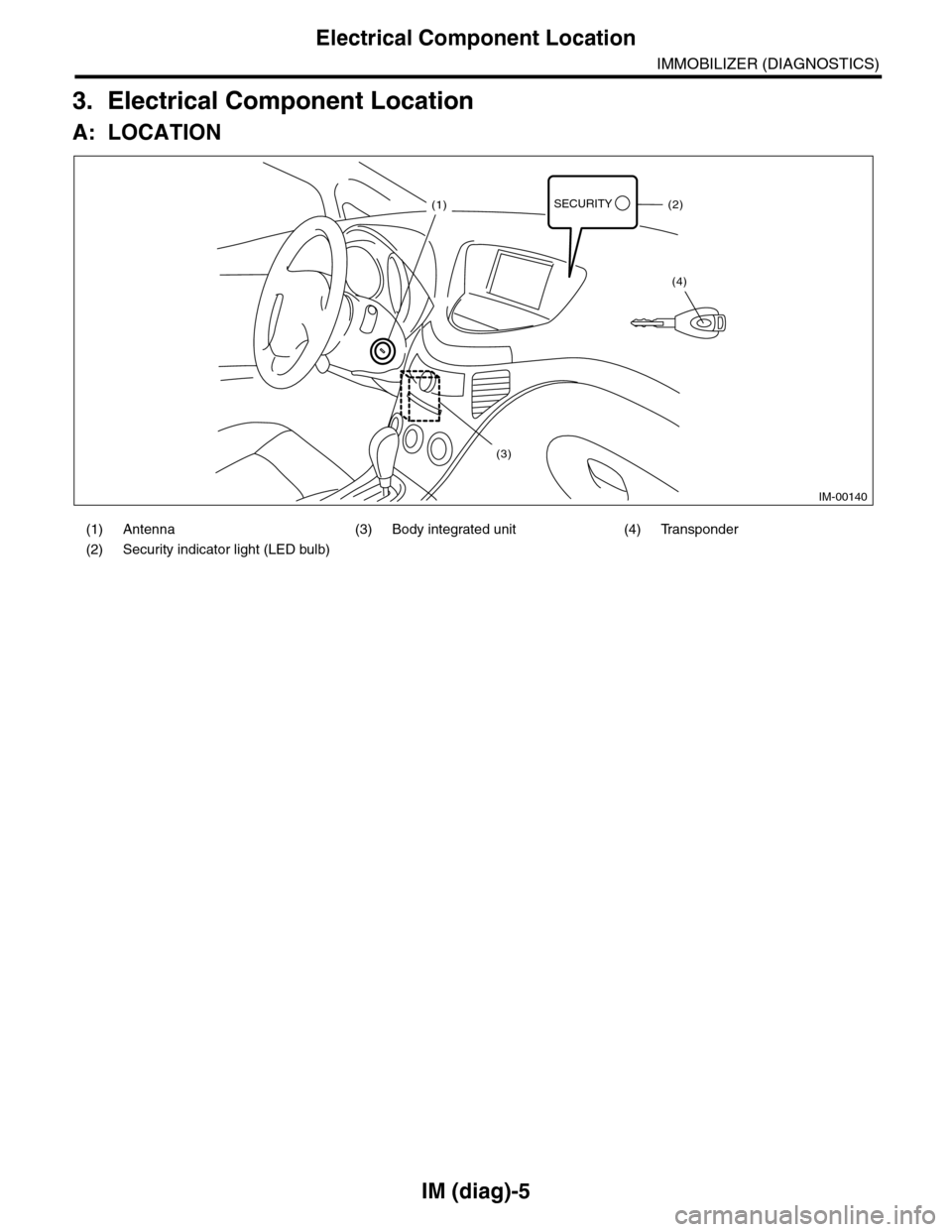
IM (diag)-5
Electrical Component Location
IMMOBILIZER (DIAGNOSTICS)
3. Electrical Component Location
A: LOCATION
(1) Antenna (3) Body integrated unit (4) Transponder
(2) Security indicator light (LED bulb)
IM-00140
SECURITY(1)(2)
(4)
(3)
Page 426 of 2453
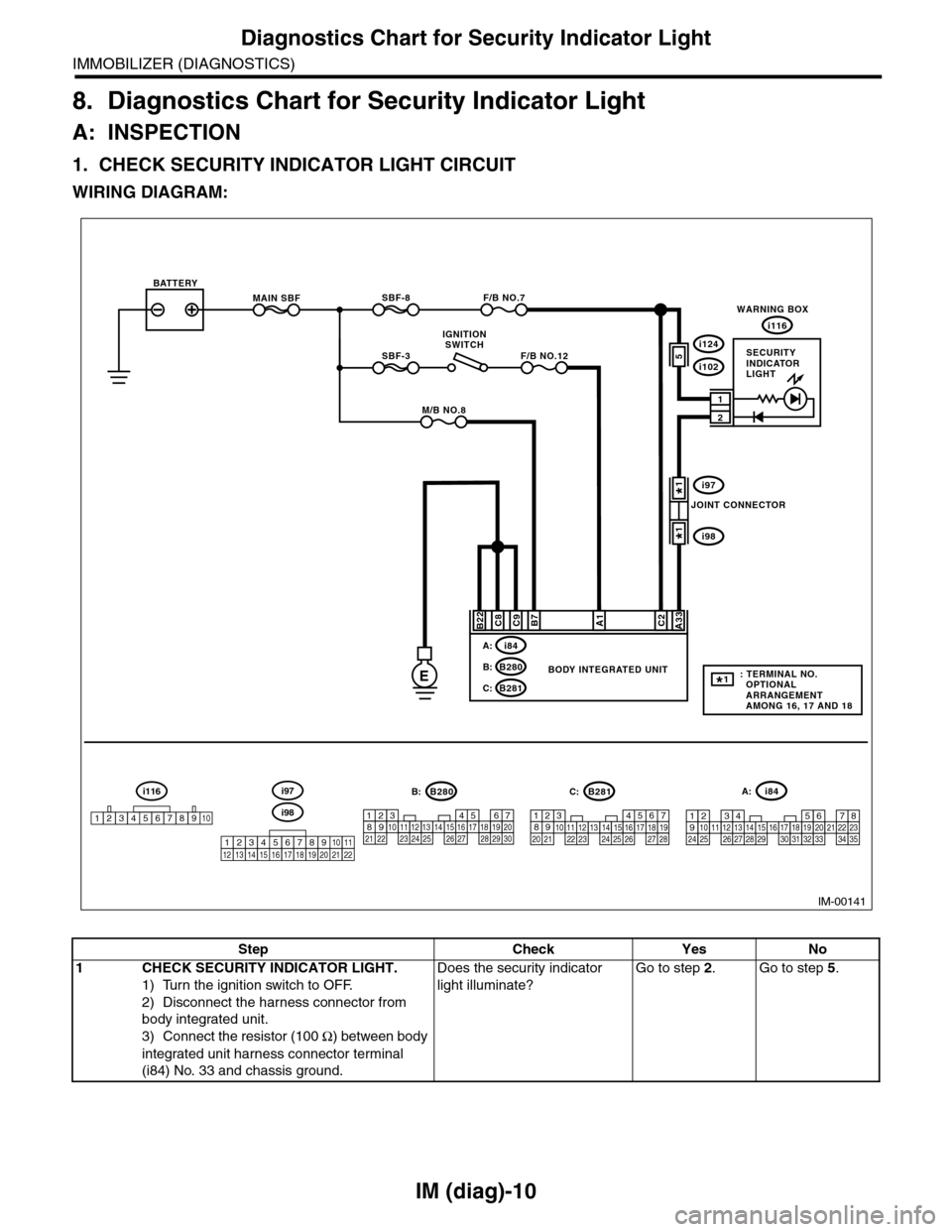
IM (diag)-10
Diagnostics Chart for Security Indicator Light
IMMOBILIZER (DIAGNOSTICS)
8. Diagnostics Chart for Security Indicator Light
A: INSPECTION
1. CHECK SECURITY INDICATOR LIGHT CIRCUIT
WIRING DIAGRAM:
IM-00141
MAIN SBF
SBF-3
BATTERY
WARNING BOX
BODY INTEGRATED UNIT
i116
F/B NO.7
F/B NO.12
IGNITIONSWITCH
A33C2B7C9C8
2
1
E
A1
M/B NO.8
SBF-8
B22
i84A:
B280B:
B281C:
567821943102422 23 25111213141526 27281617181920 21
B281i84
1234567891011121314151617181920212223242526272829303132333435
5467821931022 231112131415242526 2716171828 29192021 30
B280A:C:B:
5i124
i102
i97
i98
SECURITYINDICATORLIGHT
JOINT CONNECTOR
i116
12345678910i98
i97
12345678910111213141516171819202122
: TERMINAL NO. OPTIONAL ARRANGEMENT AMONG 16, 17 AND 18
1*
1*
1*
Step Check Yes No
1CHECK SECURITY INDICATOR LIGHT.
1) Turn the ignition switch to OFF.
2) Disconnect the harness connector from
body integrated unit.
3) Connect the resistor (100 Ω) between body
integrated unit harness connector terminal
(i84) No. 33 and chassis ground.
Does the security indicator
light illuminate?
Go to step 2.Go to step 5.
Page 427 of 2453
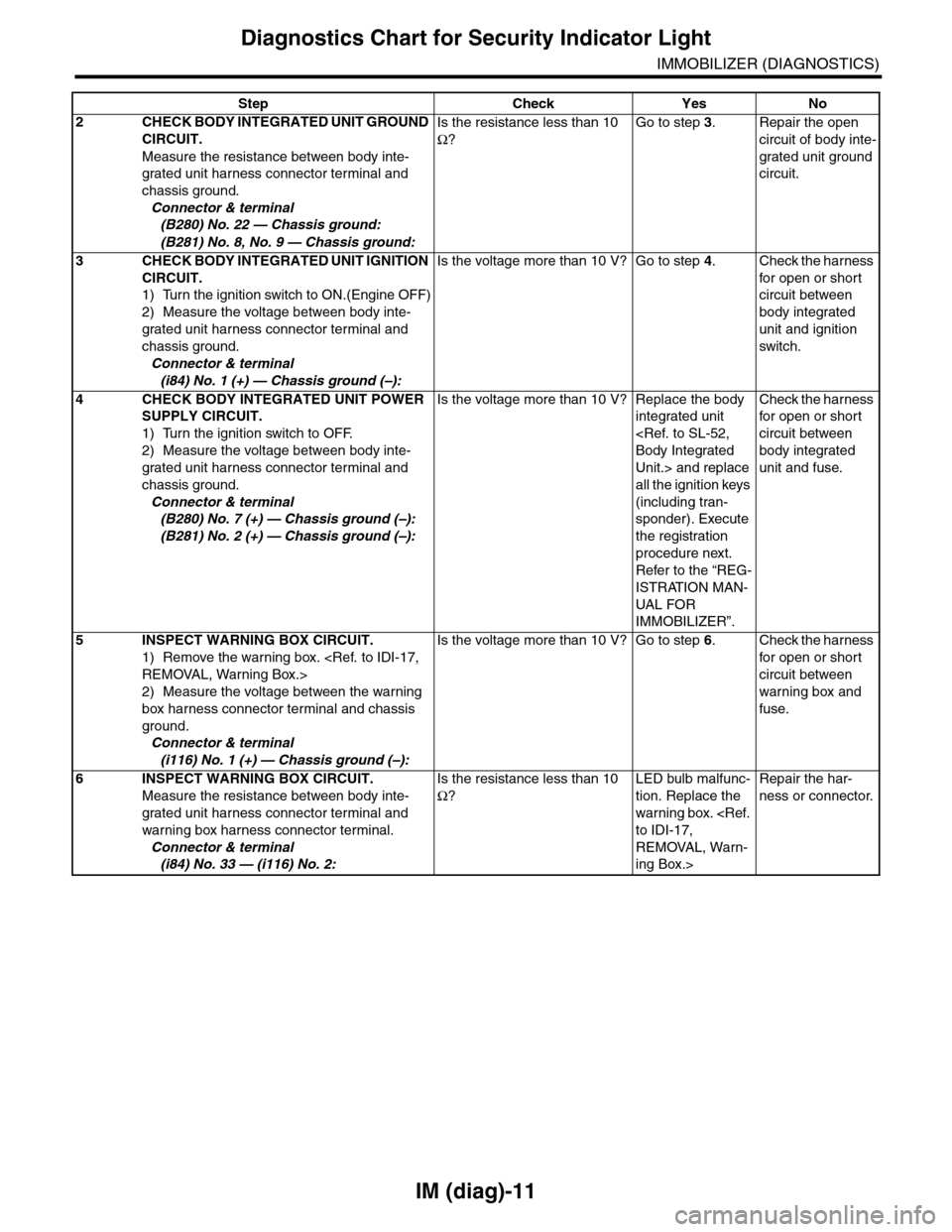
IM (diag)-11
Diagnostics Chart for Security Indicator Light
IMMOBILIZER (DIAGNOSTICS)
2CHECK BODY INTEGRATED UNIT GROUND
CIRCUIT.
Measure the resistance between body inte-
grated unit harness connector terminal and
chassis ground.
Connector & terminal
(B280) No. 22 — Chassis ground:
(B281) No. 8, No. 9 — Chassis ground:
Is the resistance less than 10
Ω?
Go to step 3.Repair the open
circuit of body inte-
grated unit ground
circuit.
3CHECK BODY INTEGRATED UNIT IGNITION
CIRCUIT.
1) Turn the ignition switch to ON.(Engine OFF)
2) Measure the voltage between body inte-
grated unit harness connector terminal and
chassis ground.
Connector & terminal
(i84) No. 1 (+) — Chassis ground (–):
Is the voltage more than 10 V? Go to step 4.Check the harness
for open or shor t
circuit between
body integrated
unit and ignition
switch.
4CHECK BODY INTEGRATED UNIT POWER
SUPPLY CIRCUIT.
1) Turn the ignition switch to OFF.
2) Measure the voltage between body inte-
grated unit harness connector terminal and
chassis ground.
Connector & terminal
(B280) No. 7 (+) — Chassis ground (–):
(B281) No. 2 (+) — Chassis ground (–):
Is the voltage more than 10 V? Replace the body
integrated unit
Unit.> and replace
all the ignition keys
(including tran-
sponder). Execute
the registration
procedure next.
Refer to the “REG-
ISTRATION MAN-
UAL FO R
IMMOBILIZER”.
Check the harness
for open or shor t
circuit between
body integrated
unit and fuse.
5INSPECT WARNING BOX CIRCUIT.
1) Remove the warning box.
2) Measure the voltage between the warning
box harness connector terminal and chassis
ground.
Connector & terminal
(i116) No. 1 (+) — Chassis ground (–):
Is the voltage more than 10 V? Go to step 6.Check the harness
for open or shor t
circuit between
warning box and
fuse.
6INSPECT WARNING BOX CIRCUIT.
Measure the resistance between body inte-
grated unit harness connector terminal and
warning box harness connector terminal.
Connector & terminal
(i84) No. 33 — (i116) No. 2:
Is the resistance less than 10
Ω?
LED bulb malfunc-
tion. Replace the
warning box.
REMOVAL, Warn-
ing Box.>
Repair the har-
ness or connector.
Step Check Yes No
Page 428 of 2453
IM (diag)-12
Diagnostics Chart for Security Indicator Light
IMMOBILIZER (DIAGNOSTICS)
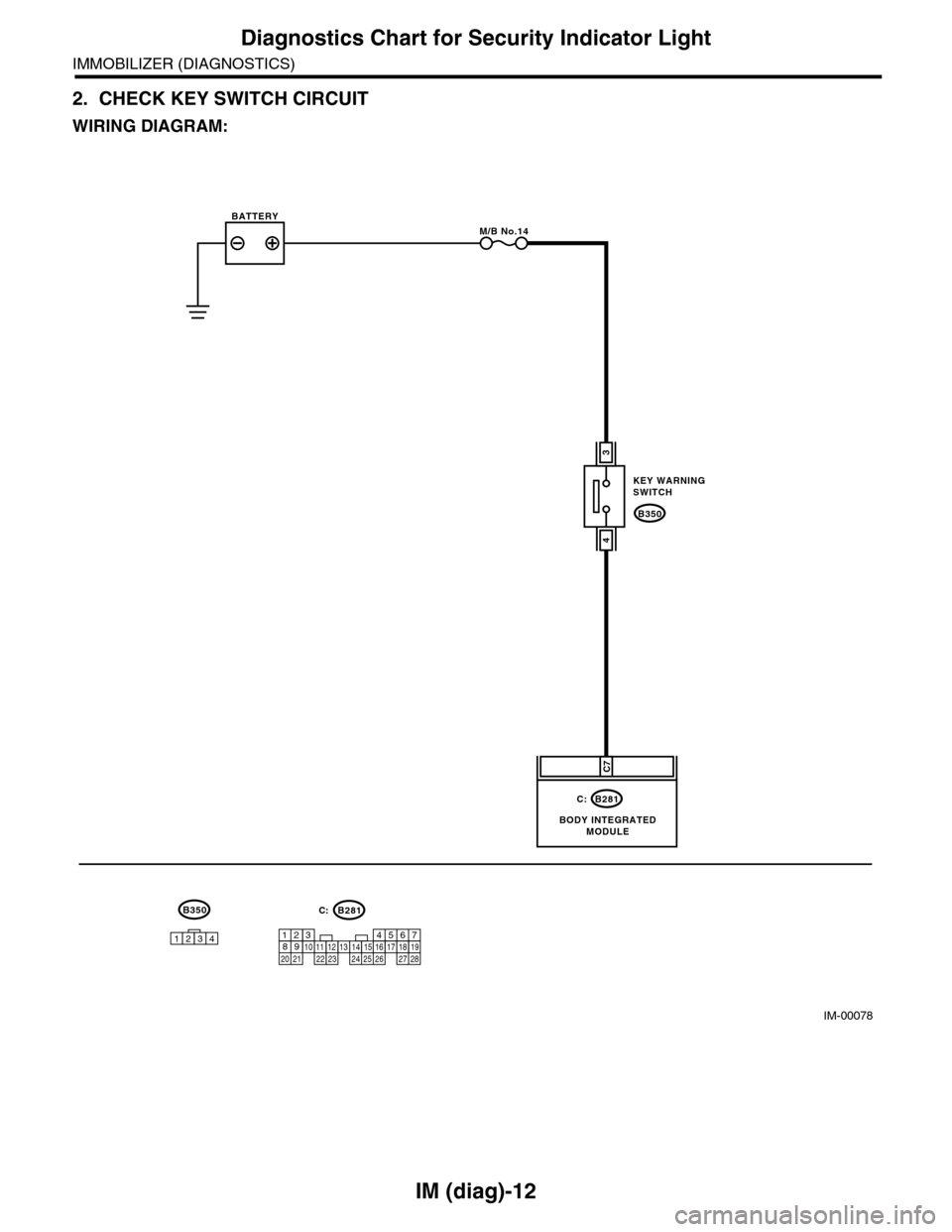
2. CHECK KEY SWITCH CIRCUIT
WIRING DIAGRAM:
IM-00078
B350
KEY WARNINGSWITCH
B281
BODY INTEGRATEDMODULE
BATTERYM/B No.14
C7
3
4
C:
567821943102422 23 25111213141526 27281617181920 21
B281C:B350
1234