instrument panel SUBARU TRIBECA 2009 1.G Service Service Manual
[x] Cancel search | Manufacturer: SUBARU, Model Year: 2009, Model line: TRIBECA, Model: SUBARU TRIBECA 2009 1.GPages: 2453, PDF Size: 46.32 MB
Page 451 of 2453
IDI-12
Combination Meter
INSTRUMENTATION/DRIVER INFO
C: DISASSEMBLY
CAUTION:
•Use gloves to avoid damage and getting fingerprints on the glass surface and meter surfaces.
•Be careful not to apply excessive force to the trip knob.
•Be sure not to touch the meter indicator needle.
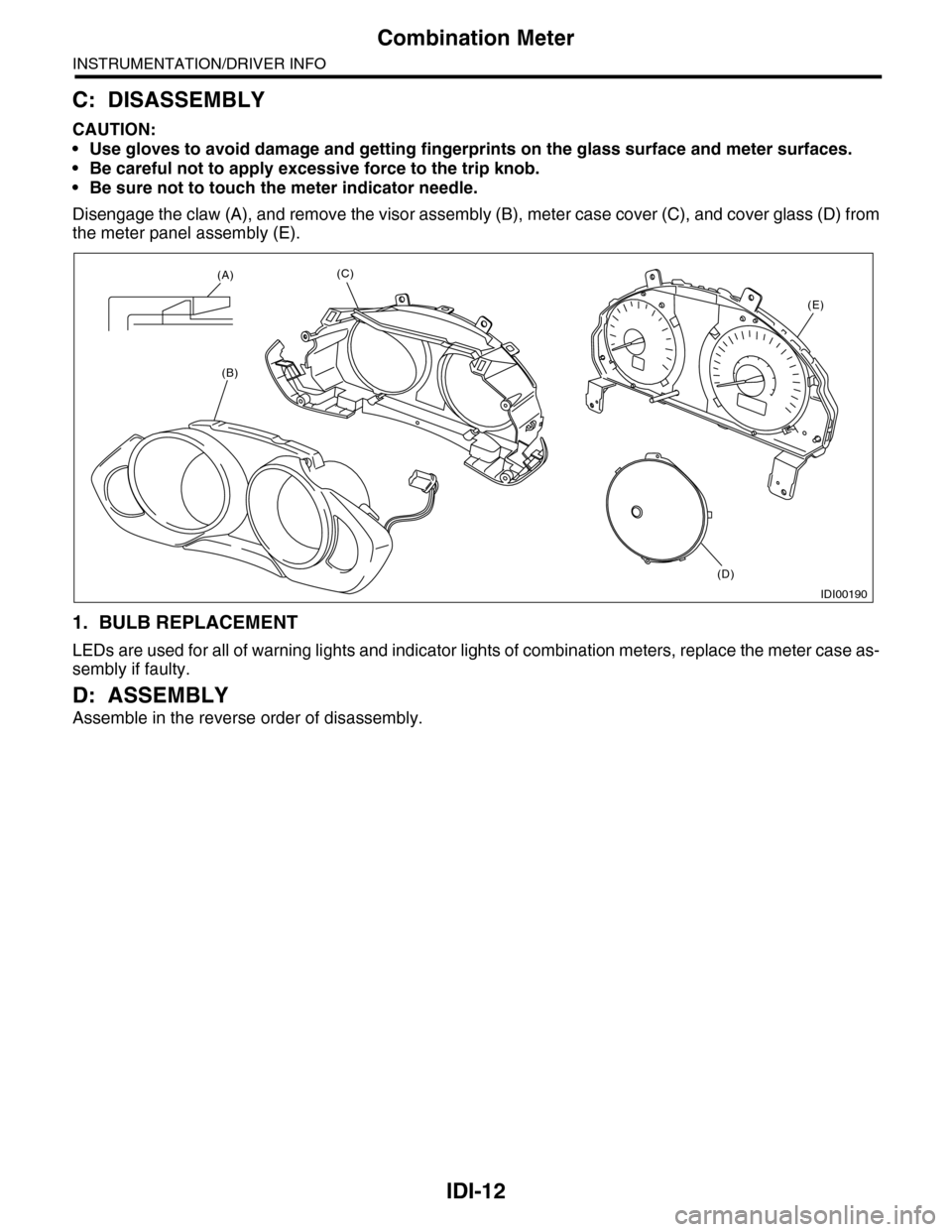
Disengage the claw (A), and remove the visor assembly (B), meter case cover (C), and cover glass (D) from
the meter panel assembly (E).
1. BULB REPLACEMENT
LEDs are used for all of warning lights and indicator lights of combination meters, replace the meter case as-
sembly if faulty.
D: ASSEMBLY
Assemble in the reverse order of disassembly.
IDI00190
(A)
(B)
(C)
(D)
(E)
Page 468 of 2453
LAN(diag)-12
Subaru Select Monitor
LAN SYSTEM (DIAGNOSTICS)
6. Subaru Select Monitor
A: OPERATION
1. READ DIAGNOSTIC TROUBLE CODE
(DTC)
NOTE:
•DTC is displayed in the sequence of inputting.
(When inputting two DTCs or more simultaneously,
they are displayed in the sequence of priority.)
•When more than two DTCs are displayed, per-
form the diagnosis of top of them.
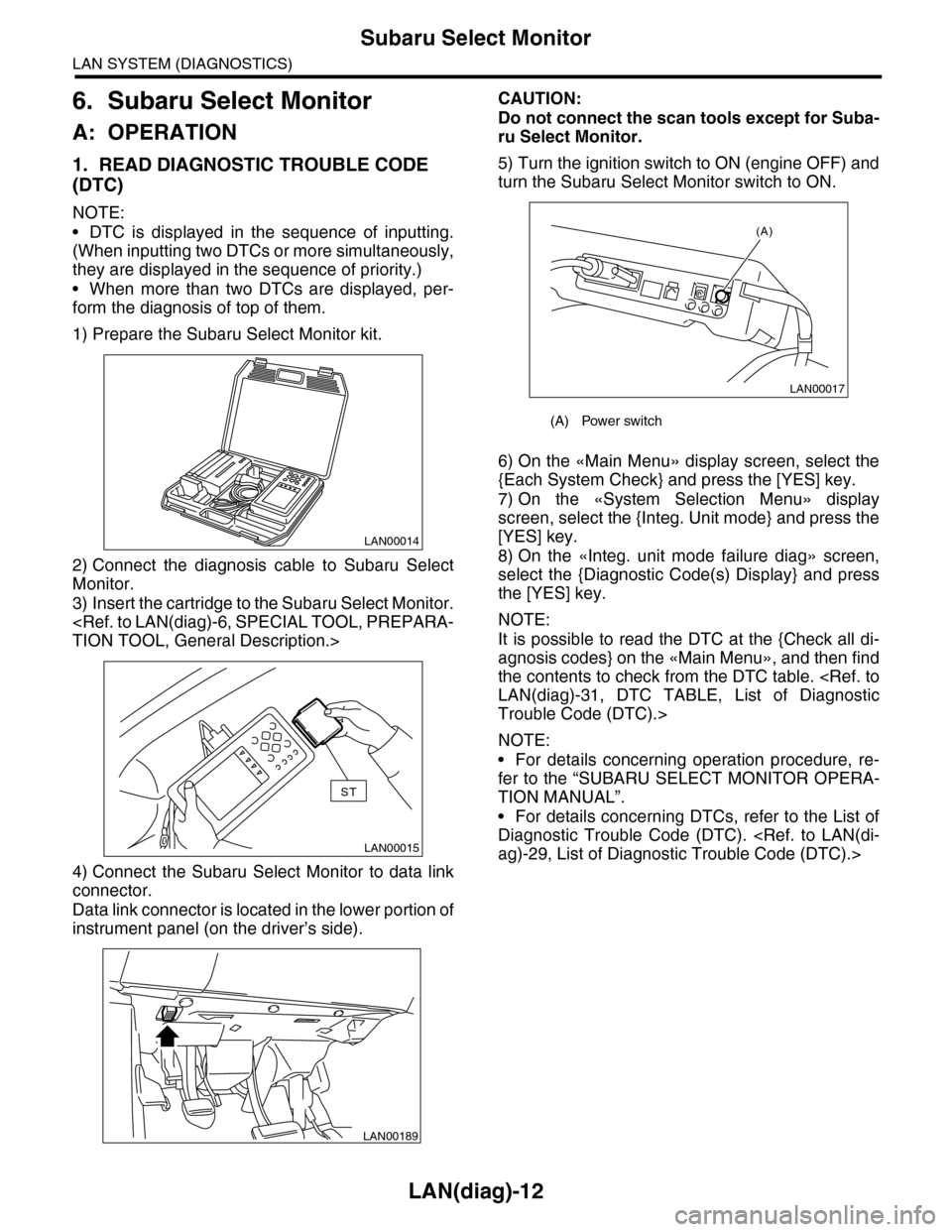
1) Prepare the Subaru Select Monitor kit.
2) Connect the diagnosis cable to Subaru Select
Monitor.
3) Insert the cartridge to the Subaru Select Monitor.
4) Connect the Subaru Select Monitor to data link
connector.
Data link connector is located in the lower portion of
instrument panel (on the driver’s side).
CAUTION:
Do not connect the scan tools except for Suba-
ru Select Monitor.
5) Turn the ignition switch to ON (engine OFF) and
turn the Subaru Select Monitor switch to ON.
6) On the «Main Menu» display screen, select the
{Each System Check} and press the [YES] key.
7) On the «System Selection Menu» display
screen, select the {Integ. Unit mode} and press the
[YES] key.
8) On the «Integ. unit mode failure diag» screen,
select the {Diagnostic Code(s) Display} and press
the [YES] key.
NOTE:
It is possible to read the DTC at the {Check all di-
agnosis codes} on the «Main Menu», and then find
the contents to check from the DTC table.
Trouble Code (DTC).>
NOTE:
•For details concerning operation procedure, re-
fer to the “SUBARU SELECT MONITOR OPERA-
TION MANUAL”.
•For details concerning DTCs, refer to the List of
Diagnostic Trouble Code (DTC).
LAN00014
LAN00015
ST
LAN00189
(A) Power switch
LAN00017
(A)
Page 675 of 2453
SL-46
Ignition Key Lock
SECURITY AND LOCKS
17.Ignition Key Lock
A: REPLACEMENT
1) Disconnect the ground cable from battery.
2) Remove the steering column.
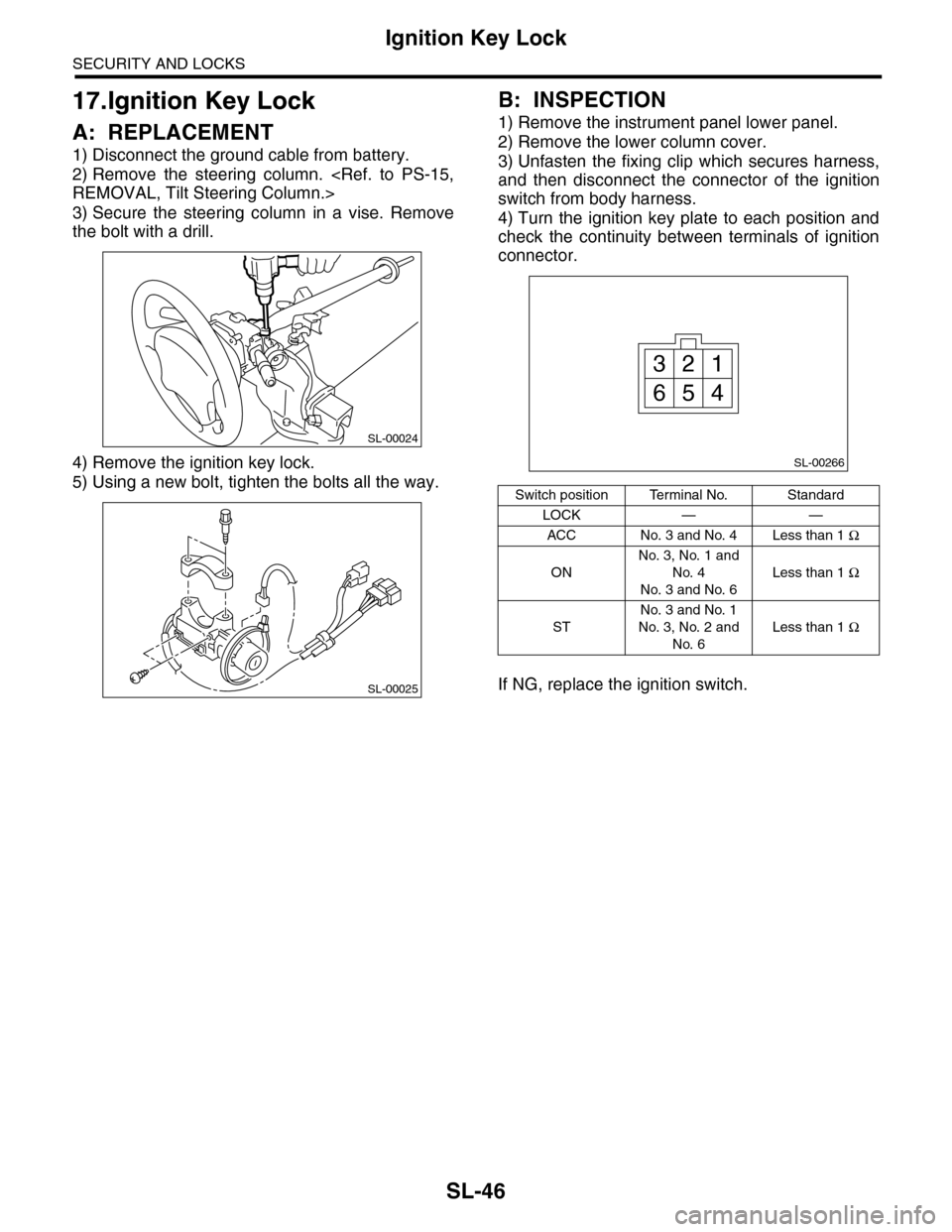
3) Secure the steering column in a vise. Remove
the bolt with a drill.
4) Remove the ignition key lock.
5) Using a new bolt, tighten the bolts all the way.
B: INSPECTION
1) Remove the instrument panel lower panel.
2) Remove the lower column cover.
3) Unfasten the fixing clip which secures harness,
and then disconnect the connector of the ignition
switch from body harness.
4) Turn the ignition key plate to each position and
check the continuity between terminals of ignition
connector.
If NG, replace the ignition switch.
SL-00024
SL-00025
Switch position Terminal No. Standard
LOCK — —
ACC No. 3 and No. 4 Less than 1 Ω
ON
No. 3, No. 1 and
No. 4
No. 3 and No. 6
Less than 1 Ω
ST
No. 3 and No. 1
No. 3, No. 2 and
No. 6
Less than 1 Ω
SL-00266
13
456
2
Page 681 of 2453
SL-52
Body Integrated Unit
SECURITY AND LOCKS
23.Body Integrated Unit
A: REMOVAL
NOTE:
•When replacing the body integrated unit, check
the current setting and note it.
OPERATION, Subaru Select Monitor.>
•When replacing the body integrated unit, all im-
mobilizer keys also must be replaced and regis-
tered again.
1) Disconnect the ground cable from battery.
2) Remove the instrument panel lower cover.
er.>
3) Disconnect the connector of body integrated
unit.
CAUTION:
•Be careful to keep water and other foreign
materials away from body integrated unit.
•Do not attach or register the immobilizer re-
lated unit which is already registered to another
vehicle, for the purpose of diagnosis or func-
tion check.
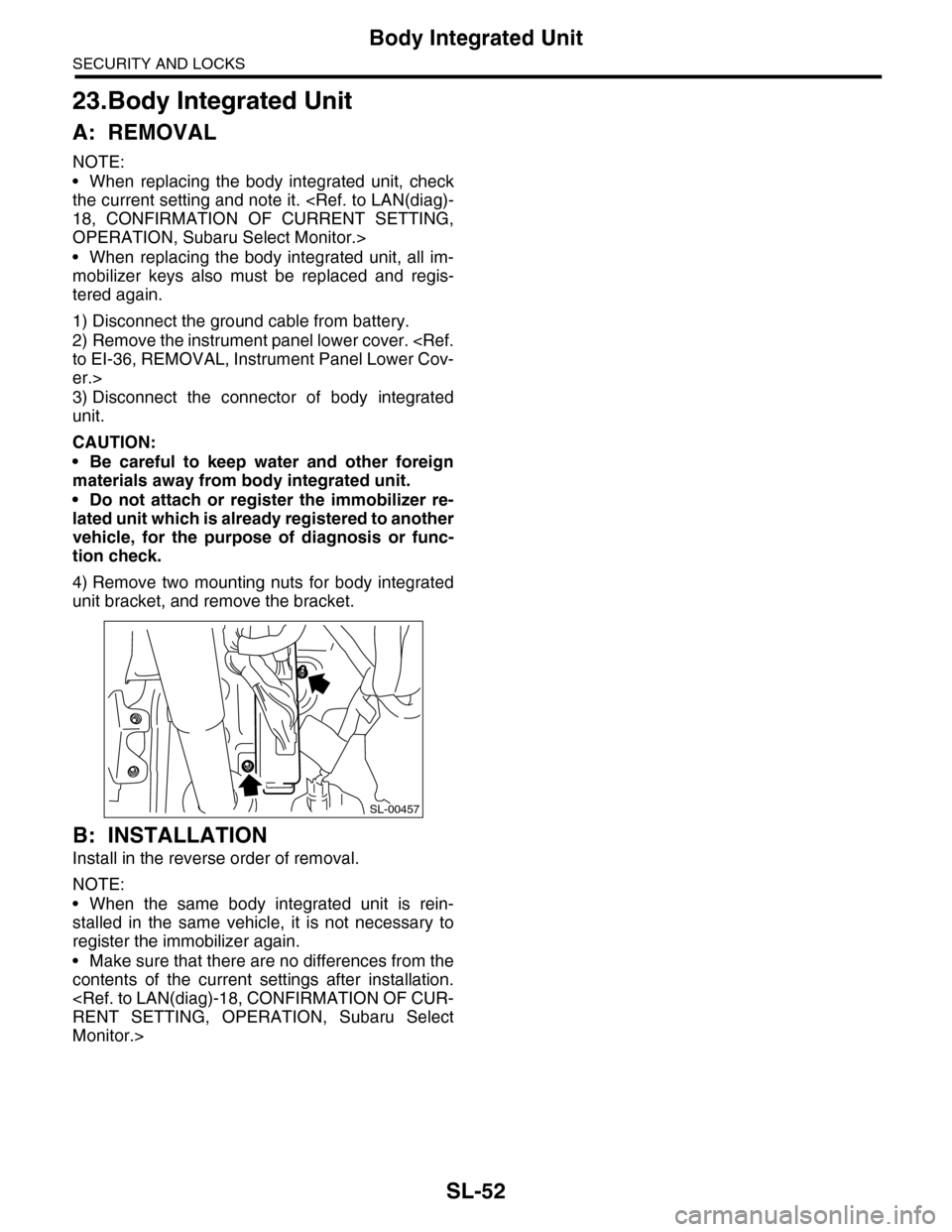
4) Remove two mounting nuts for body integrated
unit bracket, and remove the bracket.
B: INSTALLATION
Install in the reverse order of removal.
NOTE:
•When the same body integrated unit is rein-
stalled in the same vehicle, it is not necessary to
register the immobilizer again.
•Make sure that there are no differences from the
contents of the current settings after installation.
Monitor.>
SL-00457
Page 684 of 2453
SL-55
Immobilizer Antenna
SECURITY AND LOCKS
26.Immobilizer Antenna
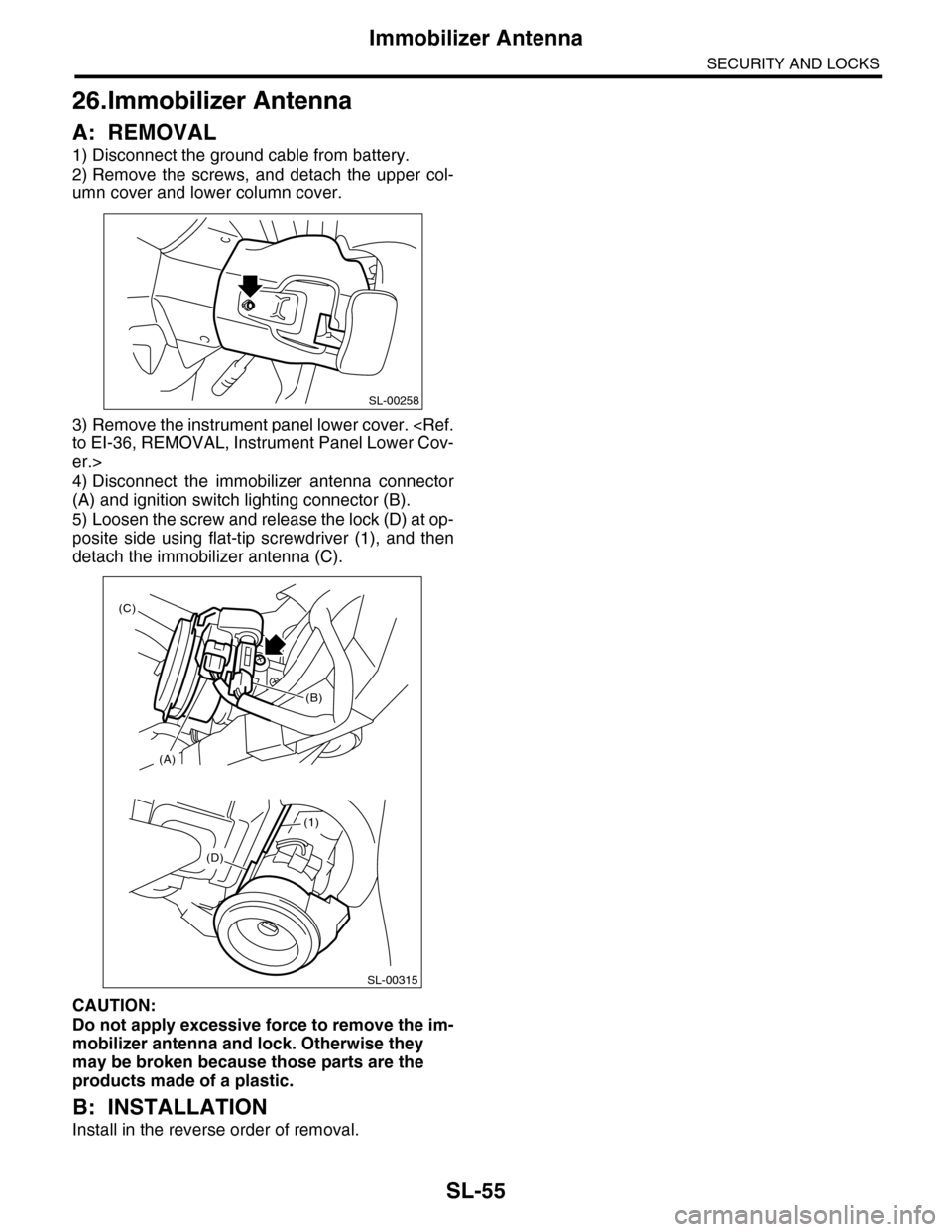
A: REMOVAL
1) Disconnect the ground cable from battery.
2) Remove the screws, and detach the upper col-
umn cover and lower column cover.
3) Remove the instrument panel lower cover.
er.>
4) Disconnect the immobilizer antenna connector
(A) and ignition switch lighting connector (B).
5) Loosen the screw and release the lock (D) at op-
posite side using flat-tip screwdriver (1), and then
detach the immobilizer antenna (C).
CAUTION:
Do not apply excessive force to remove the im-
mobilizer antenna and lock. Otherwise they
may be broken because those parts are the
products made of a plastic.
B: INSTALLATION
Install in the reverse order of removal.
SL-00258
(D)
(1)
SL-00315
(A)
(C)
(B)
Page 764 of 2453
BVC(diag)-9
Subaru Select Monitor
BRAKE VACUUM CONTROL (BVC) (DIAGNOSTICS)
6. Subaru Select Monitor
A: OPERATION
1. READ DIAGNOSTIC TROUBLE CODE
(DTC)
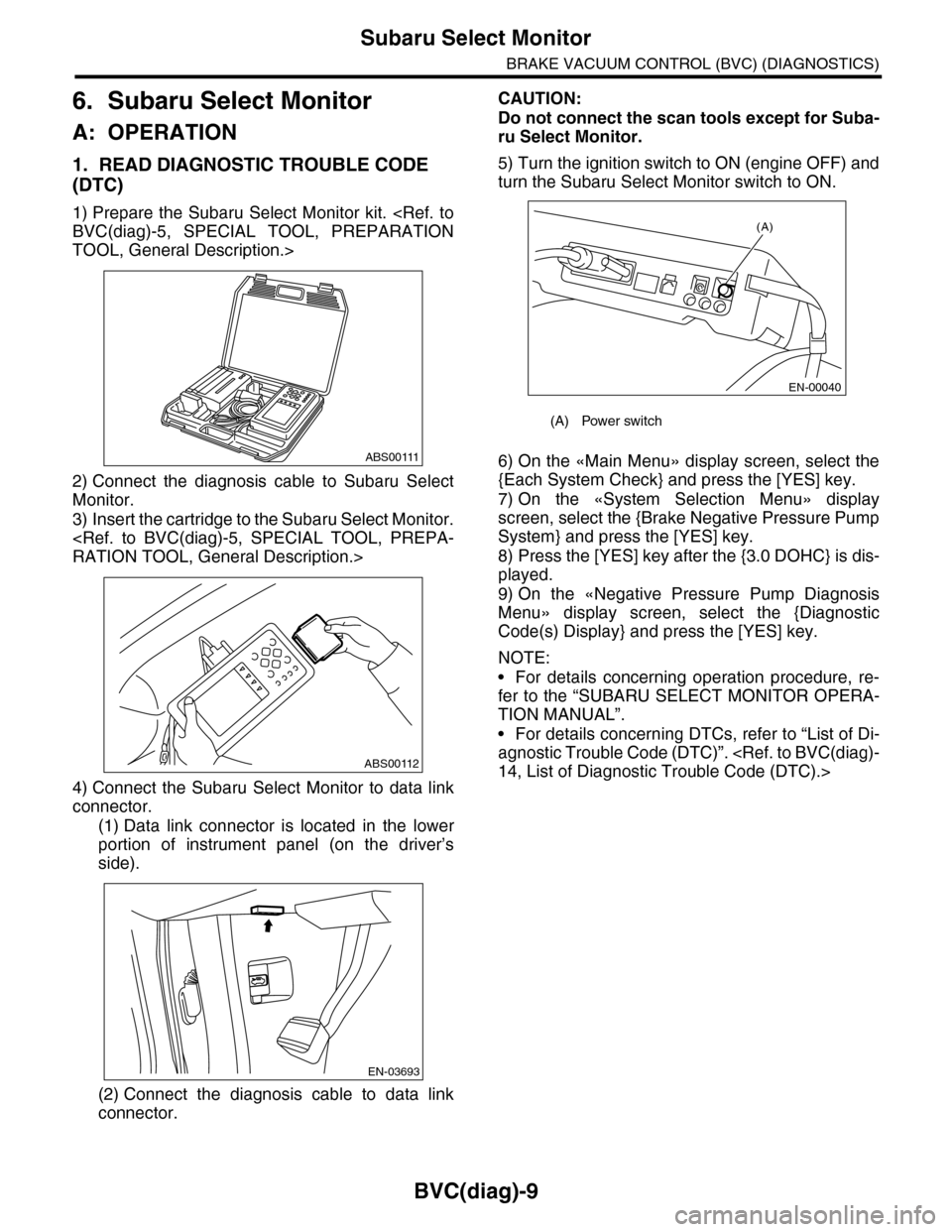
1) Prepare the Subaru Select Monitor kit.
TOOL, General Description.>
2) Connect the diagnosis cable to Subaru Select
Monitor.
3) Insert the cartridge to the Subaru Select Monitor.
4) Connect the Subaru Select Monitor to data link
connector.
(1) Data link connector is located in the lower
portion of instrument panel (on the driver’s
side).
(2) Connect the diagnosis cable to data link
connector.
CAUTION:
Do not connect the scan tools except for Suba-
ru Select Monitor.
5) Turn the ignition switch to ON (engine OFF) and
turn the Subaru Select Monitor switch to ON.
6) On the «Main Menu» display screen, select the
{Each System Check} and press the [YES] key.
7) On the «System Selection Menu» display
screen, select the {Brake Negative Pressure Pump
System} and press the [YES] key.
8) Press the [YES] key after the {3.0 DOHC} is dis-
played.
9) On the «Negative Pressure Pump Diagnosis
Menu» display screen, select the {Diagnostic
Code(s) Display} and press the [YES] key.
NOTE:
•For details concerning operation procedure, re-
fer to the “SUBARU SELECT MONITOR OPERA-
TION MANUAL”.
•For details concerning DTCs, refer to “List of Di-
agnostic Trouble Code (DTC)”.
ABS00111
ABS00112
EN-03693
(A) Power switch
(A)
EN-00040
Page 875 of 2453
PB-4
Parking Brake Pedal
PARKING BRAKE
2. Parking Brake Pedal
A: REMOVAL
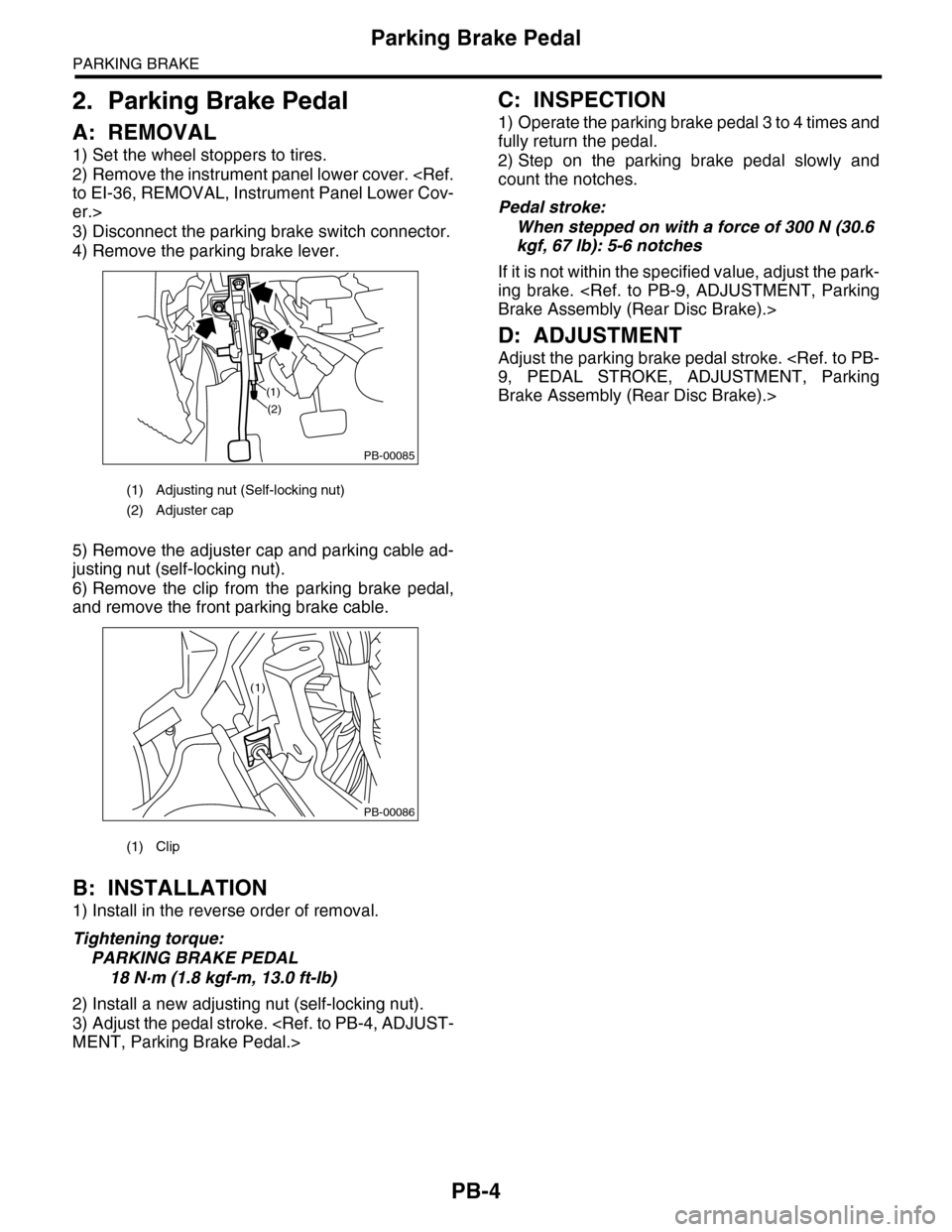
1) Set the wheel stoppers to tires.
2) Remove the instrument panel lower cover.
er.>
3) Disconnect the parking brake switch connector.
4) Remove the parking brake lever.
5) Remove the adjuster cap and parking cable ad-
justing nut (self-locking nut).
6) Remove the clip from the parking brake pedal,
and remove the front parking brake cable.
B: INSTALLATION
1) Install in the reverse order of removal.
Tightening torque:
PARKING BRAKE PEDAL
18 N·m (1.8 kgf-m, 13.0 ft-lb)
2) Install a new adjusting nut (self-locking nut).
3) Adjust the pedal stroke.
C: INSPECTION
1) Operate the parking brake pedal 3 to 4 times and
fully return the pedal.
2) Step on the parking brake pedal slowly and
count the notches.
Pedal stroke:
When stepped on with a force of 300 N (30.6
kgf, 67 lb): 5-6 notches
If it is not within the specified value, adjust the park-
ing brake.
D: ADJUSTMENT
Adjust the parking brake pedal stroke.
Brake Assembly (Rear Disc Brake).>
(1) Adjusting nut (Self-locking nut)
(2) Adjuster cap
(1) Clip
PB-00085
(1)
(2)
PB-00086
(1)
Page 895 of 2453
PS-15
Tilt Steering Column
POWER ASSISTED SYSTEM (POWER STEERING)
4. Tilt Steering Column
A: REMOVAL
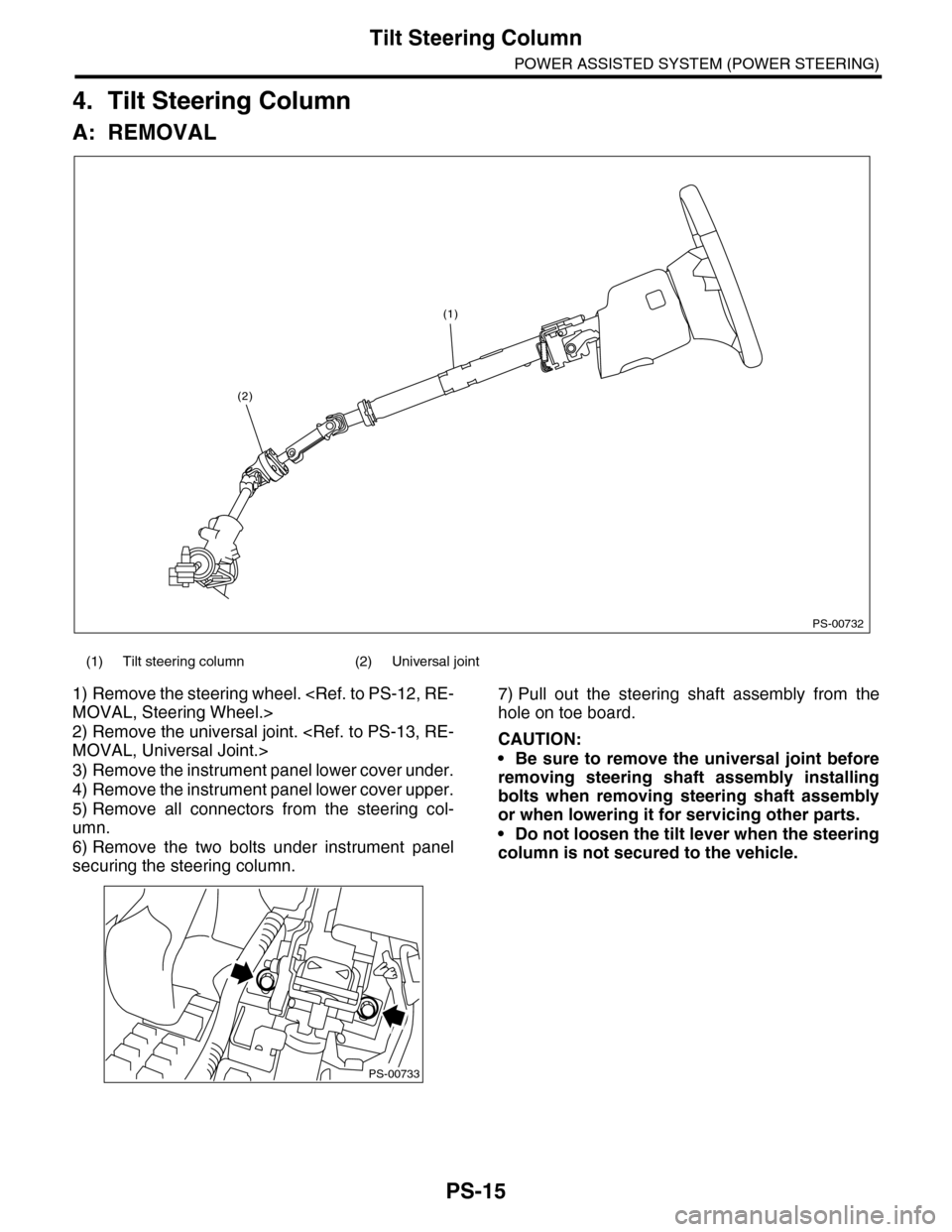
1) Remove the steering wheel.
2) Remove the universal joint.
3) Remove the instrument panel lower cover under.
4) Remove the instrument panel lower cover upper.
5) Remove all connectors from the steering col-
umn.
6) Remove the two bolts under instrument panel
securing the steering column.
7) Pull out the steering shaft assembly from the
hole on toe board.
CAUTION:
•Be sure to remove the universal joint before
removing steering shaft assembly installing
bolts when removing steering shaft assembly
or when lowering it for servicing other parts.
•Do not loosen the tilt lever when the steering
column is not secured to the vehicle.
(1) Tilt steering column (2) Universal joint
PS-00732
(1)
(2)
PS-00733
Page 896 of 2453
PS-16
Tilt Steering Column
POWER ASSISTED SYSTEM (POWER STEERING)
B: INSTALLATION
1) Insert the end of the steering shaft into the toe
board.
2) With the tilt lever secured, tighten the steering
shaft mounting bolts under instrument panel.
Tightening torque:
25 N·m (2.5 kgf-m, 18.1 ft-lb)
3) Connect all the connectors under the instrument
panel.
4) Connect the airbag system connector at the har-
ness spool.
NOTE:
Make sure to apply double lock.
5) Install the instrument panel lower cover with tilt
lever held in the lowered position.
6) Install the universal joint.
7) Align the center position of the roll connector.
8) Install the steering wheel.
CAUTION:
Insert the roll connector guide pin into the
guide hole on lower end of steering wheel sur-
face to prevent damage.
C: DISASSEMBLY
Remove the two screws securing the upper steer-
ing column covers, and the two screws securing
the combination switch, and then remove related
parts.
D: ASSEMBLY
Insert the combination switch to the upper column
shaft, and install the upper column cover. Then
route the ignition key harness and combination
switch harness between the column cover mount-
ing bosses.
Tightening torque:
1.2 N·m (0.12 kgf-m, 0.9 ft-lb)
CAUTION:
Do not overtorque the screw.
E: INSPECTION
1. BASIC INSPECTION
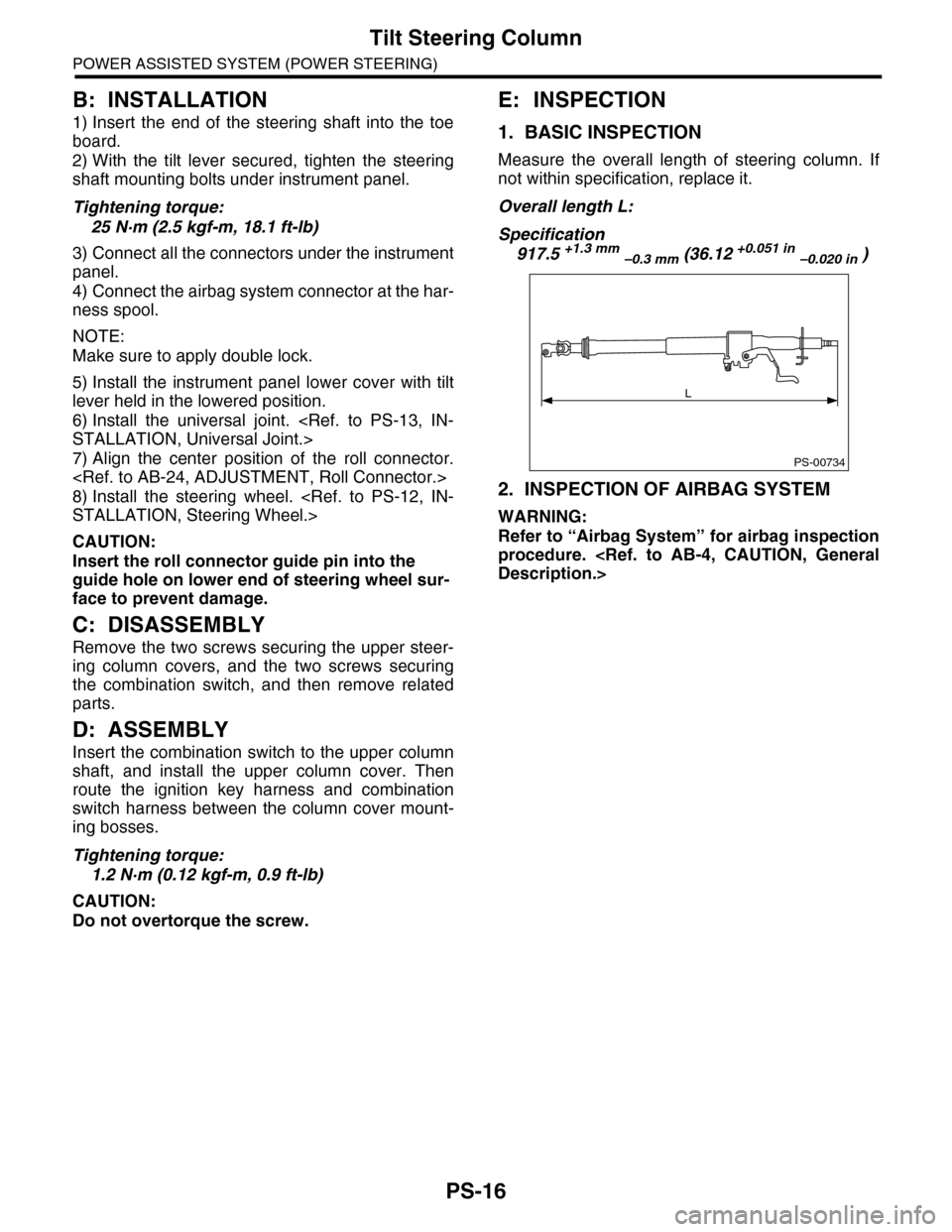
Measure the overall length of steering column. If
not within specification, replace it.
Overall length L:
Specification
917.5 +1.3 mm –0.3 mm (36.12 +0.051 in –0.020 in )
2. INSPECTION OF AIRBAG SYSTEM
WARNING:
Refer to “Airbag System” for airbag inspection
procedure.
PS-00734
L
Page 958 of 2453
TPM(diag)-8
Subaru Select Monitor
TIRE PRESSURE MONITORING SYSTEM (DIAGNOSTICS)
5. Subaru Select Monitor
A: OPERATION
1. READ DIAGNOSTIC TROUBLE CODE
(DTC)
1) Prepare the Subaru Select Monitor kit.
TOOL, General Description.>
2) Connect the diagnosis cable to Subaru Select
Monitor.
3) Insert the cartridge to Subaru Select Monitor.
4) Connect the Subaru Select Monitor to data link
connector.
(1) Data link connector is located in the lower
portion of instrument panel (on the driver's
side).
(2) Connect the diagnosis cable to data link
connector.
CAUTION:
Do not connect the scan tools except for Suba-
ru Select Monitor.
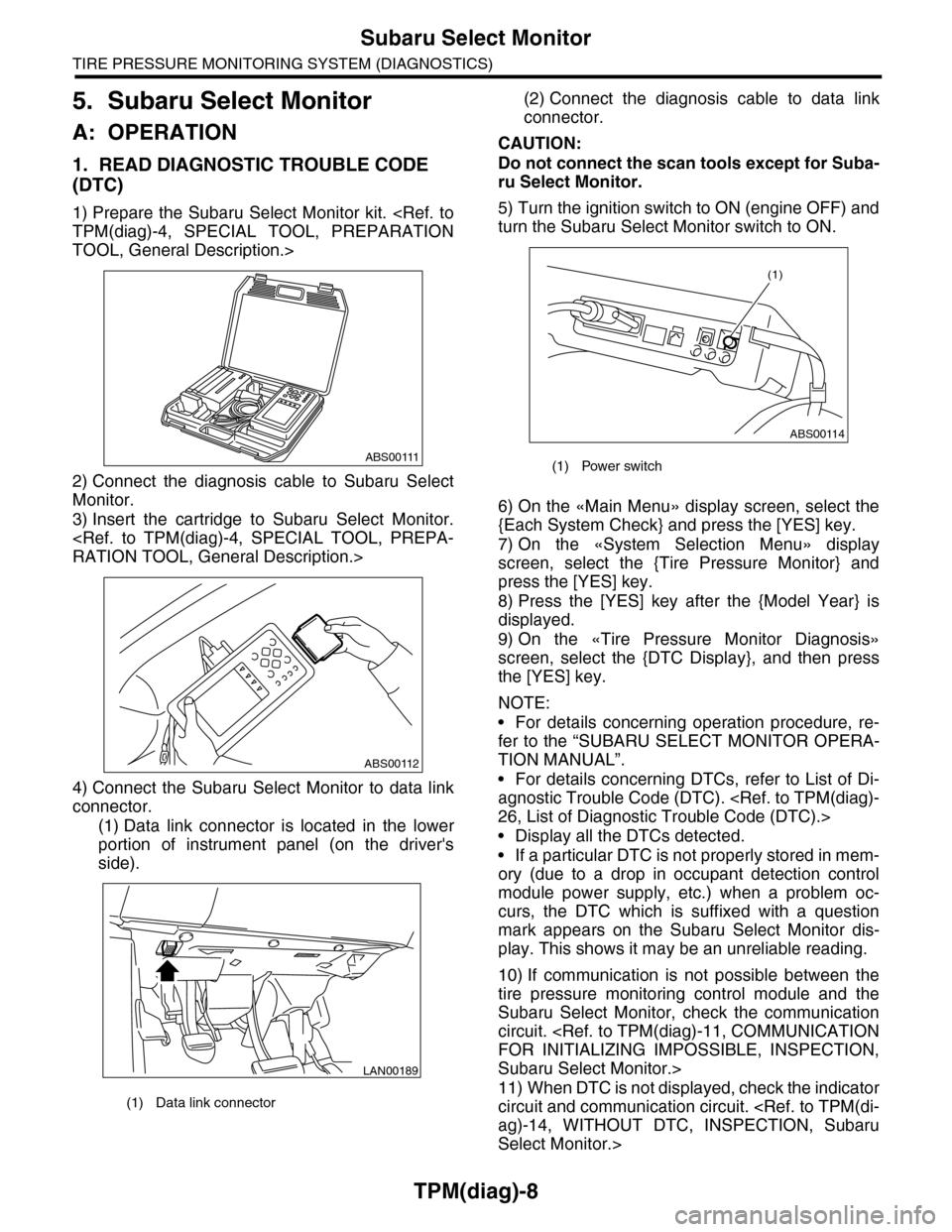
5) Turn the ignition switch to ON (engine OFF) and
turn the Subaru Select Monitor switch to ON.
6) On the «Main Menu» display screen, select the
{Each System Check} and press the [YES] key.
7) On the «System Selection Menu» display
screen, select the {Tire Pressure Monitor} and
press the [YES] key.
8) Press the [YES] key after the {Model Year} is
displayed.
9) On the «Tire Pressure Monitor Diagnosis»
screen, select the {DTC Display}, and then press
the [YES] key.
NOTE:
•For details concerning operation procedure, re-
fer to the “SUBARU SELECT MONITOR OPERA-
TION MANUAL”.
•For details concerning DTCs, refer to List of Di-
agnostic Trouble Code (DTC).
•Display all the DTCs detected.
•If a particular DTC is not properly stored in mem-
ory (due to a drop in occupant detection control
module power supply, etc.) when a problem oc-
curs, the DTC which is suffixed with a question
mark appears on the Subaru Select Monitor dis-
play. This shows it may be an unreliable reading.
10) If communication is not possible between the
tire pressure monitoring control module and the
Subaru Select Monitor, check the communication
circuit.
Subaru Select Monitor.>
11) When DTC is not displayed, check the indicator
circuit and communication circuit.
Select Monitor.>
(1) Data link connector
ABS00111
ABS00112
LAN00189
(1) Power switch
ABS00114
(1)