instrument panel SUBARU TRIBECA 2009 1.G Service Owner's Manual
[x] Cancel search | Manufacturer: SUBARU, Model Year: 2009, Model line: TRIBECA, Model: SUBARU TRIBECA 2009 1.GPages: 2453, PDF Size: 46.32 MB
Page 254 of 2453
EI-12
General Description
EXTERIOR/INTERIOR TRIM
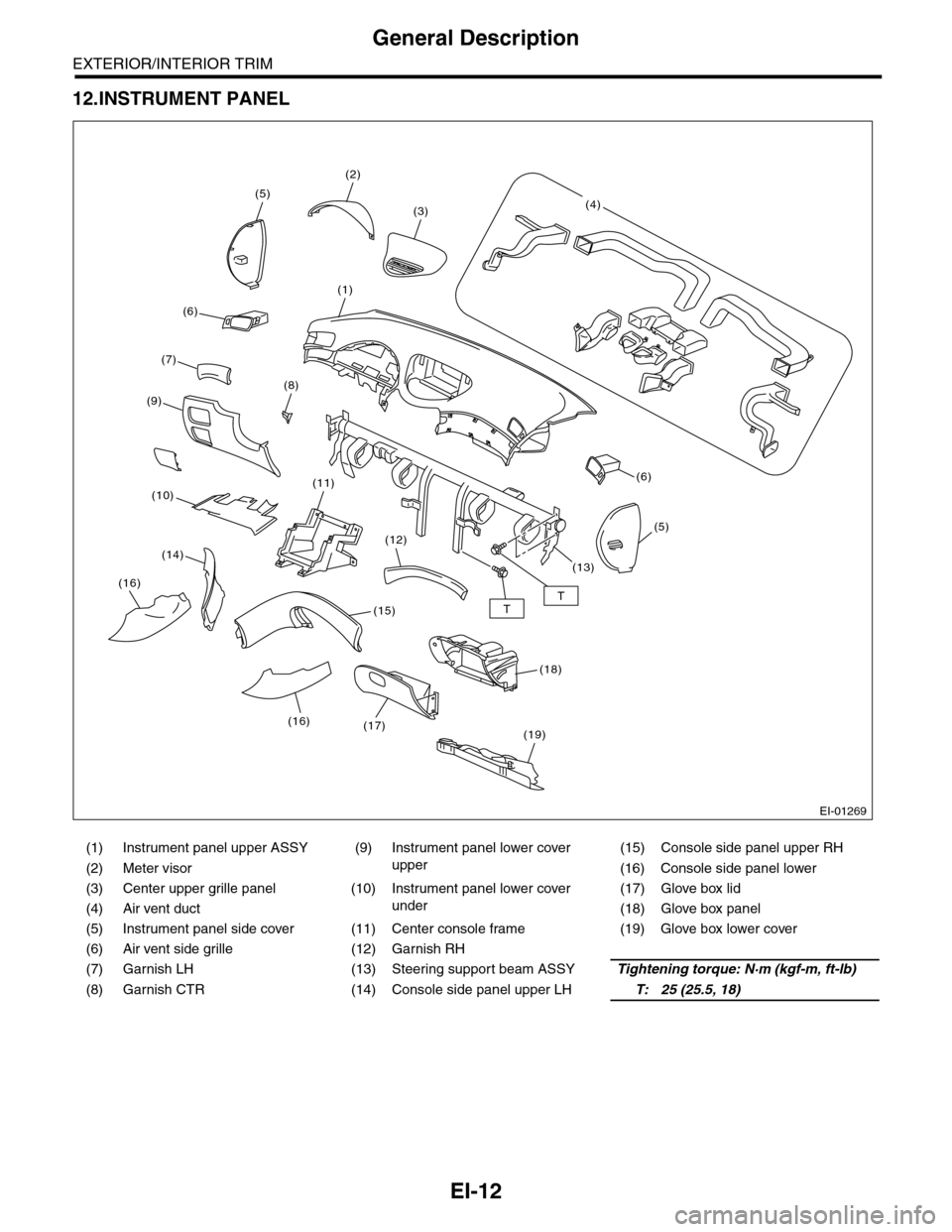
12.INSTRUMENT PANEL
(1) Instrument panel upper ASSY (9)
Instrument panel lower cover
upper
(15) Console side panel upper RH
(2) Meter visor (16) Console side panel lower
(3) Center upper grille panel (10)
Instrument panel lower cover
under
(17) Glove box lid
(4) Air vent duct (18) Glove box panel
(5) Instrument panel side cover (11) Center console frame (19) Glove box lower cover
(6) Air vent side grille (12) Garnish RH
(7) Garnish LH (13) Steering support beam ASSYTightening torque: N·m (kgf-m, ft-lb)
(8) Garnish CTR (14) Console side panel upper LHT: 25 (25.5, 18)
EI-01269
TT
(2)
(5)
(1)
(8)
(6)
(19)
(11)
(12)
(15)
(17)
(5)
(6)
(3)(4)
(7)
(9)
(10)
(14)
(16)
(18)
(13)
(16)
Page 278 of 2453
EI-36
Instrument Panel Lower Cover
EXTERIOR/INTERIOR TRIM
13. Instrument Panel Lower Cover
A: REMOVAL
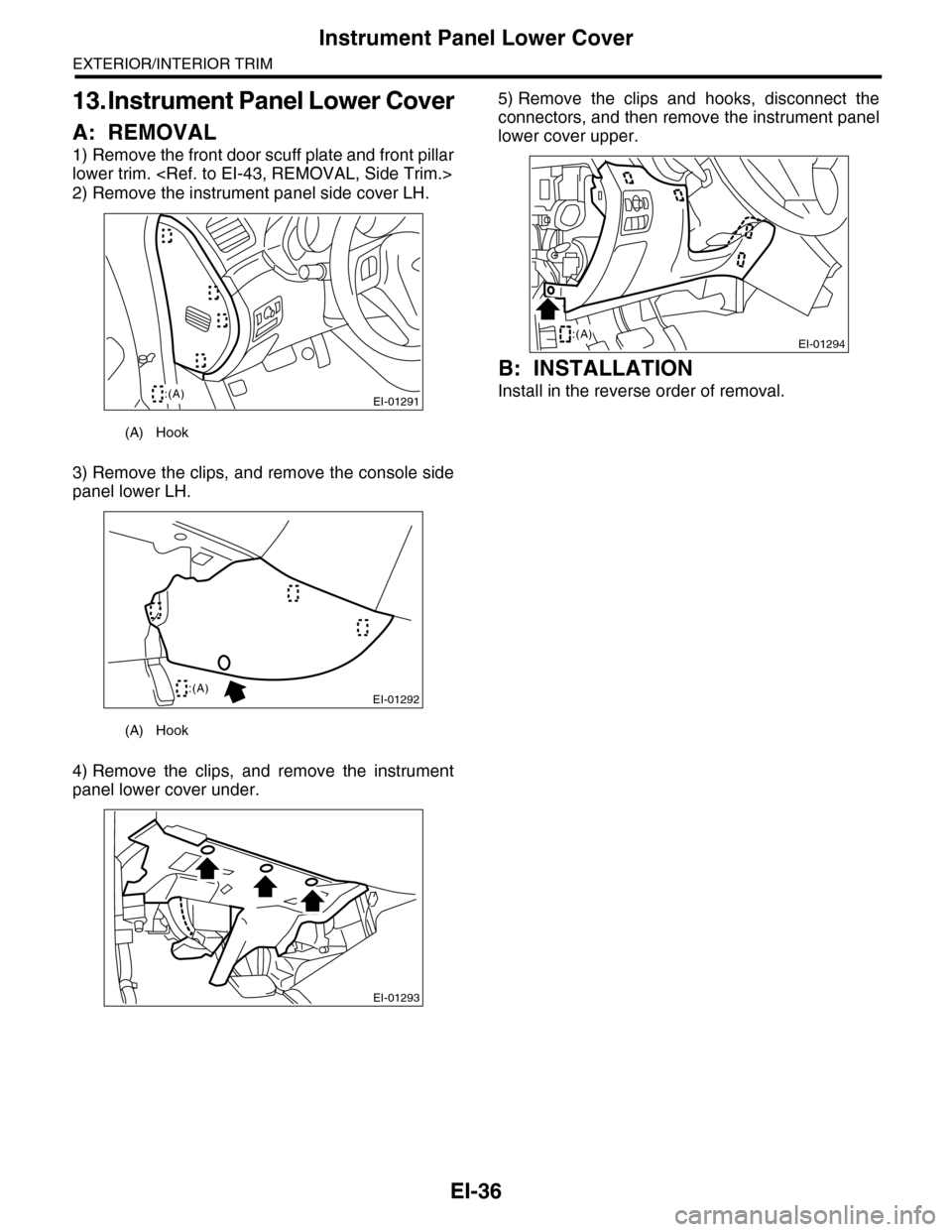
1) Remove the front door scuff plate and front pillar
lower trim.
2) Remove the instrument panel side cover LH.
3) Remove the clips, and remove the console side
panel lower LH.
4) Remove the clips, and remove the instrument
panel lower cover under.
5) Remove the clips and hooks, disconnect the
connectors, and then remove the instrument panel
lower cover upper.
B: INSTALLATION
Install in the reverse order of removal.
(A) Hook
(A) Hook
EI-01291:(A)
EI-01292:(A)
EI-01293
EI-01294:(A)
Page 279 of 2453
EI-37
Glove Box
EXTERIOR/INTERIOR TRIM
14.Glove Box
A: REMOVAL
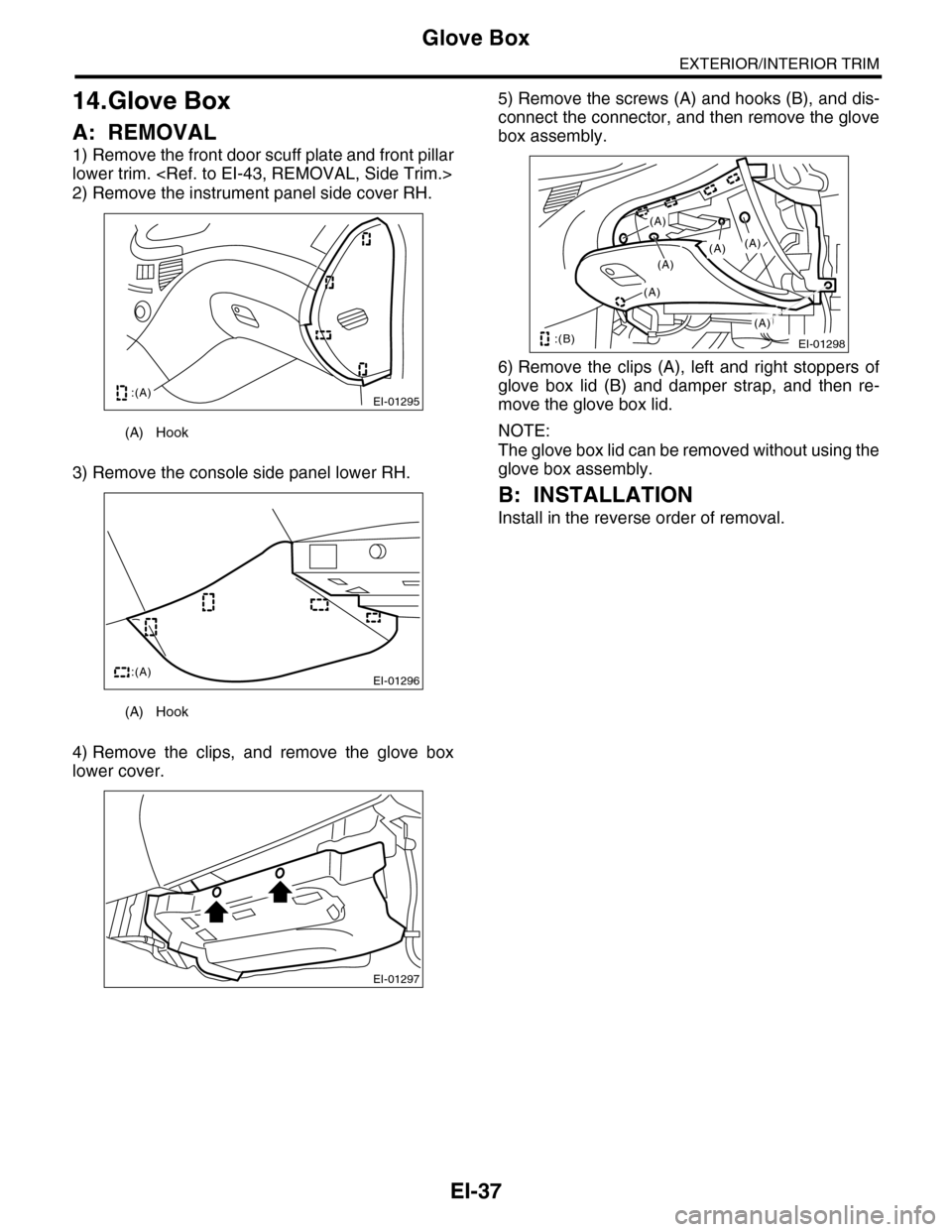
1) Remove the front door scuff plate and front pillar
lower trim.
2) Remove the instrument panel side cover RH.
3) Remove the console side panel lower RH.
4) Remove the clips, and remove the glove box
lower cover.
5) Remove the screws (A) and hooks (B), and dis-
connect the connector, and then remove the glove
box assembly.
6) Remove the clips (A), left and right stoppers of
glove box lid (B) and damper strap, and then re-
move the glove box lid.
NOTE:
The glove box lid can be removed without using the
glove box assembly.
B: INSTALLATION
Install in the reverse order of removal.
(A) Hook
(A) Hook
EI-01295:(A)
EI-01296:(A)
EI-01297
EI-01298
(A)
(A)
(A)
(A)
(A)
(A)
:(B)
Page 281 of 2453
EI-39
Center Console
EXTERIOR/INTERIOR TRIM
16.Center Console
A: REMOVAL
1) Remove the control panel.
2) Remove the instrument panel lower cover.
er.>
3) Remove the glove box.
4) Remove the console box.
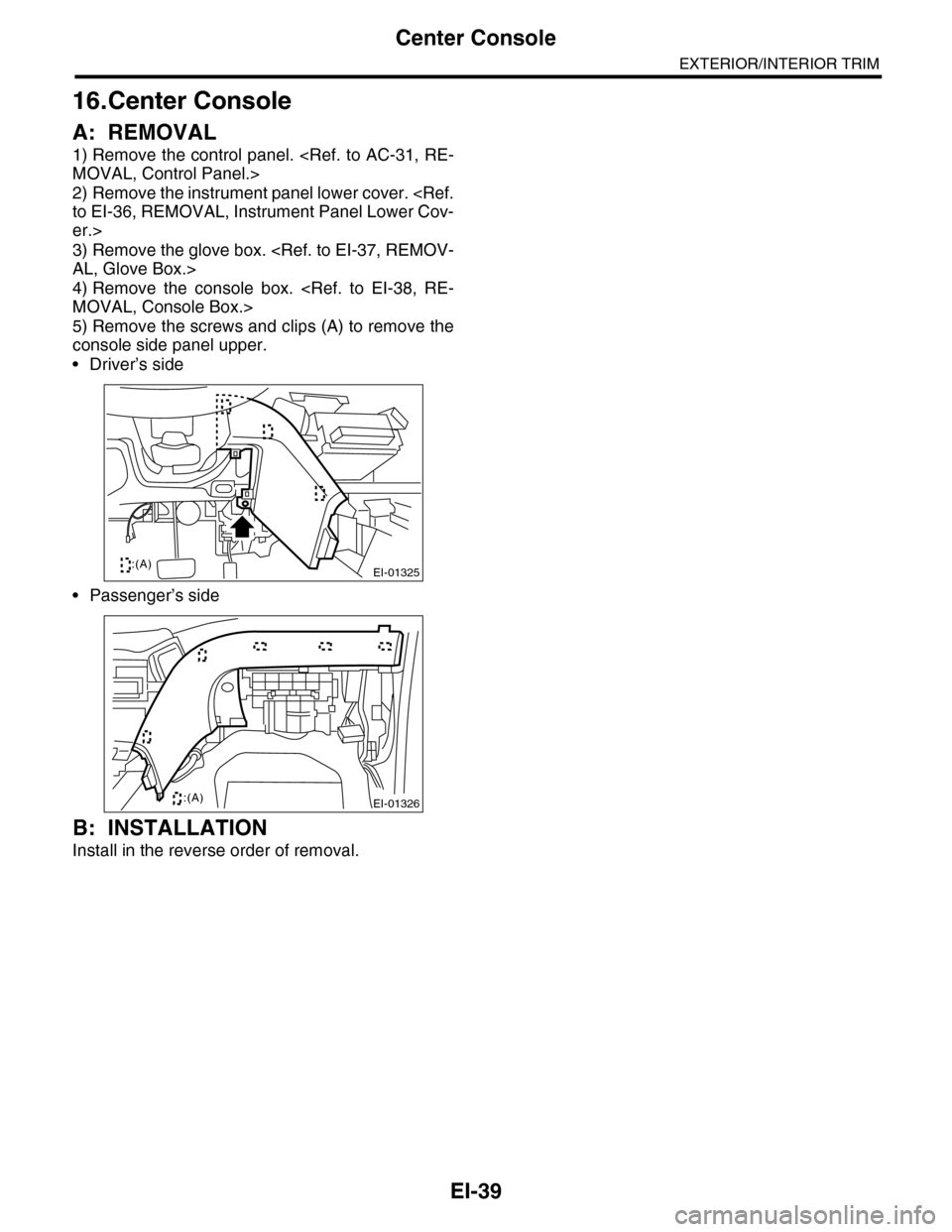
5) Remove the screws and clips (A) to remove the
console side panel upper.
•Driver’s side
•Passenger’s side
B: INSTALLATION
Install in the reverse order of removal.
EI-01325:(A)
EI-01326:(A)
Page 282 of 2453
EI-40
Instrument Panel Assembly
EXTERIOR/INTERIOR TRIM
17.Instrument Panel Assembly
A: REMOVAL
CAUTION:
Take care of the following when removing the
instrument panel from the vehicle body.
•Refer to “CAUTION” of “General Description”
before starting the work.
•Be sure to disconnect each harness connec-
tor. Applying excessive pulling force may dam-
age the harness.
•Be careful to the harness of airbag system.
Damage of the harness may cause the air bag
system malfunction.
•Take care not to damage the interior trims
when removing the instrument panel from the
vehicle body.
NOTE:
•Putting alignment marks to each connector as
necessary facilitates the reassembly work.
•When storing the removed instrument panel, be
sure to prepare a table or the like to put the instru-
ment panel on in order to prevent damage.
1. INSTRUMENT PANEL UPPER
1) Disconnect the ground cable from battery and
wait for at least 20 seconds before starting work.
2) Remove the console box.
3) Remove the instrument panel lower cover.
er.>
4) Remove the glove box.
5) Remove the center console.
6) Remove the audio unit.
7) Remove the combination meter assembly.
8) Remove the upper grille.
9) Remove the multi function display or navigation
monitor, and warning box.
10) Remove the front pillar upper trim.
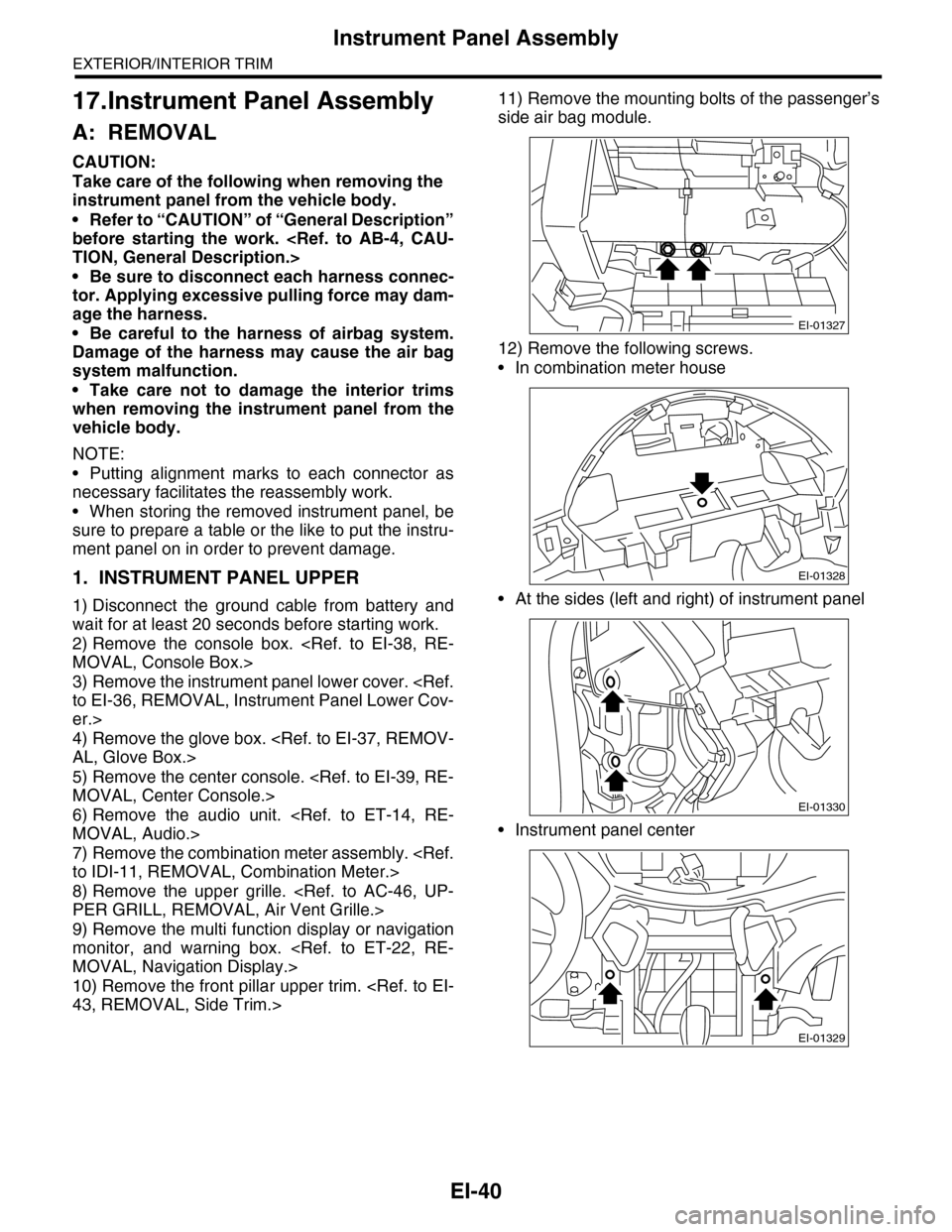
11) Remove the mounting bolts of the passenger’s
side air bag module.
12) Remove the following screws.
•In combination meter house
•At the sides (left and right) of instrument panel
•Instrument panel center
EI-01327
EI-01328
EI-01330
EI-01329
Page 283 of 2453
EI-41
Instrument Panel Assembly
EXTERIOR/INTERIOR TRIM
13) Make sure that the instrument panel upper is
removed from the steering support beam
14) Disconnect the connectors, and remove the in-
strument panel from vehicle body.
15) Remove the heater vent duct.
16) Remove the air vent grille.
17) Remove the passenger airbag module.
ule.>
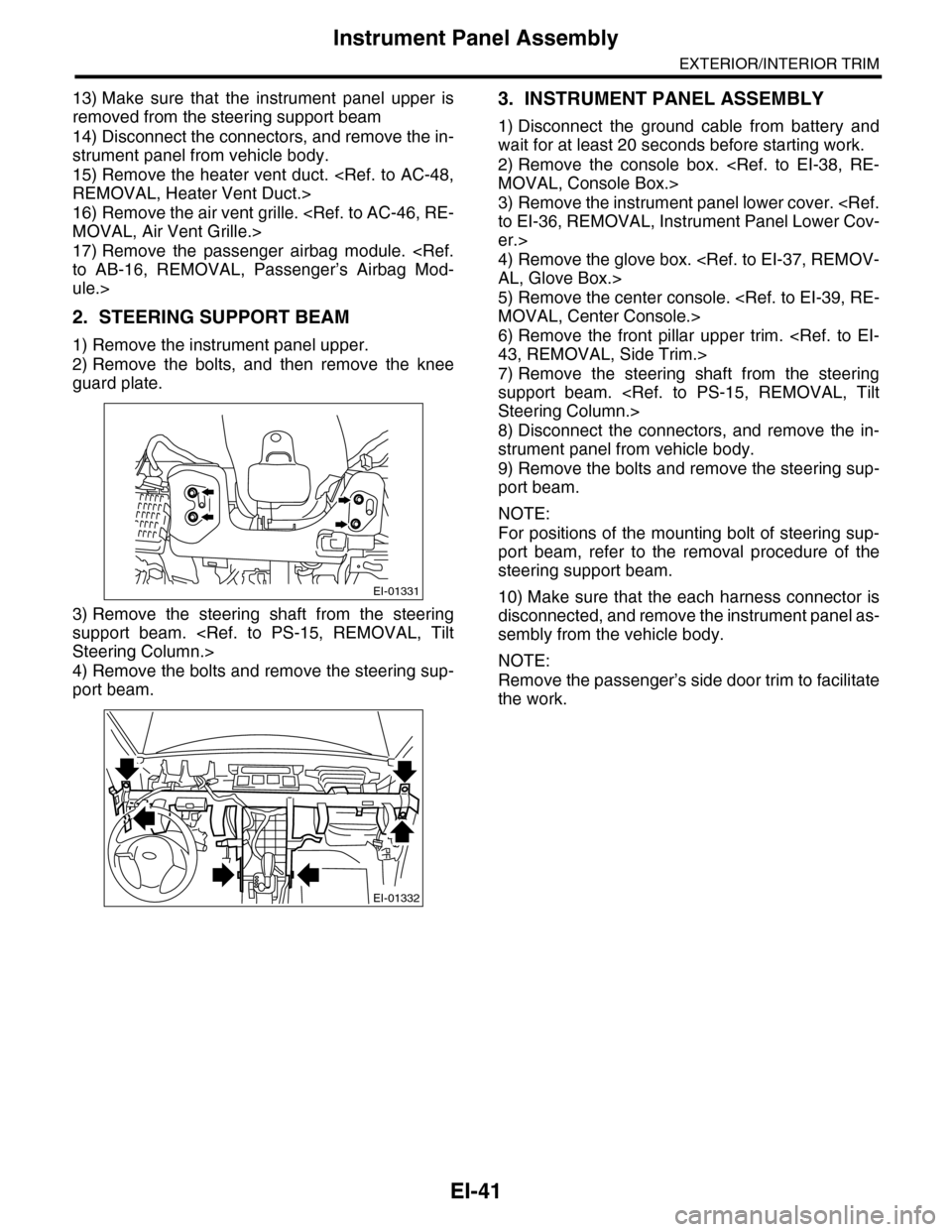
2. STEERING SUPPORT BEAM
1) Remove the instrument panel upper.
2) Remove the bolts, and then remove the knee
guard plate.
3) Remove the steering shaft from the steering
support beam.
4) Remove the bolts and remove the steering sup-
port beam.
3. INSTRUMENT PANEL ASSEMBLY
1) Disconnect the ground cable from battery and
wait for at least 20 seconds before starting work.
2) Remove the console box.
3) Remove the instrument panel lower cover.
er.>
4) Remove the glove box.
5) Remove the center console.
6) Remove the front pillar upper trim.
7) Remove the steering shaft from the steering
support beam.
8) Disconnect the connectors, and remove the in-
strument panel from vehicle body.
9) Remove the bolts and remove the steering sup-
port beam.
NOTE:
For positions of the mounting bolt of steering sup-
port beam, refer to the removal procedure of the
steering support beam.
10) Make sure that the each harness connector is
disconnected, and remove the instrument panel as-
sembly from the vehicle body.
NOTE:
Remove the passenger’s side door trim to facilitate
the work.
EI-01331
EI-01332
Page 284 of 2453
EI-42
Instrument Panel Assembly
EXTERIOR/INTERIOR TRIM
B: INSTALLATION
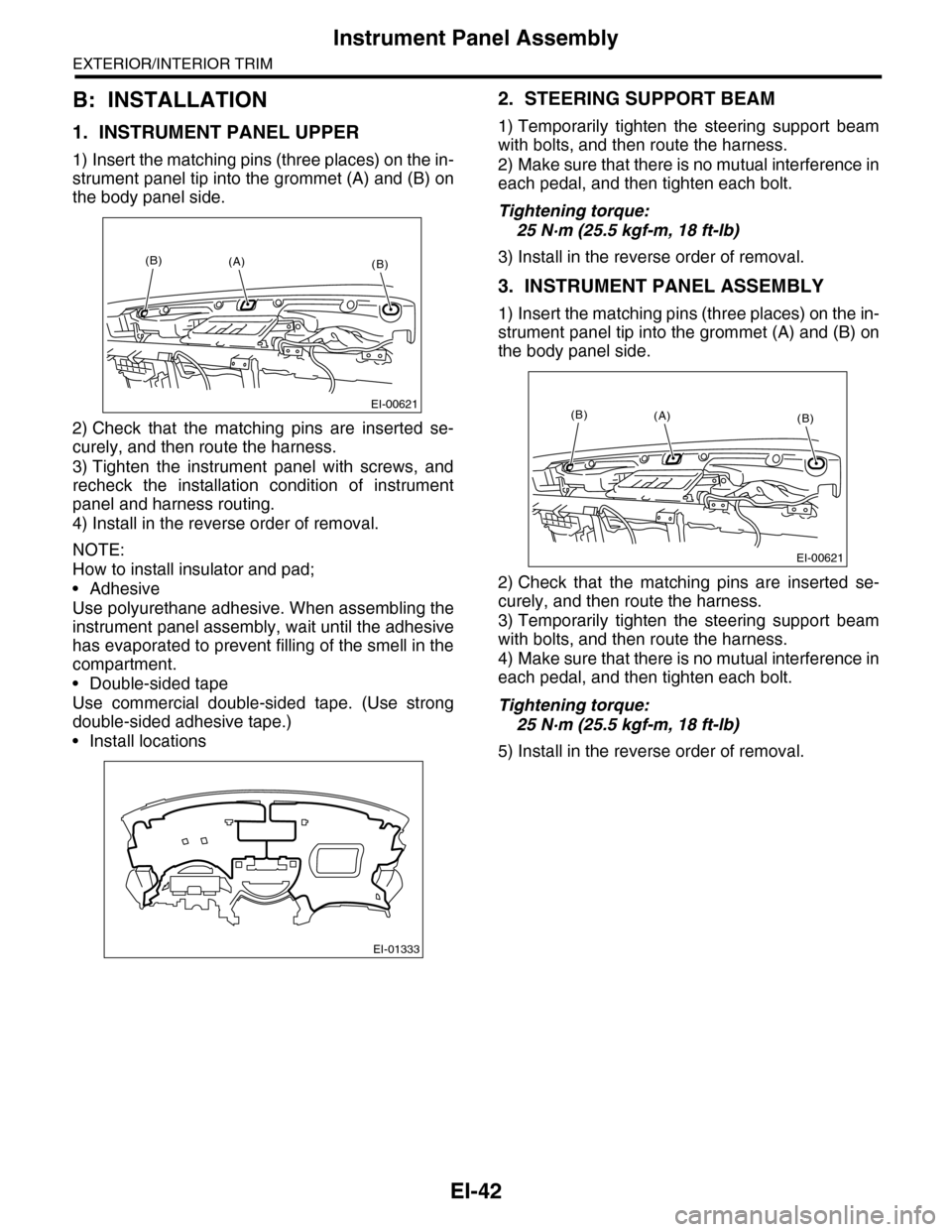
1. INSTRUMENT PANEL UPPER
1) Insert the matching pins (three places) on the in-
strument panel tip into the grommet (A) and (B) on
the body panel side.
2) Check that the matching pins are inserted se-
curely, and then route the harness.
3) Tighten the instrument panel with screws, and
recheck the installation condition of instrument
panel and harness routing.
4) Install in the reverse order of removal.
NOTE:
How to install insulator and pad;
•Adhesive
Use polyurethane adhesive. When assembling the
instrument panel assembly, wait until the adhesive
has evaporated to prevent filling of the smell in the
compartment.
•Double-sided tape
Use commercial double-sided tape. (Use strong
double-sided adhesive tape.)
•Install locations
2. STEERING SUPPORT BEAM
1) Temporarily tighten the steering support beam
with bolts, and then route the harness.
2) Make sure that there is no mutual interference in
each pedal, and then tighten each bolt.
Tightening torque:
25 N·m (25.5 kgf-m, 18 ft-lb)
3) Install in the reverse order of removal.
3. INSTRUMENT PANEL ASSEMBLY
1) Insert the matching pins (three places) on the in-
strument panel tip into the grommet (A) and (B) on
the body panel side.
2) Check that the matching pins are inserted se-
curely, and then route the harness.
3) Temporarily tighten the steering support beam
with bolts, and then route the harness.
4) Make sure that there is no mutual interference in
each pedal, and then tighten each bolt.
Tightening torque:
25 N·m (25.5 kgf-m, 18 ft-lb)
5) Install in the reverse order of removal.
EI-00621
(B)(B)(A)
EI-01333
EI-00621
(B)(B)(A)
Page 289 of 2453
EI-47
Floor Mat
EXTERIOR/INTERIOR TRIM
20.Floor Mat
A: REMOVAL
1. FRONT FLOOR MAT
1) Remove the front seats.
2) Remove the second–row seats.
3) Remove the console box.
4) Remove the instrument panel lower cover.
er.>
5) Remove the glove box.
6) Remove the following trims.
•Front door scuff plate
•Rear door scuff plate
•Front pillar lower trim
•Center pillar lower trim
7) Remove the remote opener cover.
8) Remove the navigation unit.
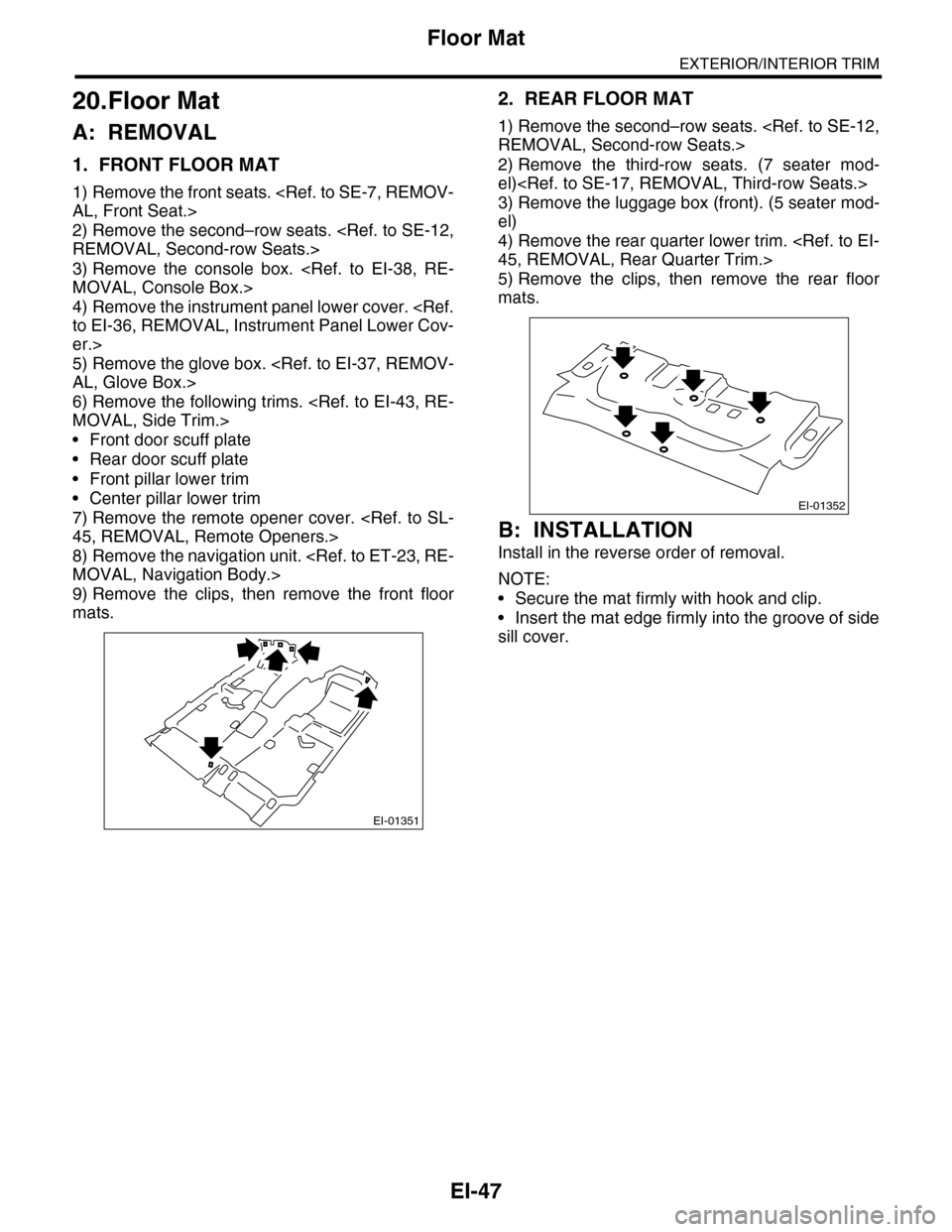
9) Remove the clips, then remove the front floor
mats.
2. REAR FLOOR MAT
1) Remove the second–row seats.
2) Remove the third-row seats. (7 seater mod-
el)
3) Remove the luggage box (front). (5 seater mod-
el)
4) Remove the rear quarter lower trim.
5) Remove the clips, then remove the rear floor
mats.
B: INSTALLATION
Install in the reverse order of removal.
NOTE:
•Secure the mat firmly with hook and clip.
•Insert the mat edge firmly into the groove of side
sill cover.
EI-01351
EI-01352
Page 310 of 2453
GW-15
Remote Control Mirror Switch
GLASS/WINDOWS/MIRRORS
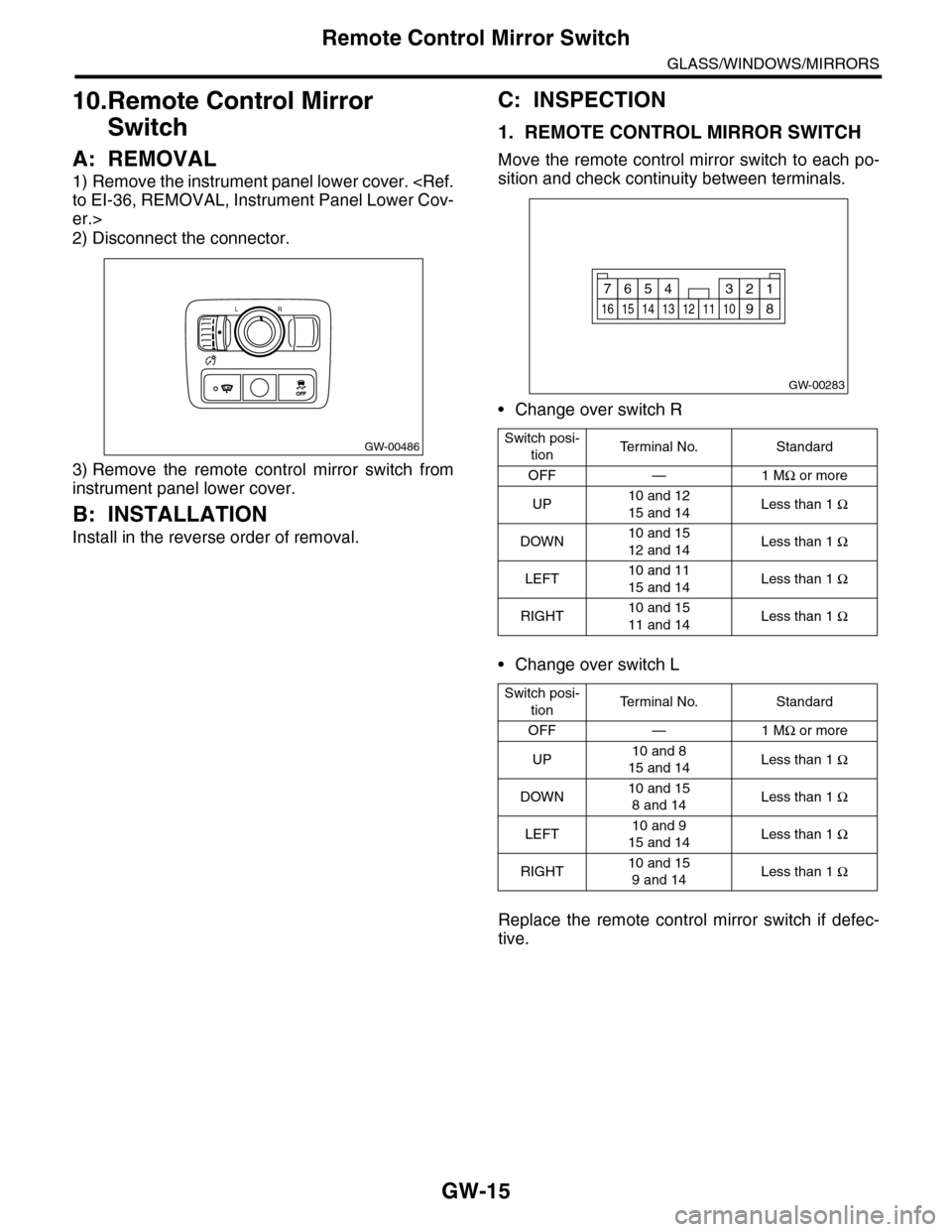
10.Remote Control Mirror
Switch
A: REMOVAL
1) Remove the instrument panel lower cover.
er.>
2) Disconnect the connector.
3) Remove the remote control mirror switch from
instrument panel lower cover.
B: INSTALLATION
Install in the reverse order of removal.
C: INSPECTION
1. REMOTE CONTROL MIRROR SWITCH
Move the remote control mirror switch to each po-
sition and check continuity between terminals.
•Change over switch R
•Change over switch L
Replace the remote control mirror switch if defec-
tive.
GW-00486
LR
OFFOFF
Switch posi-
tionTe r m i n a l N o . S t a n d a r d
OFF — 1 MΩ or more
UP10 and 12
15 and 14Less than 1 Ω
DOWN10 and 15
12 and 14Less than 1 Ω
LEFT10 and 11
15 and 14Less than 1 Ω
RIGHT10 and 15
11 and 14Less than 1 Ω
Switch posi-
tionTe r m i n a l N o . S t a n d a r d
OFF — 1 MΩ or more
UP10 and 8
15 and 14Less than 1 Ω
DOWN10 and 15
8 and 14Less than 1 Ω
LEFT10 and 9
15 and 14Less than 1 Ω
RIGHT10 and 15
9 and 14Less than 1 Ω
GW-00283
914
7654321
8131211101615
Page 326 of 2453
GW-31
Wiper Deicer Switch
GLASS/WINDOWS/MIRRORS
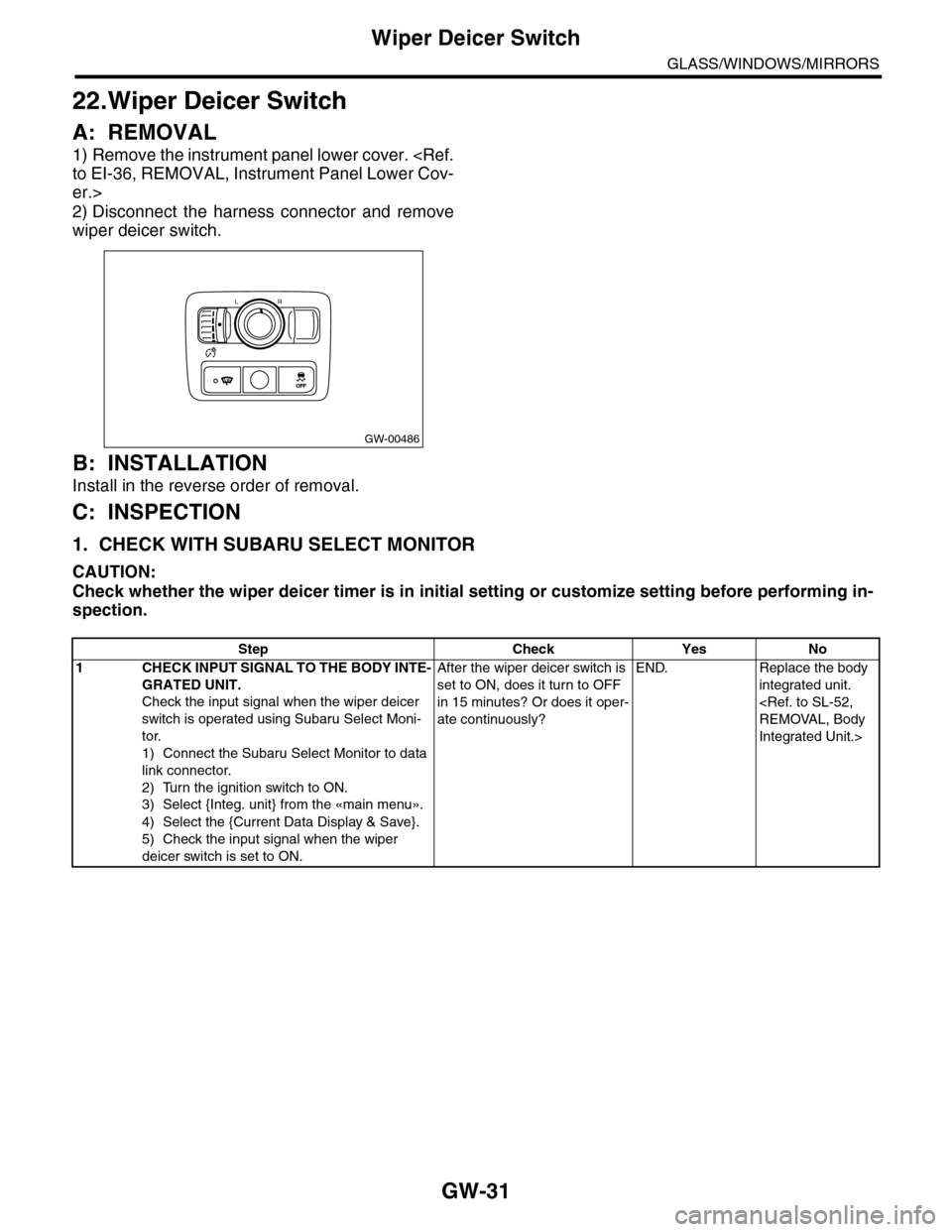
22.Wiper Deicer Switch
A: REMOVAL
1) Remove the instrument panel lower cover.
er.>
2) Disconnect the harness connector and remove
wiper deicer switch.
B: INSTALLATION
Install in the reverse order of removal.
C: INSPECTION
1. CHECK WITH SUBARU SELECT MONITOR
CAUTION:
Check whether the wiper deicer timer is in initial setting or customize setting before performing in-
spection.
GW-00486
LR
OFFOFF
Step Check Yes No
1CHECK INPUT SIGNAL TO THE BODY INTE-
GRATED UNIT.
Check the input signal when the wiper deicer
switch is operated using Subaru Select Moni-
tor.
1) Connect the Subaru Select Monitor to data
link connector.
2) Turn the ignition switch to ON.
3) Select {Integ. unit} from the «main menu».
4) Select the {Current Data Display & Save}.
5) Check the input signal when the wiper
deicer switch is set to ON.
After the wiper deicer switch is
set to ON, does it turn to OFF
in 15 minutes? Or does it oper-
ate continuously?
END. Replace the body
integrated unit.
Integrated Unit.>