ECU SUBARU TRIBECA 2009 1.G Service Repair Manual
[x] Cancel search | Manufacturer: SUBARU, Model Year: 2009, Model line: TRIBECA, Model: SUBARU TRIBECA 2009 1.GPages: 2453, PDF Size: 46.32 MB
Page 456 of 2453
IDI-17
Warning Box
INSTRUMENTATION/DRIVER INFO
8. Warning Box
A: REMOVAL
1) Disconnect the ground cable from battery.
2) Remove the upper grille.
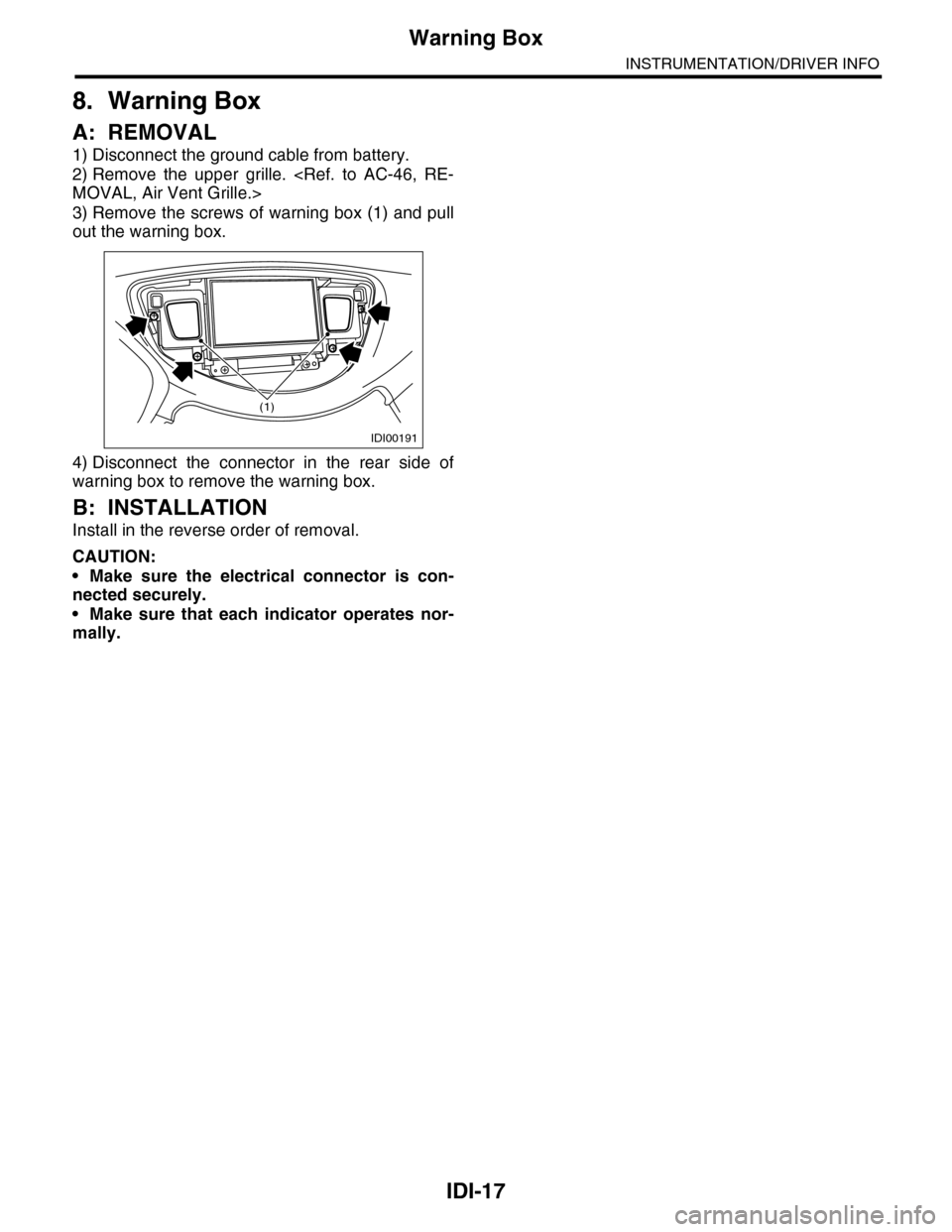
3) Remove the screws of warning box (1) and pull
out the warning box.
4) Disconnect the connector in the rear side of
warning box to remove the warning box.
B: INSTALLATION
Install in the reverse order of removal.
CAUTION:
•Make sure the electrical connector is con-
nected securely.
•Make sure that each indicator operates nor-
mally.
IDI00191
(1)
Page 458 of 2453
LAN(diag)-2
Basic Diagnostic Procedure
LAN SYSTEM (DIAGNOSTICS)
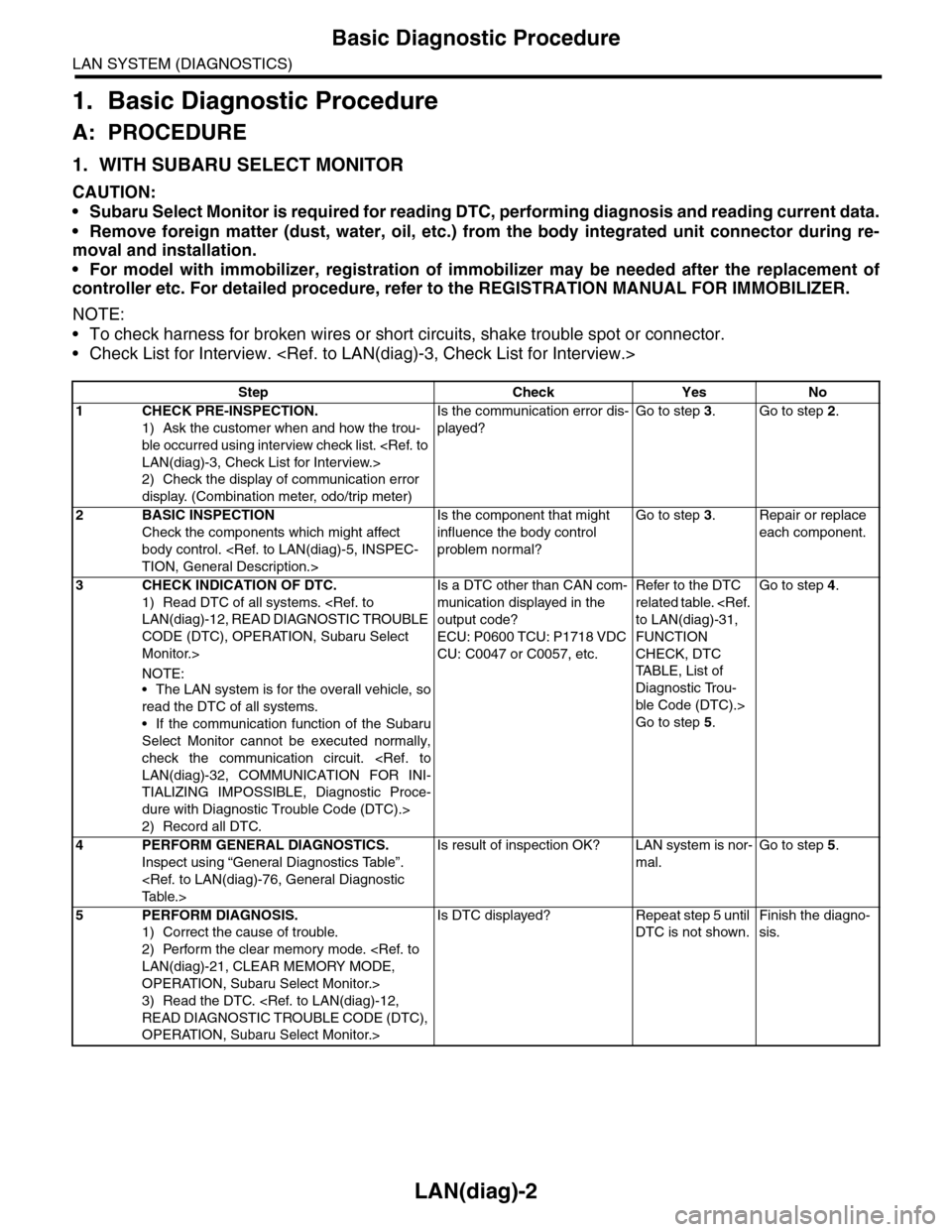
1. Basic Diagnostic Procedure
A: PROCEDURE
1. WITH SUBARU SELECT MONITOR
CAUTION:
•Subaru Select Monitor is required for reading DTC, performing diagnosis and reading current data.
•Remove foreign matter (dust, water, oil, etc.) from the body integrated unit connector during re-
moval and installation.
•For model with immobilizer, registration of immobilizer may be needed after the replacement of
controller etc. For detailed procedure, refer to the REGISTRATION MANUAL FOR IMMOBILIZER.
NOTE:
•To check harness for broken wires or short circuits, shake trouble spot or connector.
•Check List for Interview.
Step Check Yes No
1CHECK PRE-INSPECTION.
1) Ask the customer when and how the trou-
ble occurred using interview check list.
2) Check the display of communication error
display. (Combination meter, odo/trip meter)
Is the communication error dis-
played?
Go to step 3.Go to step 2.
2BASIC INSPECTION
Check the components which might affect
body control.
Is the component that might
influence the body control
problem normal?
Go to step 3.Repair or replace
each component.
3CHECK INDICATION OF DTC.
1) Read DTC of all systems.
CODE (DTC), OPERATION, Subaru Select
Monitor.>
NOTE:•The LAN system is for the overall vehicle, so
read the DTC of all systems.
•If the communication function of the Subaru
Select Monitor cannot be executed normally,
check the communication circuit.
TIALIZING IMPOSSIBLE, Diagnostic Proce-
dure with Diagnostic Trouble Code (DTC).>
2) Record all DTC.
Is a DTC other than CAN com-
munication displayed in the
output code?
ECU: P0600 TCU: P1718 VDC
CU: C0047 or C0057, etc.
Refer to the DTC
related table.
FUNCTION
CHECK, DTC
TA B L E , L i s t o f
Diagnostic Trou-
ble Code (DTC).>
Go to step 5.
Go to step 4.
4PERFORM GENERAL DIAGNOSTICS.
Inspect using “General Diagnostics Table”.
Is result of inspection OK? LAN system is nor-
mal.
Go to step 5.
5PERFORM DIAGNOSIS.
1) Correct the cause of trouble.
2) Perform the clear memory mode.
OPERATION, Subaru Select Monitor.>
3) Read the DTC.
OPERATION, Subaru Select Monitor.>
Is DTC displayed? Repeat step 5 until
DTC is not shown.
Finish the diagno-
sis.
Page 459 of 2453
LAN(diag)-3
Check List for Interview
LAN SYSTEM (DIAGNOSTICS)
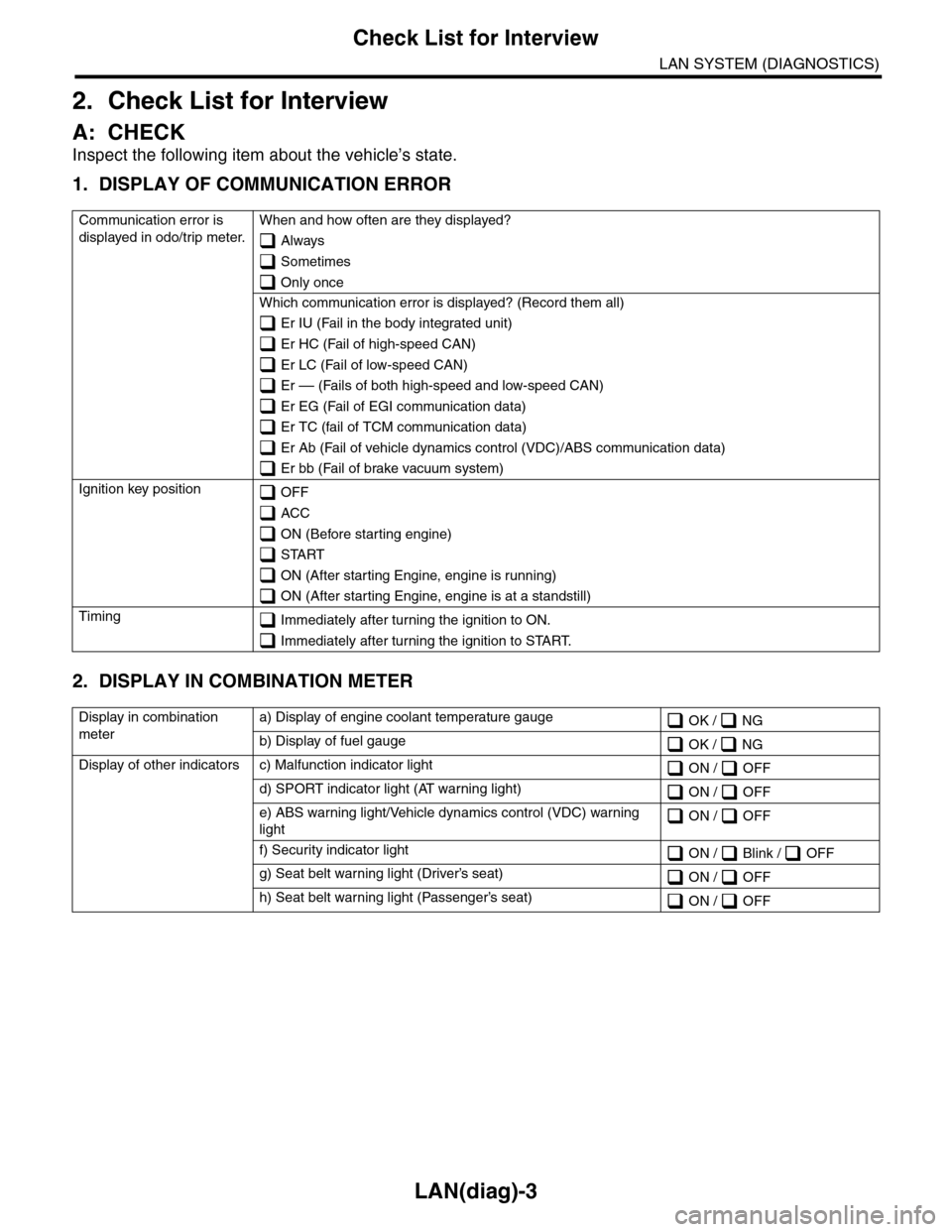
2. Check List for Interview
A: CHECK
Inspect the following item about the vehicle’s state.
1. DISPLAY OF COMMUNICATION ERROR
2. DISPLAY IN COMBINATION METER
Communication error is
displayed in odo/trip meter.
When and how often are they displayed?
Always
Sometimes
Only once
Which communication error is displayed? (Record them all)
Er IU (Fail in the body integrated unit)
Er HC (Fail of high-speed CAN)
Er LC (Fail of low-speed CAN)
Er –– (Fails of both high-speed and low-speed CAN)
Er EG (Fail of EGI communication data)
Er TC (fail of TCM communication data)
Er Ab (Fail of vehicle dynamics control (VDC)/ABS communication data)
Er bb (Fail of brake vacuum system)
Ignition key position OFF
ACC
ON (Before starting engine)
START
ON (After starting Engine, engine is running)
ON (After starting Engine, engine is at a standstill)
Timing Immediately after turning the ignition to ON.
Immediately after turning the ignition to START.
Display in combination
meter
a) Display of engine coolant temperature gauge OK / NG
b) Display of fuel gauge OK / NG
Display of other indicators c) Malfunction indicator light ON / OFF
d) SPORT indicator light (AT warning light) ON / OFF
e) ABS warning light/Vehicle dynamics control (VDC) warning
light ON / OFF
f) Security indicator light ON / Blink / OFF
g) Seat belt warning light (Driver’s seat) ON / OFF
h) Seat belt warning light (Passenger’s seat) ON / OFF
Page 467 of 2453
LAN(diag)-11
Control Module I/O Signal
LAN SYSTEM (DIAGNOSTICS)
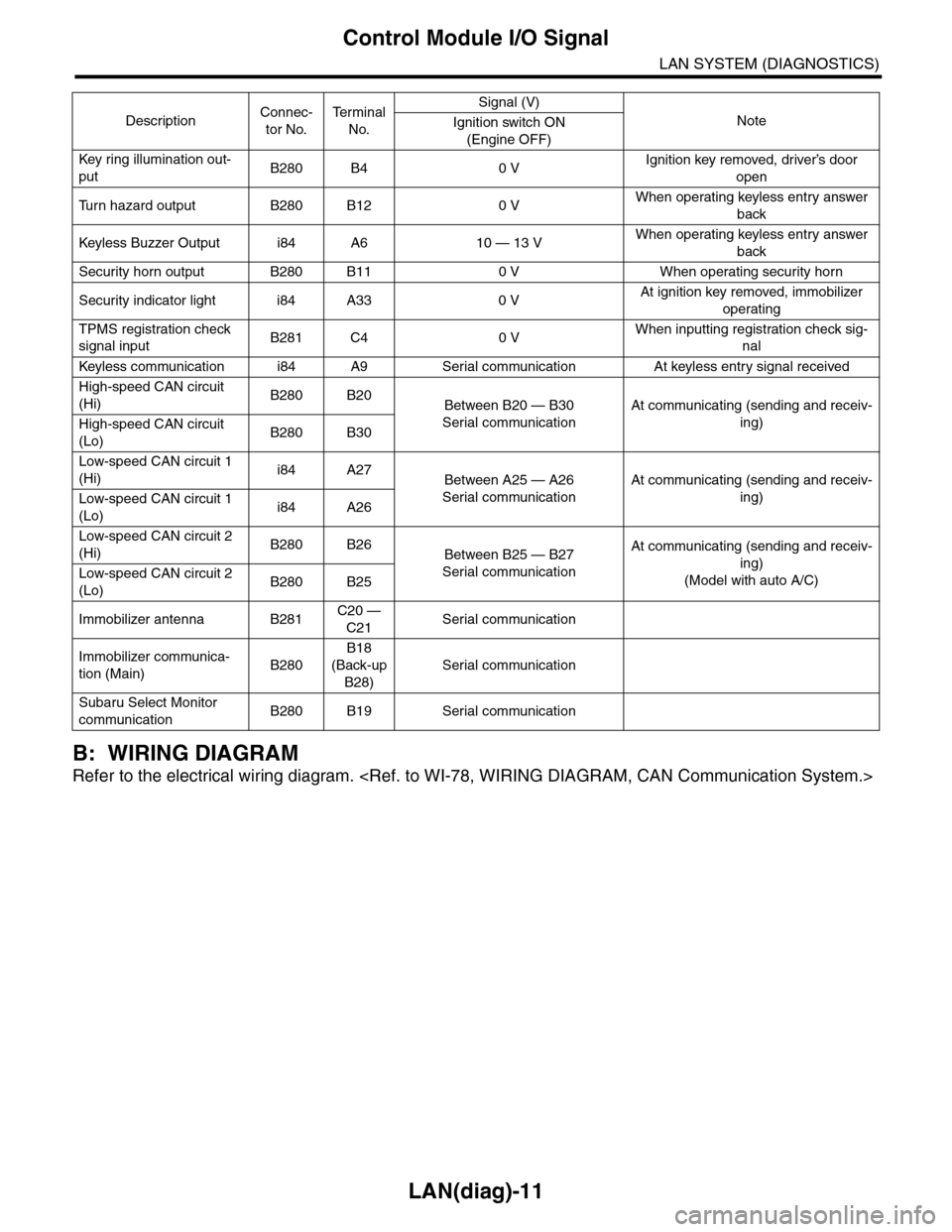
B: WIRING DIAGRAM
Refer to the electrical wiring diagram.
Key r ing illumination out-
putB280 B4 0 VIgnition key removed, driver’s door
open
Tu r n h a z a r d o u t p u t B 2 8 0 B 1 2 0 VWhen operating keyless entry answer
back
Keyless Buzzer Output i84 A6 10 — 13 VWhen operating keyless entry answer
back
Security horn output B280 B11 0 V When operating security horn
Security indicator light i84 A33 0 VAt ignition key removed, immobilizer
operating
TPMS registration check
signal inputB281 C4 0 VWhen inputting registration check sig-
nal
Keyless communication i84 A9 Ser ial communication At keyless entr y signal received
High-speed CAN circuit
(Hi)B280 B20Between B20 — B30
Serial communication
At communicating (sending and receiv-
ing)High-speed CAN circuit
(Lo)B280 B30
Low-speed CAN circuit 1
(Hi)i84 A27Between A25 — A26
Serial communication
At communicating (sending and receiv-
ing)Low-speed CAN circuit 1
(Lo)i84 A26
Low-speed CAN circuit 2
(Hi)B280 B26Between B25 — B27
Serial communication
At communicating (sending and receiv-
ing)
(Model with auto A/C)Low-speed CAN circuit 2
(Lo)B280 B25
Immobilizer antenna B281C20 —
C21Serial communication
Immobilizer communica-
tion (Main)B280
B18
(Back-up
B28)
Serial communication
Subaru Select Monitor
communicationB280 B19 Serial communication
DescriptionConnec-
tor No.
Te r m i n a l
No.
Signal (V)
NoteIgnition switch ON
(Engine OFF)
Page 471 of 2453
LAN(diag)-15
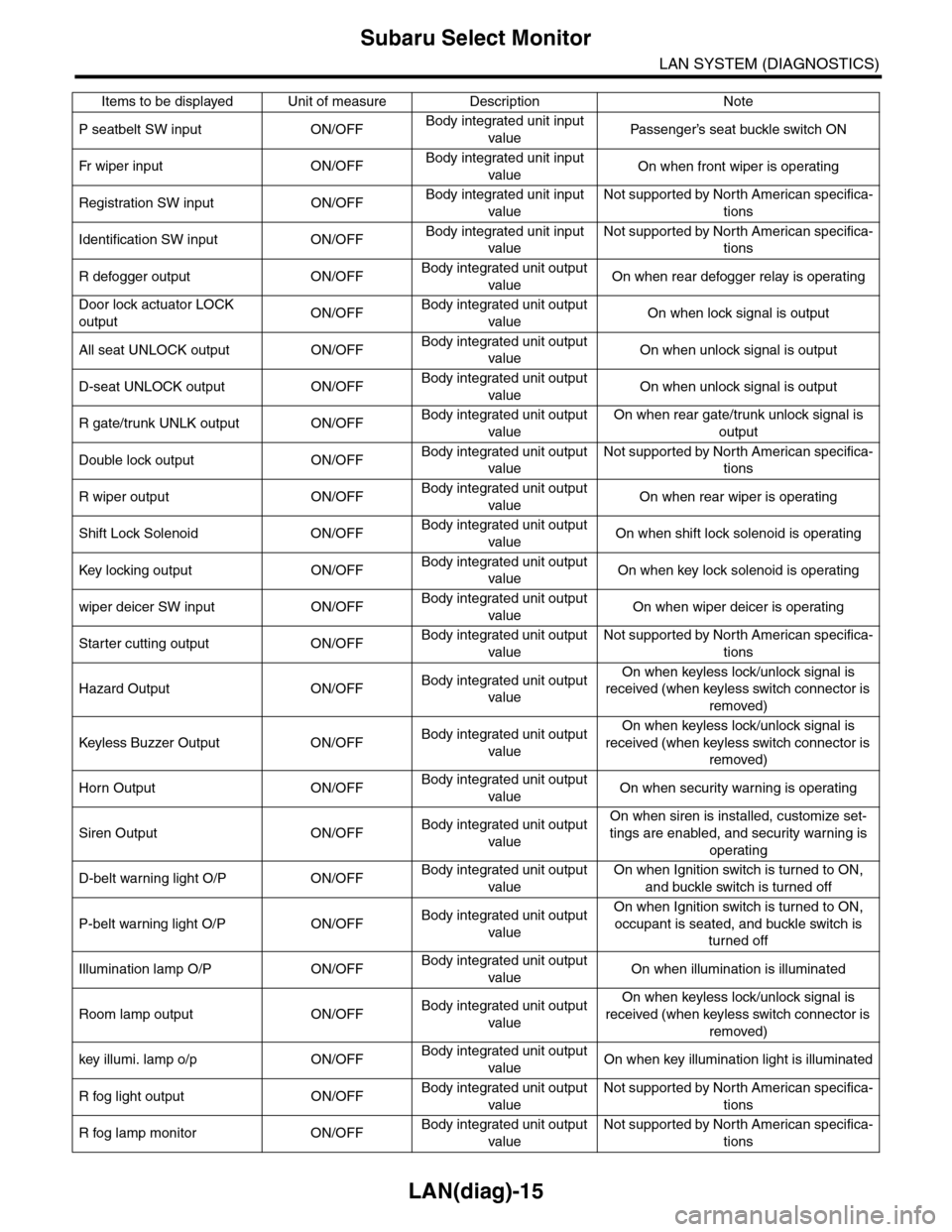
Subaru Select Monitor
LAN SYSTEM (DIAGNOSTICS)
P seatbelt SW input ON/OFFBody integrated unit input
valuePa s se ng e r ’s se at bu ckl e sw it c h ON
Fr wi pe r in p ut O N/O FFBody integrated unit input
valueOn when front wiper is operating
Registration SW input ON/OFFBody integrated unit input
value
Not supported by North American specifica-
tions
Identification SW input ON/OFFBody integrated unit input
value
Not supported by North American specifica-
tions
R defogger output ON/OFFBody integrated unit output
valueOn when rear defogger relay is operating
Door lock actuator LOCK
outputON/OFFBody integrated unit output
valueOn when lock signal is output
All seat UNLOCK output ON/OFFBody integrated unit output
valueOn when unlock signal is output
D-seat UNLOCK output ON/OFFBody integrated unit output
valueOn when unlock signal is output
R gate/trunk UNLK output ON/OFFBody integrated unit output
value
On when rear gate/trunk unlock signal is
output
Double lock output ON/OFFBody integrated unit output
value
Not supported by North American specifica-
tions
R wiper output ON/OFFBody integrated unit output
valueOn when rear wiper is operating
Shift Lock Solenoid ON/OFFBody integrated unit output
valueOn when shift lock solenoid is operating
Key locking output ON/OFFBody integrated unit output
valueOn when key lock solenoid is operating
wiper deicer SW input ON/OFFBody integrated unit output
valueOn when wiper deicer is operating
Starter cutting output ON/OFFBody integrated unit output
value
Not supported by North American specifica-
tions
Hazard Output ON/OFFBody integrated unit output
value
On when keyless lock/unlock signal is
received (when keyless switch connector is
removed)
Keyless Buzzer Output ON/OFFBody integrated unit output
value
On when keyless lock/unlock signal is
received (when keyless switch connector is
removed)
Horn Output ON/OFFBody integrated unit output
valueOn when security warning is operating
Siren Output ON/OFFBody integrated unit output
value
On when siren is installed, customize set-
tings are enabled, and security warning is
operating
D-belt warning light O/P ON/OFFBody integrated unit output
value
On when Ignition switch is turned to ON,
and buckle switch is turned off
P-belt warning light O/P ON/OFFBody integrated unit output
value
On when Ignition switch is turned to ON,
occupant is seated, and buckle switch is
turned off
Illumination lamp O/P ON/OFFBody integrated unit output
valueOn when illumination is illuminated
Room lamp output ON/OFFBody integrated unit output
value
On when keyless lock/unlock signal is
received (when keyless switch connector is
removed)
key illumi. lamp o/p ON/OFFBody integrated unit output
valueOn when key illumination light is illuminated
R fog light output ON/OFFBody integrated unit output
value
Not supported by North American specifica-
tions
R fog lamp monitor ON/OFFBody integrated unit output
value
Not supported by North American specifica-
tions
Items to be displayed Unit of measure Description Note
Page 474 of 2453
![SUBARU TRIBECA 2009 1.G Service Repair Manual LAN(diag)-18
Subaru Select Monitor
LAN SYSTEM (DIAGNOSTICS)
5. CONFIRMATION OF CURRENT SETTING
1) On the «Main Menu» display screen, select the {Each System Check} and press the [YES] key.
2) On the](/img/17/7322/w960_7322-473.png "SUBARU TRIBECA 2009 1.G Service Repair Manual LAN(diag)-18
Subaru Select Monitor
LAN SYSTEM (DIAGNOSTICS)
5. CONFIRMATION OF CURRENT SETTING
1) On the «Main Menu» display screen, select the {Each System Check} and press the [YES] key.
2) On the")
LAN(diag)-18
Subaru Select Monitor
LAN SYSTEM (DIAGNOSTICS)
5. CONFIRMATION OF CURRENT SETTING
1) On the «Main Menu» display screen, select the {Each System Check} and press the [YES] key.
2) On the «System Selection Menu» display screen, select the {Integ. Unit mode} and press the [YES] key.
3) On the «Integ. unit mode failure diag» display screen, select the {Current Data Display & Save} and press
the [YES] key.
4) On the «Current Data Display & Save» display screen, select the {12 Data Display} and press the [YES]
key.
5) Using the scroll key, scroll the display screen up or down until the desired data is shown.
6) Display the following item and record the settings.
Required items for new registration (Except for system not equipped)
Item Item to confirm Remarks
Key No. to register 1 2 3 4 Registered ID type
Off delay OFF Long Normal Short Setting for lighting off time
Auto-lock 60, 50 40, 30, 20 OFF Not suppor ted by Nor th Amer ican specifications (Unit sec.)
Rr defogger op. mode Normal ContinuousNormal: Off at 15 minutes of operation
Continuous: Operations from switch on to off
Wiper deicer op. mode Normal Continuous
Normal: Off at 15 minutes of operation
Continuous: Operations from switch ON to OFF, repeats ON
for 15 minutes, OFF for 2 minutes
Security Alarm Setup ON OFFON: Warning device operation possible
OFF: Warning device does not operate
Impact Sensor Setup ON OFF
ON: Impact sensor operation possible
OFF: Impact sensor does not operate
Tu r n O F F f o r v e h i c l e s n o t e q u i p p e d w i t h a n I m p a c t S e n s o r
Alarm monitor delay set-
tingON OFF
ON: Monitor after a fixed period of time from reception of the
keyless lock signal
OFF: Monitor after reception of the keyless lock signal
Lockout prevention ON OFFON: Lockout prevention operation
OFF: Lockout prevention not operated
Impact Sensor Yes No
Ye s : I m p a c t s e n s o r e q u i p p e d
No: Impact sensor not equipped
Always set to no for vehicles not equipped with the impact sen-
sor.
Siren setting Yes No
Ye s : V e h i c l e e q u i p p e d w i t h s i r e n
No: Vehicle not equipped with siren
The horn does not honk when the warning operates if the vehi-
cle not equipped with a siren is set to ‘Yes’.
Answer-back buzzer
setupON OFFON: Answer-back buzzer operation possible
OFF: Answer-back buzzer not operated
Hazard answer-back
setupON OFFON: Hazard answer-back buzzer operation possible
OFF: Hazard answer-back buzzer not operated
Automatic locking setup ON OFF Not suppor ted by Nor th Amer ican specifications
Ans.-back Buzzer Yes NoYe s : V e h i c l e e q u i p p e d w i t h a n s w e r - b a c k b u z z e r
No: Vehicle not equipped with answer-back buzzer
Auto locking Yes No Not suppor ted by Nor th Amer ican specifications
Door open warning (pre-
vention of batter y run-
out)
Ye s N o
Ye s : D o o r i n t e r l o c k e d r o o m l i g h t g o e s o f f w h e n o n f o r 1 0 m i n -
utes consecutively when door is open.
No: Room light remains illuminated until door is closed.
A/C ECM setting Yes No Model with auto A/C (Set to ‘Yes’)
P/W ECM setting Yes No Not supported by North American specifications
Center display failure Yes NoYe s : V e h i c l e e q u i p p e d w i t h M F D a n d n a v i g a t i o n d i s p l a y
No: Vehicle not equipped with MFD nor navigation display
Wiper deicer Yes NoYe s : V e h i c l e e q u i p p e d w i t h w i p e r d e i c e r
No: Vehicle not equipped with wiper deicer
Rear fog light setting Yes No Not supported by North American specifications
Fac t or y in i ti a l s et t i ng Fa ct o r y M ar ke tDo not change to the factory mode. Set to market when using
normally.
Page 478 of 2453
![SUBARU TRIBECA 2009 1.G Service Repair Manual LAN(diag)-22
Subaru Select Monitor
LAN SYSTEM (DIAGNOSTICS)
9. FUNCTION SETTING (ECM CUSTOMIZING)
1) On the «Main Menu» display screen, select the {Each System Check} and press the [YES] key.
2) On](/img/17/7322/w960_7322-477.png "SUBARU TRIBECA 2009 1.G Service Repair Manual LAN(diag)-22
Subaru Select Monitor
LAN SYSTEM (DIAGNOSTICS)
9. FUNCTION SETTING (ECM CUSTOMIZING)
1) On the «Main Menu» display screen, select the {Each System Check} and press the [YES] key.
2) On")
LAN(diag)-22
Subaru Select Monitor
LAN SYSTEM (DIAGNOSTICS)
9. FUNCTION SETTING (ECM CUSTOMIZING)
1) On the «Main Menu» display screen, select the {Each System Check} and press the [YES] key.
2) On the «System Selection Menu» display screen, select the {Integ. Unit mode} and press the [YES] key.
3) On the «Integ. Unit mode failure diag» display screen, select the {ECM customizing} and press the [YES] key.
4) Change the setting with UP/DOWN key and press the [YES] key.
•List of function setting item (ECM customizing)
NOTE:
Even if changes are made to items that are not equipped, the contents are not confirmed and do not operate.
DataInitial set-
ting value
Customize
settingRemarksDestination
Specifications
Off delay time Normal
Delay time below can be selected by setting.
After door closed After key unlock
OFF 0 sec. 0 sec.
Short 3 sec. 10 sec.
Normal 5 sec. 20 sec.
Long 8 sec. 30 sec.
Auto lock time 30 sec.0 — 60
sec.
Workable when Auto locking is set to “ON” and Automatic
locking setup is “ON”. Time can be changed by 10 sec-
onds: 0 (OFF) — 60 (maximum).
Not supported by North
American specifications
Rr defogger op.
mode15 min.
15 min.Rear defogger stops in 15 minutes automatically after
switch is turned to ON.
ContinuousRear defogger repeats active condition for 15 minutes and
inactive condition for 2 minutes until switch is turned to OFF.
Wiper deicer op.
mode15 min.
15 min.Wiper deicer stops in 15 minutes automatically after
switch is turned to ON.
ContinuousWiper deicer repeats active condition for 15 minutes and
inactive condition for 2 minutes until switch is turned to OFF.
Security Alarm
SetupONON Security alarm (hazard, horn or siren) in active condition
OFF Security alarm in inactive condition
Impact Sensor
SetupOFF
ONWorkable when Impact Sensor Setup is set to “ON”
Impact sensor in active condition
OFFImpact sensor in inactive condition (Set Impact Sensor
Setup of model without impact sensor to “OFF”.)
Alarm monitor
delay settingON
After doors are locked by keyless entry system operated,
Alarm monitor starts in following time.
ON Delay time is 30 seconds.
OFF Delay time is 0 seconds.
Lockout preven-
tionONONLockout prevention in inactive condition (Lockout preven-
tion does not operate if safety knob is locked by hand.)
OFF Lockout prevention in inactive condition
Impact Sensor OFFON
Ve h i c l e i s c o n t r o l l e d i n i m p a c t s e n s o r e q u i p p e d m o d e .
(Set impact sensor to “OFF” in model without impact sen-
sor. If impact sensor is set to “ON”, hazard, horn or siren
operate after doors are locked by keyless entry system
operated (Alarm monitor starting).
Set to “ON” when an
optional impact sensor
is installed.
OFF Vehicle is controlled in impact sensor no-equipped mode.
Siren setting OFFON
Siren sounds when alarm operates. (Set siren setting to
“OFF” in model without siren. Horn does not sound if siren
setting is set to “ON”.)
Set to “ON” when an
optional siren is
installed.OFF Horn sounds when alarm operates.
Answer-back
buzzer setupON
ON
Workable when answer-back buzzer setup is set to “ON”.
When lock/unlock is selected by keyless entry system
operated, hazard answer-back buzzer operates.
OFFWhen lock/unlock is selected by keyless entry system
operated, answer-back buzzer does not sound.
Page 479 of 2453
LAN(diag)-23
Subaru Select Monitor
LAN SYSTEM (DIAGNOSTICS)
5) After setting, make sure that vehicle equipment is same as the setting changed in the {Current Data Dis-
play & Save}.
CAUTION:
•It is possible to control the original functions of vehicle when settings above are corresponded to
vehicle equipment.
•Do not change the settings except for setting above during operation of equipment setting.
•Be sure not to change Factory initial setting except installation of new body integrated unit.
NOTE:
For details concerning operation procedure, refer to the “SUBARU SELECT MONITOR OPERATION MANUAL”.
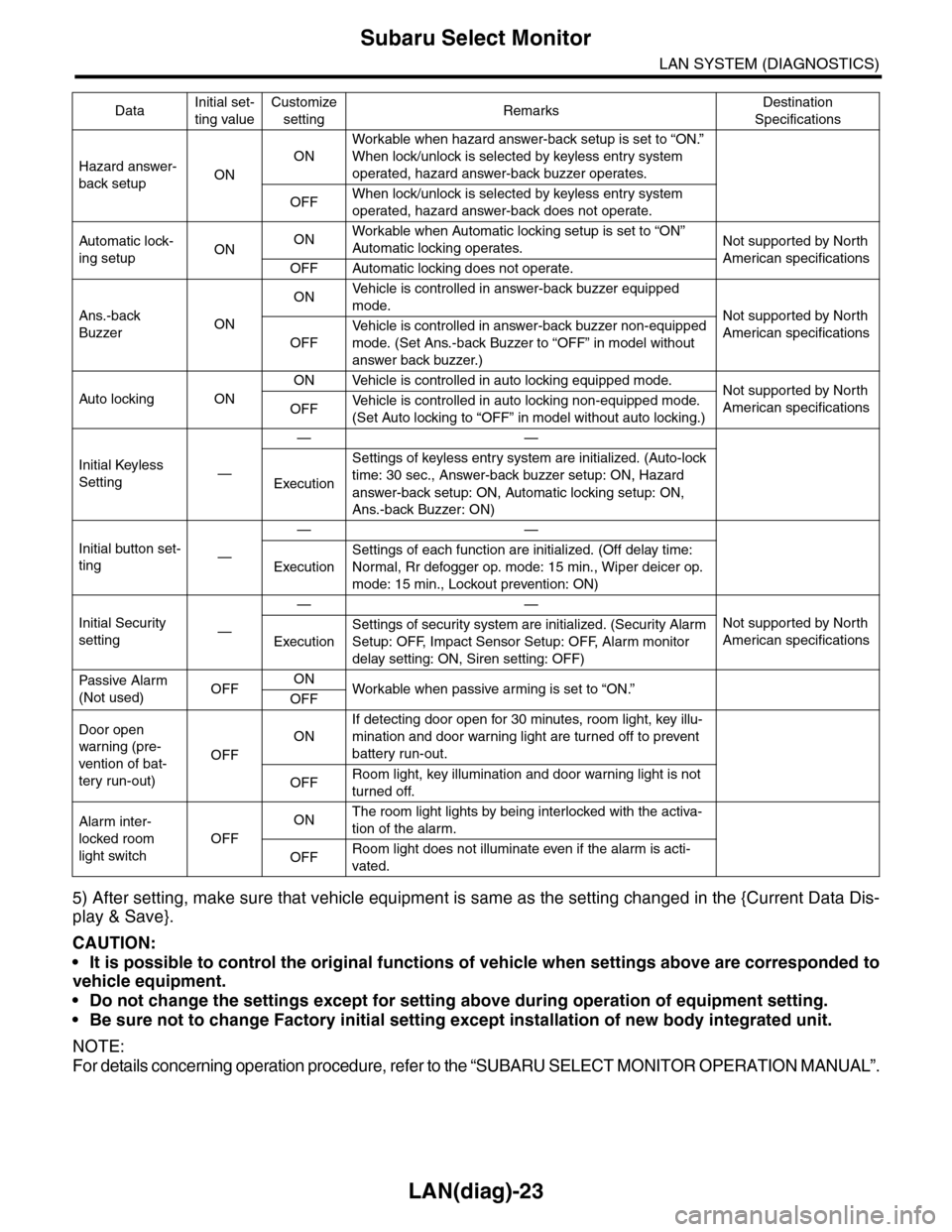
Hazard answer-
back setupON
ON
Workable when hazard answer-back setup is set to “ON.”
When lock/unlock is selected by keyless entry system
operated, hazard answer-back buzzer operates.
OFFWhen lock/unlock is selected by keyless entry system
operated, hazard answer-back does not operate.
Automatic lock-
ing setupONONWorkable when Automatic locking setup is set to “ON”
Automatic locking operates.Not supported by North
American specificationsOFF Automatic locking does not operate.
Ans.-back
BuzzerON
ONVe h i c l e i s c o n t r o l l e d i n a n sw e r - b a c k b u z z e r e q u i p p e d
mode.Not supported by North
American specificationsOFF
Ve h i c l e i s c o n t r o l l e d i n a n sw e r - b a c k b u z z e r n o n - e q u i p p e d
mode. (Set Ans.-back Buzzer to “OFF” in model without
answer back buzzer.)
Auto locking ON
ON Vehicle is controlled in auto locking equipped mode.Not supported by North
American specificationsOFFVe h i c l e i s c o n t r o l l e d i n a u t o l o c k i n g n o n - e q u i p p e d m o d e .
(Set Auto locking to “OFF” in model without auto locking.)
Initial Keyless
Setting—
——
Execution
Settings of keyless entry system are initialized. (Auto-lock
time: 30 sec., Answer-back buzzer setup: ON, Hazard
answer-back setup: ON, Automatic locking setup: ON,
Ans.-back Buzzer: ON)
Initial button set-
ting—
——
Execution
Settings of each function are initialized. (Off delay time:
Normal, Rr defogger op. mode: 15 min., Wiper deicer op.
mode: 15 min., Lockout prevention: ON)
Initial Security
setting—
——
Not supported by North
American specificationsExecution
Settings of security system are initialized. (Security Alarm
Setup: OFF, Impact Sensor Setup: OFF, Alarm monitor
delay setting: ON, Siren setting: OFF)
Passive Alar m
(Not used)OFFONWorkable when passive ar ming is set to “ON.”
OFF
Door open
warning (pre-
vention of bat-
tery run-out)
OFF
ON
If detecting door open for 30 minutes, room light, key illu-
mination and door warning light are turned off to prevent
battery run-out.
OFFRoom light, key illumination and door warning light is not
turned off.
Alarm inter-
locked room
light switch
OFF
ONThe room light lights by being interlocked with the activa-
tion of the alarm.
OFFRoom light does not illuminate even if the alarm is acti-
vated.
DataInitial set-
ting value
Customize
settingRemarksDestination
Specifications
Page 489 of 2453
LAN(diag)-33
Diagnostic Procedure with Diagnostic Trouble Code (DTC)
LAN SYSTEM (DIAGNOSTICS)
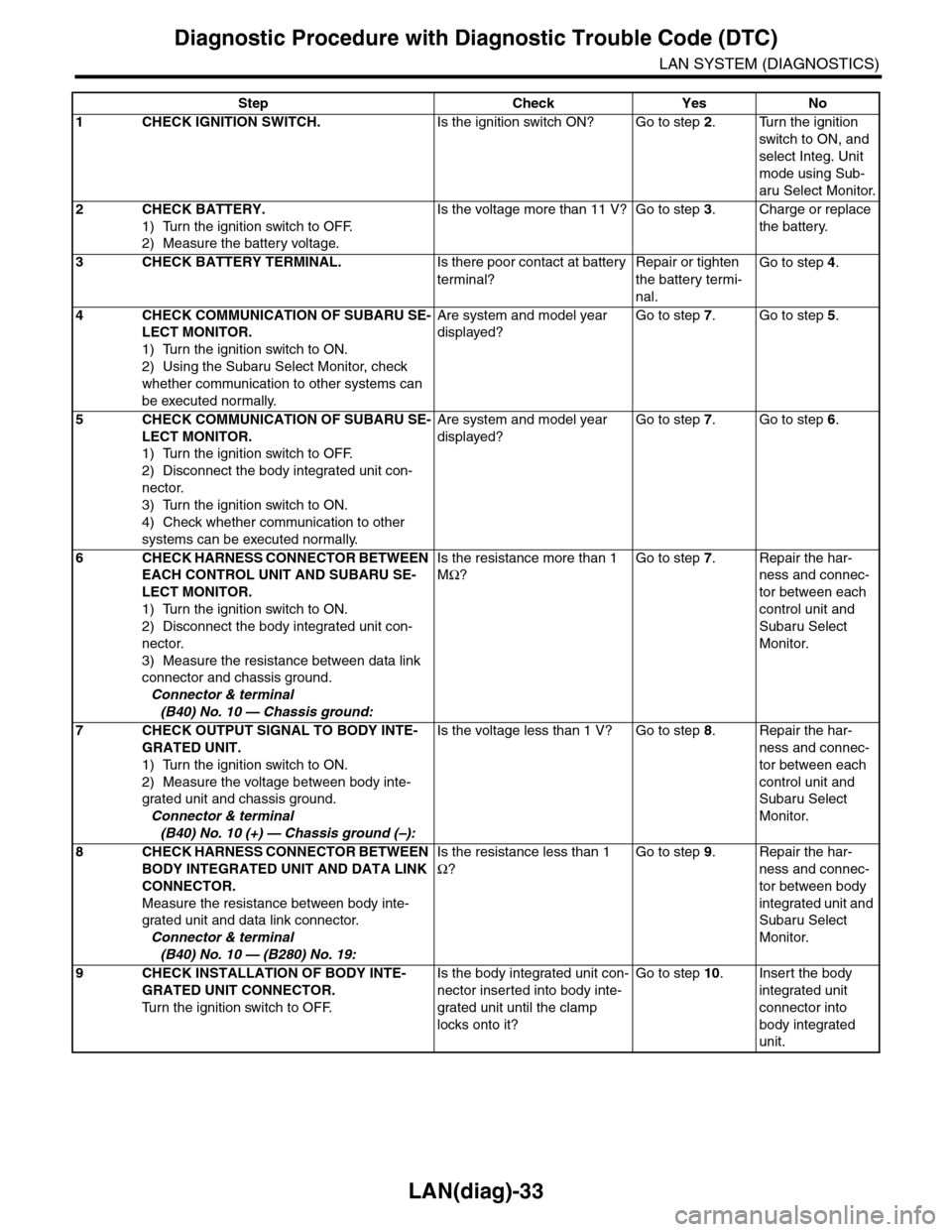
Step Check Yes No
1CHECK IGNITION SWITCH.Is the ignition switch ON? Go to step 2.Turn the ignition
switch to ON, and
select Integ. Unit
mode using Sub-
aru Select Monitor.
2CHECK BATTERY.
1) Turn the ignition switch to OFF.
2) Measure the battery voltage.
Is the voltage more than 11 V? Go to step 3.Charge or replace
the battery.
3CHECK BATTERY TERMINAL.Is there poor contact at battery
terminal?
Repair or tighten
the battery termi-
nal.
Go to step 4.
4CHECK COMMUNICATION OF SUBARU SE-
LECT MONITOR.
1) Turn the ignition switch to ON.
2) Using the Subaru Select Monitor, check
whether communication to other systems can
be executed normally.
Are system and model year
displayed?
Go to step 7.Go to step 5.
5CHECK COMMUNICATION OF SUBARU SE-
LECT MONITOR.
1) Turn the ignition switch to OFF.
2) Disconnect the body integrated unit con-
nector.
3) Turn the ignition switch to ON.
4) Check whether communication to other
systems can be executed normally.
Are system and model year
displayed?
Go to step 7.Go to step 6.
6CHECK HARNESS CONNECTOR BETWEEN
EACH CONTROL UNIT AND SUBARU SE-
LECT MONITOR.
1) Turn the ignition switch to ON.
2) Disconnect the body integrated unit con-
nector.
3) Measure the resistance between data link
connector and chassis ground.
Connector & terminal
(B40) No. 10 — Chassis ground:
Is the resistance more than 1
MΩ?
Go to step 7.Repair the har-
ness and connec-
tor between each
control unit and
Subaru Select
Monitor.
7CHECK OUTPUT SIGNAL TO BODY INTE-
GRATED UNIT.
1) Turn the ignition switch to ON.
2) Measure the voltage between body inte-
grated unit and chassis ground.
Connector & terminal
(B40) No. 10 (+) — Chassis ground (–):
Is the voltage less than 1 V? Go to step 8.Repair the har-
ness and connec-
tor between each
control unit and
Subaru Select
Monitor.
8CHECK HARNESS CONNECTOR BETWEEN
BODY INTEGRATED UNIT AND DATA LINK
CONNECTOR.
Measure the resistance between body inte-
grated unit and data link connector.
Connector & terminal
(B40) No. 10 — (B280) No. 19:
Is the resistance less than 1
Ω?
Go to step 9.Repair the har-
ness and connec-
tor between body
integrated unit and
Subaru Select
Monitor.
9CHECK INSTALLATION OF BODY INTE-
GRATED UNIT CONNECTOR.
Tu r n t h e i g n i t i o n s w i t c h t o O F F.
Is the body integrated unit con-
nector inserted into body inte-
grated unit until the clamp
locks onto it?
Go to step 10.Insert the body
integrated unit
connector into
body integrated
unit.
Page 491 of 2453
LAN(diag)-35
Diagnostic Procedure with Diagnostic Trouble Code (DTC)
LAN SYSTEM (DIAGNOSTICS)
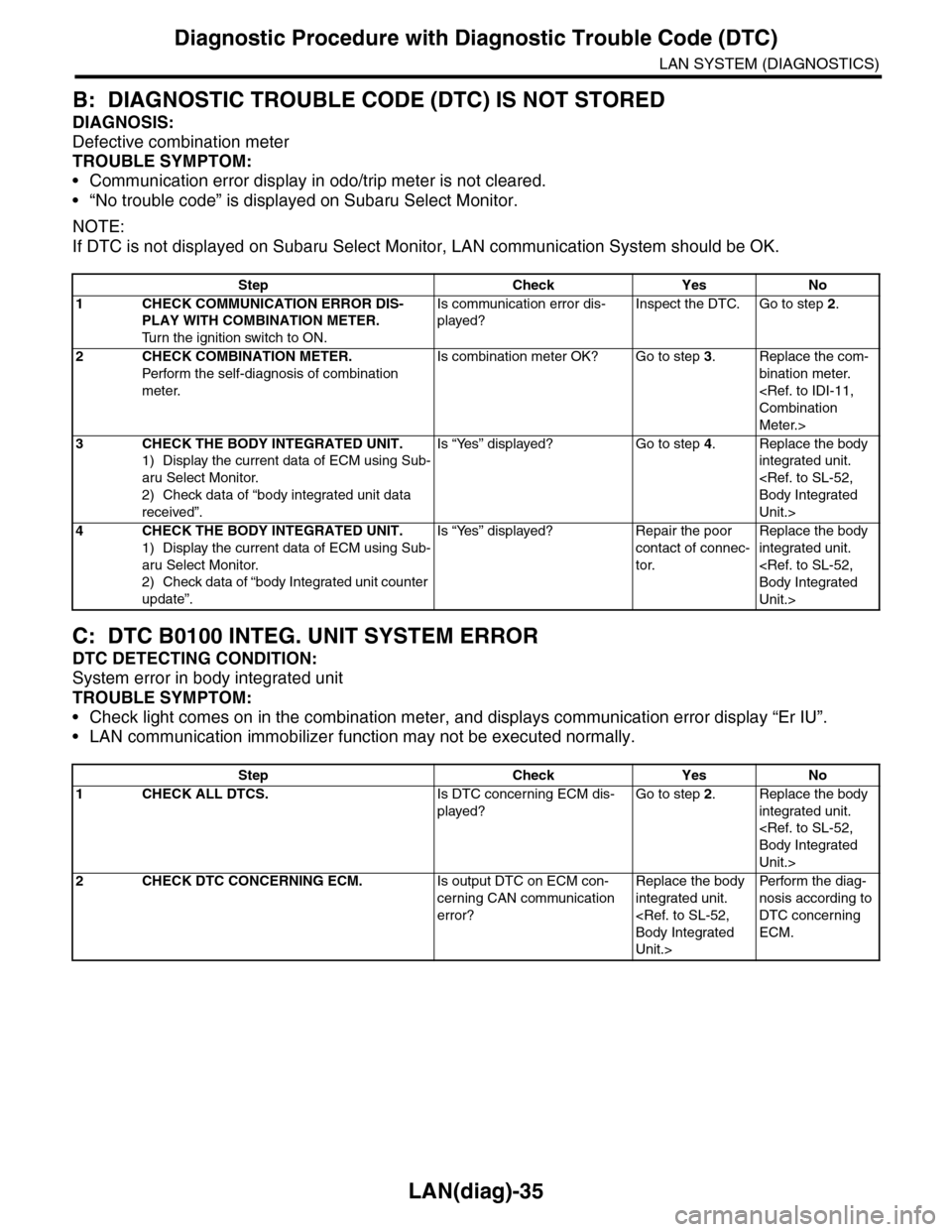
B: DIAGNOSTIC TROUBLE CODE (DTC) IS NOT STORED
DIAGNOSIS:
Defective combination meter
TROUBLE SYMPTOM:
•Communication error display in odo/trip meter is not cleared.
•“No trouble code” is displayed on Subaru Select Monitor.
NOTE:
If DTC is not displayed on Subaru Select Monitor, LAN communication System should be OK.
C: DTC B0100 INTEG. UNIT SYSTEM ERROR
DTC DETECTING CONDITION:
System error in body integrated unit
TROUBLE SYMPTOM:
•Check light comes on in the combination meter, and displays communication error display “Er IU”.
•LAN communication immobilizer function may not be executed normally.
Step Check Yes No
1CHECK COMMUNICATION ERROR DIS-
PLAY WITH COMBINATION METER.
Tu r n t h e i g n i t i o n s w i t c h t o O N .
Is communication error dis-
played?
Inspect the DTC. Go to step 2.
2CHECK COMBINATION METER.
Perfor m the self-diagnosis of combination
meter.
Is combination meter OK? Go to step 3.Replace the com-
bination meter.
Meter.>
3CHECK THE BODY INTEGRATED UNIT.
1) Display the current data of ECM using Sub-
aru Select Monitor.
2) Check data of “body integrated unit data
received”.
Is “Yes” displayed? Go to step 4.Replace the body
integrated unit.
Unit.>
4CHECK THE BODY INTEGRATED UNIT.
1) Display the current data of ECM using Sub-
aru Select Monitor.
2) Check data of “body Integrated unit counter
update”.
Is “Yes” displayed? Repair the poor
contact of connec-
tor.
Replace the body
integrated unit.
Unit.>
Step Check Yes No
1CHECK ALL DTCS.Is DTC concerning ECM dis-
played?
Go to step 2.Replace the body
integrated unit.
Unit.>
2CHECK DTC CONCERNING ECM.Is output DTC on ECM con-
cerning CAN communication
error?
Replace the body
integrated unit.
Unit.>
Per fo r m th e di ag -
nosis according to
DTC concerning
ECM.