ECU SUBARU TRIBECA 2009 1.G Service Repair Manual
[x] Cancel search | Manufacturer: SUBARU, Model Year: 2009, Model line: TRIBECA, Model: SUBARU TRIBECA 2009 1.GPages: 2453, PDF Size: 46.32 MB
Page 510 of 2453
LAN(diag)-54
Diagnostic Procedure with Diagnostic Trouble Code (DTC)
LAN SYSTEM (DIAGNOSTICS)
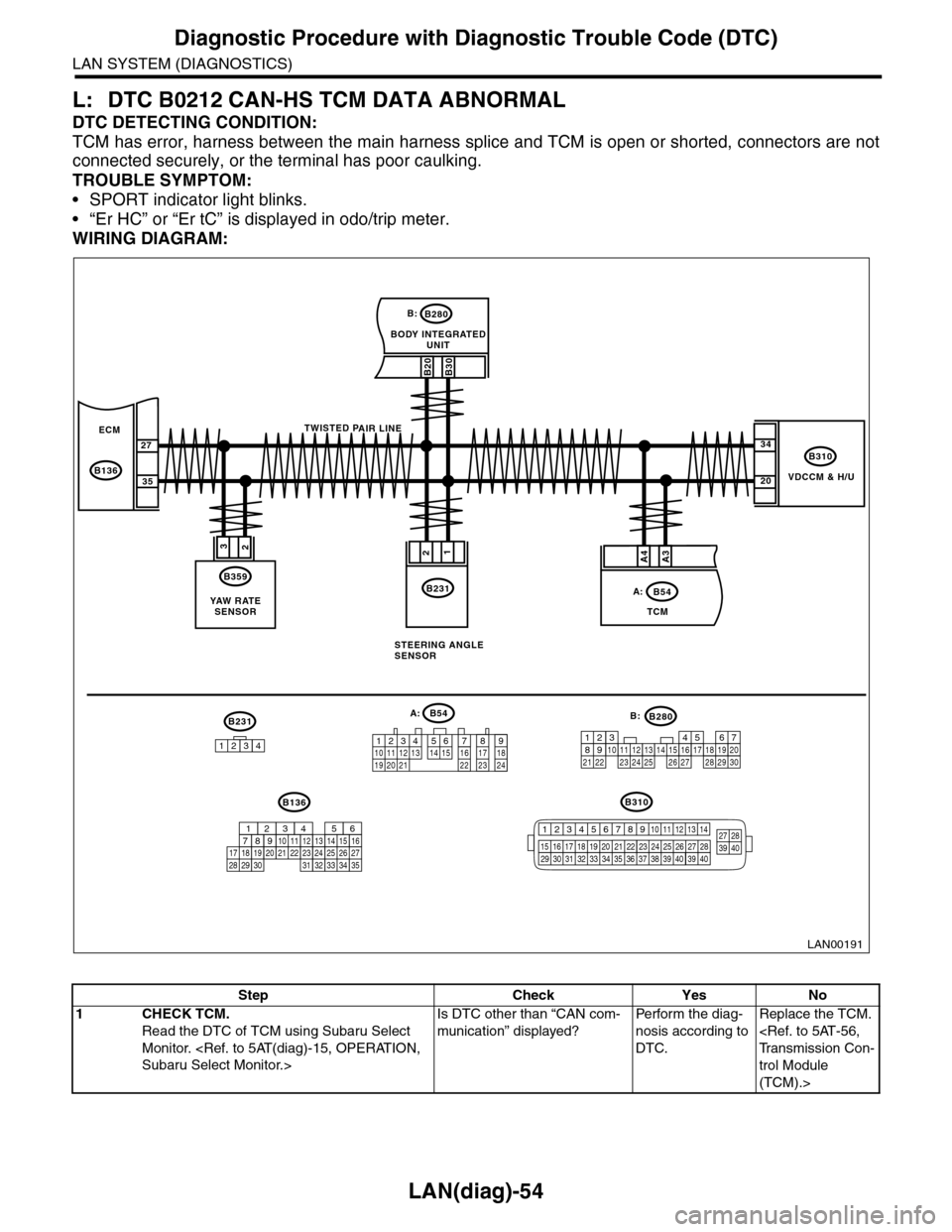
L: DTC B0212 CAN-HS TCM DATA ABNORMAL
DTC DETECTING CONDITION:
TCM has error, harness between the main harness splice and TCM is open or shorted, connectors are not
connected securely, or the terminal has poor caulking.
TROUBLE SYMPTOM:
•SPORT indicator light blinks.
•“Er HC” or “Er tC” is displayed in odo/trip meter.
WIRING DIAGRAM:
VDCCM & H/U
B310
B20B30
BODY INTEGRATEDUNIT
B280B:
TCM
B54A:
23
B359
YAW R AT ESENSOR
34
20
B231
21
STEERING ANGLESENSOR
B231
1234
B54A:
12 7 8 9563410 11 1219 20 2113 14 15 16 17 1822 23 24
B136B310
B280B:
5467821931022 23111213141524 25 26 2716171828 29192021 30
ECM
B136
27
35
A3A4
TWISTED PAIR LINE
12345678910 11 12 13 14
15 16 17 18 19 2021 22 23 24 25 26 27 2829 30 31 32 33 3435 36 37 38 39403940
27 28394016101112131415252430
9871718192028212223293231
123456
2726333435
LAN00191
Step Check Yes No
1CHECK TCM.
Read the DTC of TCM using Subaru Select
Monitor.
Is DTC other than “CAN com-
munication” displayed?
Pe r for m t h e d ia g -
nosis according to
DTC.
Replace the TCM.
trol Module
(TCM).>
Page 515 of 2453
LAN(diag)-59
Diagnostic Procedure with Diagnostic Trouble Code (DTC)
LAN SYSTEM (DIAGNOSTICS)
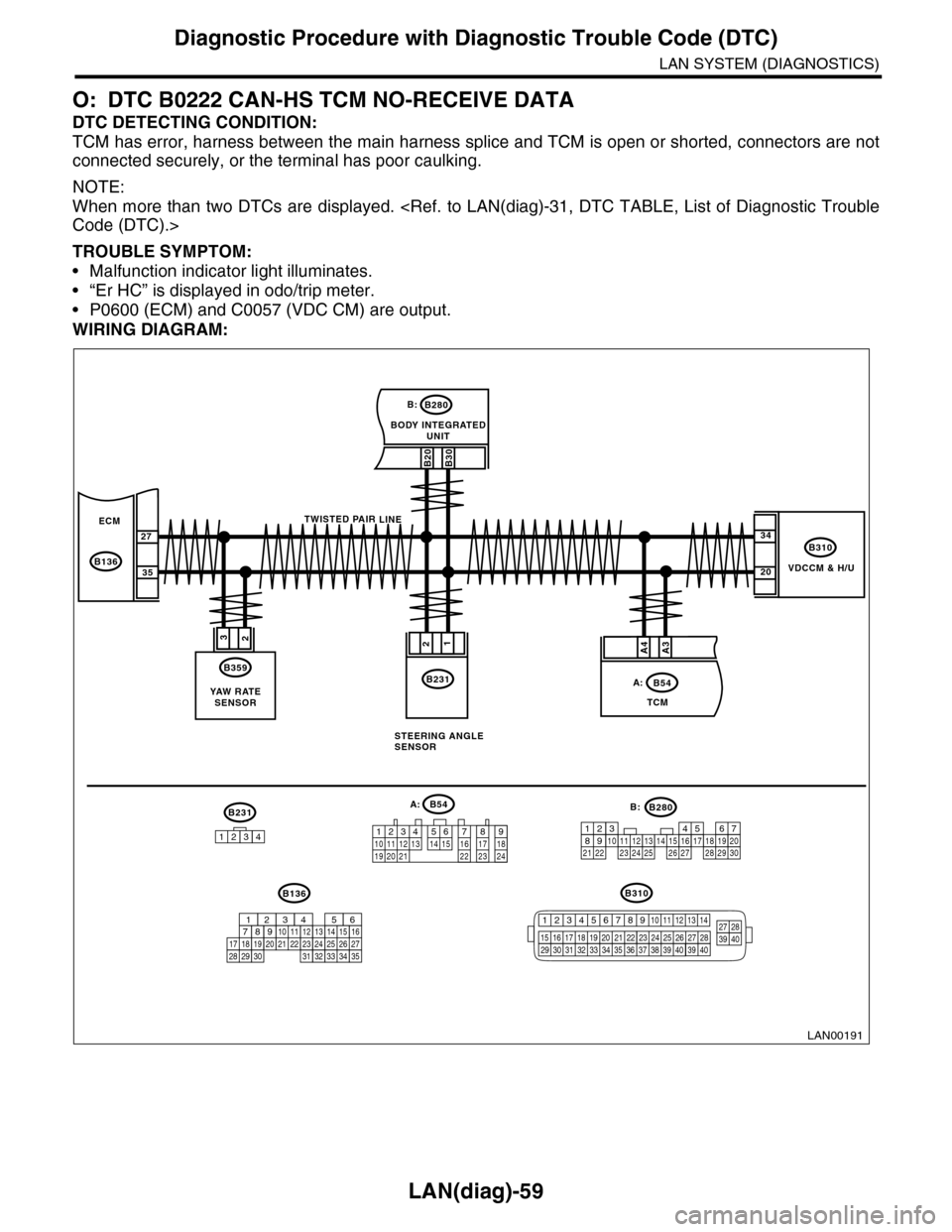
O: DTC B0222 CAN-HS TCM NO-RECEIVE DATA
DTC DETECTING CONDITION:
TCM has error, harness between the main harness splice and TCM is open or shorted, connectors are not
connected securely, or the terminal has poor caulking.
NOTE:
When more than two DTCs are displayed.
TROUBLE SYMPTOM:
•Malfunction indicator light illuminates.
•“Er HC” is displayed in odo/trip meter.
•P0600 (ECM) and C0057 (VDC CM) are output.
WIRING DIAGRAM:
VDCCM & H/U
B310
B20B30
BODY INTEGRATEDUNIT
B280B:
TCM
B54A:
23
B359
YAW R AT ESENSOR
34
20
B231
21
STEERING ANGLESENSOR
B231
1234
B54A:
12 7 8 9563410 11 1219 20 2113 14 15 16 17 1822 23 24
B136B310
B280B:
5467821931022 23111213141524 25 26 2716171828 29192021 30
ECM
B136
27
35
A3A4
TWISTED PAIR LINE
12345678910 11 12 13 14
15 16 17 18 19 2021 22 23 24 25 26 27 2829 30 31 32 33 3435 36 37 38 39403940
27 28394016101112131415252430
9871718192028212223293231
123456
2726333435
LAN00191
Page 526 of 2453
LAN(diag)-70
Diagnostic Procedure with Diagnostic Trouble Code (DTC)
LAN SYSTEM (DIAGNOSTICS)
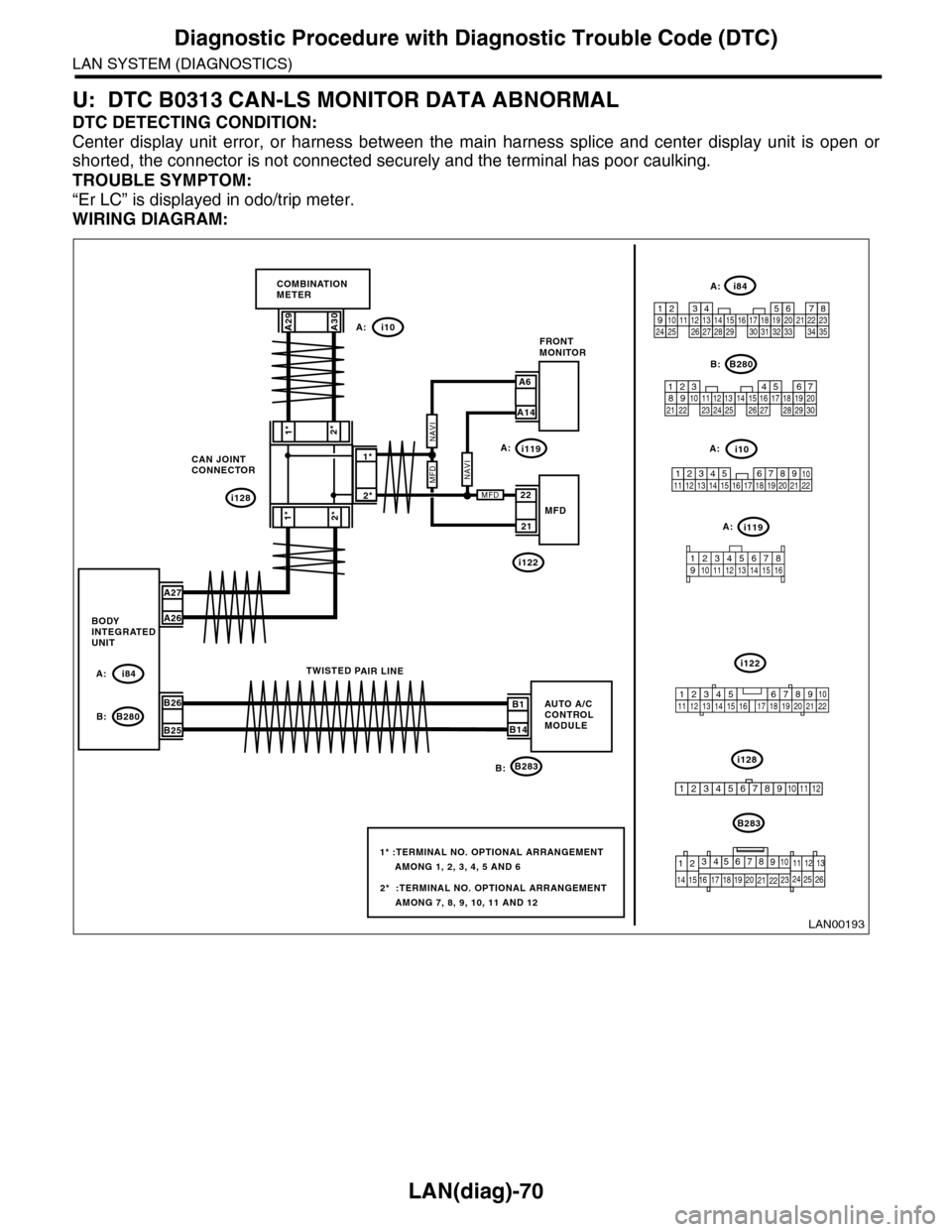
U: DTC B0313 CAN-LS MONITOR DATA ABNORMAL
DTC DETECTING CONDITION:
Center display unit error, or harness between the main harness splice and center display unit is open or
shorted, the connector is not connected securely and the terminal has poor caulking.
TROUBLE SYMPTOM:
“Er LC” is displayed in odo/trip meter.
WIRING DIAGRAM:
i128
1*
2*1*
2*
CAN JOINTCONNECTOR
i10
B283
A29A30
A27
A26
B26
B25
A: i84
B: B280B1
B14
TWISTED PAIR LINE
5467821931022 231112131415242526 2716171828 29192021 30
B280
i84
1234567891011121314151617181920212223242526272829303132333435
2345 678912 13 14 15 16 17 18 19 20 21 2210111
B283
i10
COMBINATIONMETER
BODYINTEGRATEDUNIT
AUTO A/CCONTROLMODULE
123456789101112
LAN00193
A:
B:
2*
1*
A6
A14
FRONTMONITOR
21
22MFD
2* :TERMINAL NO. OPTIONAL ARRANGEMENT AMONG 7, 8, 9, 10, 11 AND 12
1* :TERMINAL NO. OPTIONAL ARRANGEMENT AMONG 1, 2, 3, 4, 5 AND 6
i119
i122
A:
A:
A:
i119A:
i122
i128B:
MFDNAVI
MFD
NAVI
9
19 20
105672143131211
14 15 16 17
8
18222125262423
12345678910 11 12 13 14 15 16
345 678919 20 2114 15 16 17 1812101211 13 22
Page 533 of 2453
LAN(diag)-77
General Diagnostic Table
LAN SYSTEM (DIAGNOSTICS)
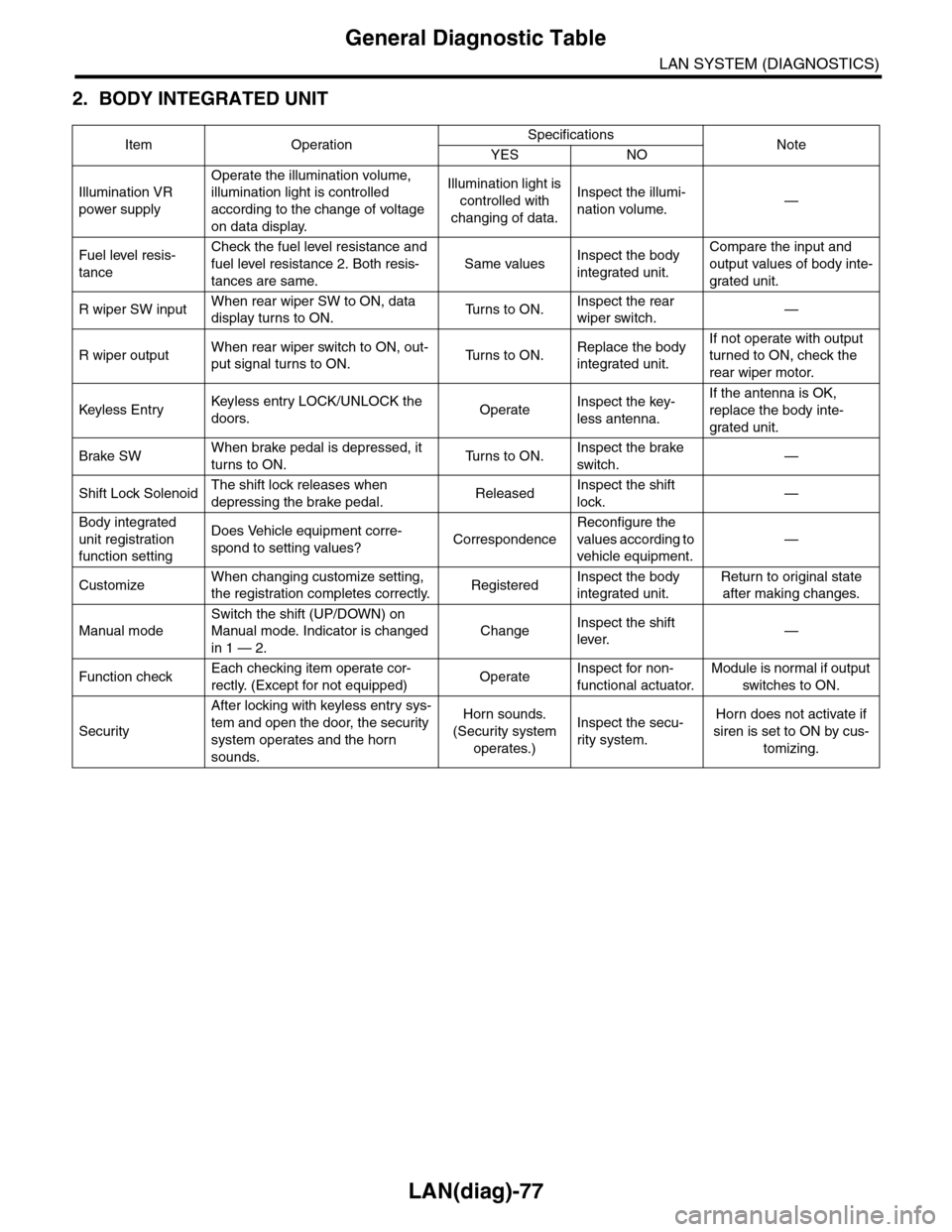
2. BODY INTEGRATED UNIT
Item OperationSpecificationsNoteYES NO
Illumination VR
power supply
Operate the illumination volume,
illumination light is controlled
according to the change of voltage
on data display.
Illumination light is
controlled with
changing of data.
Inspect the illumi-
nation volume.—
Fuel level resis-
tance
Check the fuel level resistance and
fuel level resistance 2. Both resis-
tances are same.
Same valuesInspect the body
integrated unit.
Compare the input and
output values of body inte-
grated unit.
R wiper SW inputWhen rear wiper SW to ON, data
display turns to ON.Tu r n s t o O N .Inspect the rear
wiper switch.—
R wiper outputWhen rear wiper switch to ON, out-
put signal turns to ON.Tu r n s t o O N .Replace the body
integrated unit.
If not operate with output
turned to ON, check the
rear wiper motor.
Keyless Entr yKeyless entr y LOCK/UNLOCK the
doors.OperateInspect the key-
less antenna.
If the antenna is OK,
replace the body inte-
grated unit.
Brake SWWhen brake pedal is depressed, it
turns to ON.Tu r n s t o O N .Inspect the brake
switch.—
Shift Lock SolenoidThe shift lock releases when
depressing the brake pedal.ReleasedInspect the shift
lock.—
Body integrated
unit registration
function setting
Does Vehicle equipment corre-
spond to setting values?Correspondence
Reconfigure the
values according to
vehicle equipment.
—
CustomizeWhen changing customize setting,
the registration completes correctly.RegisteredInspect the body
integrated unit.
Return to original state
after making changes.
Manual mode
Switch the shift (UP/DOWN) on
Manual mode. Indicator is changed
in 1 — 2.
ChangeInspect the shift
lever.—
Function checkEach checking item operate cor-
rectly. (Except for not equipped)OperateInspect for non-
functional actuator.
Module is normal if output
switches to ON.
Security
After locking with keyless entry sys-
tem and open the door, the security
system operates and the horn
sounds.
Horn sounds.
(Security system
operates.)
Inspect the secu-
rity system.
Horn does not activate if
siren is set to ON by cus-
tomizing.
Page 535 of 2453
LI-2
General Description
LIGHTING SYSTEM
1. General Description
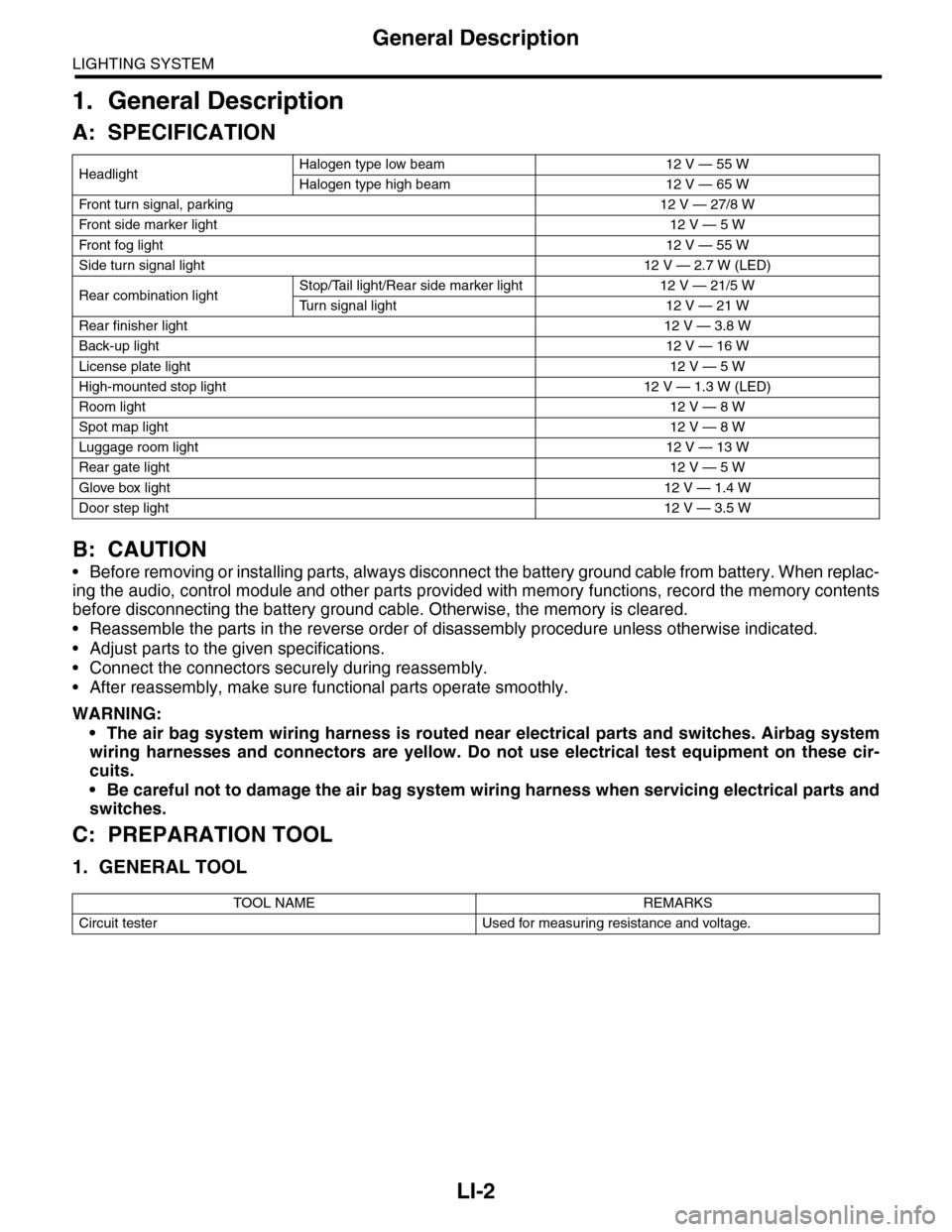
A: SPECIFICATION
B: CAUTION
•Before removing or installing parts, always disconnect the battery ground cable from battery. When replac-
ing the audio, control module and other parts provided with memory functions, record the memory contents
before disconnecting the battery ground cable. Otherwise, the memory is cleared.
•Reassemble the parts in the reverse order of disassembly procedure unless otherwise indicated.
•Adjust parts to the given specifications.
•Connect the connectors securely during reassembly.
•After reassembly, make sure functional parts operate smoothly.
WARNING:
•The air bag system wiring harness is routed near electrical parts and switches. Airbag system
wiring harnesses and connectors are yellow. Do not use electrical test equipment on these cir-
cuits.
•Be careful not to damage the air bag system wiring harness when servicing electrical parts and
switches.
C: PREPARATION TOOL
1. GENERAL TOOL
HeadlightHalogen type low beam 12 V — 55 W
Halogen type high beam 12 V — 65 W
Fr o nt t ur n si gn a l, p ar k in g 1 2 V — 27 / 8 W
Fr o nt si d e m ar ke r li gh t12 V — 5 W
Fr o nt fog li g ht12 V — 55 W
Side turn signal light 12 V — 2.7 W (LED)
Rear combination lightStop/Tail light/Rear side marker light 12 V — 21/5 W
Tu r n s i g n a l l i g h t 1 2 V — 2 1 W
Rear finisher light12 V — 3.8 W
Back-up light12 V — 16 W
License plate light12 V — 5 W
High-mounted stop light 12 V — 1.3 W (LED)
Room light12 V — 8 W
Spot map light12 V — 8 W
Luggage room light12 V — 13 W
Rear gate light12 V — 5 W
Glove box light12 V — 1.4 W
Door step light12 V — 3.5 W
TOOL NAME REMARKS
Circuit tester Used for measuring resistance and voltage.
Page 542 of 2453
LI-9
Combination Switch (Light)
LIGHTING SYSTEM
8. Combination Switch (Light)
A: REMOVAL
1) Disconnect the ground cable from battery.
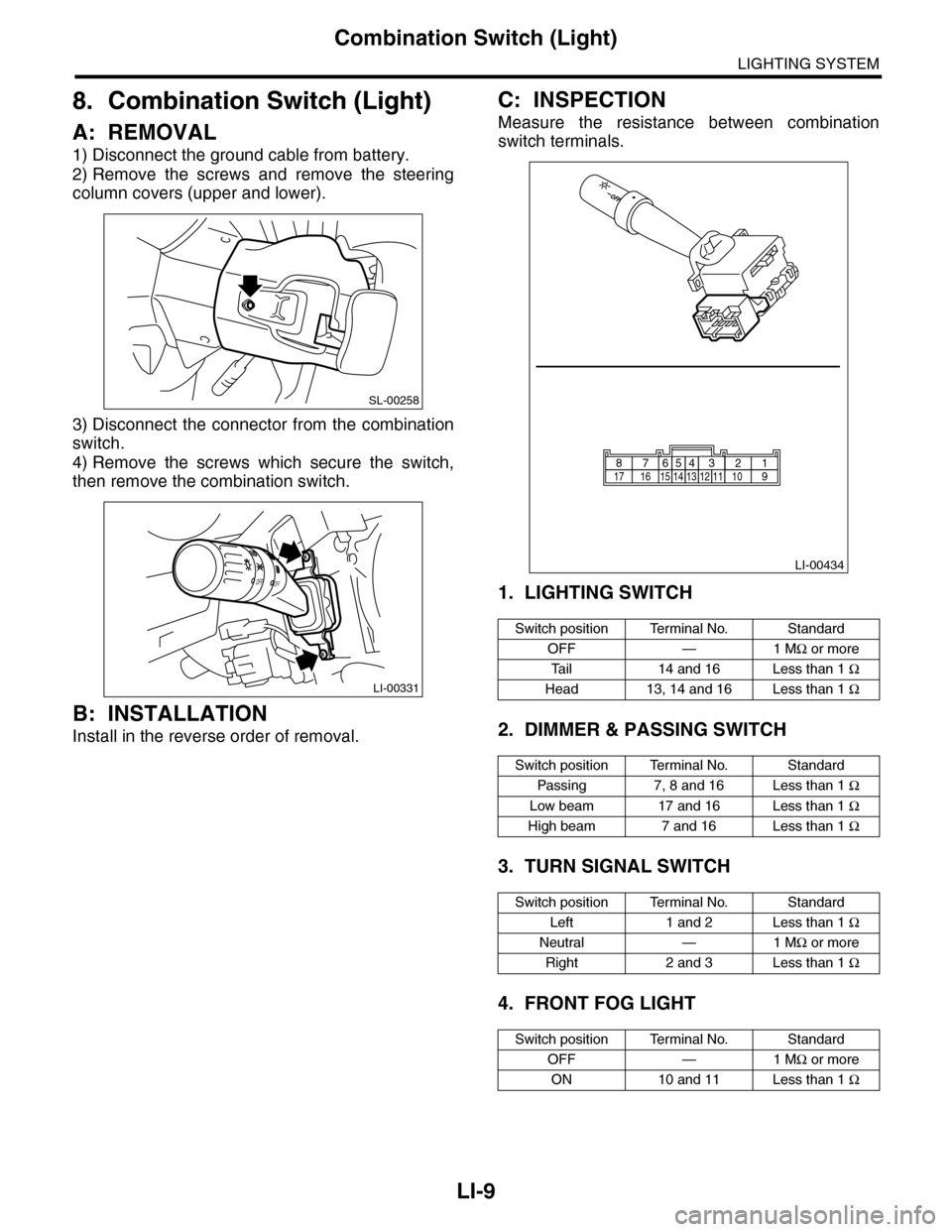
2) Remove the screws and remove the steering
column covers (upper and lower).
3) Disconnect the connector from the combination
switch.
4) Remove the screws which secure the switch,
then remove the combination switch.
B: INSTALLATION
Install in the reverse order of removal.
C: INSPECTION
Measure the resistance between combination
switch terminals.
1. LIGHTING SWITCH
2. DIMMER & PASSING SWITCH
3. TURN SIGNAL SWITCH
4. FRONT FOG LIGHT
SL-00258
LI-00331
OFFOFF
Switch position Terminal No. Standard
OFF — 1 MΩ or more
Ta i l 1 4 a n d 1 6 L e s s t h a n 1 Ω
Head 13, 14 and 16 Less than 1 Ω
Switch position Terminal No. Standard
Passing 7, 8 and 16 Less than 1 Ω
Low beam 17 and 16 Less than 1 Ω
High beam 7 and 16 Less than 1 Ω
Switch position Terminal No. Standard
Left 1 and 2 Less than 1 Ω
Neutral — 1 MΩ or more
Right 2 and 3 Less than 1 Ω
Switch position Terminal No. Standard
OFF — 1 MΩ or more
ON 10 and 11 Less than 1 Ω
LI-00434
1514131211109171665432187
Page 544 of 2453
LI-11
Headlight Assembly
LIGHTING SYSTEM
10.Headlight Assembly
A: REMOVAL
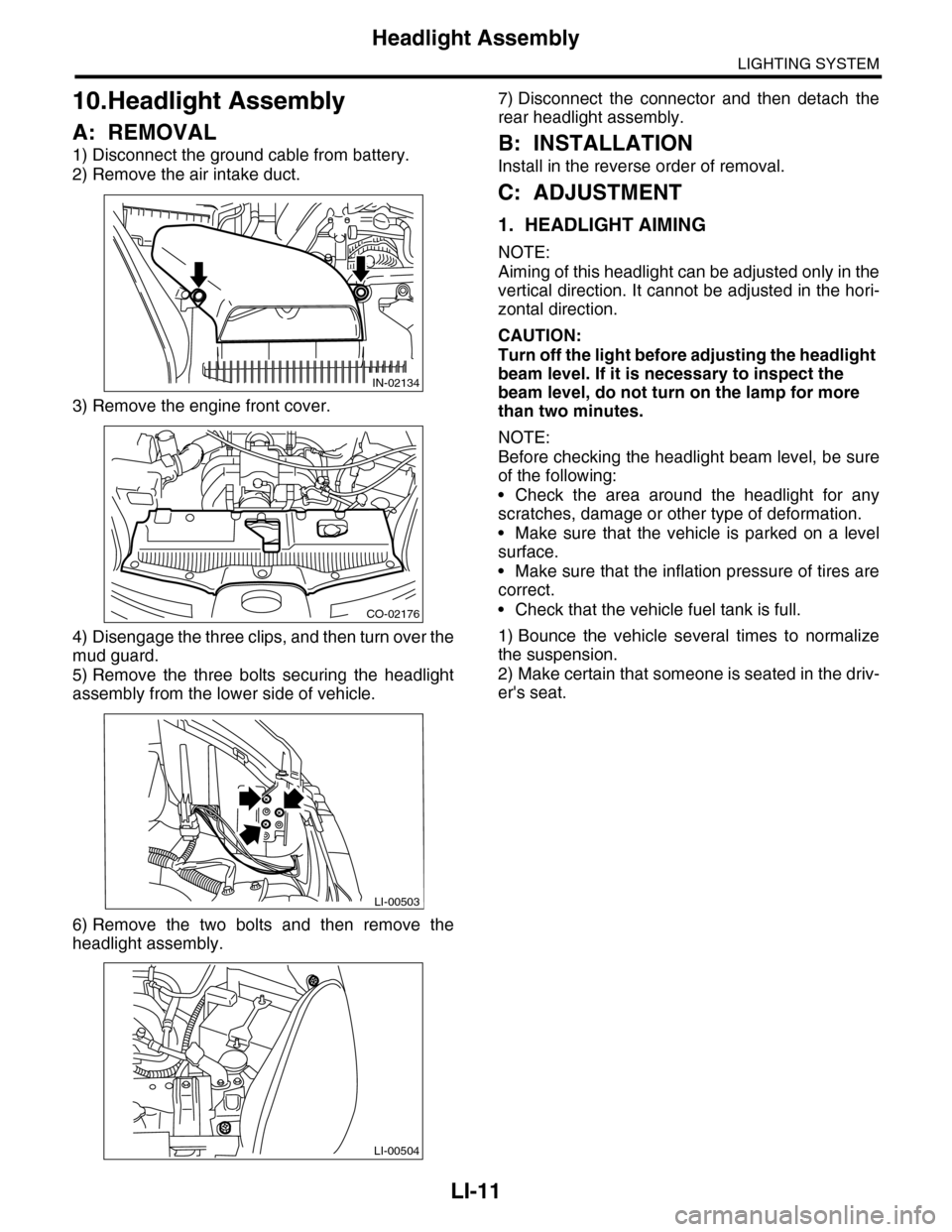
1) Disconnect the ground cable from battery.
2) Remove the air intake duct.
3) Remove the engine front cover.
4) Disengage the three clips, and then turn over the
mud guard.
5) Remove the three bolts securing the headlight
assembly from the lower side of vehicle.
6) Remove the two bolts and then remove the
headlight assembly.
7) Disconnect the connector and then detach the
rear headlight assembly.
B: INSTALLATION
Install in the reverse order of removal.
C: ADJUSTMENT
1. HEADLIGHT AIMING
NOTE:
Aiming of this headlight can be adjusted only in the
vertical direction. It cannot be adjusted in the hori-
zontal direction.
CAUTION:
Turn off the light before adjusting the headlight
beam level. If it is necessary to inspect the
beam level, do not turn on the lamp for more
than two minutes.
NOTE:
Before checking the headlight beam level, be sure
of the following:
•Check the area around the headlight for any
scratches, damage or other type of deformation.
•Make sure that the vehicle is parked on a level
surface.
•Make sure that the inflation pressure of tires are
correct.
•Check that the vehicle fuel tank is full.
1) Bounce the vehicle several times to normalize
the suspension.
2) Make certain that someone is seated in the driv-
er's seat.
IN-02134
CO-02176
LI-00503
LI-00504
Page 570 of 2453
OD(diag)-2
Basic Diagnostic Procedure
OCCUPANT DETECTION SYSTEM (DIAGNOSTICS)
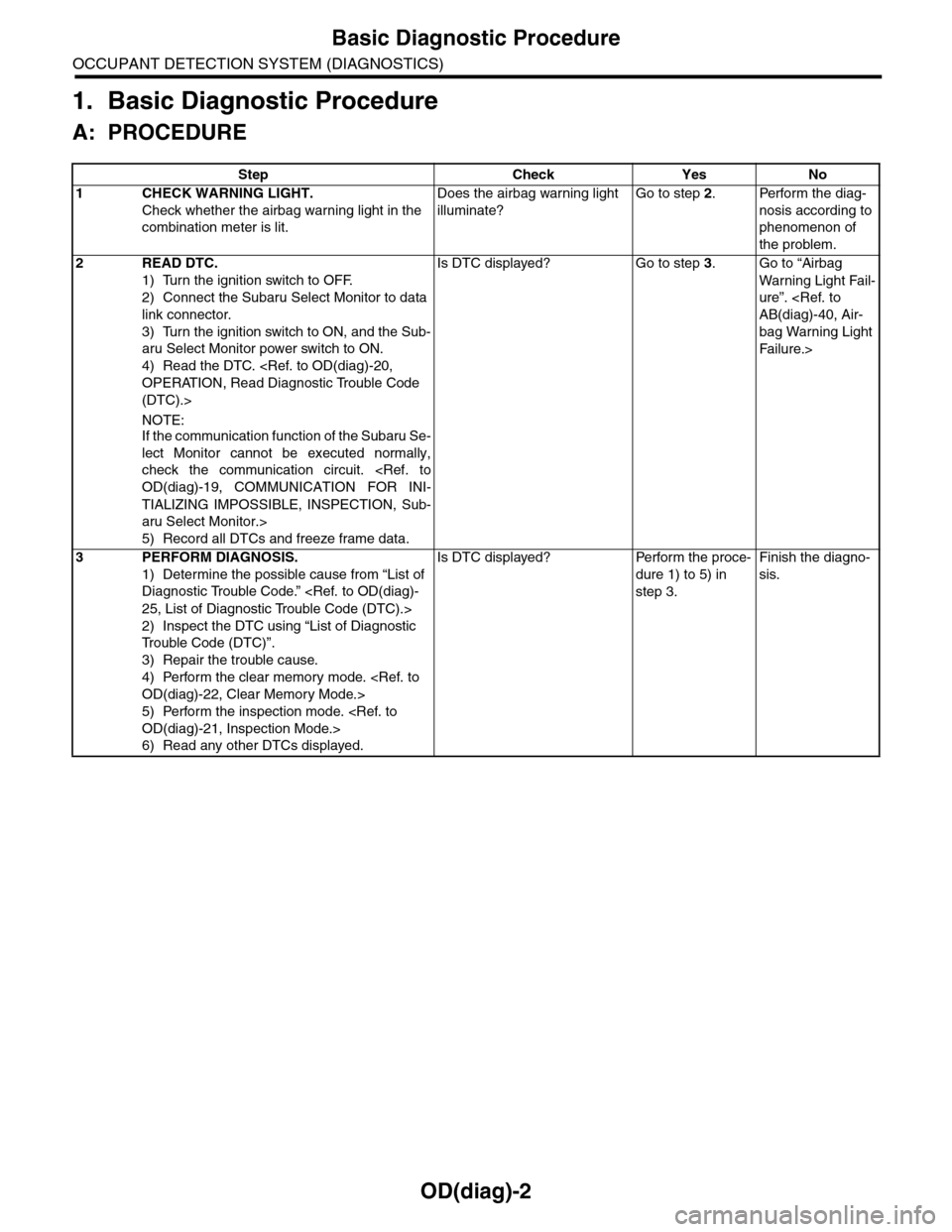
1. Basic Diagnostic Procedure
A: PROCEDURE
Step Check Yes No
1CHECK WARNING LIGHT.
Check whether the airbag warning light in the
combination meter is lit.
Does the airbag warning light
illuminate?
Go to step 2.Perform the diag-
nosis according to
phenomenon of
the problem.
2READ DTC.
1) Turn the ignition switch to OFF.
2) Connect the Subaru Select Monitor to data
link connector.
3) Turn the ignition switch to ON, and the Sub-
aru Select Monitor power switch to ON.
4) Read the DTC.
(DTC).>
NOTE:If the communication function of the Subaru Se-
lect Monitor cannot be executed normally,
check the communication circuit.
TIALIZING IMPOSSIBLE, INSPECTION, Sub-
aru Select Monitor.>
5) Record all DTCs and freeze frame data.
Is DTC displayed? Go to step 3.Go to “Airbag
Wa r ni n g L ig h t Fa i l-
ure”.
bag Warning Light
Fai lu r e.>
3PERFORM DIAGNOSIS.
1) Determine the possible cause from “List of
Diagnostic Trouble Code.”
2) Inspect the DTC using “List of Diagnostic
Tr o u b l e C o d e ( D T C ) ” .
3) Repair the trouble cause.
4) Perform the clear memory mode.
5) Perform the inspection mode.
6) Read any other DTCs displayed.
Is DTC displayed? Perform the proce-
dure 1) to 5) in
step 3.
Finish the diagno-
sis.
Page 608 of 2453
SB-11
Front Seat Belt
SEAT BELT SYSTEM
B: INSTALLATION
1. OUTER SEAT BELT ASSEMBLY
Install in the reverse order of removal.
CAUTION:
•The parts of driver and passenger sides are
not the same. Before installation, make sure
that the correct part is used.
•Be careful not to twist the seat belts during
installation.
Tightening torque:
2. INNER SEAT BELT ASSEMBLY
Install in the reverse order of removal.
CAUTION:
•After the driver’s and passenger’s inner seat
belt assembly installation, check that the seat
belt buckle switch operates normally using the
Subaru Select Monitor in {Status Data} of “Air-
bag System”.
aru Select Monitor.>Improper buckle switch op-
eration may cause airbag system malfunction.
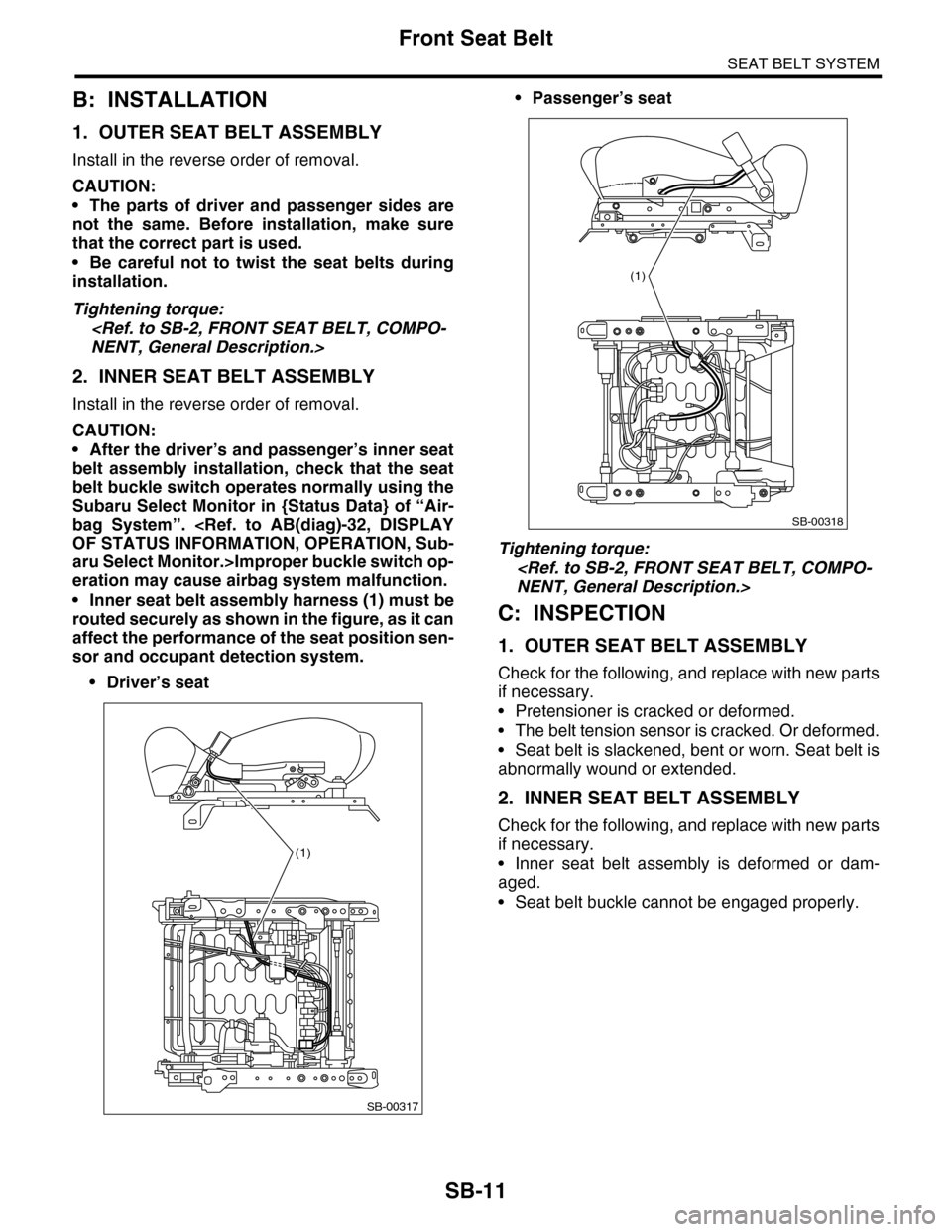
•Inner seat belt assembly harness (1) must be
routed securely as shown in the figure, as it can
affect the performance of the seat position sen-
sor and occupant detection system.
•Driver’s seat
•Passenger’s seat
Tightening torque:
C: INSPECTION
1. OUTER SEAT BELT ASSEMBLY
Check for the following, and replace with new parts
if necessary.
•Pretensioner is cracked or deformed.
•The belt tension sensor is cracked. Or deformed.
•Seat belt is slackened, bent or worn. Seat belt is
abnormally wound or extended.
2. INNER SEAT BELT ASSEMBLY
Check for the following, and replace with new parts
if necessary.
•Inner seat belt assembly is deformed or dam-
aged.
•Seat belt buckle cannot be engaged properly.
SB-00317
(1)
SB-00318
(1)
Page 620 of 2453
SE-10
Front Seat
SEATS
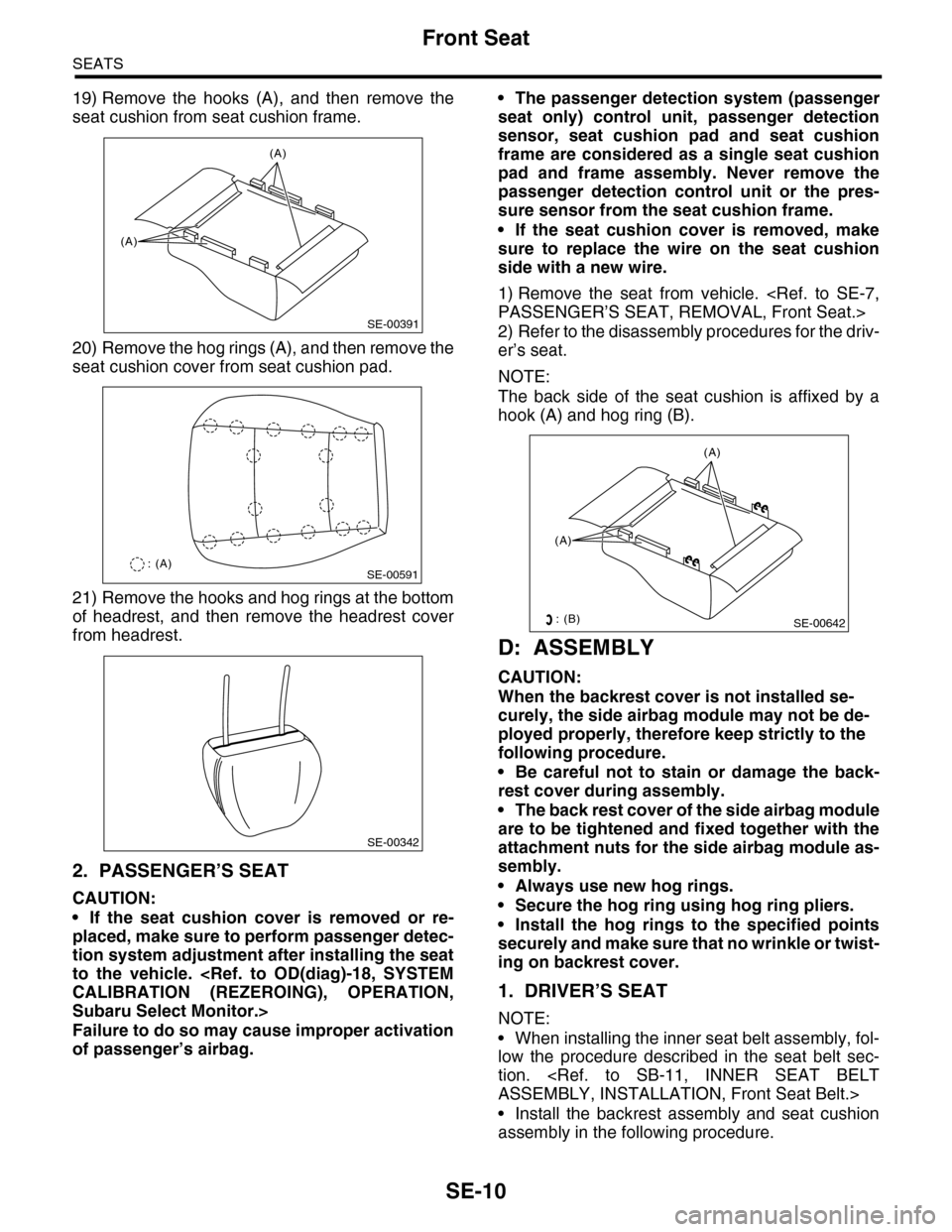
19) Remove the hooks (A), and then remove the
seat cushion from seat cushion frame.
20) Remove the hog rings (A), and then remove the
seat cushion cover from seat cushion pad.
21) Remove the hooks and hog rings at the bottom
of headrest, and then remove the headrest cover
from headrest.
2. PASSENGER’S SEAT
CAUTION:
•If the seat cushion cover is removed or re-
placed, make sure to perform passenger detec-
tion system adjustment after installing the seat
to the vehicle.
Subaru Select Monitor.>
Failure to do so may cause improper activation
of passenger’s airbag.
•The passenger detection system (passenger
seat only) control unit, passenger detection
sensor, seat cushion pad and seat cushion
frame are considered as a single seat cushion
pad and frame assembly. Never remove the
passenger detection control unit or the pres-
sure sensor from the seat cushion frame.
•If the seat cushion cover is removed, make
sure to replace the wire on the seat cushion
side with a new wire.
1) Remove the seat from vehicle.
2) Refer to the disassembly procedures for the driv-
er’s seat.
NOTE:
The back side of the seat cushion is affixed by a
hook (A) and hog ring (B).
D: ASSEMBLY
CAUTION:
When the backrest cover is not installed se-
curely, the side airbag module may not be de-
ployed properly, therefore keep strictly to the
following procedure.
•Be careful not to stain or damage the back-
rest cover during assembly.
•The back rest cover of the side airbag module
are to be tightened and fixed together with the
attachment nuts for the side airbag module as-
sembly.
•Always use new hog rings.
•Secure the hog ring using hog ring pliers.
•Install the hog rings to the specified points
securely and make sure that no wrinkle or twist-
ing on backrest cover.
1. DRIVER’S SEAT
NOTE:
•When installing the inner seat belt assembly, fol-
low the procedure described in the seat belt sec-
tion.
•Install the backrest assembly and seat cushion
assembly in the following procedure.
SE-00391
(A)
(A)
SE-00591: (A)
SE-00342
(A)
(A)
SE-00642: (B)