radio SUBARU WRX 2016 Owner's Guide
[x] Cancel search | Manufacturer: SUBARU, Model Year: 2016, Model line: WRX, Model: SUBARU WRX 2016Pages: 594, PDF Size: 19.43 MB
Page 298 of 594
. Program Service Data: Presents song
name, artist, station IDs, and other rele-
vant data streams.
. iTunes Tagging provides you the op-
portunity to discover a wide range of
content and the means to “ tag ” that
content for later review and purchase from
the iTunes Store. Also refer to the Apple
Automotive specifications for implement-
ing iTunes Tagging.
. Visual information related to content
being played on your HD Radio receiver,
such as Album Art, historical photographs,
still art from live broadcasts, among other
related content. Audio/Radio operation
– CONTINUED –5-43
Page 299 of 594

Audio/Radio operation
! Troubleshooting guide Experience Cause Action
Mismatch of time alignment - a user may hear
a short period of programming replayed or an
echo, stutter or skip. The radio stations analog and digital volume is
not properly aligned or the station is in ballgame
mode. None, radio broadcast issue. A user can contact
the radio station.
Sound fades, blending in and out. Radio is shifting between analog and digital
audio. Reception issue, may clear-up as the vehicle
continues to be driven. Turning the indicator of the
“ HD Radio TM
” button off can force radio in an
analog audio.
Audio mute condition when an HD2/HD3
multicast channel had been playing. The radio does not have access to digital
signals at the moment. This is normal behavior, wait until the digital signal
returns. If out of the coverage area, seek a new
station.
Audio mute delay when selecting an HD2/
HD3 multicast channel preset. The digital multicast content is not available until
HD Radio TM
broadcast can be decoded and
make the audio available. This takes up to 7
seconds. This is normal behavior, wait for the audio to
become available.
Text information does not match the present
song audio. Data service issue by the radio broadcaster. Broadcaster should be notified. Complete the form;
www.ibiquity.com/automotive/report_radio
_station_experiences.
No text information shown for the present
selected frequency. Data service issue by the radio broadcaster. Broadcaster should be notified. Complete the form;
www.ibiquity.com/automotive/report_radio
_station_experiences.5-44
Page 300 of 594
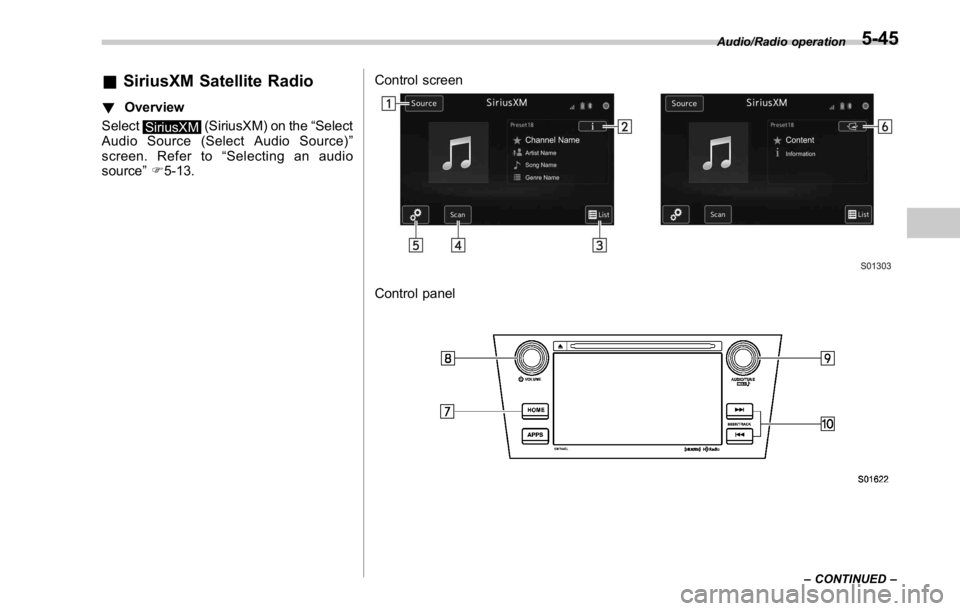
& SiriusXM Satellite Radio ! Overview
Select
SiriusXM (SiriusXM) on the “ Select
Audio Source (Select Audio Source) ”
screen. Refer to “ Selecting an audio
source ” F 5-13. Control screen
Control panel Audio/Radio operation
– CONTINUED –5-45
Page 301 of 594
Audio/Radio operation
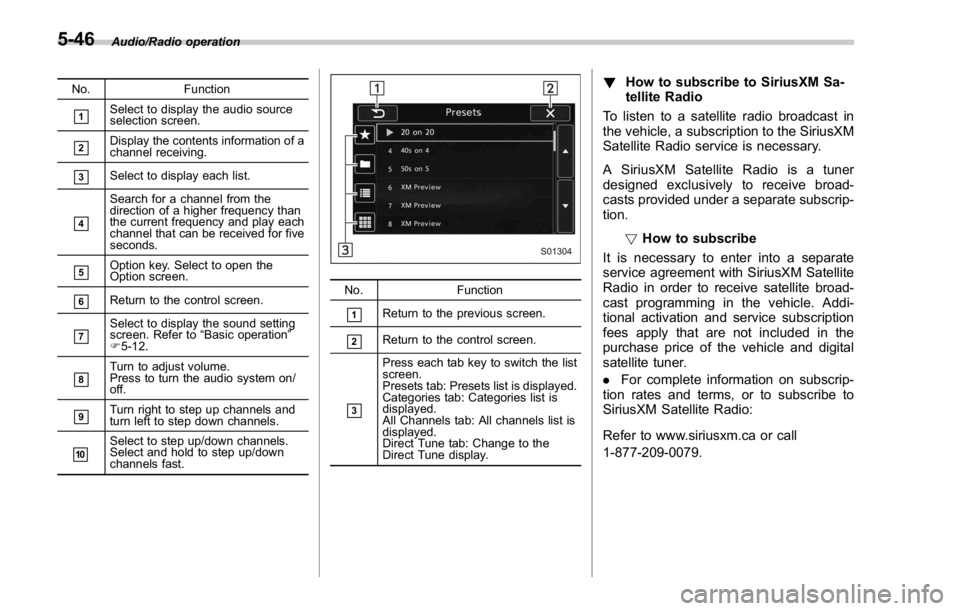
No. Function
& 1
Select to display the audio source
selection screen.
& 2
Display the contents information of a
channel receiving.
& 3
Select to display each list.
& 4
Search for a channel from the
direction of a higher frequency than
the current frequency and play each
channel that can be received for five
seconds.
& 5
Option key. Select to open the
Option screen.
& 6
Return to the control screen.
& 7
Select to display the sound setting
screen. Refer to “ Basic operation ”
F 5-12.
& 8
Turn to adjust volume.
Press to turn the audio system on/
off.
& 9
Turn right to step up channels and
turn left to step down channels.
& 10
Select to step up/down channels.
Select and hold to step up/down
channels fast. No. Function
& 1
Return to the previous screen.
& 2
Return to the control screen.
& 3Press each tab key to switch the list
screen.
Presets tab: Presets list is displayed.
Categories tab: Categories list is
displayed.
All Channels tab: All channels list is
displayed.
Direct Tune tab: Change to the
Direct Tune display. ! How to subscribe to SiriusXM Sa-
tellite Radio
To listen to a satellite radio broadcast in
the vehicle, a subscription to the SiriusXM
Satellite Radio service is necessary.
A SiriusXM Satellite Radio is a tuner
designed exclusively to receive broad-
casts provided under a separate subscrip-
tion.
! How to subscribe
It is necessary to enter into a separate
service agreement with SiriusXM Satellite
Radio in order to receive satellite broad-
cast programming in the vehicle. Addi-
tional activation and service subscription
fees apply that are not included in the
purchase price of the vehicle and digital
satellite tuner.
. For complete information on subscrip-
tion rates and terms, or to subscribe to
SiriusXM Satellite Radio:
Refer to www.siriusxm.ca or call
1-877-209-0079.5-46
Page 302 of 594
WARNING. SiriusXM Satellite Radio Services
— Legal Disclaimers and Warn-
ings
– Fees and Taxes — Subscrip-
tion fee, taxes, one time acti-
vation fee, and other fees may
apply. Subscription fee is con-
sumer only. All fees and pro-
gramming subject to change.
Subscriptions subject to Cus-
tomer Agreement available at
www.siriusxm.ca XM service
only available in Canada.
Explicit Language Notice —
Channels with frequent expli-
cit language are indicated
with an “ XL ” preceding the
channel name. Channel block-
ing is available for SiriusXM
Satellite Radio receivers by
notifying XM at;
Visit www.siriusxm.ca or call-
ing
1-877-209-0079 CAUTION. It is prohibited to copy, decom-
pile, disassemble, reverse engi-
neer, hack, manipulate, or other-
wise make available any technol-
ogy or software incorporated in
receivers compatible with the
SiriusXM Satellite Radio System
or that support the XM website,
the Online Service or any of its
content. Furthermore, the
AMBE ®
voice compression soft-
ware included in this product is
protected by intellectual property
rights including patent rights,
copyrights, and trade secrets of
Digital Voice Systems, Inc.
. Note: this applies to SiriusXM
Satellite Radio receivers only
and not XM Ready devices.
NOTE . SiriusXM Satellite Services — De-
scriptions
– Only SiriusXM Satellite Radio ®
brings you more of what you love,
all in one place. Get over 175
channels, including commercial-
free music, plus the best sports,
news, talk, comedy and entertain- ment. Welcome to the world of
satellite radio. More information
about SiriusXM Satellite Radio is
available online at www.siriusxm.
ca.
. SiriusXM Satellite Services — Sub-
scription Instructions
– For SiriusXM Services requiring
a subscription (such as SiriusXM
Satellite Radio, and some Infotain-
ment & data services), the following
applies.
Required SiriusXM Satellite Radio
and some Infotainment & data ser-
vices monthly subscriptions sold
separately after trial period. Sub-
scription fee is consumer only. All
fees and programming subject to
change. Subscriptions are subject
to the Customer Agreement avail-
able at www.siriusxm.ca. Sirius, XM
and all related marks and logos are
trademarks of Sirius XM Radio Inc.
All other marks, channel names and
logos are the property of their
respective owners.
For more information, program
schedules, and to subscribe or
extend subscription after compli-
mentary trial period; more informa-
tion is available at:
Visit www.siriusxm.ca or calling Audio/Radio operation
– CONTINUED –5-47
Page 303 of 594
Audio/Radio operation
1-877-209-0079
. SiriusXM Satellite Radio is solely
responsible for the quality, availability
and content of the satellite radio ser-
vices provided, which are subject to
the terms and conditions of the
SiriusXM Satellite Radio customer ser-
vice agreement.
. Customers should have their radio
ID ready; the radio ID can be found by
tuning to “ Ch 000 ” on the radio. For
details, see “ DISPLAYING THE RADIO
ID ” below.
. All fees and programming are the
responsibility of SiriusXM Satellite
Radio and are subject to change.
! Displaying the Radio ID
Each SiriusXM tuner is identified with a
unique radio ID. The radio ID is required
when activating an SiriusXM Satellite
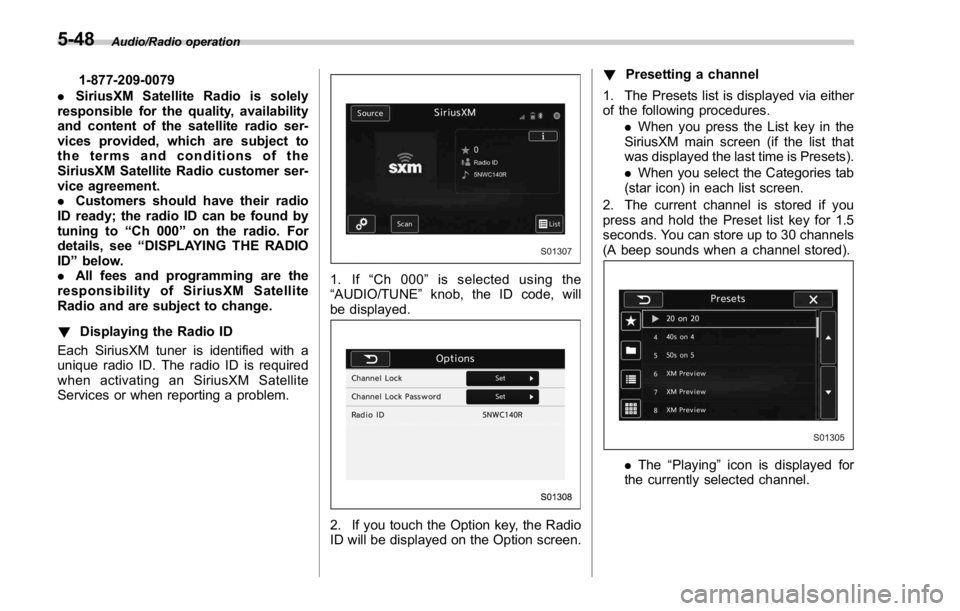
Services or when reporting a problem. 1. If “ Ch 000 ” is selected using the
“ AUDIO/TUNE ” knob, the ID code, will
be displayed.
2. If you touch the Option key, the Radio
ID will be displayed on the Option screen. ! Presetting a channel
1. The Presets list is displayed via either
of the following procedures.
. When you press the List key in the
SiriusXM main screen (if the list that
was displayed the last time is Presets).
. When you select the Categories tab
(star icon) in each list screen.
2. The current channel is stored if you
press and hold the Preset list key for 1.5
seconds. You can store up to 30 channels
(A beep sounds when a channel stored).
. The “ Playing ” icon is displayed for
the currently selected channel.5-48
Page 304 of 594
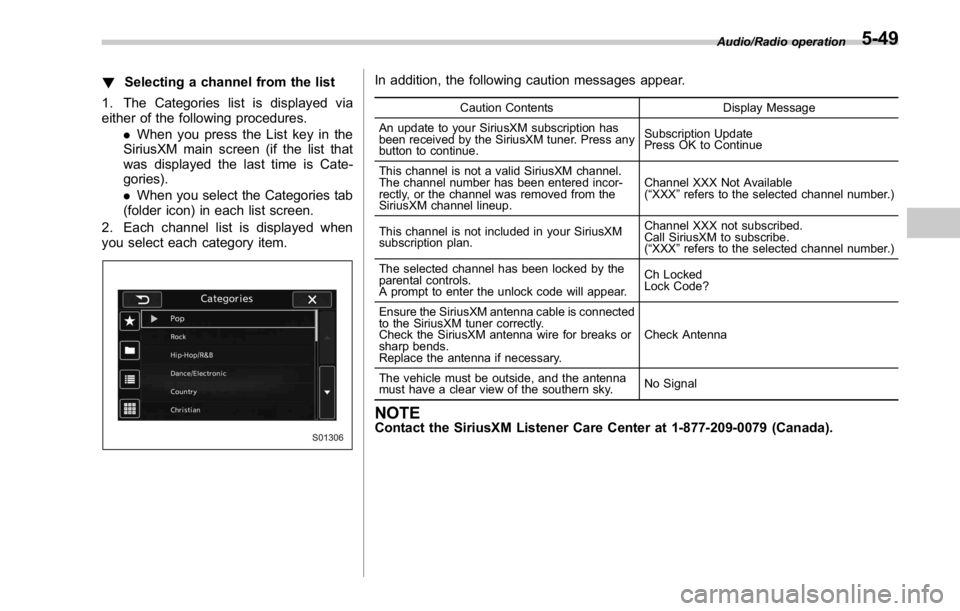
! Selecting a channel from the list
1. The Categories list is displayed via
either of the following procedures.
. When you press the List key in the
SiriusXM main screen (if the list that
was displayed the last time is Cate-
gories).
. When you select the Categories tab
(folder icon) in each list screen.
2. Each channel list is displayed when
you select each category item. In addition, the following caution messages appear. Caution Contents Display Message
An update to your SiriusXM subscription has
been received by the SiriusXM tuner. Press any
button to continue. Subscription Update
Press OK to Continue
This channel is not a valid SiriusXM channel.
The channel number has been entered incor-
rectly, or the channel was removed from the
SiriusXM channel lineup. Channel XXX Not Available
( “ XXX ” refers to the selected channel number.)
This channel is not included in your SiriusXM
subscription plan. Channel XXX not subscribed.
Call SiriusXM to subscribe.
( “ XXX ” refers to the selected channel number.)
The selected channel has been locked by the
parental controls.
A prompt to enter the unlock code will appear. Ch Locked
Lock Code?
Ensure the SiriusXM antenna cable is connected
to the SiriusXM tuner correctly.
Check the SiriusXM antenna wire for breaks or
sharp bends.
Replace the antenna if necessary. Check Antenna
The vehicle must be outside, and the antenna
must have a clear view of the southern sky. No Signal
NOTE Contact the SiriusXM Listener Care Center at 1-877-209-0079 (Canada). Audio/Radio operation
5-49
Page 318 of 594
WARNING. Do not operate the player ’ s con-
trols or connect to the Bluetooth
audio system while driving.
. Your audio unit is fitted with
Bluetooth antennas. People with
implantable cardiac pacemakers,
cardiac resynchronization ther-
apy-pacemakers or implantable
cardioverter defibrillators should
maintain a reasonable distance
between themselves and the
Bluetooth antennas. The radio
waves may affect the operation
of such devices.
. Before using Bluetooth devices,
users of any electrical medical
device other than implantable
cardiac pacemakers, cardiac re-
synchronization therapy-pace-
makers or implantable cardiover-
ter defibrillators should consult
the manufacturer of the device
for information about its opera-
tion under the influence of radio
waves. Radio waves could have
unexpected effects on the opera-
tion of such medical devices. CAUTIONDo not leave your portable player in
the vehicle. In particular, high tem-
peratures inside the vehicle may
damage the portable player.
NOTE . Depending on the Bluetooth device
that is connected to the system, the
music may start playing when selecting
while it is paused. Conversely, the
music may pause when selecting
while it is playing.
. In the following conditions, the sys-
tem may not function:
– The Bluetooth device is turned
off.
– The Bluetooth device is not con-
nected.
– The Bluetooth device has a low
battery.
. Itmaytaketimetoconnectthe
phone when Bluetooth audio is being
played.
. For operating the portable player,
see the instruction manual that comes
with it.
. If the Bluetooth device is discon-
nected due to poor reception from the
Bluetooth network when the ignition switch is in the “ ACC ” or “ ON ” posi-
tion, the system will automatically
reconnect to the portable player.
. If the Bluetooth device is discon-
nected on purpose, such as it was
turned off, this does not happen.
Reconnect the portable player manu-
ally.
. Bluetooth device information is re-
gistered when the Bluetooth device is
connected to the Bluetooth audio sys-
tem. When selling or disposing of the
vehicle, remove the Bluetooth audio
information from the system. Refer to
“ Other settings ” F 5-10.
! Connecting a Bluetooth device
To use the Bluetooth audio system, it is
necessary to register a Bluetooth device
with the system.
Registering an additional device
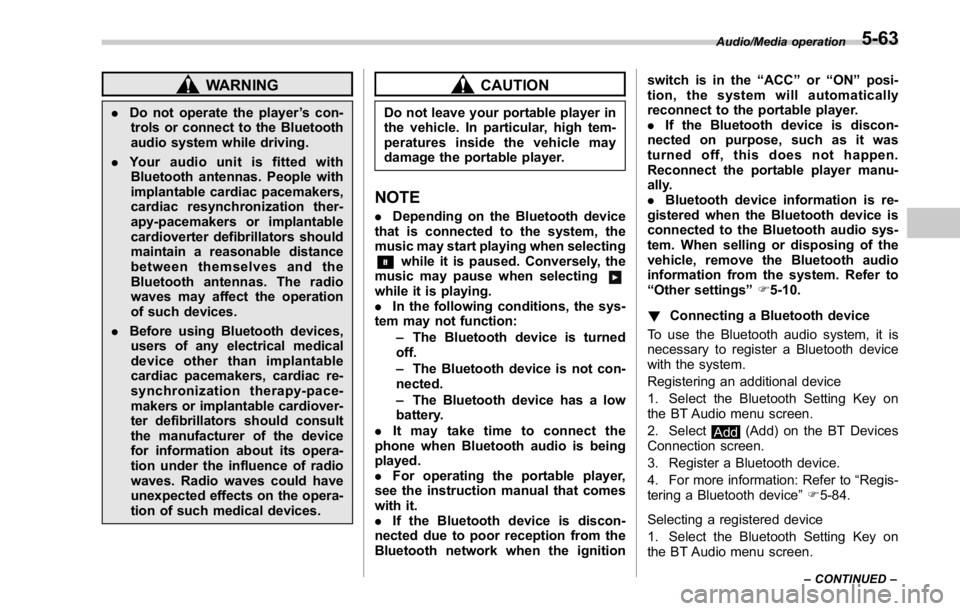
1. Select the Bluetooth Setting Key on
the BT Audio menu screen.
2. Select
Add (Add) on the BT Devices
Connection screen.
3. Register a Bluetooth device.
4. For more information: Refer to “ Regis-
tering a Bluetooth device ” F 5-84.
Selecting a registered device
1. Select the Bluetooth Setting Key on
the BT Audio menu screen. Audio/Media operation
– CONTINUED –5-63
Page 319 of 594
Audio/Media operation
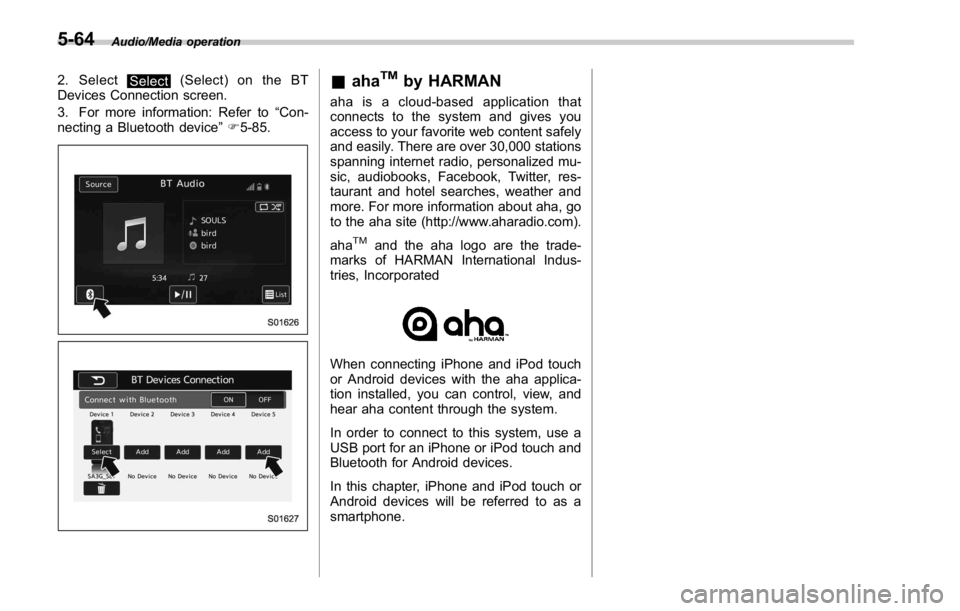
2. Select
Select (Select) on the BT
Devices Connection screen.
3. For more information: Refer to “ Con-
necting a Bluetooth device ” F 5-85.
& aha TM
by HARMAN aha is a cloud-based application that
connects to the system and gives you
access to your favorite web content safely
and easily. There are over 30,000 stations
spanning internet radio, personalized mu-
sic, audiobooks, Facebook, Twitter, res-
taurant and hotel searches, weather and
more. For more information about aha, go
to the aha site (http://www.aharadio.com).
aha TM
and the aha logo are the trade-
marks of HARMAN International Indus-
tries, Incorporated
When connecting iPhone and iPod touch
or Android devices with the aha applica-
tion installed, you can control, view, and
hear aha content through the system.
In order to connect to this system, use a
USB port for an iPhone or iPod touch and
Bluetooth for Android devices.
In this chapter, iPhone and iPod touch or
Android devices will be referred to as a
smartphone.5-64
Page 327 of 594
Audio/Media operation
! Using aha application
Ifyouconnectasmartphonetothis
system after starting a supported aha
application on the smartphone, you can
display and operate the aha application
displayed on the smartphone on the
system screen.
NOTE . Connect a smartphone to the USB
port before turning the ignition switch
to the “ ACC ” or “ ON ” position.
. When it is not played back normally,
press the POWER/VOLUME knob twice
while a USB cable is connected.
1. Run the aha application on your
smartphone.
2. Connect the iPhone/iPod touch to the
USB port or connect the Android device
by utilizing the Bluetooth connection (SPP
and A2DP profile).
. For details about connecting an
iPhone/iPod touch: Refer to “ Connect-
ing and disconnecting a USB memory/
portable device ” F 5-6.
. For details about registering or con-
necting an Android device: Refer to
“ Registering/connecting Bluetooth ®
device ” F 5-81.
Press AUDIO/TUNE knob twice to switch
between iPhone and Android. 3. Select “ aha ” on the “ Select Audio
Source (Select Audio Source) ” screen.
Refer to “ Basic operation ” F 5-12.
Select “ aha ” on the “ Apps (APPS) ” screen.
Refer to “ STARLINK ” F 5-30.
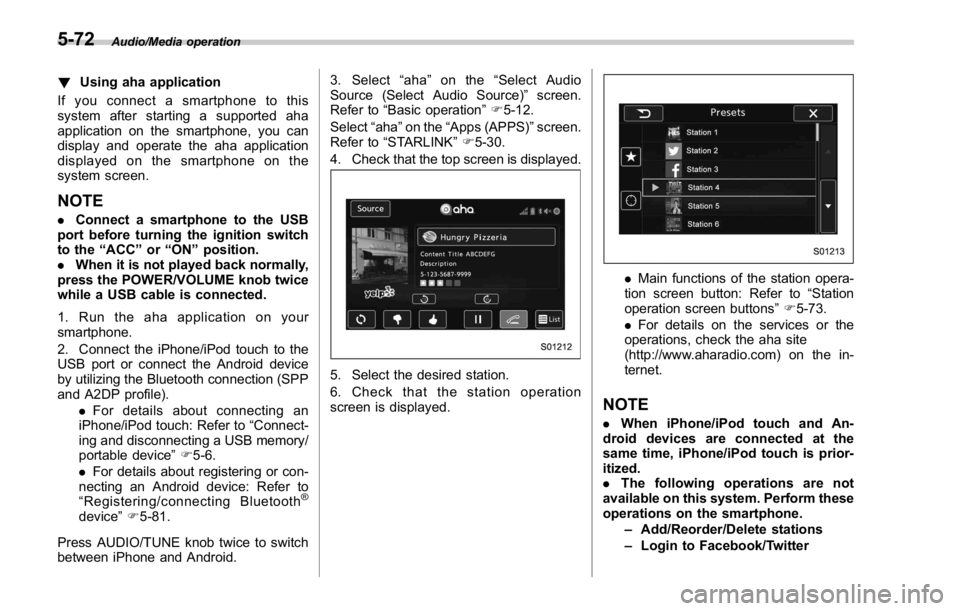
4. Check that the top screen is displayed.
5. Select the desired station.
6. Check that the station operation
screen is displayed. . Main functions of the station opera-
tion screen button: Refer to “ Station
operation screen buttons ” F 5-73.
. For details on the services or the
operations, check the aha site
(http://www.aharadio.com) on the in-
ternet.
NOTE . When iPhone/iPod touch and An-
droid devices are connected at the
same time, iPhone/iPod touch is prior-
itized.
. The following operations are not
available on this system. Perform these
operations on the smartphone.
– Add/Reorder/Delete stations
– Login to Facebook/Twitter5-72