CAN SUZUKI IGNIS 2018 Owners Manual
[x] Cancel search | Manufacturer: SUZUKI, Model Year: 2018, Model line: IGNIS, Model: SUZUKI IGNIS 2018Pages: 505, PDF Size: 8.36 MB
Page 313 of 505
5-58
OTHER CONTROLS AND EQUIPMENT
75RM4-01E
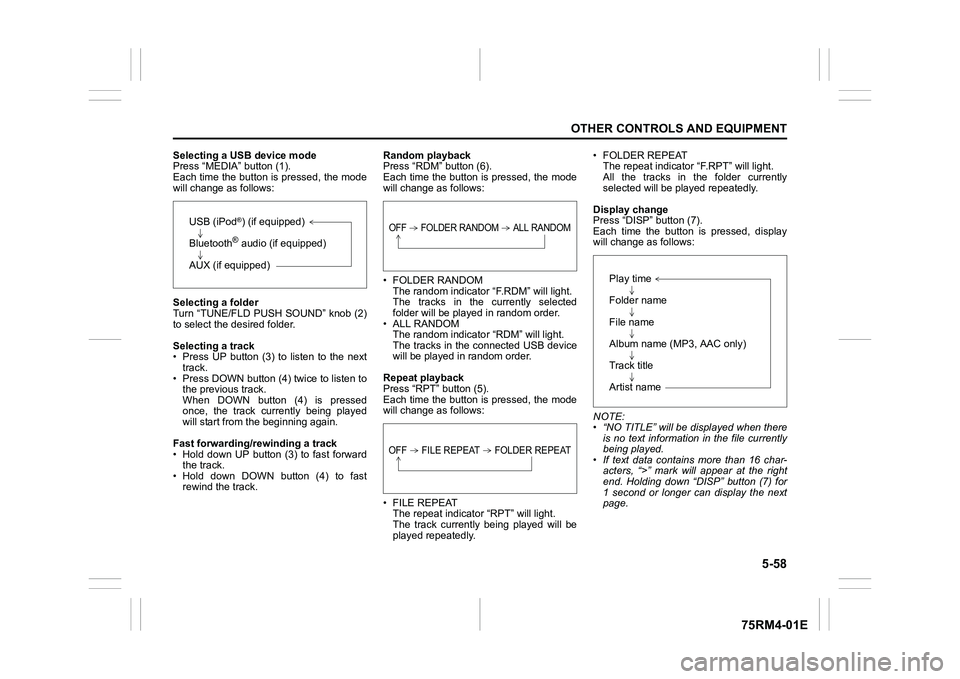
Selecting a USB device mode
Press “MEDIA” button (1).
Each time the button is pressed, the mode
will change as follows:
Selecting a folder
Turn “TUNE/FLD PUSH SOUND” knob (2)
to select the desired folder.
Selecting a track
• Press UP button (3) to listen to the next track.
• Press DOWN button (4) twice to listen to the previous track.
When DOWN button (4) is pressed
once, the track currently being played
will start from the beginning again.
Fast forwarding/rewinding a track
• Hold down UP button (3) to fast forward the track.
• Hold down DOWN button (4) to fast rewind the track. Random playback
Press “RDM” button (6).
Each time the button is pressed, the mode
will change as follows:
• FOLDER RANDOM
The random indicator “F.RDM” will light.
The tracks in the currently selected
folder will be played in random order.
•ALL RANDOM The random indicato r “RDM” will light.
The tracks in the connected USB device
will be played in random order.
Repeat playback
Press “RPT” button (5).
Each time the button is pressed, the mode
will change as follows:
• FILE REPEAT The repeat indicator “RPT” will light.
The track currently being played will be
played repeatedly. • FOLDER REPEAT
The repeat indicator “F.RPT” will light.
All the tracks in t he folder currently
selected will be played repeatedly.
Display change
Press “DISP” button (7).
Each time the button is pressed, display
will change as follows:
NOTE:
• “NO TITLE” will be displayed when there is no text information in the file currently
being played.
• If text data contains more than 16 char- acters, “>” mark will appear at the right
end. Holding down “DISP” button (7) for
1 second or longer can display the next
page.
USB (iPod
®) (if equipped)
Bluetooth® audio (if equipped)
AUX (if equipped)
OFF FOLDER RANDOM ALL RANDOMOFF FILE REPEAT FOLDER REPEAT
Play time
Folder name
File name
Album name (MP3, AAC only)
Track title
Artist name
Page 314 of 505
5-59OTHER CONTROLS AND EQUIPMENT
75RM4-01E
Notes on USB deviceCompatible USB devices
• USB mass storage classFor details as to whether your USB
memory/USB audio is compatible with
USB mass storage class, please contact
the USB memory/USB audio manufac-
turer.
• USB standard compatibility 1.1/2.0 full
speed
• File system FAT12/16/32, VFAT
• Maximum current less than 1.0 A
• If devices such as USB hub, extension cable are connected to the audio sys-
tem, it may not be recognized. In such
case, connect the USB device directly to
the audio system.
• Devices such as MP3 player/mobile
phone/digital camera may not be recog-
nized by the audio system for playing
music. USB device connection
• When connecting a USB device, check
that the connector is pushed all the way
into the port.
• Do not leave the USB device for long periods of time inside the vehicle where
the temperature can rise too high.
• Back up any important data beforehand. We cannot accept responsibility for any
lost data.
• It is recommended not to connect a USB device that contains data files other than
MP3/WMA/AAC format.
Recording MP3/WMA/AAC files on a
USB device
• Playback or display may not be possible depending on the type of USB device in
use or the condition of the recording.
• Depending on the connected USB mem-
ory, the files may be played in different
order from the stored one. Compression formats
MP3
• Bit rate
:
MPEG1 Audio Layer III: 32 k - 320 kbps
MPEG2 Audio Layer III: 8 k - 160 kbps
MPEG2.5 Audio Layer III: 8 k - 160 kbps
• Sampling frequency
:
MPEG1 Audio Layer III: 32 k/44.1 k/48 kHz
MPEG2 Audio Layer III: 16 k/22.05 k/24 kHz
MPEG2.5 Audio Layer III: 8 k/11.025 k/12 kHzWMA (Ver. 7, Ver. 8, Ver. 9*)
• Bit rate: CBR 32 k - 320 kbps
• Sampling frequency: 32 k/44.1 k/48 kHz
* WMA 9 Professional/LossLess/Voice are
not supported.
AAC*
• Bit rate: ABR 16 k - 320 kbps
• Sampling frequency: 32 k/44.1 k/48 kHz
* Apple Lossless is not supported.
Maximum number o f files/folders
• Maximum number of files: 2500
• Maximum number of files in a folder: 255
• Maximum depth of tree structure: 8
• Maximum number of folders: 255 (Root folder is included.)
Page 316 of 505
5-61OTHER CONTROLS AND EQUIPMENT
75RM4-01E
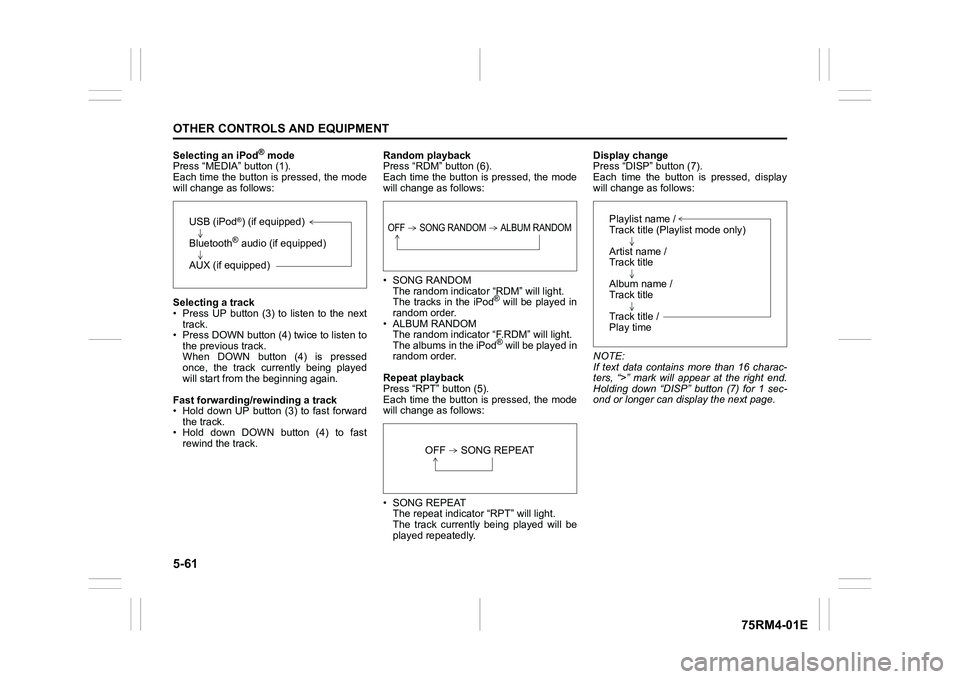
Selecting an iPod
® mode
Press “MEDIA” button (1).
Each time the button is pressed, the mode
will change as follows:
Selecting a track
• Press UP button (3) to listen to the next track.
• Press DOWN button (4) twice to listen to
the previous track.
When DOWN button (4) is pressed
once, the track currently being played
will start from the beginning again.
Fast forwarding/rewinding a track
• Hold down UP button (3) to fast forward the track.
• Hold down DOWN button (4) to fast
rewind the track. Random playback
Press “RDM” button (6).
Each time the button is pressed, the mode
will change as follows:
• SONG RANDOM
The random indicato r “RDM” will light.
The tracks in the iPod
® will be played in
random order.
• ALBUM RANDOM The random indicator “F.RDM” will light.
The albums in the iPod® will be played in
random order.
Repeat playback
Press “RPT” button (5).
Each time the button is pressed, the mode
will change as follows:
• SONG REPEAT The repeat indicator “RPT” will light.
The track currently being played will be
played repeatedly. Display change
Press “DISP” button (7).
Each time the button is pressed, display
will change as follows:
NOTE:
If text data contains more than 16 charac-
ters, “>” mark will appear at the right end.
Holding down “DISP” button (7) for 1 sec-
ond or longer can display the next page.
USB (iPod
®) (if equipped)
Bluetooth® audio (if equipped)
AUX (if equipped)
OFF SONG RANDOM ALBUM RANDOM
OFF SONG REPEAT
Playlist name /
Track title (Playlist mode only)
Artist name /
Track title
Album name /
Track title
Track title /
Play time
Page 319 of 505
5-64
OTHER CONTROLS AND EQUIPMENT
75RM4-01E
NOTE:
• Please consult your place of purchasefor details about whether a given auxil-
iary audio source can be connected and
the proper auxiliary cord to use.
• The volume and tone controls of the
auxiliary audio source can be adjusted
on the unit.
• In AUX mode, the volume setting is dif-
ferent from another mode.
Page 321 of 505
5-66
OTHER CONTROLS AND EQUIPMENT
75RM4-01E
Phone registration
NOTE:
• Up to 5 phones can be registered.
• To set up a new phone, disconnect theaudio player from the unit. Connect the
audio player again after phone setup is
completed if necessary.
• When attempts to establish the pairing
fail within 60 seconds, the connecting
operation will be canceled. Try to estab-
lish the pairing again or refer to the man-
ual of the phone in use for how to
establish the pairing with the phone.
1) Press the Bluetooth
® setup button (5)
or (6).
The Bluetooth
® setup menu will be dis-
played.
2) Turn “TUNE/FLD PUSH SOUND” knob (1) to select “Setup Bluetooth”, and
press the knob (1) to determine the
selection.
3) Turn “TUNE/FLD PUSH SOUND” knob (1) to select “Pairi ng”, and press the
knob (1) to determine the selection.
4) Select “My Car” from the Bluetooth
®
menu of the phone and establish the
pairing.
Refer to the manual of the phone in use
for further information.
5) Enter the passkey displayed on the unit to the phone. 6) When the pairing with the phone is
established, automatic transfer of the
phonebook and the call history
becomes selectable. The automatic
transfer starts with “Yes” and it does not
with “No”.
7) Press ON HOOK button (8).
NOTE:
• When selecting “Go Back” or pressing BACK button (4), the previous menu will
be displayed.
• When registering an additional phone, repeat Step from 1).
Receiving a call
Press OFF HOOK button (7) to receive a
call.
Ending a call
Press ON HOOK button (8) to end a call.
Rejecting a call (only for supported
models)
Press ON HOOK button (8) to reject a
incoming call.
Mute of hands-free microphone
Press MUTE switch (9) to mute the micro-
phone. To cancel the mute, press MUTE
switch (9) again. Adjusting the listening volume
• Turn “VOL PUSH PWR” knob (2) during
a call.
Turning it clockwise increases the vol-
ume; turning it counterclockwise
decreases the volume.
• Press “VOL” switch (10) during a call. Pressing the switch up increases the vol-
ume; pressing the switch down
decreases the volume.
Adjusting the ring volume
• Turn “VOL PUSH PWR” knob (2) while a call is coming in.
Turning it clockwise increases the vol-
ume; turning it counterclockwise
decreases the volume.
• Press “VOL” switch (10) during a call. Pressing the switch up increases the vol-
ume; pressing the switch down
decreases the volume.To use the hands-free function with this
unit, it is required to register the phone
in advance.
Page 322 of 505
5-67OTHER CONTROLS AND EQUIPMENT
75RM4-01E
Adjusting the call or ringtone volume
Follow the instructions below to adjust the
call or ringtone volume.
1) Press the Bluetooth
® setup button (5)
or (6).
The Bluetooth
® setup menu will be dis-
played.
2) Turn “TUNE/FLD PUSH SOUND” knob (1) to select “Setup Telephone”, and
press the knob (1) to determine the
selection.
3) Turn “TUNE/FLD PUSH SOUND” knob
(1) to select “Sound Setting”, and press
the knob (1) to dete rmine the selection.
4) Turn “TUNE/FLD PUSH SOUND” knob
(1) to select “Call Volume” or “Ringtone
Volume”, and press the knob (1) to
determine the selection.
The current call or ringtone volume will
be displayed.
5) Turn “TUNE/FLD PUSH SOUND” knob (1) to select the desired call or ringtone
volume, and press the knob (1) to
determine the selection.
NOTE:
When selecting “Go Back” or pressing
BACK button (4), the previous menu will
be displayed. Dialing using missed/incoming/
outgoing calls
Follow the instructions below to dial to the
previously dialed number again.
NOTE:
Up to 30 phone numbers of the latest calls
can be stored. (30 ca
lls including missed,
received and dialed call)
1) Press OFF HOOK button (7). The Bluetooth
® phonebook menu will
be displayed.
2) Turn “TUNE/FLD PUSH SOUND” knob (1) to select “All Ca lls”, “Missed Calls”,
“Incoming Calls” or “Outgoing Calls”,
and press the knob (1) to determine the
selection.
To dial from the dialed history or the
received history, select “All Calls”,
“Missed Calls”, “Incoming Calls” or
“Outgoing Calls” respectively.
3) Turn “TUNE/FLD PUSH SOUND” knob
(1) to select the desired number, and
press the knob (1) to determine the
selection.
4) Turn “TUNE/FLD PUSH SOUND” knob (1) to select “Dial”, and press the knob
(1) or OFF HOOK button (7) to dial to
the selected number.
NOTE:
• When selecting “Go Back” or pressing BACK button (4), the previous menu will
be displayed. • Pressing “Confirm” after selecting “Add
Speed Dial” can register the selected
number in the speed dial.
• Pressing “Confirm” after selecting
“Delete” can delete the selected number
from the call history.
Deletion of call history
Follow the instructions below to delete a
missed/incoming/outgoing call history.
1) Press the Bluetooth
® setup button (5)
or (6).
The Bluetooth
® setup menu will be dis-
played.
2) Turn “TUNE/FLD PUSH SOUND” knob
(1) to select “Setup Telephone”, and
press the knob (1) to determine the
selection.
3) Turn “TUNE/FLD PUSH SOUND” knob (1) to select “Setup Phonebook”, and
press the knob (1) to determine the
selection.
4) Turn “TUNE/FLD PUSH SOUND” knob
(1) to select “Delete History”, and press
the knob (1) to dete rmine the selection.
5) Turn “TUNE/FLD PUSH SOUND” knob
(1) to select “Missed Calls”, “Incoming
Calls”, or “Outgoing Calls”, and press
the knob (1) to dete rmine the selection.
6) Turn “TUNE/FLD PUSH SOUND” knob (1) to select a number to be deleted or
“ALL”, and press the knob (1) to deter-
mine the selection.
Page 323 of 505

5-68
OTHER CONTROLS AND EQUIPMENT
75RM4-01E
7) Turn “TUNE/FLD PUSH SOUND” knob(1) to select “Delete?” or “Delete All?”,
and press the knob (1) to determine the
selection.
8) Turn “TUNE/FLD PUSH SOUND” knob (1) to select “Confirm”, and press the
knob (1) to complete the deletion.
NOTE:
When selecting “Go Back” or pressing
BACK button (4), the previous menu will
be displayed.
Registration in Phonebook
Follow the instructions below to register
phone numbers in the Phonebook of the
unit.
1) Press the Bluetooth
® setup button (5)
or (6).
The Bluetooth
® setup menu will be dis-
played.
2) Turn “TUNE/FLD PUSH SOUND” knob (1) to select “Setup Telephone”, and
press the knob (1) to determine the
selection.
3) Turn “TUNE/FLD PUSH SOUND” knob
(1) to select “Setup Phonebook”, and
press the knob (1) to determine the
selection.
4) Turn “TUNE/FLD PUSH SOUND” knob (1) to select “Add Contacts”, and press
the knob (1) to dete rmine the selection. 5) Turn “TUNE/FLD PUSH SOUND” knob
(1) to select “Overwrite All” or “Add One
Contact”, and press the knob (1) to
determine the selection.
“Rewrite All (MAX100 0): Ok?” or “Rest
of Memory XXXX: Ok?” will be dis-
played.
6) Press or turn “TUNE/FLD PUSH SOUND” knob (1) to select “Confirm”,
and press the knob (1) to determine the
selection.
7) Transfer contacts from the phone.
When the registration is completed, the
“Setup Phonebook” will be displayed.
NOTE:
• When selecting “Go Back” or pressing BACK button (4), the previous menu will
be displayed.
• Up to 1000 numbers can be registered in
Phonebook. Transfer of call history (Call History)
Follow the instructions below to transfer
call history of the
registered phone.
1) Press the Bluetooth
® setup button (5)
or (6).
The Bluetooth
® setup menu will be dis-
played.
2) Turn “TUNE/FLD PUSH SOUND” knob (1) to select “Setup Telephone”, and
press the knob (1) to determine the
selection.
3) Turn “TUNE/FLD PUSH SOUND” knob
(1) to select “Call History”, and press
the knob (1) to dete rmine the selection.
4) Turn “TUNE/FLD PUSH SOUND” knob
(1) to select “Overw rite Call History?”,
and press the knob (1) to determine the
selection.
5) Turn “TUNE/FLD PUSH SOUND” knob (1) to select “Confirm”, and press the
knob (1) to transfer the call history from
the phone.
NOTE:
When selecting “Go Back” or pressing
BACK button (4), the previous menu will
be displayed.
Page 324 of 505

5-69OTHER CONTROLS AND EQUIPMENT
75RM4-01E
Automatic transfer of phonebook/call
history
You can select whether or not the device
transfers the phonebook and the call his-
tory automatically when the phone is regis-
tered.
Follow the instructions below to select.
1) Press the Bluetooth
® setup button (5)
or (6).
The Bluetooth
® setup menu will be dis-
played.
2) Turn “TUNE/FLD PUSH SOUND” knob
(1) to select “Setup Telephone”, and
press the knob (1) to determine the
selection.
3) Turn “TUNE/FLD PUSH SOUND” knob (1) to select “A.Transfer”, and press the
knob (1) to determine the selection.
4) Pressing “TUNE/FLD PUSH SOUND” knob (1) switches between “A.transfer
On” and “A.transfer Off”.
5) Selecting “Go Back” or pressing the BACK button (4) stores displayed set-
ting and the previous menu is dis-
played. Making a call by phonebook
Follow the instructions below to dial a num-
ber registered in phonebook.
1) Press OFF HOOK
button (7).
The Bluetooth
® phonebook menu will
be displayed.
2) Turn “TUNE/FLD PUSH SOUND” knob (1) to select “Phonebook”, and press
the knob (1) to dete rmine the selection.
3) Turn “TUNE/FLD PUSH SOUND” knob (1) to select the initial of the name you
would like to make a call, and press the
knob (1) to determine the selection.
The registered numbers will be dis-
played in sequence. If names have
been registered tog ether with numbers,
the names will be displayed.
Turn “TUNE/FLD PUSH SOUND” knob
(1) to select the name you would like to
make a call, and press the knob (1) to
determine the selection.
4) Turn “TUNE/FLD PUSH SOUND” knob (1) to select “Dial”, and press the knob
(1) or OFF HOOK button (7).
The displayed number or the number
registered with the displayed name will
be dialed. Deletion of registered data (Delete
Entry)
Follow the instructions below to delete a
number registered in phonebook.
1) Press the Bluetooth
® setup button (5)
or (6).
The Bluetooth
® setup menu will be dis-
played.
2) Turn “TUNE/FLD PUSH SOUND” knob
(1) to select “Setup Telephone”, and
press the knob (1) to determine the
selection.
3) Turn “TUNE/FLD PUSH SOUND” knob (1) to select “Setup Phonebook”, and
press the knob (1) to determine the
selection.
4) Turn “TUNE/FLD PUSH SOUND” knob
(1) to select “Delete Contacts”, and
press the knob (1) to determine the
selection.
5) Turn “TUNE/FLD PUSH SOUND” knob (1) to select the initial of the name you
would like to delete or “ALL”, and press
the knob (1) to dete rmine the selection.
Turn “TUNE/FLD PUSH SOUND” knob
(1) to select the name you would like to
delete, and press the knob (1) to deter-
mine the selection.
6) Turn “TUNE/FLD PUSH SOUND” knob
(1) to select “Delete?” or “Delete All?”,
and press the knob (1) to determine the
selection.
7) Turn “TUNE/FLD PUSH SOUND” knob (1) to select “Confirm”, and press the
knob (1) to complete the deletion.
Page 325 of 505

5-70
OTHER CONTROLS AND EQUIPMENT
75RM4-01E
NOTE:
When selecting “Go Back” or pressing
BACK button (4), the previous menu will
be displayed.
Registration in speed dial
Follow the instructions below to assign a
number to one of PRESET buttons (3) to
use as the speed dial.
1) Press the Bluetooth
® setup button (5)
or (6).
The Bluetooth
® setup menu will be dis-
played.
2) Turn “TUNE/FLD PUSH SOUND” knob (1) to select “Setup Telephone”, and
press the knob (1) to determine the
selection.
3) Turn “TUNE/FLD PUSH SOUND” knob (1) to select “Setup Phonebook”, and
press the knob (1) to determine the
selection.
4) Turn “TUNE/FLD PUSH SOUND” knob (1) to select “Add Speed Dial”, and
press the knob (1) to determine the
selection.
5) Turn “TUNE/FLD PUSH SOUND” knob
(1) to select the initial of the name you
would like to register in speed dial, and
press the knob (1) to determine the
selection.
The registered numbers will be dis-
played in sequence. If names have
been registered tog ether with numbers,
the names will be displayed.
Turn “TUNE/FLD PUSH SOUND” knob
(1) to select the name you would like to register in speed dial, and press the
knob (1) to determine the selection.
6) Turn “TUNE/FLD PUSH SOUND” knob
(1) to select “Choose Preset”, and
press one of PRESET buttons (3) to
which the selected number is to be
assigned. If a number is already
assigned to the selected button, a con-
firmation message will be displayed.
Turn “TUNE/FLD PUSH SOUND” knob
(1) to select a confirmation message,
and press the knob (1) to complete the
assignment.
Turn “TUNE/FLD PUSH SOUND” knob
(1) to select “Confirm”, and press the
knob (1) to complete the assignment.
When the assignment is completed, the
“Setup Phonebook” will be displayed.
NOTE:
When selecting “Go Back” or pressing
BACK button (4), the previous menu will
be displayed. One-touch call (Speed dial)
Follow the instructions below to dial the
number assigned to each of the PRESET
buttons (3).
1) Press OFF HOOK
button (7).
The Bluetooth
® phonebook menu will
be displayed.
Pressing one of PRESET buttons (3)
can skip step 2) and the 1st line of step
3).
2) Turn “TUNE/FLD PUSH SOUND” knob (1) to select “Speed Dials”, and press
the knob (1) to dete rmine the selection.
3) Press one of PRESET buttons (3). The assigned number will be displayed.
If no number is assigned, “No Entry” is
displayed.
4) Press OFF HOOK button (7).
The selected num ber will be dialed.
Page 330 of 505
5-75OTHER CONTROLS AND EQUIPMENT
75RM4-01E
Registration of audio devices
NOTE:
• To set up a new audio player, disconnectthe phone from the unit. Connect the
phone after audio player setup is com-
pleted if necessary.
• When attempts to establish the pairing fail within 60 seconds, the connecting
operation will be canceled. Try to estab-
lish the pairing again or refer to the audio
player manual for assistance with the
pairing process.
1) Press the Bluetooth
® setup button (7)
or (8).
The Bluetooth
® setup menu will be dis-
played.
2) Turn “TUNE/FLD PUSH SOUND” knob
(2) to select “Setup Bluetooth”, and
press the knob (2) to determine the
selection.
3) Turn “TUNE/FLD PUSH SOUND” knob (2) to select “Pairi ng”, and press the
knob (2) to determine the selection.
4) Select “My Car” from the Bluetooth
®
menu of the audio player and establish
the pairing.
Refer to the manual of the audio player
in use for further information.
5) Enter the passkey displayed on the unit
to the audio player. NOTE:
• When selecting “Go Back” or pressing
BACK button (6), the previous menu will
be displayed.
• When registering additional audio devices, repeat Step from 1).
Selecting Bluetooth
® audio mode
Press “MEDIA” button (1).
Each time the button is pressed, the mode
will change as follows:
Selecting a group (only for supported
models)
Turn “TUNE/FLD PUSH SOUND” knob (2)
to select a group.
Selecting a track
• Press UP button (3) to listen to the next track.
• Press DOWN button (4) twice to listen to the previous track.
When DOWN button (4) is pressed
once, the track currently being played
will start from the beginning again. Fast forwarding/rewinding a track
• Hold down UP button (3) to fast forward
the track.
• Hold down DOWN button (4) to fast rewind the track.
NOTE:
Some functions may not be available
depending on Bluetooth
® audio.
Display change
Press “DISP” button (5).
Each time the button is pressed, display
will change as follows:
NOTE:
If text data contains more than 16 charac-
ters, “>” mark will appear at the right end.
Holding down “DISP” button (5) for 1 sec-
ond or longer can display the next page.
To use Bluetooth
® ready audio devices
with this unit, it is r equired to register the
devices.
USB (iPod
®) (if equipped)
Bluetooth® audio (if equipped)
AUX (if equipped)
Play time
Track name
Artist name
Album name