CAN SUZUKI IGNIS 2018 Owners Manual
[x] Cancel search | Manufacturer: SUZUKI, Model Year: 2018, Model line: IGNIS, Model: SUZUKI IGNIS 2018Pages: 505, PDF Size: 8.36 MB
Page 332 of 505

5-77OTHER CONTROLS AND EQUIPMENT
75RM4-01E
Deletion of audio device information
(Delete Audio)
Follow the instructions below to delete the
registered audio device information.
1) Press the Bluetooth
® setup button (7)
or (8).
The Bluetooth
® setup menu will be dis-
played.
2) Turn “TUNE/FLD PUSH SOUND” knob
(2) to select “Setup Bluetooth”, and
press the knob (2) to determine the
selection.
3) Turn “TUNE/FLD PUSH SOUND” knob (2) to select “List Audio”, and press the
knob (2) to determine the selection.
4) Turn “TUNE/FLD PUSH SOUND” knob (2) to select an audio device to be
deleted, and press the knob (2) to
determine the selection.
5) Turn “TUNE/FLD PUSH SOUND” knob
(2) to select “Delete”, and press the
knob (2) to determine the selection.
6) Turn “TUNE/FLD PUSH SOUND” knob
(2) to select “Delete?”, and press the
knob (2) to determine the selection.
7) Turn “TUNE/FLD PUSH SOUND” knob
(2) to select “Confirm”, and press the
knob (2) to complete the deletion.
NOTE:
When selecting “Go Back” or pressing
BACK button (6), the previous menu will
be displayed.
Disclaimer for Bluetooth
® function
• Depending on compatibility of mobile phone models, no Bluetooth
® function
can be used, or some Bluetooth® func-
tions may be restricted.
• Connectivity or voice quality may get
affected depending on circumstances.
• After the ignition switch is turned to “ON” position or the engine switch is pressed
to change the ignition mode to ON, the
audio system takes few seconds to
detect and connect to the Bluetooth
®
device (if already paired).
Remote audio controls (if equipped)Controlling basic functions of the audio
system is available us ing the switches on
the steering wheel.
75RM063
(4) (4)
(2)
(1) (3)
Page 333 of 505
5-78
OTHER CONTROLS AND EQUIPMENT
75RM4-01E
Adjusting the volume
• To increase the volume, press the “VOL”switch (1) up. The volume will continue
to increase until the switch is released.
• To decrease the volume, press the “VOL” switch (1) down. The volume will
continue to decrease until the switch is
released.
• To mute the sound, pr ess the switch (2).
Selecting the mode
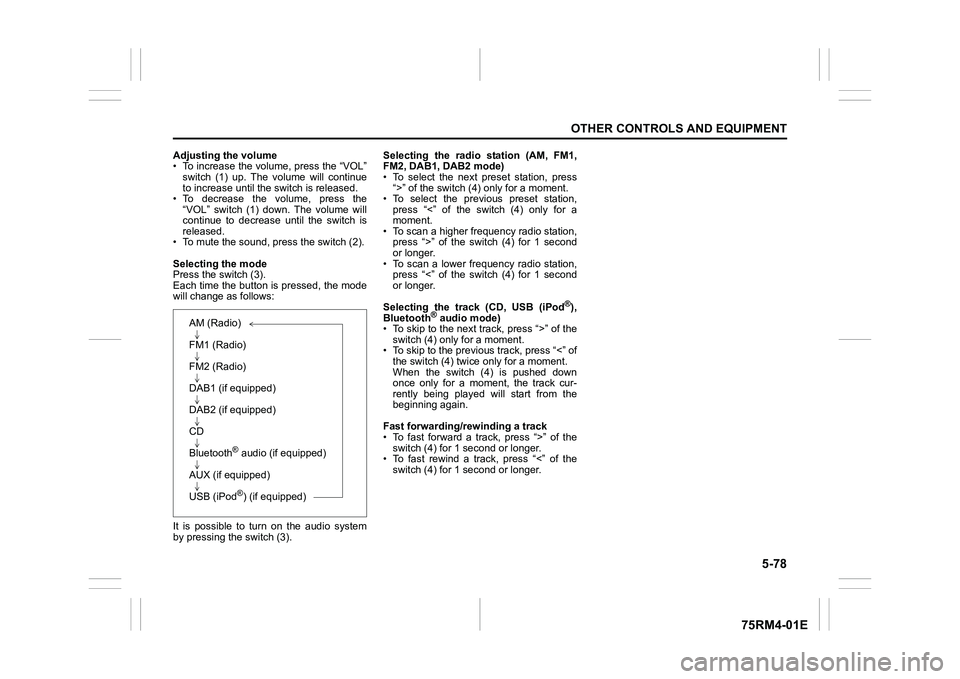
Press the switch (3).
Each time the button is pressed, the mode
will change as follows:
It is possible to turn on the audio system
by pressing the switch (3). Selecting the radio station (AM, FM1,
FM2, DAB1, DAB2 mode)
• To select the next preset station, press
“>” of the switch (4 ) only for a moment.
• To select the previous preset station, press “<” of the switch (4) only for a
moment.
• To scan a higher frequency radio station, press “>” of the switch (4) for 1 second
or longer.
• To scan a lower frequency radio station, press “<” of the switch (4) for 1 second
or longer.
Selecting the track (CD, USB (iPod
®),
Bluetooth
® audio mode)
• To skip to the next track, press “>” of the
switch (4) only for a moment.
• To skip to the previous track, press “<” of the switch (4) twice only for a moment.
When the switch (4) is pushed down
once only for a moment, the track cur-
rently being played will start from the
beginning again.
Fast forwarding/rewinding a track
• To fast forward a track, press “>” of the switch (4) for 1 second or longer.
• To fast rewind a track, press “<” of the
switch (4) for 1 second or longer.
AM (Radio)
FM1 (Radio)
FM2 (Radio)
DAB1 (if equipped)
DAB2 (if equipped)
CD
Bluetooth
® audio (if equipped)
AUX (if equipped)
USB (iPod®) (if equipped)
Page 335 of 505
![SUZUKI IGNIS 2018 Owners Manual 5-80
OTHER CONTROLS AND EQUIPMENT
75RM4-01E
Setting the anti-theft function
1) Press “VOL PUSH PWR” knob (1) to power off.
2) Hold down the buttons numbered [1] and [6] of PRESET b](/img/20/43482/w960_43482-334.png "SUZUKI IGNIS 2018 Owners Manual 5-80
OTHER CONTROLS AND EQUIPMENT
75RM4-01E
Setting the anti-theft function
1) Press “VOL PUSH PWR” knob (1) to power off.
2) Hold down the buttons numbered [1] and [6] of PRESET b")
5-80
OTHER CONTROLS AND EQUIPMENT
75RM4-01E
Setting the anti-theft function
1) Press “VOL PUSH PWR” knob (1) to power off.
2) Hold down the buttons numbered [1] and [6] of PRESET buttons (2) and
press “VOL PUSH PWR” knob (1).
“SECURITY” will be displayed.
3) Press UP button (3) and the button numbered [1] of P RESET buttons (2)
simultaneously.
4) Enter a 4-digit number to be registered as PIN using the buttons numbered [1]
- [4] of PRESET buttons (2).
5) Hold down “TUNE/FLD PUSH
SOUND” knob (4) for 1 second or lon-
ger to set the anti-theft function.
NOTE:
Take a note of the registered PIN and keep
it for the future use. Canceling the anti-theft feature
To cancel the anti-theft function, delete the
registered PIN.
1) Press “VOL PUSH PWR” knob (1) to
power off.
2) Hold down the buttons numbered [1]
and [6] of PRESET buttons (2) and
press “VOL PUSH PWR” knob (1).
“PIN ENTRY” will be displayed.
3) Press UP button (3) and the button numbered [1] of P RESET buttons (2)
simultaneously.
4) Enter a 4-digit number to be registered as PIN using the buttons numbered [1]
- [4] of PRESET buttons (2).
5) Hold down “TUNE/FLD PUSH SOUND” knob (4) for 1 second or lon-
ger to delete the registered PIN. The
indication “----” will be displayed and
the anti-theft function will be canceled.
NOTE:
To change your PIN, first delete your cur-
rent PIN, and then set a new one. Confirming the Personal Identification
Number (PIN)
When the main power source is discon-
nected such as when the lead-acid battery
is replaced, etc, it is required to enter the
PIN to operate
the unit again.
1) Set the ignition switch to “ACC” posi- tion or the ignition mode to ON.
“SECURITY” will be displayed.
2) Press UP button (3) and the button numbered [1] of P RESET buttons (2)
simultaneously.
3) Enter a 4-digit number to be registered as PIN using the buttons numbered [1]
- [4] of PRESET buttons (2).
4) Hold down “TUNE/FLD PUSH SOUND” knob (4) for 1 second or lon-
ger.
When the same PIN as registered is
entered, the power of the audio system
will be turned off automatically and it
will become operable again.
NOTE:
If an incorrect PIN is entered, “ERROR”
and the total number of incorrect entry
attempts will be displayed.
If an incorrect PIN is entered 10 times or
more, “HELP” will be displayed and the
audio system will become inoperable.
Page 338 of 505
5-83OTHER CONTROLS AND EQUIPMENT
75RM4-01E
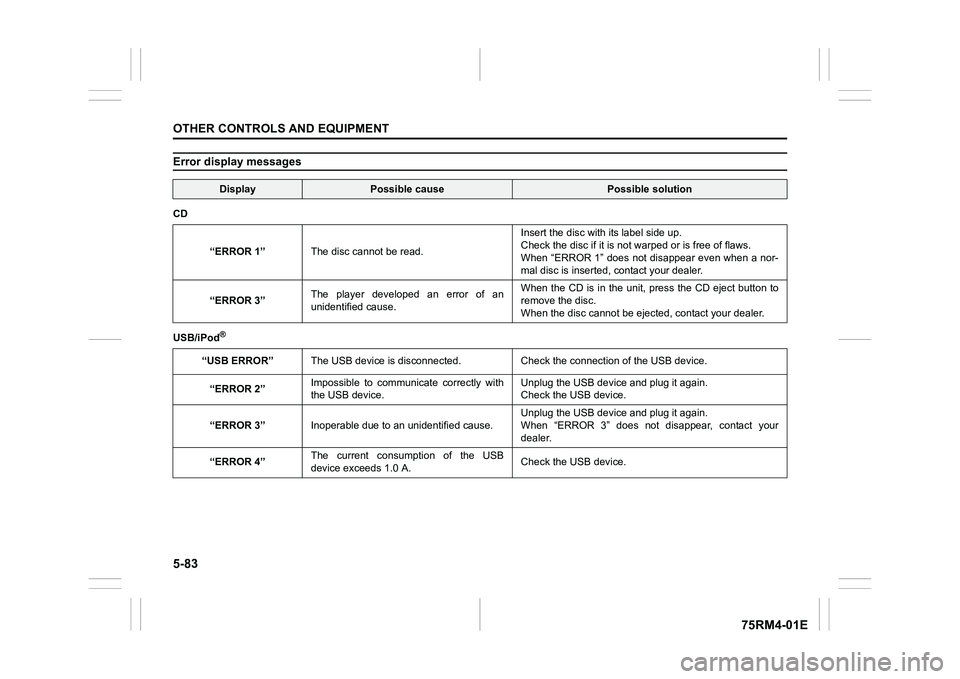
Error display messages
Display
Possible cause
Possible solution
CD
“ERROR 1” The disc cannot be read. Insert the disc with its label side up.
Check the disc
if it is not warped or is free of flaws.
When “ERROR 1” does not disappear even when a nor-
mal disc is inserted, contact your dealer.
“ERROR 3” The player developed an error of an
unidentified cause. When the CD is in the unit, press the CD eject button to
remove the disc.
When the disc cannot
be ejected, contact your dealer.
USB/iPod
®
“USB ERROR” The USB device is disconnected. Check the connection of the USB device.
“ERROR 2” Impossible to communicate correctly with
the USB device. Unplug the USB devic
e and plug it again.
Check the USB device.
“ERROR 3” Inoperable due to an unidentified cause. Unplug the USB devic
e and plug it again.
When “ERROR 3” does not disappear, contact your
dealer.
“ERROR 4” The current consumption of the USB
device exceeds 1.0 A. Check the USB device.
Page 342 of 505
6-1VEHICLE LOADING AND TOWING
75RM4-01E
Vehicle loadingYour vehicle was designed for specific
weight capacities. The weight capacities of
your vehicle are indicated by the Gross
Vehicle Weight Rating (GVWR) and the
Permissible maximum Axle Weight (PAW,
front and rear). The GVWR and PAW (front
and rear) are listed in the “SPECIFICA-
TIONS” section.
GVWR – Maximum permissible overall
weight of the fully loaded vehicle (including
all the occupants, accessories and cargo
plus the trailer nose weight if towing a
trailer).
PAW (front and rear) – Maximum permissi-
ble weight on an individual axle.
Actual weight of the loaded vehicle and
actual loads at the front and rear axles can
only be determined by weighing the vehi-
cle. Compare these weights to the GVWR
and PAW (front and rear). If the gross vehi-
cle weight or the load on either axle
exceeds these ratings, you must remove
enough weight to bring the load down to
the rated capacity.
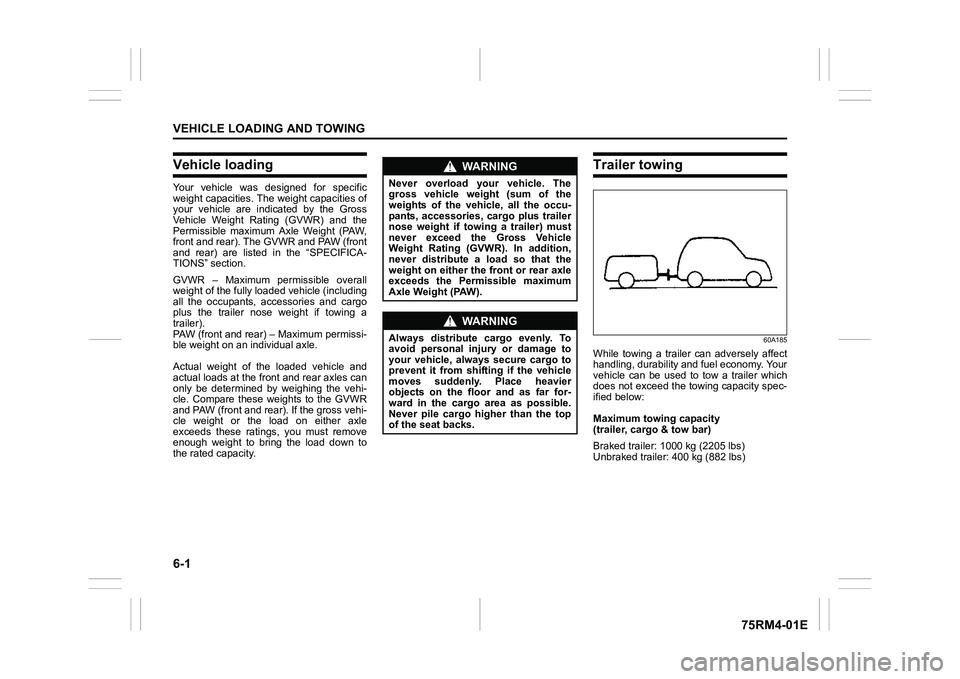
Trailer towing
60A185
While towing a trailer can adversely affect
handling, durability and fuel economy. Your
vehicle can be used to tow a trailer which
does not exceed the towing capacity spec-
ified below:
Maximum towing capacity
(trailer, cargo & tow bar)
Braked trailer: 1000 kg (2205 lbs)
Unbraked trailer: 400 kg (882 lbs)
WA R N I N G
Never overload your vehicle. The
gross vehicle weight (sum of the
weights of the vehicle, all the occu-
pants, accessories, cargo plus trailer
nose weight if towing a trailer) must
never exceed the Gross Vehicle
Weight Rating (GVWR). In addition,
never distribute a load so that the
weight on either the front or rear axle
exceeds the Permissible maximum
Axle Weight (PAW).
WA R N I N G
Always distribute cargo evenly. To
avoid personal injury or damage to
your vehicle, always secure cargo to
prevent it from shifting if the vehicle
moves suddenly. Place heavier
objects on the floor and as far for-
ward in the cargo area as possible.
Never pile cargo higher than the top
of the seat backs.
Page 343 of 505
6-2
VEHICLE LOADING AND TOWING
75RM4-01E
To w b a r sOnly use a tow bar that is designed to
attach to the chassis of your vehicle, and a
hitch that is designed to bolt to this tow bar.
We recommend that you use a genuine
SUZUKI tow bar (available as option), or
equivalent.Safety chainsAlways attach safety chains between your
vehicle and trailer. Cross safety chains
under the nose of the trailer so that the
nose will not drop to the road if the trailer
becomes separated from the tow bar. Fol-
low the manufacturer’s recommendation
for attaching safety chains. Always leave
just enough slack to permit full turning.
Never allow safety chains to drag on the
road.
Trailer lightsCheck that your trailer is equipped with
lights which meet local requirements.
Always check for the proper operation of
all trailer lights before you start to tow.Brakes
WA R N I N G
For vehicles equipped with the dual
camera brake support, if your vehicle
is used to tow a trailer, press the dual
camera brake support OFF switch
and turn off the dual camera brake
support. If not, unexpected acci-
dents related to the system being
turned on may occur.
NOTICE
Trailer towing puts additional stress
on the engine, drive train and brakes
of your vehicle. Never tow a trailer
during the first 960 km (600 miles) of
vehicle operation.
NOTICE
When towing by a vehicle with CVT
on a long steep hill, try to take some
rest on the way to prevent overheat
or damage of the engine or transaxle.
WA R N I N G
Never use a tow bar which attaches
to the axle or the bumper of your
vehicle.
WA R N I N G
Never attach safety chains to the
bumper of your vehicle. Secure con-
nections so that they cannot come
loose.
WA R N I N G
Never connect trailer lights directly
into your vehicle’s electrical system,
or electrical system damage may
occur.
WA R N I N G
If trailer brakes are used, follow all
instructions provided by the manu-
facturer. Never connect to the brake
system of your vehicle and never
take an electrical supply directly from
the wiring harness.
Page 344 of 505
6-3VEHICLE LOADING AND TOWING
75RM4-01E
TiresMirrorsCheck if your vehicle’s mirrors meet local
requirements for mirrors used on towing
vehicles. If they do not, you must install the
required mirrors before you tow.Vehicle/trailer loadingTo load your vehicle and trailer properly,
you must know how to measure gross
trailer weight and trailer nose weight.
Gross trailer weight is the weight of the
trailer plus all the cargo in it. You can mea-
sure gross trailer weight by putting the fully
loaded trailer on a vehicle scale.
Nose weight is the downward force
exerted on the tow bar by the trailer cou- pler, with the trailer fully loaded and the
coupler at its normal towing height. This
weight can be measured using a bathroom
scale.
The weight of your loaded trailer (gross
trailer weight) should never exceed towing
capacity.
Distribute cargo in your trailer so that nose
weight is about 10% of gross trailer weight,
but does not exceed “Maximum vertical
load” of 50 kg (110 lbs), and does not fall
below 25 kg (55 lbs) or 4%, whichever is
heavier, on trailer hitch point. You should
measure gross trailer weight and nose
weight before towing to check that your
load is properly distributed.
NOTE:
For 4WD model in Europe, in the Member
States where the road traffic legislation
allows it, as it is also stated in COMMIS-
SION REGULATION (EU) 1230/2012, the
technically permissi
ble maximum laden
mass (GVWR) of the vehicle may be
exceeded by not more than 40 kg (88 lbs)
in case of towing a trailer.
WA R N I N G
When towing a trailer, it is very
important for your vehicle and trailer
to have properly inflated tires. Your
vehicle’s tires should be inflated to
the pressures listed on your vehicles
tire information label. If laden pres-
sures are listed on the label, the tires
should be inflated to the laden pres-
sures. Inflate trailer tires according to
the specifications provided by the
trailer manufacturer.
WA R N I N G
Improper weight distribution of your
trailer may result in poor vehicle han-
dling and swaying of the trailer.
Always check that trailer nose weight
is about 10% of gross trailer weight,
but does not exceed “Maximum verti-
cal load” of 50 kg (110 lbs), and does
not fall below 25 kg (55 lbs) or 4%,
whichever is heavier, on trailer hitch
point. Also check that the cargo is
properly secured. Failure to observe
this requirement may result in an
accident.
WA R N I N G
Never overload cargo on your trailer
or your vehicle. Gross trailer weight
must never exceed towing capacity.
Gross vehicle weight (sum of the
weights of the vehicle, all the occu-
pants, accessories including tow
bars and a trailer hitch, cargo and
trailer nose weight) must never
exceed the Gross Vehicle Weight Rat-
ing (GVWR) listed in the “SPECIFICA-
TIONS” section.
Page 345 of 505
6-4
VEHICLE LOADING AND TOWING
75RM4-01E
Additional trailer towing warnings
WA R N I N G
Connect trailer lights and hook up
safety chains every time you tow.
NOTICE
Because towing a trailer puts addi-
tional stress on your vehicle, more
frequent maintenance will be
required than under normal driving
conditions. Follow the schedule in
“Maintenance recommended under
severe driving conditions”.
WA R N I N G
Your vehicle should be handled in a
different way when towing a trailer.
For the safety of yourself and others,
observe the following precautions:
• Practice turning, stopping, andreversing before you begin towing
a trailer in traffi c. Do not tow a
trailer in traffic until you are confi-
dent that you can handle the vehi-
cle and trailer safely.
• Never exceed towing speed limits
or 80 km/h (50 mph), whichever is
lower.
• Never drive at a speed that causes shaking or swaying of the trailer. If
you notice even the slightest sign
of shaking or sw aying, slow down.
• When roads are wet, slippery or rough, drive at a slower speed than
you would on dry or smooth roads.
Failure to slow down when road
conditions are bad can result in
loss of control.
• Always have someone guide you when reversing.
(Continued)
WA R N I N G
(Continued)
• Allow adequate stopping distance.Stopping distance is increased
when you tow a trailer. For each 16
km/h (10 mph) of speed, allow at
least one vehicle and trailer length
between you and the vehicle
ahead. Allow a greater stopping
distance if roads are wet or slip-
pery.
• If the trailer has over-run brakes,
apply the brakes gradually to avoid
snatching caused by the trailer
wheels locking.
• Slow down before corners and maintain a steady speed while cor-
nering. Deceleration or accelera-
tion while cornering can result in
loss of control. Remember that a
larger than normal turning radius is
needed because the trailer wheels
will be closer than vehicle wheels
to the inside of the turn.
• Avoid sudden acceleration and stopping of the vehicle. Do not
make quick maneuvers unless they
are necessary.
• Slow down in cross winds and be
prepared for gusts of wind from
large passing vehicles. (Continued)
Page 350 of 505
7-1INSPECTION AND MAINTENANCE
75RM4-01E
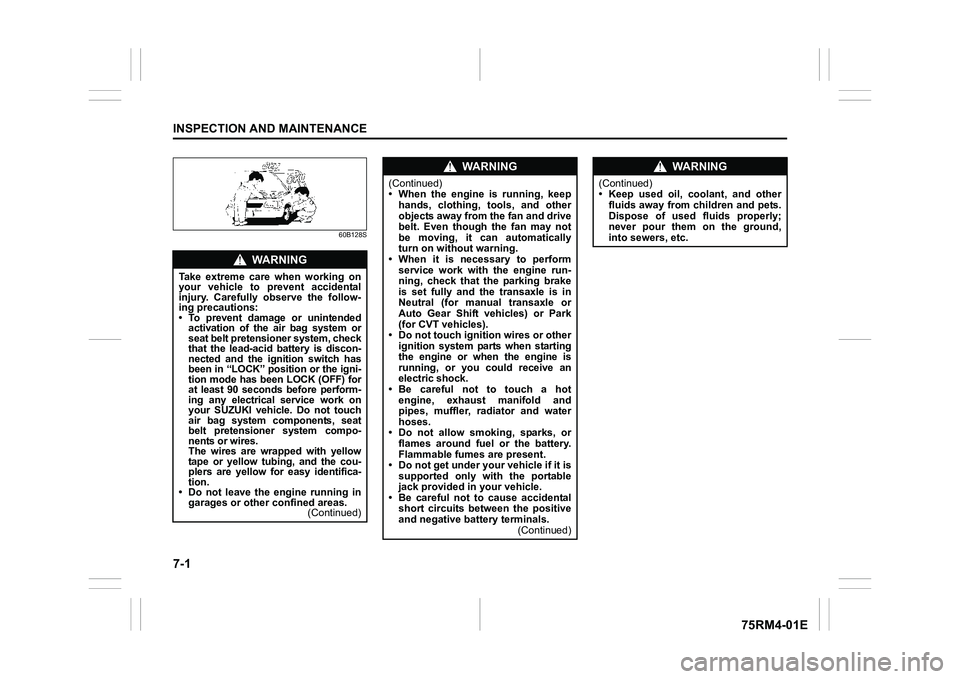
60B128S
WA R N I N G
Take extreme care when working on
your vehicle to prevent accidental
injury. Carefully observe the follow-
ing precautions:
• To prevent damage or unintendedactivation of the air bag system or
seat belt pretensioner system, check
that the lead-acid battery is discon-
nected and the ignition switch has
been in “LOCK” position or the igni-
tion mode has been LOCK (OFF) for
at least 90 seconds before perform-
ing any electrical service work on
your SUZUKI vehicle. Do not touch
air bag system components, seat
belt pretensioner system compo-
nents or wires.
The wires are wrapped with yellow
tape or yellow tubing, and the cou-
plers are yellow for easy identifica-
tion.
• Do not leave the engine running in garages or other confined areas. (Continued)
WA R N I N G
(Continued)
• When the engine is running, keep
hands, clothing, tools, and other
objects away from the fan and drive
belt. Even though the fan may not
be moving, it can automatically
turn on without warning.
• When it is necessary to perform
service work with the engine run-
ning, check that the parking brake
is set fully and the transaxle is in
Neutral (for manual transaxle or
Auto Gear Shift vehicles) or Park
(for CVT vehicles).
• Do not touch ignition wires or other ignition system parts when starting
the engine or when the engine is
running, or you could receive an
electric shock.
•Be careful not to touch a hot engine, exhaust manifold and
pipes, muffler, radiator and water
hoses.
• Do not allow smoking, sparks, or flames around fuel or the battery.
Flammable fumes are present.
• Do not get under your vehicle if it is supported only with the portable
jack provided in your vehicle.
• Be careful not to cause accidental short circuits between the positive
and negative battery terminals. (Continued)
WA R N I N G
(Continued)
• Keep used oil, coolant, and other
fluids away from children and pets.
Dispose of used fluids properly;
never pour them on the ground,
into sewers, etc.
Page 351 of 505
7-2
INSPECTION AND MAINTENANCE
75RM4-01E
Maintenance scheduleThe following table shows the times when
you should perform regular maintenance
on your vehicle. This table shows in miles,
kilometers and months when you should
perform inspections, adjustments, lubrica-
tion and other services. These intervals
should be shortened if driving is usually
done under severe conditions (refer to
“Maintenance recommended under severe
driving conditions”).
WA R N I N G
SUZUKI recommends that mainte-
nance on items marked with an aster-
isk (*) be performed by your
authorized SUZUKI dealer or a quali-
fied service technician. If you are
qualified, you may perform mainte-
nance on the unmarked items by
referring to the instructions in this
section. If you are not sure whether
you can successfully complete any of
the unmarked maintenance jobs, ask
your authorized SUZUKI dealer to do
the maintenance for you.
NOTICE
Whenever it becomes necessary to
replace parts on your vehicle, it is
recommended that you use genuine
SUZUKI replacement parts or their
equivalent.