Eps SUZUKI SX4 2006 1.G Service Owner's Manual
[x] Cancel search | Manufacturer: SUZUKI, Model Year: 2006, Model line: SX4, Model: SUZUKI SX4 2006 1.GPages: 1556, PDF Size: 37.31 MB
Page 388 of 1556
Downloaded from www.Manualslib.com manuals search engine 1G-11 Fuel System:
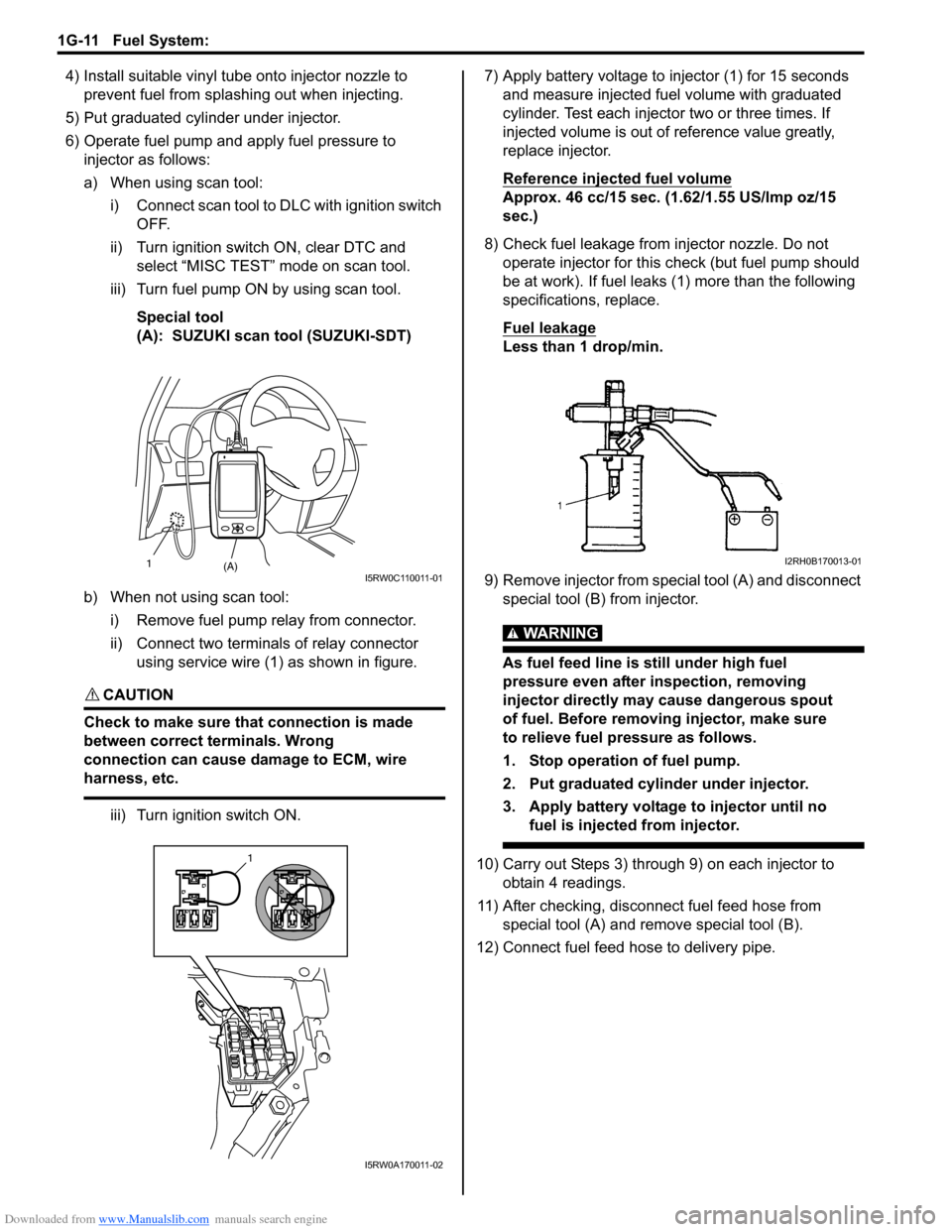
4) Install suitable vinyl tube onto injector nozzle to
prevent fuel from splashing out when injecting.
5) Put graduated cylinder under injector.
6) Operate fuel pump and apply fuel pressure to
injector as follows:
a) When using scan tool:
i) Connect scan tool to DLC with ignition switch
OFF.
ii) Turn ignition switch ON, clear DTC and
select “MISC TEST” mode on scan tool.
iii) Turn fuel pump ON by using scan tool.
Special tool
(A): SUZUKI scan tool (SUZUKI-SDT)
b) When not using scan tool:
i) Remove fuel pump relay from connector.
ii) Connect two terminals of relay connector
using service wire (1) as shown in figure.
CAUTION!
Check to make sure that connection is made
between correct terminals. Wrong
connection can cause damage to ECM, wire
harness, etc.
iii) Turn ignition switch ON.7) Apply battery voltage to injector (1) for 15 seconds
and measure injected fuel volume with graduated
cylinder. Test each injector two or three times. If
injected volume is out of reference value greatly,
replace injector.
Reference injected fuel volume
Approx. 46 cc/15 sec. (1.62/1.55 US/lmp oz/15
sec.)
8) Check fuel leakage from injector nozzle. Do not
operate injector for this check (but fuel pump should
be at work). If fuel leaks (1) more than the following
specifications, replace.
Fuel leakage
Less than 1 drop/min.
9) Remove injector from special tool (A) and disconnect
special tool (B) from injector.
WARNING!
As fuel feed line is still under high fuel
pressure even after inspection, removing
injector directly may cause dangerous spout
of fuel. Before removing injector, make sure
to relieve fuel pressure as follows.
1. Stop operation of fuel pump.
2. Put graduated cylinder under injector.
3. Apply battery voltage to injector until no
fuel is injected from injector.
10) Carry out Steps 3) through 9) on each injector to
obtain 4 readings.
11) After checking, disconnect fuel feed hose from
special tool (A) and remove special tool (B).
12) Connect fuel feed hose to delivery pipe.
(A) 1I5RW0C110011-01
1
I5RW0A170011-02
I2RH0B170013-01
Page 421 of 1556
Downloaded from www.Manualslib.com manuals search engine Charging System: 1J-7
1) Set parking brake and place automatic transaxle in
PARK (NEUTRAL on manual transaxle). Turn off
ignition, turn off lights and all other electrical loads.
2) Check electrolyte level. If it is below low level line,
add distilled water.
3) Attach end of one jumper cable to positive terminal
of booster battery and the other end of the same
cable to positive terminal of discharged battery. (Use
12-volt battery only to jump start engine).
4) Attach one end of the remaining negative cable to
negative terminal of booster battery, and the other
end to a solid engine ground (such as exhaust
manifold) at least 45 cm (18 in.) away from battery of
vehicle being started.
5) Start engine of vehicle with booster battery and turn
off electrical accessories. Then start engine of the
vehicle with discharged battery.
6) Disconnect jumper cables in the exact reverse order.
With Charging Equipment
CAUTION!
When jump starting engine with charging
equipment, be sure equipment used is 12-
volt and negative ground. Do not use 24-volt
charging equipment. Using such equipment
can cause serious damage to electrical
system or electronic parts.
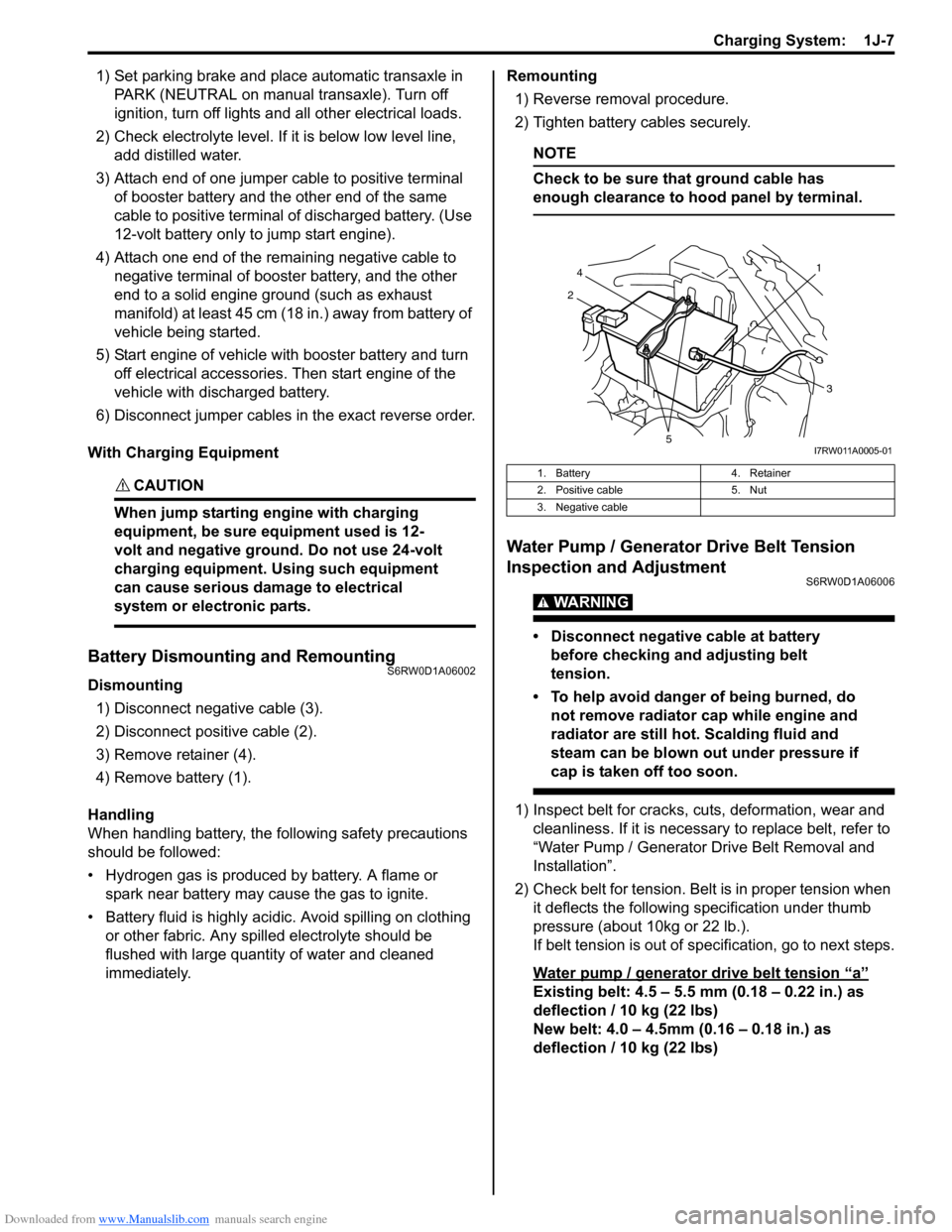
Battery Dismounting and RemountingS6RW0D1A06002
Dismounting
1) Disconnect negative cable (3).
2) Disconnect positive cable (2).
3) Remove retainer (4).
4) Remove battery (1).
Handling
When handling battery, the following safety precautions
should be followed:
• Hydrogen gas is produced by battery. A flame or
spark near battery may cause the gas to ignite.
• Battery fluid is highly acidic. Avoid spilling on clothing
or other fabric. Any spilled electrolyte should be
flushed with large quantity of water and cleaned
immediately.Remounting
1) Reverse removal procedure.
2) Tighten battery cables securely.
NOTE
Check to be sure that ground cable has
enough clearance to hood panel by terminal.
Water Pump / Generator Drive Belt Tension
Inspection and Adjustment
S6RW0D1A06006
WARNING!
• Disconnect negative cable at battery
before checking and adjusting belt
tension.
• To help avoid danger of being burned, do
not remove radiator cap while engine and
radiator are still hot. Scalding fluid and
steam can be blown out under pressure if
cap is taken off too soon.
1) Inspect belt for cracks, cuts, deformation, wear and
cleanliness. If it is necessary to replace belt, refer to
“Water Pump / Generator Drive Belt Removal and
Installation”.
2) Check belt for tension. Belt is in proper tension when
it deflects the following specification under thumb
pressure (about 10kg or 22 lb.).
If belt tension is out of specification, go to next steps.
Water pump / generator drive belt tension
“a”
Existing belt: 4.5 – 5.5 mm (0.18 – 0.22 in.) as
deflection / 10 kg (22 lbs)
New belt: 4.0 – 4.5mm (0.16 – 0.18 in.) as
deflection / 10 kg (22 lbs)
1. Battery 4. Retainer
2. Positive cable 5. Nut
3. Negative cable
21
4
3
5I7RW011A0005-01
Page 603 of 1556
Downloaded from www.Manualslib.com manuals search engine Parking Brake: 4D-2
Repair Instructions
Parking Brake Inspection and AdjustmentS6RW0D4406001
Inspection
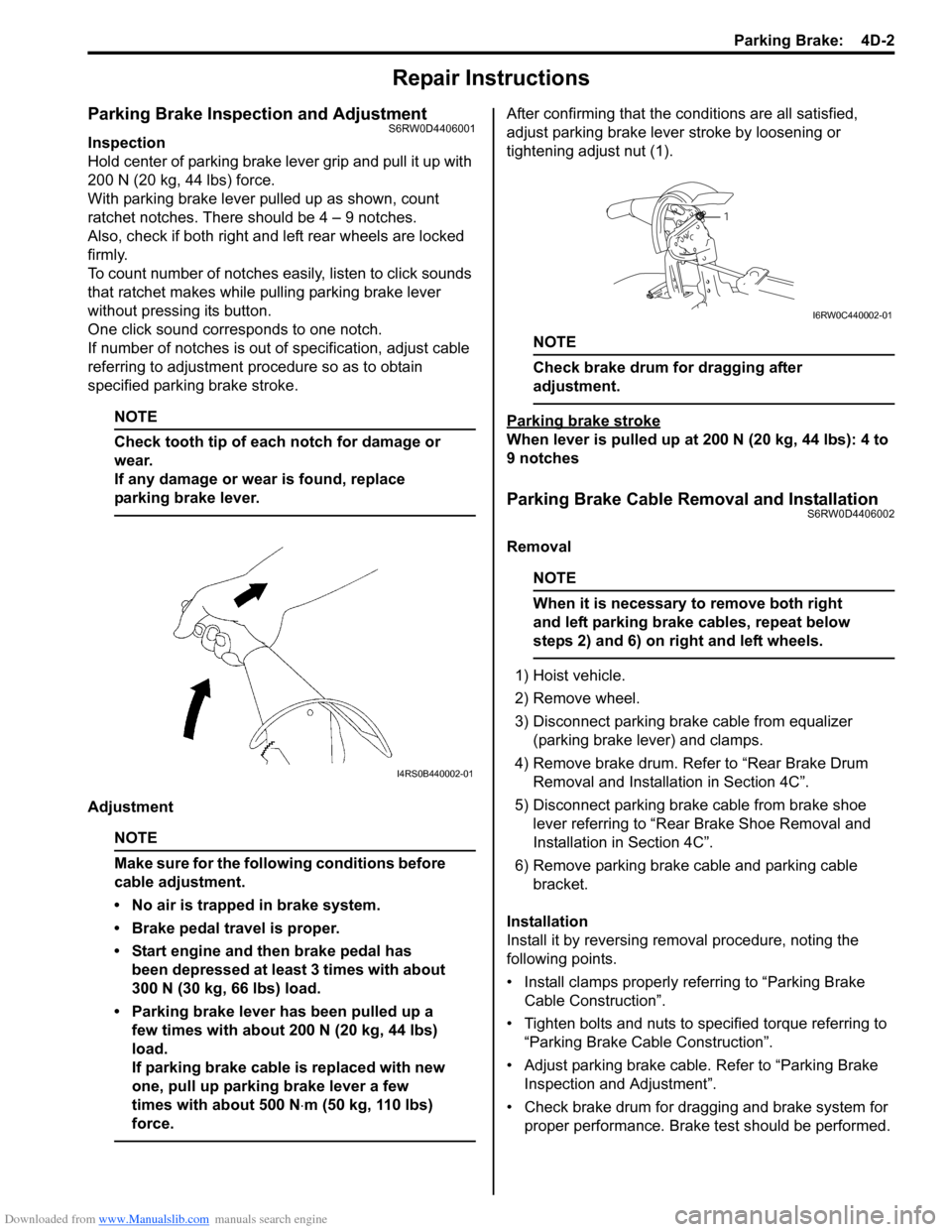
Hold center of parking brake lever grip and pull it up with
200 N (20 kg, 44 lbs) force.
With parking brake lever pulled up as shown, count
ratchet notches. There should be 4 – 9 notches.
Also, check if both right and left rear wheels are locked
firmly.
To count number of notches easily, listen to click sounds
that ratchet makes while pulling parking brake lever
without pressing its button.
One click sound corresponds to one notch.
If number of notches is out of specification, adjust cable
referring to adjustment procedure so as to obtain
specified parking brake stroke.
NOTE
Check tooth tip of each notch for damage or
wear.
If any damage or wear is found, replace
parking brake lever.
Adjustment
NOTE
Make sure for the following conditions before
cable adjustment.
• No air is trapped in brake system.
• Brake pedal travel is proper.
• Start engine and then brake pedal has
been depressed at least 3 times with about
300 N (30 kg, 66 lbs) load.
• Parking brake lever has been pulled up a
few times with about 200 N (20 kg, 44 lbs)
load.
If parking brake cable is replaced with new
one, pull up parking brake lever a few
times with about 500 N⋅m (50 kg, 110 lbs)
force.
After confirming that the conditions are all satisfied,
adjust parking brake lever stroke by loosening or
tightening adjust nut (1).
NOTE
Check brake drum for dragging after
adjustment.
Parking brake stroke
When lever is pulled up at 200 N (20 kg, 44 lbs): 4 to
9 notches
Parking Brake Cable Removal and InstallationS6RW0D4406002
Removal
NOTE
When it is necessary to remove both right
and left parking brake cables, repeat below
steps 2) and 6) on right and left wheels.
1) Hoist vehicle.
2) Remove wheel.
3) Disconnect parking brake cable from equalizer
(parking brake lever) and clamps.
4) Remove brake drum. Refer to “Rear Brake Drum
Removal and Installation in Section 4C”.
5) Disconnect parking brake cable from brake shoe
lever referring to “Rear Brake Shoe Removal and
Installation in Section 4C”.
6) Remove parking brake cable and parking cable
bracket.
Installation
Install it by reversing removal procedure, noting the
following points.
• Install clamps properly referring to “Parking Brake
Cable Construction”.
• Tighten bolts and nuts to specified torque referring to
“Parking Brake Cable Construction”.
• Adjust parking brake cable. Refer to “Parking Brake
Inspection and Adjustment”.
• Check brake drum for dragging and brake system for
proper performance. Brake test should be performed.
I4RS0B440002-01
1
I6RW0C440002-01
Page 615 of 1556
Downloaded from www.Manualslib.com manuals search engine ABS: 4E-10
Problem symptom confirmation
Check if what the customer claimed in “Customer
Questionnaire” is actually found in the vehicle and if that
symptom is found, whether it is identified as a failure.
(This step should be shared with the customer if
possible.) Check warning lights related to brake system
referring to “EBD Warning Light (Brake Warning Light)
Check” and “ABS Warning Light Check”.
DTC check, record and clearance
Perform “DTC Check” procedure, record it and then
clear it referring to “DTC Clearance”.
Recheck DTC referring to “DTC Check”.
When DTC which is recorded at DTC check procedure is
detected again after performing DTC clearance, go to
“Step 4: ABS Check: ” to proceed the diagnosis.
When DTC which is recorded at DTC check procedure is
not indicated anymore after performing DTC clearance,
ABS control module does not perform the system
diagnosis, or temporary abnormality may occur,
therefore go to “Step 2: Driving Test: ” to proceed the
diagnosis.
Step 2: Driving Test
Test drive the vehicle at 40 km/h (25 MPH) for more than
a minute and check if any trouble symptom (such as
abnormal lighting of ABS warning light) exists.
If the malfunction DTC is confirmed again at ignition
switch ON, driving test as described is not necessary.
Proceed to Step 3.
Step 3: DTC Check
Recheck DTC referring to “DTC Check”.
Step 4: ABS Check
According to ABS Check for the DTC confirmation in
Step 3, locate the cause of the trouble, namely in a
sensor, switch, wire harness, connector, actuator
assembly or other part and repair or replace faulty parts.
Step 5: Brakes Diagnosis
Check the parts or system suspected as a possible
cause referring to “Brakes Symptom Diagnosis in
Section 4A” and based on symptoms appearing on the
vehicle (symptom obtained through Steps 1 and 2 and
repair or replace faulty parts, if any).
Step 6: Check for Intermittent Problem
Check parts where an intermittent trouble is easy to
occur (e.g., wire harness, connector, etc.), referring to
“Intermittent and Poor Connection Inspection in Section
00” and related circuit of trouble code recorded in Step 1
to 3.
Step 7: Final Confirmation Test
Confirm that the problem symptom has gone and the
ABS is free from any abnormal conditions. If what has
been repaired is related to the malfunction DTC, clear
the DTC once referring to “DTC Clearance” and perform
test driving and confirm that no DTC is indicated.ABS Warning Light CheckS6RW0D4504002
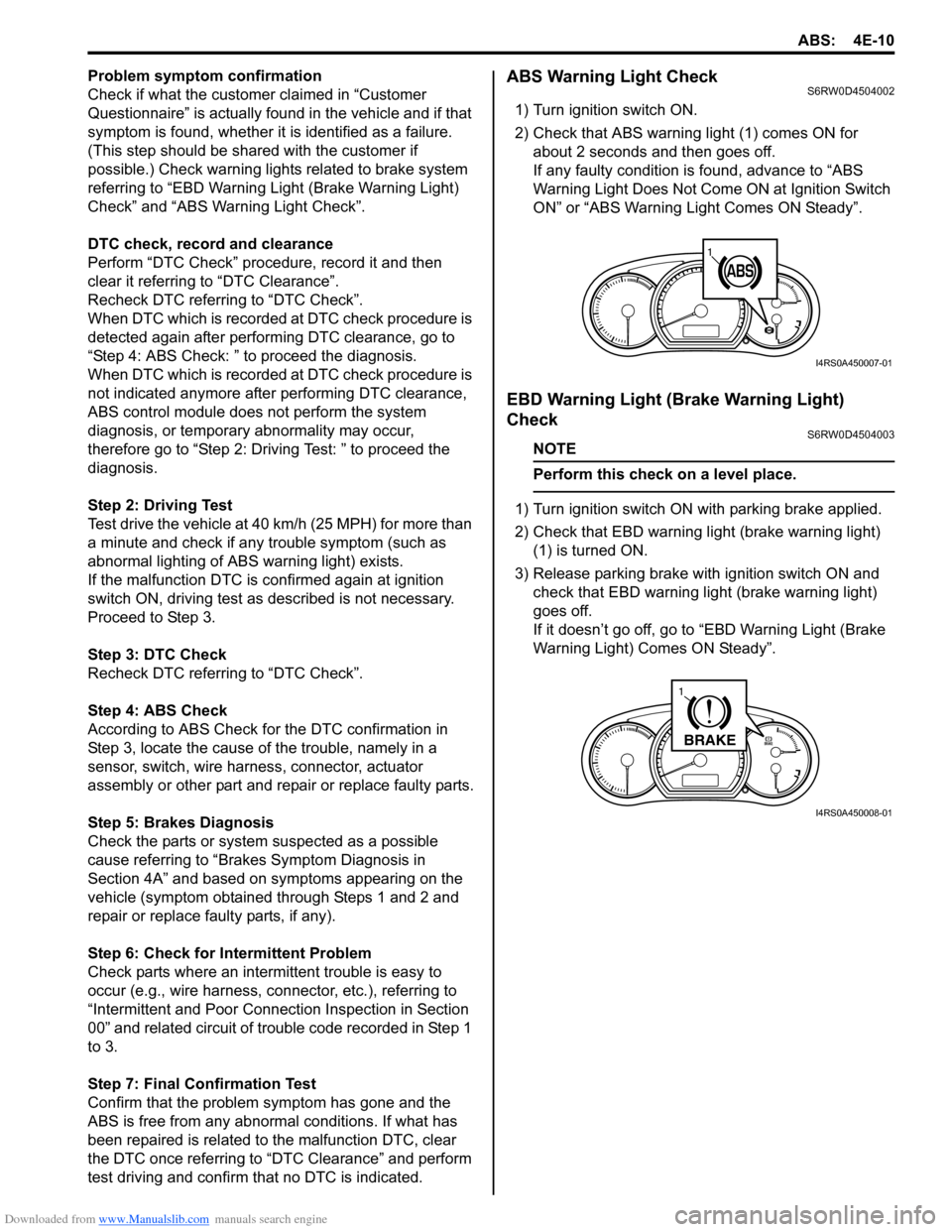
1) Turn ignition switch ON.
2) Check that ABS warning light (1) comes ON for
about 2 seconds and then goes off.
If any faulty condition is found, advance to “ABS
Warning Light Does Not Come ON at Ignition Switch
ON” or “ABS Warning Light Comes ON Steady”.
EBD Warning Light (Brake Warning Light)
Check
S6RW0D4504003
NOTE
Perform this check on a level place.
1) Turn ignition switch ON with parking brake applied.
2) Check that EBD warning light (brake warning light)
(1) is turned ON.
3) Release parking brake with ignition switch ON and
check that EBD warning light (brake warning light)
goes off.
If it doesn’t go off, go to “EBD Warning Light (Brake
Warning Light) Comes ON Steady”.
11
I4RS0A450007-01
BRAKE
1
I4RS0A450008-01
Page 619 of 1556
Downloaded from www.Manualslib.com manuals search engine ABS: 4E-14
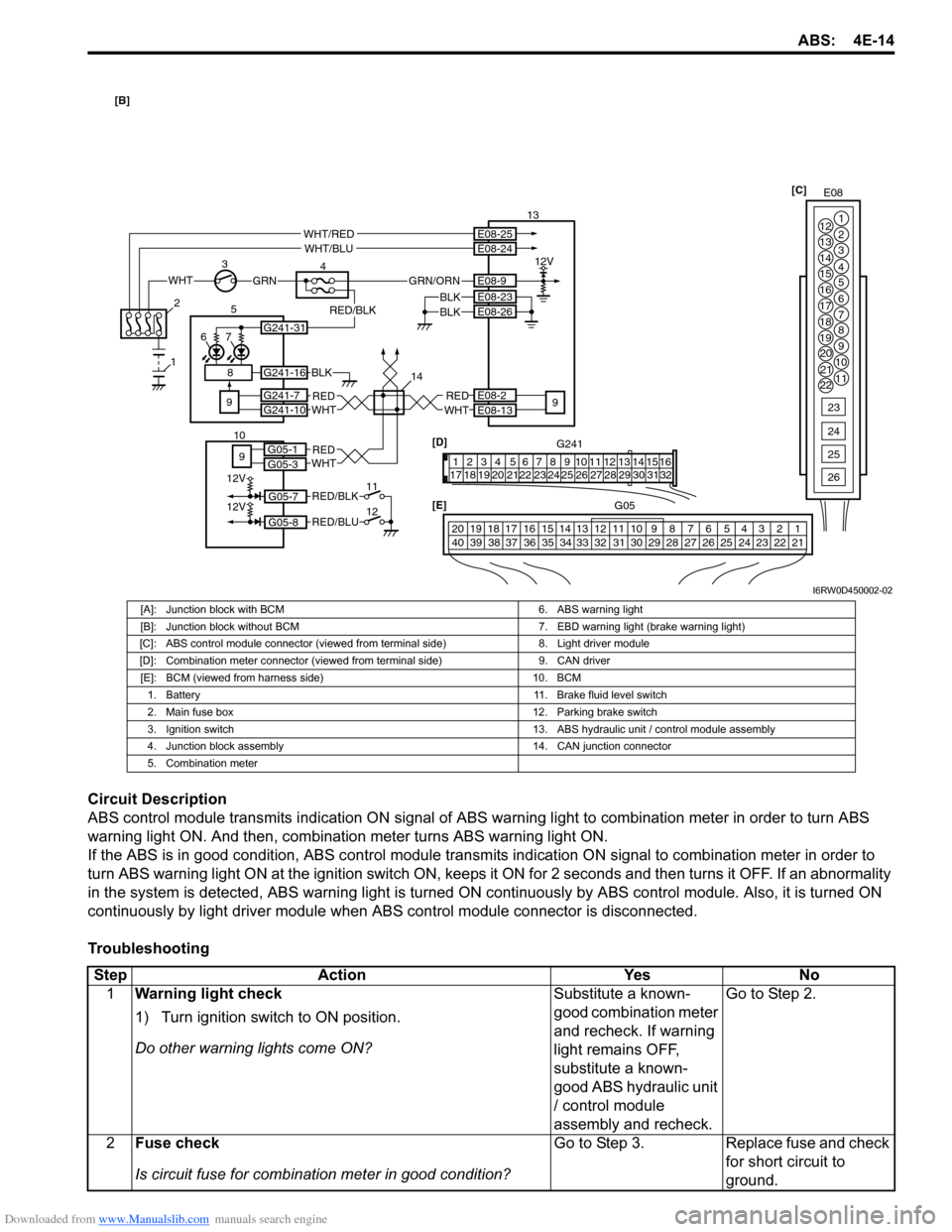
Circuit Description
ABS control module transmits indication ON signal of ABS warning light to combination meter in order to turn ABS
warning light ON. And then, combination meter turns ABS warning light ON.
If the ABS is in good condition, ABS control module transmits indication ON signal to combination meter in order to
turn ABS warning light ON at the ignition switch ON, keeps it ON for 2 seconds and then turns it OFF. If an abnormality
in the system is detected, ABS warning light is turned ON continuously by ABS control module. Also, it is turned ON
continuously by light driver module when ABS control module connector is disconnected.
Troubleshooting
G241 [D]
132 4 5 6 7 8 9 10111213141516
17 1918 20 2122 23 24 25 26 27 28 29 30 31 32E08 [C]
1
2
3
4
5
6
7 12
13
14
15
16
17
18
19
20
21
228
9
10
11
23
24
25
26
G05 [E]
1 2 3 4 765 8 9 10 11 14 15 16
36 34 33 32 3135 24 23 2122 28 27 2526 37 39 38 4018 17 13 12 19 20
30 29
WHTGRN
3
E08-2
E08-13REDWHT 5
4 13
9
E08-23
E08-26BLKBLK
67
BLK
REDWHTG241-7G241-10
G241-16
12V
E08-25E08-24
E08-9
WHT/REDWHT/BLU
GRN/ORN
9
2
1
14
G241-31
RED/BLK
8
REDWHT9
12V
12V
11
12G05-7
G05-1G05-3
G05-8
RED/BLK
RED/BLU
10
[B]
I6RW0D450002-02
[A]: Junction block with BCM 6. ABS warning light
[B]: Junction block without BCM 7. EBD warning light (brake warning light)
[C]: ABS control module connector (viewed from terminal side) 8. Light driver module
[D]: Combination meter connector (viewed from terminal side) 9. CAN driver
[E]: BCM (viewed from harness side) 10. BCM
1. Battery 11. Brake fluid level switch
2. Main fuse box 12. Parking brake switch
3. Ignition switch 13. ABS hydraulic unit / control module assembly
4. Junction block assembly 14. CAN junction connector
5. Combination meter
Step Action Yes No
1Warning light check
1) Turn ignition switch to ON position.
Do other warning lights come ON?Substitute a known-
good combination meter
and recheck. If warning
light remains OFF,
substitute a known-
good ABS hydraulic unit
/ control module
assembly and recheck.Go to Step 2.
2Fuse check
Is circuit fuse for combination meter in good condition?Go to Step 3. Replace fuse and check
for short circuit to
ground.
Page 621 of 1556
Downloaded from www.Manualslib.com manuals search engine ABS: 4E-16
EBD Warning Light (Brake Warning Light) Comes ON SteadyS6RW0D4504010
Wiring Diagram
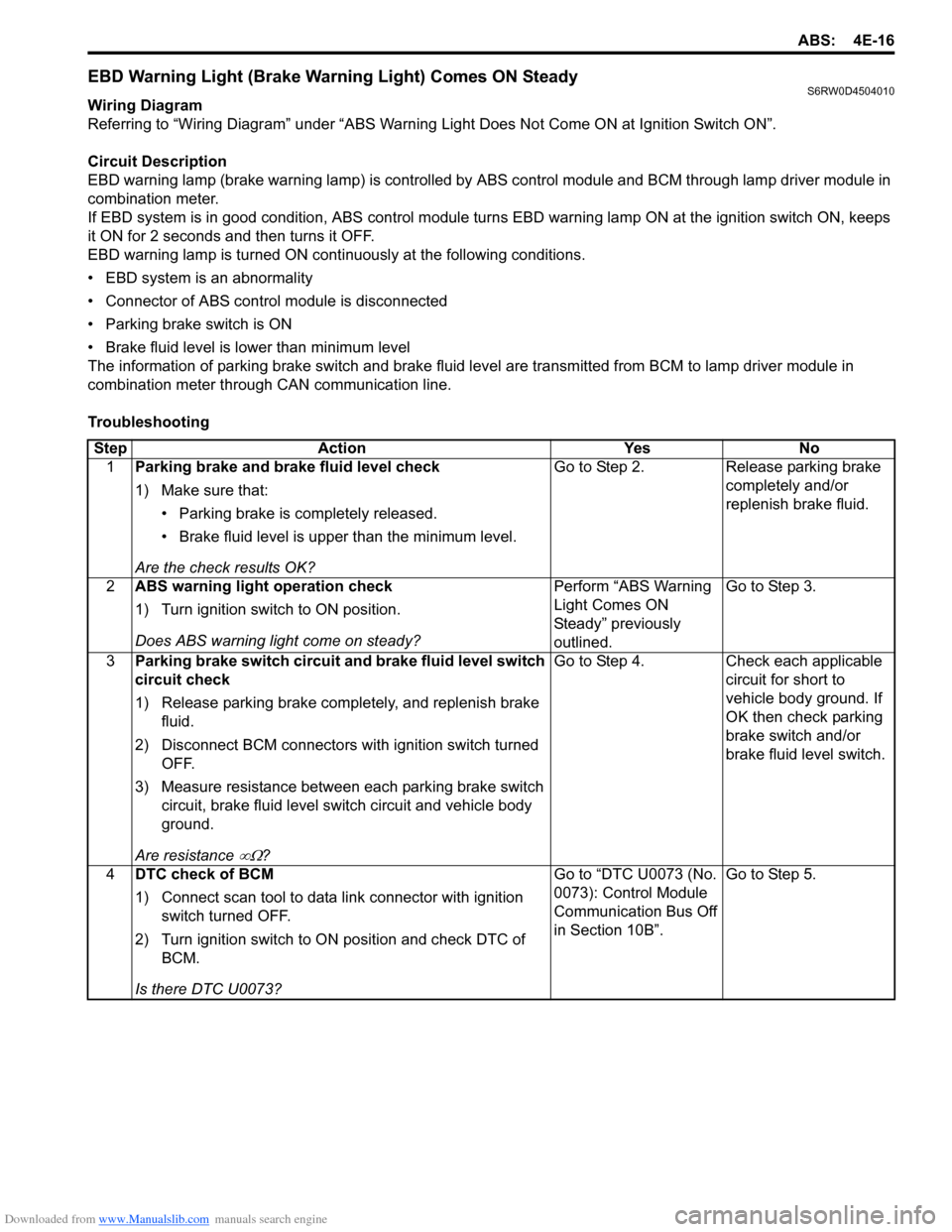
Referring to “Wiring Diagram” under “ABS Warning Light Does Not Come ON at Ignition Switch ON”.
Circuit Description
EBD warning lamp (brake warning lamp) is controlled by ABS control module and BCM through lamp driver module in
combination meter.
If EBD system is in good condition, ABS control module turns EBD warning lamp ON at the ignition switch ON, keeps
it ON for 2 seconds and then turns it OFF.
EBD warning lamp is turned ON continuously at the following conditions.
• EBD system is an abnormality
• Connector of ABS control module is disconnected
• Parking brake switch is ON
• Brake fluid level is lower than minimum level
The information of parking brake switch and brake fluid level are transmitted from BCM to lamp driver module in
combination meter through CAN communication line.
Troubleshooting
Step Action Yes No
1Parking brake and brake fluid level check
1) Make sure that:
• Parking brake is completely released.
• Brake fluid level is upper than the minimum level.
Are the check results OK?Go to Step 2. Release parking brake
completely and/or
replenish brake fluid.
2ABS warning light operation check
1) Turn ignition switch to ON position.
Does ABS warning light come on steady?Perform “ABS Warning
Light Comes ON
Steady” previously
outlined.Go to Step 3.
3Parking brake switch circuit and brake fluid level switch
circuit check
1) Release parking brake completely, and replenish brake
fluid.
2) Disconnect BCM connectors with ignition switch turned
OFF.
3) Measure resistance between each parking brake switch
circuit, brake fluid level switch circuit and vehicle body
ground.
Are resistance
∞Ω?Go to Step 4. Check each applicable
circuit for short to
vehicle body ground. If
OK then check parking
brake switch and/or
brake fluid level switch.
4DTC check of BCM
1) Connect scan tool to data link connector with ignition
switch turned OFF.
2) Turn ignition switch to ON position and check DTC of
BCM.
Is there DTC U0073?Go to “DTC U0073 (No.
0073): Control Module
Communication Bus Off
in Section 10B”.Go to Step 5.
Page 666 of 1556
Downloaded from www.Manualslib.com manuals search engine 5A-18 Automatic Transmission/Transaxle:
Step 2. DTC / Freeze Frame Data Check, Record and
Clearance
First, referring to “DTC Check”, check DTC and pending
DTC. If DTC exists, print or write down DTC and freeze
frame data and then clear malfunction DTC(s) by
referring to “DTC Clearance”. Malfunction DTC indicates
malfunction in the system but it is not possible to know
from it whether the malfunction is occurring now or it
occurred in the past and normal condition has been
restored. In order to know that, check symptom in
question according to Step 5 and then recheck DTC
according to Step 6.
Diagnosing a trouble based on the DTC in this step only
or failure to clear the DTC in this step may result in an
faulty diagnosis, trouble diagnosis of a normal circuit or
difficulty in troubleshooting which is otherwise
unnecessary.
Step 3 and 4. Visual Inspection
As a preliminary step, be sure to perform visual check of
the items that support proper function of the engine and
automatic transaxle referring to “Visual Inspection”.
Step 5. Trouble Symptom Confirmation
Check trouble symptoms based on information obtained
in “Step 1. Customer Complaint Analysis: ” and “Step 2.
DTC / Freeze Frame Data Check, Record and
Clearance: ”.
Also, reconfirm DTC according to “DTC Confirmation
Procedure” described in each DTC flow.
Step 6 and 7. Rechecking and Record of DTC and
Freeze Frame Data
Refer to “DTC Check” for checking procedure.Step 8. A/T Basic Check and A/T Symptom
Diagnosis
Perform basic check of A/T according to “A/T Basic
Check” first. When the end of the flow has been reached,
check the parts of the system suspected as a possible
cause referring to “A/T Symptom Diagnosis” and based
on symptoms appearing on the vehicle (symptoms
obtained through steps of customer complaint analysis,
trouble symptom confirmation and/or A/T basic check)
and repair or replace faulty parts, if any.
Step 9. Troubleshooting for DTC
Based on the DTC indicated in Step 6 / 7 and referring to
“applicable DTC flow”, locate the cause of the trouble,
namely in a sensor, switch, wire harness, connector,
actuator, TCM or other part and repair or replace faulty
parts.
Step 10. Check for Intermittent Problem
Check parts where an intermittent trouble is easy to
occur (e.g. wire harness, connector, etc.), referring to
“Intermittent and Poor Connection Inspection in Section
00” and related circuit of DTC recorded in Step 2.
Step 11. Final Confirmation Test
Confirm that the problem symptom has gone and the
vehicle is free from any abnormal conditions. If what has
been repaired is related to the malfunction DTC, clear
the DTC once and check to ensure that no malfunction
DTC is indicated.
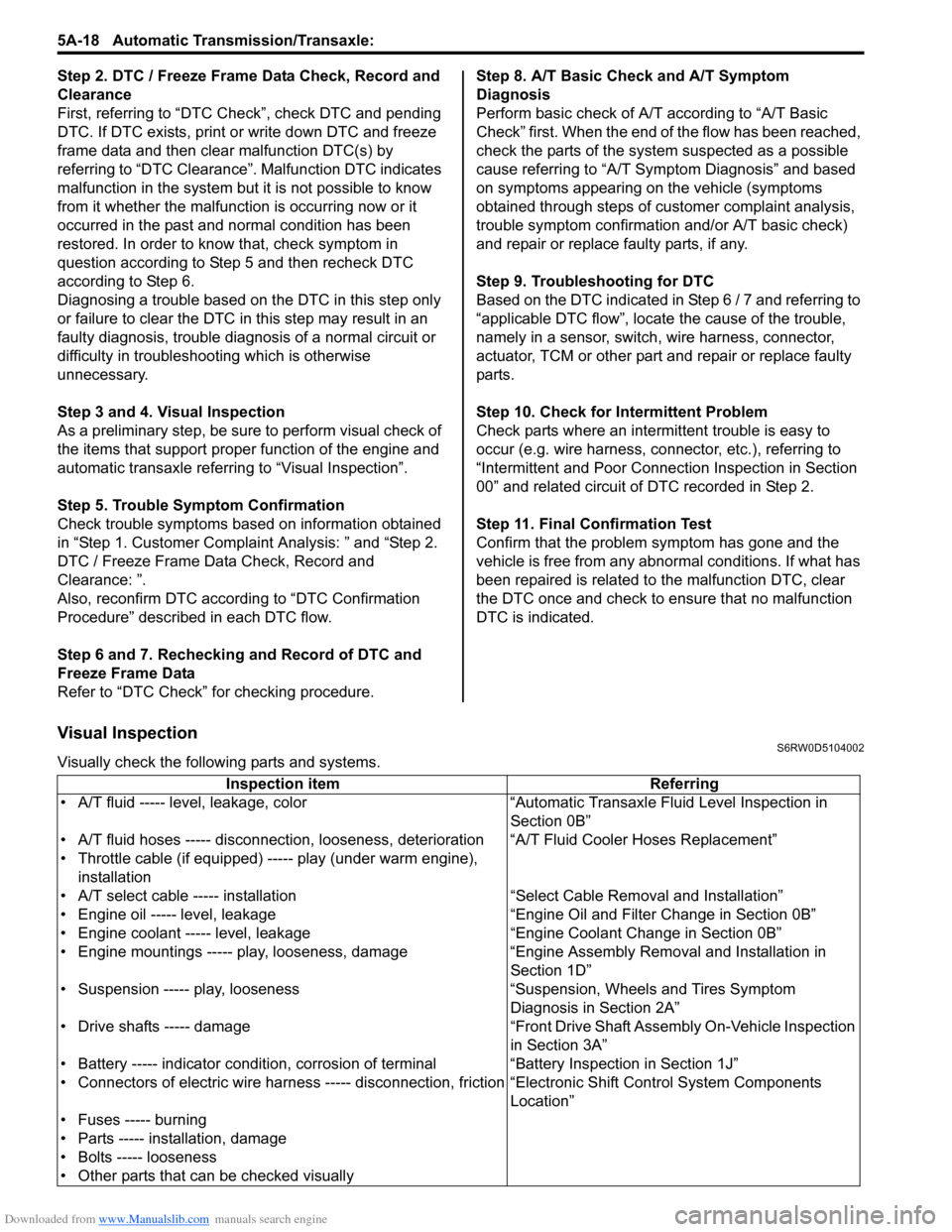
Visual InspectionS6RW0D5104002
Visually check the following parts and systems.
Inspection item Referring
• A/T fluid ----- level, leakage, color “Automatic Transaxle Fluid Level Inspection in
Section 0B”
• A/T fluid hoses ----- disconnection, looseness, deterioration “A/T Fluid Cooler Hoses Replacement”
• Throttle cable (if equipped) ----- play (under warm engine),
installation
• A/T select cable ----- installation “Select Cable Removal and Installation”
• Engine oil ----- level, leakage “Engine Oil and Filter Change in Section 0B”
• Engine coolant ----- level, leakage “Engine Coolant Change in Section 0B”
• Engine mountings ----- play, looseness, damage “Engine Assembly Removal and Installation in
Section 1D”
• Suspension ----- play, looseness “Suspension, Wheels and Tires Symptom
Diagnosis in Section 2A”
• Drive shafts ----- damage “Front Drive Shaft Assembly On-Vehicle Inspection
in Section 3A”
• Battery ----- indicator condition, corrosion of terminal “Battery Inspection in Section 1J”
• Connectors of electric wire harness ----- disconnection, friction “Electronic Shift Control System Components
Location”
• Fuses ----- burning
• Parts ----- installation, damage
• Bolts ----- looseness
• Other parts that can be checked visually
Page 734 of 1556

Downloaded from www.Manualslib.com manuals search engine 5A-86 Automatic Transmission/Transaxle:
Select Cable ComponentsS6RW0D5106006
Select Cable Removal and InstallationS6RW0D5106007
Removal
1) Remove console box referring to “Console Box
Components in Section 9H”.
2) Disconnect select cable from select lever and then
detach from bracket.
3) Remove clip and disconnect select cable from
manual select lever.
4) Remove select cable retainer from dash panel.
Installation
Install select cable by reversing removal procedure.
The important steps in installation are as follows.
• Apply grease to pin and cable joint.
• Tighten bolts to specified torque referring to “Select
Cable Components”.• Adjusting procedure is as follows. Refer to “Select
Cable Adjustment”.Select Cable AdjustmentS6RW0D5106008
1) Shift manual shift lever to “N” range (transmission
range sensor “N” range).
(a)
(b)
(c)
6
7A
112
[B]
[B] [A]
[A]
34
5
9
8
101
A
I5RW0C510031-01
[A]: View [A] 5. Clip 11. Radiator inlet hose
[B]: View [B] 6. Manual select lever pin
: Apply lithium grease 99000-25011 to all around pin (0.15 g):23 N⋅m (2.0 kgf-m, 17.0 lb-ft)
1. Select lever assembly 7. Select lever pin
: Apply lithium grease 99000-25011 to all around pin (0.15 g):6.5 N⋅m (0.65 kgf-m, 5.0 lb-ft)
2. Select cable 8. Adjuster case : 13 N⋅m (1.3 kgf-m, 9.5 lb-ft)
3. Cable bracket 9. Lock
4. Manual select lever 10. P/S control module
“P”“R”“N”
“D”
“2”
“L”
I2RH0B510040-01
Page 736 of 1556
![SUZUKI SX4 2006 1.G Service Owners Manual Downloaded from www.Manualslib.com manuals search engine 5A-88 Automatic Transmission/Transaxle:
Installation
1) Lay interlock cable to its original cabling route.
C
1 2
3
4
5
61
9 [C] [A]
7
12
3
4
5](/img/20/7612/w960_7612-735.png "SUZUKI SX4 2006 1.G Service Owners Manual Downloaded from www.Manualslib.com manuals search engine 5A-88 Automatic Transmission/Transaxle:
Installation
1) Lay interlock cable to its original cabling route.
C
1 2
3
4
5
61
9 [C] [A]
7
12
3
4
5")
Downloaded from www.Manualslib.com manuals search engine 5A-88 Automatic Transmission/Transaxle:
Installation
1) Lay interlock cable to its original cabling route.
C
1 2
3
4
5
61
9 [C] [A]
7
12
3
4
567
8
2 [B]
I5RW0C510073-01
[A]: LH steering vehicle 2. Clamp 6. EPS control module
[B]: RH steering vehicle 3. Steering lock assembly / Steering lock unit (if equipped with Keyless
start system)7. Brake switch bracket
[C]: View C 4. Key cylinder cover 8. Wiring harness
1. Key interlock cable 5. Select lever assembly 9. Marking
Page 865 of 1556
Downloaded from www.Manualslib.com manuals search engine Table of Contents 6- i
6
Section 6
CONTENTS
Steering
Precautions ................................................. 6-1
Precautions............................................................. 6-1
Precautions on Steering........................................ 6-1
Steering General Diagnosis.................... 6A-1
Precautions........................................................... 6A-1
Precautions for Steering Diagnosis ..................... 6A-1
Diagnostic Information and Procedures ............ 6A-1
Steering Symptom Diagnosis .............................. 6A-1
Steering System Inspection ................................ 6A-2
Steering Wheel and Column................... 6B-1
Precautions........................................................... 6B-1
Service Precautions of Steering Wheel and
Column.............................................................. 6B-1
General Description ............................................. 6B-1
Steering Wheel and Column Construction .......... 6B-1
Diagnostic Information and Procedures ............ 6B-2
Checking Steering Column for Accident
Damage ............................................................ 6B-2
Repair Instructions .............................................. 6B-3
Steering Wheel and Column Construction .......... 6B-3
Steering Wheel Removal and Installation ........... 6B-4
Contact Coil Cable Assembly Removal and
Installation ......................................................... 6B-5
Centering Contact Coil Cable Assembly ............. 6B-6
Contact Coil Cable Assembly Inspection ............ 6B-6
Steering Column Removal and Installation ......... 6B-6
Steering Column Inspection ................................ 6B-8
Ignition Switch Cylinder Assembly Removal
and Installation (Non- Keyless Start Model)...... 6B-8
Steering Lock Assembly (Ignition Switch)
Removal and Installation................................... 6B-9
Steering Lower Shaft Removal and
Installation ....................................................... 6B-10
Specifications..................................................... 6B-11
Tightening Torque Specifications ...................... 6B-11
Special Tools and Equipment ........................... 6B-11
Special Tool ...................................................... 6B-11
Power Assisted Steering System........... 6C-1
Precautions........................................................... 6C-1
P/S System Note ................................................. 6C-1
Precautions in Diagnosing Troubles ................... 6C-1General Description .............................................6C-2
P/S System Description ......................................6C-2
EPS Diagnosis General Description ...................6C-3
On-Board Diagnostic System Description ...........6C-3
Schematic and Routing Diagram ........................6C-4
EPS System Wiring Circuit Diagram ...................6C-4
Diagnostic Information and Procedures ............6C-5
EPS System Check .............................................6C-5
“EPS” Warning Light Check ................................6C-8
DTC Check..........................................................6C-8
DTC Clearance ...................................................6C-9
DTC Table ...........................................................6C-9
Visual Inspection ...............................................6C-11
Scan Tool Data .................................................6C-12
P/S System Symptom Diagnosis ......................6C-13
DLC and Its Communication Check (No
communication to P/S Control Module)...........6C-14
“EPS” Warning Light Does Not Come ON with
Ignition Switch Turned ON before Engine
Starts ...............................................................6C-16
“EPS” Warning Light Remains ON Steady
after Engine Starts ..........................................6C-18
DTC C1111 / C1113 / C1115: Torque Sensor
Circuit Failure ..................................................6C-19
DTC C1116: Steering Torque Sensor Power
Supply Circuit ..................................................6C-21
DTC C1121 / C1123 / C1124: Vehicle Speed
Signal Circuit Failure .......................................6C-22
DTC C1122: Engine Speed Signal....................6C-24
DTC C1141 / C1142 / C1143 / C1145: Motor
Circuit Failure ..................................................6C-26
DTC C1153: P/S Control Module Power
Supply Circuit ..................................................6C-27
DTC C1155: P/S Control Module Internal
Failure .............................................................6C-28
P/S Control Module Power Supply and
Ground Circuit Check ......................................6C-29
Inspection of P/S Control Module and Its
Circuits ............................................................6C-30
Steering Wheel Play Check ..............................6C-34
Steering Force Check .......................................6C-34
Repair Instructions ............................................6C-35
Steering Gear Case Assembly Components ....6C-35
Tie-Rod End Boot On-Vehicle Inspection .........6C-36
Tie-Rod End Removal and Installation..............6C-36