Can line SUZUKI SX4 2006 1.G Service Repair Manual
[x] Cancel search | Manufacturer: SUZUKI, Model Year: 2006, Model line: SX4, Model: SUZUKI SX4 2006 1.GPages: 1556, PDF Size: 37.31 MB
Page 502 of 1556
Downloaded from www.Manualslib.com manuals search engine 3B-5 Differential:
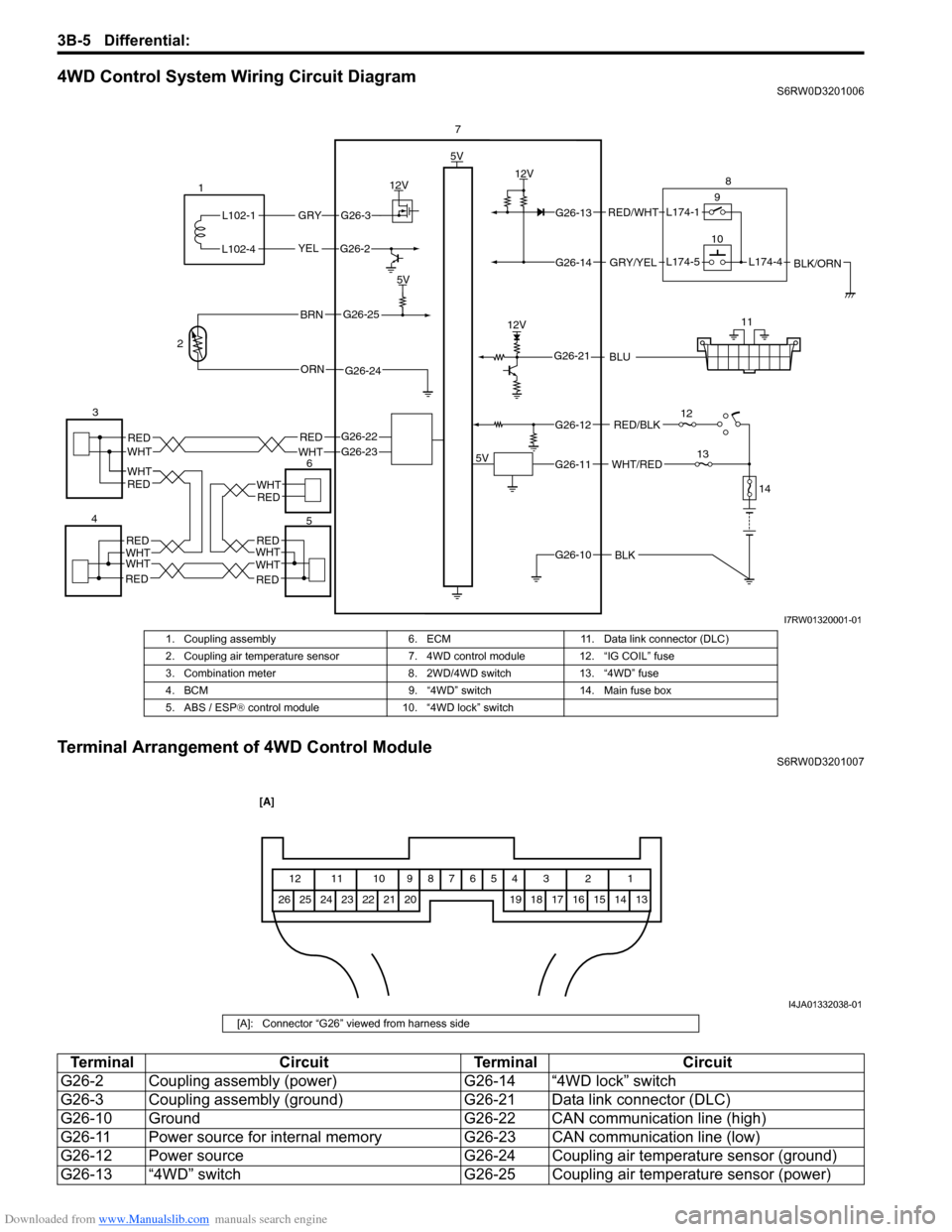
4WD Control System Wiring Circuit DiagramS6RW0D3201006
Terminal Arrangement of 4WD Control ModuleS6RW0D3201007
5V
5V
12V
G26-3
YEL
GRY
G26-2
G26-22G26-23REDWHT
G26-13
G26-14
G26-12
G26-11
G26-10BLK
WHT/RED
RED/BLK
GRY/YEL
RED/WHT
12V
L102-1
L102-4
1
37
9
10
12
13
14
12V
G26-21BLU
G26-25
G26-24ORN
BRN
5V
28
11
WHT
WHT
WHTWHTWHTWHT
WHT
RED
RED
RED
REDRED
RED
RED
46
5
L174-4BLK/ORNL174-5L174-1
I7RW01320001-01
1. Coupling assembly 6. ECM 11. Data link connector (DLC)
2. Coupling air temperature sensor 7. 4WD control module 12. “IG COIL” fuse
3. Combination meter 8. 2WD/4WD switch 13. “4WD” fuse
4. BCM 9. “4WD” switch 14. Main fuse box
5. ABS / ESP® control module 10. “4WD lock” switch
1 2 3 4 5 6 7 8 9 10 11 12
13 14 15 16 17 18 19 20 21 22 23 24 25 26
[A]
I4JA01332038-01
[A]: Connector “G26” viewed from harness side
Te r m i n a l C i r c u i t Te r m i n a l C i r c u i t
G26-2 Coupling assembly (power) G26-14 “4WD lock” switch
G26-3 Coupling assembly (ground) G26-21 Data link connector (DLC)
G26-10 Ground G26-22 CAN communication line (high)
G26-11 Power source for internal memory G26-23 CAN communication line (low)
G26-12 Power source G26-24 Coupling air temperature sensor (ground)
G26-13 “4WD” switch G26-25 Coupling air temperature sensor (power)
Page 508 of 1556
Downloaded from www.Manualslib.com manuals search engine 3B-11 Differential:
Visual InspectionS6RW0D3204004
Check the following parts and systems visually.
DTC CheckS6RW0D3204005
1) Turn ignition switch to OFF position.
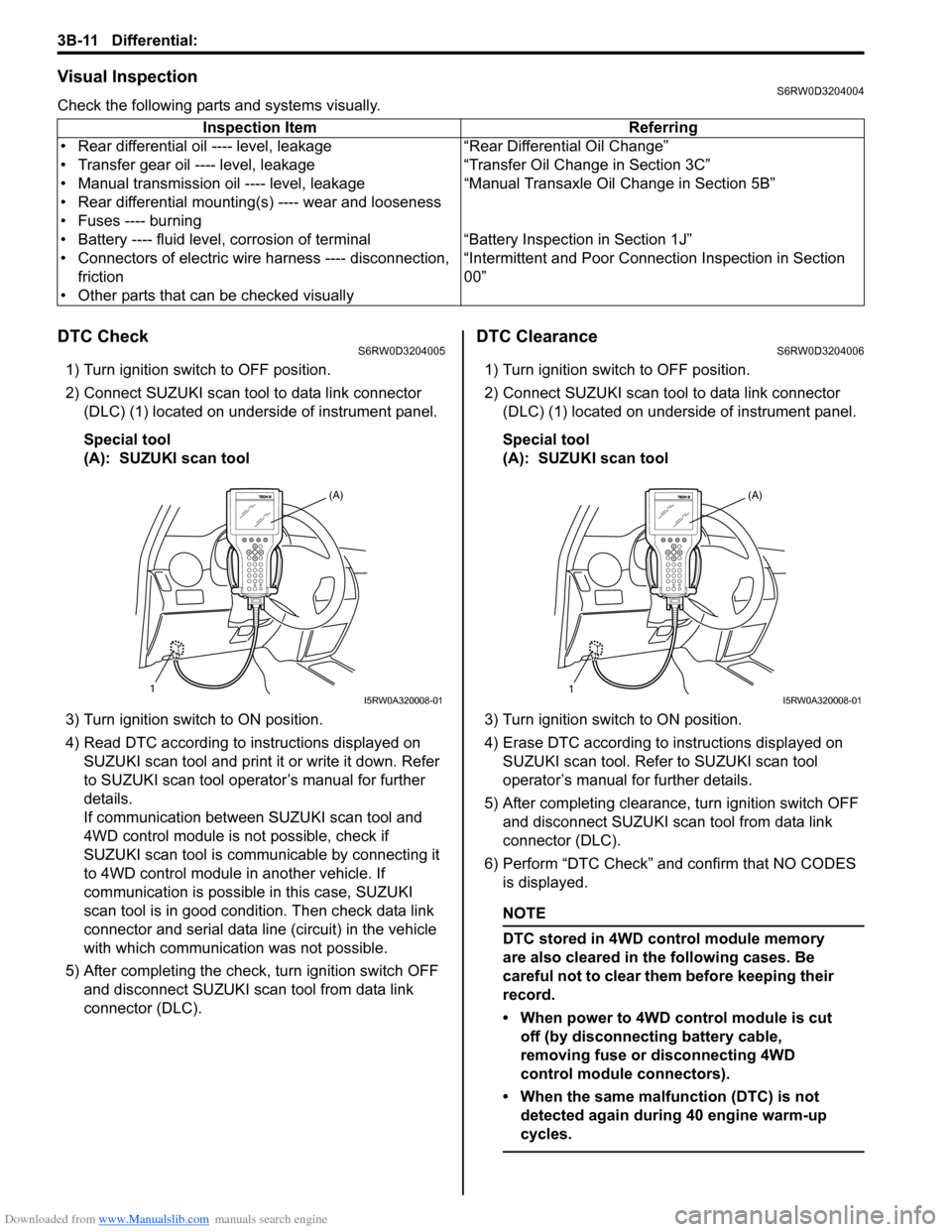
2) Connect SUZUKI scan tool to data link connector
(DLC) (1) located on underside of instrument panel.
Special tool
(A): SUZUKI scan tool
3) Turn ignition switch to ON position.
4) Read DTC according to instructions displayed on
SUZUKI scan tool and print it or write it down. Refer
to SUZUKI scan tool operator’s manual for further
details.
If communication between SUZUKI scan tool and
4WD control module is not possible, check if
SUZUKI scan tool is communicable by connecting it
to 4WD control module in another vehicle. If
communication is possible in this case, SUZUKI
scan tool is in good condition. Then check data link
connector and serial data line (circuit) in the vehicle
with which communication was not possible.
5) After completing the check, turn ignition switch OFF
and disconnect SUZUKI scan tool from data link
connector (DLC).
DTC ClearanceS6RW0D3204006
1) Turn ignition switch to OFF position.
2) Connect SUZUKI scan tool to data link connector
(DLC) (1) located on underside of instrument panel.
Special tool
(A): SUZUKI scan tool
3) Turn ignition switch to ON position.
4) Erase DTC according to instructions displayed on
SUZUKI scan tool. Refer to SUZUKI scan tool
operator’s manual for further details.
5) After completing clearance, turn ignition switch OFF
and disconnect SUZUKI scan tool from data link
connector (DLC).
6) Perform “DTC Check” and confirm that NO CODES
is displayed.
NOTE
DTC stored in 4WD control module memory
are also cleared in the following cases. Be
careful not to clear them before keeping their
record.
• When power to 4WD control module is cut
off (by disconnecting battery cable,
removing fuse or disconnecting 4WD
control module connectors).
• When the same malfunction (DTC) is not
detected again during 40 engine warm-up
cycles.
Inspection Item Referring
• Rear differential oil ---- level, leakage “Rear Differential Oil Change”
• Transfer gear oil ---- level, leakage “Transfer Oil Change in Section 3C”
• Manual transmission oil ---- level, leakage “Manual Transaxle Oil Change in Section 5B”
• Rear differential mounting(s) ---- wear and looseness
• Fuses ---- burning
• Battery ---- fluid level, corrosion of terminal “Battery Inspection in Section 1J”
• Connectors of electric wire harness ---- disconnection,
friction“Intermittent and Poor Connection Inspection in Section
00”
• Other parts that can be checked visually
1(A)I5RW0A320008-011(A)I5RW0A320008-01
Page 510 of 1556

Downloaded from www.Manualslib.com manuals search engine 3B-13 Differential:
Scan Tool DataS6RW0D3204009
Scan Tool Data Definitions
Accel pedal Pos (Accelerator pedal position) (%)
Accelerator pedal opening ratio detected by signal on
CAN communication line fed from ECM.
Engine Speed (RPM)
This parameter indicates engine revolution calculated by
4WD control module.
4WD mode (2WD / AUTO / LOCK / ABS mode / Yaw
cont / ESP® req)
This parameter indicates 4WD mode according to 2WD/
4WD switch signal status detected by 4WD control
module.
4WD current (A)
This parameter indicates input current of coupling
assembly.
Battery voltage (V)
This parameter indicates battery voltage detected by
4WD control module.Coupling temp (°C, °F)
Coupling temperature detected by coupling air
temperature sensor installed in coupling assembly.
Wheel speed (F), Wheel speed (R) (km/h, mph)
Wheel speed is an ABS / ESP® control module internal
parameter. It is computed by reference pulses from the
wheel speed sensor.
F-R Wheel speed diff (Front-rear wheel speed
differential) (rpm)
This parameter indicates rotation difference between
front wheel and rear wheel detected by 4WD control
module.
4WD duty (%)
This parameter indicates operation rate of coupling
assembly. Scan tool data Vehicle conditionNormal condition / reference
values
) Accel pedal PosIgnition switch ON after
warmed up engineAccelerator pedal released 0 – 5%
Accelerator pedal depressed
fully90 – 100%
) Engine speed At engine idle speed Engine idle speed is display
) 4WD mode2WD/4WD switch selected to 2WD position 2WD
2WD/4WD switch selected to AUTO position AUTO
2WD/4WD switch selected to LOCK position LOCK
ABS operating ABS mode
Ignition switch ON and engine stop Relay off
Stability control operating Yaw cont
ESP® operating ESP® mode
) 4WD current Engine running 0 – 200 mA
) Battery voltage At engine idle speed 10 – 14 V
) Coupling temp Engine running –40 °C – 100 °C (–40 °F – 212 °F)
) Wheel speed (F) Vehicle stop 0 km/h, 0 MPH
) Wheel speed (R) Vehicle stop 0 km/h, 0 MPH
) F-R Wheel speed
DiffVehicle stop 0 rpm
) 4WD dutyIgnition switch ON and 2WD/4WD switch selected to
2WD position0%
Page 525 of 1556
Downloaded from www.Manualslib.com manuals search engine Differential: 3B-28
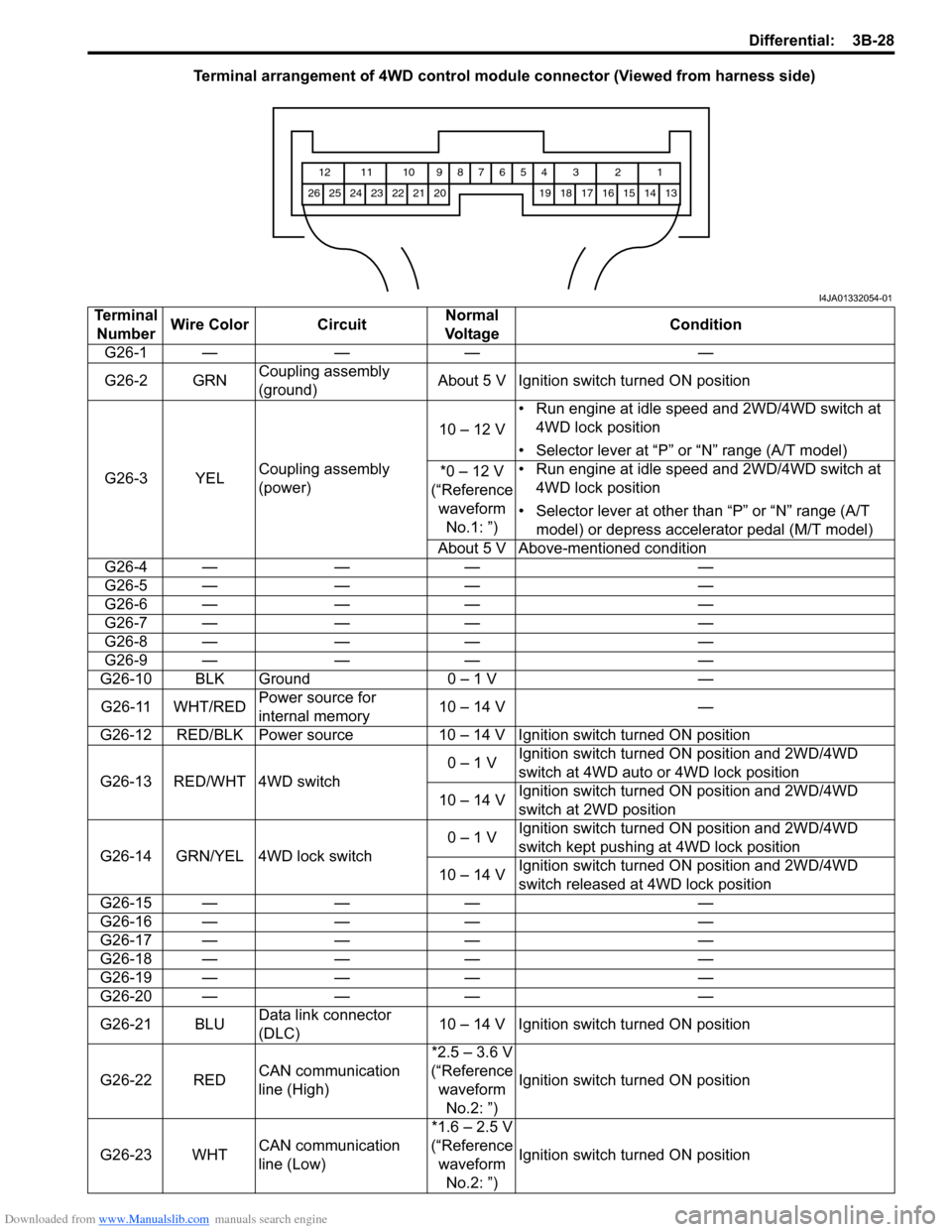
Terminal arrangement of 4WD control module connector (Viewed from harness side)
1 2 3 4 5 6 7 8 9 10 11 12
13 14 15 16 17 18 19 20 21 22 23 24 25 26
I4JA01332054-01
Terminal
NumberWire Color CircuitNormal
Vo l ta g eCondition
G26-1 — — — —
G26-2 GRNCoupling assembly
(ground)About 5 V Ignition switch turned ON position
G26-3 YELCoupling assembly
(power)10 – 12 V• Run engine at idle speed and 2WD/4WD switch at
4WD lock position
• Selector lever at “P” or “N” range (A/T model)
*0 – 12 V
(“Reference
waveform
No.1: ”)• Run engine at idle speed and 2WD/4WD switch at
4WD lock position
• Selector lever at other than “P” or “N” range (A/T
model) or depress accelerator pedal (M/T model)
About 5 V Above-mentioned condition
G26-4 — — — —
G26-5 — — — —
G26-6 — — — —
G26-7 — — — —
G26-8 — — — —
G26-9 — — — —
G26-10 BLK Ground 0 – 1 V —
G26-11 WHT/REDPower source for
internal memory10 – 14 V —
G26-12 RED/BLK Power source 10 – 14 V Ignition switch turned ON position
G26-13 RED/WHT 4WD switch0 – 1 VIgnition switch turned ON position and 2WD/4WD
switch at 4WD auto or 4WD lock position
10 – 14 VIgnition switch turned ON position and 2WD/4WD
switch at 2WD position
G26-14 GRN/YEL 4WD lock switch0 – 1 VIgnition switch turned ON position and 2WD/4WD
switch kept pushing at 4WD lock position
10 – 14 VIgnition switch turned ON position and 2WD/4WD
switch released at 4WD lock position
G26-15 — — — —
G26-16 — — — —
G26-17 — — — —
G26-18 — — — —
G26-19 — — — —
G26-20 — — — —
G26-21 BLUData link connector
(DLC)10 – 14 V Ignition switch turned ON position
G26-22 REDCAN communication
line (High)*2.5 – 3.6 V
(“Reference
waveform
No.2: ”)Ignition switch turned ON position
G26-23 WHTCAN communication
line (Low)*1.6 – 2.5 V
(“Reference
waveform
No.2: ”)Ignition switch turned ON position
Page 526 of 1556
Downloaded from www.Manualslib.com manuals search engine 3B-29 Differential:
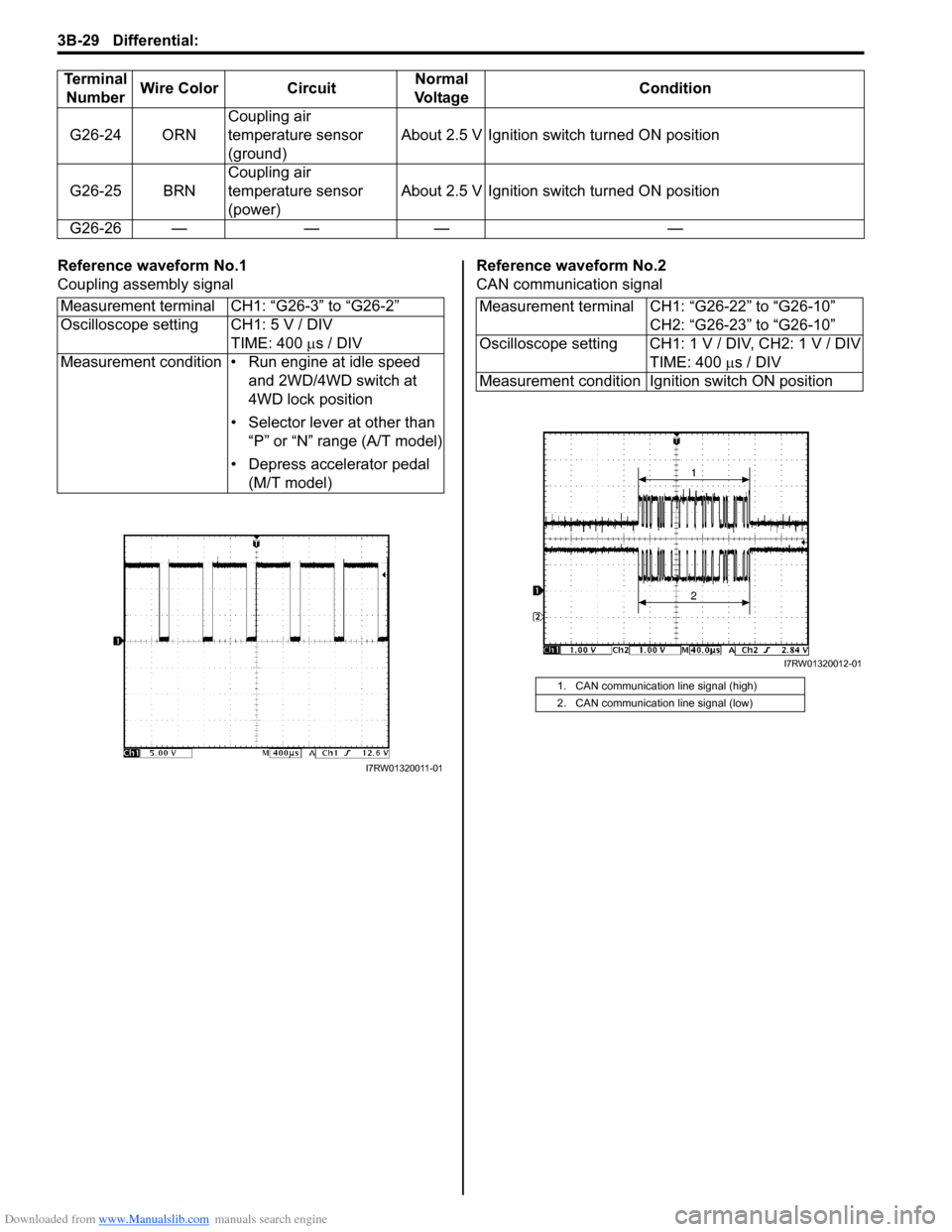
Reference waveform No.1
Coupling assembly signalReference waveform No.2
CAN communication signal G26-24 ORNCoupling air
temperature sensor
(ground)About 2.5 V Ignition switch turned ON position
G26-25 BRNCoupling air
temperature sensor
(power)About 2.5 V Ignition switch turned ON position
G26-26 — — — — Terminal
NumberWire Color CircuitNormal
Vo l ta g eCondition
Measurement terminal CH1: “G26-3” to “G26-2”
Oscilloscope setting CH1: 5 V / DIV
TIME: 400 µs / DIV
Measurement condition • Run engine at idle speed
and 2WD/4WD switch at
4WD lock position
• Selector lever at other than
“P” or “N” range (A/T model)
• Depress accelerator pedal
(M/T model)
I7RW01320011-01
Measurement terminal CH1: “G26-22” to “G26-10”
CH2: “G26-23” to “G26-10”
Oscilloscope setting CH1: 1 V / DIV, CH2: 1 V / DIV
TIME: 400 µs / DIV
Measurement condition Ignition switch ON position
1. CAN communication line signal (high)
2. CAN communication line signal (low)
I7RW01320012-01
Page 548 of 1556
Downloaded from www.Manualslib.com manuals search engine 3C-1 Transfer:
Driveline / Axle
Transfer
General Description
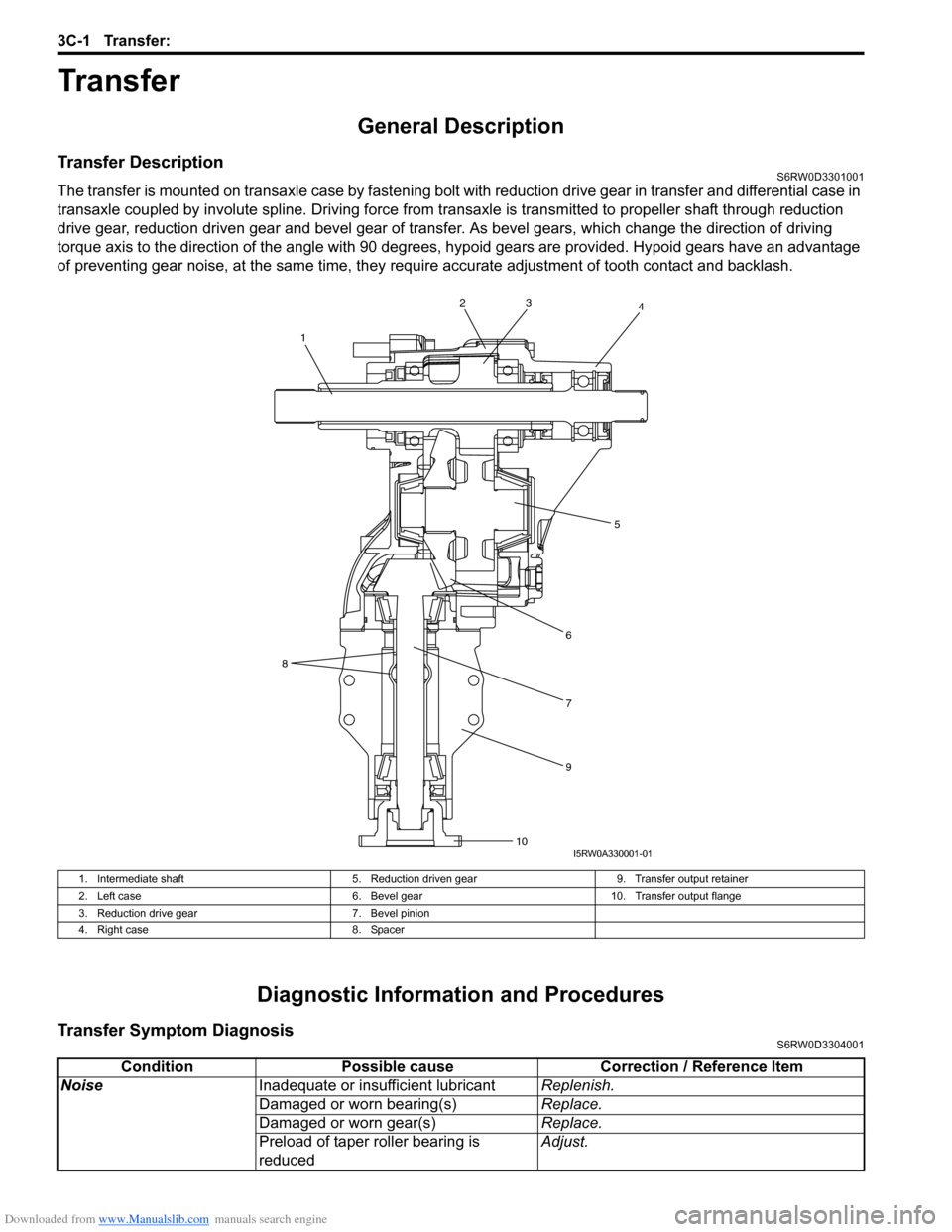
Transfer DescriptionS6RW0D3301001
The transfer is mounted on transaxle case by fastening bolt with reduction drive gear in transfer and differential case in
transaxle coupled by involute spline. Driving force from transaxle is transmitted to propeller shaft through reduction
drive gear, reduction driven gear and bevel gear of transfer. As bevel gears, which change the direction of driving
torque axis to the direction of the angle with 90 degrees, hypoid gears are provided. Hypoid gears have an advantage
of preventing gear noise, at the same time, they require accurate adjustment of tooth contact and backlash.
Diagnostic Information and Procedures
Transfer Symptom DiagnosisS6RW0D3304001
2
1
8
34
5
6
7
9
10I5RW0A330001-01
1. Intermediate shaft 5. Reduction driven gear 9. Transfer output retainer
2. Left case 6. Bevel gear 10. Transfer output flange
3. Reduction drive gear 7. Bevel pinion
4. Right case 8. Spacer
Condition Possible cause Correction / Reference Item
NoiseInadequate or insufficient lubricantReplenish.
Damaged or worn bearing(s)Replace.
Damaged or worn gear(s)Replace.
Preload of taper roller bearing is
reducedAdjust.
Page 566 of 1556
Downloaded from www.Manualslib.com manuals search engine 3D-1 Propeller Shafts:
Driveline / Axle
Propeller Shafts
Precautions
Propeller Shaft CautionS6RW0D3400001
CAUTION!
• All propeller shaft fasteners are an important attaching part in that it could affect the performance of
vital parts and systems, and/or could result in major repair expense. They must be replaced with one
of the same part number or with an equivalent part if replacement becomes necessary. Do not use a
replacement part of lesser quality or substitute design. Torque values must be used as specified
during reassembly to assure proper retention of this part.
• Never attempt to heat, quench or straighten any propeller shaft part. Replace it with a new part, or
damage to the part may result.
General Description
Propeller Shaft ConstructionS6RW0D3401001
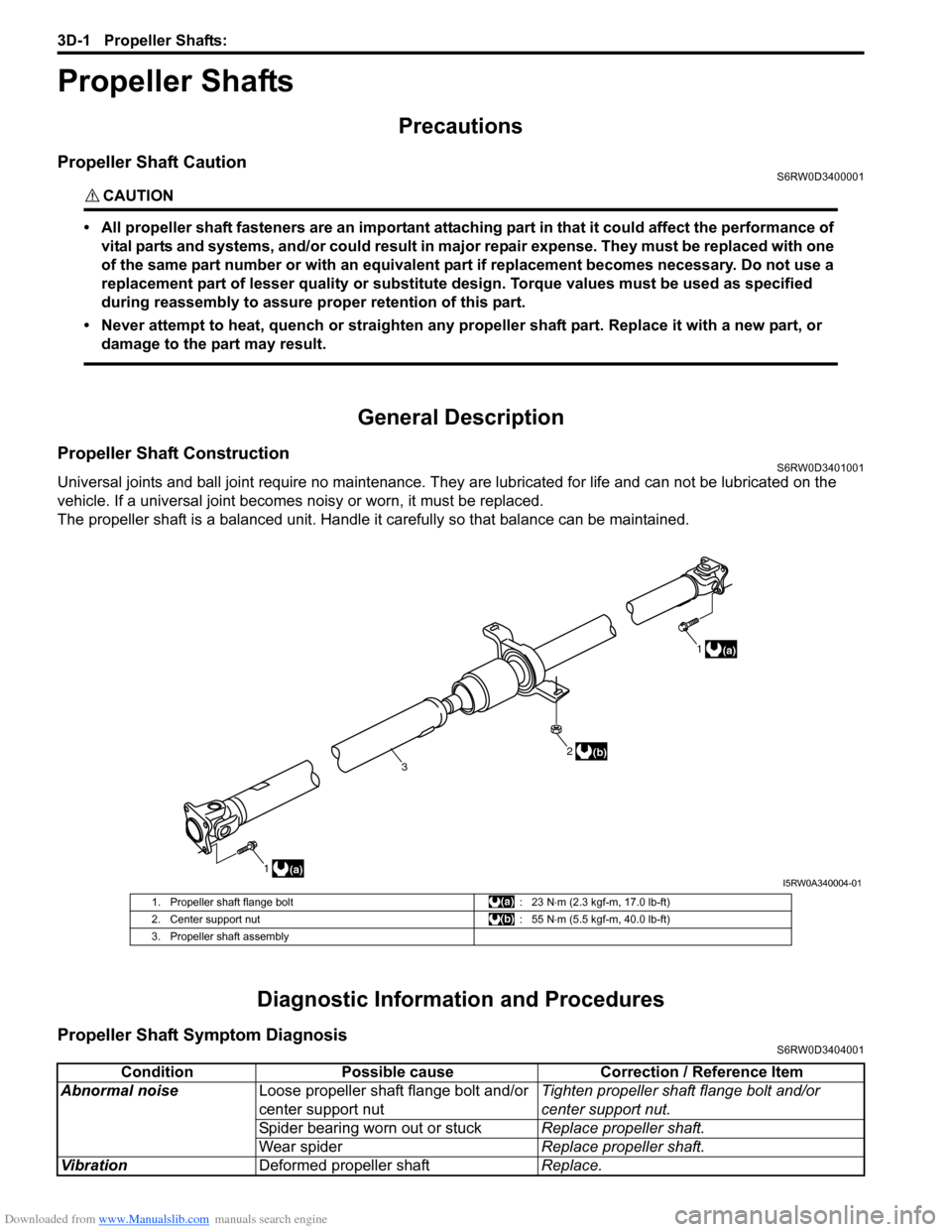
Universal joints and ball joint require no maintenance. They are lubricated for life and can not be lubricated on the
vehicle. If a universal joint becomes noisy or worn, it must be replaced.
The propeller shaft is a balanced unit. Handle it carefully so that balance can be maintained.
Diagnostic Information and Procedures
Propeller Shaft Symptom DiagnosisS6RW0D3404001
1(a)1
(a)
2
3(b)
I5RW0A340004-01
1. Propeller shaft flange bolt : 23 N⋅m (2.3 kgf-m, 17.0 lb-ft)
2. Center support nut : 55 N⋅m (5.5 kgf-m, 40.0 lb-ft)
3. Propeller shaft assembly
Condition Possible cause Correction / Reference Item
Abnormal noiseLoose propeller shaft flange bolt and/or
center support nutTighten propeller shaft flange bolt and/or
center support nut.
Spider bearing worn out or stuckReplace propeller shaft.
Wear spiderReplace propeller shaft.
VibrationDeformed propeller shaftReplace.
Page 567 of 1556

Downloaded from www.Manualslib.com manuals search engine Propeller Shafts: 3D-2
Repair Instructions
Propeller Shaft Joint CheckS6RW0D3406001
If universal joints and ball joint are suspected of
producing chattering or rattling noise, inspect them for
wear. For universal joint, check to see if cross spider
rattles in yokes are worn down and replace defective
propeller shaft assembly with new one.
Noise coming from universal joint and ball joint can be
easily distinguished from other noises because rhythm
of chattering or rattling is in step with cruising speed.
Noise is pronounced particularly on standing start or in
coasting condition (when braking effect of engine is
showing in the drive line).
Propeller Shaft Assembly Removal and
Installation
S6RW0D3406002
Removal
1) Hoist vehicle.
2) Before removing propeller shaft assembly, give
match marks (2) on joint flange and propeller shaft
as shown.
3) Separate propeller shaft assembly (1) from transfer
output flange and rear differential flange.4) Remove propeller shaft by removing center support
nuts (1).
CAUTION!
Use care not to drop it. Otherwise, vibration
may occur during driving.
Installation
Reverse removal procedure to install propeller shaft,
noting the following point.
• When installing propeller shaft, align the match marks
(2). Otherwise, vibration may occur during driving.
• Use the following specification to torque each bolt and
nut.
Tightening torque
Propeller shaft bolt: 23 N·m (2.3 kgf-m, 17.0 lb-ft)
Center support nut: 55 N·m (5.5 kgf-m, 40.0 lb-ft)
Propeller Shaft InspectionS6RW0D3406003
1) Check propeller shaft joints for wear, play and
damage. If any defect is found, replace.
2) Check propeller shaft center support for biting of
foreign matter, crack, abnormal noise and damage. If
any defect is found, replace.
I5JB0A340003-01
2
2
1
1
I5RW0A340002-01
1I5RW0A340003-01
Page 606 of 1556
Downloaded from www.Manualslib.com manuals search engine 4E-1 ABS:
Brakes
ABS
Precautions
Precautions in Diagnosing TroublesS6RW0D4500001
To ensure that the trouble diagnosis is done accurately
and smoothly, observe the following and follow “ABS
Check”.
• Diagnostic information stored in ABS control module
memory can be cleared as well as checked by using
SUZUKI scan tool. Before using scan tool, read its
Operator's (Instruction) Manual carefully to have good
understanding as to what functions are available and
how to use it.
• If the vehicle was operated in any of the following
ways, ABS warning light may light momentarily but
this does not indicate anything abnormal in ABS.
– The vehicle was driven with parking brake pulled.
– The vehicle was driven with brake dragging.
– The vehicle was stuck in mud, sand, etc.
– Wheel spin occurred while driving.
– Wheel(s) was rotated while the vehicle was jacked
up.
• Be sure to read “Precautions for Electrical Circuit
Service in Section 00” and “Precaution for CAN
Communication System in Section 00” before
inspection and observe what is written there.
• Be sure to use the trouble diagnosis procedure as
described in “ABS Check”. Failure to follow it may
result in incorrect diagnosis. (Some other diagnosis
trouble code may be stored by mistake in the memory
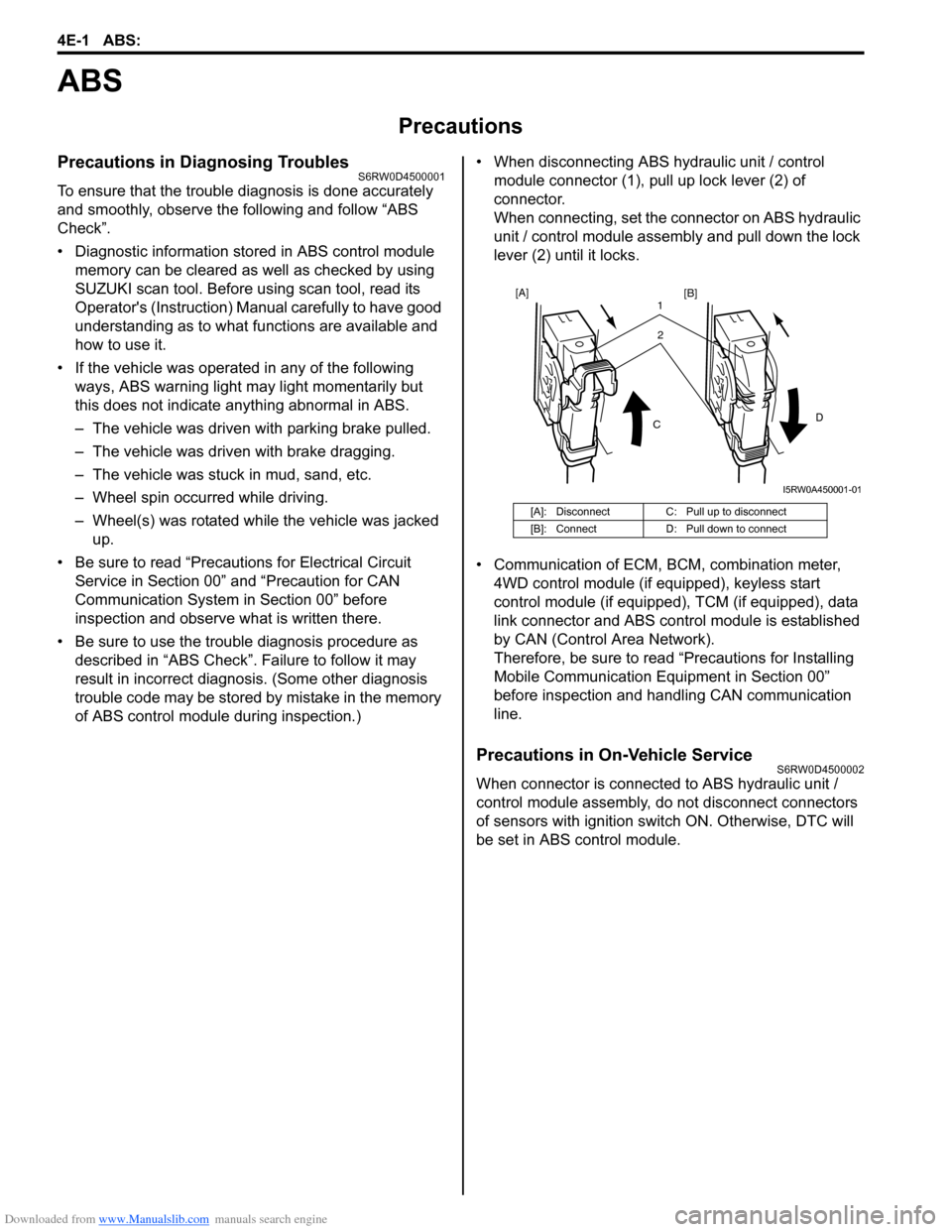
of ABS control module during inspection.)• When disconnecting ABS hydraulic unit / control
module connector (1), pull up lock lever (2) of
connector.
When connecting, set the connector on ABS hydraulic
unit / control module assembly and pull down the lock
lever (2) until it locks.
• Communication of ECM, BCM, combination meter,
4WD control module (if equipped), keyless start
control module (if equipped), TCM (if equipped), data
link connector and ABS control module is established
by CAN (Control Area Network).
Therefore, be sure to read “Precautions for Installing
Mobile Communication Equipment in Section 00”
before inspection and handling CAN communication
line.
Precautions in On-Vehicle ServiceS6RW0D4500002
When connector is connected to ABS hydraulic unit /
control module assembly, do not disconnect connectors
of sensors with ignition switch ON. Otherwise, DTC will
be set in ABS control module.
[A]: Disconnect C: Pull up to disconnect
[B]: Connect D: Pull down to connect
2 1
CD
[A]
[B]
I5RW0A450001-01
Page 612 of 1556
Downloaded from www.Manualslib.com manuals search engine 4E-7 ABS:
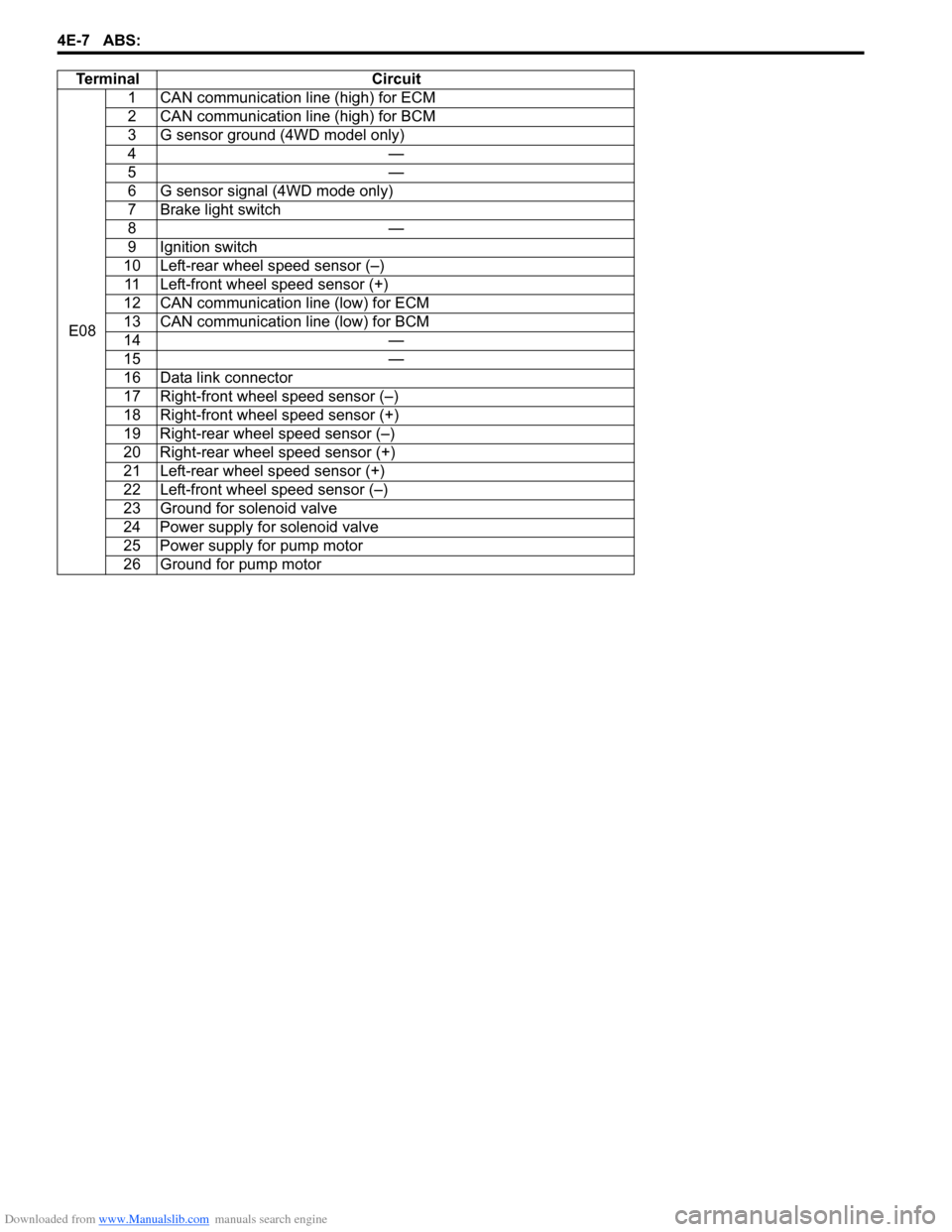
Te r m i n a l C i r c u i t
E081 CAN communication line (high) for ECM
2 CAN communication line (high) for BCM
3 G sensor ground (4WD model only)
4—
5—
6 G sensor signal (4WD mode only)
7 Brake light switch
8—
9 Ignition switch
10 Left-rear wheel speed sensor (–)
11 Left-front wheel speed sensor (+)
12 CAN communication line (low) for ECM
13 CAN communication line (low) for BCM
14 —
15 —
16 Data link connector
17 Right-front wheel speed sensor (–)
18 Right-front wheel speed sensor (+)
19 Right-rear wheel speed sensor (–)
20 Right-rear wheel speed sensor (+)
21 Left-rear wheel speed sensor (+)
22 Left-front wheel speed sensor (–)
23 Ground for solenoid valve
24 Power supply for solenoid valve
25 Power supply for pump motor
26 Ground for pump motor