light TESLA MODEL S 2014 Owner's manual (North America)
[x] Cancel search | Manufacturer: TESLA, Model Year: 2014, Model line: MODEL S, Model: TESLA MODEL S 2014Pages: 159, PDF Size: 6.14 MB
Page 2 of 159
DOCUMENT APPLICABILITY
Features released in the most recent versions of software may not be described in this document but are
described in Release Notes. Display Release Notes on the touchscreen by touching the Tesla “T” at the top
center of the touchscreen, then touching the Release Notes link. If information provided in this document
conflicts with information in the Release Notes, the Release Notes take precedence.
ILLUSTRATIONS
The illustrations provided in this document are for demonstration purposes only. Depending on vehicle options,
software version and market region, the information displayed on the touchscreen in your Model S may appear
slightly different.
PRODUCT SPECIFICATIONS
All specifications and descriptions contained in this document are verified to be accurate at the time of printing.
However, because continuous improvement is a goal at Tesla, we reserve the right to make product
modifications at any time.
ERRORS OR OMISSIONS
To communicate any inaccuracies or omissions in this document, please send an email to:
ownersmanualfeedback @teslamotors.com.
The Model S Owners Manual is available on the touchscreen.
To view it, touch CONTROLS > SETTINGS > MANUAL
(located in the lower left corner).
More information about your Model S is available at
www.teslamotors.com/mytesla .
To contact Tesla, call 1-877-79TESLA (1-877-798-3752) .
©2012-2014 TESLA MOTORS, INC. All rights reserved.
All information in this document and all MODEL S® software is subject to copyright and other intellectual property
rights of Tesla Motors, Inc. and its licensors. This material may not be modified, reproduced or copied, in whole or in
part, without the prior written permission of Tesla Motors, Inc. and its licensors. Additional information is available
upon request. The following are trademarks or registered tr ademarks of Tesla Motors, Inc. in the United States and
other countries:
HOMELINK® and the HOMELINK® house icon are registered trademarks of Johnson Controls, Inc. Bluetooth® is a
registered trademark of Bluetooth SIG, Inc. iPhone® is a registered trademark of Apple, Inc. Android™ and
Google Maps™ are trademarks of Google, Inc. Sirius, XM and all related marks and logos are trademarks of Sirius XM
Radio Inc. Pandora is a registered trad emark of Pandora Media, Inc. Spotify is a registered trademark of the Spotify
Group. All other trademarks contained in this document are the property of their respective owners and their use
herein does not imply sponsorship or endorsement of their products or services. The unauthorized use of any
trademark displayed in this document or on the vehicle is strictly prohibited. TESLA TESLA MOTORS TESLA
ROADSTER MODEL S
Cover - North America 5.8.2.fm Page 2
Thursday, January 16, 2014 3:10 PM
Page 3 of 159
Overview............................................ 2Interior Overview........................................................................ 2
Exterior Overview....................................................................... 3
Opening and Closing.....................4 Doors............................................................................................... 4
Keyless Locking and Unlocking 4Using the Key 4Using Exterior Door Handles 6Using Interior Door Handles 6Interior Locking and Unlocking 6Child-protection Lock 7Drive-away Locking 7Walk-away Locking 7Unlocking When the Key Doesn't Work 7Opening Interior Doors with No Power 8
Windows........................................................................................ 9
Opening and Closing 9Locking Rear Windows 9
Rear Trunk................................................................................... 10
Opening 10Closing 10Adjusting the Opening Height 10Interior Release 11Opening with No Power 11
Front Trunk.................................................................................. 12
Opening 12Closing 12Interior Emergency Release 13Opening with No Power 13
Glove Box..................................................................................... 14
Opening and Closing 14
Sunroof.......................................................................................... 15
Opening and Closing 15
Cup Holders................................................................................. 16
Opening and Closing 16
Seating and Safety
Restraints..........................................17 Front and Rear Seats............................................................... 17
Correct Driving Position 17Adjusting the Driver’s Seat 17Folding Rear Seats 18Raising Rear Seats 18Head Supports 18Seat Covers 18
Seat Belts......................................................................................19
Wearing Seat Belts 19Wearing Seat Belts When Pregnant 19Seat Belt Pre-tensioners 20Testing Seat Belts 20Seat Belt Warnings 20
Child Safety Seats.................................................................... 22
Guidelines for Seating Children 22Choosing a Child Safety Seat 23Seating Larger Children 24Installing Child Safety Seats 24Installing Seat Belt Retained Child Seats 24Installing LATCHChild Seats 25Attaching Upper Tether Straps 25Testing a Child Safety Seat 26Warnings - Child Safety Seats 26
Tesla Built-In Rear Facing Child Seats............................. 27
Usage Restrictions 27Opening 27Folding 27Seating a Child 29Warnings - Tesla Child Seats 29
Airbags.......................................................................................... 31
Location of Airbags 31How the Airbags Work 32Types of Airbags 32Passenger Front Airbag 33Inflation Effects 34Airbag Warning Indicator 34Airbag Warnings 34
Driving.............................................. 35Driver Profiles............................................................................ 35
Creating a Driver Profile 35Restoring a Driver’s Profile 35Saved Driver Settings 35
Steering Wheel..........................................................................36
Adjusting Position 36Adjusting Sensitivity 36Using Left Steering Wheel Buttons 36Using Right Steering Wheel Buttons 37Using Voice Commands 37Horn 38
Mirrors...........................................................................................39
Adjusting Exterior Side Mirrors 39Rear View Mirror 39
Starting and Powering Off................................................... 40
Starting Model S 40Powering Off 40
Gears.............................................................................................. 41
Shifting Gears 41Leaving Model S in Neutral - Tow Mode 41
Instrument Panel.......................................................................42
Instrument Panel Overview 42Indicator Lights 43
Lights............................................................................................ 46
Controlling Lights 46Headlight High Beams 48Headlights After Exit 48Cornering Lights 48Turn Signals 49Hazard Warning Flashers 49
Wipers and Washers...............................................................50
Wipers 50Washers 50
Speed Assist................................................................................ 51
How Speed Assist Works 51Controlling Speed Assist 52Limitations and Inaccuracies 52
Lane Departure Warning....................................................... 53
How Lane Departure Warning Works 53Controlling Lane Departure Warning 53Limitations and Inaccuracies 53
Park Assist.................................................................................. 54
How Park Assist Works 54Visual and Audio Feedback 54Controlling Audible Feedback 54Limitations and False Warnings 55Other Parking Aids 55
Trip Information........................................................................ 56
Displaying Trip Information 56
Getting Maximum Range....................................................... 57
Driving Tips to Maximize Range 57Saving Energy 57
Brakes........................................................................................... 58
Braking Systems 58Brake Wear 58Regenerative Braking 59Parking Brake 59
Traction Control....................................................................... 60
How It Works 60
Cruise Control............................................................................. 61
Operating Cruise Control 61Changing the Cruising Speed 61Canceling and Resuming 61
Hill Start Assist.......................................................................... 63
Rear View Camera................................................................... 64
Camera Location 64
Using the Touchscreen.............. 65Touchscreen Overview.......................................................... 65
The Big Picture 65
Controls........................................................................................ 67
Controlling Model S Features 67
Settings........................................................................................ 69
Customizing Model S 69
Climate Controls....................................................................... 72
Overview of Climate Controls 72Customizing Climate Control 73Ventilation 74Climate Control Operating Tips 74
Smart Air Suspension..............................................................75
Manual Height Adjustments 75Location-Based Suspension 75Automatic Lowering 76Jack Mode 76
Media and Audio....................................................................... 77
Overview 77AM and FM Radio Services 77XM Radio 77Internet Radio 77Media Settings 78Favorites 78My Music & Devices 79USB Connections 7912V Power Socket 80
Maps and Navigation............................................................... 81
Overview 81Using Maps 81Starting Navigation 81During Navigation 82Favorite Destinations 82Updated Maps 82
Phone............................................................................................ 83
Bluetooth®Compatibility 83Pairing a Bluetooth Phone 83Importing Contacts 83Unpairing a Bluetooth Phone 83Connecting to a Paired Phone 84Making a Phone Call 84Receiving a Phone Call 84In Call Options 84
Calendar....................................................................................... 85
Overview 85Calendar and Navigation 85
Security Settings...................................................................... 86
About the Security System 86
HomeLink ®
Universal Transceiver....................................... 87
About HomeLink 87Programming HomeLink 87Troubleshooting HomeLink 87
Connecting to Wi-Fi................................................................ 89
Software Updates.................................................................... 90
Loading New Software 90Viewing Release Notes 90
Mobile App...................................................................................91
Model S Mobile App 91Charging.......................................... 92
Electric Vehicle Components.............................................. 92
High Voltage Components 92Charging Equipment 93
Battery Information................................................................. 94
About the Battery 94Battery Care 94
Charging Model S..................................................................... 95
Opening the Charge Port 95Plugging In 95During Charging 96Stopping Charging 96Charge Port Light 96Changing Charge Settings 97Charging Status 98
Maintenance................................... 99
Maintenance Schedule........................................................... 99
Service Intervals 99Daily Checks 99Monthly Checks 99Fluid Replacement Intervals 99High Voltage Safety 99
Tire Care and Maintenance.................................................100
Maintaining Tire Pressures 100Inspecting and Maintaining Tires 101Replacing Tires and Wheels 102Using Tire Chains 103Tire Pressure Monitoring 103
Temporary Tire Repair......................................................... 105
Tire Repair Kit 105Inflating with Sealant and Air 106Inflating with Air Only 107Replacing the Sealant Canister 108
Cleaning..................................................................................... 109
Cleaning the Exterior 109Cleaning the Interior 110Polishing, Touch Up, and Body Repair 111Using a Car Cover 111Floor Mats 111
Wiper Blades and Washer Jets.......................................... 112
Checking and Replacing Wiper Blades 112Cleaning Washer Jets 112
Fluid Reservoirs........................................................................ 114
Removing the Maintenance Panel 114Checking Battery Coolant 114Checking Brake Fluid 115Topping Up Washer Fluid 116
Fuses............................................................................................. 117
Fuse Box Locations 117Replacing a Fuse 117Fuse Box 1 118Fuse Box 2 120Fuse Box 3 122Fuse Box 4 123
Jacking and Lifting................................................................. 124
Jacking Procedure 124
Parts and Accessories........................................................... 125
Parts, Accessories, and Modifications 125Body Repairs 125
Specifications............................... 126
Identification Labels.............................................................. 126
Vehicle Identification Number 126Emission Control Label 126
Vehicle Loading....................................................................... 127
Load Capacity Labeling 127Calculating Load Limits 128Towing a Trailer 129Roof Racks 129
Dimensions and Weights..................................................... 130
Exterior Dimensions 130Weights 131
Subsystems............................................................................... 132
Motor 132Transmission 132Steering 132Brakes 133Suspension 133Battery - 12V 133Battery - High Voltage 134
Wheels and Tires..................................................................... 135
Wheel Specifications 135Wheel Alignment Values 135Tire Specifications 136Understanding Tire Markings 137Uniform Tire Quality Grading 139Wheels and Tires Glossary 140
Roadside Assistance.................. 141
Contacting Roadside Assistance....................................... 141 Instructions for Transporters............................................. 142
Use a Flatbed Only 142Disable Self-Leveling (air suspension vehicles only) 142Activate Tow Mode 142Connect the Tow Chain 143Pull Onto the Trailer and Secure the Wheels 144
Consumer Information..............145
About this Owner Information.......................................... 145
Illustrations 145Errors or Inaccuracies 145Location of Components 145Document Applicability 145Copyrights and Trademarks 146
Disclaimers................................................................................ 147
Vehicle Telematics/Data Recorders 147Quality Control 147California Proposition 65 147
Reporting Concerns...............................................................148
Contacting Tesla 148Reporting Safety Defects - US 148Reporting Safety Defects - Canada 148
Declarations of Conformity................................................ 149
Key and Passive Unlocking System 149Tire Pressure Monitoring System 150Media Control Unit 150HomeLink 151Radio Frequency Information 151Contents
Page 4 of 159
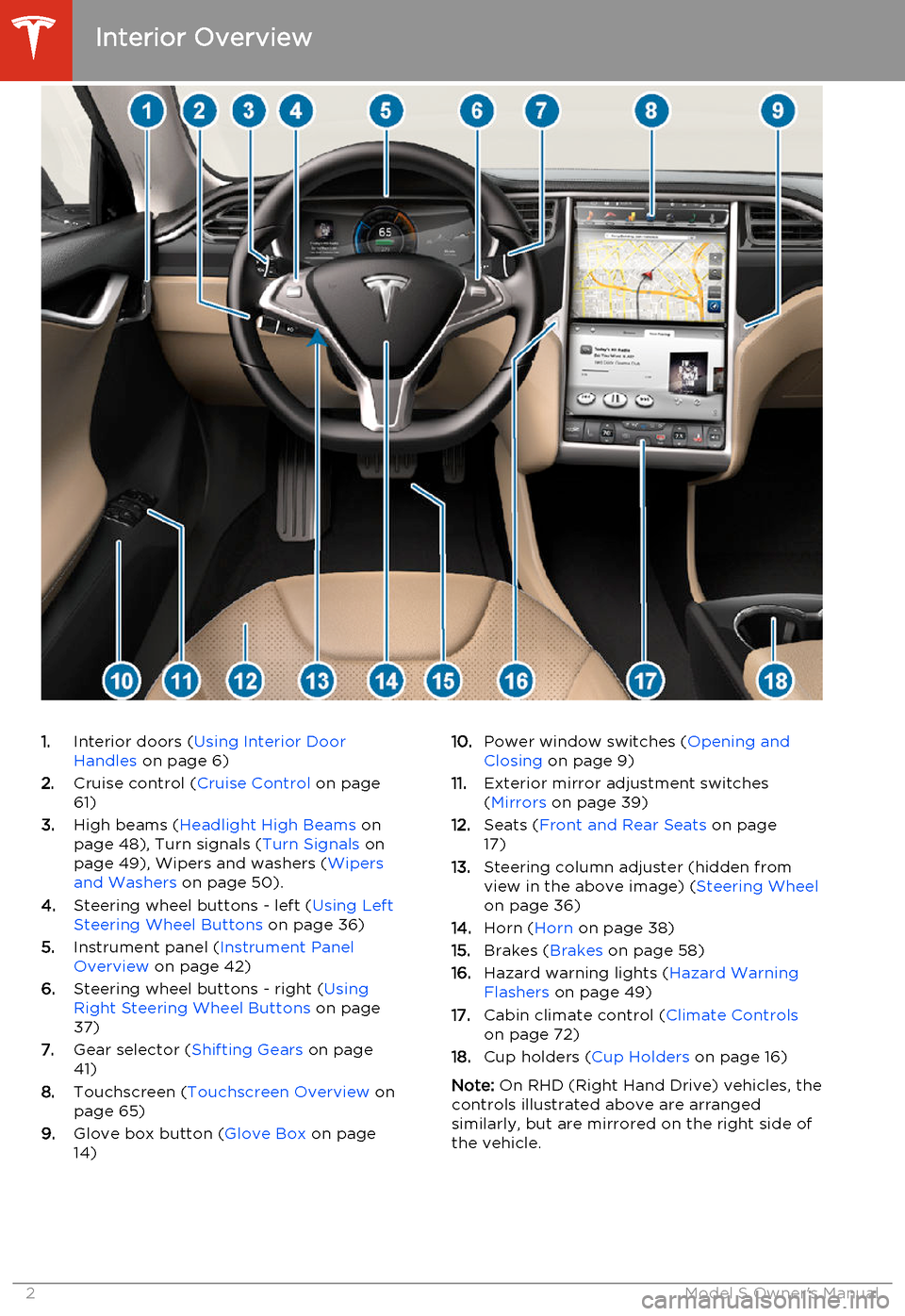
1.Interior doors ( Using Interior Door
Handles on page 6)
2. Cruise control ( Cruise Control on page
61)
3. High beams ( Headlight High Beams on
page 48), Turn signals ( Turn Signals on
page 49), Wipers and washers ( Wipers
and Washers on page 50).
4. Steering wheel buttons - left ( Using Left
Steering Wheel Buttons on page 36)
5. Instrument panel ( Instrument Panel
Overview on page 42)
6. Steering wheel buttons - right ( Using
Right Steering Wheel Buttons on page
37)
7. Gear selector ( Shifting Gears on page
41)
8. Touchscreen ( Touchscreen Overview on
page 65)
9. Glove box button ( Glove Box on page
14)10. Power window switches ( Opening and
Closing on page 9)
11. Exterior mirror adjustment switches
( Mirrors on page 39)
12. Seats ( Front and Rear Seats on page
17)
13. Steering column adjuster (hidden from
view in the above image) ( Steering Wheel
on page 36)
14. Horn ( Horn on page 38)
15. Brakes ( Brakes on page 58)
16. Hazard warning lights ( Hazard Warning
Flashers on page 49)
17. Cabin climate control ( Climate Controls
on page 72)
18. Cup holders ( Cup Holders on page 16)
Note: On RHD (Right Hand Drive) vehicles, the
controls illustrated above are arranged
similarly, but are mirrored on the right side of
the vehicle.
Interior Overview
2Model S Owner's Manual
Page 5 of 159
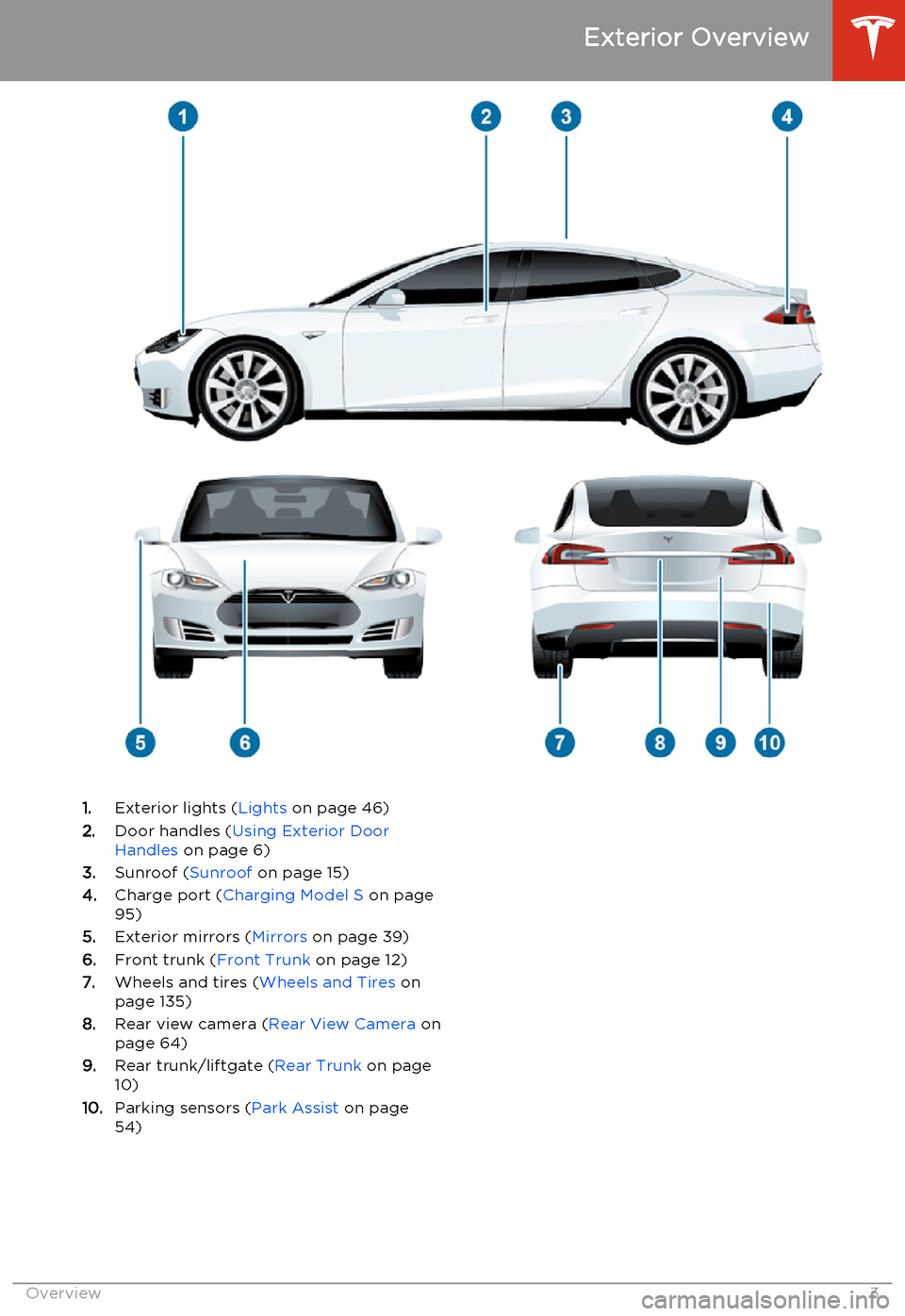
1.Exterior lights ( Lights on page 46)
2. Door handles ( Using Exterior Door
Handles on page 6)
3. Sunroof ( Sunroof on page 15)
4. Charge port ( Charging Model S on page
95)
5. Exterior mirrors ( Mirrors on page 39)
6. Front trunk ( Front Trunk on page 12)
7. Wheels and tires ( Wheels and Tires on
page 135)
8. Rear view camera ( Rear View Camera on
page 64)
9. Rear trunk/liftgate ( Rear Trunk on page
10)
10. Parking sensors ( Park Assist on page
54)
Exterior Overview
Overview3
Page 6 of 159
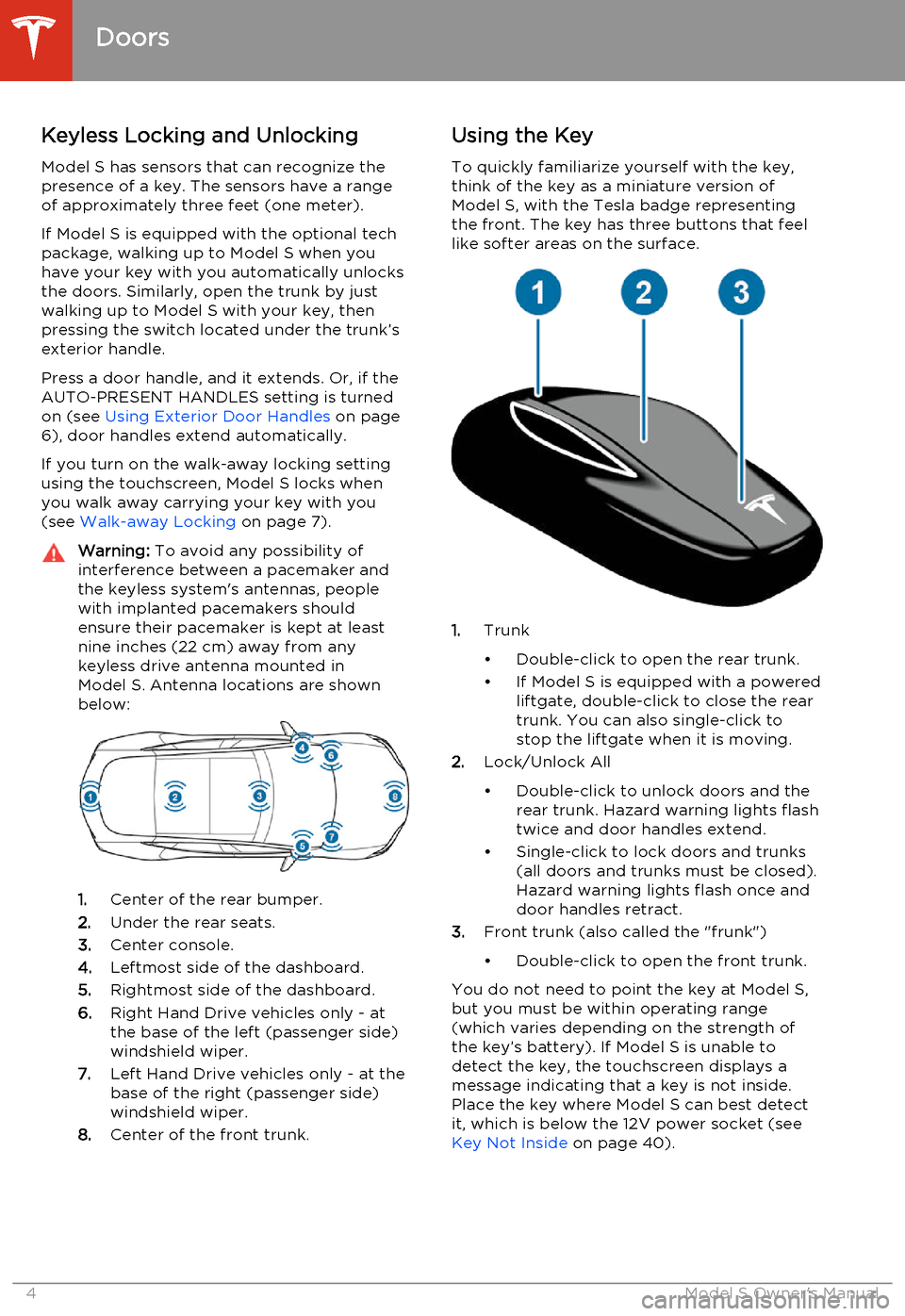
Keyless Locking and Unlocking
Model S has sensors that can recognize the
presence of a key. The sensors have a range of approximately three feet (one meter).
If Model S is equipped with the optional tech package, walking up to Model S when you
have your key with you automatically unlocks
the doors. Similarly, open the trunk by just
walking up to Model S with your key, then
pressing the switch located under the trunk’s
exterior handle.
Press a door handle, and it extends. Or, if the
AUTO-PRESENT HANDLES setting is turned
on (see Using Exterior Door Handles on page
6), door handles extend automatically.
If you turn on the walk-away locking setting
using the touchscreen, Model S locks when
you walk away carrying your key with you (see Walk-away Locking on page 7).Warning: To avoid any possibility of
interference between a pacemaker and
the keyless system's antennas, people
with implanted pacemakers should
ensure their pacemaker is kept at least
nine inches (22 cm) away from any
keyless drive antenna mounted in
Model S. Antenna locations are shown
below:
1. Center of the rear bumper.
2. Under the rear seats.
3. Center console.
4. Leftmost side of the dashboard.
5. Rightmost side of the dashboard.
6. Right Hand Drive vehicles only - at
the base of the left (passenger side)
windshield wiper.
7. Left Hand Drive vehicles only - at the
base of the right (passenger side)
windshield wiper.
8. Center of the front trunk.
Using the Key
To quickly familiarize yourself with the key,
think of the key as a miniature version of
Model S, with the Tesla badge representing
the front. The key has three buttons that feel
like softer areas on the surface.
1. Trunk
• Double-click to open the rear trunk.
• If Model S is equipped with a powered liftgate, double-click to close the rear
trunk. You can also single-click to
stop the liftgate when it is moving.
2. Lock/Unlock All
• Double-click to unlock doors and the rear trunk. Hazard warning lights flash
twice and door handles extend.
• Single-click to lock doors and trunks (all doors and trunks must be closed).Hazard warning lights flash once and
door handles retract.
3. Front trunk (also called the "frunk")
• Double-click to open the front trunk.
You do not need to point the key at Model S,
but you must be within operating range
(which varies depending on the strength of the key’s battery). If Model S is unable to
detect the key, the touchscreen displays a
message indicating that a key is not inside. Place the key where Model S can best detectit, which is below the 12V power socket (see Key Not Inside on page 40).
Doors
4Model S Owner's Manual
Page 8 of 159
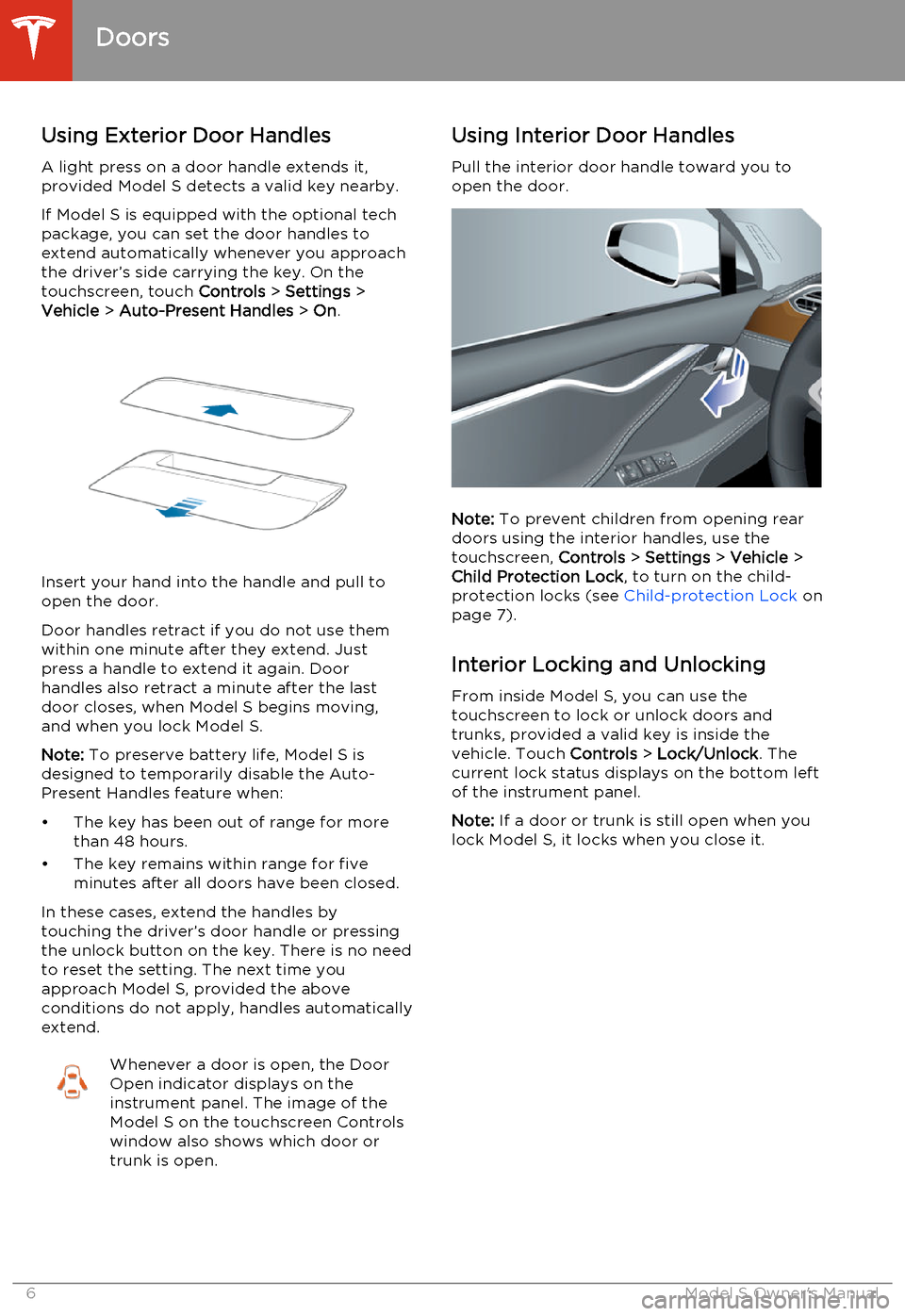
Using Exterior Door HandlesA light press on a door handle extends it,provided Model S detects a valid key nearby.
If Model S is equipped with the optional tech package, you can set the door handles to
extend automatically whenever you approach
the driver’s side carrying the key. On the
touchscreen, touch Controls > Settings >
Vehicle > Auto-Present Handles > On .
Insert your hand into the handle and pull to
open the door.
Door handles retract if you do not use them within one minute after they extend. Just
press a handle to extend it again. Door handles also retract a minute after the last
door closes, when Model S begins moving,
and when you lock Model S.
Note: To preserve battery life, Model S is
designed to temporarily disable the Auto-
Present Handles feature when:
• The key has been out of range for more than 48 hours.
• The key remains within range for five minutes after all doors have been closed.
In these cases, extend the handles by
touching the driver’s door handle or pressing
the unlock button on the key. There is no need
to reset the setting. The next time you
approach Model S, provided the above
conditions do not apply, handles automatically
extend.
Whenever a door is open, the Door
Open indicator displays on the
instrument panel. The image of the
Model S on the touchscreen Controls
window also shows which door or
trunk is open.Using Interior Door Handles
Pull the interior door handle toward you to
open the door.
Note: To prevent children from opening rear
doors using the interior handles, use the touchscreen, Controls > Settings > Vehicle >
Child Protection Lock , to turn on the child-
protection locks (see Child-protection Lock on
page 7).
Interior Locking and Unlocking From inside Model S, you can use the
touchscreen to lock or unlock doors and
trunks, provided a valid key is inside the
vehicle. Touch Controls > Lock/Unlock . The
current lock status displays on the bottom left
of the instrument panel.
Note: If a door or trunk is still open when you
lock Model S, it locks when you close it.
Doors
6Model S Owner's Manual
Page 11 of 159
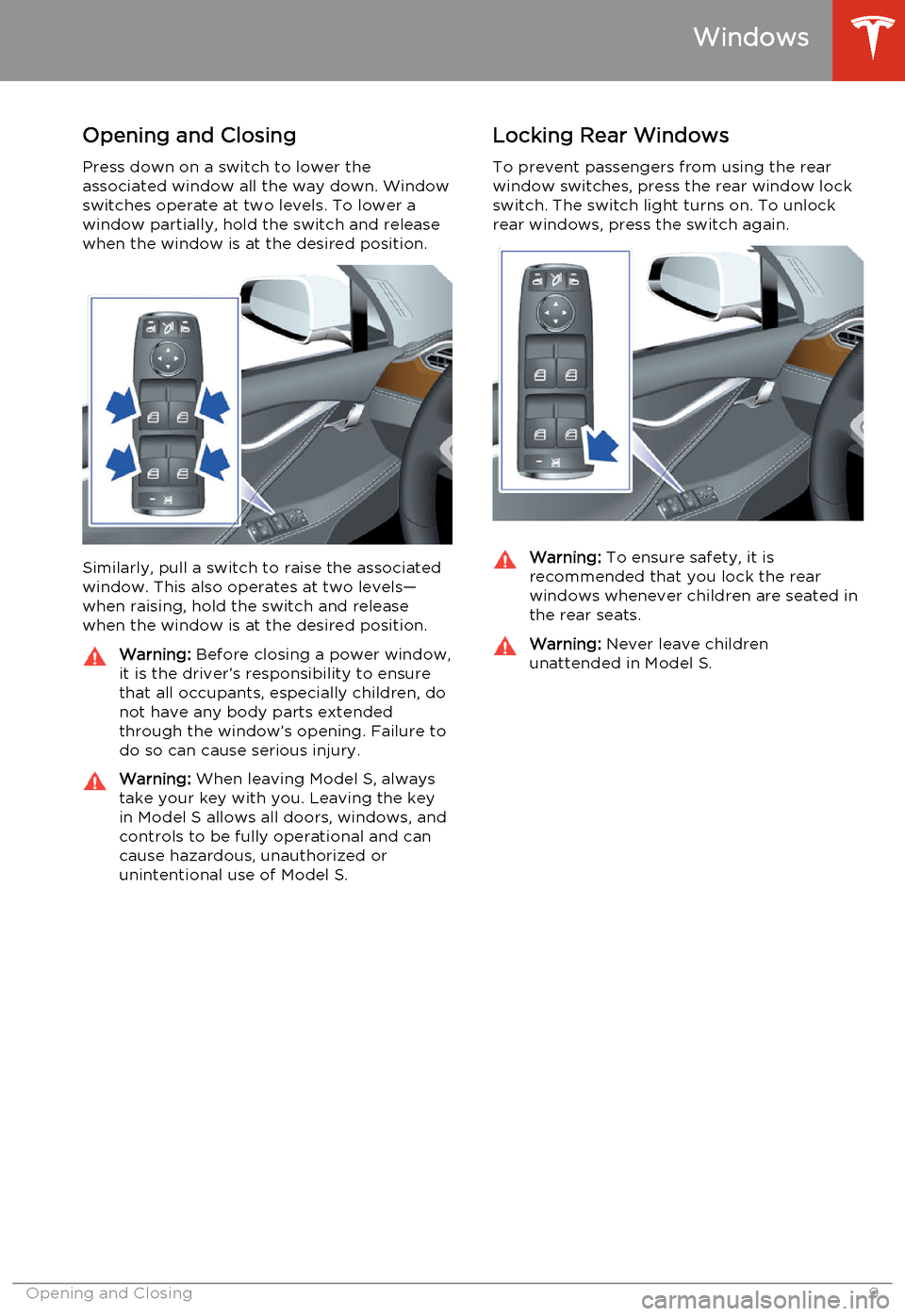
Opening and Closing
Press down on a switch to lower the
associated window all the way down. Window
switches operate at two levels. To lower a window partially, hold the switch and release
when the window is at the desired position.
Similarly, pull a switch to raise the associated
window. This also operates at two levels—
when raising, hold the switch and release when the window is at the desired position.
Warning: Before closing a power window,
it is the driver’s responsibility to ensure
that all occupants, especially children, do
not have any body parts extended
through the window’s opening. Failure to
do so can cause serious injury.Warning: When leaving Model S, always
take your key with you. Leaving the key in Model S allows all doors, windows, and
controls to be fully operational and can cause hazardous, unauthorized or
unintentional use of Model S.Locking Rear Windows
To prevent passengers from using the rear window switches, press the rear window lockswitch. The switch light turns on. To unlock
rear windows, press the switch again.Warning: To ensure safety, it is
recommended that you lock the rear
windows whenever children are seated in
the rear seats.Warning: Never leave children
unattended in Model S.
Windows
Opening and Closing9
Page 12 of 159
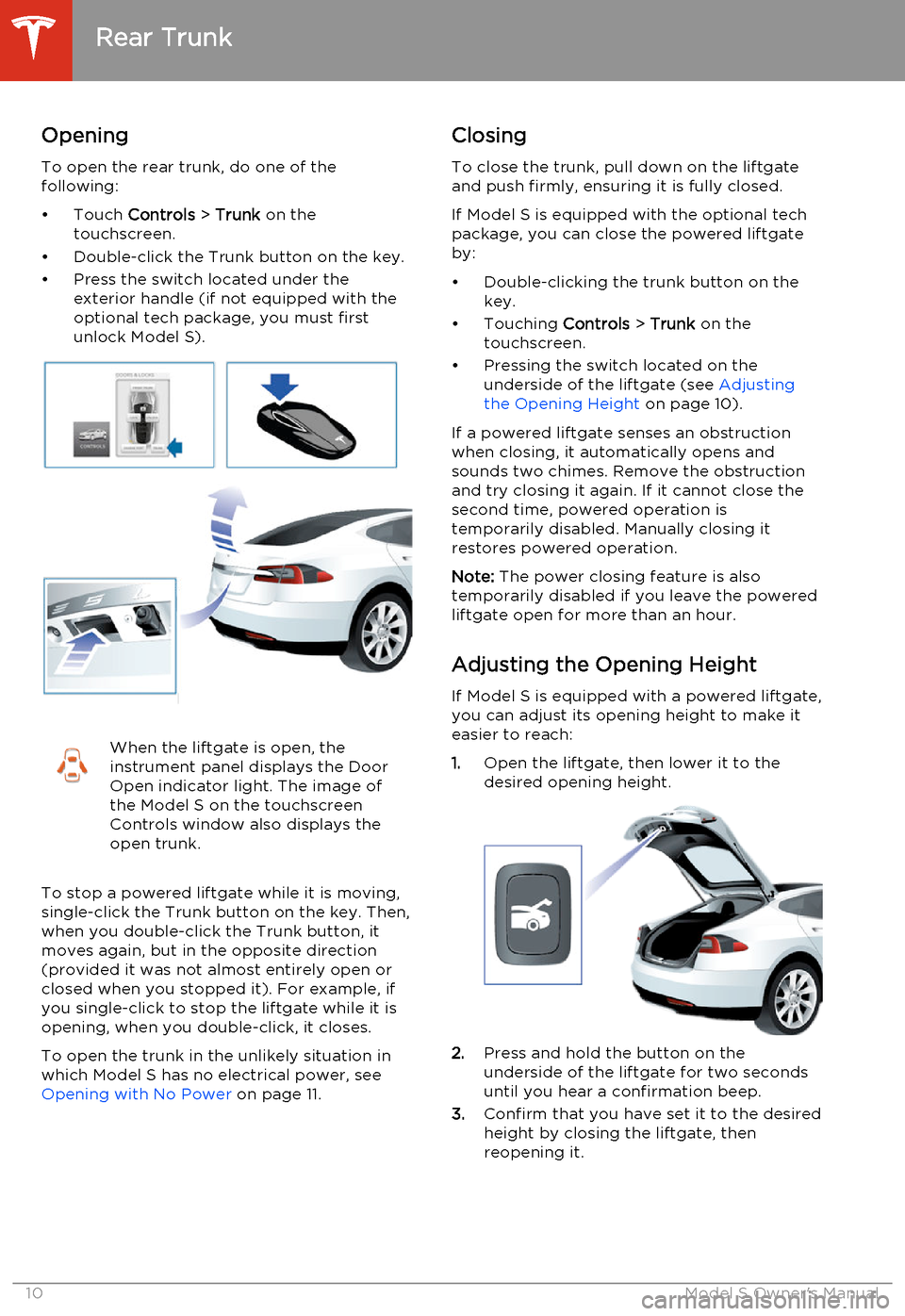
Opening
To open the rear trunk, do one of the
following:
• Touch Controls > Trunk on the
touchscreen.
• Double-click the Trunk button on the key.
• Press the switch located under the exterior handle (if not equipped with the
optional tech package, you must first
unlock Model S).When the liftgate is open, the
instrument panel displays the Door
Open indicator light. The image of
the Model S on the touchscreen
Controls window also displays the
open trunk.
To stop a powered liftgate while it is moving,
single-click the Trunk button on the key. Then, when you double-click the Trunk button, it
moves again, but in the opposite direction
(provided it was not almost entirely open or
closed when you stopped it). For example, if you single-click to stop the liftgate while it isopening, when you double-click, it closes.
To open the trunk in the unlikely situation inwhich Model S has no electrical power, see
Opening with No Power on page 11.
Closing
To close the trunk, pull down on the liftgate
and push firmly, ensuring it is fully closed.
If Model S is equipped with the optional tech
package, you can close the powered liftgate
by:
• Double-clicking the trunk button on the key.
• Touching Controls > Trunk on the
touchscreen.
• Pressing the switch located on the underside of the liftgate (see Adjusting
the Opening Height on page 10).
If a powered liftgate senses an obstruction when closing, it automatically opens and
sounds two chimes. Remove the obstruction
and try closing it again. If it cannot close the
second time, powered operation is
temporarily disabled. Manually closing it
restores powered operation.
Note: The power closing feature is also
temporarily disabled if you leave the powered liftgate open for more than an hour.
Adjusting the Opening Height If Model S is equipped with a powered liftgate,you can adjust its opening height to make it
easier to reach:
1. Open the liftgate, then lower it to the
desired opening height.
2. Press and hold the button on the
underside of the liftgate for two seconds
until you hear a confirmation beep.
3. Confirm that you have set it to the desired
height by closing the liftgate, then
reopening it.
Rear Trunk
10Model S Owner's Manual
Page 13 of 159
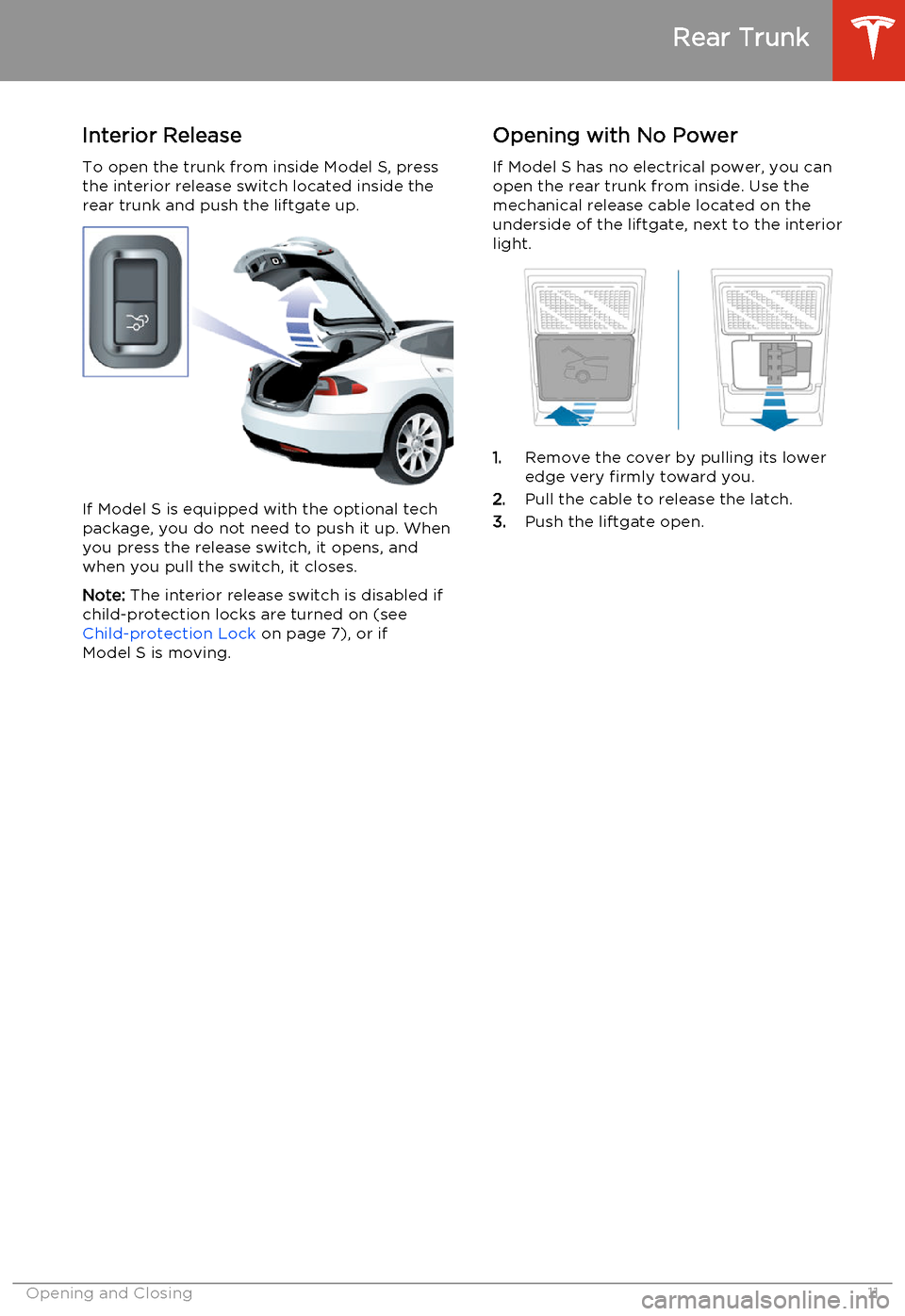
Interior ReleaseTo open the trunk from inside Model S, press
the interior release switch located inside the
rear trunk and push the liftgate up.
If Model S is equipped with the optional tech package, you do not need to push it up. When
you press the release switch, it opens, and
when you pull the switch, it closes.
Note: The interior release switch is disabled if
child-protection locks are turned on (see Child-protection Lock on page 7), or if
Model S is moving.
Opening with No Power
If Model S has no electrical power, you can
open the rear trunk from inside. Use the mechanical release cable located on the
underside of the liftgate, next to the interior
light.
1. Remove the cover by pulling its lower
edge very firmly toward you.
2. Pull the cable to release the latch.
3. Push the liftgate open.
Rear Trunk
Opening and Closing11
Page 14 of 159
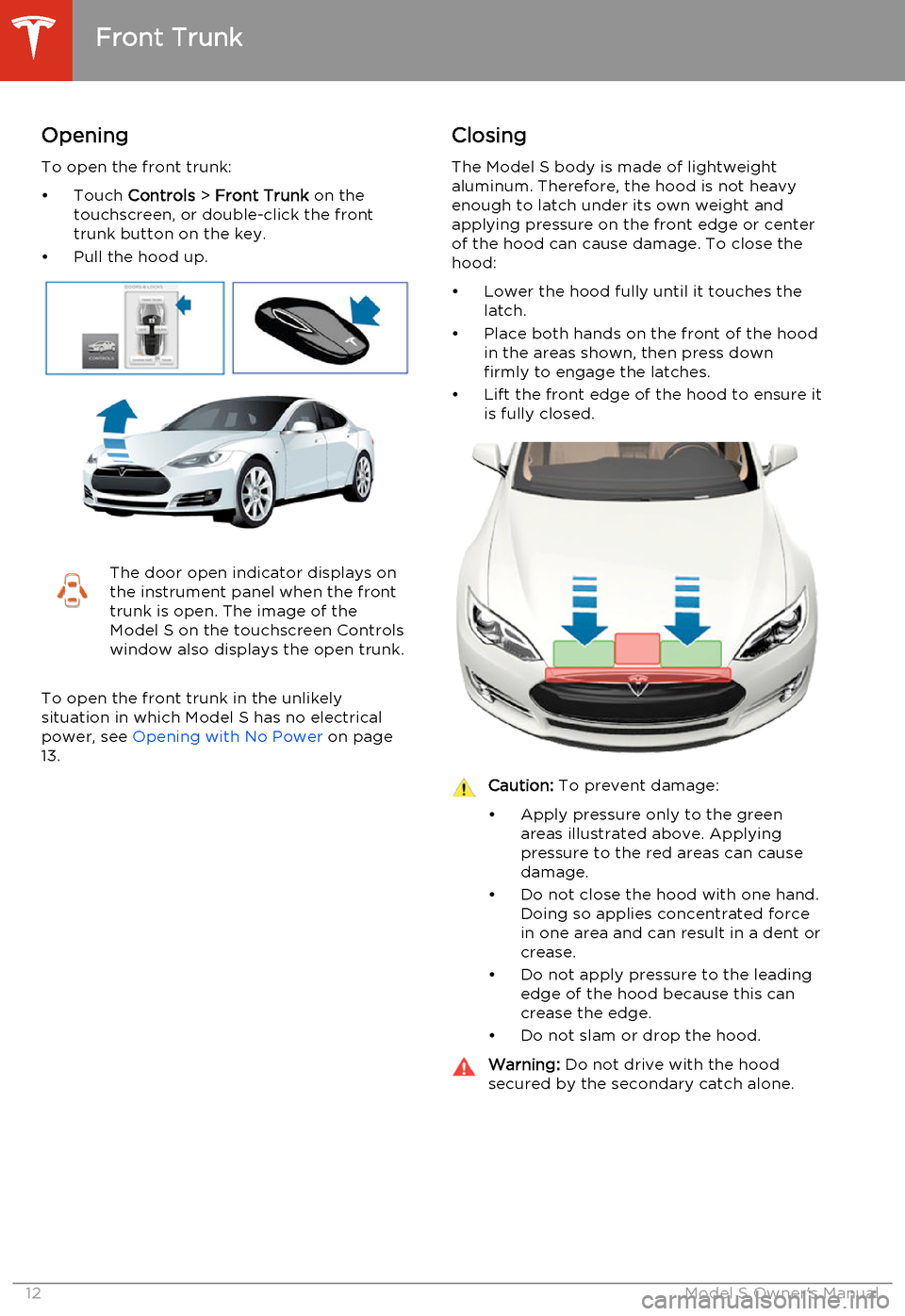
Opening
To open the front trunk:
• Touch Controls > Front Trunk on the
touchscreen, or double-click the front
trunk button on the key.
• Pull the hood up.The door open indicator displays on
the instrument panel when the front
trunk is open. The image of the
Model S on the touchscreen Controls
window also displays the open trunk.
To open the front trunk in the unlikely
situation in which Model S has no electrical
power, see Opening with No Power on page
13.
Closing
The Model S body is made of lightweightaluminum. Therefore, the hood is not heavy
enough to latch under its own weight and
applying pressure on the front edge or center
of the hood can cause damage. To close the hood:
• Lower the hood fully until it touches the latch.
• Place both hands on the front of the hood in the areas shown, then press down
firmly to engage the latches.
• Lift the front edge of the hood to ensure it is fully closed.Caution: To prevent damage:
• Apply pressure only to the green areas illustrated above. Applying
pressure to the red areas can cause
damage.
• Do not close the hood with one hand. Doing so applies concentrated force
in one area and can result in a dent or crease.
• Do not apply pressure to the leading edge of the hood because this can
crease the edge.
• Do not slam or drop the hood.Warning: Do not drive with the hood
secured by the secondary catch alone.
Front Trunk
12Model S Owner's Manual