lock TOYOTA 86 2017 Workshop Manual
[x] Cancel search | Manufacturer: TOYOTA, Model Year: 2017, Model line: 86, Model: TOYOTA 86 2017Pages: 428, PDF Size: 5.25 MB
Page 177 of 428
1772-3. Operating the lights and windshield wipers
2
When driving
■ The windshield wipers and washer can be operated when
The engine switch is in the “ON” position.
■ If no windshield washer fluid sprays
Check that the washer nozzles are not blocked if there is washer fluid in the
windshield washer fluid tank.
WARNING■ Caution regarding the use of washer fluid
When it is cold, do not use the washer fluid until the windshield becomes
warm. The fluid may freeze on the windshield and cause low visibility. This
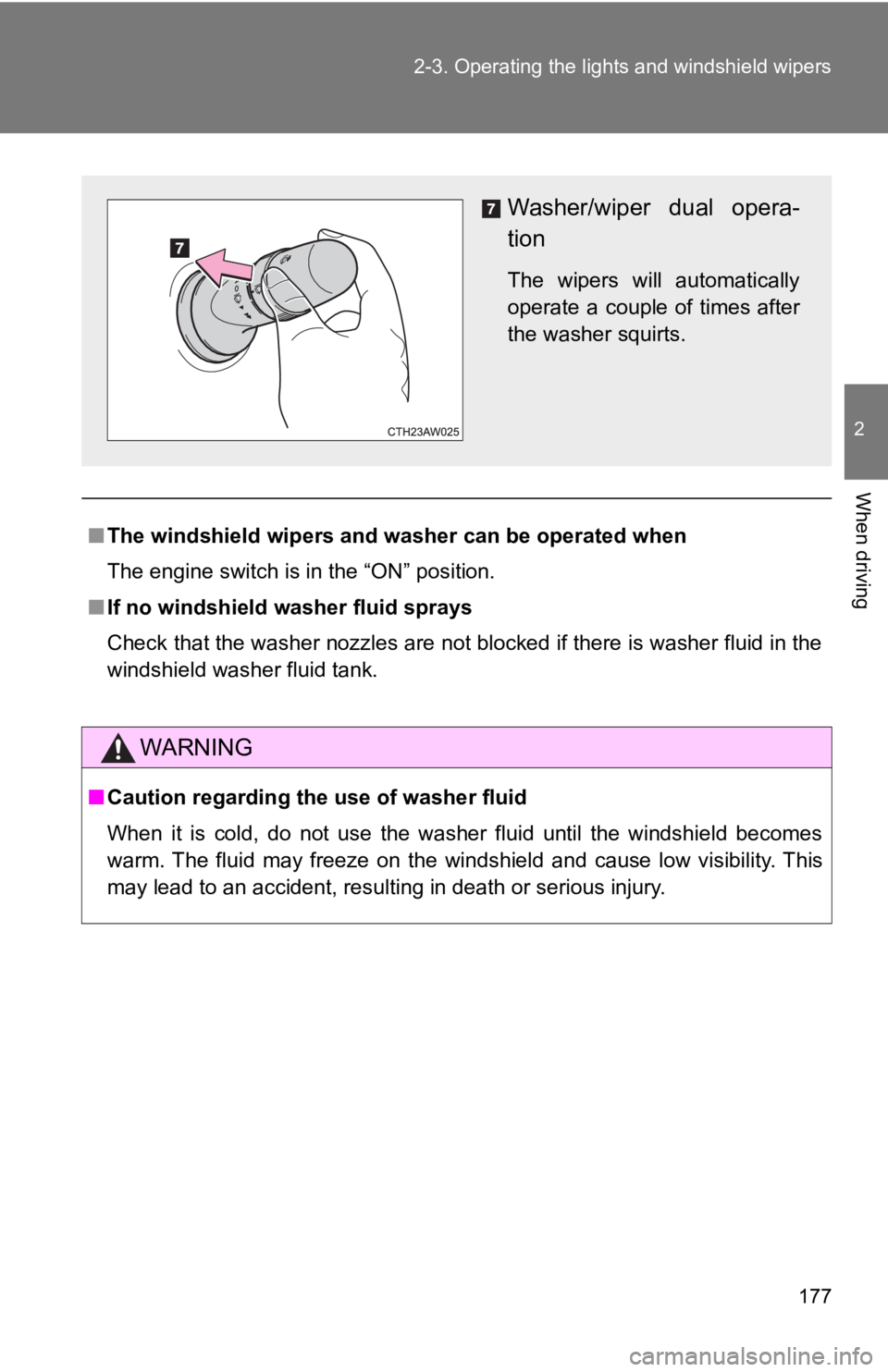
may lead to an accident, resulting in death or serious injury. Washer/wiper dual opera-
tion The wipers will automatically
operate a couple of times after
the washer squirts.
Page 178 of 428

1782-3. Operating the lights and windshield wipers
NOTICE■ When the windshield is dry
Do not use the wipers, as they may damage the windshield.
■ When the washer fluid tank is empty
Do not operate the switch continually as the washer fluid pump may over-
heat.
■ When a nozzle becomes blocked
In this case, contact your Toyota dealer.
Do not try to clear it with a pin or other object. The nozzle will be damaged.
Page 184 of 428
1842-4. Using other driving systems
Driving assist systems To help enhance driving safety a nd performance, the following sys-
tems operate automatically in res ponse to various driving situations.
Be aware, however, that these systems are supplementary and
should not be relied upon too h eavily when operating the vehicle.
■ ABS (Anti-lock Brake System) Helps to prevent wheel lock when the brakes are applied suddenly, or if
the brakes are applied while driving on a slippery road surface
■ Brake assist Generates an increased level of braking force after the brake pedal is
depressed when the system detects a panic stop situation
■ VSC (Vehicle Stability Control) Helps the driver to control skidding when swerving suddenly or turning
on slippery road surfaces
■ TRAC (Traction Control) Helps to maintain drive power and prevent the drive wheels from spin-
ning when starting the vehicle or accelerating on slippery roads.
The TRAC system is also equipped with the brake LSD function.
■ Hill-start assist control
→ P. 191
■ EPS (Electric Power Steering) Employs an electric motor to reduce the amount of effort needed to turn
the steering wheel
Page 188 of 428

1882-4. Using other driving systems
■ Sounds and vibrations caused by the ABS, brake assist, TRAC and
VSC systems
● A sound may be heard from the engine compartment when the brake
pedal is depressed repeatedly, when the engine is started or just after the
vehicle begins to move. This sound does not indicate that a malfunction
has occurred in any of these systems.
● Any of the following conditions may occur when the above systems are
operating. None of these indicates that a malfunction has occurred.
• Vibrations may be felt through the vehicle body and steering.
• A motor sound may be heard after the vehicle comes to a stop.
• The brake pedal may pulsate slightly after the ABS is activated.
• The brake pedal may move down slightly after the ABS is activated.
■ EPS operation sound
When the steering wheel is operated, a motor sound (whirring sound) may
be heard. This does not indicate a malfunction.
■ Automatic reactivation of TRAC and VSC systems
After turning the TRAC and VSC systems off, the systems will be automati-
cally reactivated in the following situations:
● When the engine switch is turned to “LOCK” position
● If only the TRAC system is turned off, the TRAC will turn on when vehicle
speed is more than approximately 31 mph (50 km/h).
If both the TRAC and VSC systems are turned off, automatic reactivation
will not occur when vehicle speed increases.
Page 189 of 428

1892-4. Using other driving systems
2
When driving ■ Reduced effectiveness of the EPS system
The effectiveness of the EPS system is reduced to prevent the system from
overheating when there is frequent steering input over an extended period of
time. The steering wheel may feel heavy as a result. Should this occur,
refrain from excessive steering input or stop the vehicle and turn the engine
off. The EPS system should return to normal after a little while.
■ Automatic deactivation of “TRACK” mode
When the engine switch is turned to “LOCK” position after driving in
“TRACK” mode, the mode is automatically deactivated.
WARNING■ The ABS does not operate effectively when
● Tires with inadequate gripping ability are used (such as excessively worn
tires on a snow covered road).
● The vehicle hydroplanes while driving at high speed on wet or slick roads.
■ Stopping distance when the ABS is operating may exceed that of nor-
mal conditions
The ABS is not designed to shorten the vehicle’s stopping distance. Always
maintain a safe distance from the vehicle in front of you in the following situ-
ations:
● When driving on dirt, gravel or snow-covered roads
● When driving with tire chains
● When driving over bumps in the road
● When driving over roads with potholes or uneven surfaces
■ TRAC may not operate effectively when
Directional control and power may not be achievable while driving on slip-
pery road surfaces, even if the TRAC system is operating.
Do not drive the vehicle in conditions where stability and power may be lost.
■ When the VSC and/or brake LSD function is activated
The slip indicator light flashes. Always drive carefully. Reckless driving may
cause an accident. Exercise particular care when the indicator light flashes.
Page 191 of 428
1912-4. Using other driving systems
2
When driving
Hill-start assist control Hill-start assist control helps to maintain braking force to assist
starting off forward while facing uphill or starting off backward while
facing downhill. As hill-start assist control is initially disabled,
enable the system to make it op erable. The enabled/disabled setting
will be maintained the next time the engine is started.
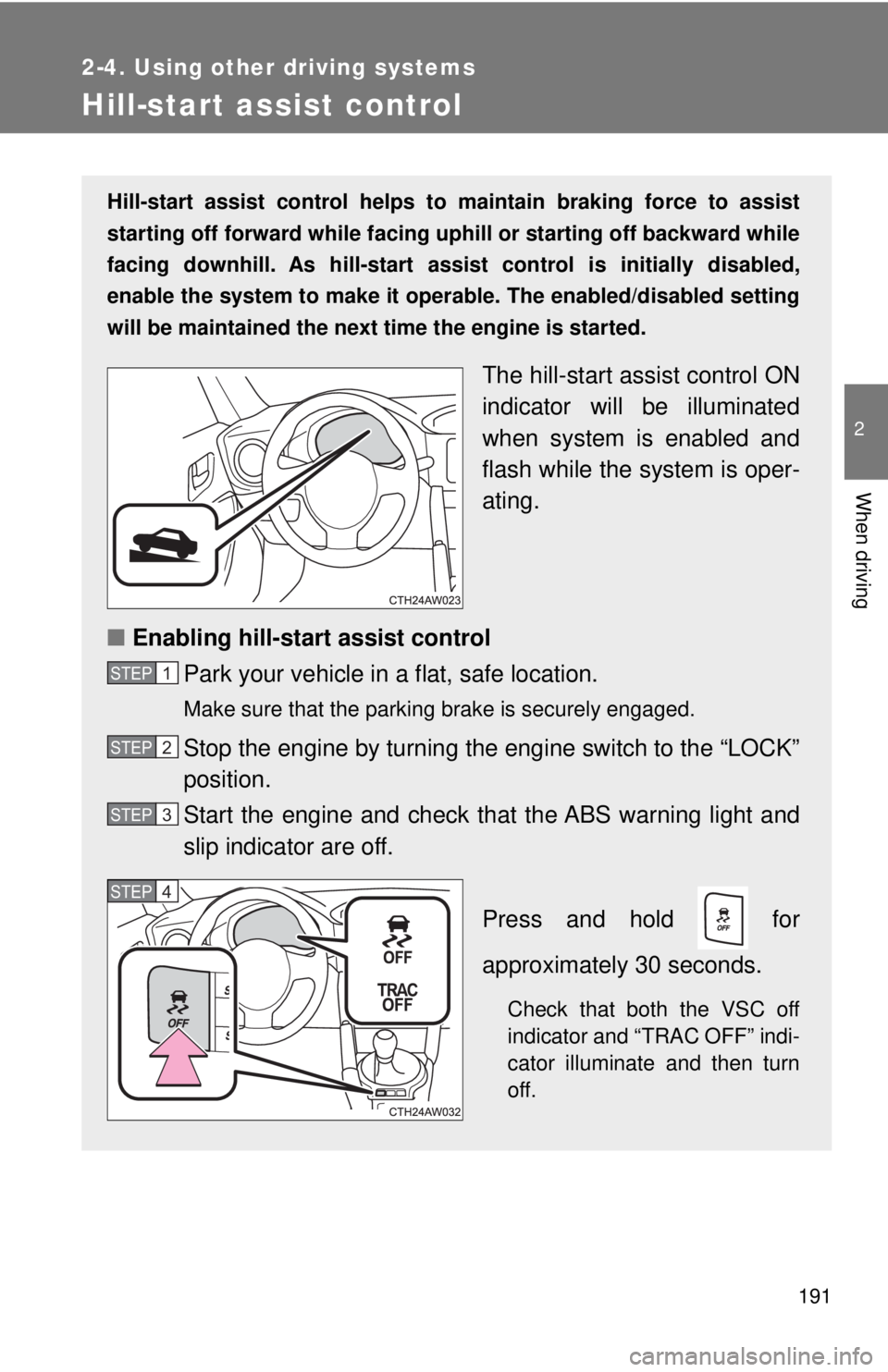
The hill-start as sist control ON
indicator will be illuminated
when system is enabled and
flash while the system is oper-
ating.
■ Enabling hill-start assist control
Park your vehicle in a flat, safe location. Make sure that the parking brake is securely engaged.
Stop the engine by turning the engine switch to the “LOCK”
position.
Start the engine and check t hat the ABS warning light and
slip indicator are off.
Press and hold for
approximately 30 seconds.
Check that both the VSC off
indicator and “TRAC OFF” indi-
cator illuminate and then turn
off.STEP 1
STEP 2
STEP 3
STEP 4
Page 192 of 428
1922-4. Using other driving systems
■ When enabling the hill-start assist control
● If the hill-start assist control ON indicator does not illuminate or if an
incorrect operation is performed, turn the engine switch to the “LOCK”
position and then restart the enabling procedure from .
● If is pressed and held for approximately 30 seconds or more, the
VSC off indicator and “TRAC OFF” indicator will turn off and subsequent
operations of the switch will be rejected. In this case, the VSC system will
operate in normal mode. ( → P. 187) To enable , turn the engine
switch to the “ACC” or “LOCK” position and then restart the engine. Within 5 seconds after the indicator lights turn off, release
. Then, press the switch again within 2 seconds of
releasing it. The hill-start assist control ON indicator will illuminate and then
turn off.
Turn the engine switch to the “LOCK” position. Then, restart
the engine and check that the hill-start assist control ON
indicator is illuminated. Hill-start assist control is enabled when the indicator is illumi-
nated.
To disable hill-start assist control, perform the above
through again. STEP 5
STEP 6
STEP 1
STEP 6
STEP 4
Page 193 of 428

1932-4. Using other driving systems
2
When driving ■ Operating conditions of hill-start assist control
When the following conditions are met, the hill-start assist control will oper-
ate:
● Vehicles with an automatic transmission: The shift lever is in D or M
(when starting off forward on while facing uphill) or in R (when starting off
backward while facing downhill).
● Vehicles with a manual transmission: The shift lever is in a position other
than R (when starting off forward while facing uphill) or in R (when start-
ing off backward while facing downhill).
● The vehicle is stopped.
● The accelerator pedal is not depressed.
● The parking brake is not engaged.
■ Hill-start assist control will not operate when
Hill-start assist control will not operate when any of the following conditions
are met:
● Vehicles with an automatic transmission: The shift lever is in a position
other than D or M (when facing uphill) or in a position other than R (when
facing downhill).
● Vehicles with a manual transmission: The shift lever is in R (when facing
uphill) or in a position other than R (when facing downhill).
● Vehicles with an automatic transmission: The accelerator pedal is
depressed.
● The parking brake is applied.
● Vehicles with a manual transmission: The clutch is engaged.
● Approximately 2 seconds have elapsed since the brake pedal was
released.
● The hill-start assist control ON indicator is not illuminated.
● The engine switch is turned to the “ACC” or “LOCK” position.
Page 198 of 428

1982-5. Driving information
WARNING■
Storage precautions
Observe the following precautions.
Failure to do so may result in death or serious injury.●
Stow cargo and luggage in the trunk whenever possible.●
To prevent cargo and luggage from sliding forward during braking, do
not stack anything in the enlarged trunk. Keep cargo and luggage low,
as close to the floor as possible.●
When you fold down the rear seats, long items should not be placed
directly behind the front seats.●
Never allow anyone to ride in the enlarged trunk. It is not designed for
passengers. They should ride in t heir seats with their seat belts prop-
erly fastened. Otherwise, they are much more likely to suffer death or
serious bodily injury, in the event of sudden braking, sudden swerving
or an accident.
●
Do not place cargo or luggage in or on the following locations as the
item may get under the clutch, brake or accelerator pedal and prevent
the pedals from being depressed properly, block the driver’s vision, or
hit the driver or passengers, causing an accident:
• At the feet of the driver
• On the front passenger or rear seats (when stacking items)
• On the package tray
• On the instrument panel
• On the dashboard
●
Secure all items in the occupant compartment, as they may shift and
injure someone during sudden braking, sudden swerving or an acci-
dent.
■
Capacity and distribution
●
Do not exceed the maximum axle weight rating or the total vehicle
weight rating.
●
Even if the total load of occupant's weight and the cargo load is less
than the total load capacity, do not apply the load unevenly. Improper
loading may cause deterioration of steering or braking control which
may cause death or serious injury.
Page 201 of 428
2012-5. Driving information
2
When driving ● If a door is opened and closed wh en its side window is frozen,
the window safety device will operate and t he side window
open/close function linked to door operation may not operate
correctly. If this occurs, perform the following after the ice has
melted.
Open the side window until it is approximately halfway open
with the door closed.
Fully close the window by pullin g the switch up to the one-
touch closing position and conti nue holding the switch for 1
second or more after the window fully closes. The window position is reset and the safety device operations will
be released.
■ When driving the vehicle
Accelerate the vehicle slowly, keep a safe distance between you
and the vehicle ahead, and drive at a reduced speed suitable to
road conditions.
■ When parking the vehicle (in the winter time or in the cold
latitudes)
Park the vehicle and move the shift lever to P (automatic trans-
mission) or 1 or R (manual transmission) without setting the
parking brake. The parking brak e may freeze up, preventing it
from being released. If necessary , block the wheels to prevent
inadvertent sliding or creeping. STEP 1
STEP 2