lock TOYOTA 86 2017 Repair Manual
[x] Cancel search | Manufacturer: TOYOTA, Model Year: 2017, Model line: 86, Model: TOYOTA 86 2017Pages: 428, PDF Size: 5.25 MB
Page 207 of 428
Interior features
3
2073-1. Using the air
conditioning system
and defogger
Manual air conditioning
system ........................... 208
Rear window and
outside rear view
mirror defoggers ............ 215
3-2. Using the audio system
Using the AUX/USB
port................................. 217
Steering wheel audio
switches ......................... 218
Using the microphone ...... 219 3-3. Using the interior lights
Interior lights list ............... 220
• Interior light ..................... 221
3-4. Using the storage
features
List of storage
features .......................... 222
• Glove box........................ 223
• Bottle holders .................. 224
• Cup holders/
console tray .................... 225
3-5. Other interior features
Sun visors ........................ 227
Vanity mirrors ................... 228
Clock ................................ 229
Power outlets ................... 230
Floor mat .......................... 232
Page 208 of 428
2083-1. Using the air conditioning system and defogger
Manual air conditioning system
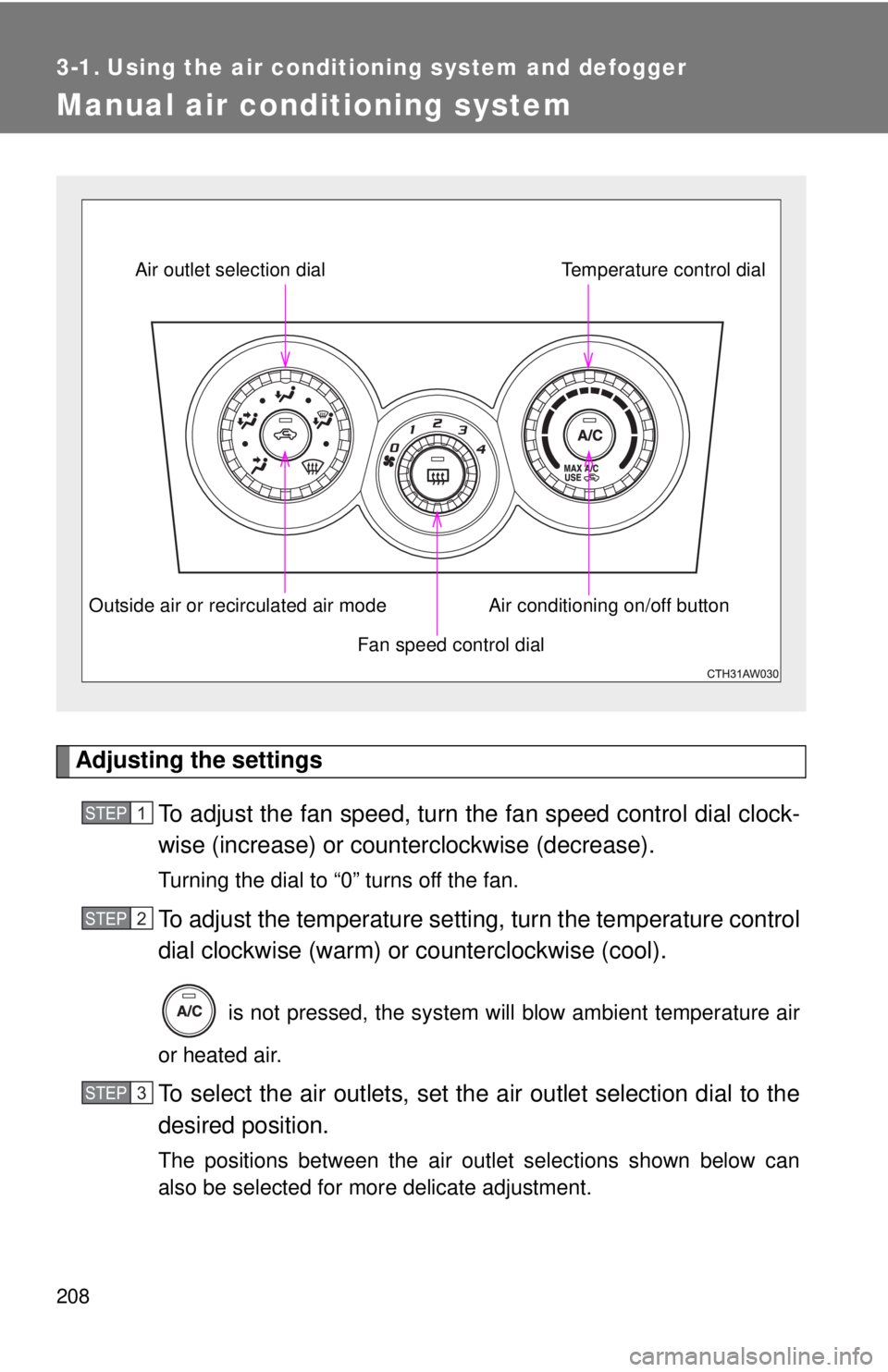
Adjusting the settings
To adjust the fan speed, turn the fan speed cont rol dial clock-
wise (increase) or count erclockwise (decrease).Turning the dial to “0” turns off the fan.
To adjust the temperature setting, turn the temperature control
dial clockwise (warm) or counterclockwise (cool).
is not pressed, the system will blow ambient temperature air
or heated air.
To select the air outlets, set the air outlet selection dial to the
desired position.
The positions between the air outlet selections shown below can
also be selected for more delicate adjustment. Fan speed control dialAir outlet selection dial
Air conditioning on/off button Temperature control dial
Outside air or recirculated air mode
STEP 1
STEP 2
STEP 3
Page 214 of 428

2143-1. Using the air cond itioning system and defogger
WARNING■ To prevent the windshield from fogging up
Do not set the air outlet selection dial to during cool air operation in
extremely humid weather. The difference between the temperature of the
outside air and that of the windshield can cause the outer surface of the
windshield to fog up, blocking your vision.
NOTICE■ To prevent battery discharge
Do not leave the air conditioning system on longer than necessary when the
engine is stopped.
Page 221 of 428
2213-3. Using the interior lights
3
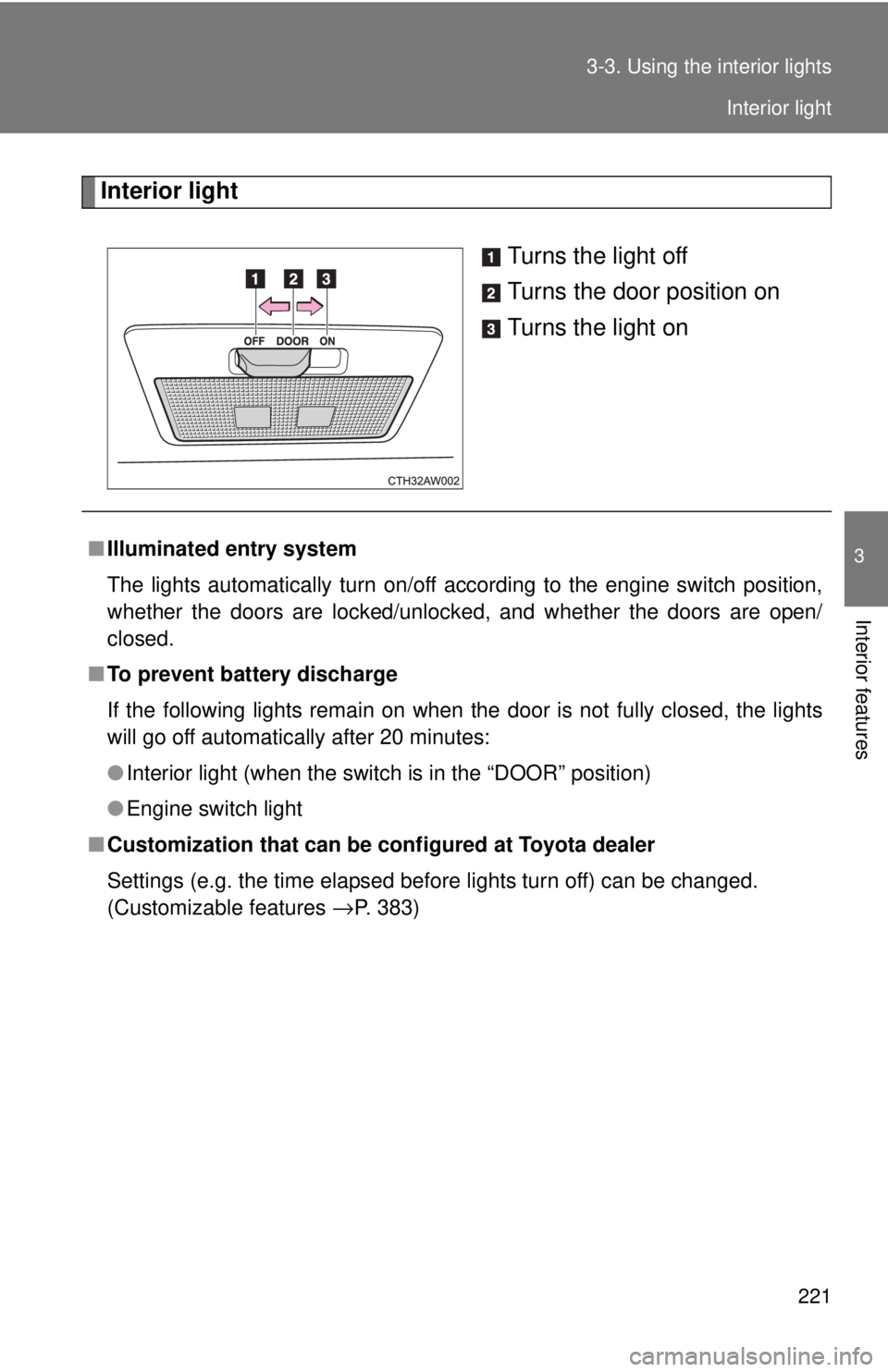
Interior features Interior light
Turns the light off
Turns the door position on
Turns the light on
■ Illuminated entry system
The lights automatically turn on/off according to the engine switch position,
whether the doors are locked/unlocked, and whether the doors are open/
closed.
■ To prevent battery discharge
If the following lights remain on when the door is not fully closed, the lights
will go off automatically after 20 minutes:
● Interior light (when the switch is in the “DOOR” position)
● Engine switch light
■ Customization that can be co nfigured at Toyota dealer
Settings (e.g. the time elapsed before lights turn off) can be changed.
(Customizable features
→ P. 383) Interior light
Page 229 of 428
2293-5. Other interior features
3
Interior features
Clock
■ The clock is displayed when
The engine switch is in the “ACC” or “ON” position.
■ When disconnecting and reco nnecting battery terminals
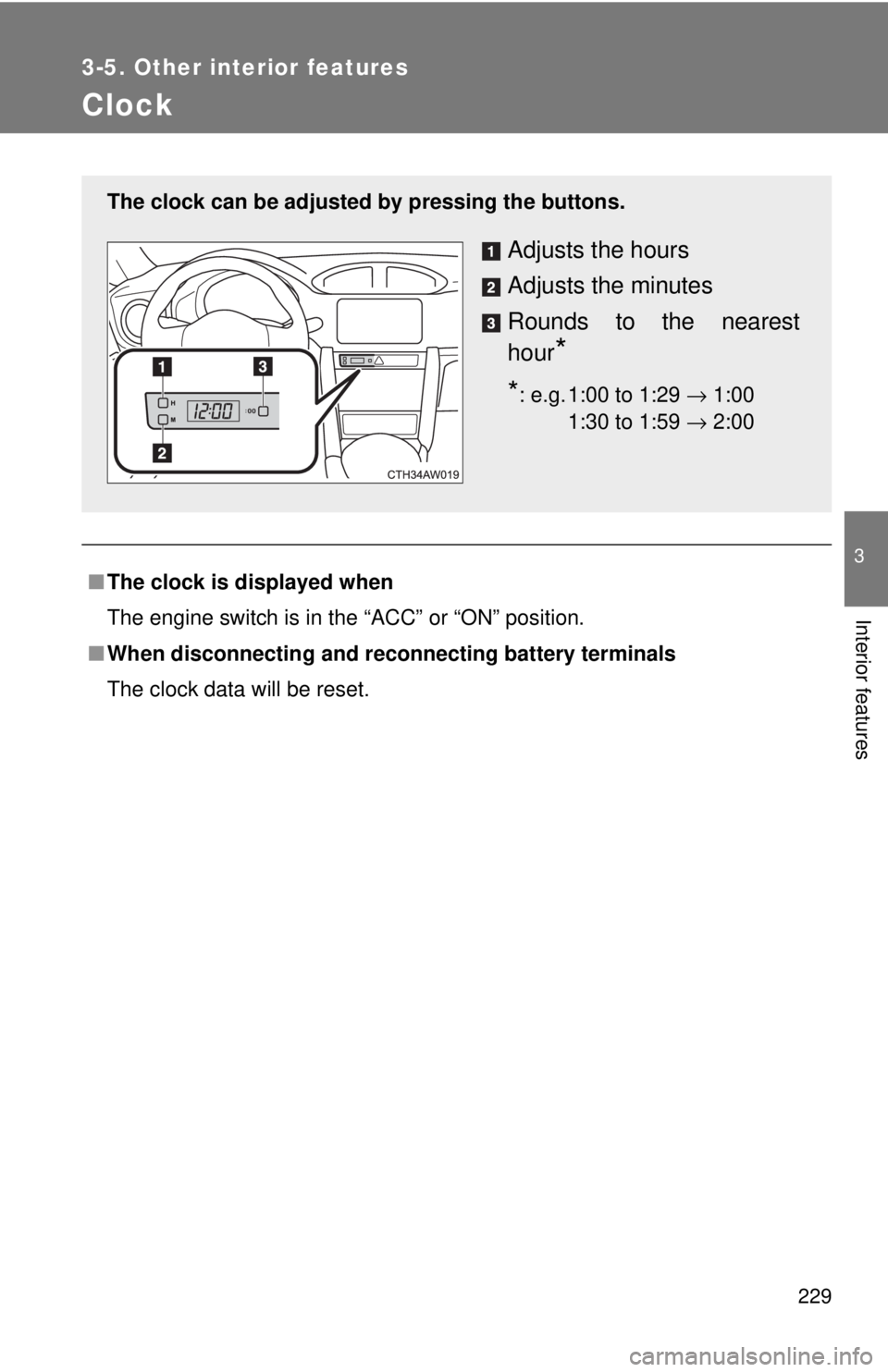
The clock data will be reset.The clock can be adjusted by pressing the buttons.
Adjusts the hours
Adjusts the minutes
Rounds to the nearest
hour
** : e.g. 1:00 to 1:29 → 1:00
1:30 to 1:59 → 2:00 00
Page 246 of 428
2464-2. Maintenance
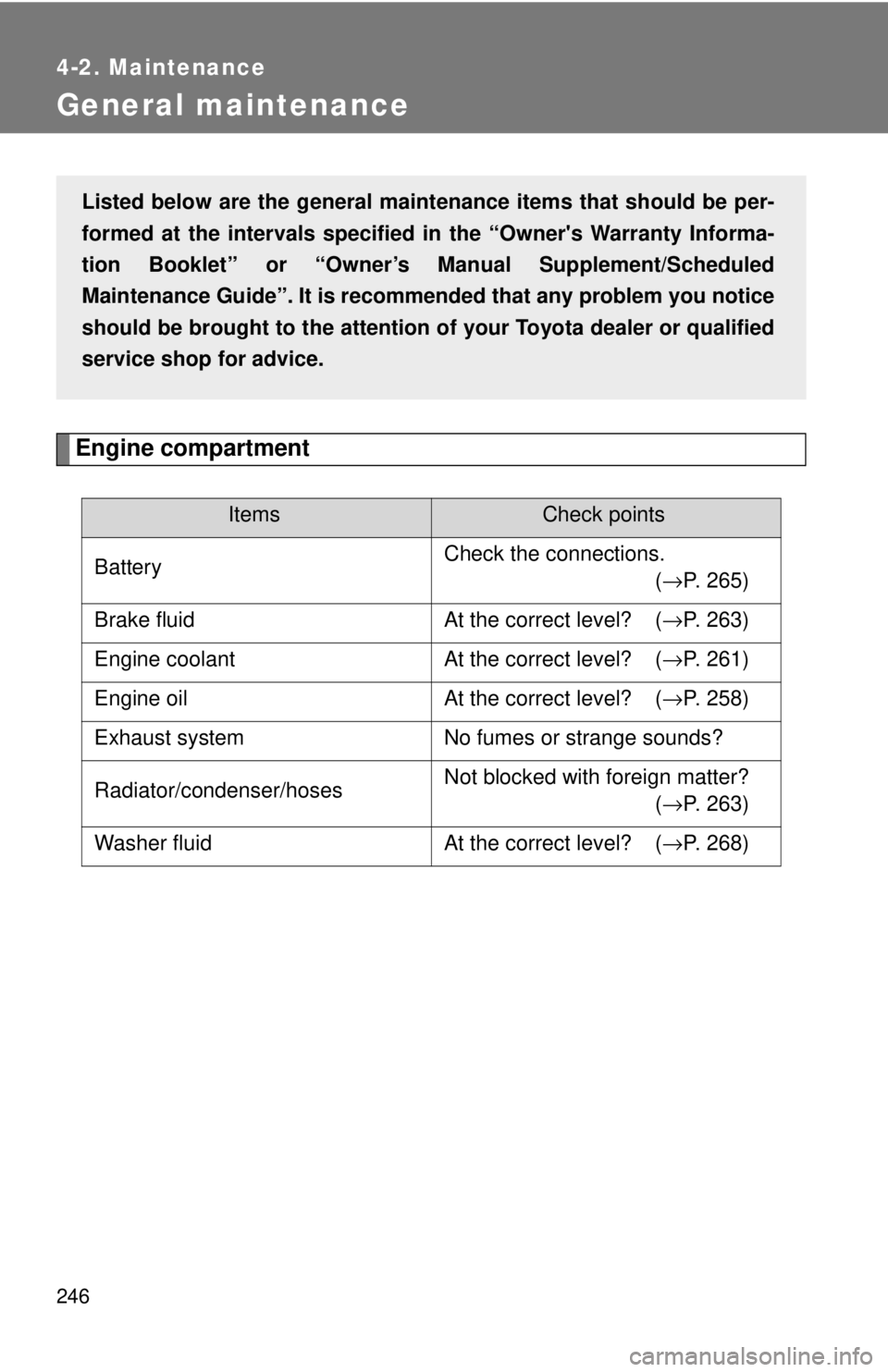
General maintenance
Engine compartment Items Check points
Battery Check the connections.
( → P. 265)
Brake fluid At the correct level? ( → P. 263)
Engine coolant At the correct level? ( → P. 261)
Engine oil At the correct level? ( → P. 258)
Exhaust system No fumes or strange sounds?
Radiator/condenser/hoses Not blocked with foreign matter?
( → P. 263)
Washer fluid At the correct level? ( → P. 268)Listed below are the general maintenance items that should be per-
formed at the intervals specified in the “Owner's Warranty Informa-
tion Booklet” or “Owner’s Manual Supplement/Scheduled
Maintenance Guide”. It is recommended that any problem you notice
should be brought to the attention of your Toyota dealer or qualified
service shop for advice.
Page 247 of 428
2474-2. Maintenance
4
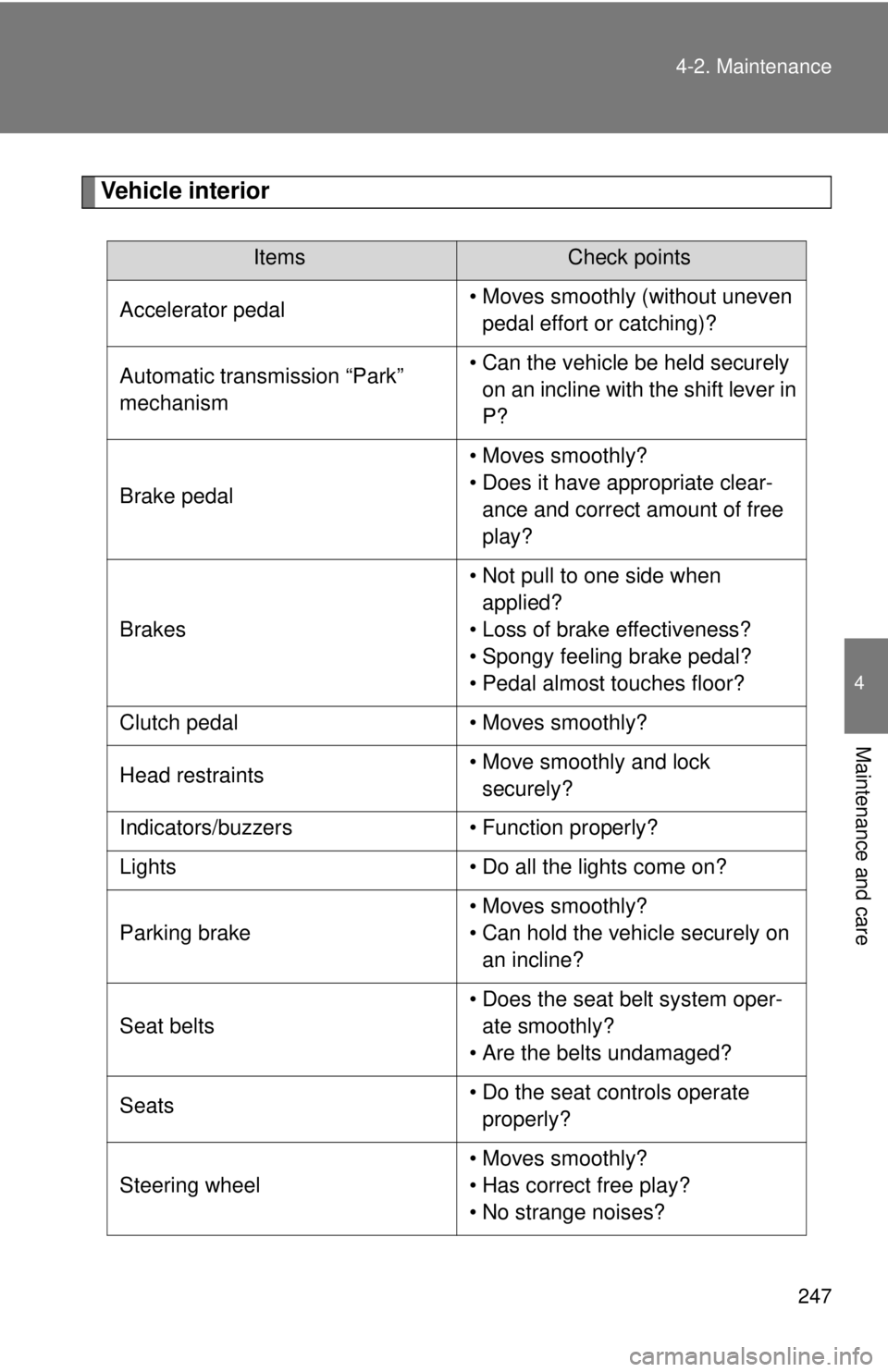
Maintenance and care Vehicle interior Items Check points
Accelerator pedal • Moves smoothly (without uneven
pedal effort or catching)?
Automatic transmission “Park”
mechanism • Can the vehicle be held securely
on an incline with the shift lever in
P?
Brake pedal • Moves smoothly?
• Does it have appropriate clear-
ance and correct amount of free
play?
Brakes • Not pull to one side when
applied?
• Loss of brake effectiveness?
• Spongy feeling brake pedal?
• Pedal almost touches floor?
Clutch pedal • Moves smoothly?
Head restraints • Move smoothly and lock
securely?
Indicators/buzzers • Function properly?
Lights • Do all the lights come on?
Parking brake • Moves smoothly?
• Can hold the vehicle securely on
an incline?
Seat belts • Does the seat belt system oper-
ate smoothly?
• Are the belts undamaged?
Seats • Do the seat controls operate
properly?
Steering wheel • Moves smoothly?
• Has correct free play?
• No strange noises?
Page 248 of 428
2484-2. Maintenance
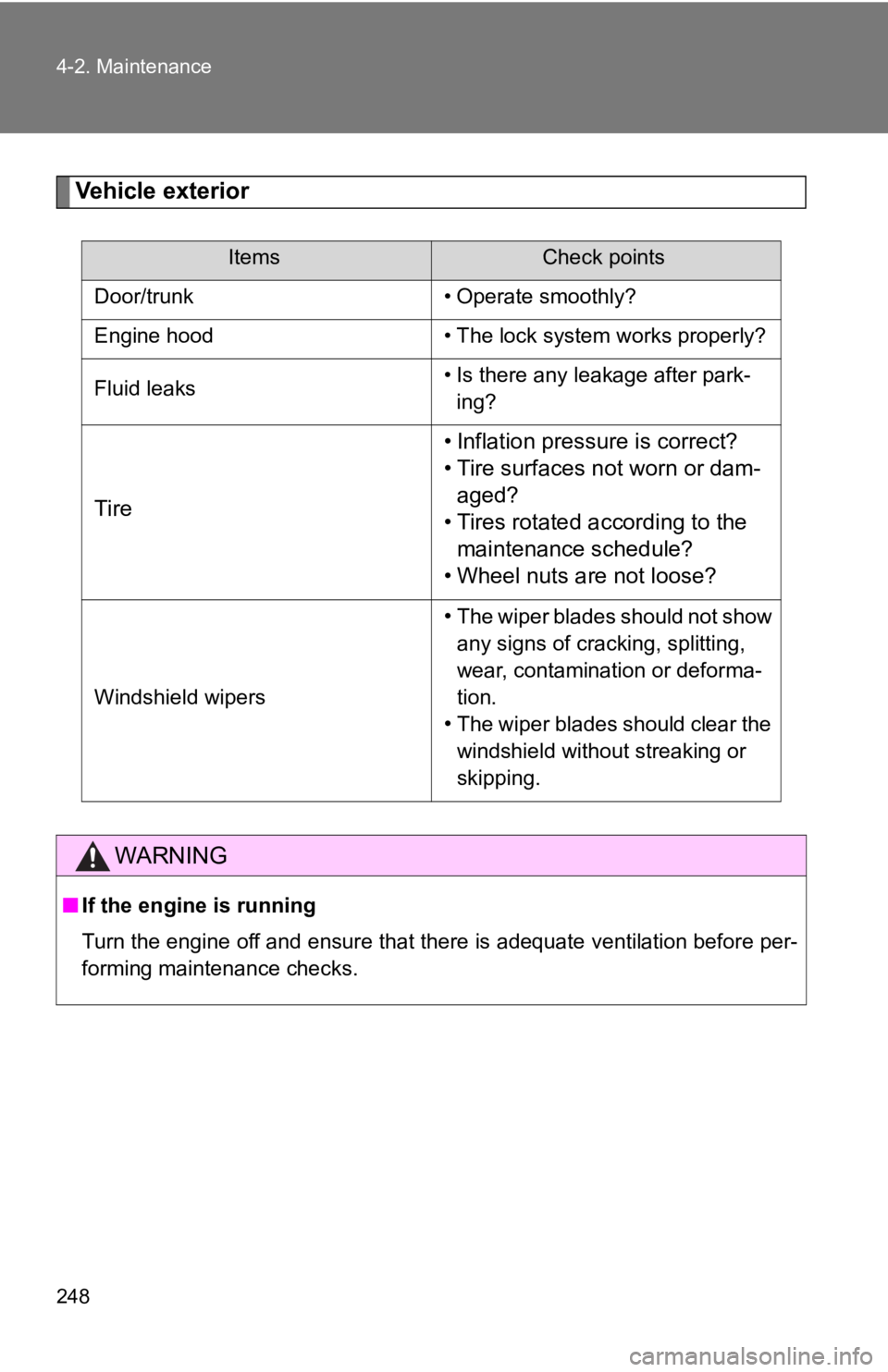
Vehicle exterior Items Check points
Door/trunk • Operate smoothly?
Engine hood • The lock system works properly?
Fluid leaks • Is there any leakage after park-
ing?
Tire • Inflation pressure is correct?
• Tire surfaces not worn or dam-
aged?
• Tires rotated according to the
maintenance schedule?
• Wheel nuts are not loose?
Windshield wipers • The wiper blades should not show
any signs of cracking, splitting,
wear, contamination or deforma-
tion.
• The wiper blades should clear the
windshield without streaking or
skipping.
WARNING■ If the engine is running
Turn the engine off and ensure that there is adequate ventilation before per-
forming maintenance checks.
Page 253 of 428
2534-3. Do-it-yourself maintenance
4
Maintenance and care
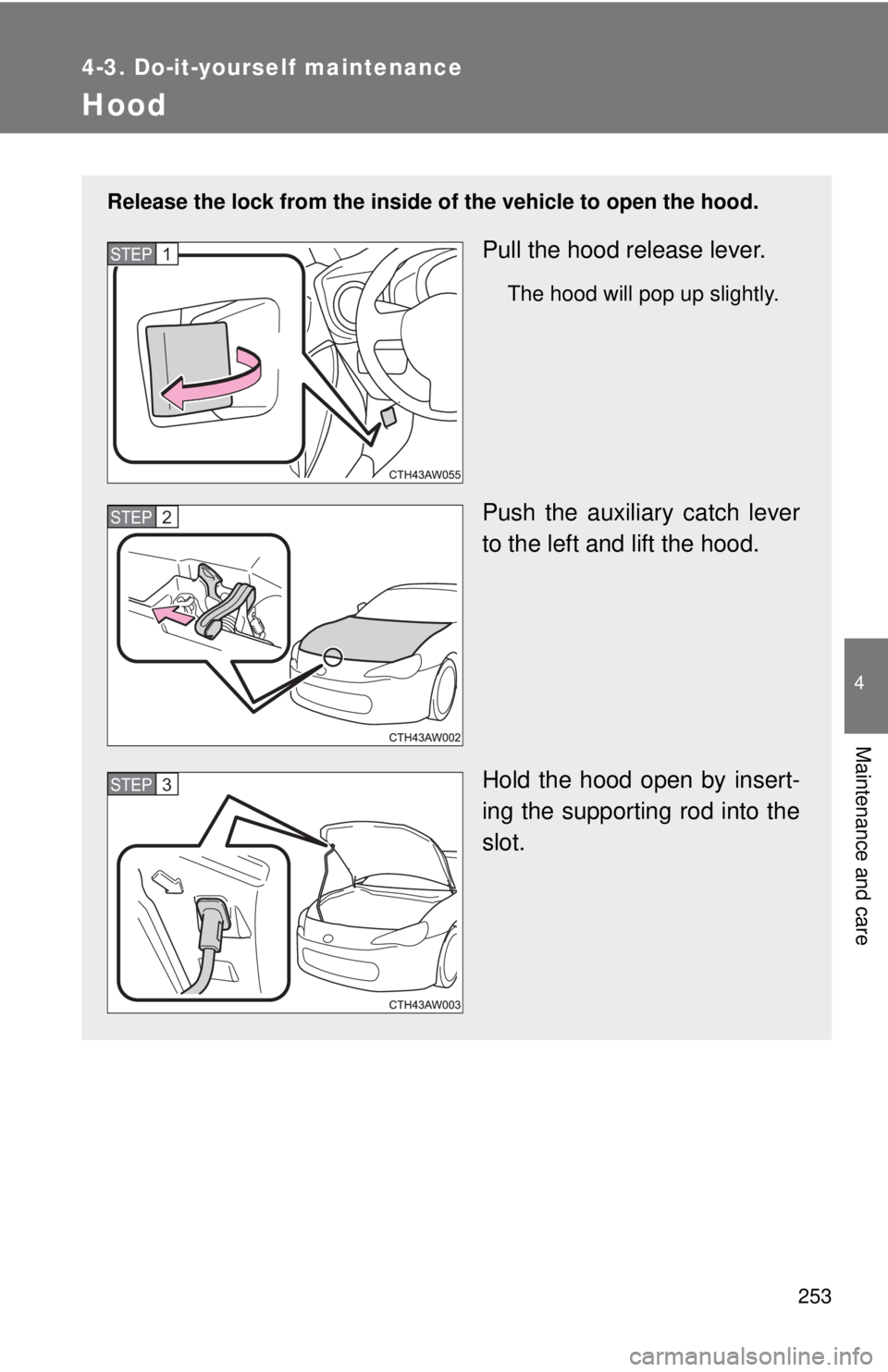
Hood Release the lock from the inside of the vehicle to open the hood.
Pull the hood release lever. The hood will pop up slightly.
Push the auxiliary catch lever
to the left and lift the hood.
Hold the hood open by insert-
ing the supporting rod into the
slot.STEP 1
STEP 2
STEP 3
Page 254 of 428

2544-3. Do-it-yourself maintenance
WARNING■ Pre-driving check
Check that the hood is fully closed and locked.
If the hood is not locked properly it may open while the vehicle is in motion
and cause an accident, which may result in death or serious injury.
NOTICE■ When opening the hood
● Do not lift up or operate the wipers. Doing so may cause the hood and wip-
ers to contact, scratching the hood.
● Use caution when opening the engine hood in windy weather as it may
close suddenly in strong wind.
● Do not attach any accessories other than genuine Toyota products to the
engine hood. Such additional weight on the engine hood may cause it to
be too heavy to be supported by the supporting rod when opened.
■ When closing the hood
Do not apply excessive weight or force when closing the hood as doing so
may result in damage.