stop start TOYOTA 86 2017 Owners Manual
[x] Cancel search | Manufacturer: TOYOTA, Model Year: 2017, Model line: 86, Model: TOYOTA 86 2017Pages: 428, PDF Size: 5.25 MB
Page 4 of 428

TABLE OF CONTENTS Index
44-3. Do-it-yourself
maintenance
Do-it-yourself service
precautions ...................... 250
Hood................................... 253
Positioning a floor jack ....... 255
Engine compartment .......... 257
Tires ................................... 270
Tire inflation pressure......... 277
Wheels ............................... 281
Air conditioning filter ........... 284
Wireless remote control
key battery ....................... 287
Checking and replacing
fuses ................................ 290
Light bulbs .......................... 298
5-1. Essential information
Emergency flashers ........... 306
If your vehicle needs to be
towed ............................... 307
If you think something is
wrong ............................... 315
Fuel pump shut off
system .............................. 316 5-2. Steps to take in an
emergency
If a warning light turns
on or a warning buzzer
sounds... .......................... 317
If you have a flat tire ........... 327
If the engine will not
start .................................. 338
If the shift lever cannot be
shifted from P ................... 339
If you lose your keys ........... 340
If the battery is
discharged ........................ 341
If your vehicle overheats..... 345
If the vehicle becomes
stuck ................................. 348
If your vehicle has to be
stopped in an
emergency........................ 350
6-1. Specifications
Maintenance data
(fuel, oil level, etc.) ........... 354
Fuel information .................. 366
Tire information................... 370
6-2. Customization
Customizable features ........ 3835
When trouble arises 6
Vehicle specifications
Page 55 of 428
551-4. Opening and closing the windows
1
Before driving ■ The power windows can be operated when
The engine switch is in the “ON” position.
■ Operating the power windows af ter turning the engine off
The power windows can be operated for approximately 45 seconds even
after the engine switch is turned to the “ACC” or “LOCK” position. They can-
not, however, be operated once either door is opened.
■ Jam protection function
If an object becomes caught between the window and the body, window
travel is stopped and the window is opened slightly.
■ When the power window does not close normally
If the jam protection function is operating abnormally and a window cannot
be closed, close all the doors and perform the following operations using the
power window switch on the relevant door.
After stopping the vehicle, the engine switch is turned to the “ON”
position.
Hold the power window switch in the one-touch closing position two
consecutive times.
Hold the power window switch in the one-touch closing position
once again and continue holding for 1 second or more after the win-
dow closes completely.
If you push the power window switch to the opening position while the win-
dow is moving, start again from the beginning. If the window continues to
close but then re-open slightly even after performing the above procedure
correctly, have the vehicle inspected by your Toyota dealer. STEP 1
STEP 2
STEP 3
Page 61 of 428
61 1
Before driving 1-6. Theft deterrent system
Engine immobilizer system
■ When the vehicle cannot be started with the registered key
Remove the key and try again.
■ System maintenance
The vehicle has a maintenance-free type engine immobilizer system.
■ Conditions that may cause the system to malfunction
● If the key is in contact with a metallic object
● If the key is in close proximity to or touching a key to the security system
(key with a built-in transponder chip) of another vehicleThe vehicle's keys have built-in tran sponder chips that prevent the
engine from starting if the key has not been previously registered in
the vehicle's on-board computer.
Never leave the keys inside the vehicle when you leave the vehicle.
This system is designed to help prevent vehicle theft but does not
guarantee absolute security against all vehicle thefts.
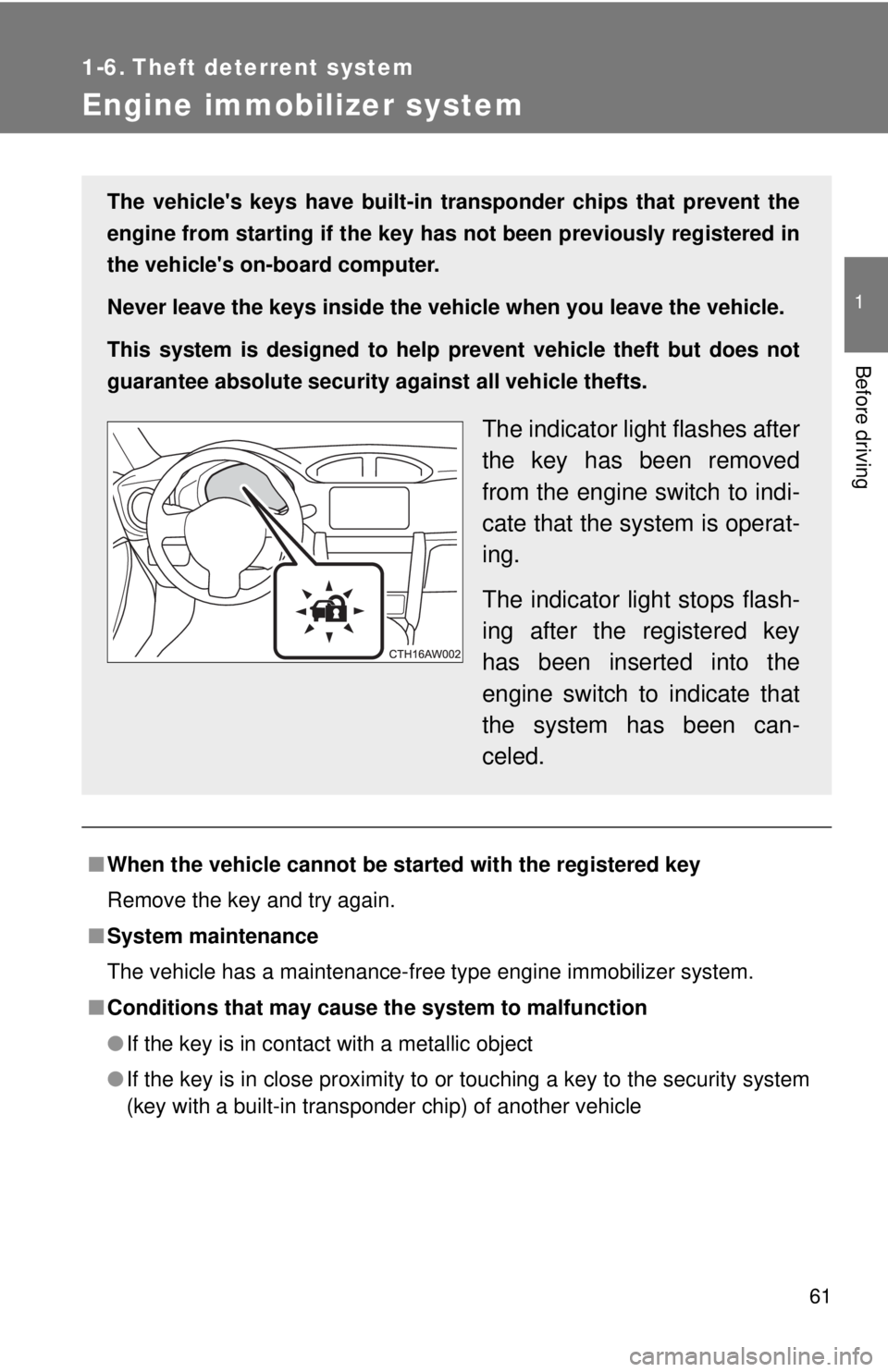
The indicator light flashes after
the key has been removed
from the engine switch to indi-
cate that the system is operat-
ing.
The indicator light stops flash-
ing after the registered key
has been inserted into the
engine switch to indicate that
the system has been can-
celed.
Page 128 of 428
1282-1. Driving procedures
Driving the vehicle The following procedures should be observed to ensure safe driv-
ing:
■ Starting the engine
→ P. 142
■ Driving
Vehicles with an au tomatic transmission
With the brake pedal depressed, shift the shift lever to D.
( → P. 145)
Release the parking brake. ( → P. 156)
Gradually release the brake pedal and gently depress the
accelerator pedal to accelerate the vehicle.
Vehicles with a manual transmission
While depressing the clutch pedal , shift the shift lever to 1.
( → P. 152)
Release the parking brake. ( → P. 156)
Gradually release the clutch pedal. At the same time, gently
depress the accelerator pedal to accelerate the vehicle.
■ Stopping
Vehicles with an au tomatic transmission
With the shift lever in D, depress the brake pedal.
If necessary, set the parking brake. If the vehicle is to be stopped for an extended period of time, shift
the shift lever to P or N. ( → P. 145)
Vehicles with a manual transmission
While depressing the clutch pedal, depress the brake
pedal.
If necessary, set the parking brake.
If the vehicle is to be stopped for an extended period of time, shift
the shift lever to N. (
→ P. 152) STEP 1
STEP 2
STEP 3
STEP 1
STEP 2
STEP 3
STEP 1
STEP 2
STEP 1
STEP 2
Page 132 of 428
1322-1. Driving procedures
■ After the engine starts
In order to secure a rich exhaust sound when starting the vehicle and envi-
ronmental performance, air intake and exhaust sounds become loud and
vibrations may increase for a little while after the engine starts. This is not a
malfunction.
■ Operating your vehicle in a foreign country
Comply with the relevant vehicle registration laws and confirm the availability
of the correct fuel. ( → P. 357)
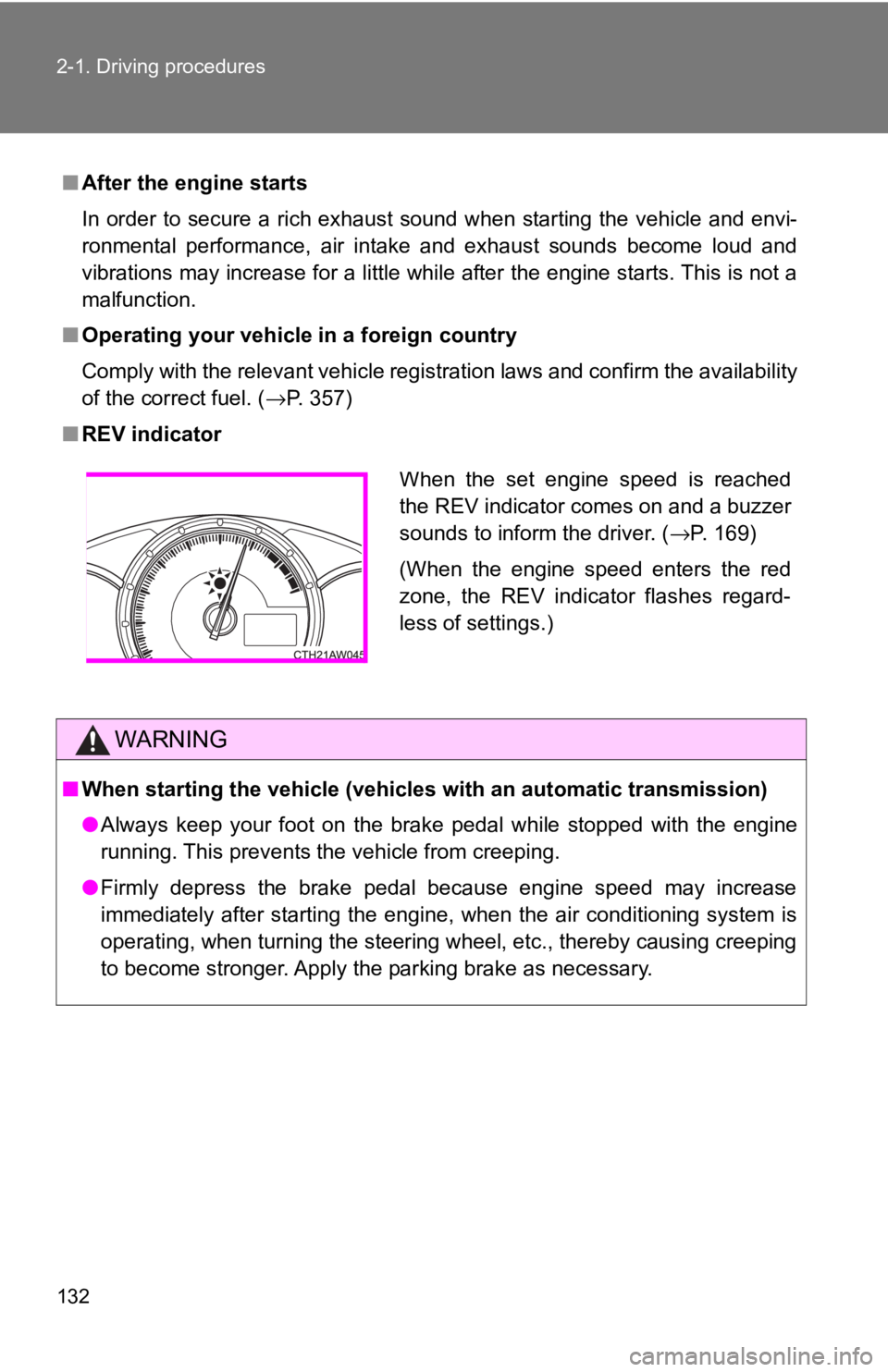
■ REV indicator
WARNING■ When starting the vehicle (vehicles with an automatic transmission)
● Always keep your foot on the brake pedal while stopped with the engine
running. This prevents the vehicle from creeping.
● Firmly depress the brake pedal because engine speed may increase
immediately after starting the engine, when the air conditioning system is
operating, when turning the steering wheel, etc., thereby causing creeping
to become stronger. Apply the parking brake as necessary. When the set engine speed is reached
the REV indicator comes on and a buzzer
sounds to inform the driver. ( → P. 169)
(When the engine speed enters the red
zone, the REV indicator flashes regard-
less of settings.)
Page 140 of 428

1402-1. Driving procedures
NOTICE■ Pre-driving check
Trapping small animals in the cooling fan and belts of the engine may result
in a malfunction. Check that no small animal enters the engine compartment
and under the vehicle before starting the engine.
■ When driving the vehicle
Vehicles with an automatic transmission
● Do not depress the accelerator and brake pedals at the same time during
driving, as this may restrain driving torque.
● Do not use the accelerator pedal or depress the accelerator and brake
pedals at the same time to hold the vehicle on a hill.
Vehicles with a manual transmission
● Do not depress the accelerator and brake pedals at the same time during
driving, as this may restrain driving torque.
● Do not shift gears unless the clutch pedal is fully depressed. After shifting,
do not release the clutch pedal abruptly. Doing so may damage the clutch,
transmission and gears.
● Observe the following to prevent the clutch from being damaged.
• Do not rest your foot on the clutch pedal while driving.
Doing so may cause clutch trouble.
• Do not use any gear other than the 1st gear when starting off and mov-
ing forward.
Doing so may damage the clutch.
• Do not use the clutch to hold the vehicle when stopping on an uphill
grade.
Doing so may damage the clutch.
● Do not shift the shift lever to R when the vehicle is still moving. Doing so
may damage the clutch, transmission and gears.
● Do not release the clutch pedal too quickly. Doing so may damage the
transmission.
■ When parking the vehicle (vehicles with an automatic transmission)
Always shift the shift lever to P. Failure to do so may cause the vehicle to
move or the vehicle may accelerate suddenly if the accelerator pedal is acci-
dentally depressed.
Page 144 of 428
1442-1. Driving procedures
WARNING■ When starting the engine
Always start the engine while sitting in the driver's seat. Do not depress the
accelerator pedal while starting the engine under any circumstances.
Doing so may cause an accident resulting in death or serious injury.
■ Caution when driving
Do not turn the engine switch to the “LOCK” position while driving. If, in an
emergency, you must turn the engine off while the vehicle is moving, turn the
engine switch only to the “ACC” position to stop the engine. An accident may
result if the engine is stopped while driving. ( → P. 350)
NOTICE■ To prevent battery discharge
Do not leave the engine switch in the “ACC” or “ON” position for long periods
of time without the engine running.
■ When starting the engine
● Do not crank the engine for more than 10 seconds at a time. This may
overheat the starter and wiring system.
If the engine does not start, turn the engine switch to the “LOCK” position
and try to start the engine again after waiting for 10 seconds or more.
● Do not race a cold engine.
● If the engine becomes difficult to start or stalls frequently, have your vehi-
cle checked by your Toyota dealer immediately.
Page 150 of 428
1502-1. Driving procedures
■ Automatic gear selection when the vehicle is stopped
When the vehicle is idling at high rpm in order to warm up, and the vehicle is
on a slippery road, the transmission may automatically shift to 2 nd
gear for
stopping and starting off.
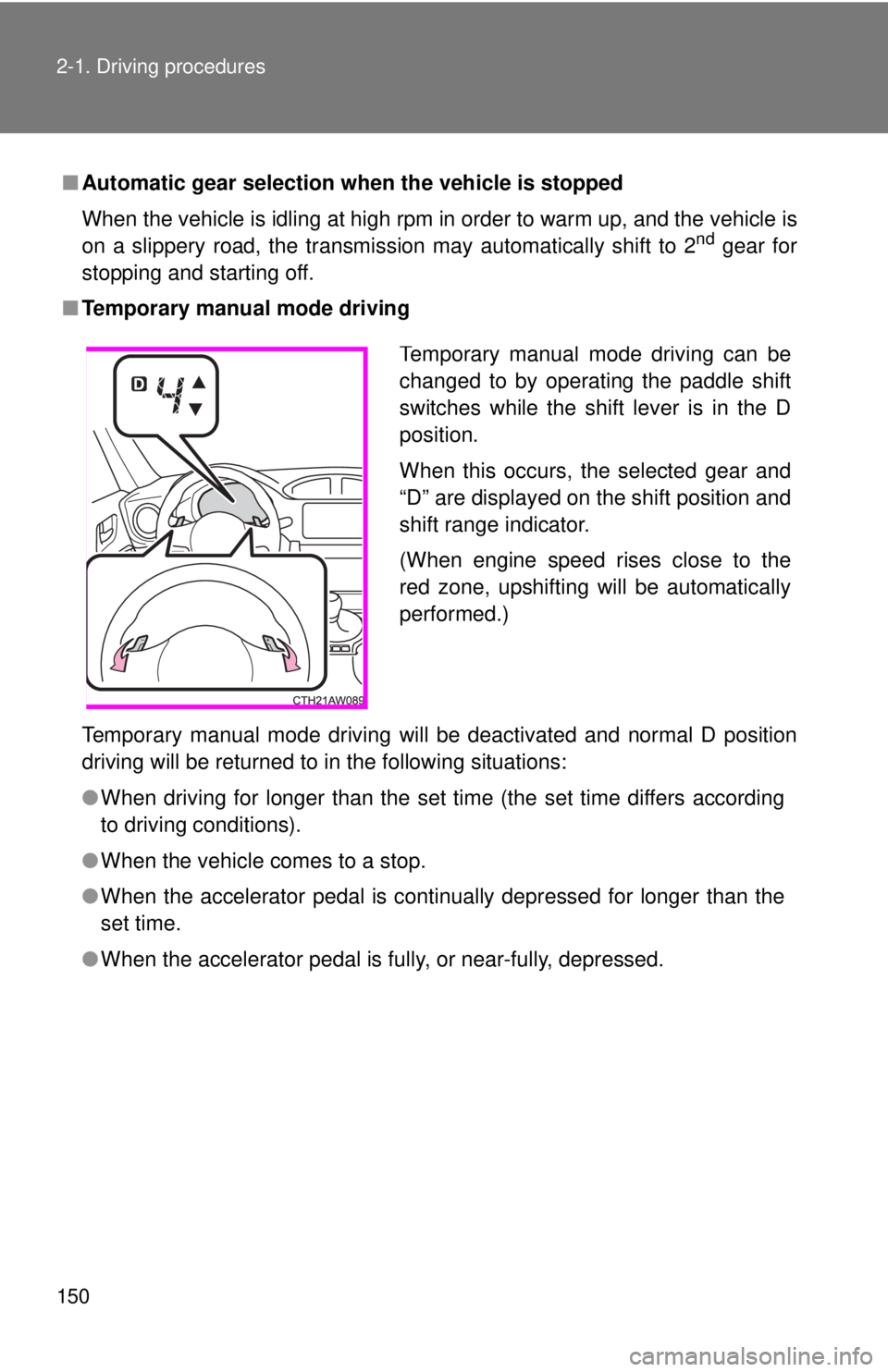
■ Temporary manual mode driving
Temporary manual mode driving will be deactivated and normal D position
driving will be returned to in the following situations:
● When driving for longer than the set time (the set time differs according
to driving conditions).
● When the vehicle comes to a stop.
● When the accelerator pedal is continually depressed for longer than the
set time.
● When the accelerator pedal is fully, or near-fully, depressed. Temporary manual mode driving can be
changed to by operating the paddle shift
switches while the shift lever is in the D
position.
When this occurs, the selected gear and
“D” are displayed on the shift position and
shift range indicator.
(When engine speed rises close to the
red zone, upshifting will be automatically
performed.)
Page 171 of 428

1712-2. Instrument cluster
2
When driving ■ Outside temperature display
● In the following situations, the correct outside temperature may not be
displayed.
• When the vehicle is very hot, such as when under the sun.
• When the vehicle is idling or being driven at low speeds such as in a
traffic jam or when the engine is stopped and then restarted immedi-
ately afterward.
• When the actual outside temperature is outside of the indicator range.
● If “ − − ” is displayed for approximately 1 minute or more or if the outside
temperature is not displayed, the system may be malfunctioning. Have
the vehicle inspected by your Toyota dealer.
WARNING■ The information displ ay at low temperatures
Allow the interior of the vehicle to warm up before using the liquid crystal
information display. At extremely low temperatures, the information display
monitor may respond slowly, and display changes may be delayed.
For example, there is a lag between the driver's shifting and the new shift
position number appearing on the display. In this case, wait until the display
changes and take care not to downshift again, causing rapid and excessive
engine braking and possibly an accident resulting in death or serious injury.
Page 184 of 428
1842-4. Using other driving systems
Driving assist systems To help enhance driving safety a nd performance, the following sys-
tems operate automatically in res ponse to various driving situations.
Be aware, however, that these systems are supplementary and
should not be relied upon too h eavily when operating the vehicle.
■ ABS (Anti-lock Brake System) Helps to prevent wheel lock when the brakes are applied suddenly, or if
the brakes are applied while driving on a slippery road surface
■ Brake assist Generates an increased level of braking force after the brake pedal is
depressed when the system detects a panic stop situation
■ VSC (Vehicle Stability Control) Helps the driver to control skidding when swerving suddenly or turning
on slippery road surfaces
■ TRAC (Traction Control) Helps to maintain drive power and prevent the drive wheels from spin-
ning when starting the vehicle or accelerating on slippery roads.
The TRAC system is also equipped with the brake LSD function.
■ Hill-start assist control
→ P. 191
■ EPS (Electric Power Steering) Employs an electric motor to reduce the amount of effort needed to turn
the steering wheel