lights TOYOTA BZ4X 2022 (in English) Workshop Manual
[x] Cancel search | Manufacturer: TOYOTA, Model Year: 2022, Model line: BZ4X, Model: TOYOTA BZ4X 2022Pages: 674, PDF Size: 120.02 MB
Page 280 of 674
278
Owners Manual_Europe_M42D76_en
5-4. Using the driving support systems
WARNING
●Always keep the windshield clean.
• If the windshield is dirty or covered
with an oily film, water droplets, snow, etc., clean the windshield.
• Even if a glass coating agent is
applied to the windshield, it will still be necessary to use the windshield wipers to remove water droplets,
etc., from the area of the windshield in front of the front camera.
• If the inner side of the windshield
where the front camera is installed is dirty, contact any authorized Toyota retailer or Toyota authorized
repairer, or any reliable repairer
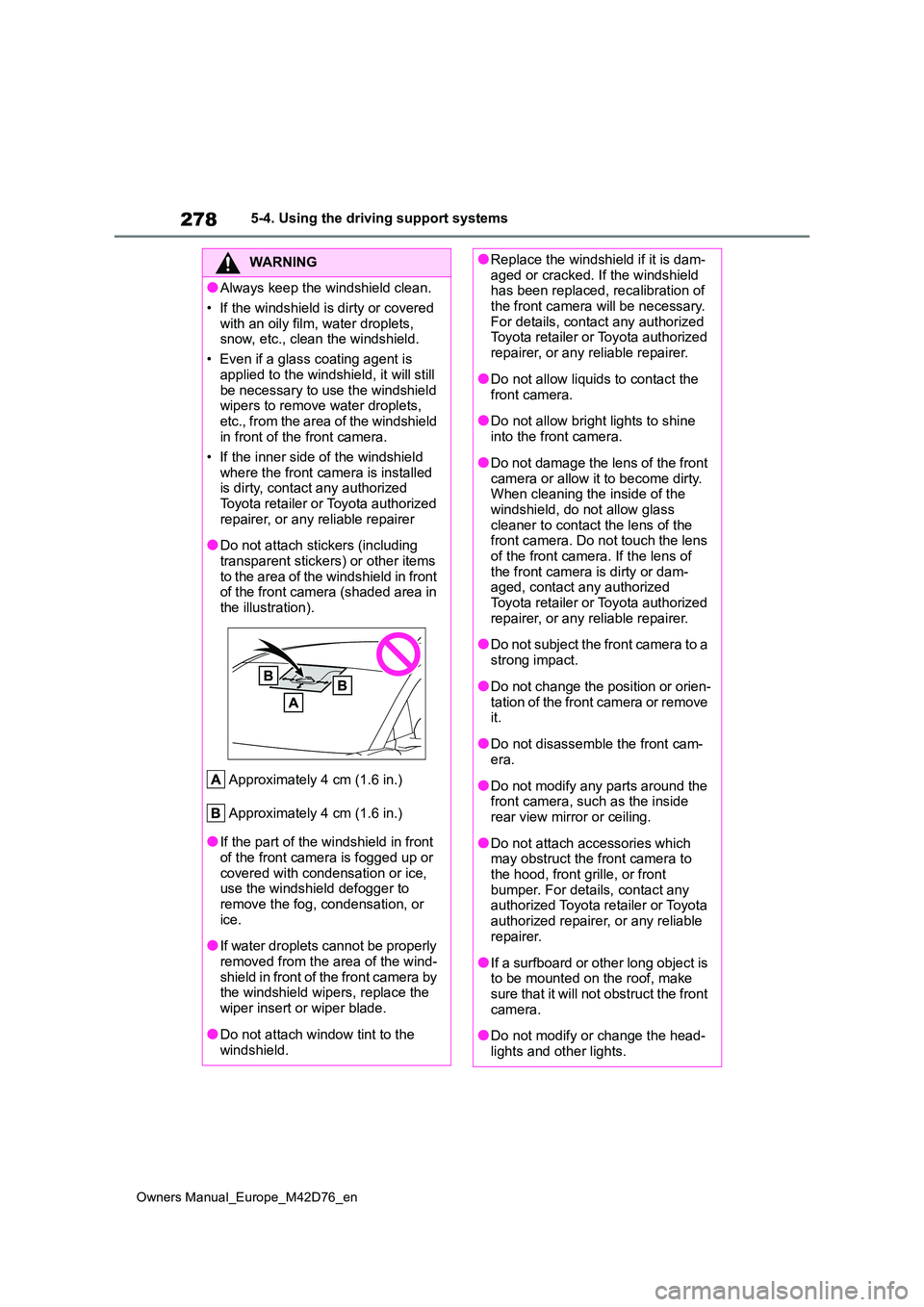
●Do not attach stickers (including
transparent stickers) or other items to the area of the windshield in front of the front camera (shaded area in
the illustration).
Approximately 4 cm (1.6 in.)
Approximately 4 cm (1.6 in.)
●If the part of the windshield in front of the front camera is fogged up or
covered with condensation or ice, use the windshield defogger to remove the fog, condensation, or
ice.
●If water droplets cannot be properly
removed from the area of the wind- shield in front of the front camera by the windshield wipers, replace the
wiper insert or wiper blade.
●Do not attach window tint to the
windshield.
●Replace the windshield if it is dam- aged or cracked. If the windshield has been replaced, recalibration of
the front camera will be necessary. For details, contact any authorized Toyota retailer or Toyota authorized
repairer, or any reliable repairer.
●Do not allow liquids to contact the
front camera.
●Do not allow bright lights to shine
into the front camera.
●Do not damage the lens of the front
camera or allow it to become dirty. When cleaning the inside of the windshield, do not allow glass
cleaner to contact the lens of the front camera. Do not touch the lens of the front camera. If the lens of
the front camera is dirty or dam- aged, contact any authorized Toyota retailer or Toyota authorized
repairer, or any reliable repairer.
●Do not subject the front camera to a
strong impact.
●Do not change the position or orien-
tation of the front camera or remove it.
●Do not disassemble the front cam-era.
●Do not modify any parts around the front camera, such as the inside rear view mirror or ceiling.
●Do not attach accessories which may obstruct the front camera to
the hood, front grille, or front bumper. For details, contact any authorized Toyota retailer or Toyota
authorized repairer, or any reliable repairer.
●If a surfboard or other long object is to be mounted on the roof, make sure that it will not obstruct the front
camera.
●Do not modify or change the head-
lights and other lights.
Page 281 of 674
279
5
Owners Manual_Europe_M42D76_en
5-4. Using the driving support systems
Driving
■Situations in which the sensors
may not operate properly
●When the height or inclination of the
vehicle has been changed due to modifications
●When the windshield is dirty, fogged up, cracked or damaged
●When the ambient temperature is high or low
●When mud, water, snow, dead insects, foreign matter, etc., is attached to the front of the sensor
●When in inclement weather such as heavy rain, fog, snow, or a sandstorm
●When water, snow, dust, etc., is
thrown up in front of the vehicle, or when driving through mist or smoke
●When the headlights are not illumi-nated while driving in the dark, such as at night or when in a tunnel
●When the lens of a headlight is dirty and illumination is weak
●When the headlights are misaligned
●When a headlight is malfunctioning
●When a the headlights of another
vehicle, sunlight, or reflected light shines directly into the front camera
●When the brightness of the surround-ing area changes suddenly
●When driving near a TV tower, broad-casting station, electric power plant,
WARNING
■Front camera installation area on the windshield
If the system determines that the windshield may be fogged up, it will automatically operate the heater to
defog the part of the windshield around the front camera. When clean-ing, etc., be careful not to touch the
area around the front camera until the windshield has cooled sufficiently, as touching it may cause burns.
■Precautions for the driver moni-tor camera (if equipped)
Observe the following precautions. Failure to do so may lead to malfunc-tion of the driver monitor camera and
the systems not operating properly, possibly leading to an accident result-ing in death or serious injury.
●Do not subject the driver monitor camera or its surrounding area to
strong impact.
If subjected to a strong impact, the
driver monitor camera may move out
of alignment and the driver may no
longer be detected correctly. In this
case, have the vehicle inspected by
any authorized Toyota retailer or
Toyota authorized repairer, or any reli-
able repairer.
●Do not disassemble or modify the driver monitor camera.
●Do not attach accessories, stickers (including transparent stickers), etc. to the driver monitor camera or its
surrounding area.
●Do not allow the driver monitor
camera or its surrounding area to get wet.
●Do not cover the driver monitor camera or place anything in front of it.
●Keep the lens of the driver monitor camera free from damage.
●Do not touch the lens of the driver monitor camera or allow it to become dirty.
When there is dirt or fingerprints on
the camera lens, clean it with a dry,
soft cloth so as to not mark or dam-
age it.
●When cleaning the lens, do not use
detergents or organic solvents that may damage plastic.
Page 283 of 674
281
5
Owners Manual_Europe_M42D76_en
5-4. Using the driving support systems
Driving
tact your vehicle, such as tall grass,
tree branches, a curtain, etc.
■Situations in which the lane may not be detected
●When the lane is extremely wide or narrow
●Immediately after changing lanes or passing through an intersection
●When driving in a temporary lane or lane regulated by construction
●When there are structures, patterns, shadows which are similar to lane lines in the surrounding
●When the lane lines are not clear or driving on a wet road surface
●When a lane line is on a curb
●When driving on a bright, reflective road surface, such as concrete
■Situations in which some or all of the functions of the system cannot
operate
●When a malfunction is detected in this
system or a related system, such as the brakes, steering, etc.
●When the VSC, TRC, or other safety related system is operating
●When the VSC, TRC, or other safety related system is off
■Changes in brake operation sound and pedal response
●When the brakes have been operated, brake operation sounds may be heard
and the brake pedal response may change, but this does not indicate a malfunction.
●When the system is operating, the brake pedal may feel stiffer than
expected or sink. In either situation the brake pedal can be depressed fur-ther. Further depress the brake pedal
as necessary.
■Situations in which the driver moni- tor may not operate properly (if equipped)
In situations such as the following, the driver monitor camera may not be able
to detect the driver’s face, and the func-
tion may not operate properly.
●When the inside of the vehicle is hot,
such as after the vehicle has been parked in the sun
●When a very bright light, such as the sun or the headlights of following vehi-cle, shines onto the driver monitor
camera
●When the brightness inside the vehi-
cle changes frequently due to the shadows of surrounding structures, etc.
●When a very bright light, such as the sun or the headlights of an oncoming
vehicle, is shining onto the driver’s face
●When light, either inside or outside of the vehicle, is being reflected from the lenses of eyeglasses or sunglasses
●When there are multiple faces in the detection range of the driver monitor
camera, such as when a front or rear passenger is leaning toward the driver’s seat
●When the driver monitor camera is being blocked by the steering wheel, a
hand holding the steering wheel, an arm, etc.
●When the driver is wearing a hat
●When the driver is wearing an eye-
patch
●When the driver is wearing eye-
glasses or sunglasses that do not easily transmit infrared rays
●When the driver is wearing contact lenses
●When the driver is wearing a face mask
●When the driver’s is laughing or their eyes are only slightly open
●When the driver’s eyes, nose, mouth, or shape of their face is blocked
●When the driver is wearing makeup which makes it difficult to detect their eyes, nose, mouth, or shape of their
face
Page 291 of 674
289
5
Owners Manual_Europe_M42D76_en
5-4. Using the driving support systems
Driving
• The accelerator pedal is strongly depressed
• The steering wheel is operated heavily or suddenly
●Emergency steering assist
The emergency steering assist will not operate when the turn si gnal lights are flash- ing.
While the emergency steering assist is operating, if any of the following are per-
formed, emergency steering assist operation may be canceled:
• The accelerator pedal is strongly depressed
• The steering wheel is operated heavily or suddenly
• The brake pedal is depressed
●Intersection collision avoidance support (left/right turn)
The intersection collision avoidance support (for left/right tu rning vehicles) will not operate when the turn signal lights are not flashing.
●Intersection collision avoidance support (crossing vehicles)
Detectable objectsVehicle speedRelative speed between
your vehicle and object
Preceding vehicles,
stopped vehicles, bicy-
cles, pedestrians, motorcy-
cles
Approximately 40 to 80
km/h (25 to 50 mph)
Approximately 40 to 80
km/h (25 to 50 mph)
Detectable objectsVehicle speedOncoming vehicle
speed
Relative speed
between your vehi-
cle and object
Oncoming vehicles
Approximately 5 to
40 km/h (3 to 25
mph)
Approximately 5 to
75 km/h (3 to 45
mph)
Approximately 10 to
115 km/h (7 to 70
mph)
Pedestrians
Approximately 5 to
30 km/h (3 to 20
mph)
-
Approximately 5 to
40 km/h (3 to 25
mph)
Bicycles
Approximately 5 to
30 km/h (3 to 20
mph)
-
Approximately 5 to
50 km/h (3 to 30
mph)
Oncoming motorcy-
cles
Approximately 5 to
40 km/h (3 to 25
mph)
Approximately 5 to
75 km/h (3 to 45
mph)
Approximately 10 to
115 km/h (7 to 70
mph)
Page 292 of 674
290
Owners Manual_Europe_M42D76_en
5-4. Using the driving support systems
●Acceleration Suppression at Low Speed
The Acceleration Suppression at Low Speed function will not ope rate when the turn signal lights are flashing.
While the Acceleration Suppression at Low Speed function is ope rating, if any of the following are performed, the low speed sudden acceleration supp ression function operation will be canceled:
• The accelerator pedal is released
• The steering wheel is operated heavily or suddenly
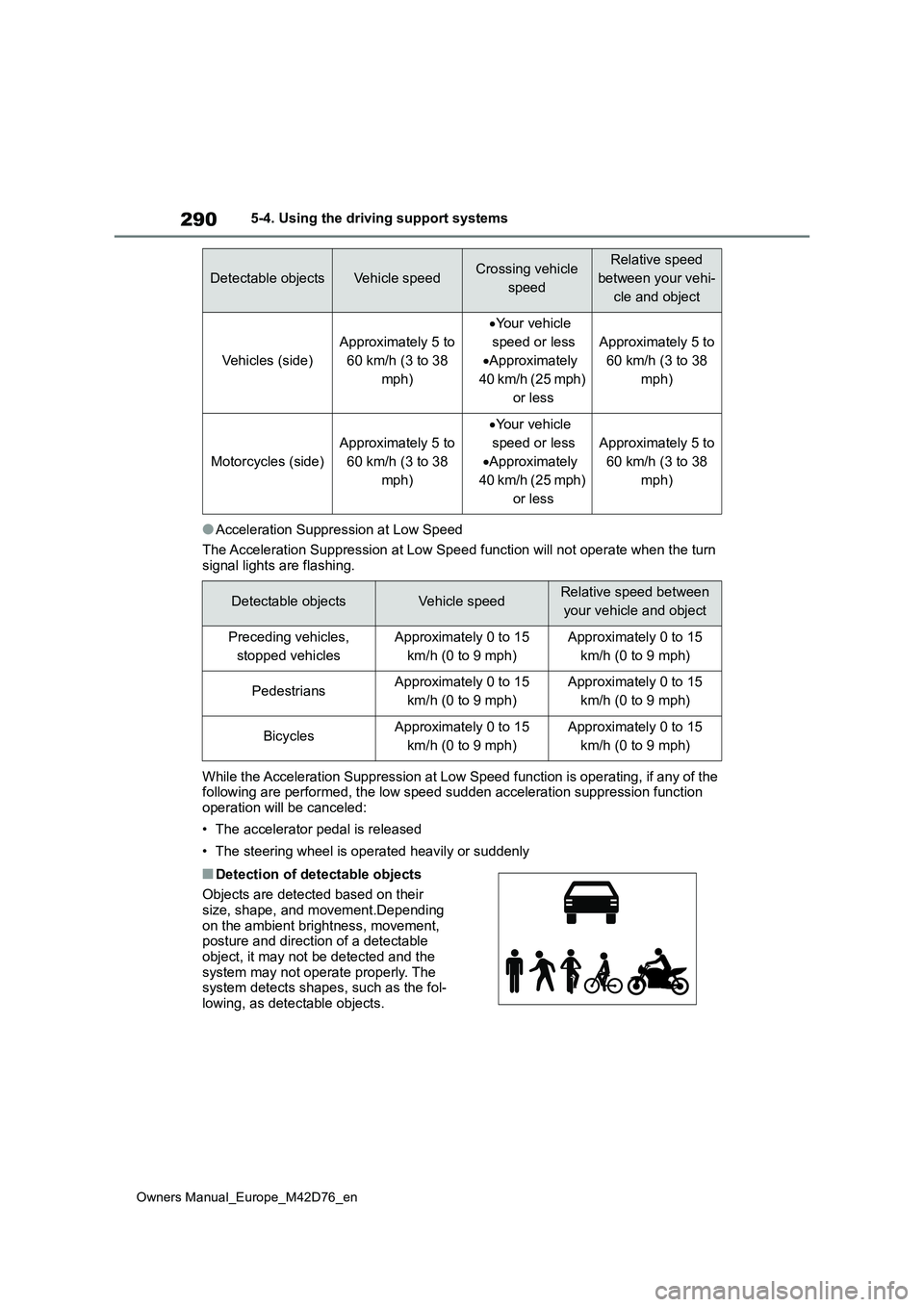
■Detection of detectable objects
Objects are detected based on their size, shape, and movement.Depending
on the ambient brightness, movement, posture and direction of a detectable object, it may not be detected and the
system may not operate properly. The system detects shapes, such as the fol-lowing, as detectable objects.
Detectable objectsVehicle speedCrossing vehicle
speed
Relative speed
between your vehi-
cle and object
Vehicles (side)
Approximately 5 to
60 km/h (3 to 38
mph)
Your vehicle
speed or less
Approximately
40 km/h (25 mph)
or less
Approximately 5 to
60 km/h (3 to 38
mph)
Motorcycles (side)
Approximately 5 to
60 km/h (3 to 38
mph)
Your vehicle
speed or less
Approximately
40 km/h (25 mph)
or less
Approximately 5 to
60 km/h (3 to 38
mph)
Detectable objectsVehicle speedRelative speed between
your vehicle and object
Preceding vehicles,
stopped vehicles
Approximately 0 to 15
km/h (0 to 9 mph)
Approximately 0 to 15
km/h (0 to 9 mph)
PedestriansApproximately 0 to 15
km/h (0 to 9 mph)
Approximately 0 to 15
km/h (0 to 9 mph)
BicyclesApproximately 0 to 15
km/h (0 to 9 mph)
Approximately 0 to 15
km/h (0 to 9 mph)
Page 311 of 674
309
5
Owners Manual_Europe_M42D76_en
5-4. Using the driving support systems
Driving
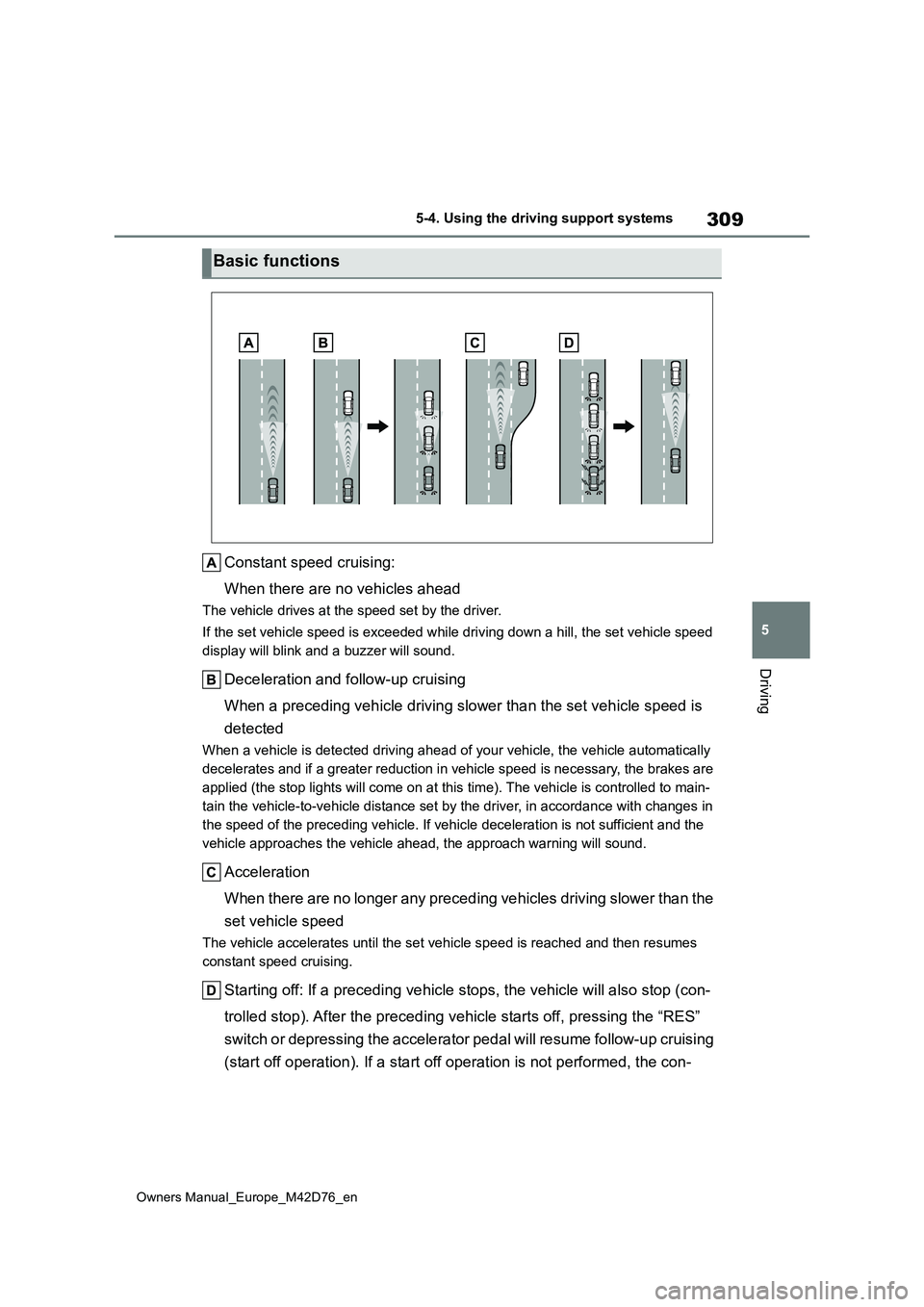
Constant speed cruising:
When there are no vehicles ahead
The vehicle drives at the speed set by the driver.
If the set vehicle speed is exceeded while driving down a hill, the set vehicle speed
display will blink and a buzzer will sound.
Deceleration and follow-up cruising
When a preceding vehicle driving slower than the set vehicle sp eed is
detected
When a vehicle is detected driving ahead of your vehicle, the v ehicle automatically
decelerates and if a greater reduction in vehicle speed is nece ssary, the brakes are
applied (the stop lights will come on at this time). The vehicl e is controlled to main-
tain the vehicle-to-vehicle distance set by the driver, in acco rdance with changes in
the speed of the preceding vehicle. If vehicle deceleration is not sufficient and the
vehicle approaches the vehicle ahead, the approach warning will sound.
Acceleration
When there are no longer any preceding vehicles driving slower than the
set vehicle speed
The vehicle accelerates until the set vehicle speed is reached and then resumes
constant speed cruising.
Starting off: If a preceding vehicle stops, the vehicle will al so stop (con-
trolled stop). After the preceding vehicle starts off, pressing the “RES”
switch or depressing the accelerator pedal will resume follow-u p cruising
(start off operation). If a start off operation is not performe d, the con-
Basic functions
Page 325 of 674
323
5
Owners Manual_Europe_M42D76_en
5-4. Using the driving support systems
Driving
functions of the system cannot oper-
ate: P. 2 8 1
■LTA control when operation is can- celed
When emergency driving stop system
operation is canceled, LTA control may also be canceled.
If driving operations are not
detected after the hands off steer-
ing wheel warning operates, a
buzzer will sound intermittently and
a message will be displayed to
warn the driver, and the system will
judge if the driver is responsive or
not. If driving operations, such as
holding the steering wheel, are not
performed within a certain amount
of time, the system will enter warn-
ing phase 2.
Vehicles with a driver monitor cam-
era: Depending on the type of
detection of the driver’s unrespon-
siveness, the system may skip
warning phase 1 and start the con-
trol of warning phase 2.
After entering warning phase 2, a
buzzer will sound in short intervals
and a message will be displayed to
warn the driver, and the vehicle will
slowly decelerate. If driving opera-
tions, such as holding the steering
wheel, are not performed within a
certain amount of time, the system
will determine that the driver is not
responsive and enter the decelera-
tion stop phase.
The audio system will be muted until
the driver becomes responsive.
When the vehicle is decelerating, the
brake lights may illuminate, depending
on the road conditions, etc.
After the vehicle has decelerated a cer-
tain amount, the emergency flashers
(hazard lights) will flash.
After the driver is judged as being
not responsive, a buzzer will sound
continuously and a message will be
displayed to warn the driver, and
the vehicle will slowly decelerate
and stop. While the vehicle is
decelerating, the emergency flash-
ers (hazard lights) will flash to warn
other drivers of the emergency.
After the vehicle is stopped, the
parking brake will be applied auto-
matically. After entering the stop
and hold phase, the buzzer will
continue sounding continuously, the
emergency flashers (hazard lights)
will flash to warn other drivers of
the emergency, and the doors will
unlock.
Warning phase 1
Warning phase 2
Deceleration stop phase
Stop hold phase
Page 336 of 674
334
Owners Manual_Europe_M42D76_en
5-4. Using the driving support systems
Use the meter control switches to
enable/disable the Toyota parking
assist-sensor. ( P. 1 7 6 )
1 Press or to select .
2 Press or to select
and then press .
When the Toyota parking assist-sensor
function is disabled, the Toyota parking
assist-sensor OFF indicator ( P.169)
illuminates.
To re-enable the system when it was
disabled, select on the multi-infor-
mation display, select and then
On. If disabled using this method, the
system will not be re-enabled by turning
the power switch off and then to ON.
Turning Toyota parking
assist-sensor on/off
WARNING
■Cautions regarding the use of
the system
There is a limit to the degree of recog- nition accuracy and control perfor-
mance that this system can provide, do not overly rely on this system. The driver is always responsible for paying
attention to the vehicle’s surroundings and driving safely.
■To ensure the system can oper-ate properly
Observe the following precautions.
Failing to do so may result in the vehi- cle being unable to be driven safely and possibly cause an accident.
●Do not damage the sensors, and always keep them clean.
●Do not attach a sticker or install an electronic component, such as a backlit license plate (especially fluo-
rescent type), fog lights, fender pole or wireless antenna near a radar sensor.
●Do not subject the surrounding area of the sensor to a strong impact. If
subjected to an impact, have the vehicle inspected by any authorized Toyota retailer or Toyota authorized
repairer, or any reliable repairer. If the front or rear bumper needs to be removed/installed or replaced,
contact any authorized Toyota retailer or Toyota authorized repairer, or any reliable repairer.
●Do n ot m od i fy, d is a sse mb l e o r p ai n t the sensors.
●Do not attach a license plate cover.
●Keep your tires properly inflated.
■When to disable the function
In the following situations, disable the function as it may operate even though there is no possibility of a colli-
sion.
●Failing to observe the warnings
above.
●A non-genuine Toyota suspension
(lowered suspension, etc.) is installed.
■Notes when washing the vehicle
Do not apply intensive bursts of water or steam to the sensor area.
Doing so may result in the sensor malfunctioning.
●When using a high pressure washer to wash the vehicle, do not spray the sensors directly, as doing
so may cause a sensor to malfunc- tion.
Page 353 of 674
351
5
Owners Manual_Europe_M42D76_en
5-4. Using the driving support systems
Driving
ing such as a rain coat, long skirt, etc.,
making their silhouette obscure • Pedestrians whose body is partially hidden by an object, such as a cart or
umbrella • Pedestrians which are obscured by darkness, such as at night
●In some situations, such as the follow-ing, pedestrians may not be detected
by the rear camera detection function, preventing the function from operating properly:
• When backing up in inclement weather (rain, snow, fog, etc.)• When the rear camera is obscured
(dirt, snow, ice, etc., are attached) or scratched• When a very bright light, such as the
sun, or the headlights of another vehi- cle, shines directly into the rear cam-era
• When backing up in a place where the surrounding brightness changes sud-denly, such as at the entrance or exit
of a garage or underground parking lot• When backing up in a dim environ-
ment such as during dusk or in an underground parking lot• When the camera position and direc-
tion are deviated • When a towing hook is attached• When water droplets are flowing on
the camera lens • When the vehicle height is extremely changed (nose up, nose down)
• When tire chains or an emergency tire puncture repair kit is used• When the rear washer is operating
• If the suspension has been modified or tires of a size other than specified are installed.
• If an electronic component, such as a backlit license plate or rear fog light, is installed near the rear camera
• If a bumper protector, such as an additional trim strip, is installed to the rear bumper
■Situations in which the system may
operate unexpectedly
●Even though there are no pedestrians
in the detection area, some objects,
such as the following, may be detected, possibly causing the rear camera detection function to operate.
• Three dimensional objects, such as a pole, traffic cone, fence, or parked vehicle
• Moving objects, such as a car or motorcycle• Objects moving toward your vehicle
when backing up, such as flags or puddles (or airborne matter, such as smoke, steam, rain, or snow)
• Cobblestone or gravel roads, tram rails, road repairs, white lines, pedes-trian crossings or fallen leaves on the
road • Metal covers (gratings), such as those used for drainage ditches
• Objects reflected in a puddle or on a wet road surface• Shadows on the road
●In some situations, such as the follow-ing, the rear camera detection func-
tion may operate even though there are no pedestrians in the detection area.
• When backing up toward the roadside or a bump on the road• When backing up toward an
incline/decline • If the rear of the vehicle is raised or lowered due to the carried load
• If a bumper protector, such as an additional trim strip, is installed to the rear bumper
• If the orientation of the rear camera has been changed• If a towing eyelet is installed to the
rear of the vehicle • When water is flowing over the rear camera lens
• When the rear camera is obscured (dirt, snow, ice, etc., are attached) or scratched
• If there is a flashing light in the detec- tion area, such as the emergency flashers of another vehicle
• When a tire chains or an emergency tire puncture repair kit is used
●Situations in which the rear camera detection function may be difficult to
Page 373 of 674
371
5
Owners Manual_Europe_M42D76_en
5-4. Using the driving support systems
Driving
WARNING
●When starting Remote control func- tion, unlock the doors with wireless
remote control by electronic key.
●When Remote control function is
operating, the driver should remain within approximately 3 m (9.8 ft.) of the vehicle. If the driver becomes
more than approximately 3 m (9.8 ft.) away, Remote control function will be suspended and a message
will be displayed on the smart- phone. Remote control function operation can be resumed by
approaching the vehicle.
●The headlights will be turned on if
the surrounding area is dark.
●If system operation is canceled due
to a malfunction, the emergency flashers will flash.The emergency flashers will turn off
if any of the following conditions are met:
• A door is opened
• 3 minutes have elapsed since the
emergency flashers began flashing
●Remote control function can only
be started when the following con- ditions are met:
• When the EV system is starting, after assist mode is selected
• When the power switch is off
• When the remote air conditioning is
operating
●After unlocking the doors using the
wireless remote control, if the doors are locked using the smart entry function, the lock operation may be
delayed.
NOTICE
■Precautions for use Advanced Park
If the 12-volt battery was discharged or has been removed and installed, fold and extend the outside rear view
mirrors.
■When using Remote control
function
●Check the battery charge level of
the smartphone before using Remote control function. If the bat-tery of the smartphone dies while
operating Remote control function, assist will be suspended. Also, if the battery charge level of the
smartphone is 20% or less when attempting to start Remote control function, Remote control function
will not be started.
●Turn on the Bluetooth communica-
tion function of the smartphone before using Remote control func-tion. Remote control function can-
not be used if the Bluetooth function is off.
●Do not turn off the Bluetooth func-tion of the smartphone or discon-nect from the multimedia system
while using Remote control func- tion. If the vehicle cannot be con-nected to via Bluetooth, Remote
control function cannot be used.
●While using Remote control func-
tion, if a call is received, etc., and another app is opened, Remote control function will be suspended.
Assist can be resumed if the Remote Park app is reopened within 3 minutes. If 3 minutes or
more elapse, assist will be can- celed.