open TOYOTA BZ4X 2023 Owners Manual
[x] Cancel search | Manufacturer: TOYOTA, Model Year: 2023, Model line: BZ4X, Model: TOYOTA BZ4X 2023Pages: 628, PDF Size: 11.91 MB
Page 411 of 628
4116-1. Using the air conditioning system and defogger
Owners Manual_USA_M42C01_en
6
Interior features
■Electronic key battery depletion
P. 1 6 2
■When the electronic key bat-
tery is fully depleted
P. 4 9 7
■Customization
Setting (e.g. Operation using “A/C”
on the wireless remote control) can
be changed. (Customizable fea-
tures: P.575)*: If equipped
WARNING
■Precautions for the Remote
Air Conditioning System
●Do not use the system if people
are in the vehicle.
Even when the system is in use,
the internal temperature may
still reach a high or low level
due to features such as the
automatic shut-off. Children and
pets left inside the vehicle may
suffer heatstroke dehydration or
hypothermia, or could result in
death or serious injury.
●Depending on the surrounding
environment, signals from the
wireless switch may transmit
further than expected. Pay
appropriate attention to the
vehicle’s surroundings and use
the switch only when necessary.
●Do not operate “A/C” if the hood
is open. The air conditioning
may operate unintentionally and
objects may be drawn into the
electrical cooling fan.
NOTICE
■To prevent the traction bat-
tery from being discharged
through incorrect operation
Use “A/C” only when necessary.
Heated steering
wheel*/seat heat-
ers*/seat ventila-
tors*/radiant heater*
Heated steering wheel
Warms up the grip of the
steering wheel
Seat heaters
Warm up the seat upholstery
Seat ventilators
Maintain good airflow on the
seat upholstery by sucking air
into the seats
Radiant heaters
Warm up the feet of the front
seats
WARNING
■To prevent minor burn inju-
ries
Care should be taken if anyone in
the following categories comes in
contact with the steering wheel or
seats when the heater is on:
●Babies, small children, the
elderly, the sick and the physi-
cally challenged
●Persons with sensitive skin
●Persons who are fatigued
●Persons who have taken alco-
hol or drugs that induce sleep
(sleeping drugs, cold remedies,
etc.)
Page 415 of 628
4156-2. Using the interior lights
Owners Manual_USA_M42C01_en
6
Interior features
6-2.Using the interior lights
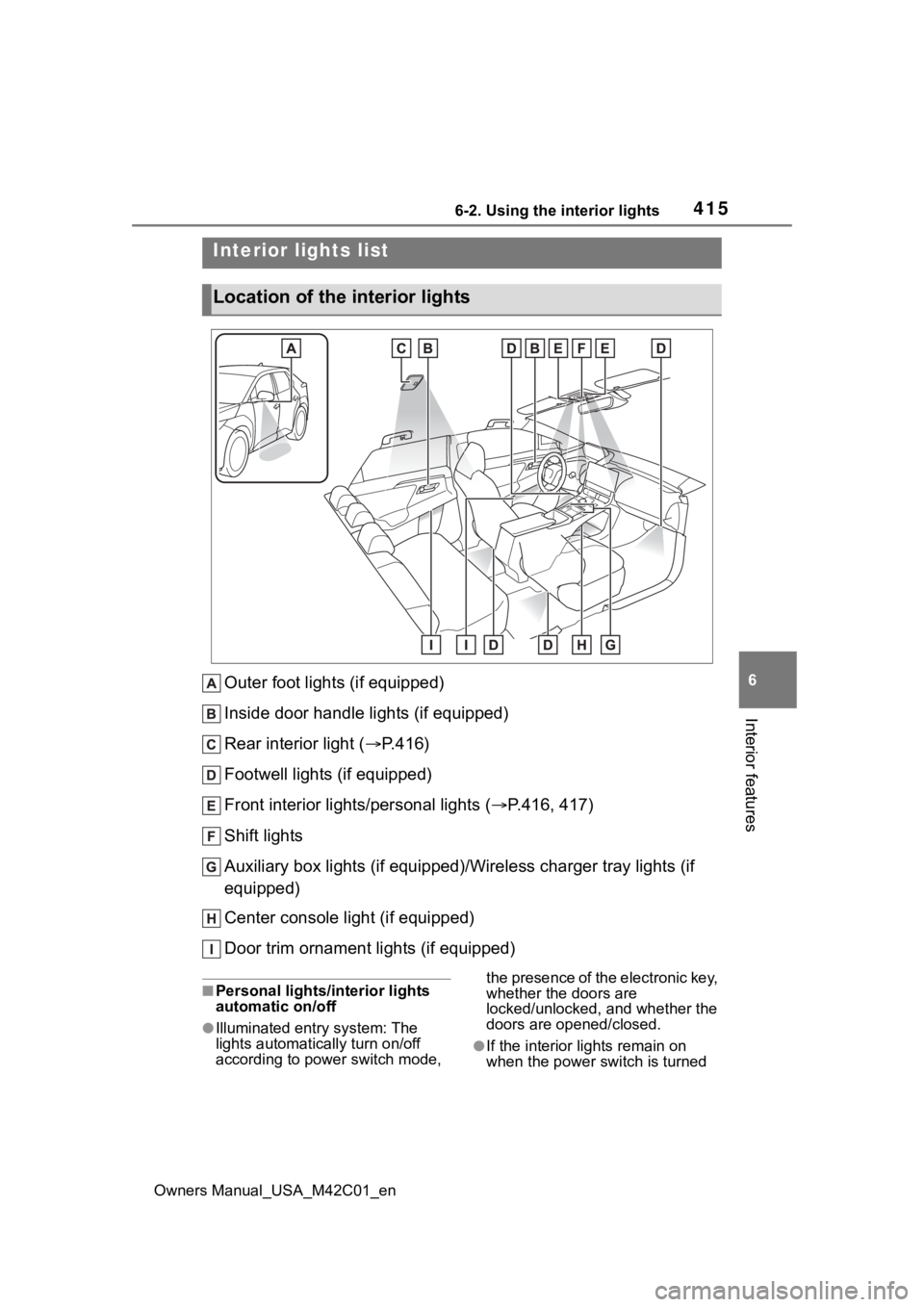
Outer foot lights (if equipped)
Inside door handle lights (if equipped)
Rear interior light ( P.416)
Footwell lights (if equipped)
Front interior lights/personal lights ( P.416, 417)
Shift lights
Auxiliary box lights (if equipped)/Wireless charger tray lights (if
equipped)
Center console light (if equipped)
Door trim ornament lights (if equipped)
■Personal lights/interior lights
automatic on/off
●Illuminated entry system: The
lights automatically turn on/off
according to power switch mode, the presence of the electronic key,
whether the doors are
locked/unlocked, and whether the
doors are opened/closed.
●If the interior
lights remain on
when the power switch is turned
Interior lights list
Location of the i nterior lights
Page 416 of 628
4166-2. Using the interior lights
Owners Manual_USA_M42C01_enoff, the lights will go off automati-
cally after 20 minutes.
■The interior lights will turn on
automatically when
If any of the SRS airbags deploy
(inflate) or in the event of a strong
rear impact, the interior lights will
turn on automatically. The interior
lights will turn off automatically after
approximately 20 minutes.
The interior lights can be turned off
manually. However, in order to help
prevent further collisions, it is rec-
ommended that they be left on until
safety can be ensured.
(The interior lights may not turn on
automatically depending on the
force of the impact and conditions of
the collision.)
■Customization
Setting (e.g. the time elapsed before
the lights turn off) can be changed.
(Customizable features: P.575)
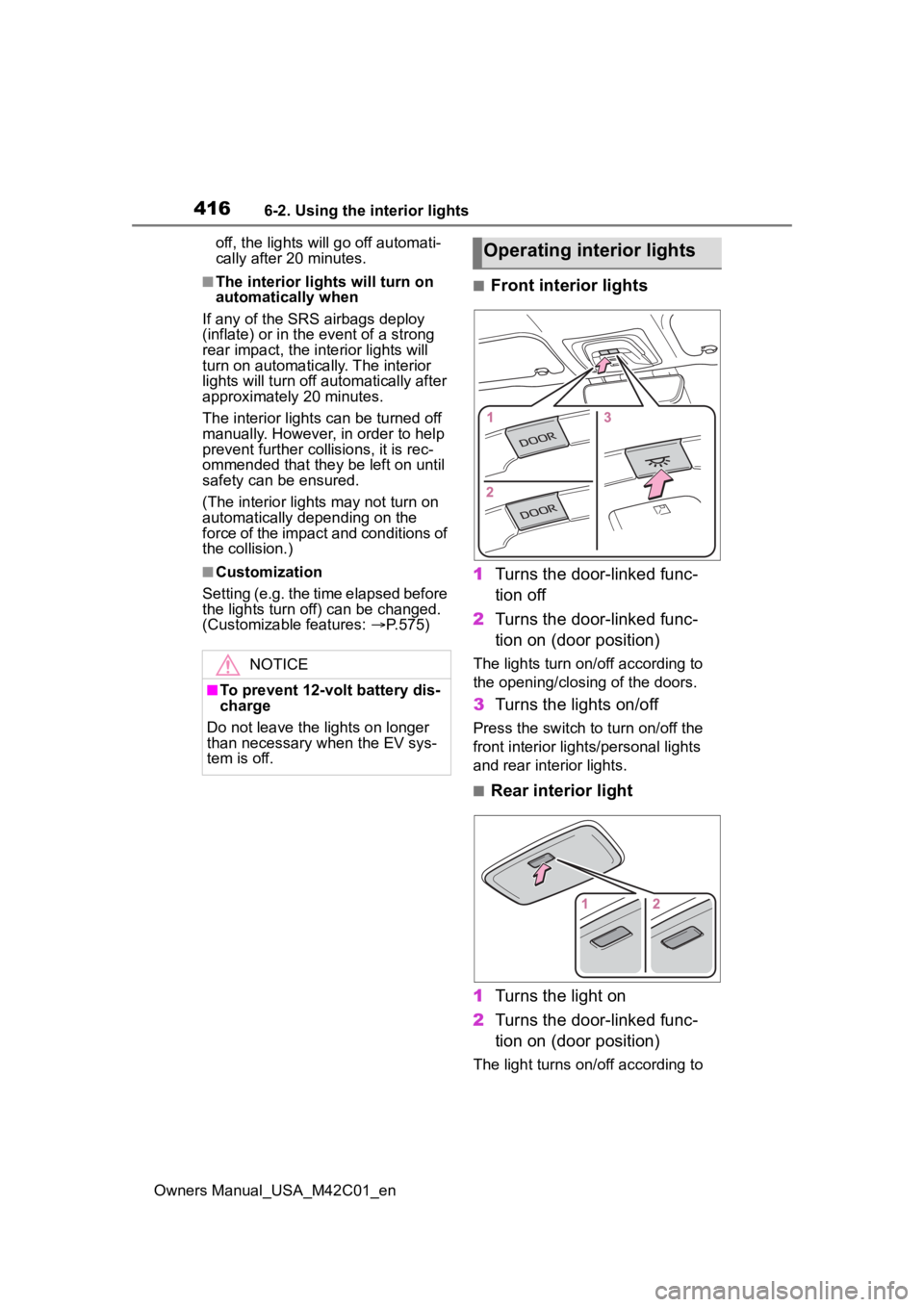
■Front interior lights
1 Turns the door-linked func-
tion off
2 Turns the door-linked func-
tion on (door position)
The lights turn on/off according to
the opening/closing of the doors.
3Turns the lights on/off
Press the switch to turn on/off the
front interior lights/personal lights
and rear interior lights.
■Rear interior light
1 Turns the light on
2 Turns the door-linked func-
tion on (door position)
The light turns on/off according to
NOTICE
■To prevent 12-volt battery dis-
charge
Do not leave the lights on longer
than necessary when the EV sys-
tem is off.
Operating interior lights
Page 417 of 628
4176-2. Using the interior lights
Owners Manual_USA_M42C01_en
6
Interior features
the opening/closing of the doors.
The rear interior light turn on/off
together the front interior light.
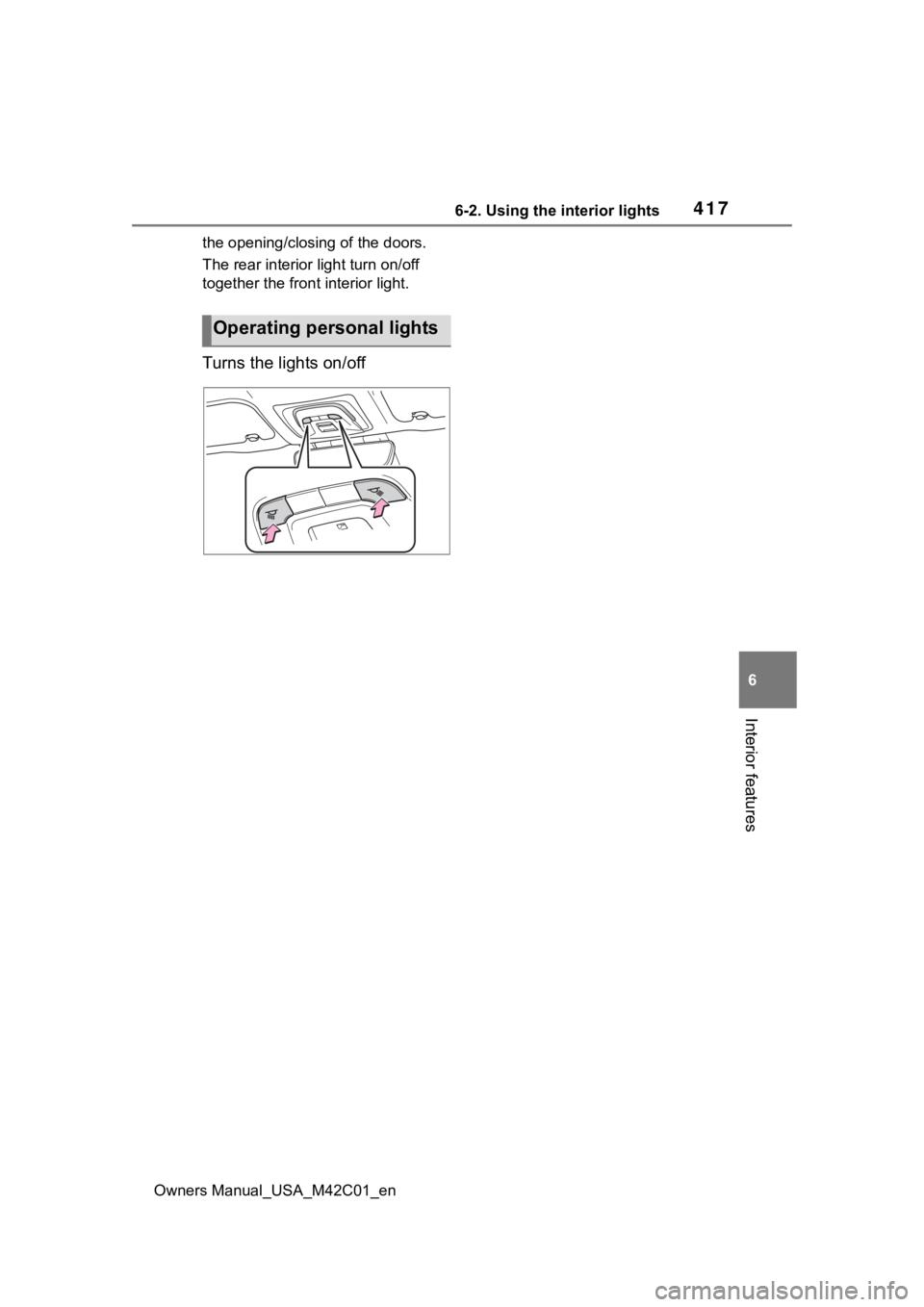
Turns the lights on/off
Operating personal lights
Page 418 of 628
4186-3. Using the storage features
Owners Manual_USA_M42C01_en
6-3.Using the storage features
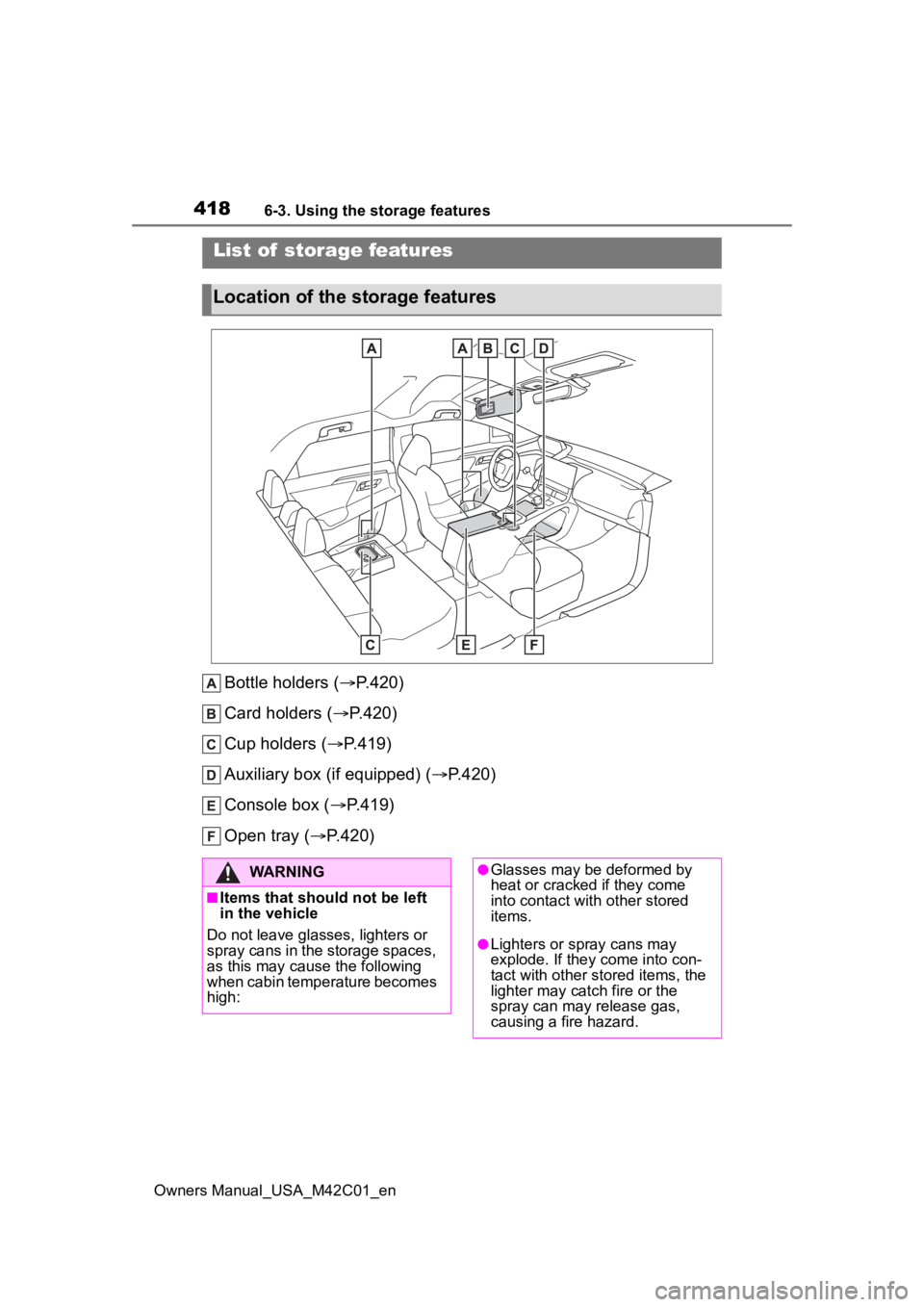
Bottle holders (P.420)
Card holders ( P.420)
Cup holders ( P.419)
Auxiliary box (if equipped) ( P.420)
Console box ( P.419)
Open tray ( P.420)
List of storage features
Location of the storage features
WARNING
■Items that should not be left
in the vehicle
Do not leave glasses, lighters or
spray cans in the storage spaces,
as this may cau se the following
when cabin temperature becomes
high:
●Glasses may be deformed by
heat or cracked if they come
into contact with other stored
items.
●Lighters or spray cans may
explode. If they come into con-
tact with other stored items, the
lighter may catch fire or the
spray can may release gas,
causing a fire hazard.
Page 420 of 628
4206-3. Using the storage features
Owners Manual_USA_M42C01_en
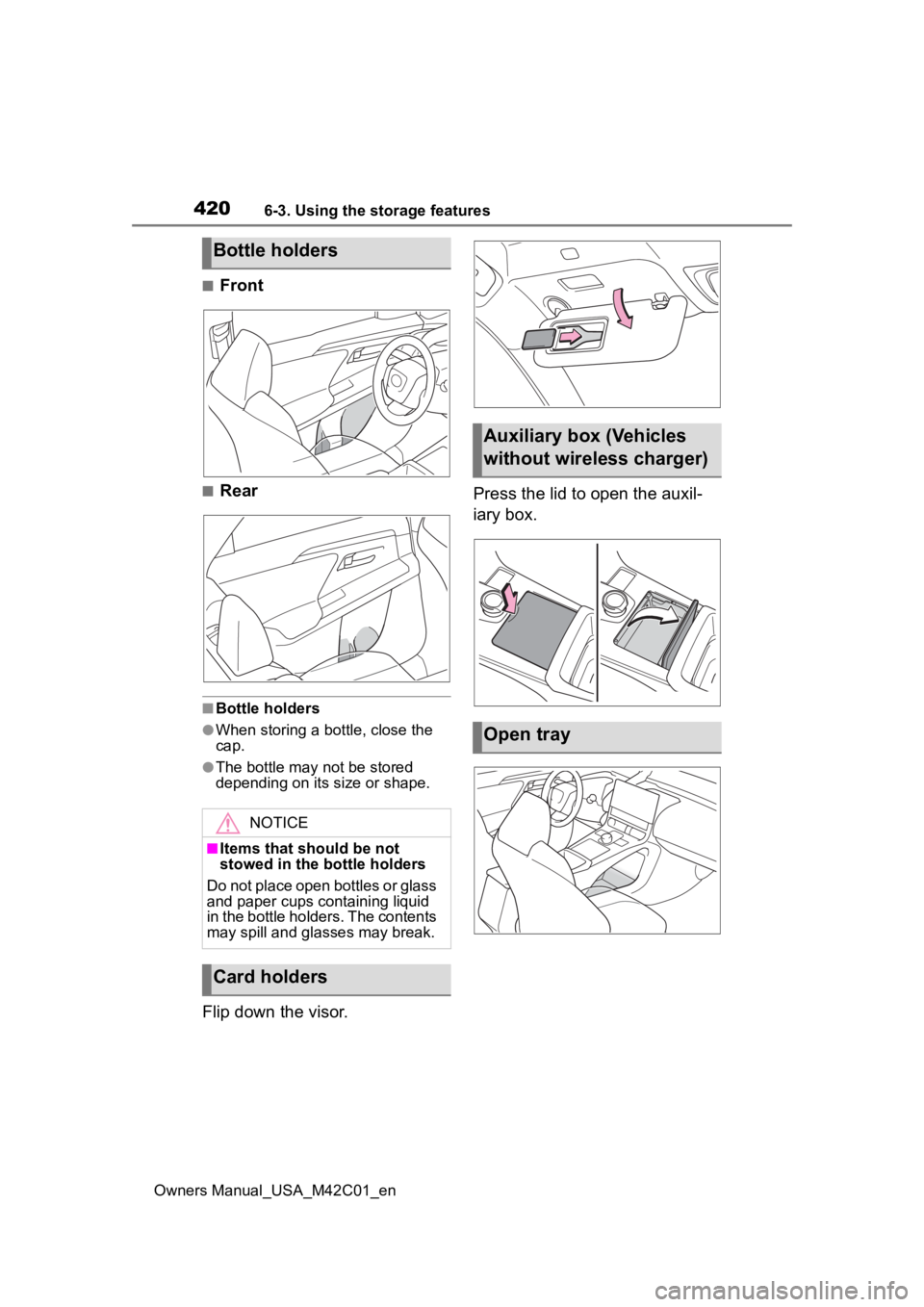
■Front
■Rear
■Bottle holders
●When storing a bottle, close the
cap.
●The bottle may not be stored
depending on its size or shape.
Flip down the visor.Press the lid to open the auxil-
iary box.
Bottle holders
NOTICE
■Items that should be not
stowed in the bottle holders
Do not place open bottles or glass
and paper cups containing liquid
in the bottle holders. The contents
may spill and glasses may break.
Card holders
Auxiliary box (Vehicles
without wireless charger)
Open tray
Page 421 of 628
4216-3. Using the storage features
Owners Manual_USA_M42C01_en
6
Interior features
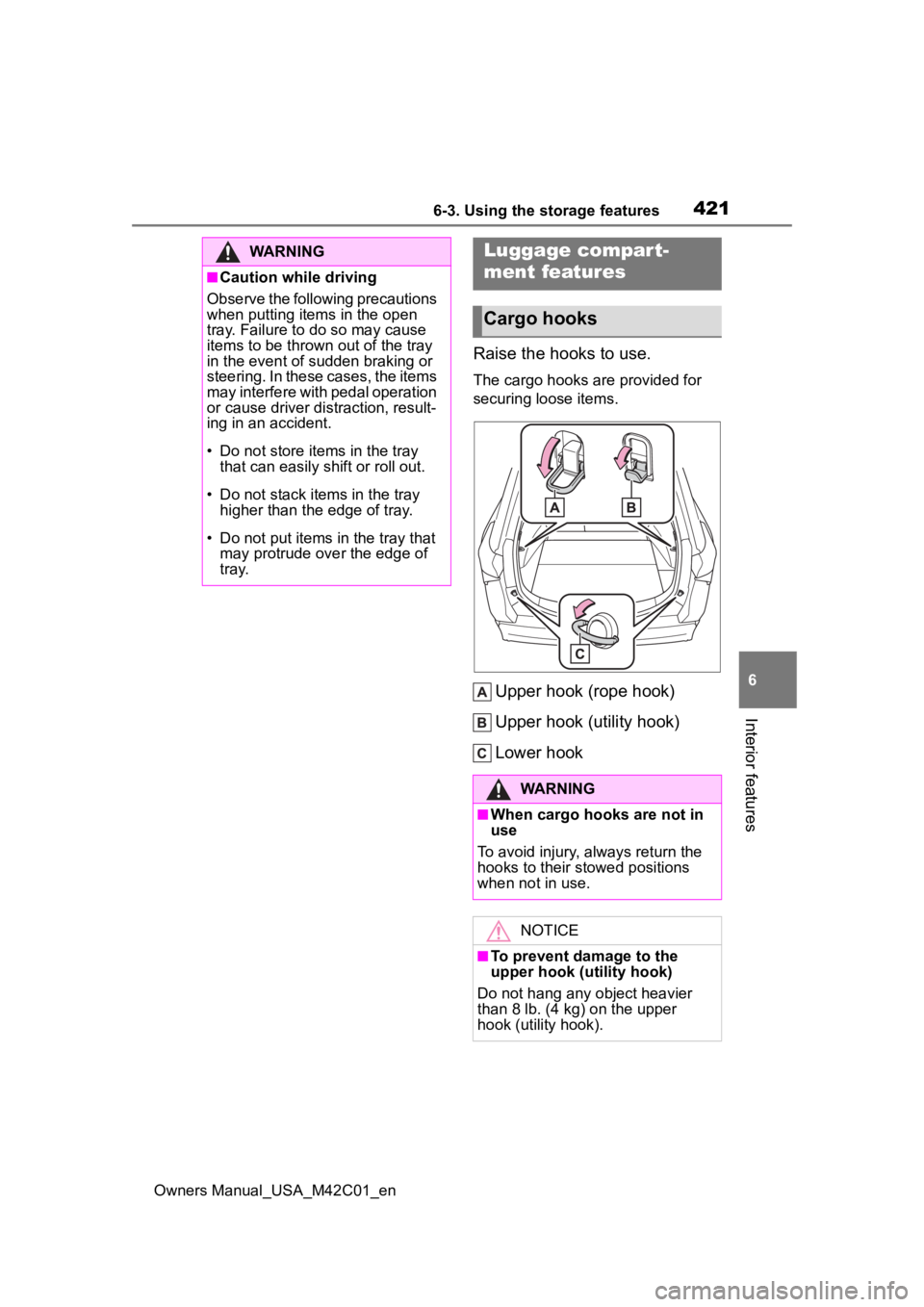
Raise the hooks to use.
The cargo hooks are provided for
securing loose items.
Upper hook (rope hook)
Upper hook (utility hook)
Lower hook
WARNING
■Caution while driving
Observe the following precautions
when putting items in the open
tray. Failure to do so may cause
items to be thrown out of the tray
in the event of sudden braking or
steering. In these cases, the items
may interfere with pedal operation
or cause driver distraction, result-
ing in an accident.
• Do not store items in the tray
that can easily shift or roll out.
• Do not stack items in the tray higher than the edge of tray.
• Do not put items in the tray that may protrude over the edge of
tray.
Luggage compar t-
ment features
Cargo hooks
WARNING
■When cargo hooks are not in
use
To avoid injury , always return the
hooks to their stowed positions
when not in use.
NOTICE
■To prevent damage to the
upper hook (utility hook)
Do not hang any object heavier
than 8 lb. (4 kg) on the upper
hook (utility hook).
Page 426 of 628
4266-4. Using the other interior features
Owners Manual_USA_M42C01_en
6-4.Using the other interior features
*: If equipped
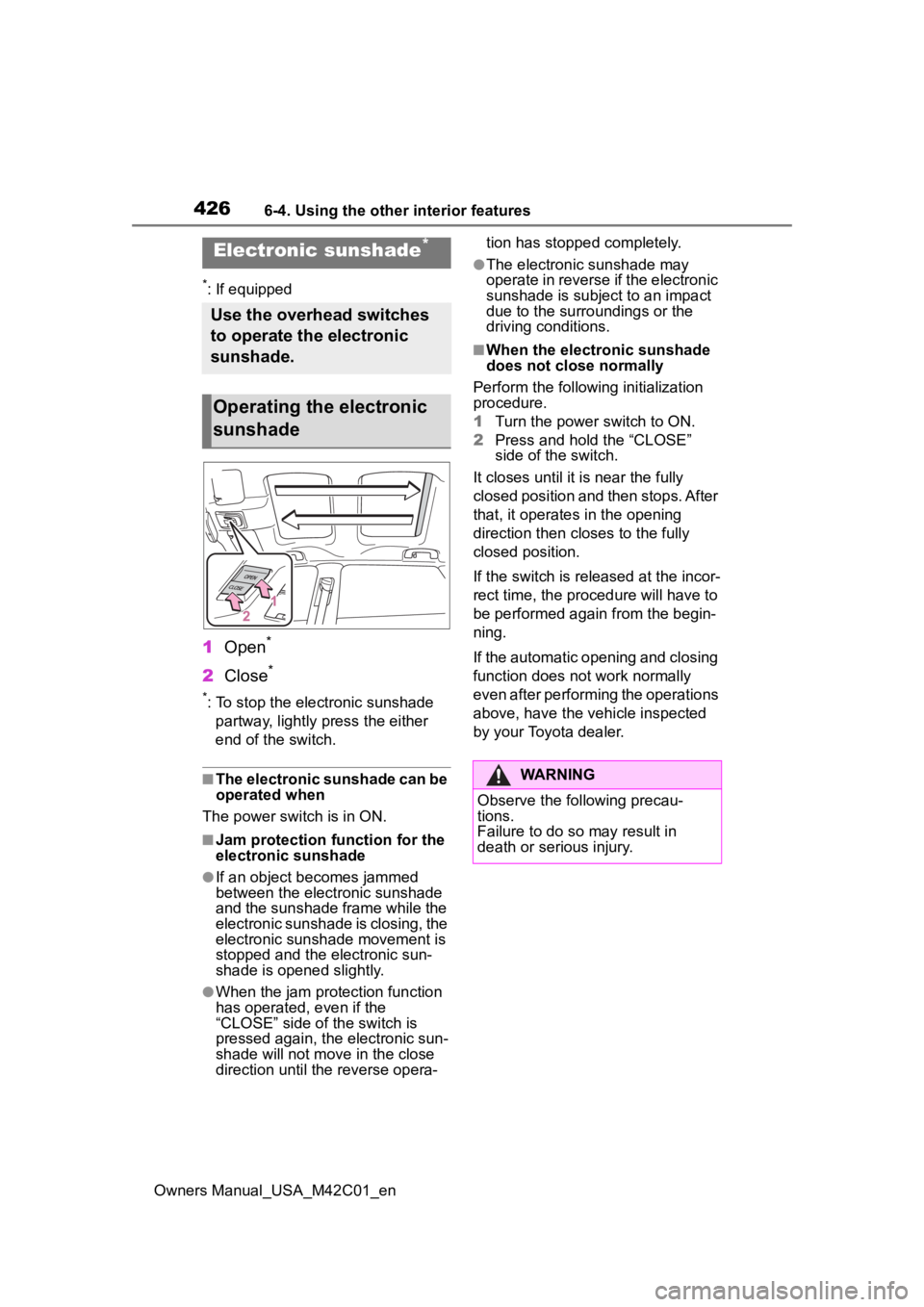
1Open*
2Close*
*: To stop the electronic sunshade
partway, lightly p ress the either
end of the switch.
■The electronic sunshade can be
operated when
The power swit ch is in ON.
■Jam protection function for the
electronic sunshade
●If an object becomes jammed
between the electronic sunshade
and the sunshade frame while the
electronic sunshade is closing, the
electronic sunshade movement is
stopped and the electronic sun-
shade is opened slightly.
●When the jam protection function
has operated, even if the
“CLOSE” side of the switch is
pressed again, the electronic sun-
shade will not m ove in the close
direction until the reverse opera- tion has stopped completely.
●The electronic sunshade may
operate in reverse if the electronic
sunshade is subject to an impact
due to the surro
undings or the
driving conditions.
■When the electronic sunshade
does not close normally
Perform the following initialization
procedure.
1 Turn the power switch to ON.
2 Press and hold the “CLOSE”
side of the switch.
It closes until it is near the fully
closed position and then stops. After
that, it operates in the opening
direction then closes to the fully
closed position.
If the switch is released at the incor-
rect time, the proc edure will have to
be performed again from the begin-
ning.
If the automatic opening and closing
function does not work normally
even after performing the operations
above, have the vehicle inspected
by your Toyota dealer.
Electronic sunshade*
Use the overhead switches
to operate the electronic
sunshade.
Operating the electronic
sunshade
WARNING
Observe the following precau-
tions.
Failure to do so may result in
death or serious injury.
Page 427 of 628
4276-4. Using the other interior features
Owners Manual_USA_M42C01_en
6
Interior features
WARNING
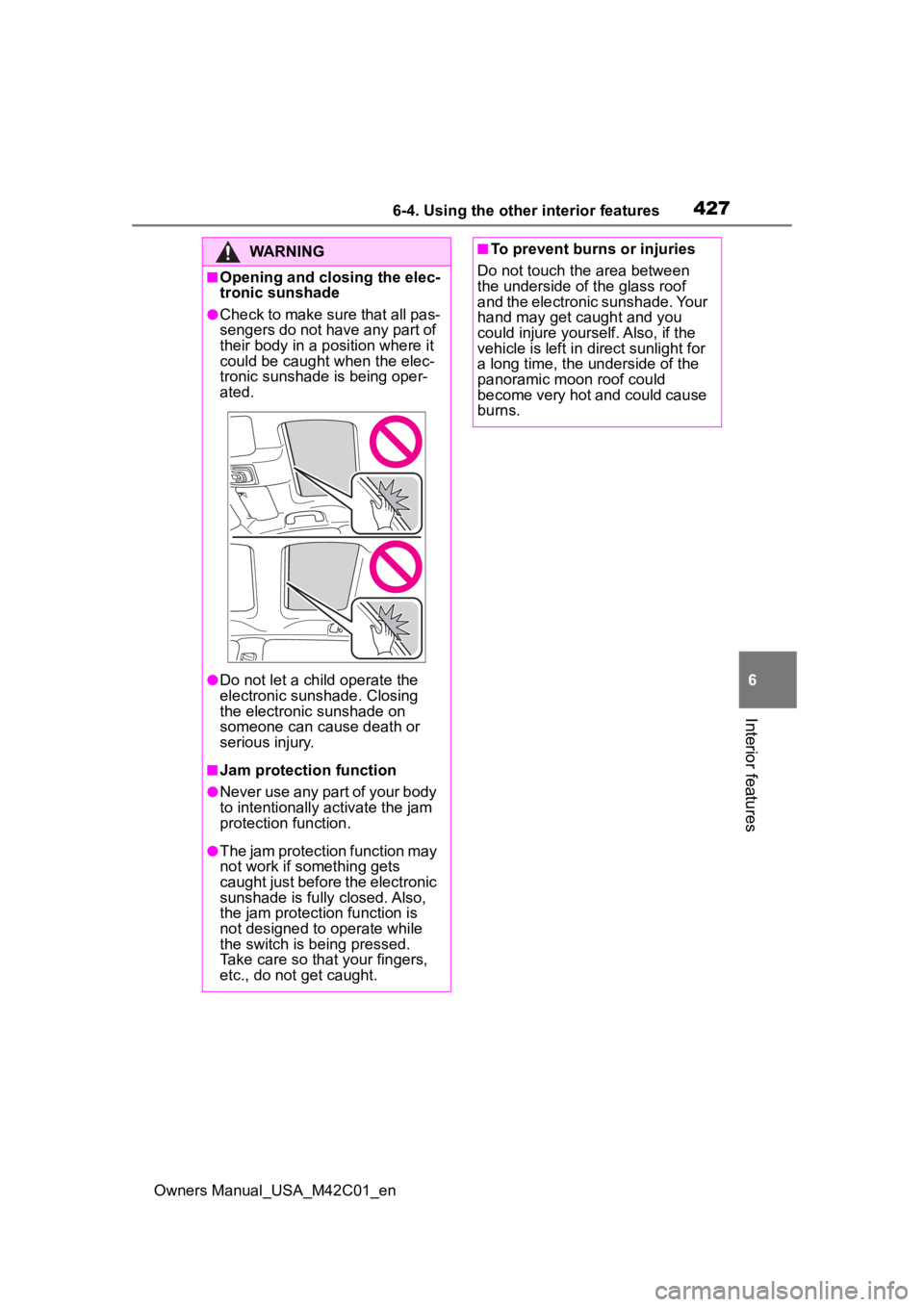
■Opening and closing the elec-
tronic sunshade
●Check to make sure that all pas-
sengers do not have any part of
their body in a position where it
could be caught when the elec-
tronic sunshade is being oper-
ated.
●Do not let a child operate the
electronic sunshade. Closing
the electronic sunshade on
someone can cause death or
serious injury.
■Jam protection function
●Never use any part of your body
to intentionally a ctivate the jam
protection function.
●The jam protection function may
not work if something gets
caught just before the electronic
sunshade is fully closed. Also,
the jam protecti on function is
not designed to operate while
the switch is being pressed.
Take care so that your fingers,
etc., do not get caught.
■To prevent burns or injuries
Do not touch the area between
the underside of the glass roof
and the electronic sunshade. Your
hand may get caught and you
could injure yourself. Also, if the
vehicle is left in direct sunlight for
a long time, the underside of the
panoramic moon roof could
become very hot and could cause
burns.
Page 428 of 628
4286-4. Using the other interior features
Owners Manual_USA_M42C01_en
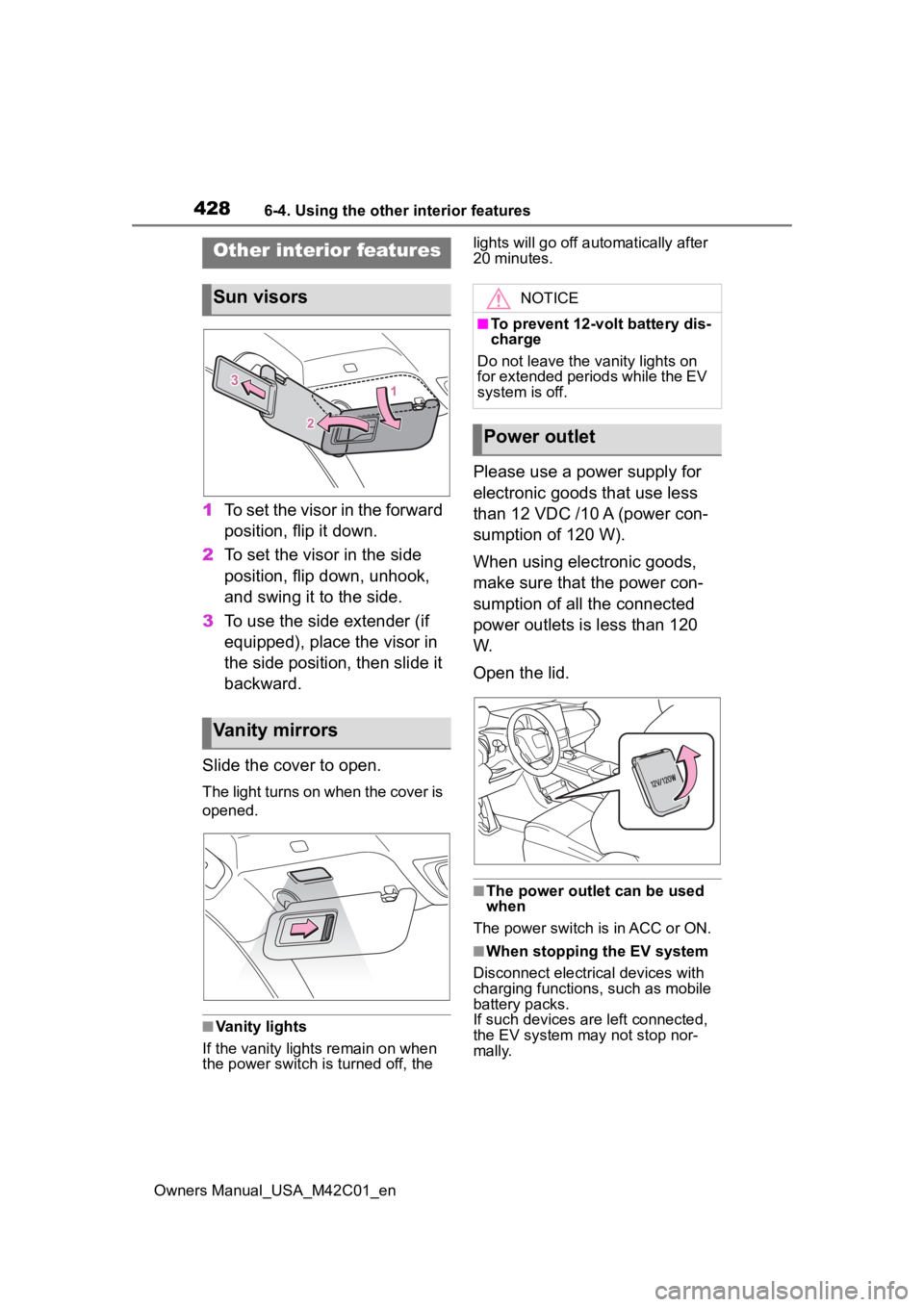
1To set the visor in the forward
position, flip it down.
2 To set the visor in the side
position, flip down, unhook,
and swing it to the side.
3 To use the side extender (if
equipped), place the visor in
the side position, then slide it
backward.
Slide the cover to open.
The light turns on when the cover is
opened.
■Vanity lights
If the vanity light s remain on when
the power switch is turned off, the lights will go off automatically after
20 minutes.
Please use a power supply for
electronic goods that use less
than 12 VDC /10 A (power con-
sumption of 120 W).
When using electronic goods,
make sure that the power con-
sumption of all the connected
power outlets is less than 120
W.
Open the lid.
■The power outlet can be used
when
The power switch is in ACC or ON.
■When stopping the EV system
Disconnect electrical devices with
charging functions, such as mobile
battery packs.
If such devices are left connected,
the EV system may not stop nor-
mally.
Other interior features
Sun visors
Vanity mirrors
NOTICE
■To prevent 12-volt battery dis-
charge
Do not leave the vanity lights on
for extended periods while the EV
system is off.
Power outlet