open TOYOTA BZ4X 2023 Manual PDF
[x] Cancel search | Manufacturer: TOYOTA, Model Year: 2023, Model line: BZ4X, Model: TOYOTA BZ4X 2023Pages: 628, PDF Size: 11.91 MB
Page 249 of 628
2495-3. Operating the lights and wipers
Owners Manual_USA_M42C01_en
5
Driving
■Automatic light off system
●When the headlights are on: The
lights turn off 30 seconds after the
power switch is turned to ACC or
OFF and a door is opened and
closed. (The lights turn off immedi-
ately if on the key is
pressed after all the doors are
closed.)
●When only the tail lights are on:
The tail lights tu rn off automati-
cally if the power switch is turned
to ACC or OFF and the driver’s
door is opened.
To turn the lights on again, turn the
power switch to ON, or turn the light
switch to the or position
once and then back to or
position.
■Light reminder buzzer
A buzzer sounds when the power
switch is turned to ACC or OFF and
the driver’s door is opened while the
lights are turned on.
■Automatic headlight leveling
system
The level of the headlights is auto-
matically adjusted according to the
number of passengers and the load-
ing condition of the vehicle to
ensure that the headlights do not
interfere with other road users.
■Windshield wiper linked head-
light illumination
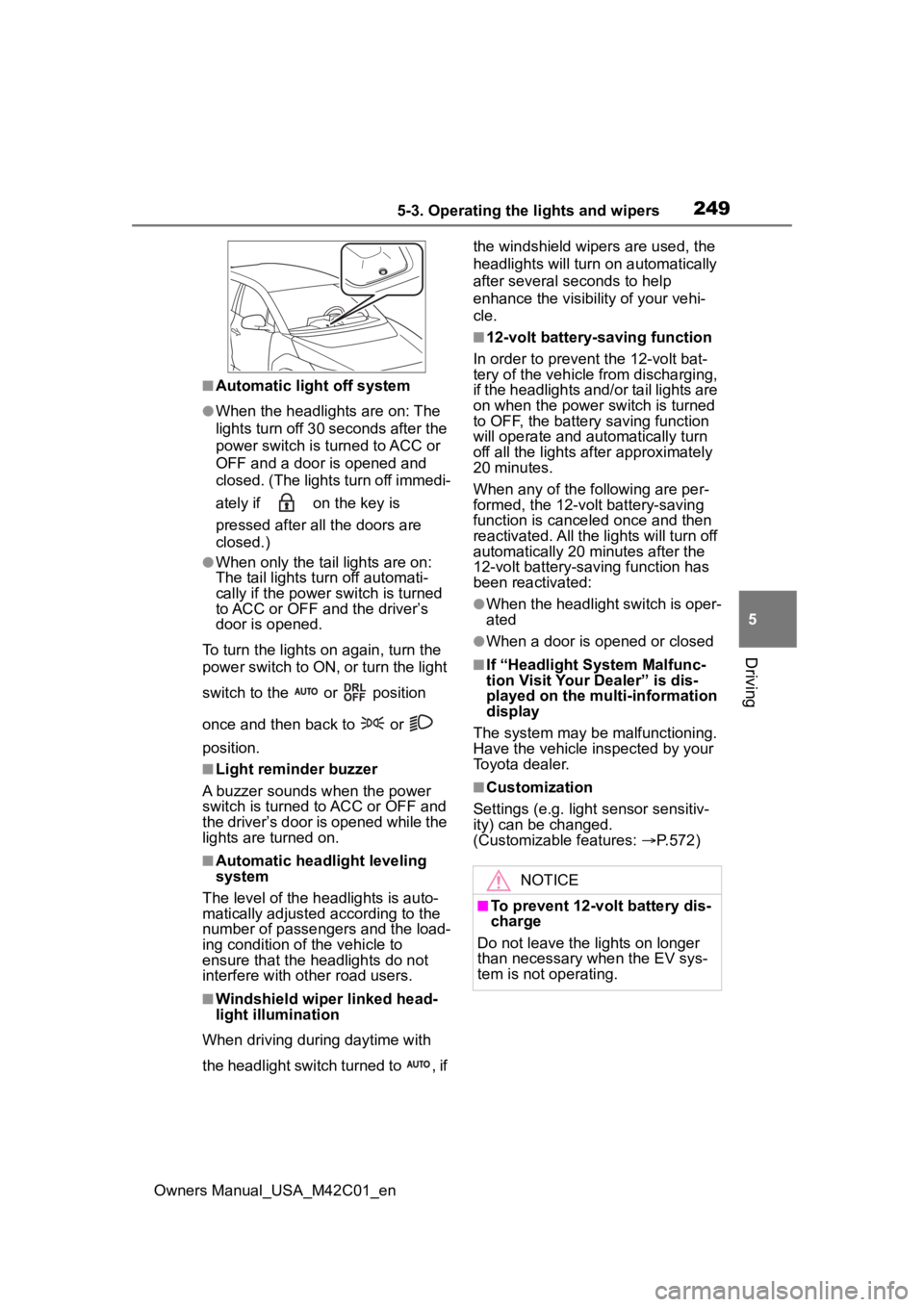
When driving during daytime with
the headlight switch turned to , if the windshield wipers are used, the
headlights will turn o
n automatically
after several seconds to help
enhance the visibility of your vehi-
cle.
■12-volt battery-saving function
In order to prevent the 12-volt bat-
tery of the vehicle from discharging,
if the headlights and/or tail lights are
on when the power switch is turned
to OFF, the battery saving function
will operate and au tomatically turn
off all the lights af ter approximately
20 minutes.
When any of the following are per-
formed, the 12-volt battery-saving
function is canceled once and then
reactivated. All the lights will turn off
automatically 20 minutes after the
12-volt battery-saving function has
been reactivated:
●When the headlight switch is oper-
ated
●When a door is opened or closed
■If “Headlight System Malfunc-
tion Visit Your Dealer” is dis-
played on the multi-information
display
The system may be malfunctioning.
Have the vehicle inspected by your
Toyota dealer.
■Customization
Settings (e.g. light sensor sensitiv-
ity) can be changed.
(Customizable features: P.572)
NOTICE
■To prevent 12-volt battery dis-
charge
Do not leave the lights on longer
than necessary when the EV sys-
tem is not operating.
Page 274 of 628
2745-4. Using the driving support systems
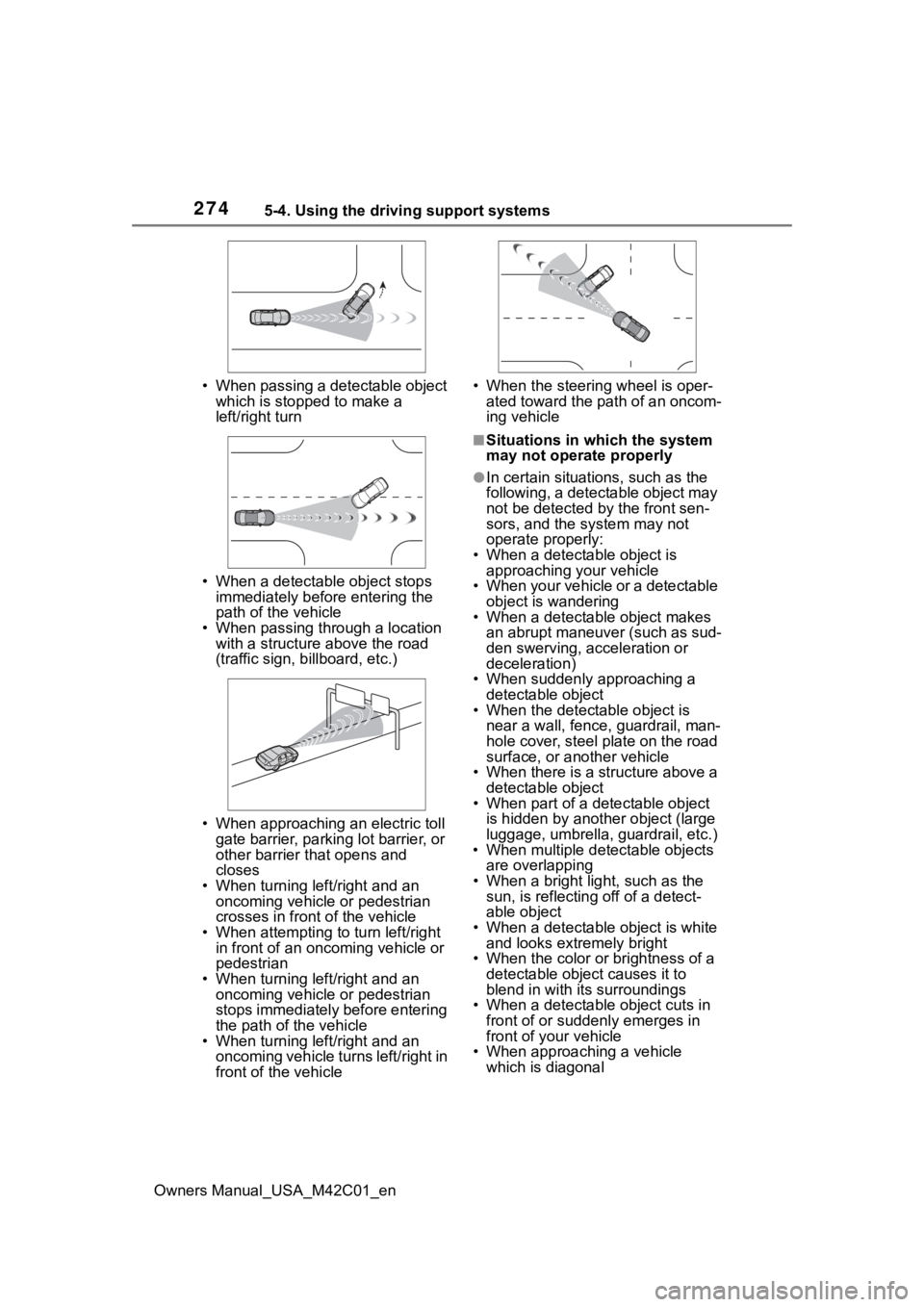
Owners Manual_USA_M42C01_en• When passing a detectable object
which is stopped to make a
left/right turn
• When a detectable object stops immediately before entering the
path of the vehicle
• When passing through a location with a structure above the road
(traffic sign, b illboard, etc.)
• When approaching an electric toll gate barrier, parking lot barrier, or
other barrier that opens and
closes
• When turning left/right and an oncoming vehicle or pedestrian
crosses in front of the vehicle
• When attempting to turn left/right in front of an oncoming vehicle or
pedestrian
• When turning left/right and an oncoming vehicle or pedestrian
stops immediately before entering
the path of the vehicle
• When turning left/right and an oncoming vehicle turns left/right in
front of the vehicle • When the steering wheel is oper-
ated toward the path of an oncom-
ing vehicle
■Situations in which the system
may not operate properly
●In certain situations, such as the
following, a detectable object may
not be detected by the front sen-
sors, and the system may not
operate properly:
• When a detectable object is approaching your vehicle
• When your vehicle or a detectable object is wandering
• When a detectable object makes
an abrupt maneuver (such as sud-
den swerving, acceleration or
deceleration)
• When suddenly approaching a detectable object
• When the detectable object is
near a wall, fence, guardrail, man-
hole cover, steel plate on the road
surface, or another vehicle
• When there is a structure above a detectable object
• When part of a detectable object
is hidden by another object (large
luggage, umbrella, guardrail, etc.)
• When multiple det ectable objects
are overlapping
• When a bright light, such as the sun, is reflecting off of a detect-
able object
• When a detectable object is white and looks extremely bright
• When the color or brightness of a detectable object causes it to
blend in with its surroundings
• When a detectable object cuts in
front of or suddenly emerges in
front of your vehicle
• When approaching a vehicle
which is diagonal
Page 294 of 628
2945-4. Using the driving support systems
Owners Manual_USA_M42C01_enoperated
●When the vehicle is stopped by
system control on a steep incline
●When any of the following are
detected while the vehicle is
stopped by system control:
• The driver’s seat belt is unfas-
tened
• The driver’s door is opened
• Approximately 3 minutes have elapsed since the vehicle was
stopped
The parking brake may be actived
automatically.
The shift position may automatically
change to P. ( P.238)
●Situations in whic h some or all of
the functions of the system cannot
operate: P. 2 6 4
■Dynamic radar cruise control
system warning messages and
buzzers
For safe use: P.259
■Preceding vehicles that the sen-
sor may not detect correctly
In the following situations, depend-
ing on the conditions, if the system
cannot provide sufficient decelera-
tion or accelerati on is necessary,
operate the brake pedal or accelera-
tor pedal.
As the sensor may not be able to
correctly detect these types of vehi-
cles, the approach warning
( P.294) may not operate.
●When a vehicle cuts in front of
your vehicle or changes lanes
away from your vehicle extremely
slowly or quickly
●When changing lanes
●When a preceding vehicle is driv-
ing at a low speed
●When a vehicle i s stopped in the
same lane as the vehicle
●When a motorcycle is traveling in
the same lane as the vehicle
■Conditions under which the
system may not operate cor-
rectly
In the following situations, operate
the brake pedal (or accelerator
pedal, depending on the situation)
as necessary.
As the sensor may not be able to
correctly detect a vehicle, the sys-
tem may not operate properly.
●When a preceding vehicle brakes
suddenly
●When changing lanes at low
speeds, such as in a traffic jam
In situations where the vehicle
approaches a preceding vehicle
and the system cannot provide
sufficient deceleration, such as
if a vehicle cuts in front of the
vehicle, a warning display will
flash and a buzzer will sound to
alert the driver. Depress the
brake pedal to ensure appropri-
ate vehicle-to-vehicle distance.
■Warnings may not occur
when
In the following situations, the
warning may not operate even
though the vehicle-to-vehicle
distance is short.
When the preceding vehicle is
traveling at the same speed
or faster than your vehicle
When the preceding vehicle is
traveling at an extremely low
speed
Immediately after the vehicle
speed has been set
Approach warning
Page 307 of 628
3075-4. Using the driving support systems
Owners Manual_USA_M42C01_en
5
Driving
*: If equipped
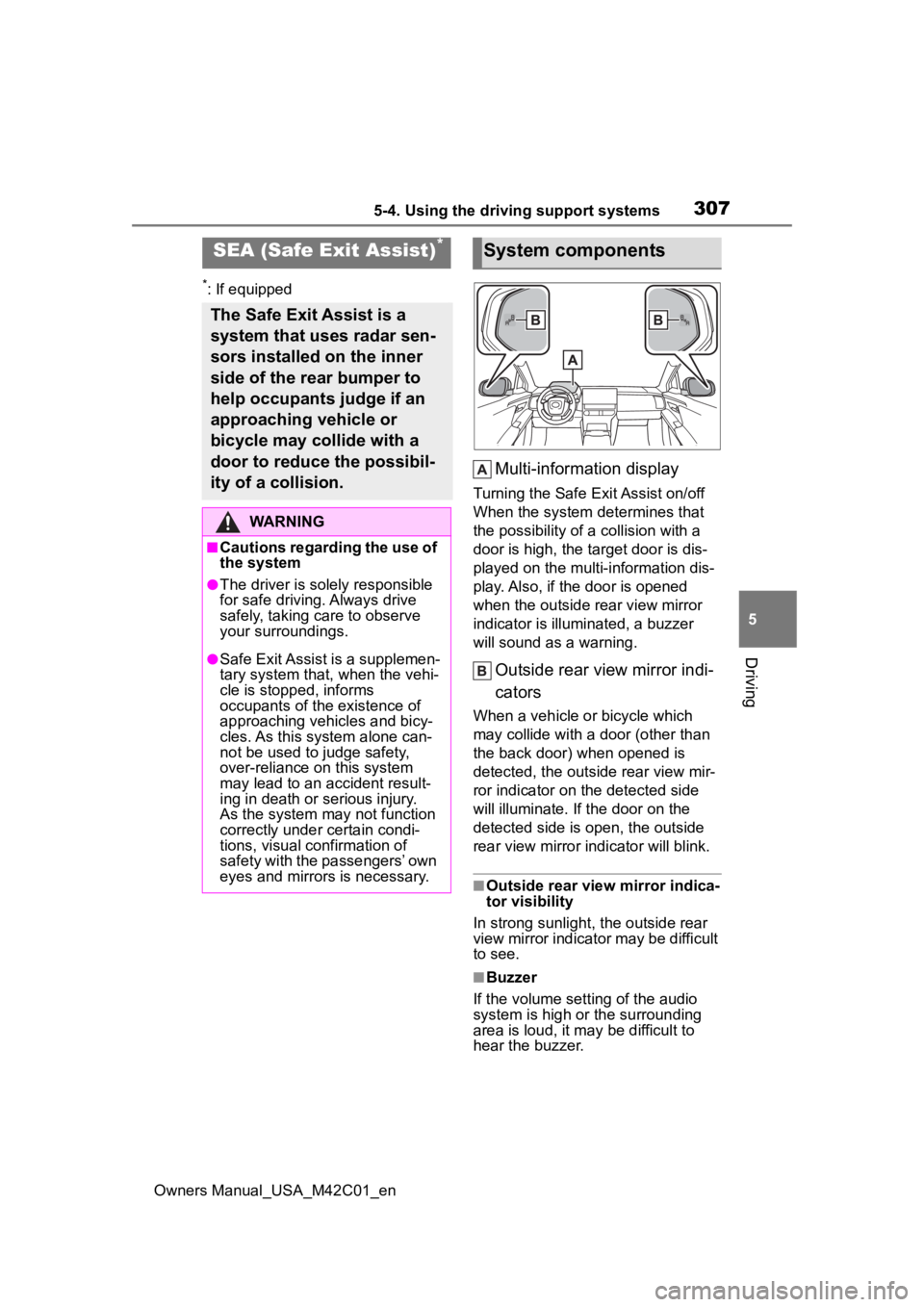
Multi-information display
Turning the Safe Exit Assist on/off
When the system determines that
the possibility of a collision with a
door is high, the target door is dis-
played on the multi-information dis-
play. Also, if the door is opened
when the outside r ear view mirror
indicator is illuminated, a buzzer
will sound as a warning.
Outside rear view mirror indi-
cators
When a vehicle or bicycle which
may collide with a door (other than
the back door) when opened is
detected, the outside rear view mir-
ror indicator on the detected side
will illuminate. If the door on the
detected side is open, the outside
rear view mirror indicator will blink.
■Outside rear vie w mirror indica-
tor visibility
In strong sunlight, the outside rear
view mirror indicator may be difficult
to see.
■Buzzer
If the volume setting of the audio
system is high or the surrounding
area is loud, it may be difficult to
hear the buzzer.
SEA (Safe Exit Assist)*
The Safe Exit Assist is a
system that uses radar sen-
sors installed on the inner
side of the rear bumper to
help occupants judge if an
approaching vehicle or
bicycle may collide with a
door to reduce the possibil-
ity of a collision.
WARNING
■Cautions regarding the use of
the system
●The driver is solely responsible
for safe driving. Always drive
safely, taking care to observe
your surroundings.
●Safe Exit Assist is a supplemen-
tary system that, when the vehi-
cle is stopped, informs
occupants of the existence of
approaching vehicles and bicy-
cles. As this system alone can-
not be used to judge safety,
over-reliance on this system
may lead to an accident result-
ing in death or serious injury.
As the system may not function
correctly under certain condi-
tions, visual confirmation of
safety with the passengers’ own
eyes and mirrors is necessary.
System components
Page 309 of 628
3095-4. Using the driving support systems
Owners Manual_USA_M42C01_en
5
Driving
Each time the power switch is
turned to ON, the Safe Exit Assist is enabled.
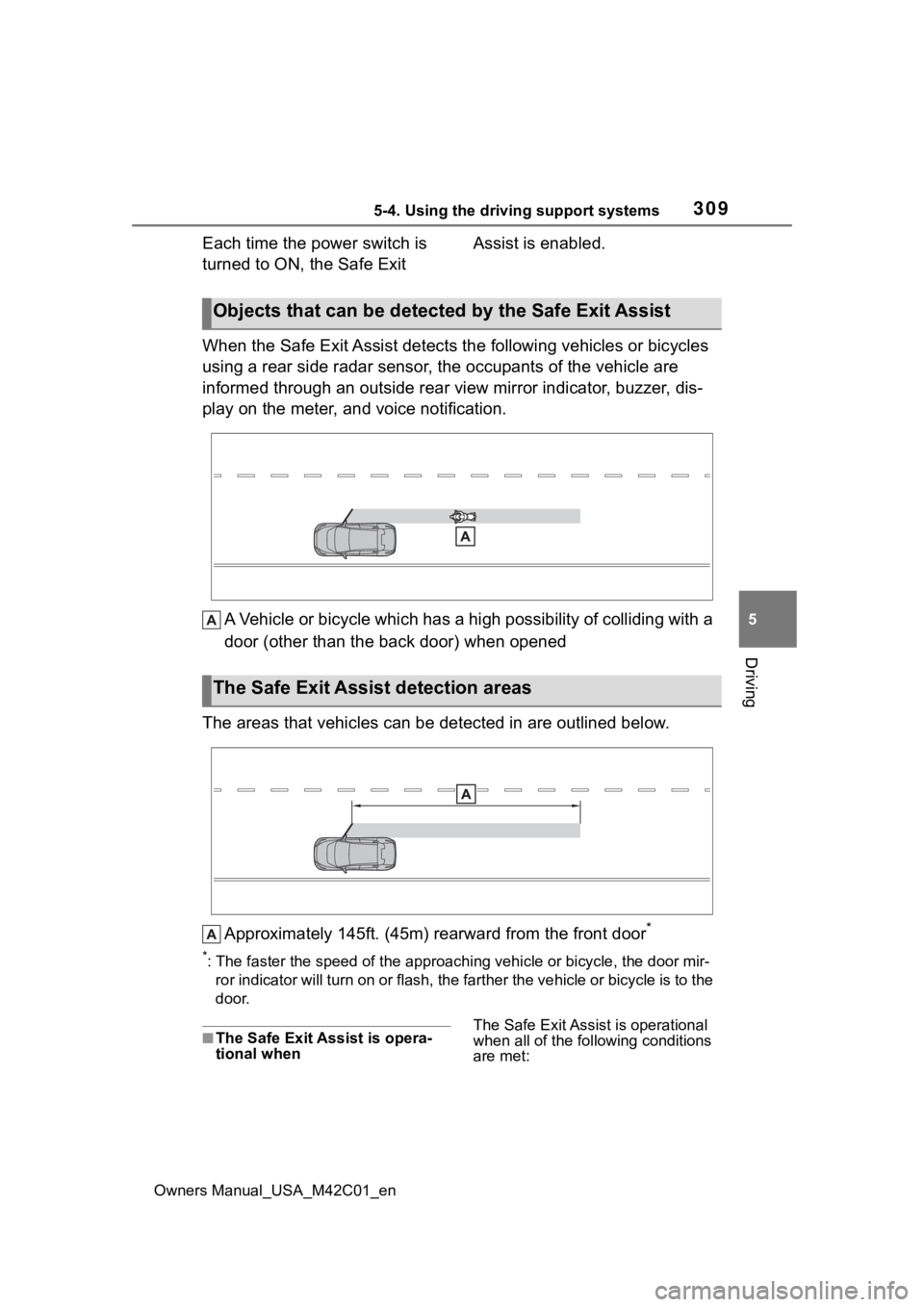
When the Safe Exit Assist detec ts the following vehicles or bicycles
using a rear side radar sensor, the occupants of the vehicle are
informed through an outside rear view mirror indicator, buzzer, dis-
play on the meter, and voice notification.
A Vehicle or bicycle which has a high possibility of colliding with a
door (other than the back door) when opened
The areas that vehicles can be detected in are outlined below.
Approximately 145ft. (45m) rearward from the front door
*
*: The faster the speed of the approaching vehicle or bicycle, th e door mir-
ror indicator will turn on or fla sh, the farther the vehicle or bicycle is to the
door.
■The Safe Exit Ass ist is opera-
tional when The Safe Exit Assist is operational
when all of the fo
llowing conditions
are met:
Objects that can be detected by the Safe Exit Assist
The Safe Exit Assist detection areas
Page 310 of 628
3105-4. Using the driving support systems
Owners Manual_USA_M42C01_en
●When the EV system is running,
less than 3 minutes have elapsed
since the EV system was stopped,
or less than 3 minutes have
elapsed since a door was opened
and someone has entered the
vehicle (the time which operation
is possible may be extended if a
door is opened and closed)
●When the Safe Exit Assist is on
●The vehicle is stopped.
●The shift position is in a position
other than R.
■The Safe Exit Assist will detect
a vehicle when
The Safe Exit Assi st will detect a
vehicle present in the detection area
in the followin g situations:
When the vehicle is stopped and a
vehicle or bicycle, which is traveling
parallel to the vehicle, is approach-
ing within the area that a door opens
(other than the back door)
■Conditions under which the
system will not detect a vehicle
●Safe Exit Assist does not detect
the following objects, vehicles,
and bicycles:
• Vehicles or bicycles which are approaching slowly
• Vehicles or bicycles which are determined to have a low possibil-
ity of colliding with a door (other
than the back door) when opened
• Vehicles or bicycles which are determined to have a low possibil-
ity of colliding with a door when
opened
• Vehicles or bicycles which are
approaching from directly behind
• Vehicles or bicycles which are approaching from the front
• Guardrails, walls , signs, parked
vehicles, and other stationary
objects
• Animals, etc.
●In situations such as the following,
Safe Exit Assist will not operate:
• When 3 minutes or more have elapsed since the EV system off
(the time which op eration is possi- ble may be extended if a door is
opened and closed)
• When your vehicle is not com-
pletely stopped
■Conditions under which the
system may not function cor-
rectly
●Vehicles and bicycles may not be
effectively detect ed in the follow-
ing situations:
• When the sensor is misaligned due to a strong impact to the sen-
sor or its surrounding area
• When mud, snow, ice, a sticker, etc., is covering the sensor or sur-
rounding area on the rear bumper
• When driving on a road surface that is wet with standing water
during bad weather, such as
heavy rain, snow, or fog
• When a vehicle or bicycle
approaches from behind a nearby
parked vehicle
• When an approaching vehicle or
bicycle suddenly changes direc-
tion
• Immediately after a vehicle or
bicycle starts moving
• When the back door is open
• When a bicycle carrier, ramp, or other accessory is installed to the
back of the vehicle
• When a parked vehicle, wall, sign,
person or other stationary object
is behind the vehicle
• When the vehicle is stopped at an
angle to the road
• When a vehicle is traveling near an approaching vehicle or bicycle
• When an approaching vehicle or bicycle is traveling along a station-
ary object, such a wall or sign
• When a vehicle or bicycle is approaching at high speed
• When towing with the vehicle
• When stopped on a steep incline
• When stopped on a curve or at the exit of a curve
●Instances of the Safe Exit Assist
unnecessarily detecting a vehicle
and/or object may increase in the
following situations:
• When the sensor is misaligned
Page 311 of 628
3115-4. Using the driving support systems
Owners Manual_USA_M42C01_en
5
Driving
due to a strong impact to the sen-
sor or its surrounding area
• When a vehicle or bicycle
approaches from behind your
vehicle at an angle
• When the vehicle is stopped at an
angle to the road
• When a vehicle or bicycle approaches from behind a parked
vehicle at an angle
• When a parked vehicle, wall, sign, person or other stationary object
is behind the vehicle
• When an approaching vehicle or bicycle suddenly changes direc-
tion
• When an approaching vehicle or bicycle is traveling along a station-
ary object, such a wall or sign
• When the back door is open
• When a bicycle carrier, ramp, or other accessory is installed to the
back of the vehicle
• When a vehicle or bicycle is
approaching at high speed
• When towing with the vehicle
• When stopped on a steep incline
• When stopped on a curve or at the exit of a curve
*: If equipped
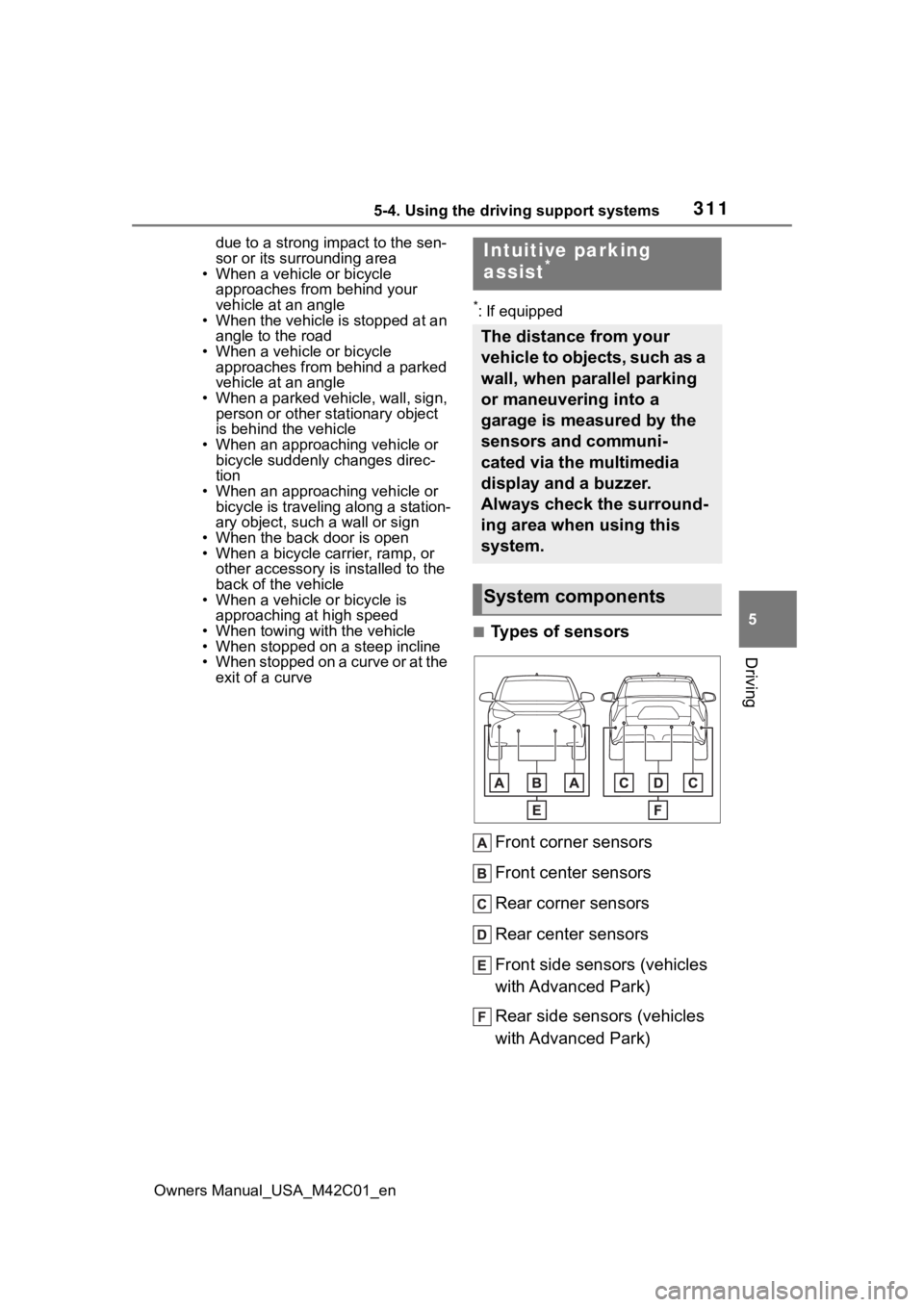
■Types of sensors
Front corner sensors
Front center sensors
Rear corner sensors
Rear center sensors
Front side sensors (vehicles
with Advanced Park)
Rear side sensors (vehicles
with Advanced Park)
Intuitive parking
assist*
The distance from your
vehicle to objects, such as a
wall, when parallel parking
or maneuvering into a
garage is measured by the
sensors and communi-
cated via the multimedia
display and a buzzer.
Always check the surround-
ing area when using this
system.
System components
Page 346 of 628
3465-4. Using the driving support systems
Owners Manual_USA_M42C01_en
WARNING
●Depending on the condition of
the road surface or the vehicle,
the distance between the vehi-
cle and a parking space, etc., it
may not be possible to detect a
parking space or the system
may not be able to provide
assistance to the point the vehi-
cle is fully parked.
●This system will guide the vehi-
cle to appropriate positions for
changing the direction of travel,
however, if you feel that the
vehicle is approaching too close
to an adjacent parked vehicle at
any time, depress the brake
pedal and change the shift posi-
tion. However, if this is per-
formed, the number of times the
vehicle changes direction may
increase, and the vehicle may
be parked at an angle.
●As following objects may not be
detected, make sure to check
the safety of the area around
your vehicle and depress the
brake pedal to stop the vehicle if
it may collide with an object.
• Thin objects such as wire, fences, rope, etc.
• Cotton, snow and other materi- als that absorb sound waves
• Sharply-angled objects
• Low objects (curb stones, park- ing blocks, etc.)
• Tall objects with upper sections that protrude outward
●Even if there is an object in the
target parking space, it may not
be detected and assistance
may be performed.
●While the system is operating, if
it is likely that your vehicle will
collide with a nearby vehicle,
parking block, object, or person,
depress the brake pedal to stop
the vehicle and press the
Advanced Park main switch to
disable the system.
●Never use only the multimedia
display to view the area behind
the vehicle. The image dis-
played may dif fer than the
actual situation. Using only the
screen when backing up may
lead to an accident, such as a
collision with another vehicle.
When backing up, make sure to
look directly or use the mirrors
to check the safe ty of the area
around your vehicle, especially
behind the vehicle.
●When the ambient temperature
is extremely low, the screen
may appear dark or the dis-
played image may become
unclear. Also, as moving objects
may appear distorted or may
not be able to be seen on the
screen, make sure to directly
check the safety of the area
around your vehicle.
In the following situations, while
the vehicle is stopped and held
by Advanced Park, it may be
canceled and th e vehicle may
start moving. Immediately
depress the brake pedal. Fail-
ure to do so may lead to an
accident.
• When the driver’s door is opened
• When operations instructed by the system are not performed
within a certain amount of time
• When the brake pedal is depressed and th e vehicle is
stopped for a certain amount of
time
Page 349 of 628
3495-4. Using the driving support systems
Owners Manual_USA_M42C01_en
5
Driving
WARNING
●Remote control function can
only perform some driving oper-
ations. It should only be oper-
ated by a driver with a valid
driving license. While using
application, carry, electronic
key. While operating, do not
stare at the application screen,
and pay attention to the vehi-
cle’s surroundings. In an emer-
gency, cancel the Remote
control function operation and
stop the vehicle.
●As with a normal vehicle, take
care to observe the area around
the vehicle while the vehicle is
moving.
●Always pay attention to the
vehicle’s surroundings while the
system is operating.
●Remote control function is a
system which assists in remote
parking or exiting operations
using a smartphone. When
using Remote control function,
the driver must carry the elec-
tronic key and smartphone and
confirm the safe ty of the area
around the vehicle.
●While using Remote control
function, the vehicle can be
stopped by stop continuously
operating the smartphone (stop-
ping movement of your finger,
removing your fi nger from the
screen, etc.). The vehicle can
also be stopped by touching the
cancel button on the smart-
phone application, unlocking the
doors using the electronic key,
or opening a door.
●If it seems like your vehicle may
contact an obstruction, etc.,
stop operating the smartphone
and cancel Remote control
function if necessary.
●System operation will only be
performed at a f ixed speed and
the vehicle cannot be acceler-
ated or decelera ted even if the
speed of continuous operation
of the smartphone is increased
or decreased.
●Never drive the vehicle while
staring at the smartphone
screen.
●When driving, make sure to
directly check the safety of the
area around your vehicle.
●Do not use Remote control
function when passengers or
pets are in the vehicle.
●In an emergency, the system
can be canceled by operating a
switch on the electronic key or
by opening a door.
●To use Remote control function,
it is necessary to have a smart-
phone with the latest version of
the Remote Park app. The fol-
lowing operating systems are
supported:
• Android
™
• Apple® iOS
●When registering the vehicle to
the Remote Park smartphone
app, disconnect any other apps
which are connected to the
vehicle.
●To enable Remote control func-
tion, make sure to disable the
Apple CarPlay connection.
●When parking, make sure that
the vehicle can be parked in the
target parking space before
beginning operation.
Page 350 of 628
3505-4. Using the driving support systems
Owners Manual_USA_M42C01_en
WARNING
●Only use Remote control func-
tion on level road surfaces
which are not slick. Do not use
Remote control function for
parking spaces on a downward
or upward incline.
●While Remote control function
is operating, if a malfunction or
system limitation is detected,
the following will occur automat-
ically:
• Remote control function will be canceled
• The vehicle will stop
• The shift position will change to P and the parking brake will be
engaged
• The power switch will turn off
(for some malfunctions, the
power switch will not turn off or
cannot be turned off. Enter the
vehicle and take corrective
action accordin g to the mes-
sage displayed on the smart-
phone.)
• The doors will remain locked
●When starting Remote control
function, unlock the doors with
wireless remote control by elec-
tronic key.
●When Remote control function
is operating, the driver should
remain within approximately 9.8
ft. (3 m) of the vehicle. If the
driver becomes more than
approximately 9.8 ft. (3 m)
away, Remote control function
will be suspend ed and a mes-
sage will be displayed on the
smartphone. Re mote control
function operation can be
resumed by approaching the
vehicle.
●The headlights will be turned on
if the surrounding area is dark.
●If system operation is canceled
due to a malfunction, the emer-
gency flashers will flash.
The emergency flashers will
turn off if any of the following
conditions are met:
• A door is opened
• 3 minutes have elapsed since the emergency flashers began
flashing
●Remote control function can
only be started when the follow-
ing conditions are met:
• When the EV system is starting, after assist mode is selected
• When the power switch is off
• When the remote air condition- ing is operating
●After unlocking the doors using
the wireless remote control, if
the doors are lo cked using the
smart entry function, the lock
operation may be delayed.
NOTICE
■Precautions for use
Advanced Park
If the 12-volt battery was dis-
charged or has been removed
and installed, fold and extend the
outside rear view mirrors.
■When using Remote control
function