open TOYOTA BZ4X 2023 Manual Online
[x] Cancel search | Manufacturer: TOYOTA, Model Year: 2023, Model line: BZ4X, Model: TOYOTA BZ4X 2023Pages: 628, PDF Size: 11.91 MB
Page 351 of 628
3515-4. Using the driving support systems
Owners Manual_USA_M42C01_en
5
Driving
NOTICE
●Check the battery charge level
of the smartphon e before using
Remote control function. If the
battery of the smartphone dies
while operating Remote control
function, assist will be sus-
pended. Also, if the battery
charge level of the smartphone
is 20% or less when attempting
to start Remote control function,
Remote control function will not
be started.
●Turn on the Bluetooth communi-
cation function of the smart-
phone before using Remote
control function. Remote con-
trol function cannot be used if
the Bluetooth function is off.
●Do not turn off the Bluetooth
function of the smartphone or
disconnect from the multimedia
system while using Remote
control function. If the vehicle
cannot be connected to via
Bluetooth, Remote control func-
tion cannot be used.
●While using Remote control
function, if a call is received,
etc., and another app is
opened, Remote control func-
tion will be suspended. Assist
can be resumed if the Remote
Park app is reopened within 3
minutes. If 3 minutes or more
elapse, assist will be canceled.
●While using Remote control
function, if the home button or
power button of the smartphone
is pressed and the screen is
locked, Remote control function
will be suspended. Assist can
be resumed if the Remote Park
app is reopened within 3 min-
utes. If 3 minutes or more
elapse, assist will be canceled.
●Do not use the Remote Park
app with devices other than
those which operation has been
confirmed by the maker. Other-
wise the system may not oper-
ate correctly.
●When the ambient temperature
is low, it may take time for the
system to start, due to 12-volt
battery charging.
●If the 12-volt battery voltage
drops, assistance will be can-
celed.
●When using Remote control
function on a slope, the vehicle
speed will be slower and the
distance that th e vehicle will
approach objects will become
longer than when on a level
road surface.
●If a system temporary failure
occurs, after th e vehicle is
stopped by the electronic park-
ing brake or the shift position
being changed to P, the power
switch may turn off and the sys-
tem may be canceled. In this
case, have the vehicle
inspected by your Toyota
dealer.
●If a system malfunction occurs,
assistance may be temporarily
suspended. If the system
returns to normal, operation can
be resumed. Follow the content
on the smartphone screen to
resume operation.
●Remote control function cannot
be started if the EV system has
been started using an aftermar-
ket remote starter.
Page 376 of 628
3765-4. Using the driving support systems
Owners Manual_USA_M42C01_en
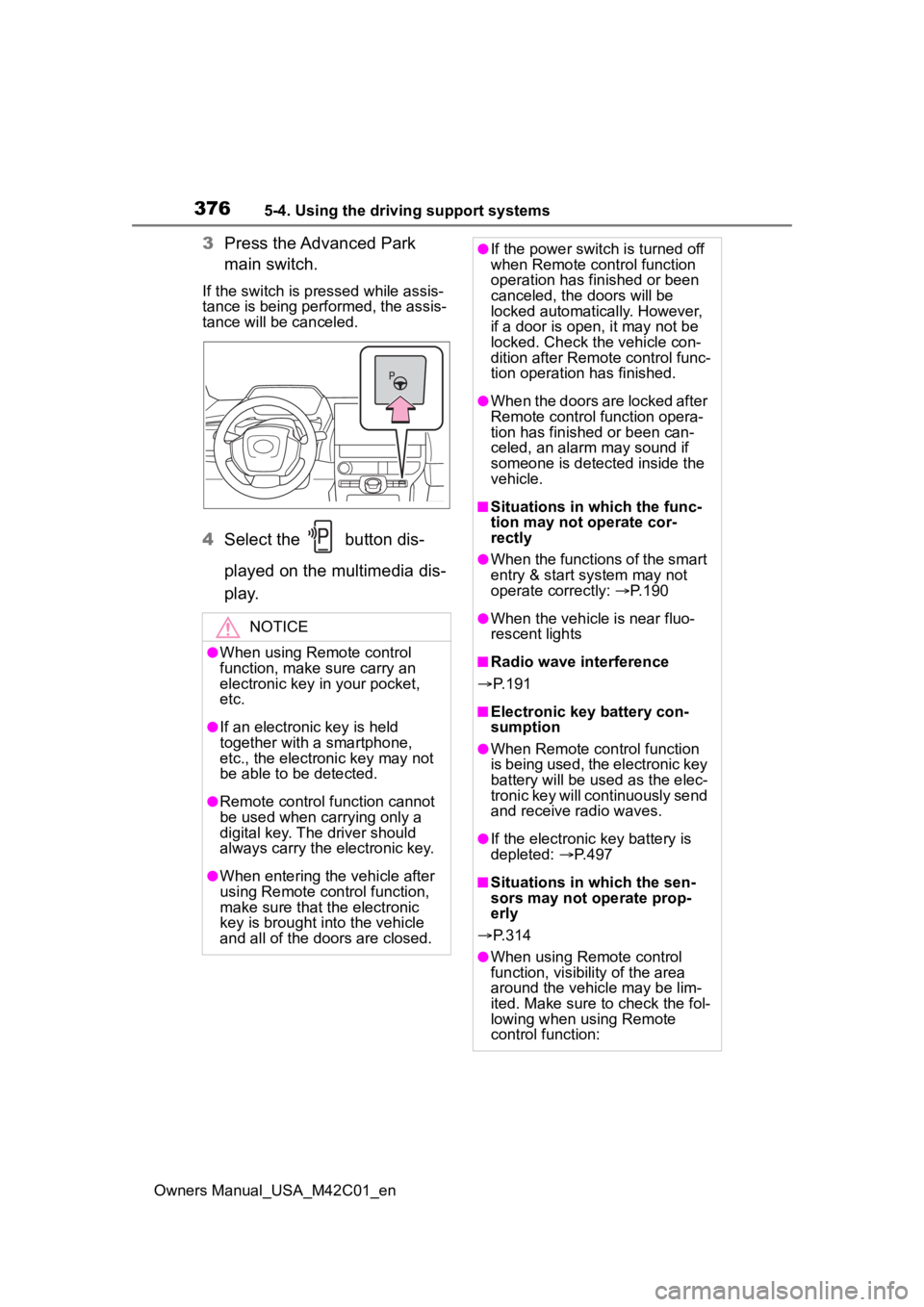
3Press the Advanced Park
main switch.
If the switch is pressed while assis-
tance is being performed, the assis-
tance will be canceled.
4Select the button dis-
played on the multimedia dis-
p l a y.
NOTICE
●When using Remote control
function, make sure carry an
electronic key in your pocket,
etc.
●If an electronic key is held
together with a smartphone,
etc., the electronic key may not
be able to be detected.
●Remote control function cannot
be used when carrying only a
digital key. The driver should
always carry the electronic key.
●When entering the vehicle after
using Remote control function,
make sure that the electronic
key is brought i nto the vehicle
and all of the doors are closed.
●If the power switch is turned off
when Remote control function
operation has finished or been
canceled, the doors will be
locked automatica lly. However,
if a door is open , it may not be
locked. Check the vehicle con-
dition after Remote control func-
tion operation has finished.
●When the doors are locked after
Remote control function opera-
tion has finished or been can-
celed, an alarm may sound if
someone is detected inside the
vehicle.
■Situations in which the func-
tion may not operate cor-
rectly
●When the functions of the smart
entry & start system may not
operate correctly: P. 1 9 0
●When the vehicle is near fluo-
rescent lights
■Radio wave interference
P. 1 9 1
■Electronic key battery con-
sumption
●When Remote control function
is being used, the electronic key
battery will be used as the elec-
tronic key will continuously send
and receive radio waves.
●If the electronic key battery is
depleted: P. 4 9 7
■Situations in which the sen-
sors may not operate prop-
erly
P. 3 1 4
●When using Remote control
function, visibility of the area
around the vehicle may be lim-
ited. Make sure to check the fol-
lowing when using Remote
control function:
Page 377 of 628
3775-4. Using the driving support systems
Owners Manual_USA_M42C01_en
5
Driving■Assistance will be can-
celed when
In situations such as the follow-
ing, Advanced Park operation
will be canceled.
As system operation has been can-
celed, begin the operation again or
continue parking manually, using
the steering wheel.
The Advanced Park main
switch is pushed
The shift position has been
changed to P
The parking brake is engaged
A door or back door is opened
The driver’s seat belt is unfas-
tened
The outside rear view mirrors are folded
The TRAC or VSC is turned
off
The TRAC, VSC or ABS oper-
ates
The power switch is pushed
The system determines assis-
tance cannot be continued in
the current parking environ-
ment
The system malfunctions
While the vehicle was
stopped, “Cancel” was
selected on the multimedia
display
■Assistance will be sus-
pended when
In situations such as the follow-
ing, Advanced Park operation
will be suspended.
Assistance can be started again by
following the directions displayed
on the multimedia display.
Also, when assistance is sus-
pended, if the shift position is
changed twice with the brake pedal
depressed, assistance will be can-
celed in tha t shift position. How-
ever, if assistance is suspended by
changing the shift position, assis-
tance will be canceled if the shift
position is changed once.
The steering wheel is oper-
ated
The accelerator pedal is
depressed
The shift position has been
NOTICE
• The vehicle and area around
the vehicle are clearly visible
• There are no people, animals, or objects in the path of the
vehicle
• An appropriate distance from the vehicle can be maintained
and the safety of yourself and
others can be ensured
• Caution for the area around the vehicle is always maintained
and there is no potential for
danger
• You can cancel Remote control function immediately if neces-
sary
Advanced Park cancel-
ation/suspension
Page 378 of 628

3785-4. Using the driving support systems
Owners Manual_USA_M42C01_en
changed
Brake control operates
Camera switch is pressed
The PKSB (Parking Support
Brake) PCS (Pre-Collision
System) has operates
■Remote control function
assistance will be canceled
when
In situations such as the follow-
ing, Remote control function
operation will be canceled.
As system operation has been
canceled, while carrying an
electronic key, enter the vehicle
and park the vehicle manually,
using the steering wheel.
When a condition for stopping
Advanced Park assistance is
met, with the exception sus-
pension due to a door being
opened or the driver’s seat
belt being released
When Remote control func-
tion is operated while the
remote air conditioning is
operating and the power
switch is changed to ON
before remote air conditioning
has ended
When 5 minutes have
elapsed since Remote con-
trol function operation was
started
When 3 minutes have
elapsed since any operation
was performed
When 30 seconds have
elapsed with the vehicle not
being able to be driven, even
though the screen of the
smartphone is being operated
to drive the vehicle
When the power button on the
screen of the smartphone is
selected
When the Remote Park app is
force closed
When the vehicle is on a
steep slope
When an electronic key is
detected inside the vehicle
while Remote control function
operation is suspended
When the ambient tempera-
ture is 14°F (-10°C) or less
■Remote control function
assistance will be sus-
pended when
In situations such as the follow-
ing, assistance will be sus-
pended.
When the Bluetooth commu-
nication between the smart-
phone and multimedia system
get lost
When smartphone continuous
operation is suspended
When the Remote Park app is
pushed to the background (a
call is received, the home but-
ton is pressed, etc.)
When electronic key does not
detected
Page 379 of 628
3795-4. Using the driving support systems
Owners Manual_USA_M42C01_en
5
Driving
When there is an obstruction
in the movement direction of
the vehicle
When the vehicle is operated
while it is being driven by
assistance
When the smart key is oper-
ated while it is being driven by
assistance
When the door is unlocked
while it is being driven by
assistance
When a door is opened while
the vehicle is being driven
Select on the multimedia
display, and then select
“Advanced Park”.
■Remote Park
Remote control function can be
turned on/off.
■Speed Profile
The vehicle speed for when
assistance is performed can be
set.
This setting cannot be changed
when registering a parking space to
the memory function.
■Detect. range
The distance from which obsta-
cles will be avoided while assis-
tance is being performed can be
set.
■Prk. Method
The preferred parking direction
displayed when at a parking
space which perpendicular (for-
ward/reverse) or parallel parking
is possible can be set.
■Prk. direction
The preferred parking direction
displayed when it is possible to
pull perpendicular forward or
reverse into a parking space can
be selected.
■Exit dir .: Per.
The preferred exit direction dis-
played when it is possible to pull
forward or reverse to the left or
right out of a parking space can
be selected.
■Exit dir .: Par.
The preferred exit direction dis-
played when it is possible to exit
to the left or right from a parallel
parking space can be selected.
■Parking view
The display angle of the camera
image when using the perpen-
dicular parking (for-
ward/reverse) function or
parallel parking function can be
set.
■Exit view
The display angle of the camera
image when using the perpen-
dicular exiting (forward/reverse)
function or parallel parking exit
function can be set.
Changing the Advanced
Park settings
Page 386 of 628
3865-4. Using the driving support systems
Owners Manual_USA_M42C01_enDrive carefully when releasing Grip
Control while driving.
■Grip Control Operations Condi-
tions
• When in “X-MODE”
• When the shift position is in D
• When the parking brake has been released
• When the driver side door is closed
• When the vehicle is stopped by stepping on the brake or the vehi-
cle speed is approximately 2 to 6
mph [2 to 10 km/h]
■Automatic Releasing the Grip
Control
In case of any of the following, the
Grip Control is released.
• When the vehicle is stopped by stepping on the brake pedal
• When the vehicle speed exceeds more than 13 mph (20 km/h)
• When the shift position in a posi- tion other than D
• When the parking brake is oper- ated
• When the driver side door is opened
• ABS/VSC is activated.
• When brake control and output suppression by the driving support
device are activated (example:
Pre-Collision S ystem, Parking
Support Brake (If equipped))
• When the system determines it cannot continue i n the current
environment
• When the power switch is turned OFF
■When Grip Control is not avail-
able
In the following conditions, Grip
Control is not available.
• When the brake system or EV system is malfunctioning
• After the EV system is started and until the vehicle has been running
for a while
■Brake hold system
The brake hold system turns OFF
when the Grip Control is being used.
Press the brake pedal firmly and
operate the switch.
When using the brake hold system
again, turn ON the brake hold sys-
tem after releasing the Grip Control.
NOTICE
■Long term usage
If used continuously for a long
periods of time, the temperature
of the brakes may rise the system
may temporarily stop.
■Operation noises and vibra-
tions
• Operating noise may be heard from motor room, however this
is not a malfunction.
• When the brake pedal is depressed, it may become
harder than usual or it may feel
different from normal, but this is
not a malfunction.
■When the operation indicator
does not turn on in the meter
even after operating the
switch
The system may not be working
properly. Have the vehicle
inspected at your Toyota dealer.
Page 394 of 628
3945-5. Driving tips
Owners Manual_USA_M42C01_en
to the driving conditions:
Do not try to forcibly open a
window or move a wiper that
is frozen. Pour warm water
over the frozen area to melt
the ice. Wipe away the water
immediately to prevent it from
freezing.
To ensure proper operation of
the climate control system
fan, remove any snow that
has accumulated on the air
inlet vents in front of the wind-
shield.
Check for and remove any
excess ice or snow that may
have accumulated on the
exterior lights, vehicle’s roof,
chassis, around the tires or on
the brakes.
Remove any snow or mud
from the bottom of your shoes
before getting in the vehicle.
Accelerate the vehicle slowly,
keep a safe distance between
you and the vehicle ahead, and
drive at a reduced speed suit-
able to road conditions.
Turn automatic mode of the
parking brake off. Otherwise,
the parking brake may freeze
and not be able to be
released automatically. Also, avoid using the following
as the parking brake may
operate automatically, even if
automatic mode is off.
• Brake hold system
• Remote parking function
Park the vehicle and shift the
shift position to P without set-
ting the parking brake. The
parking brake may freeze up,
preventing it from being
released. If the vehicle is
parked without setting the
parking brake, make sure to
block the wheels.
Failure to do so may be dan-
gerous because it may cause
the vehicle to move unexpect-
edly, possibly leading to an
accident.
When the parking brake is in
automatic mode, release the
parking brake after shifting
the shift position to P.
( P.244)
If the vehicle is parked without
setting the parking brake,
confirm that the shift position
cannot be moved out of P.
If the vehicle is left parked
with the brakes damp in cold
temperatures, there is a pos-
sibility of the brakes freezing.
When driving the vehicle
When parking the vehicle
Page 399 of 628
399
Owners Manual_USA_M42C01_en
6
6
Interior features
Interior features
6-1. Using the air conditioning system and defogger
ALL AUTO (“ECO”) control .................................. 400
Automatic air conditioning system ....................... 402
Remote Air Conditioning System ...................... 409
Heated steering wheel/seat heaters/seat ventila-
tors/radiant heater ..... 411
6-2. Using the interior lights Interior lights list .......... 415
6-3. Using the storage features List of storage features 418
Luggage compartment fea- tures .......................... 421
6-4. Using the other interior features
Electronic sunshade.... 426
Other interior features . 428
Garage door opener.... 439
Page 407 of 628
4076-1. Using the air conditioning system and defogger
Owners Manual_USA_M42C01_en
6
Interior features
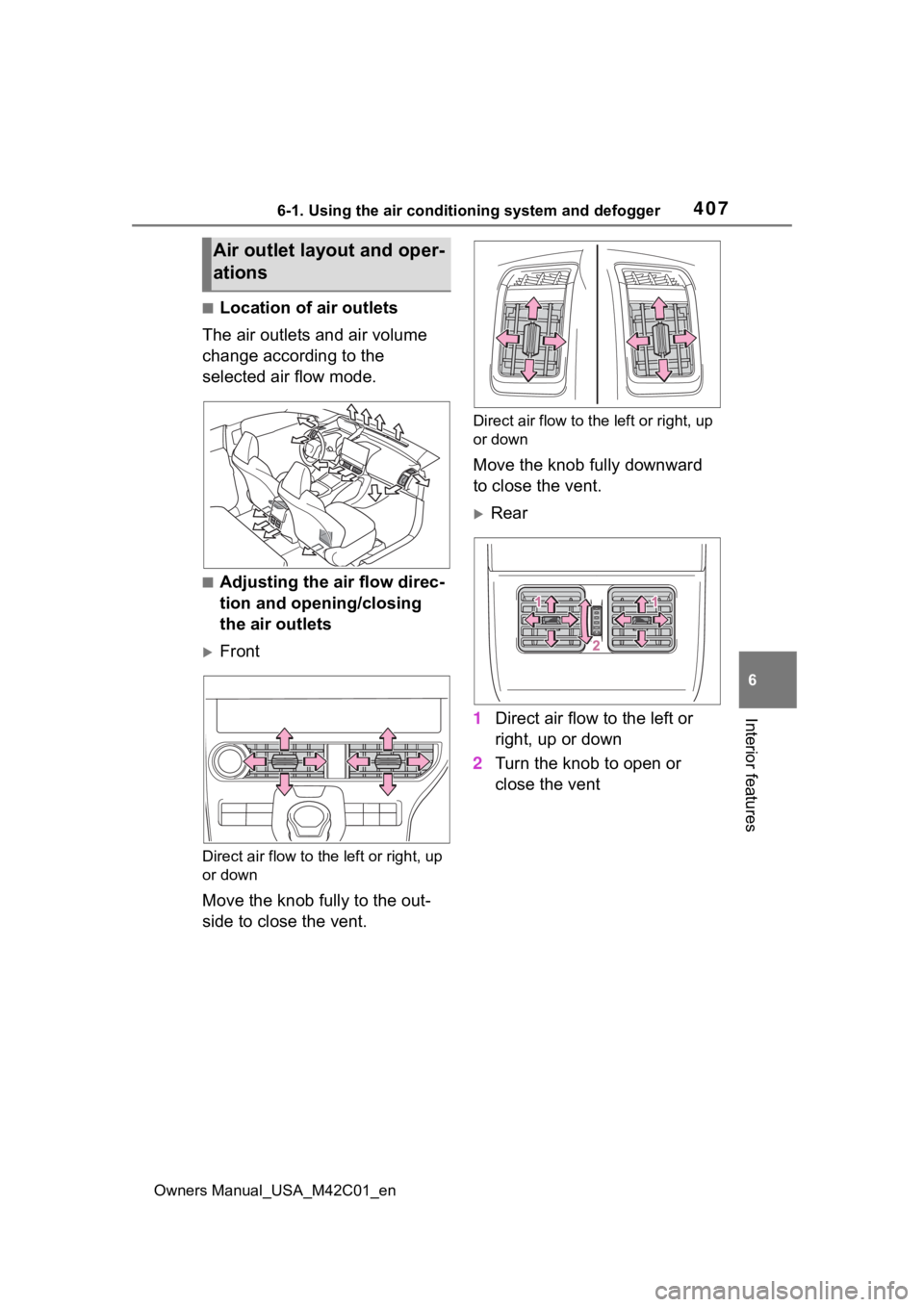
■Location of air outlets
The air outlets and air volume
change according to the
selected air flow mode.
■Adjusting the air flow direc-
tion and opening/closing
the air outlets
Front
Direct air flow to the left or right, up
or down
Move the knob fully to the out-
side to close the vent.
Direct air flow to the left or right, up
or down
Move the knob fully downward
to close the vent.
Rear
1 Direct air flow to the left or
right, up or down
2 Turn the knob to open or
close the vent
Air outlet layout and oper-
ations
Page 410 of 628
4106-1. Using the air conditioning system and defogger
Owners Manual_USA_M42C01_en
System.
The system will shut off if a door is
opened.
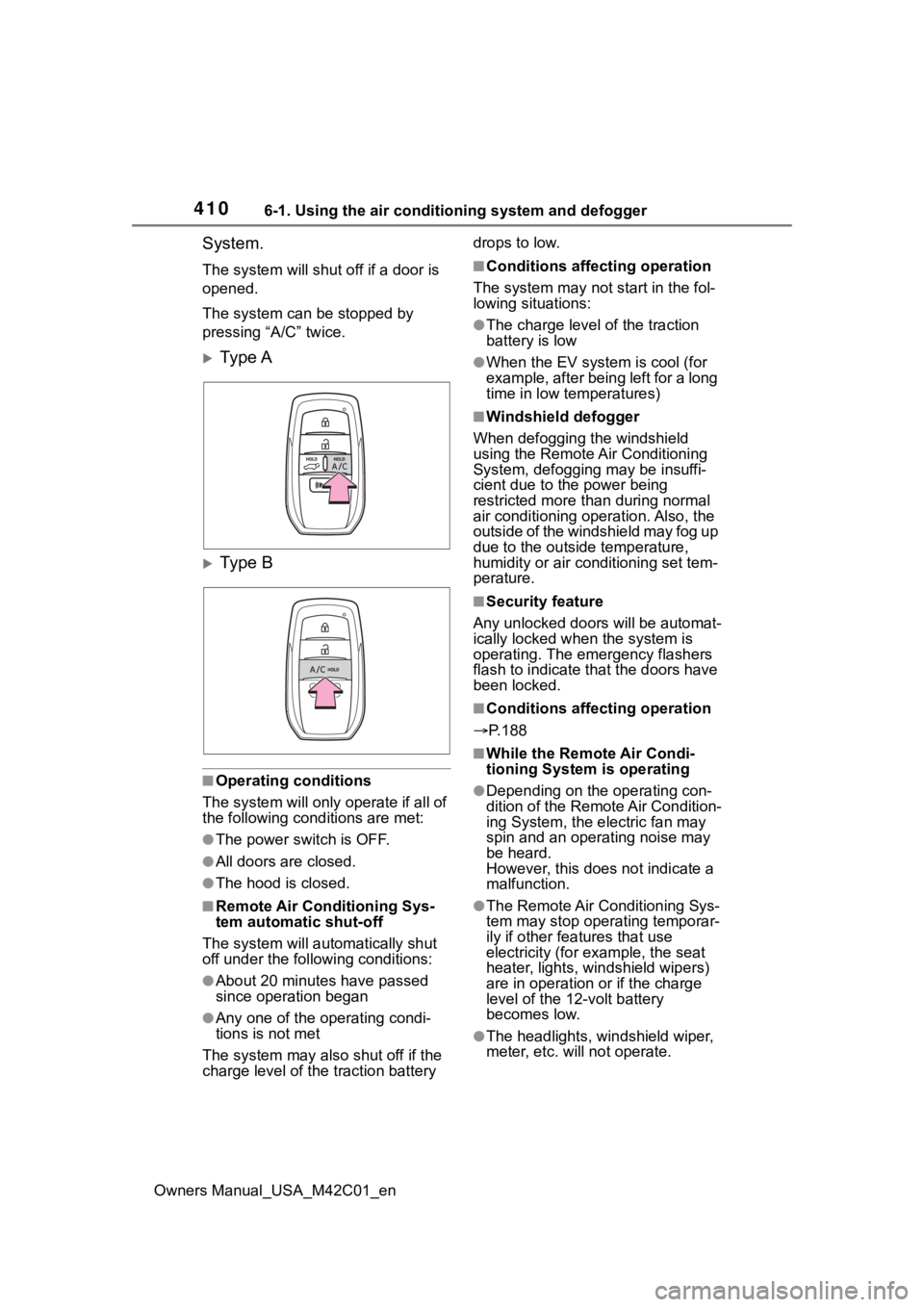
The system can be stopped by
pressing “A/C” twice.
Ty p e A
Ty p e B
■Operating conditions
The system will only operate if all of
the following cond itions are met:
●The power switch is OFF.
●All doors are closed.
●The hood is closed.
■Remote Air Conditioning Sys-
tem automatic shut-off
The system will auto matically shut
off under the following conditions:
●About 20 minutes have passed
since operation began
●Any one of the operating condi-
tions is not met
The system may also shut off if the
charge level of the traction battery drops to low.
■Conditions affecting operation
The system may not start in the fol-
lowing situations:
●The charge level of the traction
battery is low
●When the EV system is cool (for
example, after being left for a long
time in low temperatures)
■Windshield defogger
When defogging the windshield
using the Remote Air Conditioning
System, defogging may be insuffi-
cient due to the power being
restricted more than during normal
air conditioning operation. Also, the
outside of the windshield may fog up
due to the outsi de temperature,
humidity or air conditioning set tem-
perature.
■Security feature
Any unlocked doors will be automat-
ically locked when the system is
operating. The emergency flashers
flash to indicate that the doors have
been locked.
■Conditions affecting operation
P.188
■While the Remote Air Condi-
tioning System is operating
●Depending on the operating con-
dition of the Remote Air Condition-
ing System, the e lectric fan may
spin and an operating noise may
be heard.
However, this does not indicate a
malfunction.
●The Remote Air Conditioning Sys-
tem may stop operating temporar-
ily if other features that use
electricity (for example, the seat
heater, lights, windshield wipers)
are in operation or if the charge
level of the 12-volt battery
becomes low.
●The headlights, windshield wiper,
meter, etc. will not operate.