open TOYOTA BZ4X 2023 Repair Manual
[x] Cancel search | Manufacturer: TOYOTA, Model Year: 2023, Model line: BZ4X, Model: TOYOTA BZ4X 2023Pages: 628, PDF Size: 11.91 MB
Page 206 of 628
2064-4. Adjusting the steering wheel and mirrors
Owners Manual_USA_M42C01_en
■Cleaning the mirror surface
If the mirror surface is dirty, the
image on the display may be dif-
ficult to see.
Wipe the mirror surface gently
using a soft dry cloth.
■Cleaning the camera
If it is difficult to see the Digital
Rear-view Mirror image
because water, snow, mud, etc.
is stuck to the camera lens,
operate the rear camera washer
or change to optical mirror
mode. ( P.253)
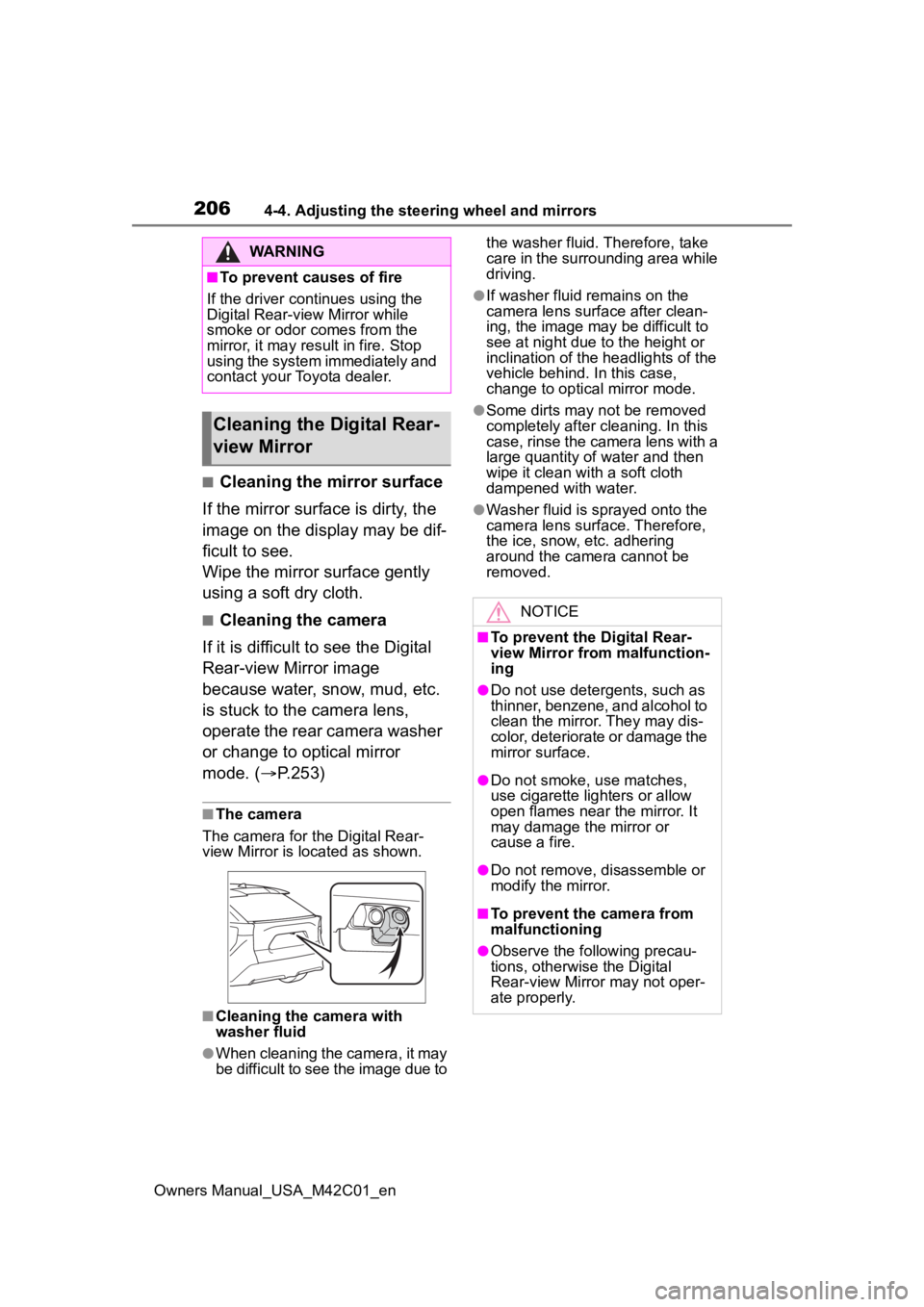
■The camera
The camera for the Digital Rear-
view Mirror is located as shown.
■Cleaning the camera with
washer fluid
●When cleaning the camera, it may
be difficult to see the image due to the washer fluid. Therefore, take
care in the surrounding area while
driving.
●If washer fluid remains on the
camera lens surface after clean-
ing, the image may be difficult to
see at night due to the height or
inclination of the
headlights of the
vehicle behind. In this case,
change to optical mirror mode.
●Some dirts may n ot be removed
completely after cl eaning. In this
case, rinse the camera lens with a
large quantity of water and then
wipe it clean with a soft cloth
dampened with water.
●Washer fluid is sprayed onto the
camera lens surface. Therefore,
the ice, snow, etc. adhering
around the camera cannot be
removed.
WARNING
■To prevent causes of fire
If the driver continues using the
Digital Rear-view Mirror while
smoke or odor comes from the
mirror, it may res ult in fire. Stop
using the system immediately and
contact your Toyota dealer.
Cleaning the D igital Rear-
view Mirror
NOTICE
■To prevent the Digital Rear-
view Mirror from malfunction-
ing
●Do not use detergents, such as
thinner, benzene, and alcohol to
clean the mirror. They may dis-
color, deteriorate or damage the
mirror surface.
●Do not smoke, use matches,
use cigarette lighters or allow
open flames near the mirror. It
may damage the mirror or
cause a fire.
●Do not remove, d isassemble or
modify the mirror.
■To prevent the camera from
malfunctioning
●Observe the fo llowing precau-
tions, otherwise the Digital
Rear-view Mirror may not oper-
ate properly.
Page 212 of 628
2124-5. Opening, closing the windows
Owners Manual_USA_M42C01_en
4-5.Opening, closing the windows
The power windows can be
opened and closed using the
switches.
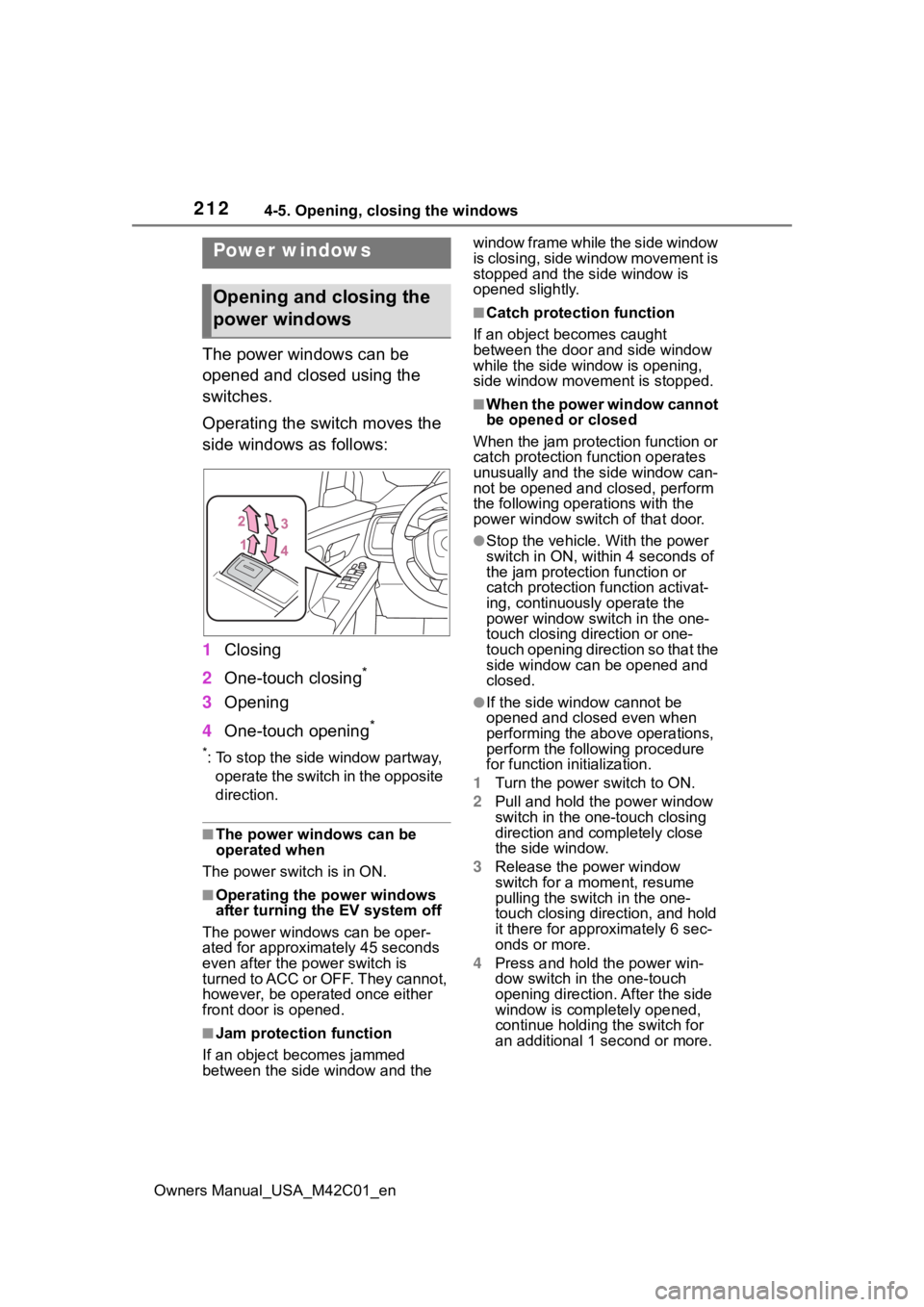
Operating the switch moves the
side windows as follows:
1Closing
2 One-touch closing
*
3Opening
4 One-touch opening
*
*: To stop the side window partway,
operate the switch in the opposite
direction.
■The power windows can be
operated when
The power swit ch is in ON.
■Operating the power windows
after turning the EV system off
The power windows can be oper-
ated for approximately 45 seconds
even after the power switch is
turned to ACC or OFF. They cannot,
however, be operat ed once either
front door is opened.
■Jam protection function
If an object becomes jammed
between the side window and the window frame while the side window
is closing, side window movement is
stopped and the side window is
opened slightly.
■Catch protection function
If an object becomes caught
between the door and side window
while the side window is opening,
side window movement is stopped.
■When the power window cannot
be opened or closed
When the jam protection function or
catch protection function operates
unusually and the side window can-
not be opened and closed, perform
the following operations with the
power window swit ch of that door.
●Stop the vehicle. With the power
switch in ON, within 4 seconds of
the jam protection function or
catch protection f unction activat-
ing, continuously operate the
power window switch in the one-
touch closing direction or one-
touch opening direction so that the
side window can be opened and
closed.
●If the side window cannot be
opened and closed even when
performing the above operations,
perform the follo wing procedure
for function initialization.
1 Turn the power switch to ON.
2 Pull and hold the power window
switch in the on e-touch closing
direction and completely close
the side window.
3 Release the power window
switch for a m oment, resume
pulling the switch in the one-
touch closing direction, and hold
it there for approximately 6 sec-
onds or more.
4 Press and hold the power win-
dow switch in the one-touch
opening direction. After the side
window is completely opened,
continue holding the switch for
an additional 1 second or more.
Power windows
Opening and closing the
power windows
Page 213 of 628
2134-5. Opening, closing the windows
Owners Manual_USA_M42C01_en
4
Before driving
5 Release the power window
switch for a m oment, resume
pushing the switch in the one-
touch opening direction, and
hold it there for a pproximately 4
seconds or more.
6 Pull and hold the power window
switch in the one-touch closing
direction again. After the side
window is completely closed,
continue holding the switch for a
further 1 second or more.
If you release the switch while the
side window is moving, start again
from the beginning.
If the side window reverses and
cannot be fully closed or opened,
have the vehicle inspected by your
Toyota dealer.
■Door lock linked power window
operation
●The power windows can be
opened and closed using the
mechanical key.
* ( P.540)
●The power windows can be
opened using the wireless remote
control.
* ( P.167)
●The alarm may be triggered if the
alarm is set and the power window
is closed using the door lock
linked power win dow operation
function. ( P. 6 9 )
*: These settings must be custom-
ized at your Toyota dealer.
■Power window open reminder
function
The buzzer sounds and a message
is shown on the multi-information
display when the power switch is
turned to OFF and the driver’s door
is opened with the power windows
open.
■Customization
Some functions can be customized.
(Customizable features: P.571)
WARNING
Observe the following precau-
tions.
Failing to do so may result in
death or serious injury.
■Closing the power windows
●The driver is responsible for all
the power window operations,
including the operation for the
passengers. In order to prevent
accidental operation, especially
by a child, do not let a child
operate the power windows. It is
possible for children and other
passengers to have body parts
caught in the power window.
Also, when ridin g with a child, it
is recommended to use the win-
dow lock switch. ( P.214)
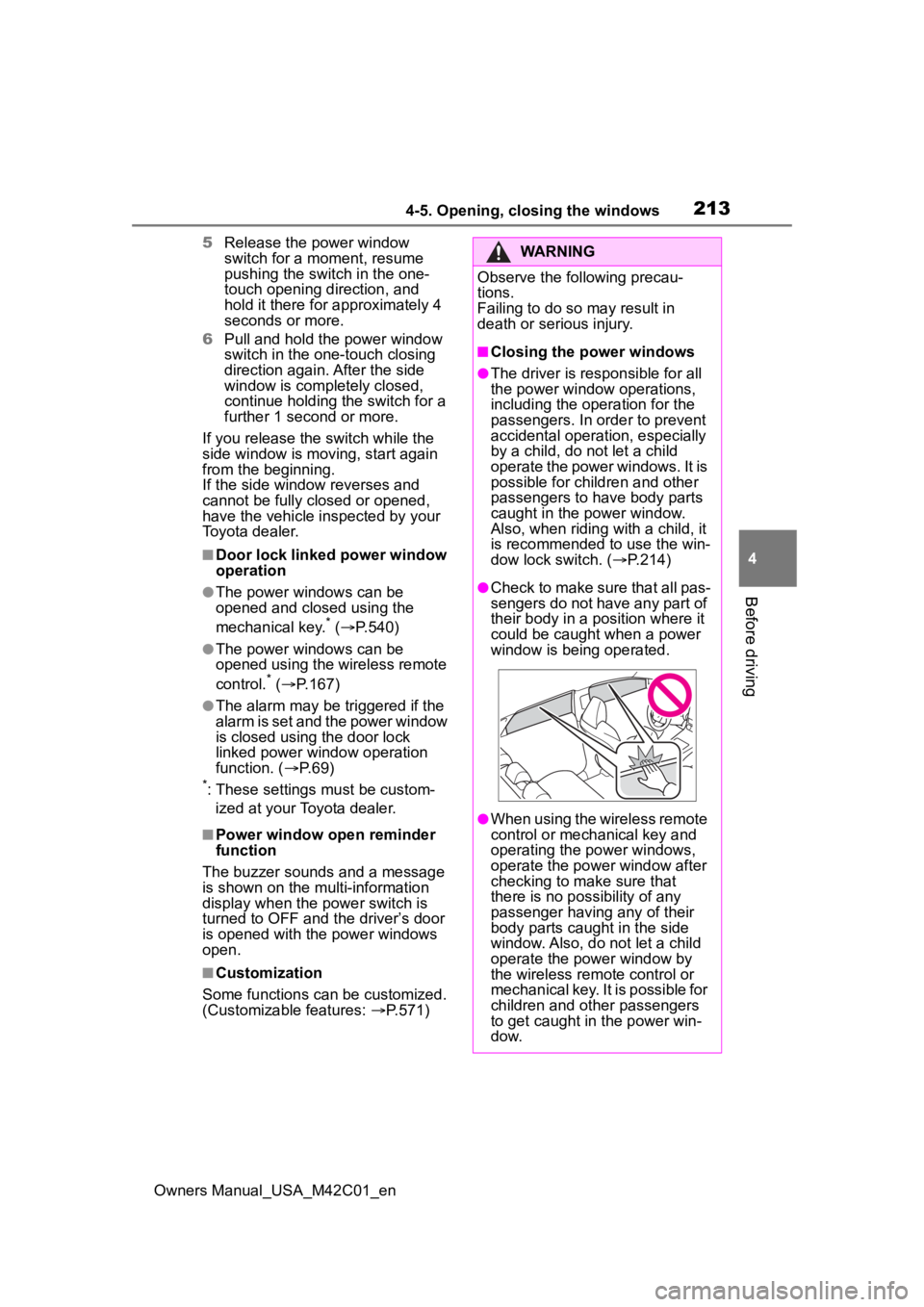
●Check to make sure that all pas-
sengers do not have any part of
their body in a position where it
could be caught when a power
window is being operated.
●When using the wireless remote
control or mechanical key and
operating the power windows,
operate the power window after
checking to make sure that
there is no possibility of any
passenger having any of their
body parts caught in the side
window. Also, do not let a child
operate the power window by
the wireless remote control or
mechanical key. It is possible for
children and other passengers
to get caught in the power win-
d o w.
Page 214 of 628
2144-5. Opening, closing the windows
Owners Manual_USA_M42C01_en
This function can be used to
prevent children from acciden-
tally opening or closing a pas-
senger window.
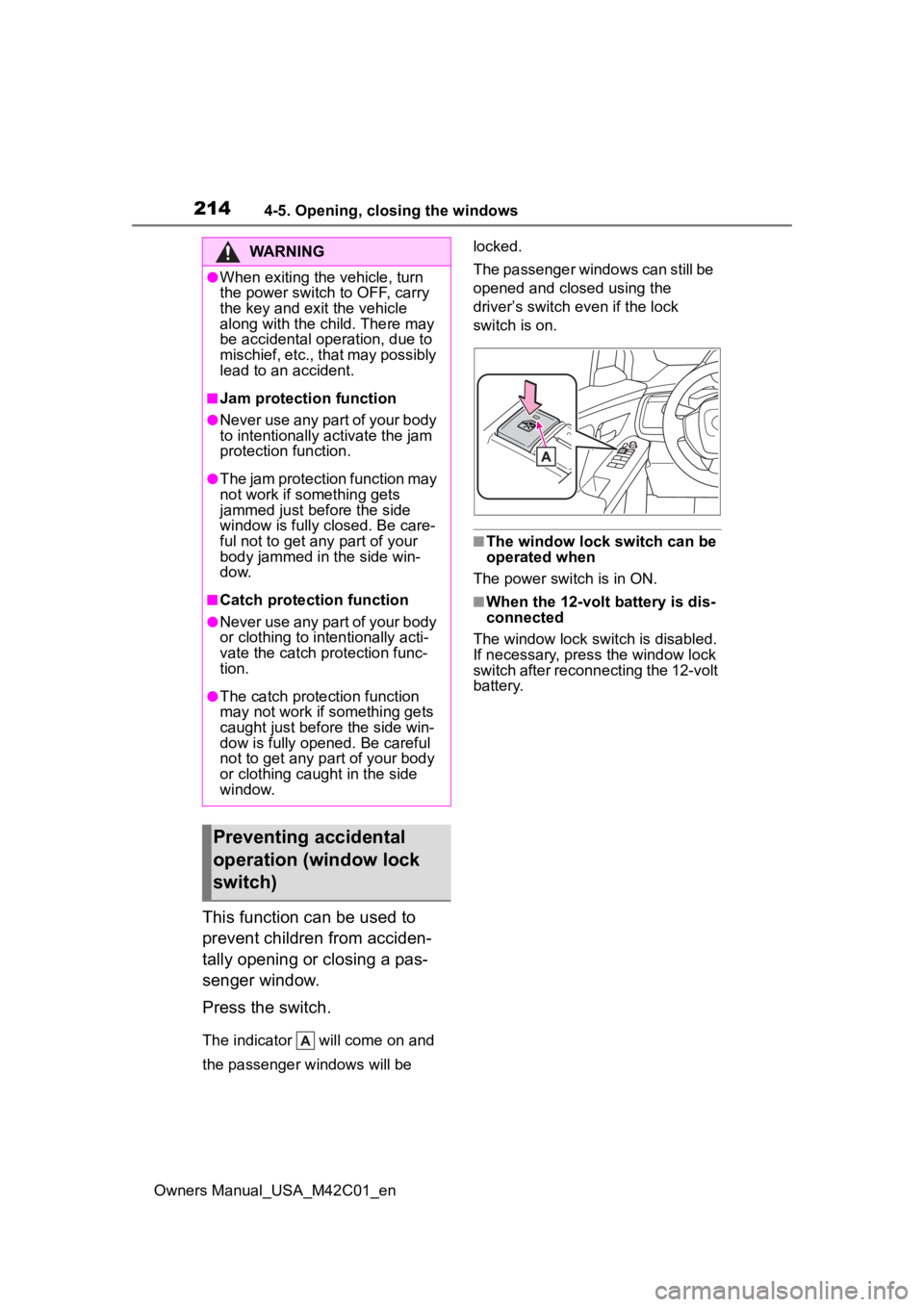
Press the switch.
The indicator will come on and
the passenger windows will be locked.
The passenger windows can still be
opened and closed using the
driver’s switch even if the lock
switch is on.
■The window lock switch can be
operated when
The power switch is in ON.
■When the 12-volt battery is dis-
connected
The window lock switch is disabled.
If necessary, press the window lock
switch after reconnecting the 12-volt
battery.
WARNING
●When exiting the vehicle, turn
the power switch to OFF, carry
the key and exit the vehicle
along with the child. There may
be accidental operation, due to
mischief, etc., that may possibly
lead to an accident.
■Jam protection function
●Never use any part of your body
to intentionally a ctivate the jam
protection function.
●The jam protection function may
not work if something gets
jammed just before the side
window is fully closed. Be care-
ful not to get any part of your
body jammed in the side win-
dow.
■Catch protection function
●Never use any part of your body
or clothing to intentionally acti-
vate the catch p rotection func-
tion.
●The catch protection function
may not work if something gets
caught just before the side win-
dow is fully opened. Be careful
not to get any part of your body
or clothing caught in the side
window.
Preventing accidental
operation (window lock
switch)
Page 231 of 628
2315-2. Driving procedures
Owners Manual_USA_M42C01_en
5
Driving
5-2.Driving procedures
1 Check that the charging
cable is disconnected.
( P.105, 113)
2 Pull the parking brake switch
to check that the parking
brake is set. ( P.243)
The parking brake indicator will
come on.
3Firmly depress the brake
pedal.
and a message will be dis-
played on the multi-information dis-
play.
If it is not displayed, the EV system
cannot be started.
When the shift position is in N, the
EV system cannot start. Shift the
shift position to P when starting the
EV system. ( P.237)
4 Press the power switch
shortly and firmly.
When operating the power switch,
one short, firm press is enough. It is
not necessary to press and hold the
switch.
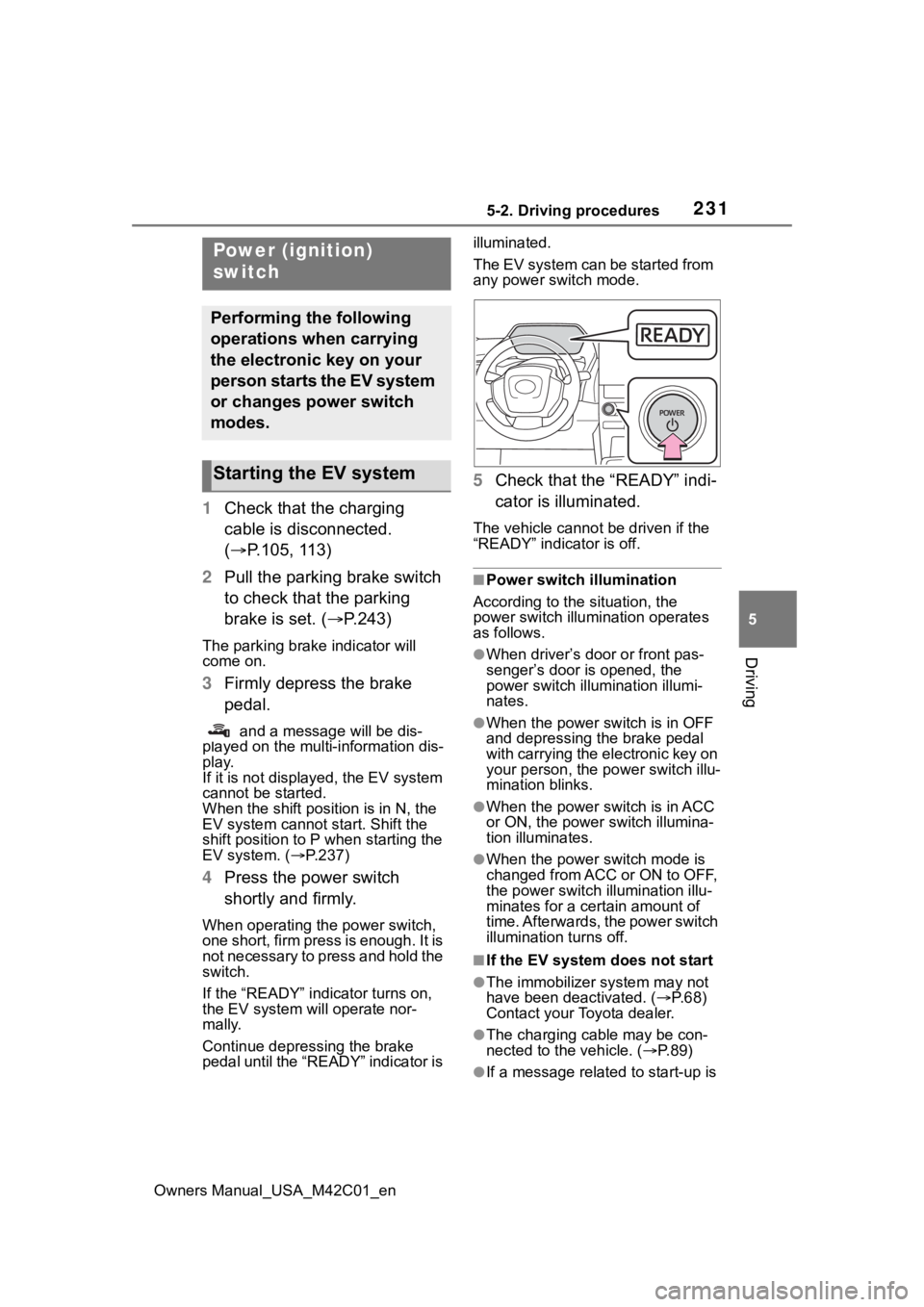
If the “READY” indicator turns on,
the EV system will operate nor-
mally.
Continue depressing the brake
pedal until the “READY” indicator is illuminated.
The EV system can be started from
any power switch mode.
5
Check that the “READY” indi-
cator is illuminated.
The vehicle cannot be driven if the
“READY” indicator is off.
■Power switch illumination
According to the situation, the
power switch illu mination operates
as follows.
●When driver’s door or front pas-
senger’s door is opened, the
power switch illu mination illumi-
nates.
●When the power switch is in OFF
and depressing t he brake pedal
with carrying the electronic key on
your person, the power switch illu-
mination blinks.
●When the power switch is in ACC
or ON, the power switch illumina-
tion illuminates.
●When the power switch mode is
changed from ACC or ON to OFF,
the power switch illumination illu-
minates for a certain amount of
time. Afterwards, the power switch
illumination turns off.
■If the EV system does not start
●The immobilizer system may not
have been deactivated. ( P. 6 8 )
Contact your Toyota dealer.
●The charging cable may be con-
nected to the vehicle. ( P. 8 9 )
●If a message related to start-up is
Power (ignition)
switch
Performing the following
operations when carrying
the electronic key on your
person starts the EV system
or changes power switch
modes.
Starting the EV system
Page 233 of 628
2335-2. Driving procedures
Owners Manual_USA_M42C01_en
5
Driving
1 Stop the vehicle completely.
2 Set the parking brake.
( P.243)
3 Press the P position switch.
( P.237)
Check that the shift position indica-
tor shows P and the parking brake
indicator is illuminated.
4Press the power switch.
The EV system will stop, and the
meter display will be extinguished
(the shift position indicator will be
extinguished a few seconds after
the meter display).
5Release the brake pedal and
check that “ACCESSORY” or
“POWER ON” is not shown
on the meter.
■Automatic EV system shut off
feature
●The vehicle is equipped with a
feature that automatically shuts off
the EV system when the shift posi-
tion is in P with the EV system operating for an extended period.
●The EV system will automatically
shut off after approximately 1 hour
if it has been left operating while
the shift position is in P.
●The timer for the automatic EV
system shut off feature will reset if
the brake pedal is depressed or if
the shift position is in a position
other than P.
●After the vehicle
is parked, if the
door is locked with the door lock
switch ( P.170) from the inside or
the mechanical key (P.539) from
the outside, the automatic EV sys-
tem shut off feature will be dis-
abled. The timer for the automatic
EV system shut off feature will be
re-enabled if the driver’s door is
opened.
■When the shift control system
malfunctions
When attempting to turn the power
switch off while t here is a malfunc-
tion in the shift control system, the
power switch mode may change to
ACC. In this case, ACC may be
turned off by applying the parking
brake and pressing the power
switch again.
If there is a malfunction in the sys-
tem, have the vehicle inspected by
your Toyota dealer immediately.
■Automatic P position selection
function
P.238
NOTICE
■When starting the EV system
If the EV system becomes difficult
to start, have your vehicle
checked by your Toyota dealer
immediately.
■Symptoms indicating a mal-
function with the power
switch
If the power switch seems to be
operating somewh at differently
than usual, such as the switch
sticking slightly, there may be a
malfunction. Contact your Toyota
dealer immediately.
Stopping the EV system
Page 234 of 628
2345-2. Driving procedures
Owners Manual_USA_M42C01_en
Modes can be changed by
pressing the power switch with
the brake pedal released. (The
mode changes each time the
switch is pressed.)
WARNING
■Stopping the EV system in an
emergency
●If you want to stop the EV sys-
tem in an emergency while driv-
ing the vehicle, press and hold
the power switch for more than
2 seconds, or press it briefly 3
times or more in succession.
( P.505)
However, do not touch the
power switch while driving
except in an emergency. Turn-
ing the EV system off while driv-
ing will not cause a loss of
steering or braking control.
However, power assist for the
steering wheel may be lost mak-
ing it difficult to steer smoothly
before stopping the vehicle
depending on the remaining
charge in the 12-volt battery or
usage conditions. In this situa-
tion, you should pull over and
stop the vehicle as soon as it is
safe to do so.
●If the power switch is operated
while the vehicle is running, a
warning message will be shown
on the multi-info rmation display
and a buzzer sounds.
●When restarting the EV system
after an emergency shutdown,
press the power switch shortly
and firmly.
■When parking
Exhaust gases include harmful
carbon monoxide (CO), which is
colorless and odorless. Observe
the following precautions.
Failure to do so may cause
exhaust gases to enter the vehicle
and may lead to an accident
caused by light-headedness, or
may lead to death or a serious
health hazard.
●If the vehicle is in a poorly venti-
lated area or a closed area,
such as a garage, stop the EV
system.
●Do not leave the vehicle with
the EV system operating for a
long time. If such a situation
cannot be avoided, park the
vehicle in an open space and
ensure that exhaust fumes do
not enter the vehicle interior.
●Do not leave the EV system
operating in an area with snow
build-up, or where it is snowing.
If snowbanks build up around
the vehicle while the EV system
is operating, exhaust gases
may collect and enter the vehi-
cle.
Changing power switch
modes
Page 238 of 628

2385-2. Driving procedures
Owners Manual_USA_M42C01_enshifting operation will be disabled.
●When selecting the shift position,
make sure that the shift position
has been changed to the desired
position by checking the shift posi-
tion indicator provided on the
instrument cluster.
■The shift position cannot be
changed when
In the following situations, a buzzer
will sound to inform you that the shift
position cannot be changed. Use
the appropriate operation to attempt
to change the shif t position again.
●When attempting to change the
shift position from P with the brake
pedal not depressed
●When attempting to change the
shift position from P with the
accelerator pedal depressed
●When attempting to change the
shift position from N while stopped
or driving at an extremely low
speed with the b rake pedal not
depressed
●When attempting to change the
shift position fro m N while stopped
or driving at an extremely low
speed with the accelerator pedal
depressed
●When the P position switch is
pressed while driving
When driving at an extremely low
speed, the shift position may
change to P.
■The shift position automatically
changes to N when
In the following situations, a buzzer
will sound to inform you that the shift
position has been changed to N.
Use the appropriate operation to
attempt to change the shift position
again.
●When attempting to change the
shift position to R while the vehicle
is moving forward
When driving at a low speed, the
shift position may change to R.
●When attempting to change the
shift position to D while the vehicle
is moving backward
When driving at a low speed, the
shift position may change to D.
■When N is selected while driv-
ing
When selecting N while traveling at
a speed above a ce rtain level, hold
the rotary shifter at the N position.
■Automatic P position selection
function
In the following situ ations, the shift
position is automatically changed to
P.
●When pressing t he power switch
with the vehicle stopped while the
power switch is in ON and the shift
position is in a position other than
P (after the shift position has been
changed to P, the power switch
will turn off)
*
●If the driver’s door is opened and
all of the following conditions are
met, while the shift position is in a
position other than P:
• The power switch is in ON.
• The driver is not wearing the seat belt.
• The brake pedal is not depressed.
To start off the vehicle after the shift
position is changed to P, operate the
rotary shifter again.
●When the vehicle is stopped after
the EV system has been stopped
in an emergency while driving
●When voltage of the 12-volt bat-
tery drops while the shift position
is in a position other than P
*: When the power switch is pressed
while driving at extremely slow
speeds, such as immediately
before stopping th e vehicle, the
shift position may automatically
change to P. Make sure that the
vehicle is completely stopped
before pressing the power switch.
Page 239 of 628
2395-2. Driving procedures
Owners Manual_USA_M42C01_en
5
Driving
■If the shift position cannot be
shifted from P
There is a possibility that the 12-volt
battery is discharged. Check the 12-
volt battery in this situation.
( P.541)
■Customization
Some functions can be customized.
( P.572)
By performing the following
operation, the shift position
can be held in N until the shift
position switches to P without
activating the automatic P
position selection function.
1 Operate the rotary shifter and
change the shift position to N
when the EV system is oper-
ating.
2 Return the rotary shifter to its
regular position.
3 Operate the rotary shifter to
N and hold it there until the
buzzer sounds.
4 Press the power switch within
5 seconds after the buzzer
sounds.
The EV system stops with the shift
position in N*
Make sure to check that the buzzer
sounds and “Holding N Push P
Switch When Done” is displayed on
the multi-information display.
In order to shift to a position
other than N, first press the P
WARNING
■For the rotary shifter
●Do not remove the rotary shifter
knob or use anything but a gen-
uine Toyota rotary shifter knob.
Also, do not hang anything on
the rotary shifter.
Doing so could prevent the
rotary shifter from returning to
position, causing unexpected
accidents to occur when the
vehicle is in motion.
●In order to prevent the shift
position from accidentally being
changed, do not touch the
rotary shifter when not using it.
■P position switch
●Do not press the P position
switch while the vehicle is mov-
ing.
If the P position switch is
pressed when driving at very
low speeds (for example,
directly before stopping the
vehicle), the vehicle may stop
suddenly when the shift position
switches to P, which could lead
to an accident.
●In order to prevent the shift
position from accidentally being
changed, do not touch the P
position switch when not using
it.
NOTICE
■When exiting the vehicle
(driver’s seat only)
Check that the shi ft position indi-
cator shows P and that the park-
ing brake indicator is illuminated
before opening the door and exit-
ing the vehicle.
Keeping the shift position
in N without activating the
automatic P position
selection function
Page 244 of 628
2445-2. Driving procedures
Owners Manual_USA_M42C01_en
Operate the shift position with
the vehicle stopped and the
brake pedal depressed.
The auto function may not operate
if the shift position is moved
extremely quickly. In this situation,
apply the parking brake manually.
( P.243)
■Turning the automatic
mode off
While the vehicle is stopped and
depressing the brake pedal,
press and hold the parking
brake switch until a buzzer
sounds and message is shown
on the multi-information display.
■Parking brake operation
●When the power s witch is not in
ON, the parking brake cannot be
released using the parking brake
switch.
●When the power s witch is not in
ON, automatic mode (automatic
brake setting and releasing) is not
available.
■Parking brake automatic
release function
When all of the follo wing conditions
are met in manual mode, the park-
ing brake can be released by
depressing the accelerator pedal.
●The driver’s door is closed
●The driver is wearing the seat belt
●The shift position is in a forward
driving position or reverse driving
position
●The malfunction in dicator lamp or
brake system warning light is not
illuminated.
When depressing the accelerator
pedal, depress it slowly.
If the parking brake is not released when the accelerator pedal is
depressed, release the parking
brake manually.
■Parking brake automatic lock
function
The parking brak e will be set auto-
matically under the following condi-
tions:
●The brake pedal is not depressed
●The driver’s door is open
●The driver’s seat belt is not fas-
tened
●The shift position is in a position
other than P or N
(The shift position is in P during
advanced park operation.)(If
equipped)
●The malfunction in dicator lamp or
brake system warning light are not
illuminated.
■If “Parking Brake Temporarily
Unavailable” is displayed on
the multi-info rmation display
If the parking brake is operated
repeatedly over a short period of
time, the system may restrict opera-
tion to prevent ove rheating. If this
happens, refrain from operating the
parking brake. Normal operation will
return after about 1 minute.
■If “Parking Brake Unavailable”
is displayed on the multi-infor-
mation display
Operate the parking brake switch. If
the message does not disappear
after operating the switch several
times, the system may be malfunc-
tioning. Have the vehicle inspected
by your Toyota dealer.
■Parking brake operation sound
When the parking brake operates, a
motor sound (whirr ing sound) may
be heard.
This does not indicate a malfunc-
tion.
■Parking brake indicator light
●Depending on the power switch