display TOYOTA C-HR 2019 Owners Manual (in English)
[x] Cancel search | Manufacturer: TOYOTA, Model Year: 2019, Model line: C-HR, Model: TOYOTA C-HR 2019Pages: 532, PDF Size: 10.35 MB
Page 2 of 532
TABLE OF CONTENTS2
C-HR_OM_USA_OM10569UFor your information....................... 6
Reading this manual .................... 10
How to search .............................. 11
Pictorial index .............................. 12
1-1. For safe use
Before driving ...................... 22
For safe driving ................... 24
Seat belts ............................ 26
SRS airbags ........................ 32
Front passenger occupant classification system ......... 46
Exhaust gas precautions ..... 53
1-2. Child safety Riding with children ............. 54
Child restraint systems ........ 55
1-3. Theft deterrent system Engine immobilizer system............................... 74
Theft prevention labels ........ 78
2. Instrument cluster Warning lights and indicators........................... 80
Gauges and meters............. 88
Multi-information display ..... 91
Fuel consumption information ........................ 99 3-1. Key information
Keys................................... 104
3-2. Opening, closing and locking the doors
Side doors ......................... 112
Back door .......................... 119
Smart key system .............. 125
3-3. Adjusting the seats Front seats......................... 135
Rear seats ......................... 136
Head restraints .................. 138
3-4. Adjusting the steering wheel and mirrors
Steering wheel ................... 142
Inside rear view mirror ....... 144
Outside rear view mirrors ............................. 146
3-5. Opening and closing the windows
Power windows.................. 149
1For safety and security
2Instrument cluster
3Operation of each
component
Page 5 of 532
5
1
8 7 5 4
3
2
9
C-HR_OM_USA_OM10569U
6
7-1. Essential informationEmergency flashers .......... 408
If your vehicle has to be stopped in
an emergency ................. 409
7-2. Steps to take in an emergency
If your vehicle needs to be towed ..................... 411
If you think something is wrong .............................. 418
Fuel pump shut off system............................. 419
If a warning light turns on or a warning buzzer
sounds ............................ 420
If a warning message is displayed ......................... 430
If you have a flat tire .......... 435
If the engine will not start ................................. 446
If the electronic key does not operate
properly (vehicles with
a smart key system) ........ 448
If the vehicle battery is discharged ...................... 451
If your vehicle overheats ........................ 455
If the vehicle becomes stuck................................ 458 8-1. Specifications
Maintenance data (fuel, oil level, etc.) .......... 462
Fuel information ................. 470
Tire information.................. 473
8-2. Customization Customizable features ....... 486
8-3. Items to initialize Items to initialize ................ 496
Reporting safety defects for U.S. owners ........................ 498
Seat belt instructions for Canadian owners
(in French)................................ 499
SRS airbag instructions for Canadian owners
(in French)................................ 501
What to do if... (Troubleshooting) ..................... 512
Alphabetical index ...................... 516
7When trouble arises
Refer to “NAVIGATION AND MULTIMEDIA SYSTEM OWNER’S
MANUAL” for information regardi ng the equipment listed below.
• Navigation system
• Hands-free system
(for cellular phone)• Rear view monitor system
• Audio system
• Toyota Entune
8Vehicle specifications
9For owners
Index
Page 15 of 532
15Pictorial index
C-HR_OM_USA_OM10569UMulti-information display . . . . . . . . . . . . . . . . . . . . . . . . . . . . P. 91
If a warning messages or indicator is displayed . . . . . . . .
. . . P. 430
Turn signal lever . . . . . . . . . . . . . . . . . . . . . . . . . . . . . . . . . . P. 186
Headlight switch
Headlights/parking lights/tail lights/daytime running lights . . . . P. 195
Windshield wiper and washer switch . . . . . . . . . . . . . . . . . P. 205
Rear window wiper and washer switch . . . . . . . . . . . . . . . . P. 211
Usage . . . . . . . . . . . . . . . . . . . . . . . . . . . . . . . . . . . . . . . P. 205, 211
Adding washer fluid . . . . . . . . . . . . . . . . . . . . . . . . . . . . . . . . . P. 362
Emergency flasher switch . . . . . . . . . . . . . . . . . . . . . . . . . . P. 408
Hood lock release lever. . . . . . . . . . . . . . . . . . . . . . . . . . . . . P. 347
Tilt and telescopic steering lock release lever . . . . . . . . . . P. 142
Air conditioning system . . . . . . . . . . . . . . . . . . . . . . . . . . . . P. 292
Usage . . . . . . . . . . . . . . . . . . . . . . . . . . . . . . . . . . . . . . . . . . . P. 292
Rear window defogger . . . . . . . . . . . . . . . . . . . . . . . . . . . . . . . P. 295
Seat heaters
*3. . . . . . . . . . . . . . . . . . . . . . . . . . . . . . . . . . . . . P. 300
Entune Audio
*4
Trip information/past record . . . . . . . . . . . . . . . . . . . . . . . . . . . . P. 99
*1: Vehicles without a smart key system
*2: Vehicles with a smart key system
*3: If equipped
*4: Refer to “NAVIGATION AND MULTIMEDIA SYSTEM OWNER’S MANUAL”.
Page 67 of 532
671-2. Child safety
1
For safety and security
C-HR_OM_USA_OM10569U■
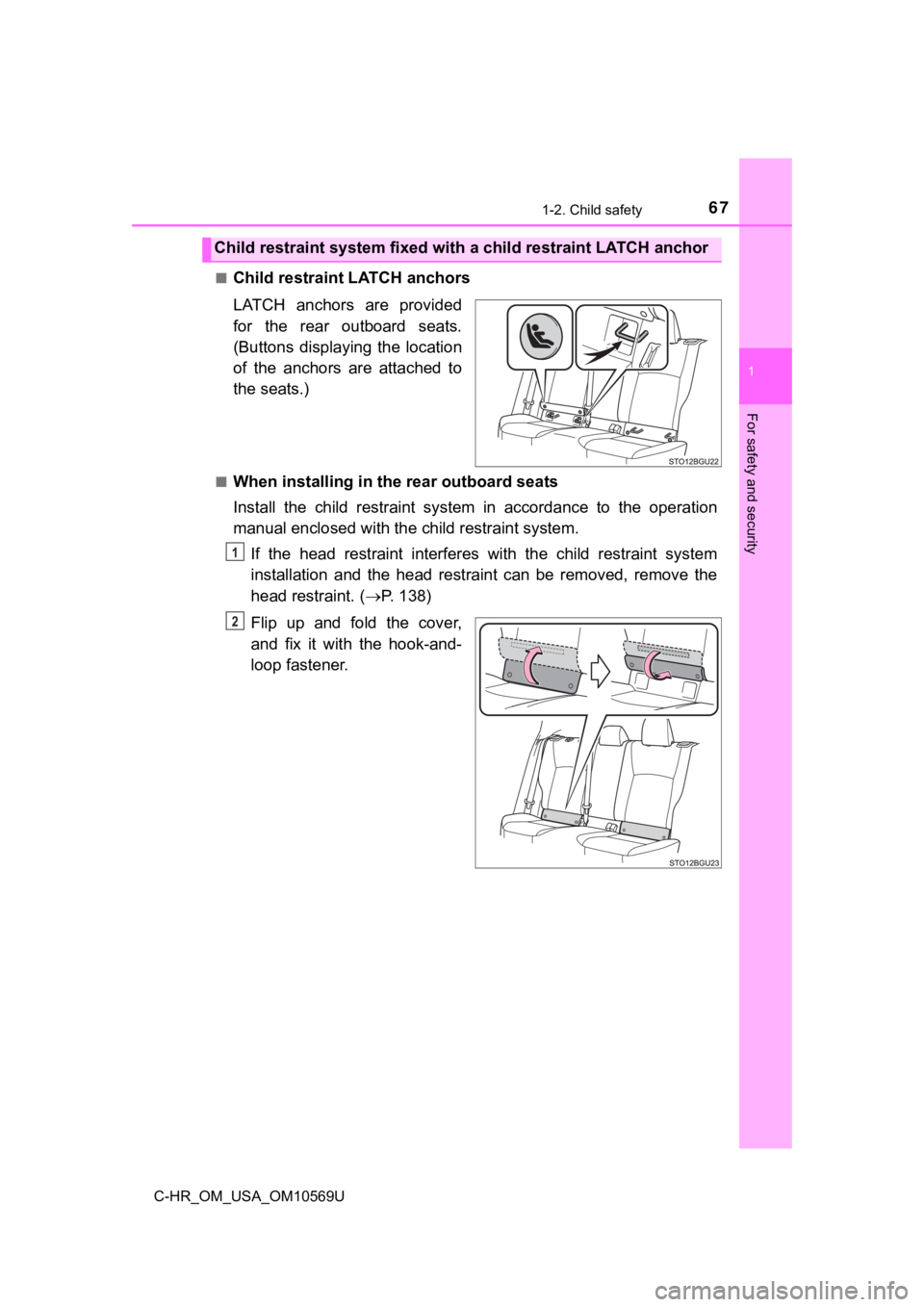
Child restraint LATCH anchors
LATCH anchors are provided
for the rear outboard seats.
(Buttons displaying the location
of the anchors are attached to
the seats.)
■When installing in the rear outboard seats
Install the child restraint system in accordance to the operati
on
manual enclosed with the child restraint system.
If the head restraint interferes with the child restraint syste m
installation and the head restraint can be removed, remove the
head restraint. ( P. 138)
Flip up and fold the cover,
and fix it with the hook-and-
loop fastener.
Child restraint system fixed with a child restraint LATCH ancho r
1
2
Page 79 of 532

79
Instrument cluster2
C-HR_OM_USA_OM10569U2. Instrument cluster
Warning lights and indicators .......................... 80
Gauges and meters ............ 88
Multi-information display ..... 91
Fuel consumption information ........................ 99
Page 84 of 532
842. Instrument cluster
C-HR_OM_USA_OM10569U
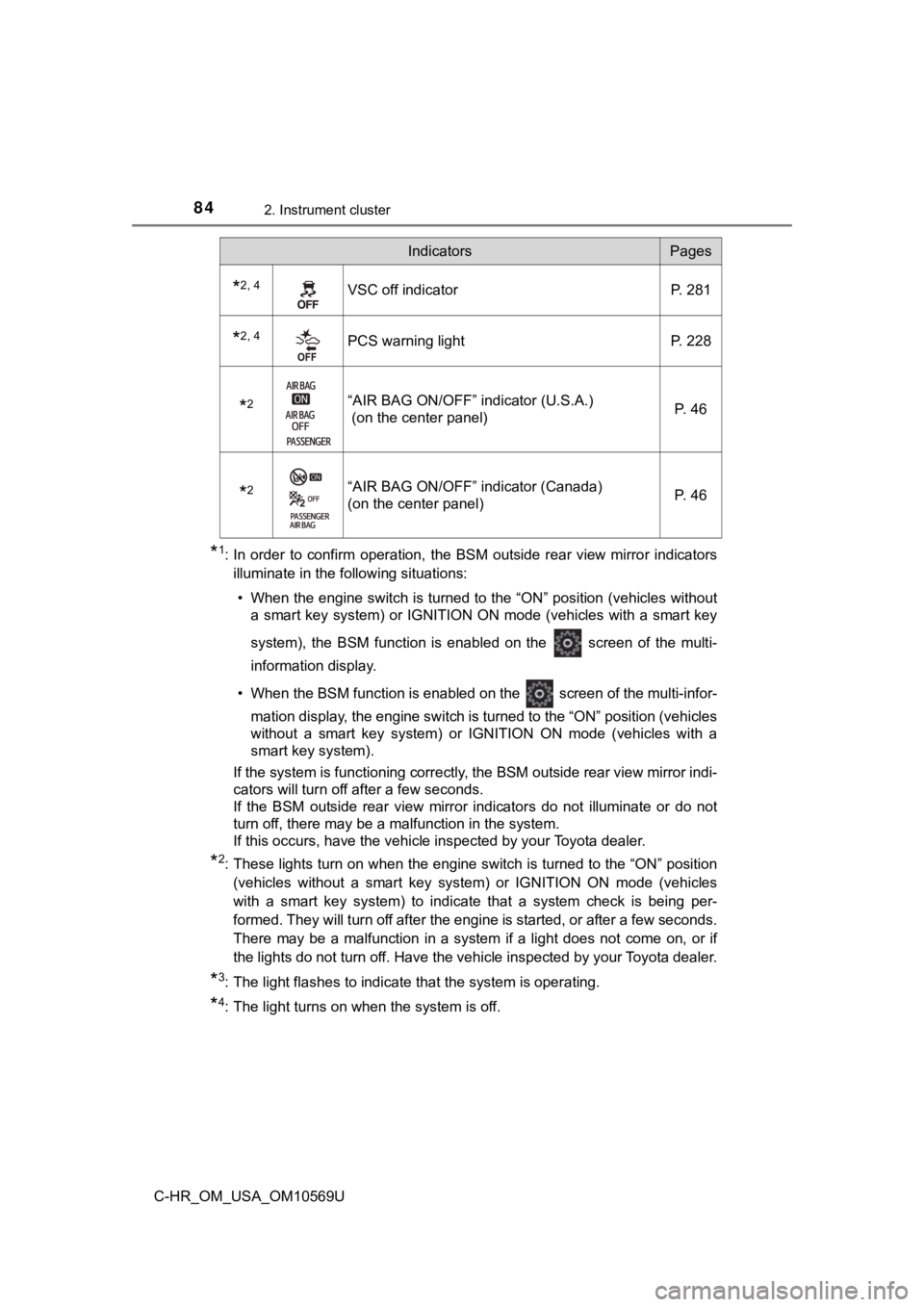
*1: In order to confirm operation, the BSM outside rear view mirror indicators
illuminate in the following situations:
• When the engine switch is turned to the “ON” position (vehicles without a smart key system) or IGNITION ON mode (vehicles with a smart key
system), the BSM function is enabled on the screen of the mult i-
information display.
• When the BSM function is enabled on the screen of the multi-i nfor-
mation display, the engine switch is turned to the “ON” positio n (vehicles
without a smart key system) or IGNITION ON mode (vehicles with a
smart key system).
If the system is functioning correctly, the BSM outside rear vi ew mirror indi-
cators will turn off after a few seconds.
If the BSM outside rear view mirror indicators do not illuminate or do not
turn off, there may be a malfunction in the system.
If this occurs, have the vehicle inspected by your Toyota deale r.
*2: These lights turn on when the engine switch is turned to the “ ON” position
(vehicles without a smart key system) or IGNITION ON mode (vehi cles
with a smart key system) to indicate that a system check is bei ng per-
formed. They will turn off after the engine is started, or after a few seconds.
There may be a malfunction in a system if a light does not come on, or if
the lights do not turn off. Have the vehicle inspected by your Toyota dealer.
*3: The light flashes to indicate that the system is operating.
*4: The light turns on when the system is off.
*2, 4VSC off indicatorP. 281
*2, 4PCS warning lightP. 228
*2“AIR BAG ON/OFF” indicator (U.S.A.)
(on the center panel) P. 46
*2“AIR BAG ON/OFF” indicator (Canada)
(on the center panel)P. 46
IndicatorsPages
Page 85 of 532
852. Instrument cluster
2
Instrument cluster
C-HR_OM_USA_OM10569U
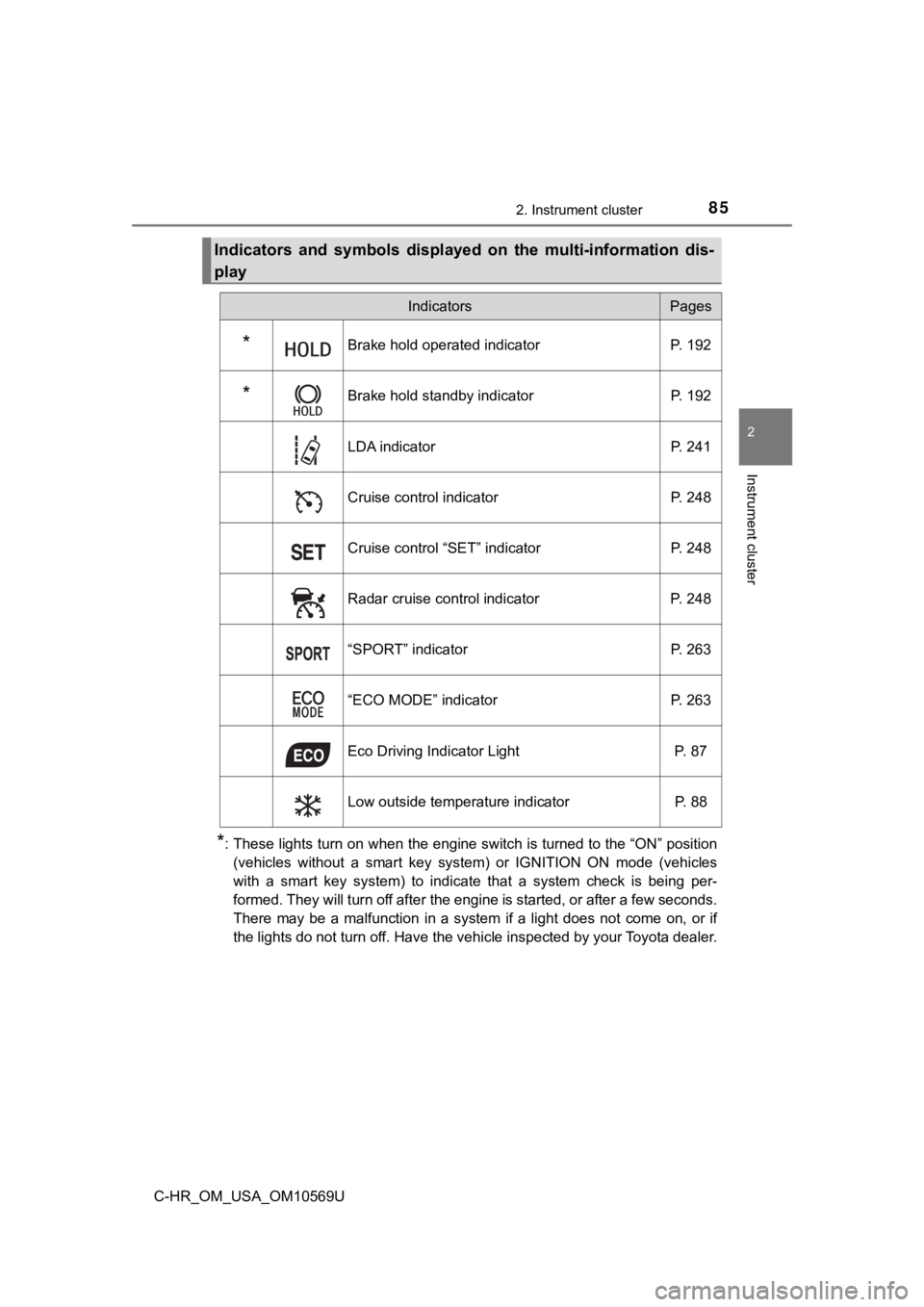
*: These lights turn on when the engine switch is turned to the “ON” position
(vehicles without a smart key system) or IGNITION ON mode (vehi cles
with a smart key system) to indicate that a system check is bei ng per-
formed. They will turn off after the engine is started, or after a few seconds.
There may be a malfunction in a system if a light does not come on, or if
the lights do not turn off. Have the vehicle inspected by your Toyota dealer.
Indicators and symbols displayed on the multi-information dis-
play
IndicatorsPages
*Brake hold operated indicator P. 192
*Brake hold standby indicator P. 192
LDA indicator P. 241
Cruise control indicator P. 248
Cruise control “SET” indicator P. 248
Radar cruise control indicator P. 248
“SPORT” indicator P. 263
“ECO MODE” indicator P. 263
Eco Driving Indicator Light P. 87
Low outside temperature indicator P. 88
Page 86 of 532
862. Instrument cluster
C-HR_OM_USA_OM10569U
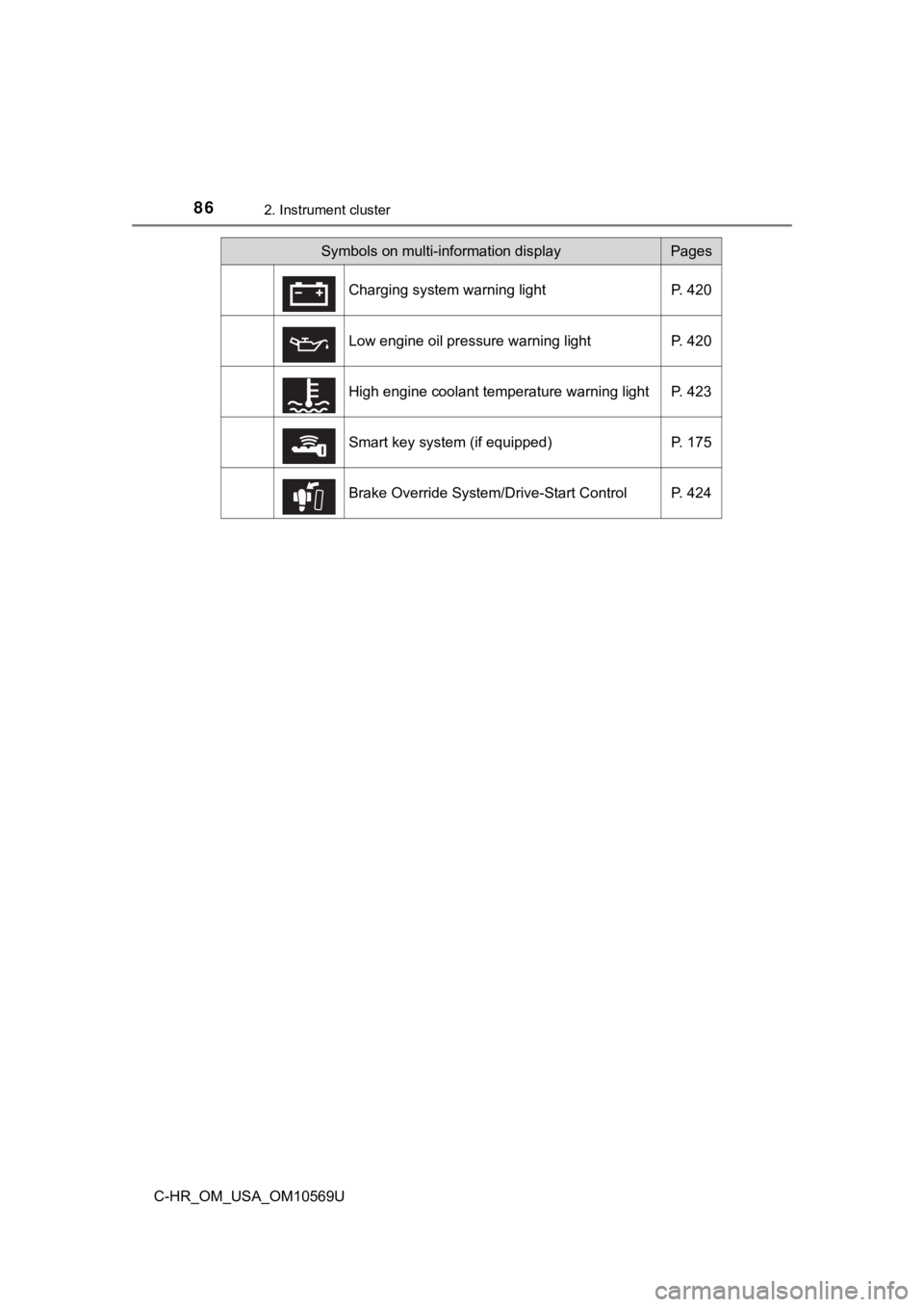
Symbols on multi-information displayPages
Charging system warning light P. 420
Low engine oil pressure warning light P. 420
High engine coolant temperature warning light P. 423
Smart key system (if equipped) P. 175
Brake Override System/Drive-Start Control P. 424
Page 88 of 532
882. Instrument cluster
C-HR_OM_USA_OM10569U
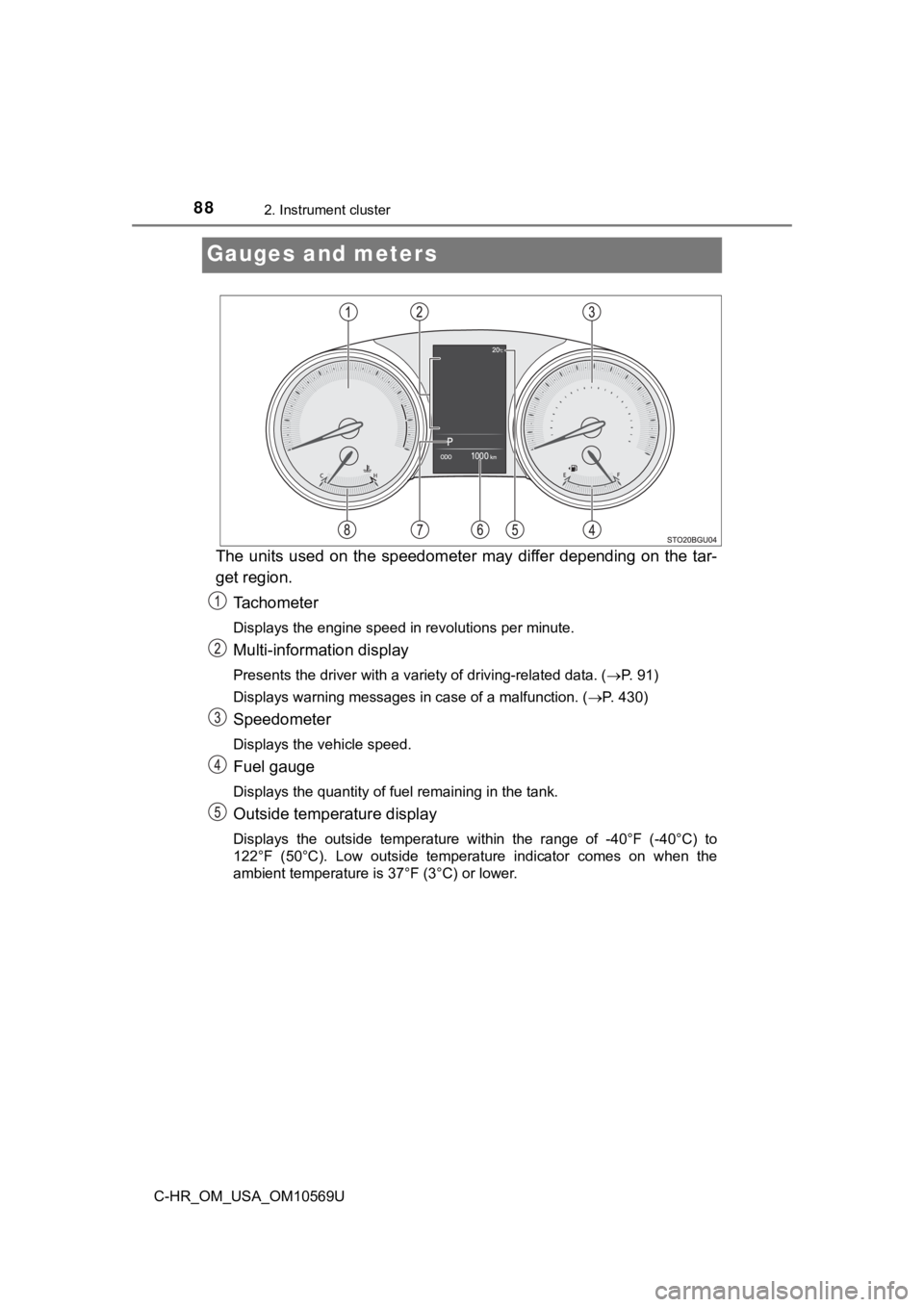
Gauges and meters
The units used on the speedometer may differ depending on the tar-
get region.
Tachometer
Displays the engine speed in revolutions per minute.
Multi-information display
Presents the driver with a variety of driving-related data. ( P. 91)
Displays warning messages in case of a malfunction. ( P. 430)
Speedometer
Displays the vehicle speed.
Fuel gauge
Displays the quantity of fuel remaining in the tank.
Outside temperature display
Displays the outside temperature within the range of -40°F (-40 °C) to
122°F (50°C). Low outside temperat ure indicator comes on when the
ambient temperature is 37°F (3°C) or lower.
Page 89 of 532
892. Instrument cluster
2
Instrument cluster
C-HR_OM_USA_OM10569U
Odometer and trip meter display
Displays the following items.
Odometer:
Displays the total distance the vehicle has been driven.
Trip meter:
Displays the distance the vehicle has been driven since the meter was last
reset. Trip meters A and B can be used to record and display different dis-
tances independently.
Maintenance required information (U.S.A. only):
Displays the remaining distance until the engine oil should be changed. If
“-” is displayed before distance, it means oil maintenance is o verdue. Have
the engine oil changed by your Toyota dealer. • Displays the maintenance required information when the engine switch
is turned to the “ON” position (vehicles without smart key syst em) or in
IGNITION ON mode (vehicles with smart key system).
• Maintenance required information reset method (P. 337)
Shift position and shift range display
Displays the selected shift position or selected shift range. ( P. 181)
Engine coolant temperature gauge
Displays the engine coolant temperature.
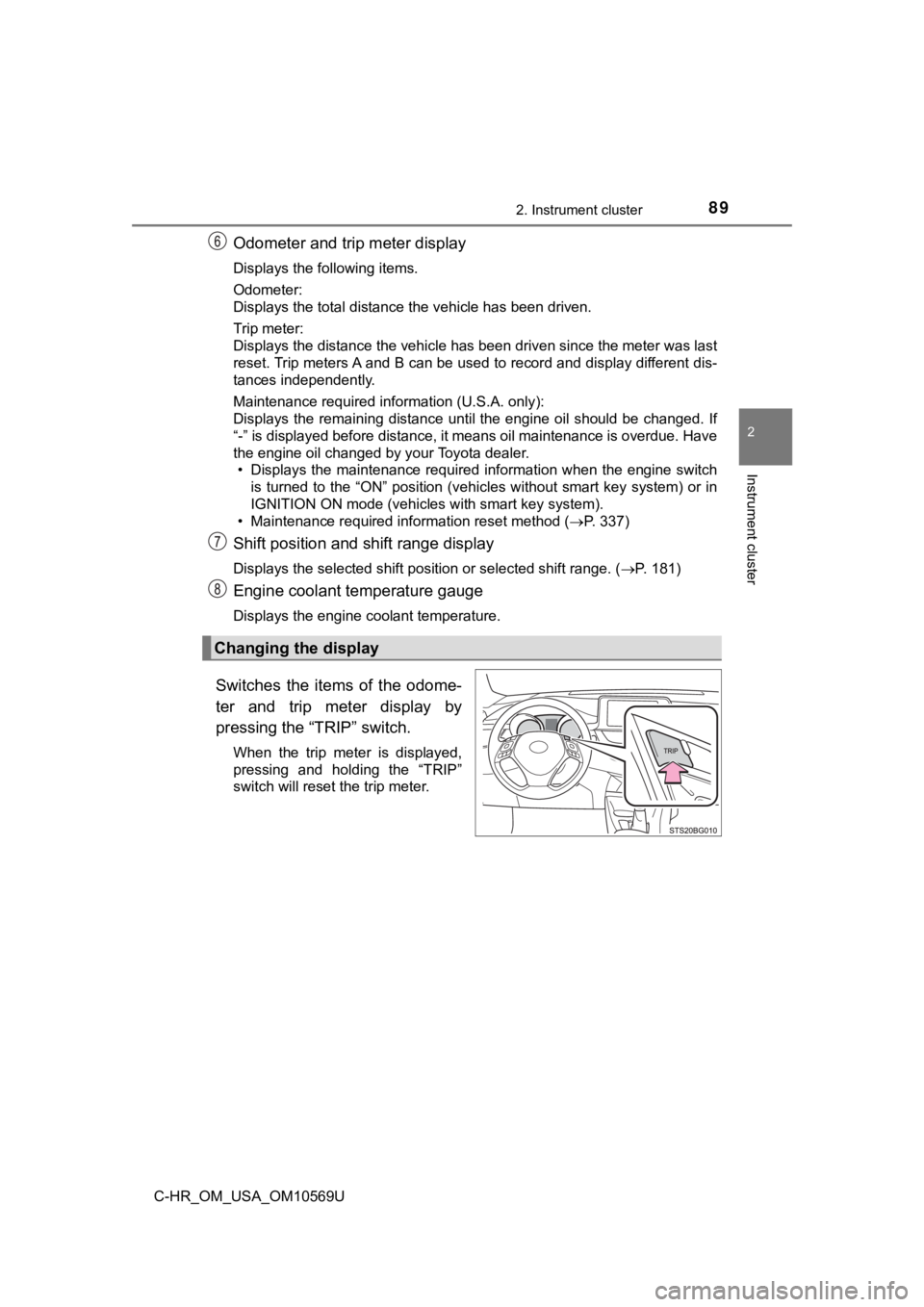
Switches the items of the odome-
ter and trip meter display by
pressing the “TRIP” switch.
When the trip meter is displayed,
pressing and holding the “TRIP”
switch will reset the trip meter.
Changing the display