warning TOYOTA C-HR 2023 Owners Manual
[x] Cancel search | Manufacturer: TOYOTA, Model Year: 2023, Model line: C-HR, Model: TOYOTA C-HR 2023Pages: 814, PDF Size: 112.62 MB
Page 471 of 814
4694-5. Using the driving support systems
4
Driving
C-HR_HEV_OM_Europe_OM10764E
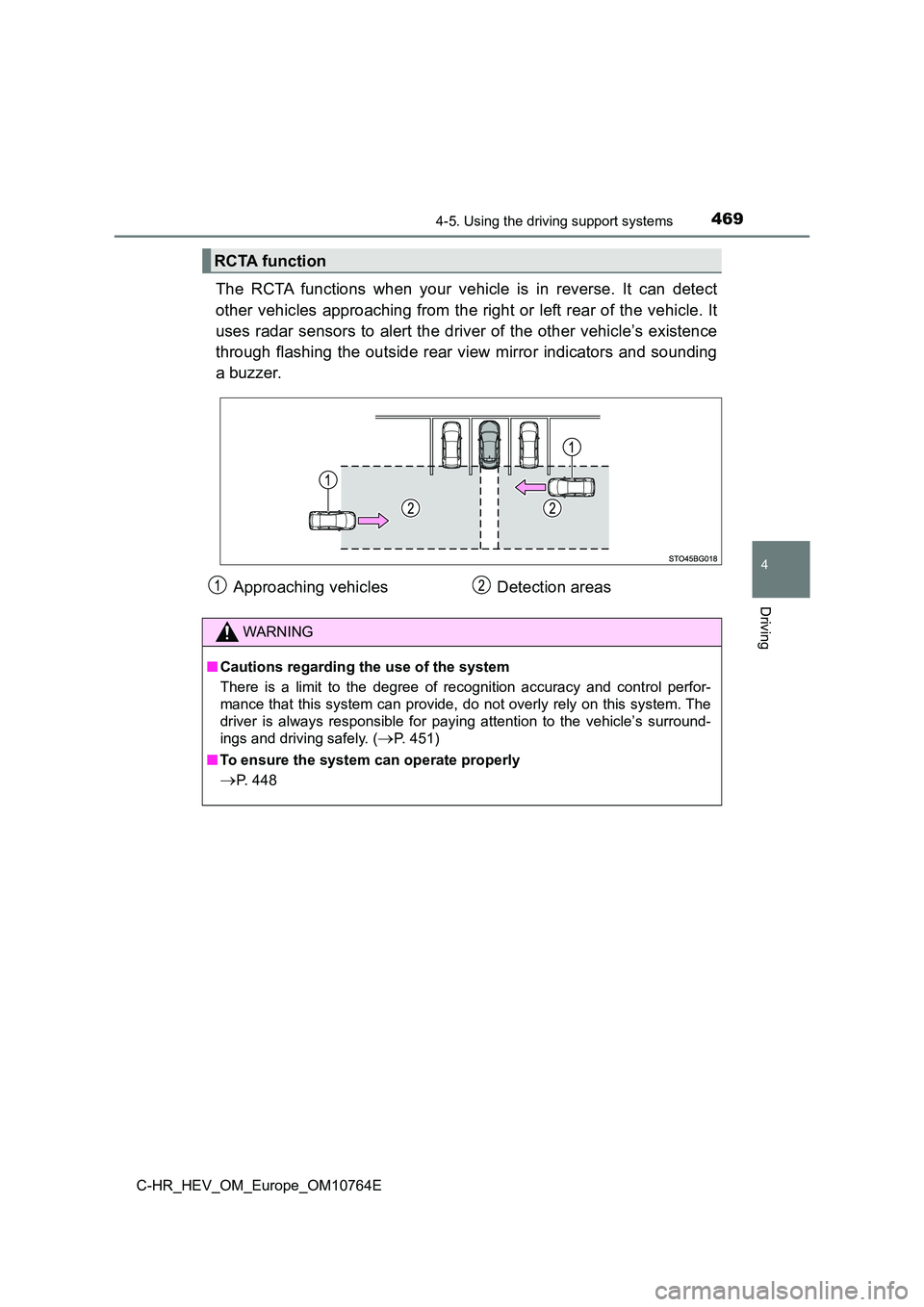
The RCTA functions when your vehicle is in reverse. It can detect
other vehicles approaching from the right or left rear of the v ehicle. It
uses radar sensors to alert the driver of the other vehicle’s e xistence
through flashing the outside rear view mirror indicators and so unding
a buzzer.
RCTA function
Approaching vehicles Detection areas
WARNING
■ Cautions regarding the use of the system
There is a limit to the degree of recognition accuracy and cont rol perfor-
mance that this system can provide, do not overly rely on this system. The
driver is always responsible for paying attention to the vehicl e’s surround-
ings and driving safely. (P. 451)
■ To ensure the system can operate properly
P. 448
Page 477 of 814
475
4
4-5. Using the driving support systems
Driving
C-HR_HEV_OM_Europe_OM10764E
PKSB (Parking Suppor t Brake)
■Parking Support Brake function (static objects)
Ultrasonic sensors are used to detect static objects, such as a wall,
in the detection area when driving at a low speed or backing up .
( P. 483)
■Parking Support Brake function (rear-crossing vehicles) (if
equipped)
Rear radar sensors are used to detect approaching vehicles in t he
detection area behind the vehicle when backing up. ( P. 4 8 7 )
: If equipped
The Parking Support Brake system consists of the following
functions that operate when driving at a low speed or backing
up, such as when parking. When the system determines that a
collision with a detected object is high, a warning operates to
urge the driver to take evasive action. If the system determine s
that the possibility of a collision with a detected object is
extremely high, the brakes are automatically applied to help
avoid the collision or help reduce the impact of the collision.
PKSB (Parking Support Brake) system
Page 484 of 814
4824-5. Using the driving support systems
C-HR_HEV_OM_Europe_OM10764E
WARNING
■Cautions regarding the use of the system
Do not overly rely on the system, as doing so may lead to an ac cident.
Always drive while checking the safety of the surroundings of t he vehicle.
Depending on the vehicle and road conditions, weather, etc., th e system
may not operate.
The detection capabilities of sensors and radars are limited. A lways drive
while checking the safety of the surroundings of the vehicle.
● The driver is solely responsible for safe driving. Always drive carefully, tak-
ing care to observe your surroundings. The Parking Support Brak e system
is designed to provide support to lessen the severity of collis ions. How-
ever, it may not operate in some situations.
● The Parking Support Brake system is not designed to stop the vehicle
completely. Additionally, even if the system has stopped the ve hicle, it is
necessary to depress the brake pedal immediately as brake contr ol will be
canceled after approximately 2 seconds.
● It is extremely dangerous to check the system operations by intentionally
driving the vehicle into the direction of a wall, etc. Never at tempt such
actions.
■ When to disable the Parking Support Brake
In the following situations, disable the Parking Support Brake as the system
may operate even though there is no possibility of a collision.
● When inspecting the vehicle using a chassis roller, chassis dynamo or free
roller
● When loading the vehicle onto a boat, truck or other transport vessel
● If the suspension has been modified or tires of a size other than specified
are installed
● If the front of the vehicle is raised or lowered due to the carried load
● When equipment that may obstruct a sensor is installed, such as a towing
eyelet, bumper protector (an addi tional trim strip, etc.), bicycle carrier, or
snow plow
● When using automatic car washing devices
● If the vehicle cannot be driven in a stable manner, such as when the vehi-
cle has been in an accident or is malfunctioning
● When the vehicle is driven in a sporty manner or off-road
● When the tires are not properly inflated
● When the tires are very worn
● When a tire chains, compact spare tire or an emergency tire puncture
repair kit is used
Page 487 of 814
4854-5. Using the driving support systems
4
Driving
C-HR_HEV_OM_Europe_OM10764E
■The Parking Support Brake function (static objects) will operate when
The function will operate when the PKSB OFF indicator is not il luminated or
flashing (P. 157, 159) and all of the following conditions are met:
● Hybrid system output restriction control
• The Parking Support Brake is enabled.
• The vehicle speed is approximately 15 km/h (9 mph) or less.
• There is a static object in the traveling direction of the veh icle and approx-
imately 2 to 4 m (6 to 13 ft.) away.
• The Parking Support Brake determines that a stronger-than-norm al brake
operation is necessary to avoid a collision.
● Brake control
• Hybrid system output restriction control is operating
• The Parking Support Brake determines that an immediate brake o pera-
tion is necessary to avoid a collision.
■ The Parking Support Brake function (static objects) will stop operating
when
The function will stop operating if any of the following condit ions are met:
● Hybrid system output restriction control
• The Parking Support Brake is disabled.
• The system determines that the collision has become avoidable with nor-
mal brake operation.
• The static object is no longer approximately 2 to 4 m (6 to 13 ft.) away
from the vehicle or in the traveling direction of the vehicle.
● Brake control
• The Parking Support Brake is disabled.
• Approximately 2 seconds have elapsed since the vehicle was sto pped by
brake control.
• The brake pedal is depressed after the vehicle is stopped by b rake con-
trol.
• The static object is no longer approximately 2 to 4 m (6 to 13 ft.) away
from the vehicle or in the traveling direction of the vehicle.
■ Detection range of the Parking Support Brake function (static objects)
The detection range of the Parking Support Brake function (stat ic objects) dif-
fers from the detection range of the Toyota parking assist-sens or. (P. 459)
Therefore, even if the Toyota parking assist-sensor detects an object and pro-
vides a warning, the Parking Support Brake function (static obj ects) may not
start operating.
■ Situations in which the system may not operate properly
P. 461
■ Situations in which the system may operate even if there is no possibil-
ity of a collision
P. 463
Page 488 of 814
4864-5. Using the driving support systems
C-HR_HEV_OM_Europe_OM10764E
WARNING
■To ensure the system can operate properly
P. 465
■ If the Parking Support Brake function (static objects) operates unnec-
essarily, such as at a railroad crossing
P. 481
■ Notes when washing the vehicle
P. 466
Page 491 of 814
4894-5. Using the driving support systems
4
Driving
C-HR_HEV_OM_Europe_OM10764E
■ Situations in which the system may not operate properly
P. 472
■ Situations in which the system may operate even if there is no possibil-
ity of a collision
P. 473
WARNING
■ To ensure the system can operate properly
P. 448
Page 492 of 814
4904-5. Using the driving support systems
C-HR_HEV_OM_Europe_OM10764E
S-IPA (Simple Intelligent Parking Assist
System)
The Simple Intelligent Parking Assist System automatically oper ates
the steering wheel to provide support when backing into an area near
a target parking spot, and when departing from a parallel parki ng spot.
(Shift lever operations and speed adjustment when moving forwar d or
backing up are not performed automatically.)
● The Simple Intelligent Parking Assist System does not park the
vehicle automatically. It is a system that provides support whe n
pulling out of a perpendicular or parallel parking spot.
● The Simple Intelligent Parking Assist System provides steering
wheel operation assistance to guide the vehicle toward the sele cted
intended parking spot. The selected intended parking spot may n ot
always be reachable, depending on road and vehicle conditions a t
the time of parking, and the distance to the intended parking s pot.
While the Simple Intelligent Parking Assist System is operating , if the
system detects an obstacle that could result in a collision, th e emer-
gency brakes operate, regardless of whether the PKSB (Parking S up-
port Brake) system is on or off. ( P. 495)
: If equipped
Function summary
Linking with the PKSB (Parking Support Brake) system (if
equipped)
WARNING
● When backing up or proceeding forward, be sure to directly confirm the
safety of the area to the front or rear, and the area around th e vehicle, and
slowly back up or proceed forward while adjusting the vehicle s peed by
depressing the brake pedal.
● If it seems the vehicle may make contact with a pedestrian, another vehi-
cle or any other obstacles, stop the vehicle by depressing the brake pedal,
and then press the S-IPA switch ( P. 492) to turn the system off.
Page 511 of 814
5094-5. Using the driving support systems
4
Driving
C-HR_HEV_OM_Europe_OM10764E
WARNING
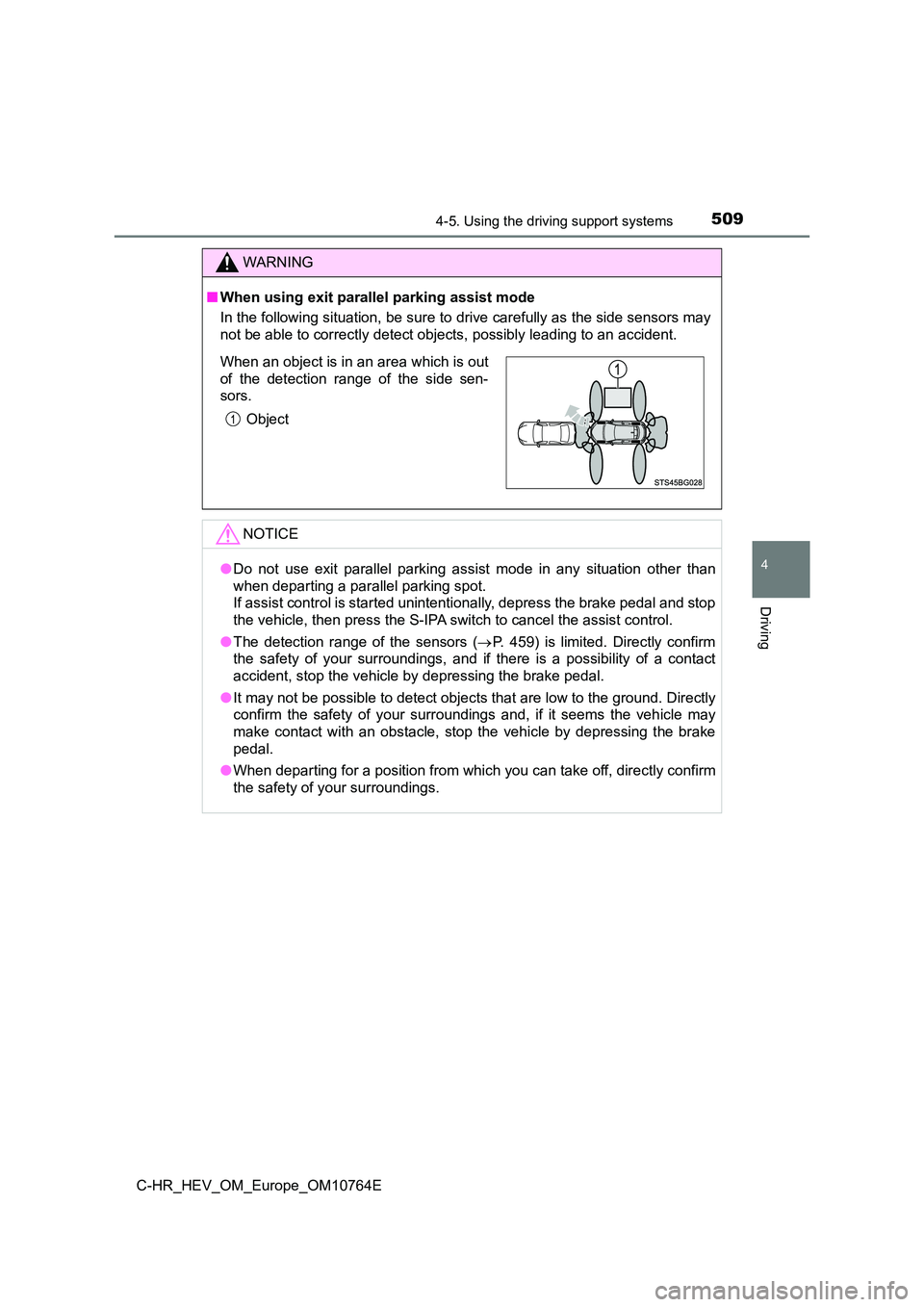
■When using exit parallel parking assist mode
In the following situation, be sure to drive carefully as the s ide sensors may
not be able to correctly detect objects, possibly leading to an accident.
NOTICE
●Do not use exit parallel parking assist mode in any situation other than
when departing a parallel parking spot.
If assist control is started unintentionally, depress the brake pedal and stop
the vehicle, then press the S-IPA switch to cancel the assist c ontrol.
● The detection range of the sensors (P. 459) is limited. Directly confirm
the safety of your surroundings, and if there is a possibility of a contact
accident, stop the vehicle by depressing the brake pedal.
● It may not be possible to detect objects that are low to the ground. Directly
confirm the safety of your surroundings and, if it seems the ve hicle may
make contact with an obstacle, stop the vehicle by depressing t he brake
pedal.
● When departing for a position from which you can take off, directly confirm
the safety of your surroundings.
When an object is in an area which is out
of the detection range of the side sen-
sors.
Object
Page 527 of 814
5254-5. Using the driving support systems
4
Driving
C-HR_HEV_OM_Europe_OM10764E
WARNING
●Do not rely solely upon the Simple Intelligent Parking Assist System. As
with unequipped vehicles, move forward and back up carefully wh ile
directly confirming the safety of your surroundings and the are a to the rear
of the vehicle.
● Do not back up while viewing the multi-information display. Backing up
while only viewing the monitor screen may cause a collision or lead to an
accident, as the image displayed on the monitor screen may diff er from
actual conditions. Make sure to visually check the surrounding areas and
the area to the rear of the vehicle with and without the mirror while backing
up.
● Drive slowly while adjusting your speed by depressing the brake pedal
when backing up or moving forward.
● If it seems the vehicle may make contact with a pedestrian, another vehi-
cle or any other obstacles, stop the vehicle by depressing the brake pedal,
and then press the S-IPA switch to turn off the system.
● Use the system in a parking lot with a flat surface.
● Observe the following precautions, as the steering wheel automatically
turns during use.
• There is risk of a necktie, scarf, your arm, etc., being caugh t on the
steering wheel. Please do not allow your upper body to be close to the
steering wheel. Also, do not allow children close to the steeri ng wheel.
• There is a possibility of injury when the steering wheel turns if you have
long fingernails.
• In case of emergency, stop the vehicle by depressing the brake pedal,
and then press the S-IPA switch to turn off the system.
● Always confirm that there is appropriate space before attempting to park
the vehicle and operate the system.
Page 528 of 814
5264-5. Using the driving support systems
C-HR_HEV_OM_Europe_OM10764E
WARNING
●Do not use the system in the following situations, as the system may be
unable to correctly assist you in reaching the target parking s pot and may
lead to an unexpected accident.
• In an area that is not a parking lot
• A parking lot that is not paved and has no parking space lines , such as
a sand or gravel parking lot
• A parking lot that has a slope or undulations in the road
• A frozen, snow-covered or slippery road
• The asphalt is melting due to hot weather
• There is an obstacle between the vehicle and the target parkin g spot
• Using tire chains or compact spare tire (if equipped)
● Do not use tire other than that provided by the manufacturer. The system
may not operate properly. When replacing tires, contact any aut horized
Toyota retailer or Toyota authorized repairer, or any reliable repairer.
● The system may not be able position the vehicle in the set location in the
following situations.
• The tires are extremely worn or the tire pressure is low
• The vehicle is carrying very heavy load
• The vehicle is tilted due to having luggage, etc., located on one side of
the vehicle
• There are road heaters installed in the parking lot to prevent the road
surface from freezing.
In any other situations when the set position and vehicle posit ion greatly
differ, have the vehicle inspected by any authorized Toyota ret ailer or
Toyota authorized repairer, or any reliable repairer.