warning TOYOTA C-HR 2023 Owners Manual
[x] Cancel search | Manufacturer: TOYOTA, Model Year: 2023, Model line: C-HR, Model: TOYOTA C-HR 2023Pages: 814, PDF Size: 112.62 MB
Page 424 of 814
4224-5. Using the driving support systems
C-HR_HEV_OM_Europe_OM10764E
■ Automatic cancelation of constant speed control mode
Constant speed control mode is automatically canceled in the fo llowing situa-
tions:
● Actual vehicle speed is more than approximately 16 km/h (10 mph) below
the set vehicle speed.
● Actual vehicle speed falls below approximately 30 km/h (20 mph).
● VSC is activated.
● TRC is activated for a period of time.
● When the VSC or TRC system is turned off.
● Pre-collision braking is activated.
If constant speed control mode is automatically canceled for an y reasons
other than the above, there may be a malfunction in the system. Contact any
authorized Toyota retailer or Toyota authorized repairer, or an y reliable
repairer.
■ The Dynamic Radar Cruise Control with Road Sign Assist may not oper-
ate properly when
As the Dynamic Radar Cruise Control with Road Sign Assist may n ot operate
properly in conditions in which RSA may not operate or detect c orrectly
( P. 406), when using this function, make sure to check the speed limit sign
displayed.
In the following situations, the set speed may not be changed t o the recog-
nized speed limit by pressing and holding the “+RES”/“-SET” swi tch.
● If speed limit information is not available
● When the recognized speed limit is the same as the set speed
● When the recognized speed limit is outside of the speed range that the
dynamic radar cruise control system can operate
■ Brake operation
A brake operation sound may be heard and the brake pedal respon se may
change, but these are not malfunctions.
■ Warning messages and buzzers for dynamic radar cruise control with
full-speed range
Warning messages and buzzers are used to indicate a system malf unction or
to inform the driver of the need for caution while driving. If a warning message
is shown on the multi-information display, read the message and follow the
instructions. ( P. 365, 690)
Page 425 of 814
4234-5. Using the driving support systems
4
Driving
C-HR_HEV_OM_Europe_OM10764E
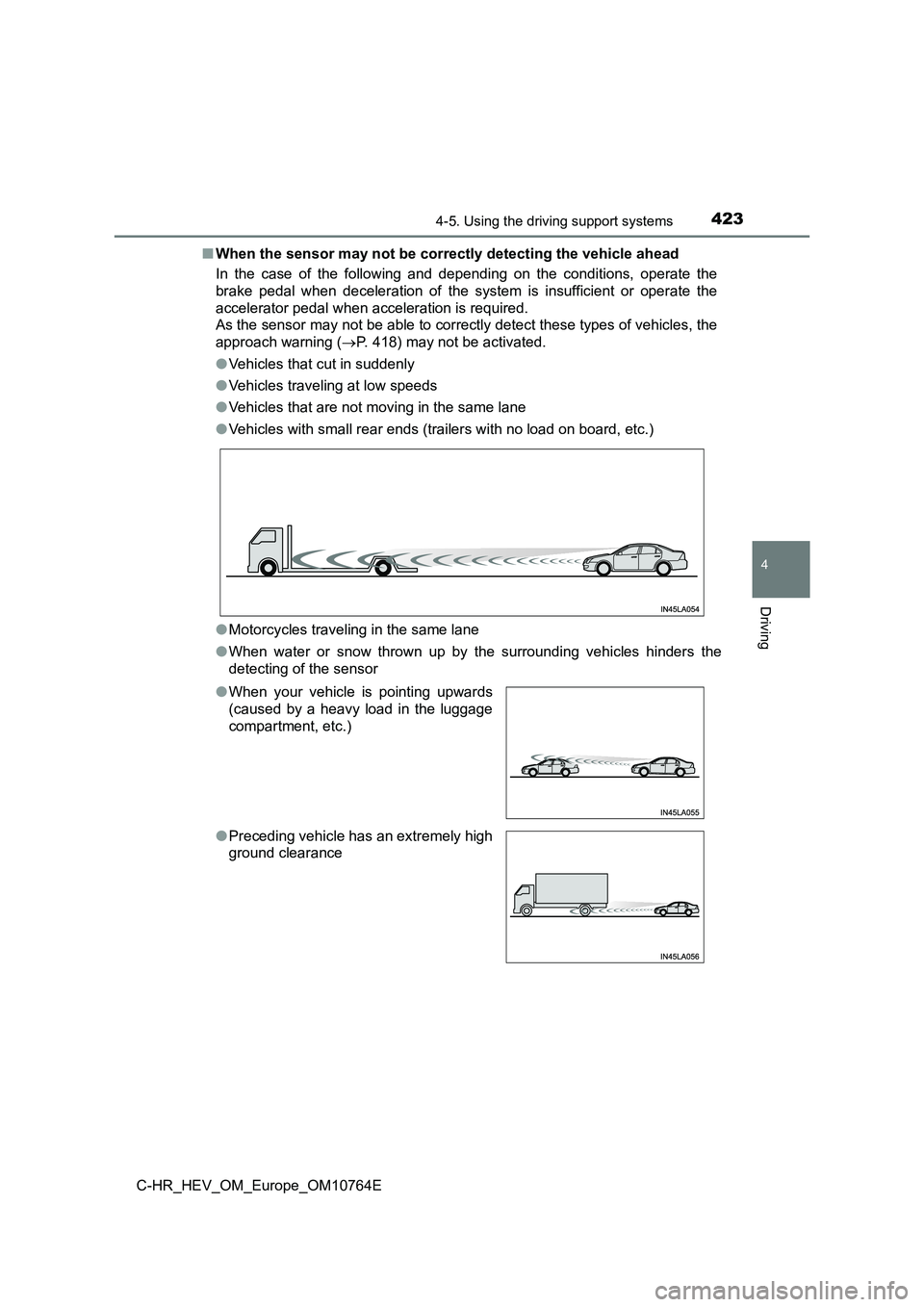
■ When the sensor may not be correctly detecting the vehicle ahead
In the case of the following and depending on the conditions, o perate the
brake pedal when deceleration of the system is insufficient or operate the
accelerator pedal when acceleration is required.
As the sensor may not be able to correctly detect these types o f vehicles, the
approach warning ( P. 418) may not be activated.
● Vehicles that cut in suddenly
● Vehicles traveling at low speeds
● Vehicles that are not moving in the same lane
● Vehicles with small rear ends (trailers with no load on board, etc.)
● Motorcycles traveling in the same lane
● When water or snow thrown up by the surrounding vehicles hinders the
detecting of the sensor
● When your vehicle is pointing upwards
(caused by a heavy load in the luggage
compartment, etc.)
● Preceding vehicle has an extremely high
ground clearance
Page 431 of 814
4294-5. Using the driving support systems
4
Driving
C-HR_HEV_OM_Europe_OM10764E
WARNING
■To avoid operating the cruise control by mistake
Switch the cruise control off using the “ON-OFF” button when no t in use.
■ Situations unsuitable for cruise control
Do not use cruise control in any of the following situations.
Doing so may result in loss of control and could cause an accid ent resulting
in death or serious injury.
● In heavy traffic
● On roads with sharp bends
● On winding roads
● On slippery roads, such as those covered with rain, ice or snow
● On steep downhills
Vehicle speed may exceed the set speed when driving down a stee p hill.
● When your vehicle is towing a trailer or during emergency towing
Page 436 of 814
4344-5. Using the driving support systems
C-HR_HEV_OM_Europe_OM10764E
■ If the “Check Speed Limiter System.” is displayed on the multi-informa-
tion display
Stop in a safe place, turn the power switch off and back on aga in, and then
set the speed limiter. If the speed limiter cannot be set, the system may be
malfunctioning. Even though the vehicle can be driven normally, have the
vehicle inspected by any authorized Toyota retailer or Toyota a uthorized
repairer, or any r eliable repairer.
WARNING
■To avoid operating the speed limiter by mistake
Keep the speed limiter switch off when not in use.
■ Situations unsuitable for speed limiter
Do not use the speed limiter in either of the following situati ons.
Doing so may result in control of the vehicle being lost and co uld cause a
serious or fatal accident.
● On slippery roads, such as those covered with rain, ice or snow
● On steep hills
● When towing a trailer or emergency towing
NOTICE
When a warning is issued using the meter display and buzzer after exceed-
ing the set speed limit on a steep decline, depress the brake p edal to decel-
erate.
Page 450 of 814
4484-5. Using the driving support systems
C-HR_HEV_OM_Europe_OM10764E
WARNING
■To ensure the system can operate properly
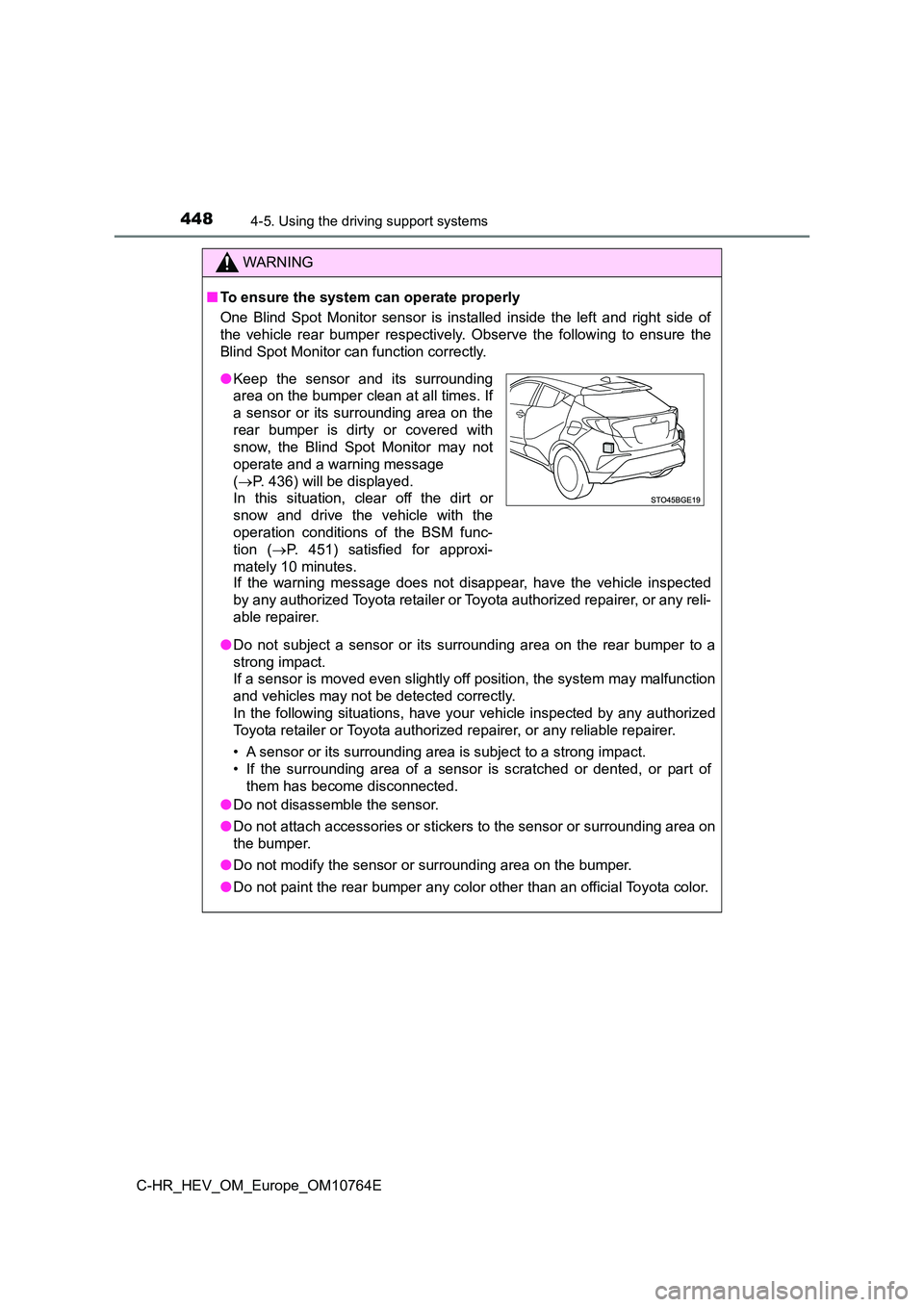
One Blind Spot Monitor sensor is installed inside the left and right side of
the vehicle rear bumper respectively. Observe the following to ensure the
Blind Spot Monitor can function correctly.
If the warning message does not disappear, have the vehicle ins pected
by any authorized Toyota retailer or Toyota authorized repairer , or any reli-
able repairer.
● Do not subject a sensor or its surrounding area on the rear bumper to a
strong impact.
If a sensor is moved even slightly off position, the system may malfunction
and vehicles may not be detected correctly.
In the following situations, have your vehicle inspected by any authorized
Toyota retailer or Toyota authorized repairer, or any reliable repairer.
• A sensor or its surrounding area is subject to a strong impact .
• If the surrounding area of a sensor is scratched or dented, or part of
them has become disconnected.
● Do not disassemble the sensor.
● Do not attach accessories or stickers to the sensor or surrounding area on
the bumper.
● Do not modify the sensor or surrounding area on the bumper.
● Do not paint the rear bumper any color other than an official Toyota color.
●Keep the sensor and its surrounding
area on the bumper clean at all times. If
a sensor or its surrounding area on the
rear bumper is dirty or covered with
snow, the Blind Spot Monitor may not
operate and a warning message
( P. 436) will be displayed.
In this situation, clear off the dirt or
snow and drive the vehicle with the
operation conditions of the BSM func-
tion ( P. 451) satisfied for approxi-
mately 10 minutes.
Page 453 of 814
4514-5. Using the driving support systems
4
Driving
C-HR_HEV_OM_Europe_OM10764E
■The BSM function is operational when
The BSM function is operational w hen all of the following conditions are met:
● The BSM system is set to on (P. 436)
● The shift lever is in a position other than R.
● Vehicle speed is greater than approximately 16 km/h (10 mph)
■ The BSM function will detect a vehicle when
The BSM function will detect a vehicle present in the detection area in the fol-
lowing situations:
● A vehicle in an adjacent lane overtakes your vehicle.
● You overtake a vehicle in adjacent lane slowly.
● Another vehicle enters the detection area when it changes lanes.
■ Conditions under which the system will not detect a vehicle
The BSM function is not designed to detect the following types of vehicles
and/or objects:
● Small motorcycles, bicycles, pedestrians, etc.*
●Vehicles traveling in the opposite direction
● Guardrails, walls, signs, parked vehicles and similar stationary objects*
●Following vehicles that are in the same lane*
●Vehicles traveling 2 lanes away from your vehicle*
●Vehicles which are being overtaken rapidly by your vehicle*
*: Depending on conditions, detection of a vehicle and/or object may occur.
WARNING
■Cautions regarding the use of the system
The driver is solely responsible for safe driving. Always drive safely, taking
care to observe your surroundings.
The Blind Spot Monitor function is a supplementary function whi ch alerts the
driver that a vehicle is present in the blind spot. Do not over ly rely on the
Blind Spot Monitor function. The function cannot judge if it is safe to change
lanes, therefore over reliance could cause an accident resultin g in death or
serious injury.
According to conditions, the system may not function correctly. Therefore
the driver’s own visual confirmation of safety is necessary.
Page 462 of 814
4604-5. Using the driving support systems
C-HR_HEV_OM_Europe_OM10764E
■The system can be operated when
● The power switch is in ON mode.
● Toyota parking assist-sensor function is on.
● The vehicle speed is less than about 10 km/h (6 mph).
● A shift lever other than P is selected.
● Vehicles with side sensors: Steering wheel is turned approximately 90° or
more
■ If “Parking assist unavailable. Clean parking assist sensor” is displayed
on the multi-information display
A sensor may be covered with ice, snow, dirt, etc. Remove the i ce, snow, dirt,
etc., from the sensor to return the system to normal.
Also, due to ice forming on a sensor at low temperatures, a war ning message
may be displayed or the sensor may not be able to detect an obj ect. Once the
ice melts, the system will return to normal.
■ If “Parking assist Malfunction Visit your dealer” is displayed on the
multi-information display
The system may not operate due to the malfunction of a sensor.
Have the vehicle inspected by any authorized Toyota retailer or Toyota autho-
rized repairer, or any reliable repairer.
■ Sensor detection information
The following situations may occur during use.
● The sensors may be able to only detect objects near the front and rear bum-
pers.
● Depending on the shape of the object and other factors, the detection dis-
tance may shorten, or detection may be impossible.
● If an object is extremely close to a sensor, it may not be detected.
● There will be a short delay between object detection and display. Even at
low speeds, there is a possibility that the object will come wi thin the sensor’s
detection areas before the display is shown and the warning bee p sounds.
● It might be difficult to hear the buzzer due to the volume of the audio system
or air flow noise of the air conditioning system.
● It may be difficult to hear the buzzer if buzzers for other systems are sound-
ing.
Page 463 of 814
4614-5. Using the driving support systems
4
Driving
C-HR_HEV_OM_Europe_OM10764E
■ Objects which the system may not be properly detected
The shape of the object may prevent the sensor from detecting i t. Pay partic-
ular attention to the following objects:
● Wires, fences, ropes, etc.
● Cotton, snow and other materials that absorb sound waves
● Sharply-angled objects
● Low objects
● Tall objects with upper sections projecting outwards in the direction of your
vehicle
People may not be detected if they are wearing certain types of clothing.
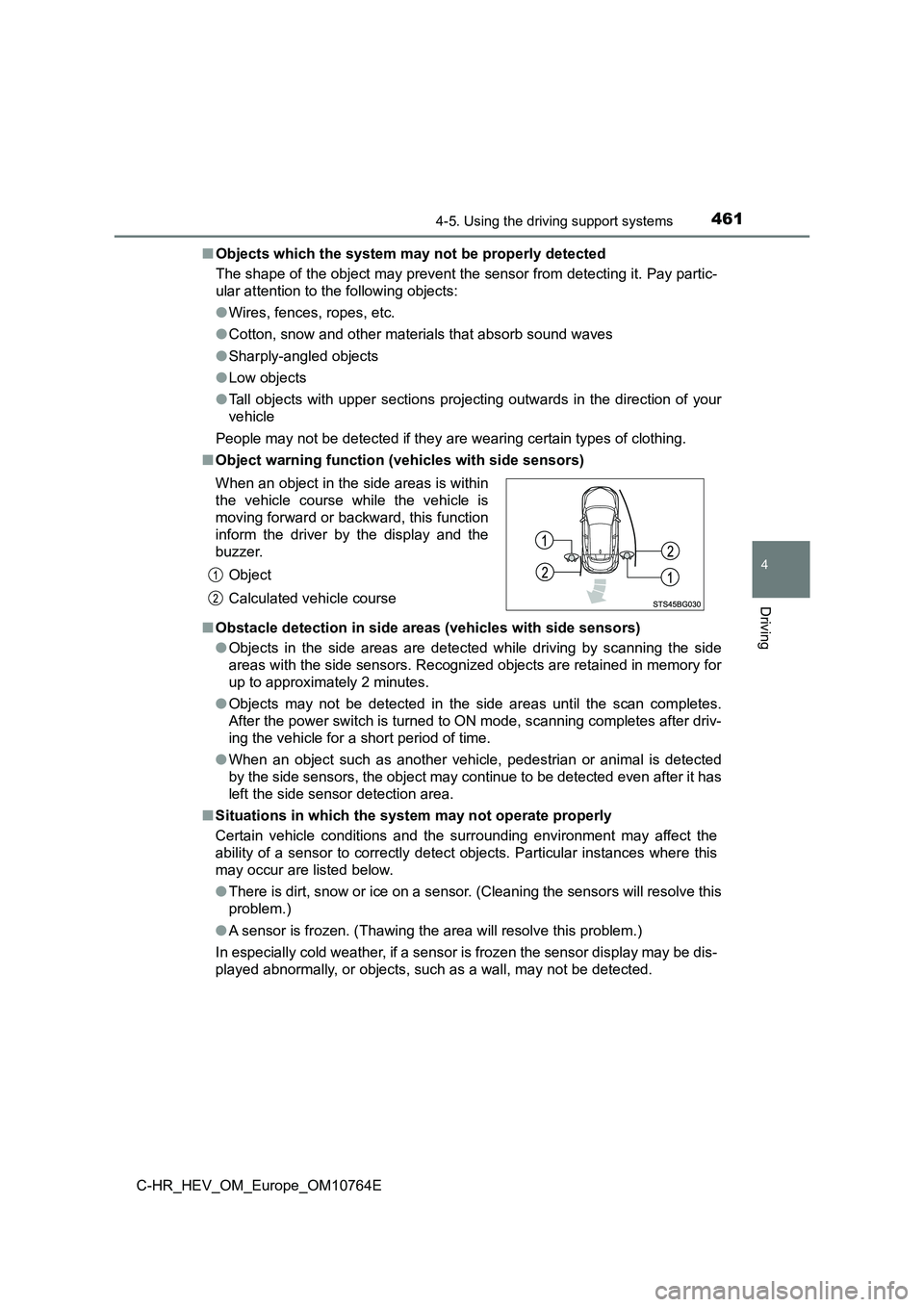
■ Object warning function (vehicles with side sensors)
■ Obstacle detection in side areas (vehicles with side sensors)
● Objects in the side areas are detected while driving by scanning the side
areas with the side sensors. Recognized objects are retained in memory for
up to approximately 2 minutes.
● Objects may not be detected in the side areas until the scan completes.
After the power switch is turned to ON mode, scanning completes after driv-
ing the vehicle for a short period of time.
● When an object such as another vehicle, pedestrian or animal is detected
by the side sensors, the object may continue to be detected eve n after it has
left the side sensor detection area.
■ Situations in which the system may not operate properly
Certain vehicle conditions and the surrounding environment may affect the
ability of a sensor to correctly detect objects. Particular ins tances where this
may occur are listed below.
● There is dirt, snow or ice on a sensor. (Cleaning the sensors will resolve this
problem.)
● A sensor is frozen. (Thawing the area will resolve this problem.)
In especially cold weather, if a sensor is frozen the sensor di splay may be dis-
played abnormally, or objects, such as a wall, may not be detec ted.
When an object in the side areas is within
the vehicle course while the vehicle is
moving forward or backward, this function
inform the driver by the display and the
buzzer.
Object
Calculated vehicle course
Page 467 of 814
4654-5. Using the driving support systems
4
Driving
C-HR_HEV_OM_Europe_OM10764E
WARNING
■Cautions regarding the use of the system
There is a limit to the degree of recognition accuracy and cont rol perfor-
mance that this system can provide, do not overly rely on this system. The
driver is always responsible for paying attention to the vehicl e’ surroundings
and driving safely.
■ To ensure the system can operate properly
Observe the following precautions.
Failing to do so may result in the vehicle being unable to be d riven safely
and possibly cause an accident.
● Do not damage the sensors, and always keep them clean.
● Do not attach a sticker or install an electronic component, such as a backlit
license plate (especially fluorescent type), fog lights, fender pole or wire-
less antenna near a radar sensor.
● Do not subject the surrounding area of the sensor to a strong impact. If
subjected to an impact, have the vehicle inspected by any autho rized
Toyota retailer or Toyota authorized repairer, or any reliable repairer. If the
front or rear bumper needs to be removed/installed or replaced, contact
any authorized Toyota retailer or Toyota authorized repairer, o r any reliable
repairer.
● Do not modify, disassemble or paint the sensors.
● Do not attach a license plate cover.
● Keep your tires properly inflated.
■ When to disable the function
In the following situations, disable the function as it may ope rate even
though there is no possibility of a collision.
● Failing to observe the warnings above.
● A non-genuine Toyota suspension (lowered suspension, etc.) is installed.
Page 468 of 814
4664-5. Using the driving support systems
C-HR_HEV_OM_Europe_OM10764E
WARNING
■Side sensors (if equipped)
In the following situations, the clearance sonar may not operat e normally
and may result in an unexpected accident. Drive carefully.
● Objects may not be detected in the side areas until the vehicle is driven for
a short time and a scan of the side areas is completed. ( P. 461)
● Even after the scan of the side areas is completed, objects such as other
vehicles, people or animals that approach from the sides cannot be
detected.
● Even after the scan of the side areas is completed, objects may not be
detected depending on the surrounding situation of the vehicle.
At that time, the side sensor displays ( P. 455) temporary turn off.
■ Notes when washing the vehicle
Do not apply intensive bursts of water or steam to the sensor a rea.
Doing so may result in the sensor malfunctioning.
● When using a high pressure washer to wash the vehicle, do not spray the
sensors directly, as doing so may cause a sensor to malfunction.
● When using steam to clean the vehicle, do not direct steam too close to
the sensors as doing so may cause a sensor to malfunction.