lock TOYOTA CAMRY 2010 XV40 / 8.G Manual PDF
[x] Cancel search | Manufacturer: TOYOTA, Model Year: 2010, Model line: CAMRY, Model: TOYOTA CAMRY 2010 XV40 / 8.GPages: 538, PDF Size: 9.22 MB
Page 193 of 538
193
2-5. Driving information
2
When driving
NOTICE
■
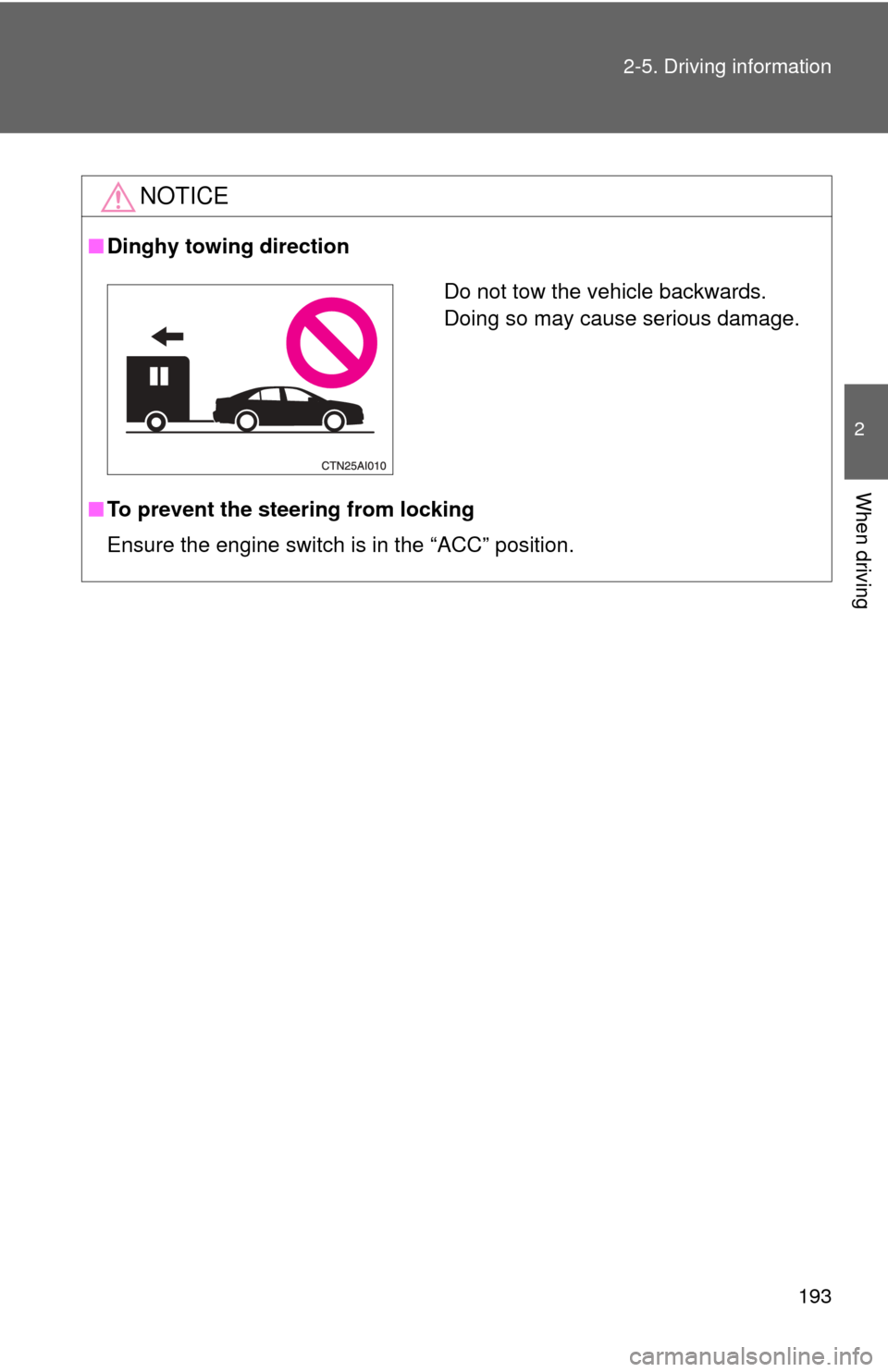
Dinghy towing direction
■ To prevent the steering from locking
Ensure the engine switch is in the “ACC” position.
Do not tow the vehicle backwards.
Doing so may cause serious damage.
Page 195 of 538
Interior features3
195
3-4. Using the hands-free phone system
(for cellular phone)
Hands-free phone system (for cellular phone)
features .......................... 279
Using the hands-free phone system
(for cellular phone) ......... 283
Making a phone call ......... 292
Setting a cellular phone ............................. 296
Security and system setup .............................. 301
Using the phone book ...... 305
3-5. Using the interior lights Interior lights list ............... 313
• Interior light ..................... 314
• Personal lights ................ 315
3-6. Using the storage features List of storage features .... 316
• Glove box........................ 317
• Console box .................... 317
• Cup holders .................... 319
• Auxiliary boxes................ 321 3-7. Other interior features
Sun visors ........................ 324
Vanity mirrors ................... 325
Clock ................................ 326
Ashtray ............................. 327
Power outlets ................... 328
Seat heaters..................... 330
Armrest ............................ 332
Rear sunshade................. 333
Trunk storage extension ....................... 334
Floor mat .......................... 335
Trunk features .................. 336
Garage door opener......... 338
Compass .......................... 343
Page 203 of 538
203
3-1. Using the air conditioning system
and defogger
3
Interior features
■Plasmacluster *
This air conditioning system adopts plasmacluster technology, which helps
to keep good air quality in the cabin by emitting positive and negative ions
through the driver's side vent.
A slight noise may be heard during operation. This is not a malfunction.
Also, static electricity may be discharged near the driver's side vent due to
the high voltage used to operate the system.
To clean the drive's side vent, turn the system off and wipe the vent using a
soft cloth.
*: Plasmacluster technology is manufactured under license from SHARP Corporation. “Plasmacluster ” is a trademark of the SHARP Corporation.
■ Air conditioning odors
●During use, various odors from inside and outside the vehicle may enter
into and accumulate in the air conditioning system. This may then cause
odor to be emitted from the vents.
● To reduce potential odors from occurring:
• It is recommended that the air conditioning system be set to outside air
mode prior to turning the vehicle off.
• The start timing of the blower may be delayed for a short period of time immediately after the air conditioning system is started in automatic
mode.
CAUTION
■ To prevent the windshield from fogging up
Do not use during cool air operation in extremely humid weather.
The difference between the temperature of the outside air and that of the
windshield can cause the outer surface of the windshield to fog up, blocking
your vision.
■ Plasmacluster
Do not disassemble or repair the system because it contains high voltage
parts. Call your Toyota dealer if the system needs repair.
Page 205 of 538
205
3-1. Using the air conditioning system and defogger
3
Interior features
Manual air conditioning system
Adjusting the settings■ Adjusting the temperature setting
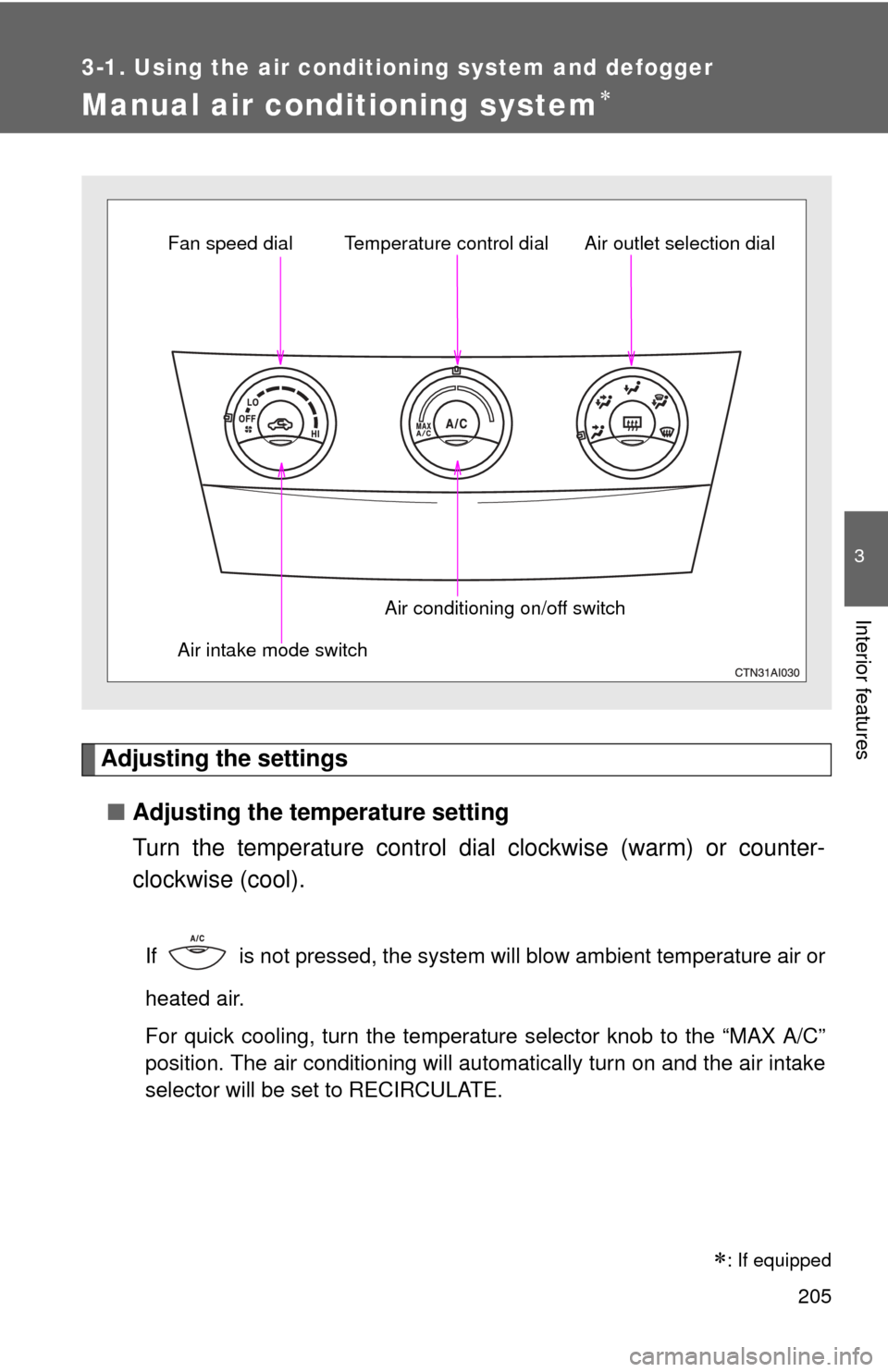
Turn the temperature control dial clockwise (warm) or counter-
clockwise (cool).
If is not pressed, the system will blow ambient temperature air or
heated air.
For quick cooling, turn the temperature selector knob to the “MAX A/C”
position. The air conditioning will automatically turn on and the air intake
selector will be set to RECIRCULATE.
Fan speed dial Air outlet selection dial
Air intake mode switch Air conditioning on/off switch
Temperature control dial
: If equipped
Page 206 of 538
206 3-1. Using the air conditioning system and defogger
■Adjusting the fan speed
Turn the fan speed dial clockwise (increase) or counterclockwise
(decrease).
Set the dial to “OFF” to turn the fan off.
■ Selecting the air outlets
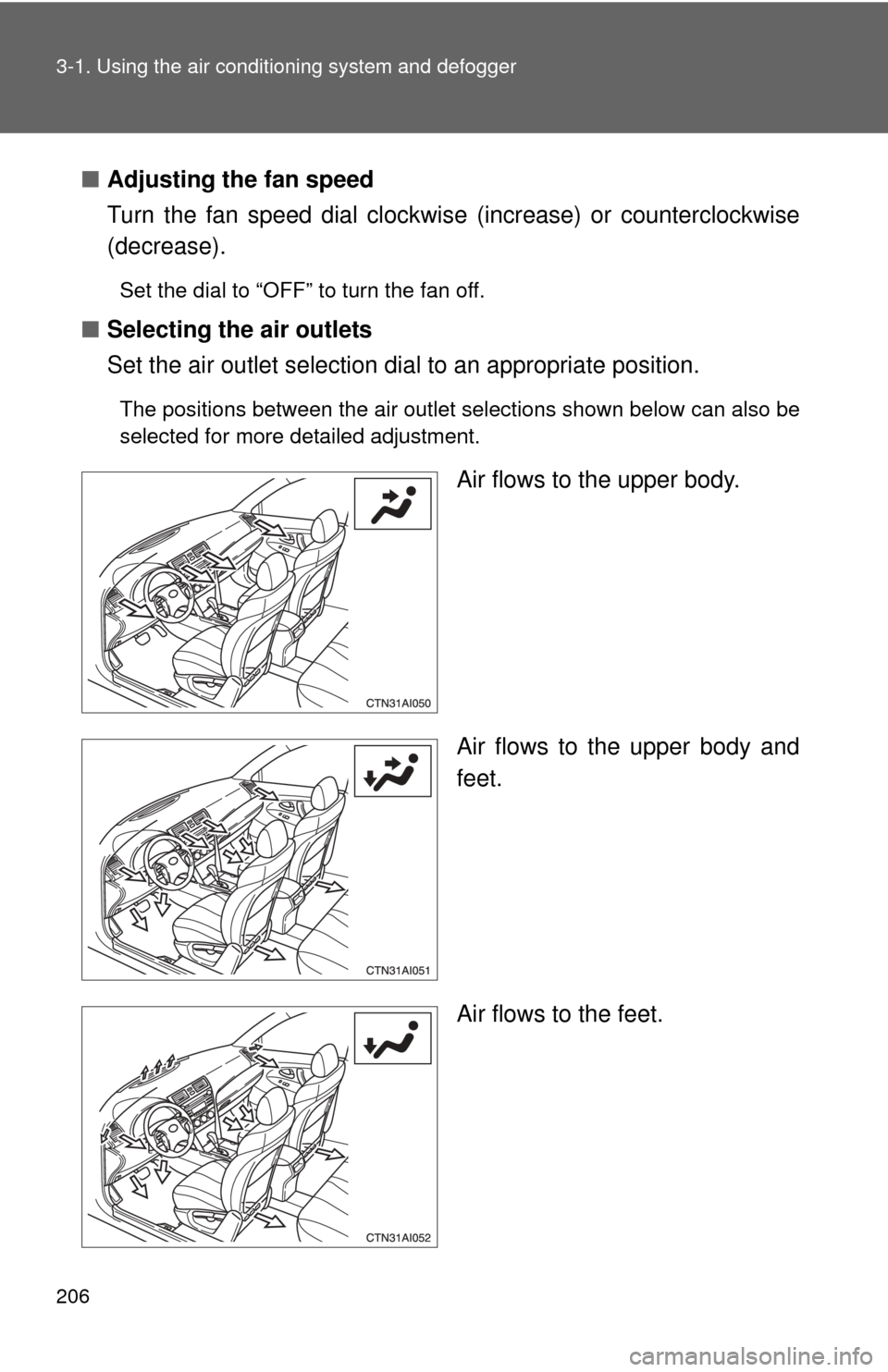
Set the air outlet selection di al to an appropriate position.
The positions between the air outlet selections shown below can also be
selected for more detailed adjustment.
Air flows to the upper body.
Air flows to the upper body and
feet.
Air flows to the feet.
Page 209 of 538
209
3-1. Using the air conditioning system
and defogger
3
Interior features
Vehicles without smart key system
In order to prevent the windows from fogging up, recirculated air mode may
automatically switch to outside air mode if the ambient temperature drops.
This feature can be cancelled by pushing and holding the air intake mode
switch for longer than 2 seconds. The feature will be reactivated when the
engine switch is turned to the “ACC” or “LOCK” position.
■ When outside air temperature approaches 32°F (0°C)
The air conditioning system may not operate even when
is pressed.
■ When the indicator light on
flashes
Press
and turn off the air conditioning system before turning it on
once more. There may be a problem in the air conditioning system if the indi-
cator light continues to flash. Turn the air conditioning system off and have it
inspected by your Toyota dealer.
■ Air conditioning odors
●During use, various odors from inside and outside the vehicle may enter
into and accumulate in the air conditioning system. This may then cause
odor to be emitted from the vents.
● To reduce potential odors from occurring:
It is recommended that the air conditioning system be set to outside air
mode prior to turning the vehicle off.
CAUTION
■To prevent the windshield from fogging up
Do not set the air outlet selection dial to during cool air operation in
extremely humid weather. The difference between the temperature of the
outside air and that of the windshield can cause the outer surface of the
windshield to fog up, blocking your vision.
Page 282 of 538
280 3-4. Using the hands-free phone system (for cellular phone)
TitlePage
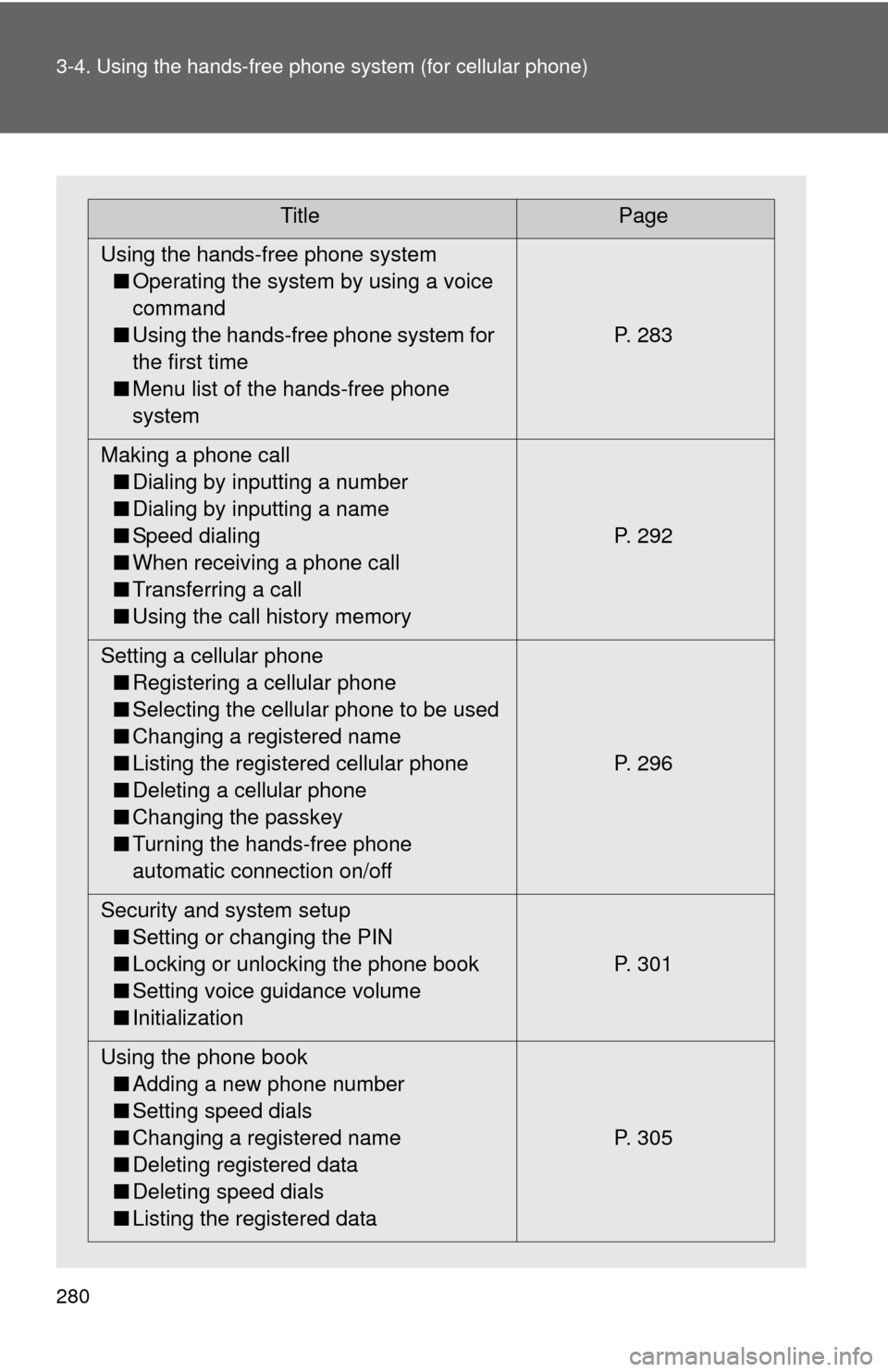
Using the hands-free phone system ■ Operating the system by using a voice
command
■ Using the hands-free phone system for
the first time
■ Menu list of the hands-free phone
system P. 283
Making a phone call ■ Dialing by inputting a number
■ Dialing by inputting a name
■ Speed dialing
■ When receiving a phone call
■ Transferring a call
■ Using the call history memory P. 292
Setting a cellular phone ■ Registering a cellular phone
■ Selecting the cellular phone to be used
■ Changing a registered name
■ Listing the registered cellular phone
■ Deleting a cellular phone
■ Changing the passkey
■ Turning the hands-free phone
automatic connection on/off P. 296
Security and system setup ■ Setting or changing the PIN
■ Locking or unlocking the phone book
■ Setting voice guidance volume
■ Initialization P. 301
Using the phone book ■ Adding a new phone number
■ Setting speed dials
■ Changing a registered name
■ Deleting registered data
■ Deleting speed dials
■ Listing the registered data P. 305
Page 291 of 538
289
3-4. Using the hand
s-free phone system (for cellular phone)
3
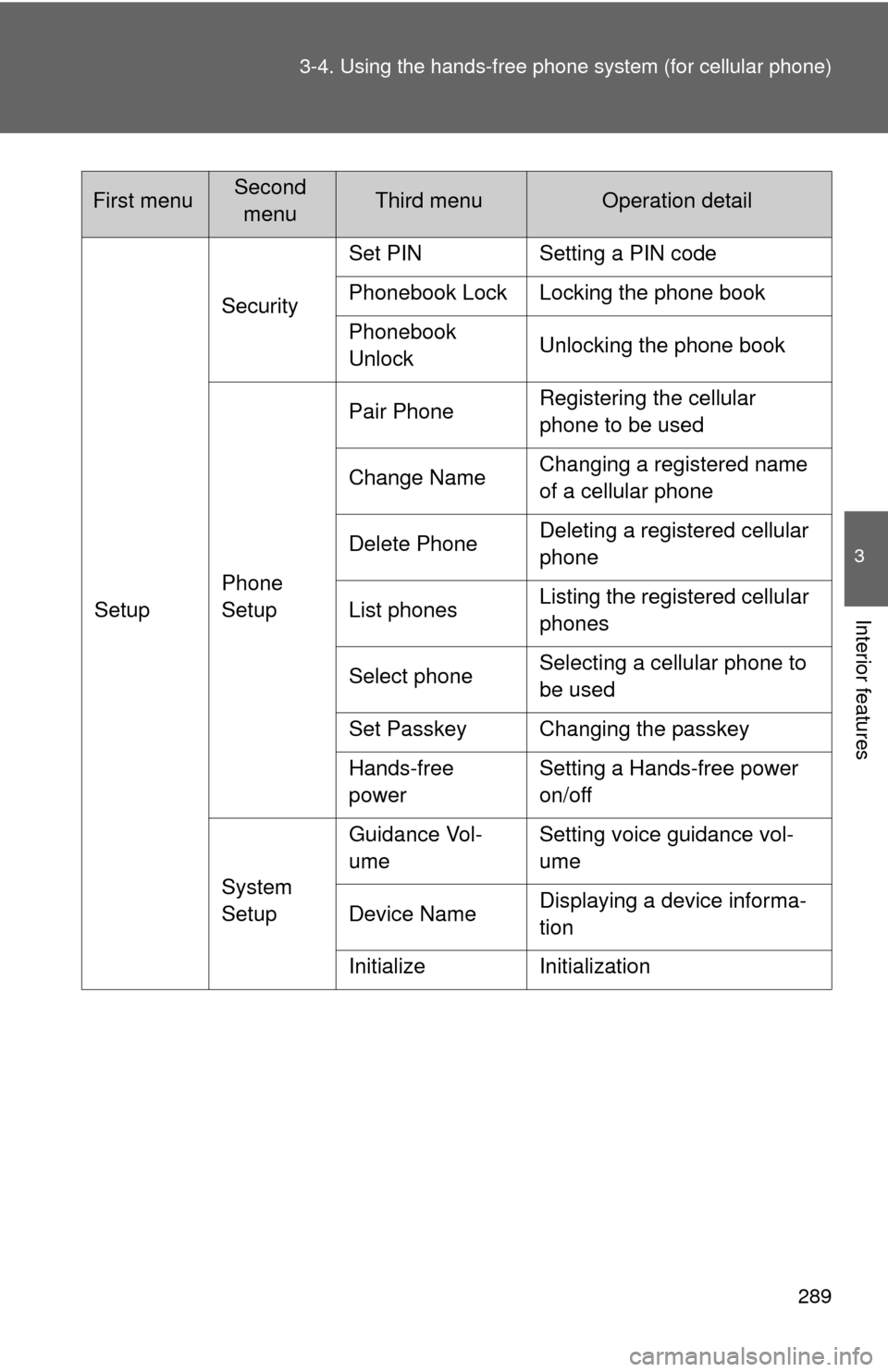
Interior featuresSetupSecurity
Set PIN Setting a PIN code
Phonebook Lock Locking the phone book
Phonebook
Unlock
Unlocking the phone book
Phone
Setup Pair Phone
Registering the cellular
phone to be used
Change Name Changing a registered name
of a cellular phone
Delete Phone Deleting a registered cellular
phone
List phones Listing the registered cellular
phones
Select phone Selecting a cellular phone to
be used
Set Passkey Changing the passkey
Hands-free
power Setting a Hands-free power
on/off
System
Setup Guidance Vol-
ume
Setting voice guidance vol-
ume
Device Name Displaying a device informa-
tion
Initialize Initialization
First menuSecond menuThird menuOperation detail
Page 292 of 538
290 3-4. Using the hands-free phone system (for cellular phone)
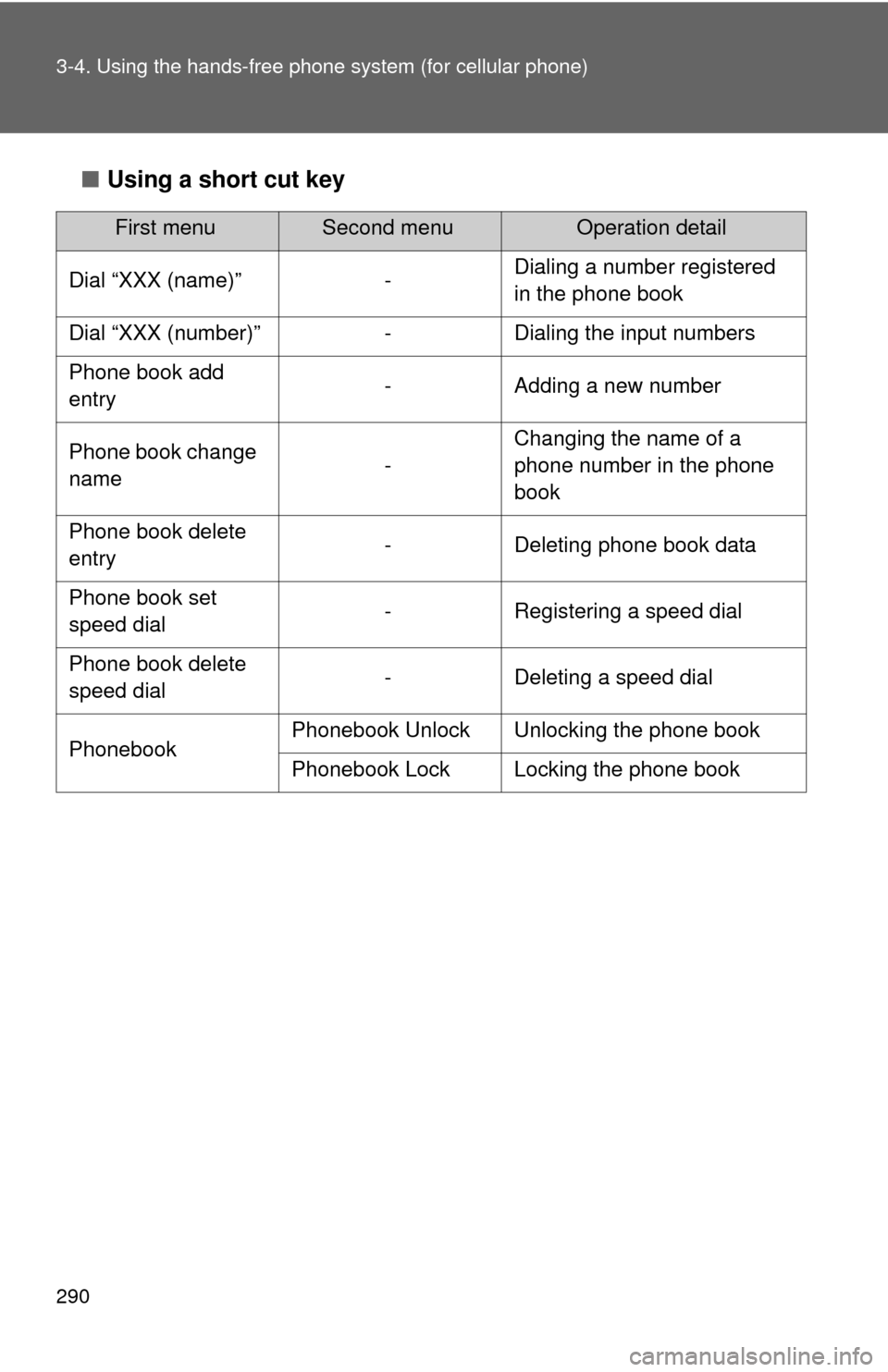
■Using a short cut key
First menuSecond menuOperation detail
Dial “XXX (name)” - Dialing a number registered
in the phone book
Dial “XXX (number)” - Dialing the input numbers
Phone book add
entry - Adding a new number
Phone book change
name -Changing the name of a
phone number in the phone
book
Phone book delete
entry - Deleting phone book data
Phone book set
speed dial - Registering a speed dial
Phone book delete
speed dial - Deleting a speed dial
Phonebook Phonebook Unlock Unlocking the phone book
Phonebook Lock Locking the phone book
Page 303 of 538
301
3-4. Using the hands-free phone system (for cellular phone)
3
Interior features
Security and system setup
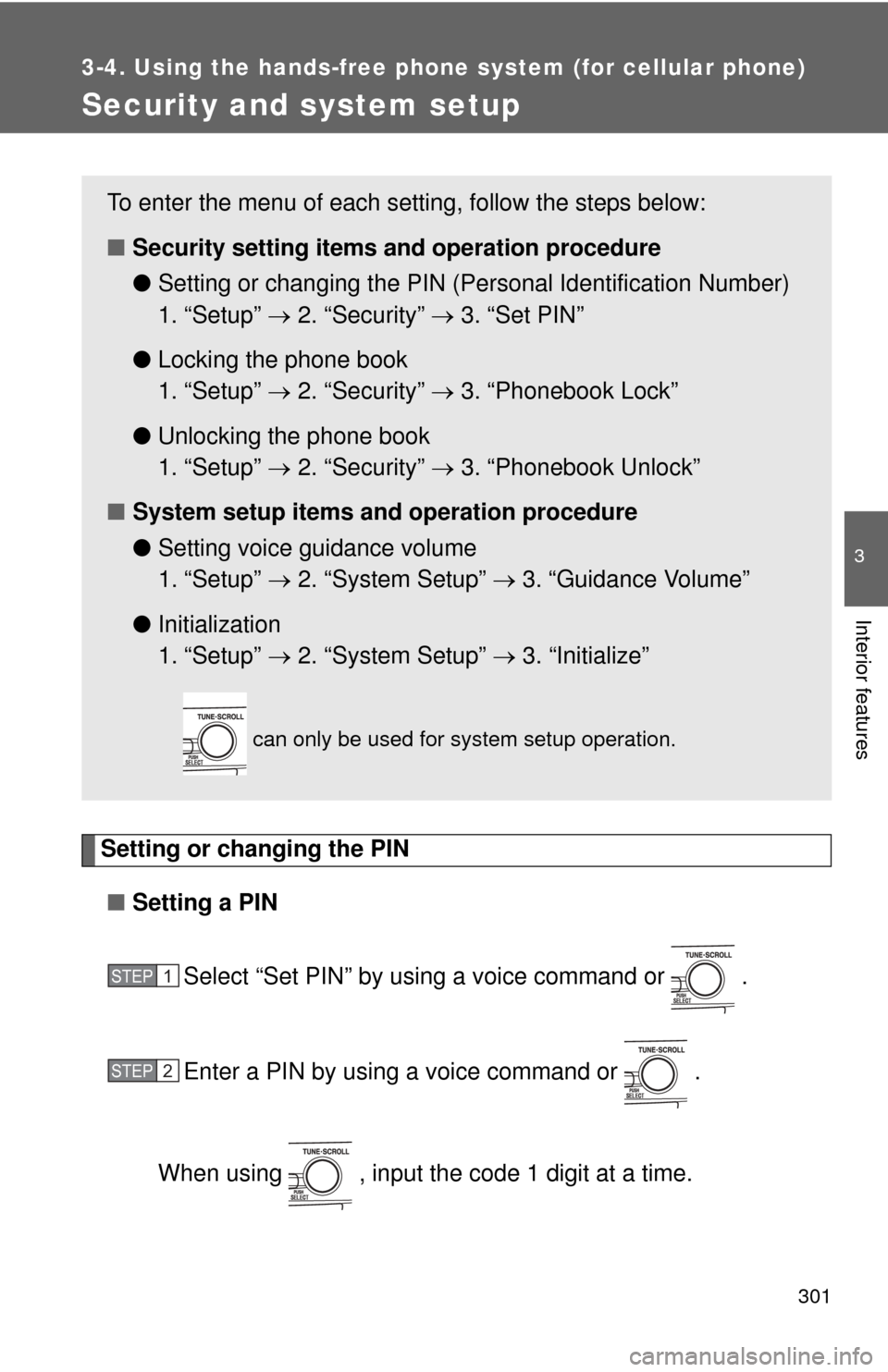
Setting or changing the PIN■ Setting a PIN
Select “Set PIN” by using a voice command or .
Enter a PIN by using a voice command or .
When using , input the code 1 digit at a time.
To enter the menu of each setting, follow the steps below:
■ Security setting items and operation procedure
● Setting or changing t he PIN (Personal Identification Number)
1. “Setup” 2. “Security” 3. “Set PIN”
● Locking the phone book
1. “Setup” 2. “Security” 3. “Phonebook Lock”
● Unlocking the phone book
1. “Setup” 2. “Security” 3. “Phonebook Unlock”
■ System setup items and operation procedure
●Setting voice guidance volume
1. “Setup” 2. “System Setup” 3. “Guidance Volume”
● Initialization
1. “Setup” 2. “System Setup” 3. “Initialize”
can only be used for system setup operation.
STEP1
STEP2