brake light TOYOTA CAMRY 2021 (in English) User Guide
[x] Cancel search | Manufacturer: TOYOTA, Model Year: 2021, Model line: CAMRY, Model: TOYOTA CAMRY 2021Pages: 660, PDF Size: 16.97 MB
Page 227 of 660
2274-2. Driving procedures
4
Driving
CAMRY_U
The parking brake is set or released automatically according to the
shift lever operation.
Even when in automatic mode, t he parking brake can be set and
released manually. ( P. 228)
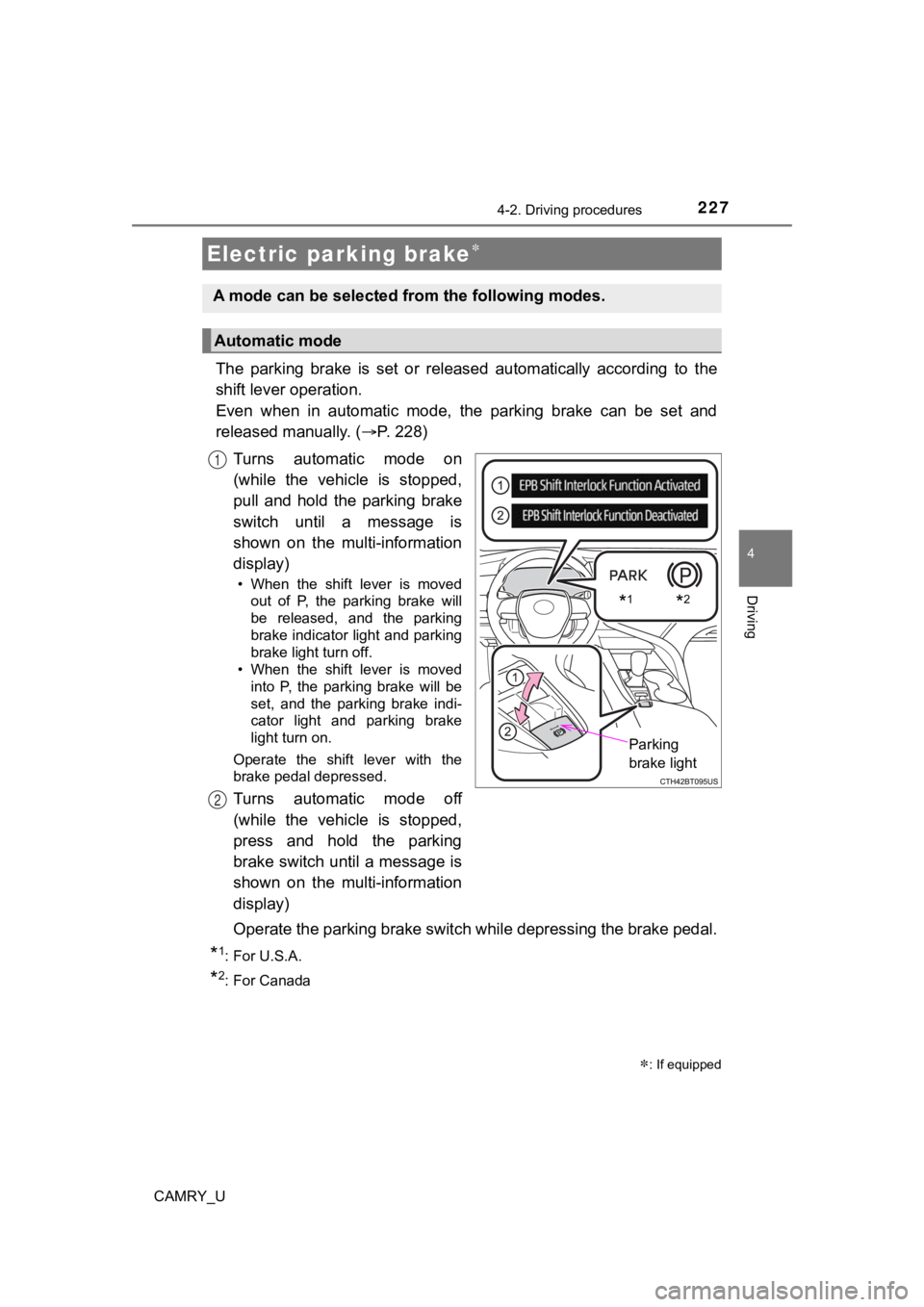
Turns automatic mode on
(while the vehicle is stopped,
pull and hold the parking brake
switch until a message is
shown on the multi-information
display)
• When the shift lever is moved out of P, the parking brake will
be released, and the parking
brake indicator light and parking
brake light turn off.
• When the shift lever is moved into P, the parking brake will be
set, and the parking brake indi-
cator light and parking brake
light turn on.
Operate the shift lever with the
brake pedal depressed.
Turns automatic mode off
(while the vehicle is stopped,
press and hold the parking
brake switch until a message is
shown on the multi-information
display)
Operate the parking brake swit ch while depressing the brake ped al.
*1: For U.S.A.
*2: For Canada
Electric parking brake
: If equipped
A mode can be selected from the following modes.
Automatic mode
*1*2
Parking
brake light
1
2
Page 228 of 660
2284-2. Driving procedures
CAMRY_U
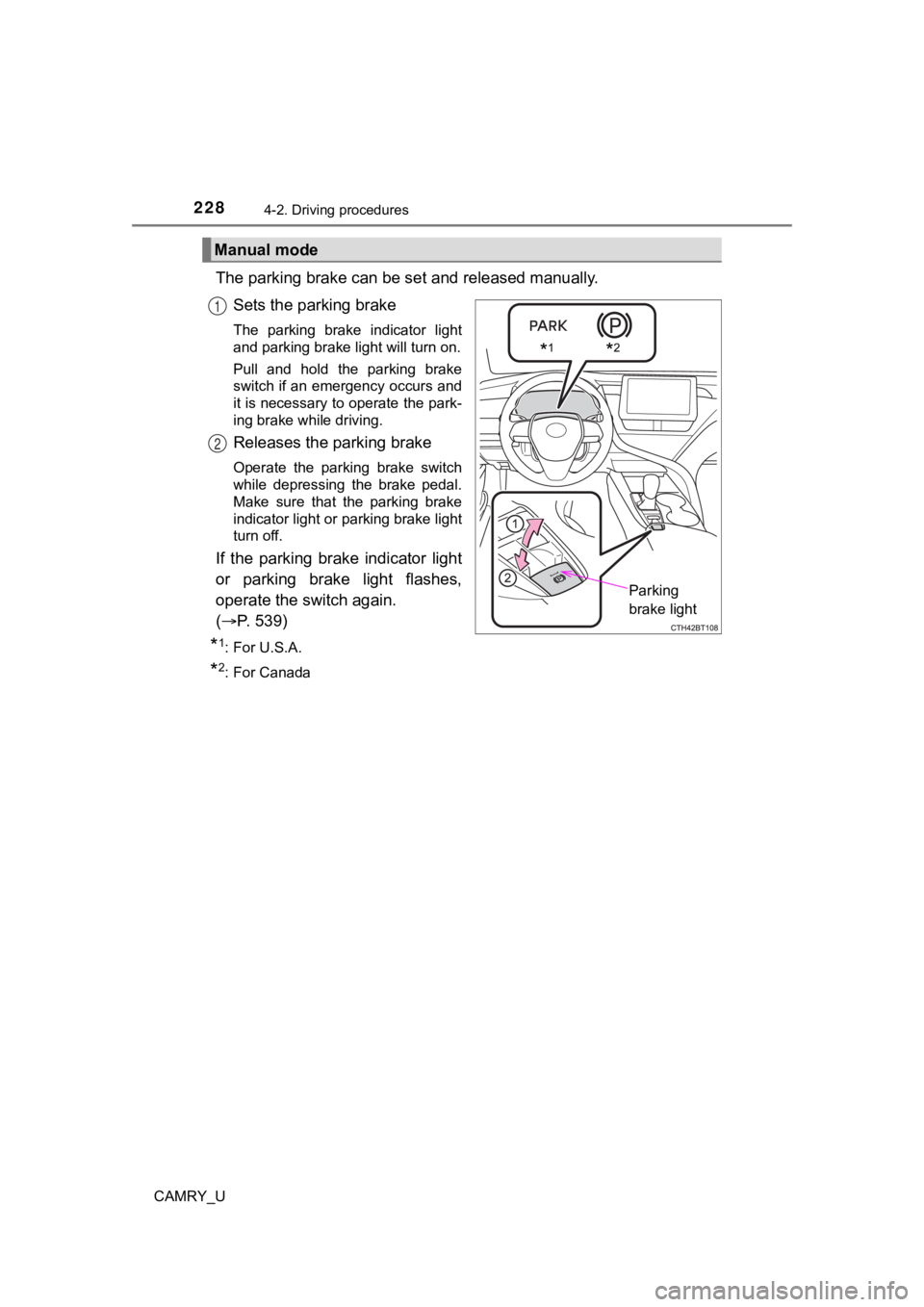
The parking brake can be set and released manually.
Sets the parking brake
The parking brake indicator light
and parking brake light will turn on.
Pull and hold the parking brake
switch if an emergency occurs and
it is necessary to operate the park-
ing brake while driving.
Releases the parking brake
Operate the parking brake switch
while depressing the brake pedal.
Make sure that the parking brake
indicator light or parking brake light
turn off.
If the parking brake indicator light
or parking brake light flashes,
operate the switch again.
( P. 539)
*1: For U.S.A.
*2: For Canada
Manual mode
*1*2
Parking
brake light
1
2
Page 229 of 660

2294-2. Driving procedures
4
Driving
CAMRY_U
■Parking the vehicle
P. 196
■ Parking brake operation
●When the engine switch is not in IGNITION ON mode, the parking brake
cannot be released using the parking brake switch.
● When the engine switch is not in IGNITION ON mode, automatic mo de
(automatic brake setting and releasing) is not available.
■ Automatic release function
The parking brake is automatical ly released when slowly depress the acceler-
ator pedal.
The parking brake will be released automatically under the foll owing condi-
tions:
● The driver’s door is closed.
● The driver’s seatbelt is fastened.
● Shift the shift lever is in a forward or reverse position.
● The malfunction indicator lamp or brake system warning light is not illumi-
nated.
If the automatic release function does not operate, manually re lease the park-
ing brake.
■ If “Parking Brake Temporarily Un available” is displayed on the multi-
information display
If the parking brake is operated repeatedly over a short period of time, the
system may restrict operation to prevent overheating. If this happens, refrain
from operating the parking brake. Normal operation will return after about 1
minute.
■ If “Parking Brake Unavailable” is displayed on the multi-information dis-
play
Operate the parking brake switch. If the message does not disappear after
operating the switch several times, the system may be malfuncti oning. Have
the vehicle inspected by your Toyota dealer immediately.
■ Parking brake operation sound
When the parking brake operates, a motor sound (whirring sound) may be
heard. This does not indicate a malfunction.
■ Parking brake indicator light and parking brake light
●Depending on the engine switch mode, the parking brake indicato r light and
parking brake light will turn on and stay on as described below:
IGNITION ON mode: Comes on until the parking brake is released.
Not in IGNITION ON mode: Stays on for approximately 15 seconds.
● When the engine switch is turned off with the parking brake set, the parking
brake indicator light and parking brake light will stay on for about 15 sec-
onds. This does not indicate a malfunction.
Page 230 of 660
2304-2. Driving procedures
CAMRY_U■
Parking brake engaged warning buzzer
A buzzer will sound if the vehicle is driven with the parking b rake engaged.
“Release Parking Brake” is displayed on the multi-information display.
■ Warning messages and buzzers
Warning messages and buzzers are used to indicate a system malfunction or
to inform the driver of the need for caution. If a warning message is shown on
the multi-information display, read the message and follow the instructions.
■ If the brake system warning light comes on
P. 538
■ Usage in winter time
P. 386
WARNING
■When parking the vehicle
Do not leave a child in the vehicle alone. The parking brake may be
released unintentionally and there is the danger of the vehicle moving that
may lead to an accident resulting in death or serious injury.
■ Parking brake switch
Do not set any objects near the parking brake switch. Objects m ay interfere
with the switch and may lead the parking brake to unexpectedly operate.
NOTICE
■ When parking the vehicle
Before you leave the vehicle, shift the shift lever to P, set the parking brake
and make sure that the vehicle does not move.
■ When the system malfunctions
Stop the vehicle in a safe place and check the warning messages.
■ When the parking brake cannot be released due to a malfunction
Driving the vehicle with the parking brake set will lead to bra ke components
overheating, which may affect braking performance and increase brake
wear. Contact your Toyota dealer immediately if this occurs.
Page 231 of 660
2314-2. Driving procedures
4
Driving
CAMRY_U
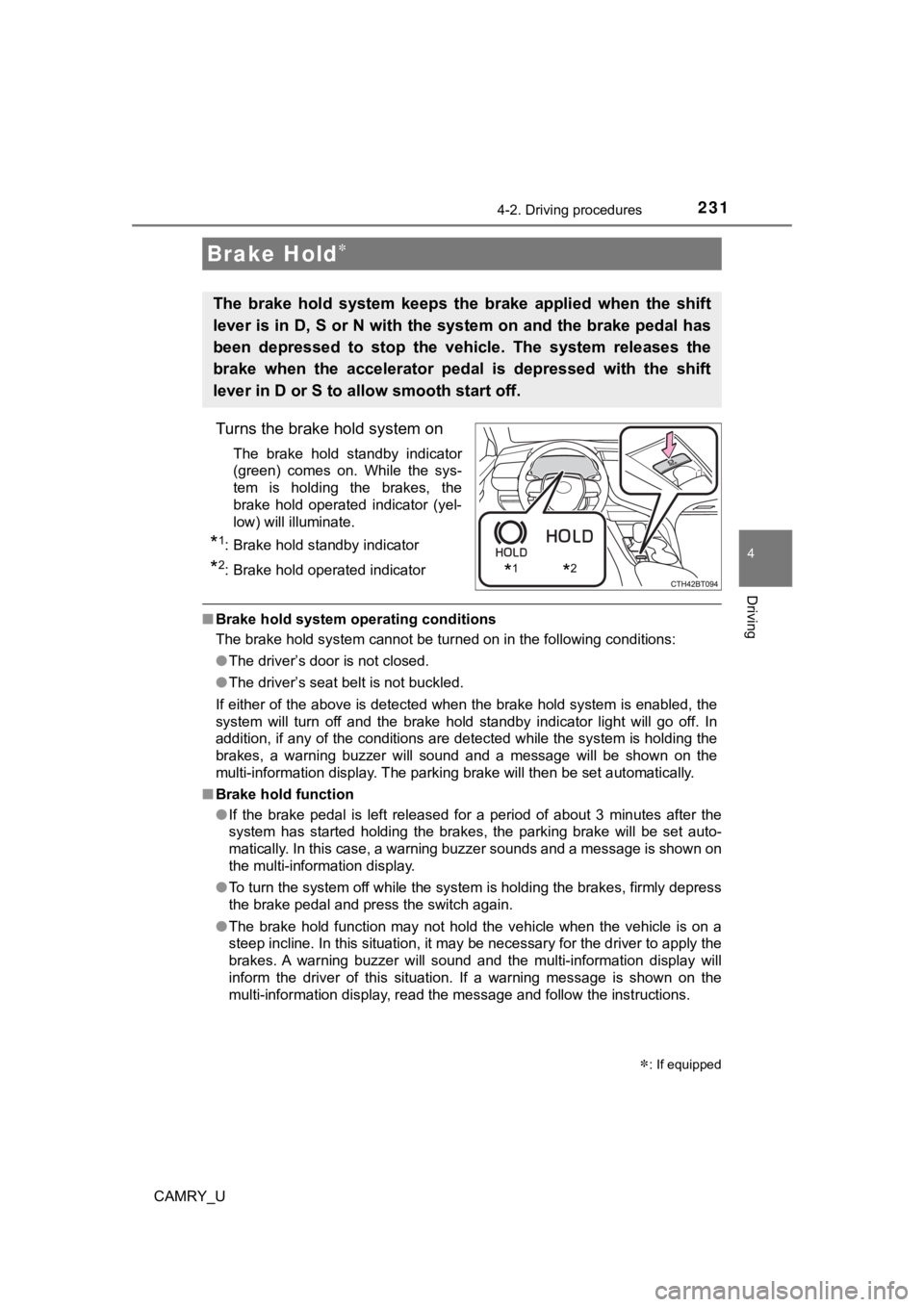
Turns the brake hold system on
The brake hold standby indicator
(green) comes on. While the sys-
tem is holding the brakes, the
brake hold operated indicator (yel-
low) will illuminate.
*1: Brake hold standby indicator
*2: Brake hold operated indicator
■Brake hold system operating conditions
The brake hold system cannot be turned on in the following cond itions:
● The driver’s door is not closed.
● The driver’s seat belt is not buckled.
If either of the above is detected when the brake hold system i s enabled, the
system will turn off and the brake hold standby indicator light will go off. In
addition, if any of the conditions are detected while the system is holding the
brakes, a warning buzzer will sound and a message will be shown on the
multi-information display. The parking brake will then be set a utomatically.
■ Brake hold function
●If the brake pedal is left released for a period of about 3 min utes after the
system has started holding the brakes, the parking brake will b e set auto-
matically. In this case, a warning buzzer sounds and a message is shown on
the multi-information display.
● To turn the system off while the system is holding the brakes, firmly depress
the brake pedal and press the switch again.
● The brake hold function may not hold the vehicle when the vehic le is on a
steep incline. In this situation, it may be necessary for the d river to apply the
brakes. A warning buzzer will sound and the multi-information d isplay will
inform the driver of this situation. If a warning message is sh own on the
multi-information display, read the message and follow the inst ructions.
Brake Hold
The brake hold system keeps the brake applied when the shift
lever is in D, S or N with the system on and the brake pedal has
been depressed to stop the vehicle. The system releases the
brake when the accelerator pedal is depressed with the shift
lever in D or S to allow smooth start off.
*1*2
: If equipped
Page 232 of 660

2324-2. Driving procedures
CAMRY_U■
When the parking brake is set aut omatically while the system is holding
the brakes
Perform any of the following operations to release the parking brake.
● Depress the accelerator pedal. (The parking brake will not be released auto-
matically if the seat belt is not fastened.)
● Operate the parking brake switch with the brake pedal depressed .
Make sure that the parking brake indicator light goes off. ( P. 227)
■ When an inspection at your Toyota dealer is necessary
When the brake hold standby indicator (green) does not illumina te even when
the brake hold switch is pressed with the brake hold system ope rating condi-
tions met, the system may be malfunctioning. Have the vehicle inspected at
your Toyota dealer.
■ Warning messages and buzzers
Warning messages and buzzers are used to indicate a system malfunction or
to inform the driver of the need for caution. If a warning message is shown on
the multi-information display, read the message and follow the instructions.
■ If the brake hold opera ted indicator flashes
P. 539
WARNING
■ When the vehicle is on a steep incline
When using the brake hold system on a steep incline, exercise caution. The
brake hold function may not hold the vehicle in such a situatio n.
■ When stopped on a slippery road
The system cannot stop the vehicle when the gripping ability of the tires has
been exceeded. Do not use the system when stopped on a slippery road.
NOTICE
■When parking the vehicle
The brake hold system is not designed for use when parking the vehicle for
a long period of time. Turning the engine switch off while the system is hold-
ing the brakes may release the brakes, which would cause the vehicle to
move. When operating the engine switch, depress the brake pedal, shift the
shift lever to P and set the parking brake.
Page 235 of 660
2354-3. Operating the lights and wipers
4
Driving
CAMRY_U
■Daytime running light system
●Type A:
The daytime running lights illuminate using the same lights as the headlights
and illuminate darker than the headlights.
Type B:
The daytime running lights illuminate using the same lights as the parking
lights and illuminate brighter than the parking lights.
● To make your vehicle more visible to other drivers during dayti me driving,
the daytime running lights turn on automatically when all of the following
conditions are met. (The daytime running lights are not designe d for use at
night.)
• The engine is running
• The parking brake is released
• The headlight switch is in the or
* position
*: When the surroundings are bright
The daytime running lights remain on after they illuminate, even if the parking
brake is set again.
● For U.S.A.: Daytime running lights can be turned off by operati ng the switch.
● Compared to turning on the headlights, the daytime running ligh t system
offers greater durability and consumes less electricity, so it can help improve
fuel economy.
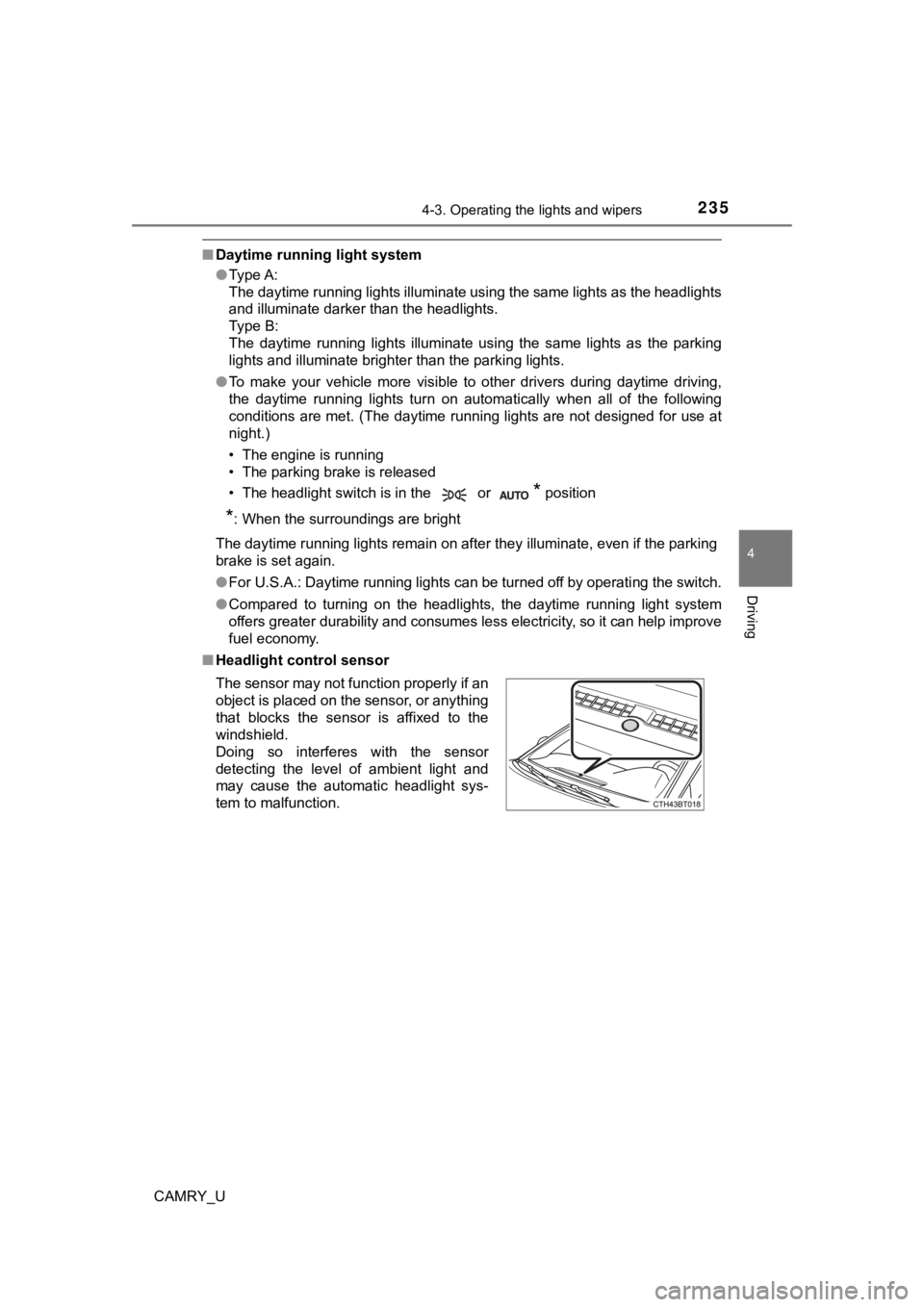
■ Headlight control sensor
The sensor may not function properly if an
object is placed on the sensor, or anything
that blocks the sensor is affixed to the
windshield.
Doing so interferes with the sensor
detecting the level of ambient light and
may cause the automatic headlight sys-
tem to malfunction.
Page 266 of 660
2664-5. Using the driving support systems
CAMRY_U●
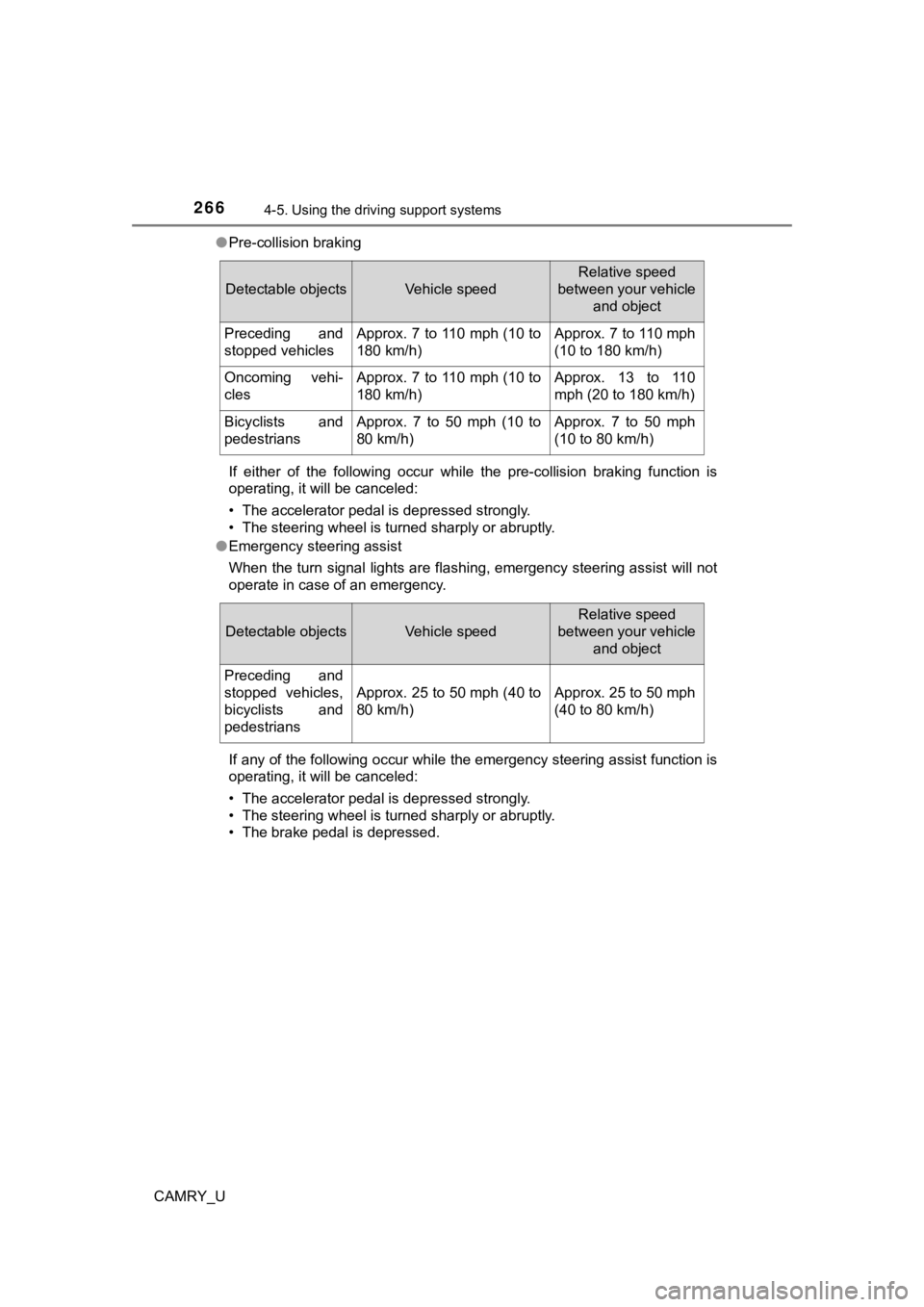
Pre-collision braking
If either of the following occur while the pre-collision brakin g function is
operating, it will be canceled:
• The accelerator pedal is depressed strongly.
• The steering wheel is turned sharply or abruptly.
● Emergency steering assist
When the turn signal lights are flashing, emergency steering as sist will not
operate in case of an emergency.
If any of the following occur while the emergency steering assi st function is
operating, it will be canceled:
• The accelerator pedal is depressed strongly.
• The steering wheel is turned sharply or abruptly.
• The brake pedal is depressed.
Detectable objectsVehicle speed
Relative speed
between your vehicle
and object
Preceding and
stopped vehiclesApprox. 7 to 110 mph (10 to
180 km/h)Approx. 7 to 110 mph
(10 to 180 km/h)
Oncoming vehi-
clesApprox. 7 to 110 mph (10 to
180 km/h)Approx. 13 to 110
mph (20 to 180 km/h)
Bicyclists and
pedestriansApprox. 7 to 50 mph (10 to
80 km/h)Approx. 7 to 50 mph
(10 to 80 km/h)
Detectable objectsVehicle speed
Relative speed
between your vehicle
and object
Preceding and
stopped vehicles,
bicyclists and
pedestrians
Approx. 25 to 50 mph (40 to
80 km/h)Approx. 25 to 50 mph
(40 to 80 km/h)
Page 273 of 660

2734-5. Using the driving support systems
4
Driving
CAMRY_U●
In some situations such as the following, sufficient braking force or steering
force may not be obtained, preventing the system from performin g properly:
• If the braking functions cannot operate to their full extent, such as when
the brake parts are extremely cold, extremely hot, or wet
• If the vehicle is not properly maintained (brakes or tires are excessively
worn, improper tire inflation pressure, etc.)
• When the vehicle is being driven on a gravel road or other sli ppery sur-
face
• When the road surface has deep wheel tracks
• When driving on a hill road
• When driving on a road that has inclines to the left or right
■ If VSC is disabled
●If VSC is disabled ( P. 328), the pre-collision brake assist and pre-collision
braking functions are also disabled.
● The PCS warning light will turn on and “VSC Turned Off Pre-Coll ision Brake
System Unavailable” will be displayed on the multi-information display.
Page 298 of 660
2984-5. Using the driving support systems
CAMRY_U
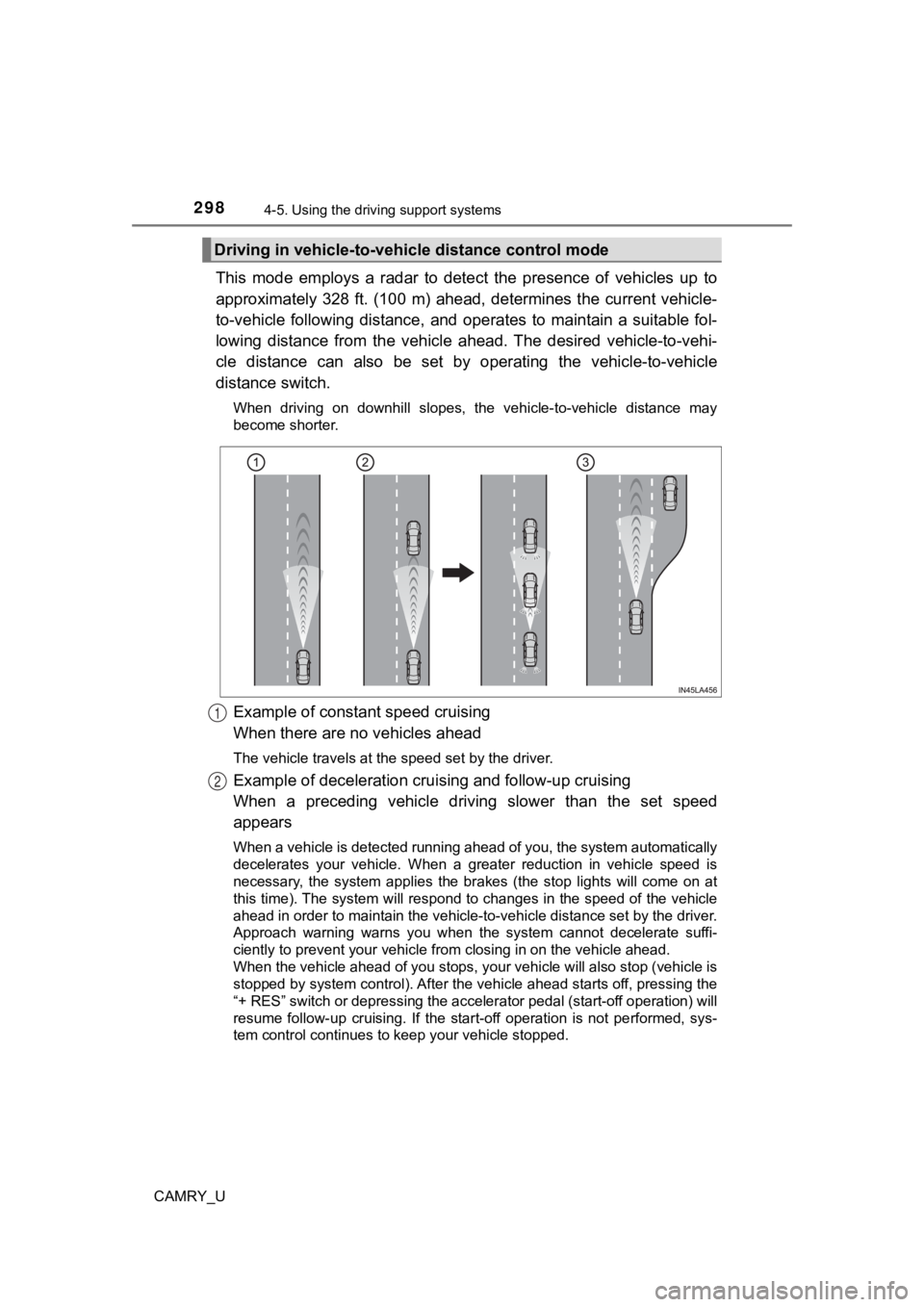
This mode employs a radar to detect the presence of vehicles up to
approximately 328 ft. (100 m) ahead, determines the current veh icle-
to-vehicle following distance, and operates to maintain a suita ble fol-
lowing distance from the vehicle ahead. The desired vehicle-to- vehi-
cle distance can also be set by operating the vehicle-to-vehicl e
distance switch.
When driving on downhill slopes, the vehicle-to-vehicle distance may
become shorter.
Example of constant speed cruising
When there are no vehicles ahead
The vehicle travels at the speed set by the driver.
Example of deceleration crui sing and follow-up cruising
When a preceding vehicle driving slower than the set speed
appears
When a vehicle is detected running ahead of you, the system automatically
decelerates your vehicle. When a greater reduction in vehicle s peed is
necessary, the system applies the brakes (the stop lights will come on at
this time). The system will respond to changes in the speed of the vehicle
ahead in order to maintain the vehicle-to-vehicle distance set by the driver.
Approach warning warns you when the system cannot decelerate su ffi-
ciently to prevent your vehicle fr om closing in on the vehicle ahead.
When the vehicle ahead of you stops, your vehicle will also stop (vehicle is
stopped by system control). After the vehicle ahead starts off, pressing the
“+ RES” switch or depressing the accelerator pedal (start-off o peration) will
resume follow-up cruising. If the start-off operation is not pe rformed, sys-
tem control continues to keep your vehicle stopped.
Driving in vehicle-to-vehi cle distance control mode
1
2