brake light TOYOTA CAMRY 2021 (in English) Owner's Manual
[x] Cancel search | Manufacturer: TOYOTA, Model Year: 2021, Model line: CAMRY, Model: TOYOTA CAMRY 2021Pages: 660, PDF Size: 16.97 MB
Page 315 of 660

3154-5. Using the driving support systems
4
Driving
CAMRY_U
Example of deceleration cruising and follow-up cruising
When a preceding vehicle driving slower than the set speed
appears
When a vehicle is detected running ahead of you, the system automatically
decelerates your vehicle. When a greater reduction in vehicle s peed is
necessary, the system applies the brakes (the stop lights will come on at
this time). The system will respond to changes in the speed of the vehicle
ahead in order to maintain the vehicle-to-vehicle distance set by the driver.
Approach warning warns you when the system cannot decelerate su ffi-
ciently to prevent your vehicle fr om closing in on the vehicle ahead.
When the turn signal lever is operated and your vehicle moves to an over-
taking lane while driving at 50 mph (80 km/h) or more, the vehi cle will
accelerate to help to overtake a passing vehicle.
The system’s identification of what is an overtaking lane may b e deter-
mined solely based on the location of the steering wheel in the vehicle (left
side driver position versus right side driver position.) If the vehicle is driven
to a region where the overtaking lane is on a different side fr om where the
vehicle is normally driven, the vehicle may accelerate when the turn signal
lever is operated in the opposite direction to the overtaking l ane (e.g., if the
driver normally operates the vehicle in a region where the overtaking lane
is to the right but then drives to a region where the overtaking lane is to the
left, the vehicle may accelerate when the right turn signal is activated).
Example of acceleration
When there are no longer any preceding vehicles driving slower
than the set speed
The system accelerates until the set speed is reached. The syst em then
returns to constant speed cruising.
2
3
Page 326 of 660
3264-5. Using the driving support systems
CAMRY_U
◆ABS (Anti-lock Brake System)
Helps to prevent wheel lock when the brakes are applied suddenl y,
or if the brakes are applied while driving on a slippery road surface
◆Brake assist
Generates an increased level of braking force after the brake p edal
is depressed when the system de tects a panic stop situation
◆VSC (Vehicle Stability Control)
Helps the driver to control skidding when swerving suddenly or
turning on slippery road surfaces.
◆Enhanced VSC (Enhanced Vehicle Stability Control)
Provides cooperative control of the ABS, TRAC, VSC and EPS.
Helps to maintain directional stability when swerving on slippe ry
road surfaces by controlling steering performance.
◆Secondary Collision Brake
When the airbag sensor detects a collision and the system oper-
ates, the brakes and stop light s are automatically controlled to
reduce the vehicle speed and hel p reduce the possibility of further
damage due to a secondary collision
◆TRAC (Traction Control)
Helps to maintain drive power and prevent the drive wheels from
spinning when starting the vehicl e or accelerating on slippery roads
◆Active Cornering Assist (ACA) (if equipped)
Helps to prevent the vehicle from sliding to the outer side by per-
forming inner wheel brake control when attempting to accelerate
while turning
Driving assist systems
To keep driving safety and perf ormance, the following systems
operate automatically in respon se to various driving situations.
Be aware, however, that these systems are supplementary and
should not be relied upon too heav ily when operating the vehi-
cle.
Page 329 of 660
3294-5. Using the driving support systems
4
Driving
CAMRY_U
■Turning off both TRAC and VSC systems
To turn the TRAC and VSC systems off, press and hold for more than 3
seconds while the vehicle is stopped.
The VSC OFF indicator light will come on and the “Traction Cont rol Turned
Off” will be shown on the multi-information display
*.
Press again to turn the systems back on.
*: On vehicles with pre-collision system, pre-collision brake ass ist and pre-
collision braking will also be disabled. The pre-collision syst em warning
light will come on and the message will be shown on the multi-i nformation
display. ( P. 2 7 3 )
■ When the message is displayed on the multi-information display show-
ing that TRAC has been disabled even if has not been pressed
TRAC is temporary deactivated. If the information continues to show, contact
your Toyota dealer.
■ Operating conditions of hill-start assist control
When the following four conditions are met, the hill-start assi st control will
operate:
● The shift lever is in a position other than P or N (when starting off forward/
backward on an upward incline)
● The vehicle is stopped
● The accelerator pedal is not depressed
● The parking brake is not engaged
■ Automatic system cancelation of hill-start assist control
The hill-start assist control will turn off in any of the following situations:
● The shift lever is shifted to P or N
● The accelerator pedal is depressed
● The parking brake is engaged
● 2 seconds at maximum elapsed after the brake pedal is released
Page 330 of 660

3304-5. Using the driving support systems
CAMRY_U■
Sounds and vibrations caused by the ABS, brake assist, VSC, TRAC and
hill-start assist control systems
●A sound may be heard from the engine compartment when the brake pedal
is depressed repeatedly, when the engine is started or just aft er the vehicle
begins to move. This sound does not indicate that a malfunction has
occurred in any of these systems.
● Any of the following conditions may occur when the above system s are
operating. None of these indicates that a malfunction has occur red.
• Vibrations may be felt through the vehicle body and steering.
• A motor sound may be heard also after the vehicle comes to a s top.
• The brake pedal may pulsate slightly after the ABS is activate d.
• The brake pedal may move down sli ghtly after the ABS is activated.
■ Active Cornering Assist operation sounds and vibrations
When the Active Cornering Assist is operated, operation sounds and vibra-
tions may be generated from the brake system, but this is not a malfunction.
■ EPS operation sound
When the steering wheel is operated, a motor sound (whirring so und) may be
heard. This does not indicate a malfunction.
■ Automatic reactivation of TRAC and VSC systems
After turning the TRAC and VSC systems off, the systems will be automati-
cally re-enabled in the following situations:
● When the engine switch is turned off
● If only the TRAC system is turned off, the TRAC will turn on wh en vehicle
speed increases
If both the TRAC and VSC systems are turned off, automatic re-e nabling will
not occur when vehicle speed increases.
■ Operating conditions of Active Cornering Assist
The system operates when the following occurs.
●TRAC/VSC can operate
● The driver is attempting to accelerate while turning
● The system detects that the vehicle is sliding to the outer sid e
● The brake pedal is released
■ Secondary Collision Brake operating conditions
The system operates when the SRS airbag sensor detects a collis ion while
the vehicle is in motion.
However, the system does not operate in any of the following si tuations.
● The vehicle speed is below 6 mph (10 km/h)
● Components are damaged
Page 333 of 660

3334-5. Using the driving support systems
4
Driving
CAMRY_U
WARNING
■Hill- start assist control does not operate effectively when
● Do not overly rely on hill-start assist control. Hill-start ass ist control may
not operate effectively on steep inclines and roads covered wit h ice.
● Unlike the parking brake, hill-start assist control is not inte nded to hold the
vehicle stationary for an extended period of time. Do not attempt to use
hill-start assist control to hold the vehicle on an incline, as doing so may
lead to an accident.
■ When the TRAC/VSC is activated
The slip indicator light flashes. Always drive carefully. Reckless driving may
cause an accident. Exercise particular care when the indicator light flashes.
■ When the TRAC/VSC systems are turned off
Be especially careful and drive at a speed appropriate to the r oad condi-
tions. As these are the systems to help ensure vehicle stability and driving
force, do not turn the TRAC/VSC systems off unless necessary.
■ Secondary Collision Brake
Do not overly rely solely upon the Secondary Collision Brake. This system
is designed to help reduce the possibility of further damage du e to a sec-
ondary collision, however, that effect changes according to various condi-
tions. Overly relying on the system may result in death or serious injury.
■ Replacing tires
Make sure that all tires are of the specified size, brand, trea d pattern and
total load capacity. In addition, make sure that the tires are inflated to the
recommended tire inflation pressure level.
The ABS, TRAC and VSC systems will not function correctly if different tires
are installed on the vehicle.
Contact your Toyota dealer for further information when replaci ng tires or
wheels.
■ Handling of tires and the suspension
Using tires with any kind of problem or modifying the suspensio n will affect
the driving assist systems, and may cause a system to malfunction.
Page 348 of 660

3484-5. Using the driving support systems
CAMRY_U
WARNING
■Sensors
Certain vehicle conditions and the surrounding environment may affect the
ability of a sensor to correctly detect an object. Particular instances where
this may occur are listed below.
● There is dirt, snow or ice on the sensor. (Wiping the sensors w ill resolve
this problem.)
● The sensor is frozen. (Thawing the area will resolve this probl em.)
In especially cold weather, if a sensor is frozen the screen may show an
abnormal display, or objects may not be detected.
● The sensor is covered in any way.
● The vehicle is leaning considerably to one side.
● On an extremely bumpy road, on an incline, on gravel, or on grass.
● The vicinity of the vehicle is noisy due to vehicle horns, moto rcycle
engines, air brakes of large vehicles, or other loud noises pro ducing ultra-
sonic waves.
● There is another vehicle equipped with parking assist sensors in the vicin-
ity.
● The sensor is coated with a sheet of spray or heavy rain.
● The sensor is drenched with water on a flooded road.
● The vehicle is equipped with a fender pole, wireless antenna or fog lights.
● The bumper or sensor receives a strong impact.
● The vehicle is approaching a tall or curved curb.
● The detection range is reduced due to an object such as a sign.
● In harsh sunlight or intense cold weather.
● The area directly under the bumpers is not detected.
● If objects draw too close to the sensor.
● A non-genuine Toyota suspension (lowered suspension, etc.) is installed.
● A backlit license plate is installed.
In addition to the examples above, there are instances in which , because of
their shape, signs and other objects may be judged by a sensor to be closer
than they are.
Page 372 of 660
3724-5. Using the driving support systems
CAMRY_U■
Situations in which the Parkin g Support Brake function (static objects)
may operate even if there is no possibility of a collision
In some situations such as the following, the Parking Support B rake function
may operate even though there is no possibility of a collision.
● Vehicle surroundings
• When driving toward a banner, flag, low-hanging branch or boom barrier
(such as those used at railroad crossings, toll gates and parki ng lots).
• When driving on a narrow path surrounded by a structure, such as in a tunnel or on an iron bridge
• When parallel parking
• When there is a rut or hole in the surface of the road
• When driving on a metal cover (grating), such as those used fo r drainage
ditches
• When driving on a steep slope
• If a sensor is hit by a large amount of water, such as when driving on a
flooded road
● Weather
• If a sensor is covered with ice, snow, dirt, etc. (when cleared, the system
will return to normal)
• If heavy rain or water strikes a sensor
• When driving in inclement weather such as fog, snow or a sands torm
• When strong winds are blowing
● Other ultrasonic waves sources
• When vehicle horns, vehicle detectors, motorcycle engines, air brakes of
large vehicles, the clearance sonar of other vehicles or other devices
which produce ultrasonic waves are near the vehicle
• If a sticker or an electronic component, such as a backlit license plate (especially fluorescent type), fog lights, a fender pole or wir eless antenna
is installed near a sensor
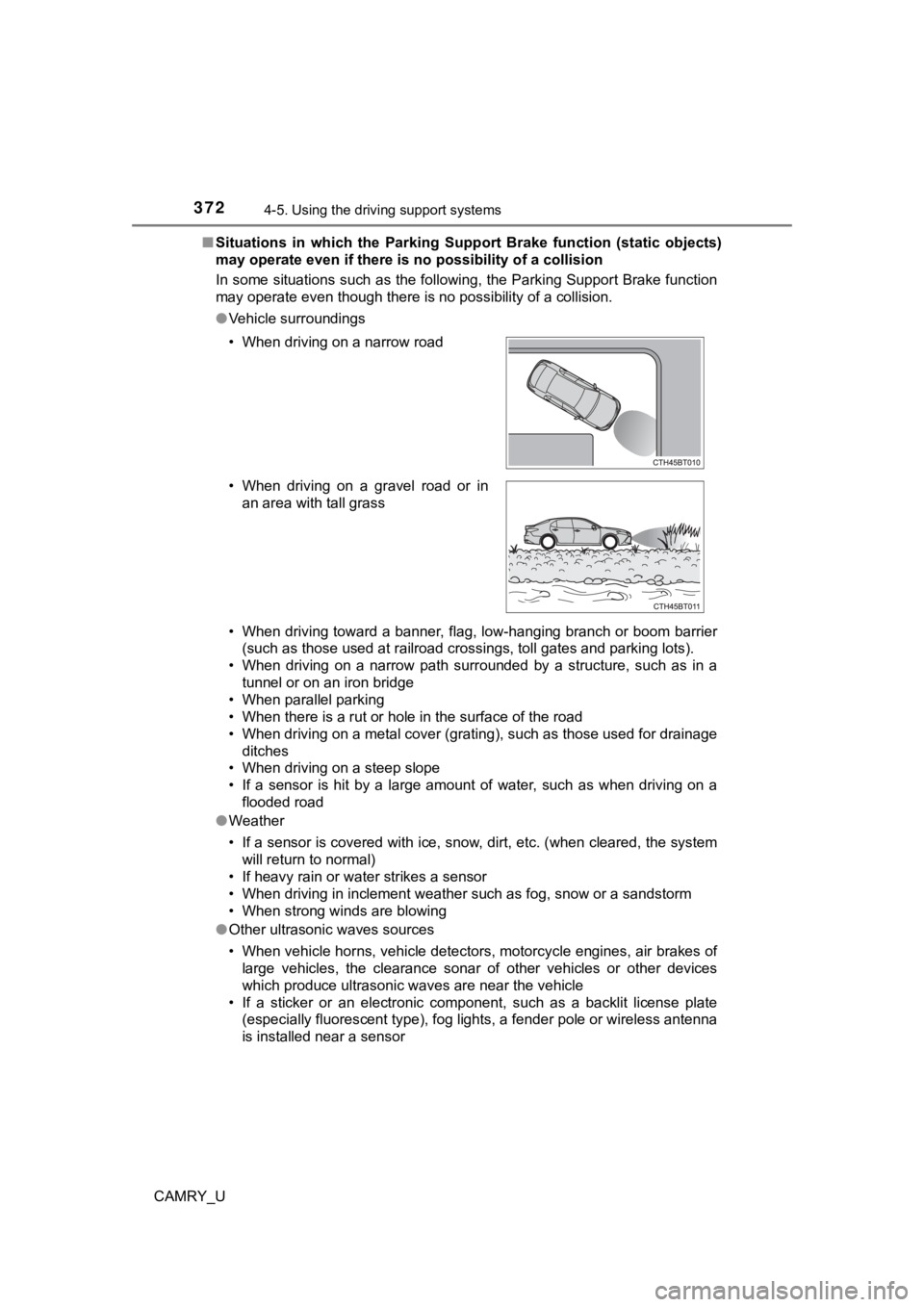
• When driving on a narrow road
• When driving on a gravel road or in
an area with tall grass
Page 374 of 660

3744-5. Using the driving support systems
CAMRY_U●
Vehicle surroundings
• When an object that cannot be detected is between the vehicle and a
detected object
• If an object such as a vehicle, motorcycle, bicycle or pedestr ian cuts in
front of the vehicle or runs out from the side of the vehicle.
• The vehicle is approaching a tall or curved curb.
• On an extremely bumpy road, on an incline, on gravel, or on gr ass.
• If objects draw too close to the sensor.
● Other ultrasonic waves sources
• When vehicle horns, vehicle detectors, motorcycle engines, air brakes of
large vehicles, the clearance sonar of other vehicles or other devices
which produce ultrasonic waves are near the vehicle
• If a sticker or an electronic component, such as a backlit license plate (especially fluorescent type), fog lights, a fender pole or wir eless antenna
is installed near a sensor
● Changes in the vehicle posture
• If the vehicle is significantly tilted
• If the front of the vehicle is raised or lowered due to the ca rried load
• If the orientation of a sensor has been changed due to a collision or other impact
• When equipment that may obstruct a sensor is installed, such a s a
bumper protector (an additional trim strip, etc.), bicycle carr ier, or snow
plow
• If the suspension has been modified or tires of a size other than specified
are installed
• If a sensor has been painted or covered with a sticker, etc.
Page 381 of 660
3814-5. Using the driving support systems
4
Driving
CAMRY_U■
Situations in which the Parking Support Brake function (rear-crossing
vehicles) may not operate properly
In some situations such as the following, this function may not operate prop-
erly.
● Objects and vehicles which the radar sensors are not designed t o detect
• Stationary objects
• Vehicles which are moving away from your vehicle
• Pedestrians, motorcycles, bicycles, etc.
*
• Objects which are extremely close to a radar sensor
• Vehicles which are approaching from the right or left at the r ear of the
vehicle at a traveling speed of less than approximately 5 mph ( 8 km/h)
• Vehicles which are approaching from the right or left at the r ear of the
vehicle at a traveling speed of more than approximately 15 mph (24 km/h)
*: Depending on conditions, detection of a vehicle and/or object may occur.
● Situations in which the radar sensors may not be able to detect an object
• When a sensor or the area around a sensor is extremely hot or cold
• If the rear bumper is covered with ice, snow, dirt, etc.
• If heavy rain or water strikes the vehicle
• When the detection area of a radar sensor is obstructed by an adjacent
vehicle
• If the vehicle is significantly tilted
• When equipment that may obstruct a sensor is installed, such a s a towing
eyelet, bumper protector (an additional trim strip, etc.), bicy cle carrier, or
snow plow
• If the suspension has been modified or tires of a size other than specified are installed
• If the front of the vehicle is raised or lowered due to the ca rried load
• If a sticker or an electronic component, such as a backlit license plate (especially fluorescent type), fog lights, a fender pole or wir eless antenna
is installed near a radar sensor
• If the orientation of a radar sensor has been changed due to a collision or
other impact or removal and installation
• When multiple vehicles are approaching with only a small gap b etween
each vehicle
• When a vehicle is approaching at high speed
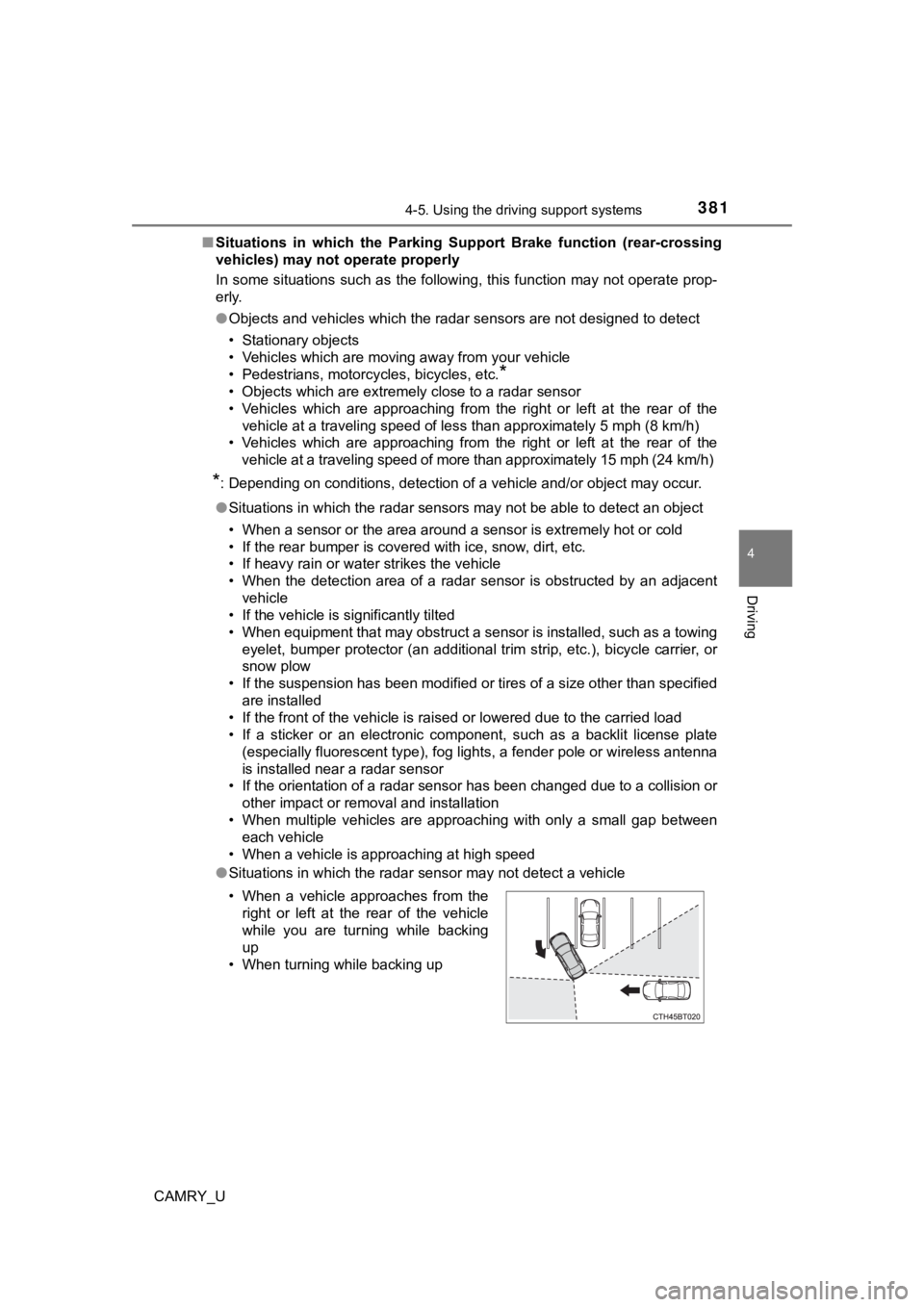
● Situations in which the radar sensor may not detect a vehicle
• When a vehicle approaches from the
right or left at the rear of the vehicle
while you are turning while backing
up
• When turning while backing up
Page 386 of 660
386
CAMRY_U
4-6. Driving tips
●Use fluids that are appropriate t o the prevailing outside tempera-
tures. • Engine oil
• Engine coolant
• Washer fluid
● Have a service technician inspec t the condition of the battery.
● Have the vehicle fitted with four snow tires or purchase a set of tire
chains for the front tires.
*
Ensure that all tires are the same size and brand, and that cha ins match
the size of the tires.
*: Tire chains cannot be mounted on vehicles with 18 and 19-inch tires.
Perform the following according to the driving conditions:
● Do not try to forcibly open a window or move a wiper that is fr ozen.
Pour warm water over the frozen area to melt the ice. Wipe away
the water immediately to p revent it from freezing.
● To ensure proper operation of the climate control system fan,
remove any snow that has accumulated on the air inlet vents in
front of the windshield.
● Check for and remove any excess ic e or snow that may have accu-
mulated on the exterior lights, vehicle’s roof, chassis, around the
tires or on the brakes.
● Remove any snow or mud from the bottom of your shoes before
getting in the vehicle.
Winter driving tips
Carry out the necessary preparations and inspections before
driving the vehicle in winter. Always drive the vehicle in a ma n-
ner appropriate to the prevailing weather conditions.
Preparation for winter
Before driving the vehicle