speed TOYOTA COROLLA 2019 (in English) Workshop Manual
[x] Cancel search | Manufacturer: TOYOTA, Model Year: 2019, Model line: COROLLA, Model: TOYOTA COROLLA 2019Pages: 608, PDF Size: 10.15 MB
Page 255 of 608

2554-5. Using the driving support systems
4
Driving
COROLLA_TMMMS_TMMC_U
WARNING
■When using the rear view monitor system
The rear view monitor system is a supplemental device intended to assist
the driver when backing up. When backing up, be sure to visually check all
around the vehicle both directly and using the mirrors before p roceeding. If
you do not, you may hit another vehicle, and could possibly cau se an acci-
dent.
Pay attention to the following precautions when using the rear view monitor
system.
● Never depend on the rear view monitor system entirely when back ing up.
The image and the position of the guide lines displayed on the screen may
differ from the actual state.
Use caution, just as you would when backing up any vehicle.
● Be sure to back up slowly, depressing the brake pedal to contro l vehicle
speed.
● The instructions given are only guidelines.
When and how much to turn the steering wheel will vary accordin g to traf-
fic conditions, road surface conditions, vehicle condition, etc . when park-
ing. It is necessary to be fully aware of this before using the rear view
monitor system.
● When parking, be sure to check that the parking space will acco mmodate
your vehicle before maneuvering into it.
● Do not use the rear view monitor system in the following cases:
• On icy or slick road surfaces, or in snow
• When using tire chains or the compact spare tire
• When the trunk lid is not closed completely
• On roads that are not flat or straight, such as curves or slop es.
● In low temperatures, the screen may darken or the image may bec ome
faint. The image could distort when the vehicle is moving, or y ou may
become unable to see the image on the screen. Be sure to visual ly check
all around the vehicle both directly and using the mirrors befo re proceed-
ing.
● If the tire sizes are changed, the position of the fixed guide lines displayed
on the screen may change.
● The camera uses a special lens. The distances between objects a nd
pedestrians that appear in the image displayed on the screen wi ll differ
from the actual distances. ( P. 250)
Page 259 of 608
2594-5. Using the driving support systems
4
Driving
COROLLA_TMMMS_TMMC_U
■Turning off both TRAC and VSC systems
To turn the TRAC and VSC systems off, press and hold for more than 3
seconds while the vehicle is stopped.
The “TRAC OFF” indicator light and VSC OFF indicator light will come on.
*
(vehicles with a monochrome display)
“Traction Control Turned Off” will be shown and VSC OFF indicat or light will
come on.
* (vehicles with a color display)
Press again to turn the systems back on.
*: Pre-collision brake assist and pre-collision braking will also be disabled.
The pre-collision system warning light will come on and the mes sage will be
shown on the multi-information display. ( P. 225)
■ When the “TRAC OFF” indicator l ight comes on even if has not b een
pressed (vehicles with a monochrome display)
TRAC cannot be operated. Contact your Toyota dealer.
■ When “Traction Control Turned Off” is shown even if has not be en
pressed (vehicles with a color display)
TRAC cannot be operated. Contact your Toyota dealer.
■ Sounds and vibrations caused by the ABS, brake assist, VSC, TRAC and
hill-start assist control systems
●A sound may be heard from the engine compartment when the brake pedal
is depressed repeatedly, when the engine is started or just aft er the vehicle
begins to move. This sound does not indicate that a malfunction has
occurred in any of these systems.
● Any of the following conditions may occur when the above system s are
operating. None of these indicates that a malfunction has occur red.
• Vibrations may be felt through the vehicle body and steering.
• A motor sound may be heard also after the vehicle comes to a s top.
• The brake pedal may pulsate slightly after the ABS is activate d.
• The brake pedal may move down sli ghtly after the ABS is activated.
■ EPS operation sound
When the steering wheel is operated, a motor sound (whirring so und) may be
heard. This does not indicate a malfunction.
■ Automatic reactivation of TRAC and VSC systems
After turning the TRAC and VSC systems off, the systems will be automati-
cally re-enabled in the following situations:
● Vehicles without a smart key system: When the engine switch is turned to
the “LOCK” position
Vehicles with a smart key system: When the engine switch is tur ned off
● If only the TRAC system is turned off, the TRAC will turn on wh en vehicle
speed increases
If both the TRAC and VSC systems are turned off, automatic re-e nabling will
not occur when vehicle speed increases.
Page 261 of 608
2614-5. Using the driving support systems
4
Driving
COROLLA_TMMMS_TMMC_U
WARNING
■The ABS does not operate effectively when
● The limits of tire gripping performance have been exceeded (suc h as
excessively worn tires on a snow covered road).
● The vehicle hydroplanes while driving at high speed on wet or s lick roads.
■ Stopping distance when the ABS is operating may exceed that of nor-
mal conditions
The ABS is not designed to shorten the vehicle’s stopping distance. Always
maintain a safe distance from the vehicle in front of you, espe cially in the
following situations:
● When driving on dirt, gravel or snow-covered roads
● When driving with tire chains
● When driving over bumps in the road
● When driving over roads with potholes or uneven surfaces
■ TRAC/VSC may not operate effectively when
Directional control and power may not be achievable while drivi ng on slip-
pery road surfaces, even if the TRAC/VSC system is operating.
Drive the vehicle carefully in conditions where stability and p ower may be
lost.
■ Hill-start assist control does not operate effectively when
● Do not overly rely on hill-start assist control. Hill-start ass ist control may
not operate effectively on steep inclines and roads covered wit h ice.
● Unlike the parking brake, hill-start assist control is not inte nded to hold the
vehicle stationary for an extended period of time. Do not attempt to use
hill-start assist control to hold the vehicle on an incline, as doing so may
lead to an accident.
■ When the TRAC/VSC is activated
The slip indicator light flashes. Always drive carefully. Reckless driving may
cause an accident. Exercise particular care when the indicator light flashes.
■ When the TRAC/VSC systems are turned off
Be especially careful and drive at a speed appropriate to the r oad condi-
tions. As these are the systems to help ensure vehicle stabilit y and driving
force, do not turn the TRAC/VSC systems off unless necessary.
Page 264 of 608

2644-6. Driving tips
COROLLA_TMMMS_TMMC_U
Accelerate the vehicle slowly, keep a safe distance between you and
the vehicle ahead, and drive at a reduced speed suitable to roa d con-
ditions.
● Park the vehicle and move the shift lever to P (continuously va riable
transmission), 1 or R (manual transmission) without setting the
parking brake. The parking brake may freeze up, preventing it from
being released. If the vehicle is parked without setting the pa rking
brake, make sure to block the wheels.
Failure to do so may be dangerou s because it may cause the vehi-
cle to move unexpectedly, pos sibly leading to an accident.
● Vehicles with a continuously var iable transmission: If the vehicle is
parked without setting the parking brake, confirm that the shif t lever
cannot be moved out of P
*.
*: The shift lever will be locked if it is attempted to be shifte d from P to any
other position without depressing the brake pedal. If the shift lever can be
shifted from P, there may be a problem with the shift lock syst em. Have the
vehicle inspected by your Toyota dealer immediately
When driving the vehicle
When parking the vehicle
Page 266 of 608

2664-6. Driving tips
COROLLA_TMMMS_TMMC_U
WARNING
■Driving with snow tires
Observe the following precautions to reduce the risk of acciden ts.
Failure to do so may result in a loss of vehicle control and ca use death or
serious injury.
● Use tires of the size specified.
● Maintain the recommended level of air pressure.
● Do not drive in excess of 75 mph (120 km/h), regardless of the type of
snow tires being used.
● Use snow tires on all, not just some wheels.
■ Driving with tire chains
Observe the following precautions to reduce the risk of acciden ts.
Failure to do so may result in the vehicle being unable to be d riven safely,
and may cause death or serious injury.
● Do not drive in excess of the speed limit specified for the tir e chains being
used, or 30 mph (50 km/h), whichever is lower.
● Avoid driving on bumpy road surfaces or over potholes.
● Avoid sudden acceleration, abrupt steering, sudden braking and shifting
operations that cause sudden engine braking.
● Slow down sufficiently before entering a curve to ensure that v ehicle con-
trol is maintained.
● Do not use LDA (Lane Departure Alert with steering control) sys tem.
NOTICE
■Repairing or replacing snow tires (vehicles with a tire pressur e
warning system)
Request repairs or replacement of snow tires from Toyota dealer s or
legitimate tire retailers.
This is because the removal and attachment of snow tires affect s the
operation of the tire pressure w arning valves and transmitters.
■Fitting tire chains (vehicles with a tire pressure warning syst em)
The tire pressure warning valves and transmitters may not funct ion cor-
rectly when tire chains are fitted.
Page 281 of 608
2815-2. Setup
5
Audio system
COROLLA_TMMMS_TMMC_U
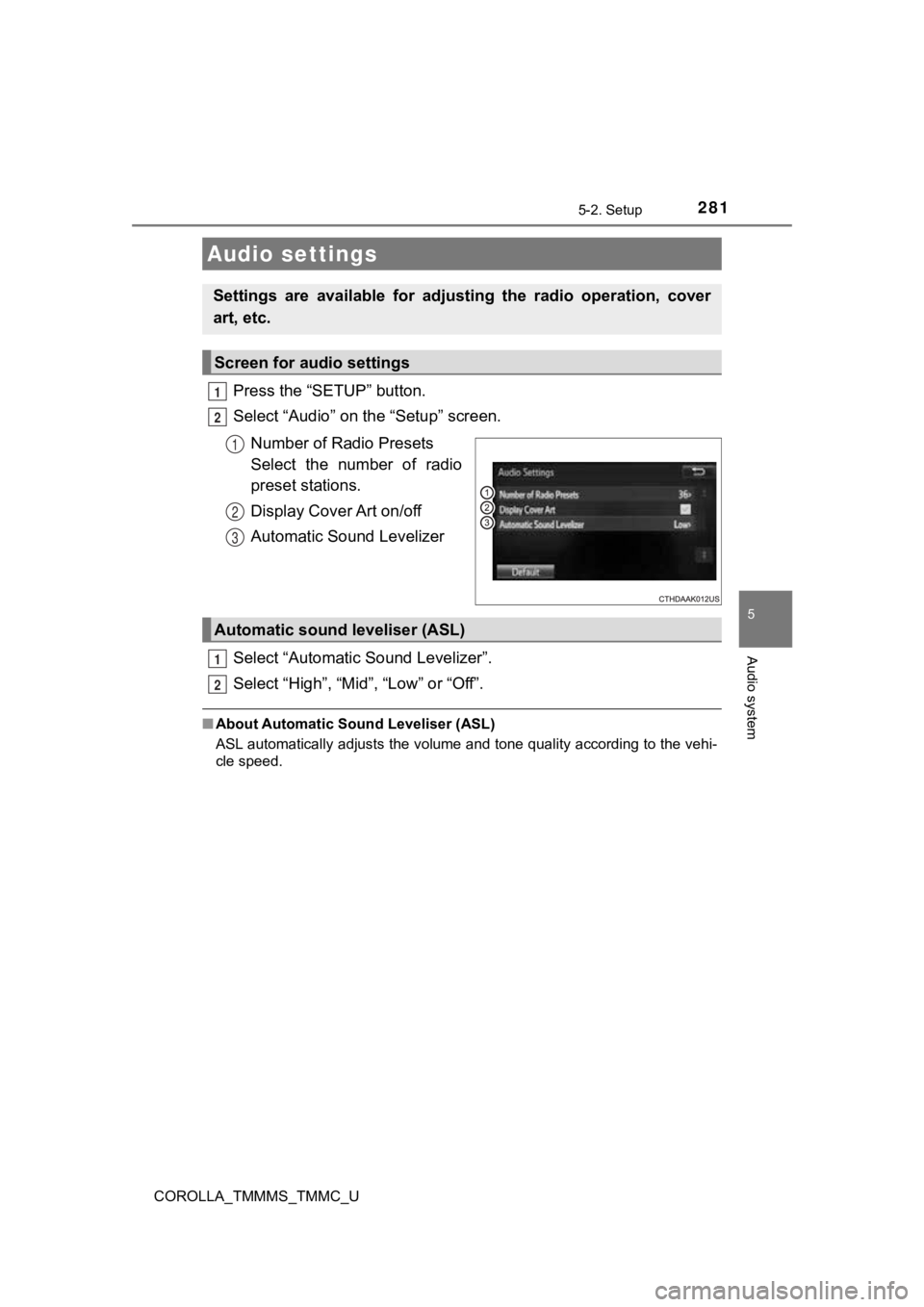
Press the “SETUP” button.
Select “Audio” on the “Setup” screen.Number of Radio Presets
Select the number of radio
preset stations.
Display Cover Art on/off
Automatic Sound Levelizer
Select “Automatic Sound Levelizer”.
Select “High”, “Mid”, “Low” or “Off”.
■ About Automatic So und Leveliser (ASL)
ASL automatically adjusts the volume and tone quality according to the vehi-
cle speed.
Audio settings
Settings are available for adjusting the radio operation, cover
art, etc.
Screen for audio settings
1
2
1
2
3
Automatic sound leveliser (ASL)
1
2
Page 355 of 608
355
5
Audio system
COROLLA_TMMMS_TMMC_U
5-10. Bluetooth®
■When using the Bluetooth® audio system
● In the following conditions, the system may not function.
• If the portable audio player is turned off
• If the portable audio player is not connected
• If the portable audio player’s battery is low
● There may be a delay if a cellular phone connection is made dur ing
Bluetooth
® audio play.
● Depending on the type of portable audio player that is connecte d to the sys-
tem, operation may differ slightly and certain functions may no t be available.
■ When using the hands-free system
●Entune Audio is muted when making a call.
● If both parties speak at the same time, it may be difficult to hear.
● If the received call volume is overly loud, an echo may be heard.
If the Bluetooth
® phone is too close to the system, quality of the sound may
deteriorate and connection status may deteriorate.
● In the following circumstances, it may be difficult to hear the other party:
• When driving on unpaved roads
• When driving at high speeds
• If a roof or window is open
• If the air conditioning is blowing directly on the microphone
• If there is interference from the network of the cellular phon e
■ Conditions under which the system will not operate
●If using a cellular phone that does not support Bluetooth
®
●If the cellular phone is turned off
● If you are outside of cellular phone service coverage
● If the cellular phone is not connected
● If the cellular phone’s battery is low
● When outgoing calls are controlled, due to heavy traffic on tel ephone lines,
etc.
● When the cellular phone itself cannot be used
● When transferring contact data from the cellular phone
Bluetooth®
Page 360 of 608
3605-11. Using the voice command system
COROLLA_TMMMS_TMMC_U
■Microphone
P. 323
■ When using the microphone
●It is unnecessary to speak directly into the microphone when gi ving a com-
mand.
● When “Voice Prompt Interrupt” set to on, it is not necessary to wait for the
confirmation beep before speaking a command. ( P. 283)
● Voice commands may not be recognized if:
• Spoken too quickly.
• Spoken at a low or high volume.
• The roof or windows are open.
• Passengers are talking while voice commands are spoken.
• The air conditioning speed is set high.
• The air conditioning vents are turned towards the microphone.
● In the following conditions, the system may not recognize the command
properly and using voice commands may not be possible:
• The command is incorrect or unclear. Note that certain words, accents or
speech patterns may be difficult for the system to recognize.
• There is excessive background noise, such as wind noise.
Due to natural language speech recognition technology, this sys tem
enables recognition of a command when spoken naturally. However ,
the system cannot recognize ever y variation of each command.
In some situations, it is possi ble to omit the command for the proce-
dure and directly state the desired operation.
Not all voice commands are displayed in the short cut menu.
This function is available in English, Spanish and French.
■Expression examples for each function
Casual speech recognization
CommandExpression examples
“Call (name)
(type)”Get me (Robert Brown).
I need to call (Robert Brown) at (Work) right away.
“Dial (number)”Please dial the number (3334445555).
Ring (3334445555).
Page 366 of 608
366
COROLLA_TMMMS_TMMC_U
6-1. Using the air conditioning system and defogger
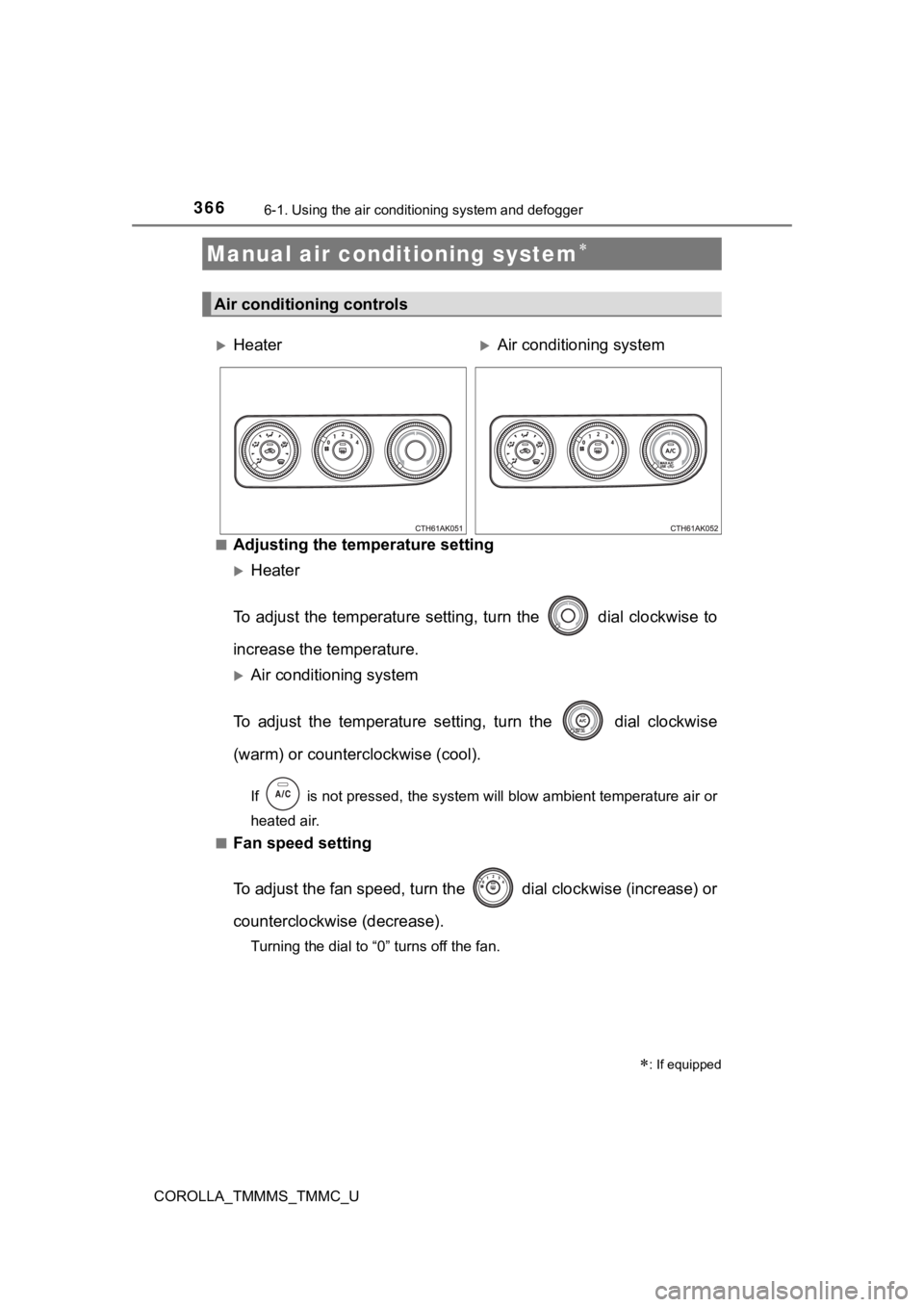
■Adjusting the temperature setting
Heater
To adjust the temperature setti ng, turn the dial clockwise to
increase the temperature.
Air conditioning system
To adjust the temperature sett ing, turn the dial clockwise
(warm) or counterclockwise (cool).
If is not pressed, the system will blow ambient temperature ai r or
heated air.
■
Fan speed setting
To adjust the fan speed, turn the dial clockwise (increase) or
counterclockwise (decrease).
Turning the dial to “0” turns off the fan.
Manual air conditioning system
: If equipped
Air conditioning controls
HeaterAir conditio ning system
Page 373 of 608
3736-1. Using the air conditioning system and defogger
6
Interior features
COROLLA_TMMMS_TMMC_U■
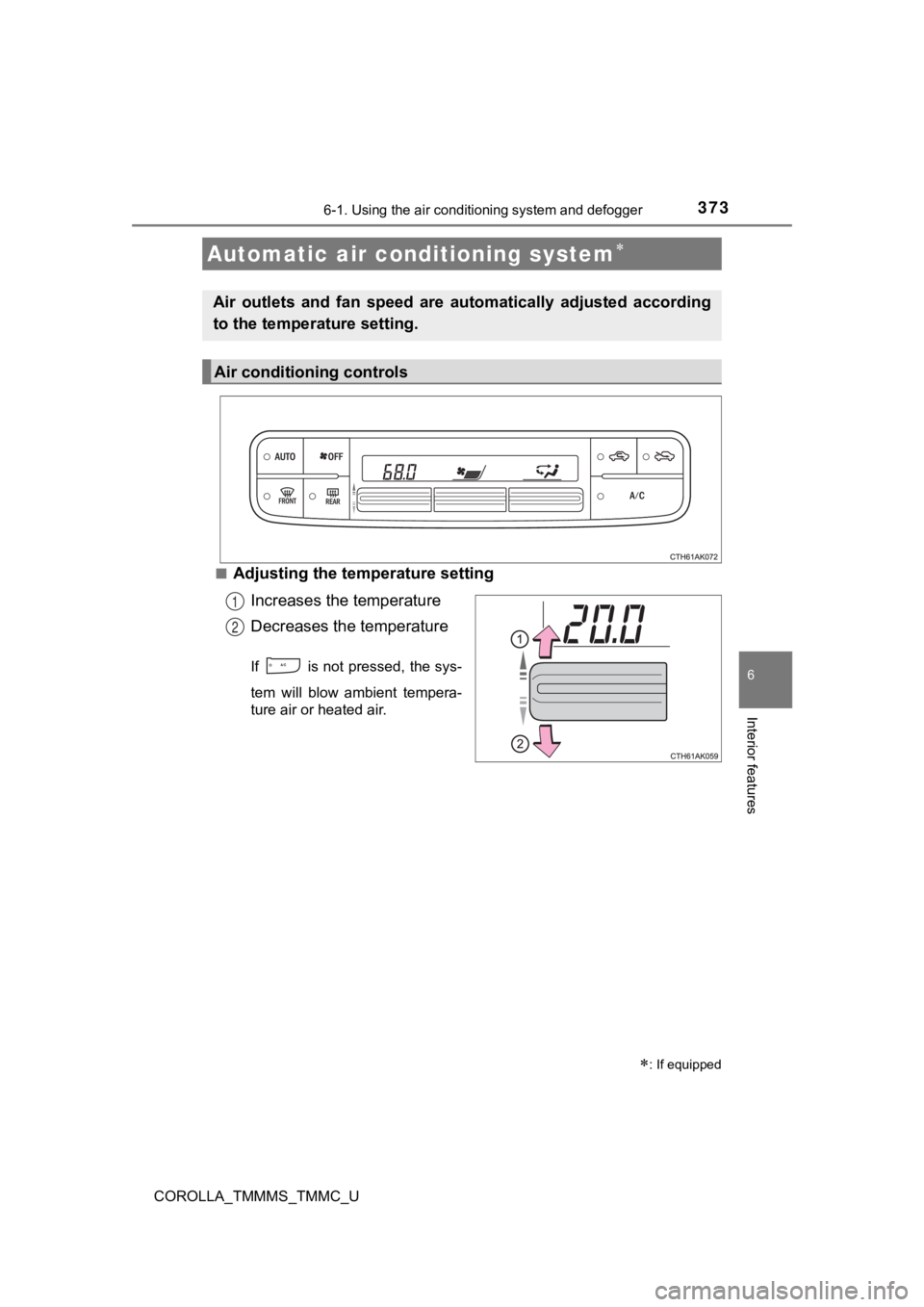
Adjusting the temperature setting
Increases the temperature
Decreases the temperature
If is not pressed, the sys-
tem will blow ambient tempera-
ture air or heated air.
Automatic air conditioning system
: If equipped
Air outlets and fan speed are automatically adjusted according
to the temperature setting.
Air conditioning controls
1
2